
Hotel Guest WiFi Architektur: PMS-Integration, Captive Portals und Bandbreitensteuerung
Dieser Leitfaden bietet einen umfassenden Rahmen für die Architektur von Hotel-WiFi-Netzwerken der Enterprise-Klasse. Er beschreibt die technischen Anforderungen für VLAN-Segmentierung, PMS-Integration via FIAS, Captive Portal-Design und Bandbreitensteuerung pro Client, um Sicherheit, Compliance und optimale Leistung zu gewährleisten.
Diesen Leitfaden anhören
Podcast-Transkript ansehen
Teil unserer Kernserie: Captive Portal Guide →
Executive Summary
Hotel WiFi architecture is no longer just about coverage; it is about secure segmentation, seamless authentication, and converting a utility cost into a strategic data asset. For IT managers and network architects deploying infrastructure across Hospitality venues, treating guest, staff, and building systems as a single flat network is a critical failure point. This guide details the technical requirements for enterprise-grade hotel WiFi, focusing on three core pillars: integrating the captive portal with your Property Management System (PMS) via FIAS for seamless guest validation, deploying robust VLAN segmentation to meet PCI DSS requirements, and enforcing per-room bandwidth controls to ensure consistent performance. By aligning your hardware strategy - whether deploying Cisco Meraki, HPE Aruba, or Juniper Mist - with intelligent Guest WiFi authentication, you secure your environment while capturing the high-quality first-party data necessary to drive loyalty and revenue.
Listen to the Briefing
Technical Deep-Dive: Architecture and Segmentation
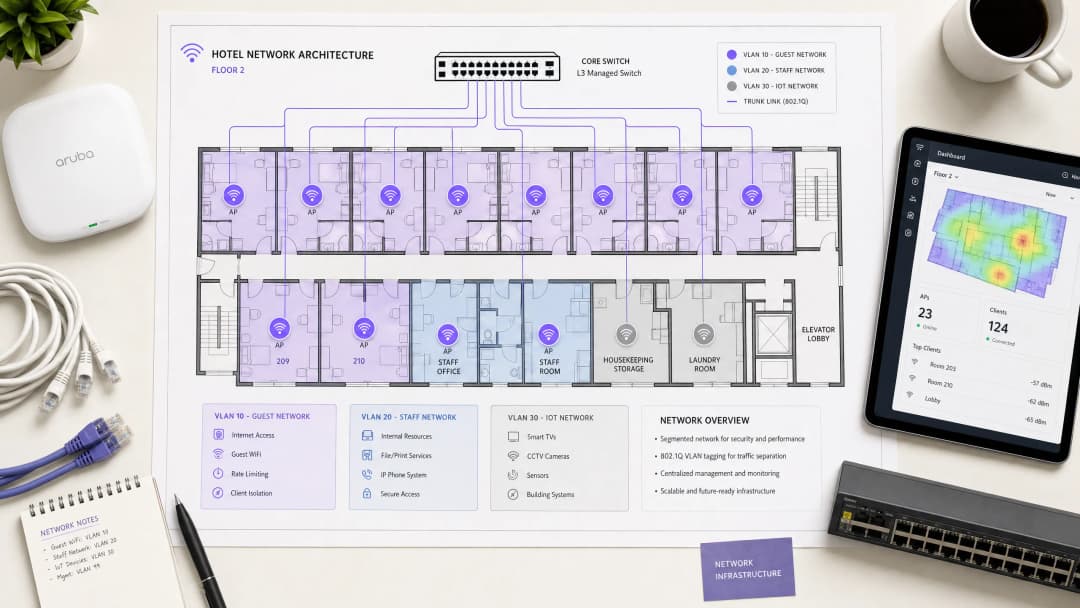
A hospitality network must simultaneously serve guests, staff, and operational technology without compromising the security or performance of any single group. The foundational requirement is logical separation using Virtual Local Area Networks (VLANs) governed by the IEEE 802.1Q standard.
You must isolate traffic at the switch level. Guest WiFi requires its own VLAN, firewalled entirely from internal resources. Staff access should operate on a separate VLAN, secured by 802.1X authentication against a RADIUS server (integrating with identity providers like Microsoft Entra ID or Okta). A third VLAN must isolate IoT devices - smart thermostats, door locks, and CCTV. Finally, any point-of-sale systems must sit on an isolated VLAN to maintain PCI DSS compliance. This segmentation eliminates the lateral movement attack vector, ensuring a compromised guest device cannot probe your property management systems.
Wireless Layer and Access Point Placement
For the radio frequency (RF) layer, WiFi 6 (IEEE 802.11ax) is the baseline standard for new deployments. It introduces Orthogonal Frequency Division Multiple Access (OFDMA), which allows a single access point to serve multiple clients simultaneously. This provides roughly four times the throughput capacity of WiFi 5 and significantly reduces latency in high-density environments.
The physical placement of access points (APs) dictates performance. The traditional model of deploying APs in corridors forces signals to penetrate thick fire doors and bathroom plumbing before reaching the guest. You must deploy an in-room AP model - one AP per room, or one AP per two rooms at minimum. Every AP requires a wired Cat 6A connection back to a PoE switch; mesh backhaul is unsuitable for enterprise hospitality environments.
Property Management System (PMS) Integration
The PMS is the central source of truth for hotel operations. Integrating your WiFi authentication layer with the PMS transforms the guest experience and radically improves data quality.
Authentication via FIAS
When a guest connects to the network, they are redirected to a captive portal. Instead of relying on a generic password or an unverified email form, PMS integration allows the guest to authenticate using their surname and room number. The captive portal platform queries the PMS in real time - typically using the Fidelio Interface Application Specification (FIAS) protocol - to validate the credentials against active reservations. This API validation occurs in under 500 milliseconds.

Session Management and Data Quality
This integration automates session lifecycles. When a guest checks out, the PMS triggers an event that revokes WiFi access immediately. If a guest extends their stay, the network session extends automatically.
More importantly, PMS integration solves the data quality problem. Standard email capture forms often yield error rates of 30%. By validating against the PMS, you capture a verified guest record linked to specific stay data. Purple has processed 440 million logins in 2024, and our data shows that PMS-integrated captive portals achieve validation rates of 70% to 80%. This consented, first-party data flows directly into your CRM, enabling targeted WiFi Analytics and post-stay marketing.
Haben Sie Fragen zu Ihrem spezifischen Setup?
Unser Team arbeitet mit Standortbetreibern, IT-Managern und Netzwerktechnikern an über 80.000 Standorten zusammen. Buchen Sie ein 20-minütiges Gespräch und wir zeigen Ihnen, wie andere diese Herausforderungen gelöst haben.
Captive Portal Design and Security
The captive portal is your primary mechanism for data capture and compliance. It operates by assigning a restricted IP address to the guest device and using a DNS intercept to redirect HTTP traffic to the splash page. Once the guest authenticates and accepts the terms, the RADIUS server authorises the MAC address, and full internet access is granted.
GDPR and Unbundled Consent
Your captive portal must present explicit, granular consent options. Consent to use the network cannot be bundled with consent for marketing communications. Purple's platform handles this natively, tying verifiable consent records to individual user profiles.
Encryption and Client Isolation
You must enable client isolation on the guest SSID. This prevents peer-to-peer communication, stopping one guest device from scanning or accessing another. For encryption, WPA3 is the standard. While WPA3-Enterprise secures the staff network, guest networks should utilise Opportunistic Wireless Encryption (OWE) where supported, providing individualised encryption for open networks without requiring a shared password. For further details on secure access, review our guide on EAP Method WiFi: A Guide to Secure Network Access.
Bandwidth Control and QoS
Bandwidth management is the final pillar of a stable architecture. The primary cause of guest complaints is an under-provisioned internet uplink.
Provisioning the Uplink
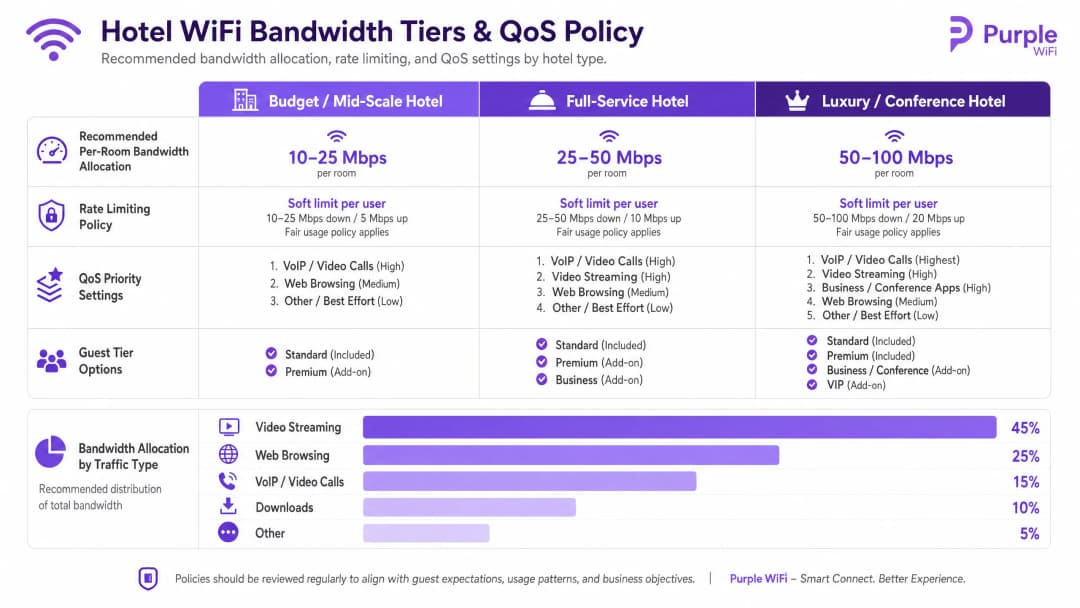
You must provision bandwidth based on peak concurrent demand, not average usage. The recommended allocations are:
- Budget / Mid-Scale: 10-25 Mbps per room
- Full-Service: 25-50 Mbps per room
- Luxury / Conference: 50-100 Mbps per room
For a 200-room property at 80% occupancy, allocating 25 Mbps per room requires a minimum committed uplink of 4 Gbps. A dedicated leased line is mandatory.
Rate Limiting and QoS Policy
To prevent a single user from saturating the uplink, you must enforce per-client rate limiting at the controller level. Whether you deploy Cisco Meraki, HPE Aruba, or Ubiquiti UniFi, configure a hard cap on both downstream and upstream traffic per device.
Above rate limiting sits Quality of Service (QoS). Using the WMM (WiFi Multimedia) standard, you must prioritise traffic into four queues. VoIP and video calls require high priority, ensuring that a guest's Microsoft Teams call is not degraded by another guest downloading a large file on the best-effort queue.
Implementation Guide
Follow this sequence for a successful deployment:
- Conduct an RF Site Survey: Walk the property with a spectrum analyser to identify interference sources before planning AP placement.
- Design the VLAN Architecture: Document your Guest, Staff, IoT, and POS VLANs. Configure explicit default-deny firewall rules between them.
- Size the Uplink: Calculate peak demand based on the 25 Mbps per room baseline and procure a dedicated leased line.
- Deploy the Captive Portal: Integrate the portal with your PMS. Test the authentication flow, consent capture, and session revocation across iOS, Android, and Windows devices.
- Monitor and Adjust: Post-deployment, monitor AP association counts and uplink utilisation to identify dead zones or bandwidth bottlenecks.
Troubleshooting & Risk Mitigation
The most frequent failure modes in hotel WiFi deployments stem from poor planning rather than hardware failure.
- The "Slow WiFi" Complaint: This is rarely an RF issue. First, check your internet uplink utilisation. If the circuit is saturated, no amount of AP tuning will fix the problem. Second, check client distribution across APs; if one AP has 40 clients and an adjacent AP has 5, your band steering configuration requires adjustment.
- The "Data Silo" Pitfall: Deploying a captive portal without a downstream integration wastes the investment. The data captured at login must flow automatically into your marketing automation tools to drive Retail or hospitality loyalty programmes.
- The Flat Network Risk: Failing to segment the wired network undermines wireless security. If a guest plugs a laptop into an exposed Ethernet port in a conference room and accesses the staff VLAN, your architecture has failed. Ensure switch ports in public areas are assigned to the guest VLAN or disabled entirely.
ROI & Business Impact
Enterprise WiFi requires significant capital expenditure, but it delivers measurable returns when architected correctly. The ROI is realised through three channels:
- Operational Efficiency: PMS integration eliminates manual voucher generation and front-desk troubleshooting, returning hours of staff time per week.
- First-Party Data Acquisition: An authenticated captive portal builds a database of verified guest profiles. This data powers direct-booking campaigns, reducing reliance on Online Travel Agencies (OTAs) and their associated commission fees.
- Guest Satisfaction: Reliable, high-speed WiFi is a primary driver of positive reviews. A segmented, properly provisioned network eliminates the friction that leads to negative feedback, directly impacting the property's reputation and average daily rate.
Schlüsseldefinitionen
VLAN (Virtual Local Area Network)
Ein logisches Subnetzwerk, das eine Gruppe von Geräten auf derselben physischen Infrastruktur zusammenfasst und deren Broadcast-Traffic von anderen VLANs isoliert.
Unerlässlich für die Trennung des Gast-Traffics von internen Hotelsystemen und zur Gewährleistung der PCI-DSS-Konformität.
Captive Portal
Eine Webseite, die den Netzwerk-Traffic abfängt und von den Nutzern verlangt, sich zu authentifizieren oder den Bedingungen zuzustimmen, bevor sie vollen Internetzugang erhalten.
Der primäre Touchpoint für die Authentifizierung von Gästen, die GDPR-Einwilligung und die Erfassung von First-Party-Daten.
FIAS (Fidelio Interface Application Specification)
Ein universelles Protokoll, das von Property-Management-Systemen (wie Oracle Opera) verwendet wird, um in Echtzeit mit Drittanbietersystemen zu kommunizieren.
Wird vom Captive Portal verwendet, um die Zimmernummer und den Nachnamen eines Gastes mit den aktiven PMS-Datensätzen abzugleichen.
WPA3-Enterprise
Die höchste Stufe der WiFi-Sicherheit, bei der sich einzelne Benutzer oder Geräte mit eindeutigen Anmeldedaten über einen RADIUS-Server (802.1X) authentifizieren müssen.
Der obligatorische Standard zur Absicherung von Mitarbeiternetzwerken und Unternehmensgeräten innerhalb des Hotels.
Client Isolation
Eine Funktion des Wireless-Controllers, die verhindert, dass Geräte, die mit derselben SSID verbunden sind, direkt miteinander kommunizieren.
Muss auf allen Gästenetzwerken aktiviert sein, um Peer-to-Peer-Angriffe zu verhindern und die Privatsphäre der Gäste zu schützen.
Rate Limiting
Die Praxis der Begrenzung der maximalen Bandbreite (Upload- und Download-Geschwindigkeit), die einem einzelnen Client-Gerät zur Verfügung steht.
Entscheidend, um zu verhindern, dass ein einzelner Gast durch das Herunterladen großer Dateien das Netzwerkerlebnis für alle anderen beeinträchtigt.
QoS (Quality of Service) / WMM
Netzwerkmechanismen, die bestimmte Arten von Traffic (wie Sprache oder Video) gegenüber weniger zeitsensitiven Daten (wie Datei-Downloads) priorisieren.
Stellt sicher, dass VoIP-Anrufe von Gästen oder Kommunikationstools der Mitarbeiter auch bei hoher Netzwerkauslastung zuverlässig funktionieren.
OFDMA
Orthogonal Frequency Division Multiple Access; eine WiFi 6-Funktion, die es einem Access Point ermöglicht, mehrere Clients gleichzeitig zu bedienen, indem Kanäle in kleinere Unterkanäle aufgeteilt werden.
Verbessert die Leistung drastisch und reduziert Latenzzeiten in stark frequentierten Bereichen wie Hotelkonferenzräumen und Lobbys.
Ausgearbeitete Beispiele
Ein Full-Service-Hotel mit 150 Zimmern verzeichnet häufige Gästebeschwerden über langsames WiFi während der abendlichen Spitzenzeiten (19:00 - 22:00 Uhr). Das Hotel verfügt derzeit über eine 1-Gbps-Breitbandverbindung und nutzt ein einziges flaches Netzwerk mit einem gemeinsamen WPA2-Passwort.
- Upgrade des Internet-Uplinks auf eine dedizierte Standleitung mit mindestens 3,75 Gbps (150 Zimmer * 25 Mbps). 2. Implementierung einer VLAN-Segmentierung, bei der die Gäste in ein isoliertes VLAN 10 verschoben werden. 3. Bereitstellung eines Captive Portals, das über FIAS in das Oracle Opera PMS des Hotels integriert ist, sodass sich Gäste mit Zimmernummer und Nachname authentifizieren können. 4. Durchsetzung einer Ratenbegrenzung pro Client von 25 Mbps Down / 10 Mbps Up am Wireless-Controller, um zu verhindern, dass einzelne Geräte den Uplink auslasten.
Ein Luxus-Resort muss sicheres WiFi für Tablets des Personals bereitstellen, die für das Housekeeping und die Wartung verwendet werden, und gleichzeitig sicherstellen, dass Gästegeräte nicht auf die Property-Management-Systeme zugreifen können.
Erstellen Sie ein dediziertes Mitarbeiter-VLAN (VLAN 20) getrennt vom Gäste-VLAN (VLAN 10). Konfigurieren Sie die Mitarbeiter-SSID für die Verwendung von WPA3-Enterprise, wobei die Tablets über 802.1X gegen den RADIUS-Server des Unternehmens authentifiziert werden. Wenden Sie strenge Inter-VLAN-Routing-Regeln an der Firewall an: Standardmäßig wird der gesamte Datenverkehr zwischen VLAN 10 und VLAN 20 blockiert, und VLAN 20 darf nur auf die spezifischen IP-Adressen und Ports zugreifen, die für die Housekeeping-Anwendung erforderlich sind.
Übungsfragen
Q1. Ein Hotelbetriebsleiter möchte ein einziges, offenes WiFi-Netzwerk sowohl für Gäste als auch für die neuen Smart-TVs in den Gästezimmern einrichten, um "die Dinge einfach zu halten". Wie reagieren Sie als Netzwerkarchitekt?
Hinweis: Berücksichtigen Sie die Auswirkungen von Lateral Movement und der Größe der Broadcast-Domäne.
Musterlösung anzeigen
Raten Sie von diesem Ansatz ab. Gästegeräte und IoT-Geräte (Smart-TVs) müssen in separate VLANs segmentiert werden. Wenn sie sich im selben offenen Netzwerk befinden, sind die TVs dem direkten Zugriff von Gästegeräten ausgesetzt, was eine erhebliche Sicherheitslücke darstellt. Darüber hinaus vergrößert dies die Broadcast-Domäne, was die gesamte Netzwerkleistung beeinträchtigen kann. Die TVs sollten sich in einem isolierten IoT-VLAN (z. B. VLAN 30) mit strengen Firewall-Regeln befinden.
Q2. Bei einer Standortbegehung für ein neues Objekt mit 300 Zimmern schlägt der Verkabelungsdienstleister vor, Kosten zu sparen, indem ein Access Point im Korridor für jeweils vier Zimmer platziert wird. Warum ist das problematisch?
Hinweis: Denken Sie an die HF-Dämpfung und physische Hindernisse in einer Hotelumgebung.
Musterlösung anzeigen
Die Platzierung im Korridor ist ein fehlerhaftes Design für Hotels. Das HF-Signal muss schwere Brandschutztüren, Spiegelschränke und geflieste Badezimmer durchdringen, um das Gästegerät im Zimmer zu erreichen, was zu einer starken Signaldämpfung und schlechter Leistung führt. Das richtige Design ist ein In-Room-AP-Modell – ein AP pro Zimmer oder mindestens einer pro zwei Zimmer –, um eine direkte Sichtverbindung oder eine Abdeckung mit minimalen Hindernissen zu gewährleisten.
Q3. Das Marketing-Team möchte jeden Gast, der sich im WiFi anmeldet, automatisch für den wöchentlichen Werbe-Newsletter des Hotels anmelden. Wie sollte das Captive Portal konfiguriert werden, um dies zu handhaben?
Hinweis: Berücksichtigen Sie die GDPR-Anforderungen bezüglich des Kopplungsverbots.
Musterlösung anzeigen
Das Captive Portal muss mit expliziten, nicht gekoppelten Einwilligungsoptionen konfiguriert werden. Gemäß GDPR darf die Einwilligung in den Zugriff auf das WiFi-Netzwerk nicht von der Einwilligung in Marketingkommunikation abhängig gemacht werden. Die Splash Page muss ein separates, nicht vorab ausgewähltes Opt-in-Kästchen für den Newsletter enthalten. Die Plattform von Purple erzwingt diese Trennung nativ und gewährleistet so die Compliance, während gleichzeitig überprüfbare Einwilligungsnachweise erfasst werden.
Weiterlesen in dieser Reihe
Ubiquiti UniFi Guest Portal leitet nicht weiter: Ursachen und Lösungen
Dieser Leitfaden grenzt einen Fehler bei der Weiterleitung des UniFi Guest Portals ein, indem er nacheinander den Guest-Status, die Weiterleitung, die Pre-Authorisation-Route und die Controller-Autorisierung prüft. Er bietet IT-Teams vor Ort eine bewährte Methode, um Verwirrung zwischen Guest-Netzwerk und Hotspot, externe Portal-Übergaben, aktuelle UniFi OS Kontoanforderungen und DNS-Isolierungstests zu adressieren.
Cisco Meraki Splashpage funktioniert nicht: Ein Flussdiagramm zur Fehlersuche
Diese praktische Day-Two-Anleitung isoliert, wo ein Cisco Meraki Splash-Flow fehlgeschlagen ist: Client-Autorisierung, Initiierung der HTTP-Weiterleitung, Erreichbarkeit des Walled Garden oder RADIUS-Anmeldung. Sie bietet IT-Teams vor Ort einen kontrollierten Nachweisweg, um das Guest WiFi wiederherzustellen, ohne weitreichende Änderungen an einer Live-Infrastruktur vorzunehmen.
Enterprise Guest WiFi Einrichtungsleitfaden: VLAN Segmentierung, Sicherheit und Captive Portals
Dieser technische Leitfaden zeigt IT-Teams, wie sie Guest WiFi als kontrollierten Internetzugangsdienst unter Verwendung von VLAN Segmentierung, Firewall-Richtlinien und einem Captive Portal einrichten. Er erklärt zudem, wie die Registrierungsformulare und Onboarding-Steuerelemente von Purple eine angemessene Visitor Experience unterstützen, ohne die Sicherheitsgrenzen um Mitarbeiter-, Zahlungs- und Betriebssysteme zu schwächen.
Haben Sie Fragen zu Ihrem spezifischen Setup?
Unser Team arbeitet mit Standortbetreibern, IT-Managern und Netzwerktechnikern an über 80.000 Standorten zusammen. Buchen Sie ein 20-minütiges Gespräch und wir zeigen Ihnen, wie andere diese Herausforderungen gelöst haben.