Sie schlagen sich wahrscheinlich gerade mit einem von zwei typischen WiFi Problemen herum.
Entweder nutzt das Team immer noch ein gemeinsames Passwort, das sich schneller verbreitet als Ihre Onboarding-E-Mails, oder Sie haben versucht, den Zugriff restriktiver zu gestalten, und endeten bei einer unübersichtlichen Mischung aus Captive Portals, Geräteausnahmen und Support-Tickets. Jemand, der das Unternehmen verlassen hat, hat immer noch Netzwerkzugriff. Ein externer Dienstleister benötigt temporären Zugriff. Ein Drucker weigert sich, sich mit modernen Systemen zu verbinden. Gäste beschweren sich, dass die Verbindung komplizierter ist als eine Bestellung bei Ihnen.
Das ist der Punkt, an dem viele IT-Manager anfangen, nach EAP method WiFi zu suchen, und direkt auf Standardbegriffe, Akronyme und Konfigurationsparameter stoßen, die eine Frage nicht klar beantworten: Welcher Ansatz bietet sicheren Zugriff, ohne neuen Betriebsaufwand zu erzeugen?
Die Kurzfassung ist einfach. EAP hilft Ihnen, WiFi nicht mehr wie einen gemeinsamen Zimmerschlüssel zu behandeln, sondern wie eine Identitätsentscheidung. Richtig umgesetzt verbessert das die Sicherheit, erleichtert legitimen Nutzern den Zugriff und gibt der IT eine präzisere Kontrolle darüber, wer sich womit und unter welcher Richtlinie verbindet.
Das Ende des gemeinsamen WiFi Passworts
Ein gemeinsames WiFi Passwort fühlt sich praktisch an - bis zu dem Tag, an dem es zu Ihrer größten Sicherheitslücke wird.
Ein Hotel-Betriebsleiter gibt das SSID Passwort für das Personal an einen neuen Mitarbeiter weiter. Bis zum Ende der Woche kennen es die Zeitarbeiter, ein ehemaliger Mitarbeiter hat es immer noch auf seinem privaten Telefon gespeichert, und jemand hat es an ein Whiteboard im Backoffice geschrieben, weil die Barcodescanner ständig die Verbindung verloren haben. Nichts davon wirkt im ersten Moment dramatisch. Es wird einfach normal.
Das Problem ist, dass gemeinsame Passwörter niemanden identifizieren. Sie identifizieren eine Gruppe. Wenn eine Person das Unternehmen verlässt, können Sie nicht nur diese eine Person entfernen. Sie müssen entweder das Risiko in Kauf nehmen oder das Passwort für alle ändern und die daraus resultierende Störung bewältigen.
Warum gemeinsamer Zugriff teuer wird
Das Sicherheitsproblem liegt auf der Hand, aber das operative Problem ist meist das, was letztendlich zum Umdenken zwingt.
- Offboarding wird umständlich: Wenn ein Mitarbeiter geht, muss die IT oft ein Passwort ändern, das jedes Gerät und jedes Team betrifft.
- Support-Teams erhalten vermeidbare Arbeit: Mitarbeiter vergessen das Passwort, tippen es falsch ein oder verbinden das falsche Gerät mit dem falschen Netzwerk.
- Die Benutzererfahrung leidet: Gäste landen auf Captive Portals. Mitarbeiter müssen sich durch Anmeldeformulare klicken. Geräte verbinden sich unzuverlässig neu.
Aus diesem Grund hat sich das moderne WiFi Design vom einzelnen, gemeinsamen Schlüssel verabschiedet und sich dem identitätsbasierten Zugriff zugewandt. Anstatt zu fragen: "Kennt dieses Gerät das Passwort?", fragt das Netzwerk: "Wer oder was ist das und sollte es zugelassen werden?"
Gemeinsame Passwörter sind leicht zu verteilen und schwer zu kontrollieren. Identitätsbasierter Zugriff dreht dieses Prinzip um.
Wie eine bessere Lösung aussieht
In einer besseren Konfiguration verbindet sich ein Laptop eines Mitarbeiters automatisch mit dem WiFi, da es bereits das richtige Profil und die richtige Identität besitzt. Ein Gast verbindet sich, ohne ein Passwort auf einem Zettel in die Hand gedrückt zu bekommen. Ein verwaltetes Gerät kann gesperrt werden, ohne dass alle anderen davon betroffen sind.
Das ist der geschäftliche Wert von EAP. Es ist nicht nur eine Protokollentscheidung. Es ist eine Möglichkeit, den WiFi-Zugang Ihren anderen professionellen Systemen anzugleichen - gebunden an Benutzer, Geräte und Richtlinien, statt an ein Geheimnis, das irgendwann jeder kennt.
EAP- und 802.1X-Grundlagen verstehen
Die meiste Verwirrung beginnt hier. Viele sprechen von EAP, als wäre es die Authentifizierungsmethode selbst. Das ist es nicht.
Im Enterprise-WiFi ist EAP das von 802.1X verwendete Verhandlungs-Framework, während der Access Point den normalen Datenverkehr blockiert und EAP-Nachrichten zwischen dem Gerät und einem RADIUS-Server weiterleitet, bis der methodenspezifische Austausch erfolgreich ist, wie in Fleets Übersicht über die Authentifizierungsmethoden für Enterprise-WiFi erklärt wird. Deshalb ist die Wahl der richtigen EAP-Methode so wichtig. Das Framework bleibt gleich, aber der Identitätsnachweis ändert sich.
Ein einfaches mentales Modell
Stellen Sie sich 802.1X wie den Sicherheitsdienst bei einer privaten Veranstaltung vor.
Das Gerät möchte eintreten. Der Access Point steht an der Tür und sagt: „Sie können noch nicht richtig eintreten.“ Der Access Point entscheidet nicht selbst über die Identität. Er leitet das Gespräch an einen Authentifizierungsserver weiter, in der Regel RADIUS.
EAP ist die Sprache, die während dieses Gesprächs gesprochen wird.
Eine EAP-Methode verlangt vielleicht: „Zeigen Sie mir Ihr Zertifikat.“ Eine andere verlangt vielleicht: „Bauen Sie zuerst einen sicheren Tunnel auf und senden Sie dann darin einen Benutzernamen und ein Passwort.“ Derselbe Sicherheitsdienst. Dieselbe Tür. Anderer Nachweis.
Die drei entscheidenden Rollen
Die Fehlerbehebung wird viel einfacher, wenn Sie wissen, wer welche Rolle spielt:
| Komponente | Rolle | Aufgabe in einfachen Worten |
|---|---|---|
| Supplicant | Client-Gerät | Der Laptop, das Telefon, das Tablet oder der Scanner, der eine Verbindung anfordert |
| Authenticator | Access Point oder Switch | Der Gatekeeper, der den Zugriff auf das Netzwerk kontrolliert |
| Authentication Server | Normalerweise RADIUS | Das System, das die Anmeldedaten prüft und den Zugriff erlaubt oder verweigert |
Wenn eine dieser Komponenten falsch konfiguriert ist, sehen Benutzer oft nur die Meldung „Verbindung nicht möglich“ - weshalb EAP bei der ersten Bereitstellung undurchsichtig wirken kann.
Warum dies zum Standardmodell für Unternehmen wurde
In Großbritannien wird die WiFi Planung für Unternehmen und den öffentlichen Sektor seit langem von IEEE- und RFC-Standards geprägt. Die EAP-Dokumentation von Microsoft weist darauf hin, dass EAP für den drahtlosen Zugriff über IEEE 802.1X verwendet wird. Zudem wurde RFC 4017 veröffentlicht, um die Anforderungen für EAP-Methoden zu definieren, die in drahtlosen IEEE 802.11-LAN-Bereitstellungen zum Einsatz kommen. Diese Standardisierung machte 802.1X mit EAP zur Standardarchitektur für sicheren drahtlosen Zugriff und ersetzte ältere Ansätze mit gemeinsam genutzten Schlüsseln. Microsoft weist außerdem darauf hin, dass EAP-TLS die einzige EAP-Methode ist, die für den WPA3-Enterprise 192-Bit-Modus zulässig ist. Dies zeigt, wie sich das zertifikatsbasierte EAP von einer Option für Unternehmen zur Voraussetzung für WiFi Bereitstellungen mit höchster Sicherheitsstufe entwickelt hat - nachzulesen in Microsofts Dokumentation über Netzwerkzugriff und EAP.
Praktische Regel: Wenn Sie das WiFi für Mitarbeiter, regulierte Umgebungen oder große Standorte verwalten, sollten Sie zuerst in den Kategorien von 802.1X und Identität denken. Beginnen Sie nicht mit dem Passwort.
Warum dies für IT-Verantwortliche wichtig ist
Hier geht es nicht nur um theoretische Architekturreinheit.
Wenn Ihr WiFi 802.1X und eine geeignete EAP-Methode nutzt, können Sie den Zugriff an den Beschäftigungsstatus, den Gerätestatus und die Richtlinien anpassen. Das verbessert die Sicherheit, da der Zugriff individuell geregelt ist. Es verbessert die Benutzererfahrung, da sich freigegebene Geräte reibungsloser verbinden. Und es steigert die operative Effizienz, weil Sie nicht mehr ein einziges Passwort ändern müssen, um viele verschiedene Probleme zu lösen.
Eine Übersicht der gängigen EAP-Methoden
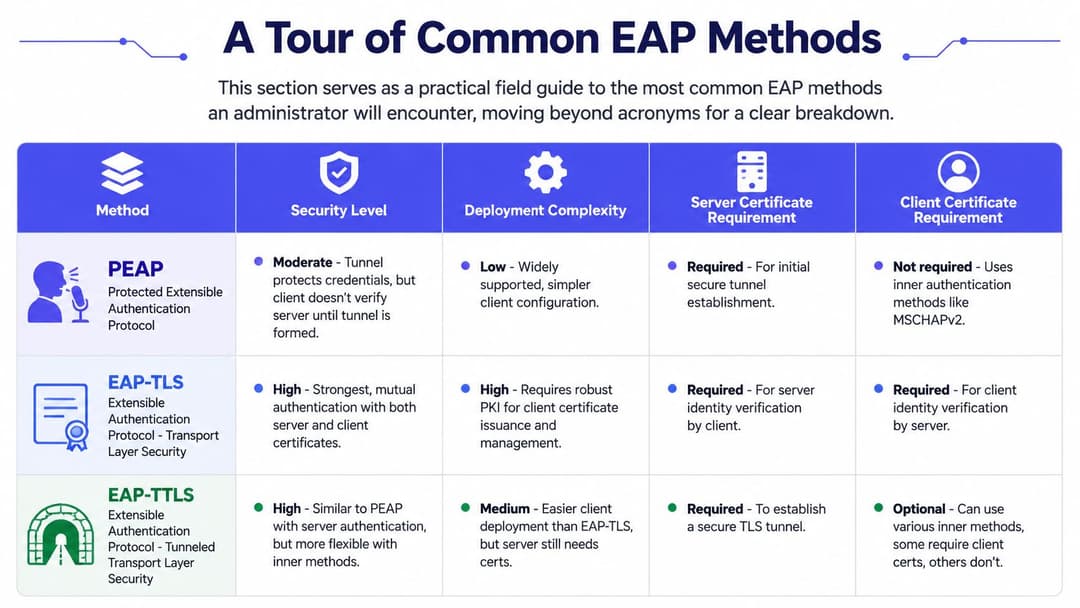
Die meisten praktischen Entscheidungen laufen auf eine kurze Liste von Methoden hinaus. Die Namen klingen ähnlich, aber die Kompromisse sind es nicht.
PEAP
PEAP wird häufig gewählt, wenn Teams eine Authentifizierung auf Unternehmensebene wünschen, ohne Client-Zertifikate auf jedem Gerät installieren zu müssen.
Es baut zuerst einen sicheren TLS-Tunnel auf und führt dann eine interne Authentifizierungsmethode innerhalb dieses Tunnels aus - in der Regel ein Verfahren mit Benutzername und Passwort. Das erleichtert die Einführung in Umgebungen, in denen Benutzer bereits über Verzeichnis-Anmeldedaten verfügen und die Gerätekontrolle gemischt ist.
Der Vorteil ist rein praktischer Natur. Sie können vorhandene Konten nutzen. Die native Unterstützung ist breit gefächert. Die Ersteinrichtung ist in der Regel weniger anspruchsvoll als ein vollständiges Zertifikatsprogramm.
Der Nachteil ist strukturbedingt. Da passwortbasierte Geheimnisse weiterhin Teil des Bildes bleiben, erbt diese Methode immer noch das passwortbezogene Risiko. Wie bereits aus der Erklärung von Fleet hervorgehoben, eliminiert EAP-TLS den passwortbasierten Diebstahl aus dem WiFi Pfad, während PEAP-MSCHAPv2 weiterhin das Risiko von Offline-Brute-Force-Angriffen durch passwortbasierte Geheimnisse erben kann.
EAP-TLS
EAP-TLS ist die Methode, die die meisten Architekten für verwaltete Unternehmensgeräte bevorzugen.
Sie verwendet Zertifikate, sodass das Gerät seine Identität nachweist, ohne dass ein Benutzer ein Passwort in den WiFi Workflow eingeben muss. In der Praxis bietet Ihnen das eine höhere Sicherheit und eine reibungslosere Benutzererfahrung. Geräte verbinden sich automatisch, sobald sie korrekt bereitgestellt wurden. Benutzer müssen nicht ständig Anmeldedaten eingeben. Angriffspfade, die auf dem Erfassen von Passworten basieren, werden weitaus unbedeutender.
Der Kompromiss liegt in der Bereitstellungsdisziplin. Sie benötigen eine Zertifizierungsstelle oder einen Zertifikatsdienst, eine zuverlässige Methode zur Ausstellung von Zertifikaten sowie einen Prozess für die Verlängerung und den Widerruf. Wenn Ihre Geräteverwaltung Schwachstellen aufweist, wird EAP-TLS diese Schwachstellen schnell offenlegen.
EAP-TTLS
EAP-TTLS steht in vielen Diskussionen genau zwischen diesen beiden Optionen.
Wie PEAP erstellt es einen TLS-Tunnel mithilfe eines Serverzertifikats. Innerhalb dieses Tunnels ermöglicht es mehr Flexibilität bei der Authentifizierung des Clients. Das kann hilfreich sein, wenn Ihre Umgebung verschiedene Betriebssysteme oder ältere Backend-Identitäts-Workflows umfasst, die sich nicht nahtlos in ein PEAP-fokussiertes Design einfügen.
Für gemischte IT-Infrastrukturen kann es ein praktischer Kompromiss sein. Es hängt zwar immer noch von einem sorgfältigen Richtlinien- und Profilmanagement ab, gibt Architekten aber mehr Spielraum bei der Integration verschiedener Identitätsspeicher oder Altsysteme.
EAP-FAST
EAP-FAST taucht in der Praxis immer noch auf, meist weil die Vergangenheit ihre Spuren hinterlässt.
Es ist wahrscheinlicher, dass Sie diese Methode in stark von Cisco geprägten Umgebungen oder bei älteren Spezialgeräten sehen, die frühere Designentscheidungen beeinflusst haben. Es kann spezifische Kompatibilitätsprobleme lösen, ist aber für die meisten neuen Projekte nicht der Ausgangspunkt für Teams.
Ein nützlicher Vergleich
| Methode | Idealer Einsatzbereich | Hauptvorteil | Hauptbedenken |
|---|---|---|---|
| PEAP | BYOD oder schnelle, verzeichnisgestützte Bereitstellung | Einfachere Client-Bereitstellung | Passwortbezogenes Risiko bleibt bestehen |
| EAP-TLS | Verwaltete Geräteflotten | Zertifikatsbasiertes, starkes gegenseitiges Vertrauensmodell | Zertifikatslebenszyklus und PKI-Aufwand |
| EAP-TTLS | Gemischte oder auf Altsysteme angewiesene Umgebungen | Flexible Optionen für die innere Authentifizierung | Mehr bewegliche Teile, als einfache Definitionen vermuten lassen |
| EAP-FAST | Spezifische Legacy-Szenarien | Kann Nischen-Kompatibilitätsanforderungen erfüllen | Weniger attraktiv für moderne, standardisierte Designs |
Wenn Ihre Infrastruktur verwaltet wird und Ihre Sicherheitsanforderungen hoch sind, lautet die Frage in der Regel nicht, ob EAP-TLS sicherer ist. Es geht vielmehr darum, ob Ihre Zertifikatsverwaltung ausgereift genug ist, um diese Methode zu unterstützen.
Die Wahl des richtigen EAP-Verfahrens für jeden Anwendungsfall
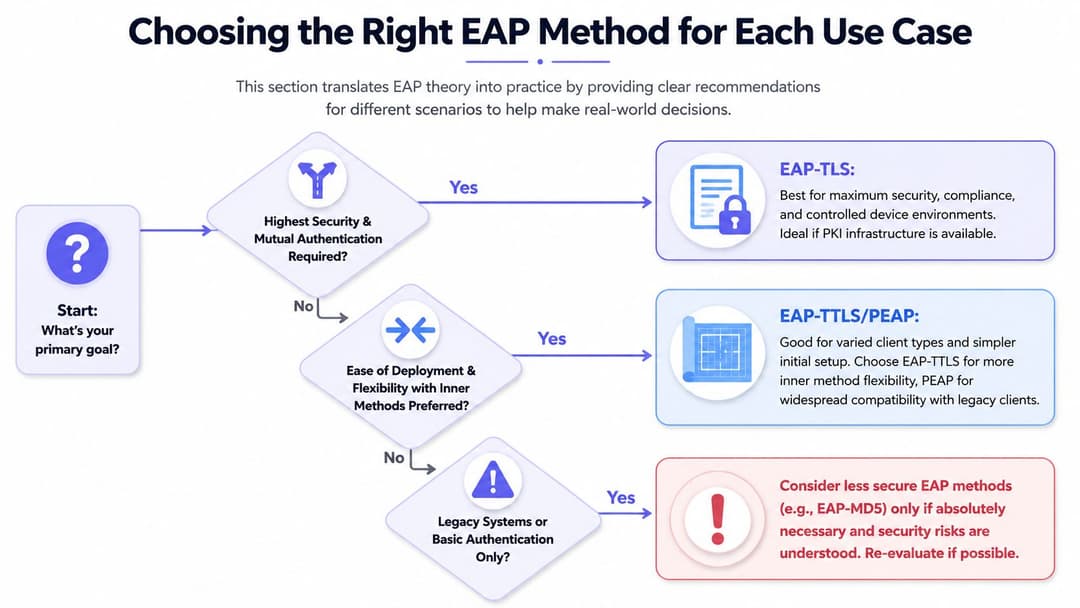
Eine gute EAP-Entscheidung beginnt mit dem Zugriffsproblem, das Sie lösen möchten. Personal, Gäste und betriebliche Geräte benötigen selten die gleiche Behandlung.
Mitarbeiternetzwerke
Für den Mitarbeiterzugriff auf verwalteten Laptops, Tablets und Mobilgeräten ist EAP-TLS in der Regel die sauberste Design-Entscheidung.
Es passt besser zu einem Zero-Trust-Ansatz, da der Zugriff an die Geräteidentität und nicht an ein gespeichertes Passwort gebunden ist. Wenn die Personalabteilung das Konto deaktiviert und die Endpunktverwaltung das Zertifikat oder das Gerätevertrauen entzieht, kann der Zugriff gesperrt werden, ohne dass das SSID-Passwort für alle anderen geändert werden muss.
Die Business-Case-Betrachtung hebt wesentliche Stärken hervor. Sicherheitsteams erhalten eine engere Kontrolle. Benutzer genießen einen nahezu unsichtbaren Login-Prozess. Die IT erhält ein Modell, das sich besser skalieren lässt als die manuelle Verwaltung von Ausnahmen.
Gästezugang
Gast-WiFi hat eine andere Aufgabe. Sie benötigen minimale Reibung, wollen aber dennoch Richtlinienkontrolle und eine sichere Onboarding-Erfahrung bieten.
In modernen Umgebungen können mühelose Gäste-Erlebnisse im Hintergrund immer noch über EAP realisiert werden, insbesondere in Ökosystemen, die auf Passpoint oder OpenRoaming basieren. Der Benutzer muss das Protokoll nicht verstehen. Er sieht nur, dass sich das Gerät nach dem ersten Onboarding automatisch und sicher verbindet.
Das ist in Hotels, Veranstaltungsorten, im Transportwesen, im Gesundheitswesen und im Einzelhandel von Bedeutung. Gäste beurteilen den Service danach, ob er schnell und konsistent funktioniert. Welcher RFC dies ermöglicht, ist ihnen egal.
IoT- und Altsysteme
In diesem Bereich müssen Architekten aufhören, Puristen zu sein.
Viele Drucker, Scanner, Mediensteuerungen, Gebäudesysteme und Spezialgeräte unterstützen 802.1X nicht ordnungsgemäß. Einige unterstützen es mangelhaft. Andere unterstützen ein bestimmtes Verfahren und fallen bei der Zertifikatserneuerung aus. Wieder andere funktionieren nur in WPA-PSK-Netzwerken einwandfrei.
Bei diesen Geräten kann das Erzwingen von vollem EAP zu mehr Ausfallzeiten als zu Schutz führen. Ein besseres Modell ist es, sie zu segmentieren und eine identitätsbasierte Alternative wie iPSK zu verwenden, sofern Ihre Plattform dies unterstützt. Dadurch erhält jedes Gerät eigene Anmeldedaten anstelle eines einzigen gemeinsam genutzten Schlüssels für die gesamte Infrastruktur.
Eine praktische Entscheidungshilfe
Nutzen Sie diese Kriterien bei der Bewertung eines EAP-Verfahrens für Ihr WiFi-Design:
- Wer besitzt das Gerät: Unternehmenseigene Geräte unterstützen stärkere Kontrollen als private Geräte.
- Wie viel Vertrauen Sie benötigen: Der Mitarbeiterzugriff auf interne Systeme erfordert mehr Sicherheit als der reine Gastzugriff auf das Internet.
- Was Sie gut betreiben können: Die auf dem Papier stärkste Methode ist die falsche Wahl, wenn Ihr Team ihren Lebenszyklus nicht verwalten kann.
- Welche Geräte problematisch sind: Drucker, Kassen, Sensoren und Gebäudesysteme erfordern oft eine separate Richtlinienbehandlung.
Typische Zuordnung
| Anwendungsfall | Normalerweise die richtige Richtung |
|---|---|
| Verwaltete Mitarbeitergeräte | EAP-TLS |
| Bring Your Own Device Zugriff | PEAP oder EAP-TTLS, je nach Client-Mix und Richtlinie |
| Gast-Roaming und nahtloser öffentlicher Zugriff | EAP-gestützte Onboarding-Modelle wie Passpoint oder OpenRoaming |
| Altsysteme im Betrieb | Segmentierte Alternativen, oft mit gerätespezifischen Zugangsdaten anstelle von gemeinsam genutzten PSKs |
Der Fehler, den ich am häufigsten sehe, ist der Versuch, eine einzige universelle Antwort zu wählen. Ein ausgereiftes WiFi Design macht das nicht. Es nutzt verschiedene Authentifizierungsmuster für unterschiedliche Risiko- und Benutzerfreundlichkeitsanforderungen, während die Richtlinien zentralisiert bleiben.
Der moderne Ansatz für Zertifikats- und passwortlose Strategien
Viele Teams hören immer noch "Zertifikate" und denken an "monatelangen PKI-Frust". In älteren Umgebungen war das oft der Fall. Das muss heute nicht mehr so sein.
Die wichtige Veränderung ist folgende: Passwortloses WiFi bedeutet nicht, dass keine Authentifizierung stattfindet. Es bedeutet, dass Benutzer keine Passwörter als Identitätsnachweis verwalten müssen, um dem Netzwerk beizutreten. Das Gerät weist eine vertrauenswürdige Identität vor, oft durch ein Zertifikat, und das Netzwerk trifft darauf basierend die Zugriffsentscheidung.
Warum zertifikatsbasierter Zugriff das Risikoprofil verändert
Bei passwortbasierten Methoden hängt ein Teil Ihrer WiFi Sicherheit immer noch davon ab, wie diese Passwörter auf den Client-Geräten erstellt, gespeichert, wiederverwendet und geschützt werden. Mit EAP-TLS hängt der Netzwerkpfad nicht davon ab, dass Benutzer ein Geheimnis in den WiFi Austausch eingeben.
Das verändert sowohl die Sicherheit als auch die Benutzererfahrung. Benutzer müssen sich kein Wireless-Passwort merken. Support-Teams müssen seltener Probleme mit abgelaufenen gespeicherten Zugangsdaten beheben. Sicherheitsteams müssen nicht das gleiche Maß an passwortbedingten Risiken akzeptieren.
Warum sich moderne Bereitstellung anders anfühlt
Geräteverwaltungsplattformen, Cloud-Identitätssysteme und verwaltete Zertifikats-Workflows haben die betriebliche Realität verändert. Ein registrierter Laptop oder ein registriertes Telefon kann das WiFi Profil und das Zertifikat automatisch empfangen. Der Benutzer klappt das Gerät auf und es verbindet sich einfach.
Das ist das Gesicht von passwortlosem WiFi. Nicht weniger Sicherheit. Sondern unsichtbarere Sicherheit.
So sieht eine solche Umgebung in der Praxis aus:
Worauf Sie vor der Implementierung achten sollten
- Der Zertifikatslebenszyklus ist entscheidend: Ablauf und Erneuerung müssen so weit wie möglich automatisiert werden.
- Gerätevertrauen ist ebenso wichtig: Eine Zertifikatsstrategie funktioniert nur dann gut, wenn registrierte Geräte ordnungsgemäß verwaltet werden.
- Benutzer sollten weniger sehen, nicht mehr: Wenn Personen aufgefordert werden, Vertrauensentscheidungen manuell zu treffen, muss das Design noch optimiert werden.
Das beste WiFi-Erlebnis ist oft das, das Benutzer kaum bemerken. Ihr Gerät verfügt bereits über alles, was es benötigt, und das Netzwerk weiß bereits, wie es zu bewerten ist.
Optimierung der Bereitstellung durch Cloud-Integration
Viele 802.1X-Projekte scheitern aus einem Grund, der nichts mit Kryptografie zu tun hat. Die EAP-Methode ist in Ordnung. Das Problem ist das Betriebsmodell dahinter.
Wenn jeder Standort eine eigene RADIUS-Pflege benötigt, wenn Zertifikatsanforderungen von manuellen Schritten abhängen und wenn WiFi-Profile von einer Gerätegruppe zur nächsten abweichen, verlangsamt sich der Rollout. Sicherheitsteams enden mit einem Design, dem sie auf dem Papier vertrauen, das sie aber im großen Maßstab nur schwer betreiben können. Die Cloud-Integration ändert diese betriebliche Perspektive.
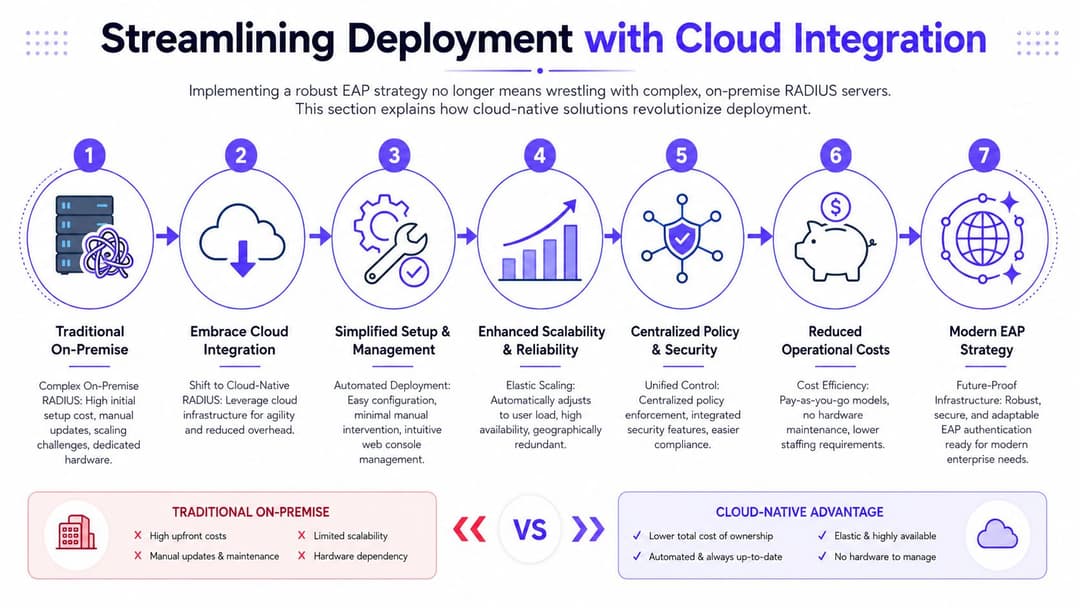
Was ein Cloud-gesteuertes Modell tatsächlich ändert
EAP erfüllt immer noch dieselbe Aufgabe. Der Unterschied liegt darin, wo Richtlinien, Identitätsprüfungen und das Onboarding von Geräten koordiniert werden.
Ein Cloud-RADIUS-Dienst oder eine identitätsbasierte Zugriffsplattform kann die WiFi-Authentifizierung mit Systemen wie Microsoft Entra ID, Google Workspace oder Okta verknüpfen. Das bedeutet, dass Ihre Wireless-Richtlinie denselben Benutzerstatus-, Gruppenmitgliedschafts- und Gerätestatusregeln folgen kann, die Sie bereits an anderer Stelle verwenden. WiFi steht nicht mehr als separates Zugriffssystem mit eigenen Ausnahmen und veralteten Datensätzen im Abseits.
Das ist besonders in Organisationen mit mehreren Standorten, gemischten Gerätetypen oder kleinen IT-Teams wichtig. Sie möchten eine einzige Steuerungsebene, keine Ansammlung lokaler Workarounds.
Warum dies den täglichen Betrieb verbessert
Der einfachste Weg, den Wert zu beurteilen, besteht darin, dem Lebenszyklus der Identität zu folgen.
- Neueinsteiger: Ein neuer Mitarbeiter wird im Verzeichnis angelegt, über das Endpoint-Management registriert und erhält das richtige Wireless-Profil ohne ein Helpdesk-Ticket.
- Wechsler: Wenn ein Benutzer die Abteilung oder den Standort wechselt, kann die gruppenbasierte Richtlinie den Zugriff anpassen, ohne die WiFi-Einrichtung neu erstellen zu müssen.
- Abgänge: Deaktivieren Sie das Konto, entziehen Sie dem Gerät das Vertrauen oder beides. Der WiFi-Zugriff endet direkt, ohne dass ein gemeinsames Passwort für alle anderen geändert werden muss.
Das ist der Business Case in einfachen Worten. Weniger manuelle Administration. Schnelleres Onboarding. Saubereres Offboarding. Weniger Sicherheitslücken, die offen bleiben, weil das Ändern eines PSK in verschiedenen Büros unpraktisch ist.
Es gibt auch einen Vorteil für die Benutzererfahrung. Die Mitarbeiter verbinden sich standortübergreifend auf vorhersehbare Weise, während die IT separate Kontrollen für Firmengeräte, BYOD, Gäste und Betriebstechnik behält.
So bewerten Sie eine Cloud-Plattform
Betrachten Sie die Plattform teils als Identitätsdienst, teils als Richtlinien-Engine und teils als Bereitstellungstool. Wenn eine dieser Komponenten schwach ist, leidet das WiFi-Erlebnis.
Achten Sie auf vier Funktionen:
- Verzeichnisintegration: Sie sollte mit dem Identitätsanbieter funktionieren, den Sie bereits verwenden, damit Zugriffsentscheidungen den tatsächlichen Benutzer- und Gerätestatus widerspiegeln.
- EAP-Methodenkompatibilität: Sie sollte die Methoden unterstützen, die Ihre Umgebung erfordert, sei es zertifikatsbasierter Mitarbeiterzugriff, Benutzername/Passwort für ausgewählte Fälle oder eingeschränkte Optionen für ältere Geräte.
- Profil- und Zertifikatsverteilung: Sie sollte die manuelle Einrichtung von Supplikanten durch MDM, UEM oder verwaltete Onboarding-Flows reduzieren.
- Richtlinientrennung: Sie sollte es Ihnen ermöglichen, unterschiedliche Regeln auf Mitarbeiter, Gäste, Auftragnehmer, IoT und gemeinsam genutzte Geräte anzuwenden, ohne ein Labyrinth von SSIDs zu erstellen.
Purple ist ein Beispiel für eine Plattform, die für die Cloud-gesteuerte WiFi-Authentifizierung in Gäste-, Mitarbeiter- und mandantenfähigen Umgebungen verwendet wird.
Die technische Wahl mit Geschäftsergebnissen verknüpfen
Viele EAP-Artikel enden oft bei den Definitionen. Die bessere Frage ist, welches Problem Sie zu lösen versuchen.
Wenn das Problem der Gästezugriff ist, hilft Ihnen die Cloud-Steuerung dabei, das Gäste-Onboarding von der internen Authentifizierungsrichtlinie zu trennen, während Berichterstellung und Administration zentralisiert bleiben. Wenn das Problem die Sicherheit der Mitarbeiter ist, reduzieren verzeichnisverknüpfte Richtlinien und die verwaltete Zertifikatsverteilung das Passwortrisiko und beschleunigen das Offboarding. Wenn das Problem IoT ist, kann eine Cloud-Richtlinie Ihnen helfen, Betriebsgeräte in ihrer eigenen Spur zu halten, anstatt sie in dasselbe Zugriffsmodell wie die Laptops der Mitarbeiter zu zwingen.
Das ist der praktische Nutzen der Cloud-Integration. Sie macht EAP von einer Protokollentscheidung zu einer Zugriffsstrategie, die sich über reale Standorte, reale Benutzer und reale Gerätevielfalt hinweg einfacher ausführen lässt.
Fehlerbehebung und Migration Ihres EAP-Setups
Die meisten EAP-Probleme fallen in einige wenige, vorhersehbare Kategorien. Die Symptome wirken auf Benutzer mysteriös, aber die Ursachen sind meist gewöhnlich.
Wo man zuerst suchen sollte
Wenn die Verbindung von Geräten plötzlich abbricht, beginnen Sie mit Vertrauensstellungen und Richtlinien, bevor Sie die Schuld auf die Funkverbindung schieben.
- Probleme mit dem Serverzertifikat: Clients vertrauen dem Serverzertifikat möglicherweise nicht mehr, oder der erwartete Servername stimmt nicht überein.
- Probleme mit dem Clientzertifikat: Verwaltete Geräte verfügen möglicherweise über ein abgelaufenes, fehlendes oder falsch zugewiesenes Zertifikat.
- Abweichungen bei der Supplicant-Konfiguration: Das Profil auf dem Gerät spezifiziert möglicherweise die falsche EAP-Methode oder falsche Vertrauenseinstellungen.
- Abweichende RADIUS-Richtlinien: Der Benutzer oder das Gerät authentifiziert sich, aber der Richtlinienpfad entspricht nicht den Erwartungen.
Eine gute Regel ist es, ein bekanntes, funktionierendes Gerät, ein fehlerhaftes Gerät und die Authentifizierungsprotokolle zusammen zu testen. Führen Sie die Fehlerbehebung bei EAP nicht nur über das Pop-up-Fenster des Clients durch.
Wenn EAP fehlschlägt, sehen Benutzer einen WiFi-Fehler. Der tatsächliche Fehler liegt meist in der Identität, dem Zertifikatsvertrauen oder der Richtlinienzuordnung.
Ein sinnvoller Migrationspfad
Wenn Sie von WPA2-PSK oder einem älteren Authentifizierungsdesign abwandern, versuchen Sie nicht, jede SSID und jedes Gerät auf einmal umzustellen.
Eine sicherere Migration sieht wie folgt aus:
- Wählen Sie eine Pilotgruppe aus, z. B. verwaltete Laptops von Mitarbeitern an einem Standort oder in einer Abteilung.
- Stellen Sie eine saubere Richtlinie bereit mit der angestrebten EAP-Methode und getesteten Geräteprofilen.
- Trennen Sie problematische Geräte wie Drucker und Controller, anstatt sie in die erste Welle zu zwingen.
- Überprüfen Sie die Protokolle vor der Erweiterung, damit Sie Vertrauens- und Profilprobleme frühzeitig erkennen.
- Mustern Sie gemeinsame Anmeldedaten schrittweise aus, sobald der neue Zugriffspfad stabil ist.
Dieser phasenweise Ansatz reduziert Störungen und gibt Ihrem Support-Team Zeit, die neuen Fehlermuster kennenzulernen. Es hilft Ihnen auch, einen häufigen Fehler zu vermeiden: die Bewertung von EAP nach einem überstürzten Rollout statt nach dem Design selbst.
Wenn Sie gemeinsame Passwörter ersetzen, Mitarbeiter-WiFi mit 802.1X planen oder versuchen, Gäste und Altsysteme zu unterstützen, ohne mehr Betriebsaufwand zu erzeugen, bietet Purple eine praktische Möglichkeit, Identität, WiFi-Authentifizierung und cloudbasierte Zugriffskontrolle in einer Plattform zu verbinden.