
হোটেল গেস্ট WiFi আর্কিটেকচার: PMS ইন্টিগ্রেশন, Captive Portals, এবং ব্যান্ডউইথ কন্ট্রোল
এই নির্দেশিকাটি এন্টারপ্রাইজ-গ্রেডের হোটেল WiFi নেটওয়ার্ক আর্কিটেকচার তৈরির জন্য একটি বিস্তৃত ফ্রেমওয়ার্ক প্রদান করে। এটি নিরাপত্তা, কমপ্লায়েন্স এবং সর্বোত্তম পারফরম্যান্স নিশ্চিত করতে VLAN সেগমেন্টেশন, FIAS-এর মাধ্যমে PMS ইন্টিগ্রেশন, captive portal ডিজাইন এবং প্রতি-ক্লায়েন্ট ব্যান্ডউইথ নিয়ন্ত্রণের প্রযুক্তিগত প্রয়োজনীয়তা বিস্তারিতভাবে বর্ণনা করে।
এই গাইডটি শুনুন
পডকাস্ট ট্রান্সক্রিপ্ট দেখুন
আমাদের মূল সিরিজের অংশ: Captive Portal Guide →
এক্সিকিউটিভ সামারি
হোটেলের WiFi আর্কিটেকচার এখন আর শুধু কভারেজের মধ্যে সীমাবদ্ধ নেই; এটি এখন সুরক্ষিত সেগমেন্টেশন, নির্বিঘ্ন অথেন্টিকেশন এবং একটি ইউটিলিটি খরচকে কৌশলগত ডেটা সম্পদে রূপান্তরিত করার বিষয়। Hospitality ভেন্যুগুলোতে অবকাঠামো স্থাপনকারী IT ম্যানেজার এবং নেটওয়ার্ক আর্কিটেক্টদের জন্য অতিথি, স্টাফ এবং বিল্ডিং সিস্টেমকে একটি একক ফ্ল্যাট নেটওয়ার্ক হিসেবে বিবেচনা করা একটি বড় ব্যর্থতা। এই নির্দেশিকাটি এন্টারপ্রাইজ-গ্রেড হোটেল WiFi-এর প্রযুক্তিগত প্রয়োজনীয়তাগুলো বিস্তারিতভাবে তুলে ধরেছে, যা তিনটি মূল স্তম্ভের উপর আলোকপাত করে: নির্বিঘ্ন গেস্ট যাচাইকরণের জন্য FIAS-এর মাধ্যমে আপনার Property Management System (PMS)-এর সাথে Captive Portal-কে একীভূত করা, PCI-DSS প্রয়োজনীয়তা পূরণের জন্য শক্তিশালী VLAN সেগমেন্টেশন স্থাপন করা এবং ধারাবাহিক পারফরম্যান্স নিশ্চিত করতে রুম-ভিত্তিক ব্যান্ডউইথ নিয়ন্ত্রণ প্রয়োগ করা। আপনার হার্ডওয়্যার কৌশলকে - তা Cisco Meraki, HPE Aruba, বা Juniper Mist যাই হোক না কেন - ইন্টেলিজেন্ট Guest WiFi অথেন্টিকেশনের সাথে সামঞ্জস্যপূর্ণ করার মাধ্যমে, আপনি আনুগত্য এবং রাজস্ব বাড়াতে প্রয়োজনীয় উচ্চ-মানের ফার্স্ট-পার্টি ডেটা সংগ্রহ করার পাশাপাশি আপনার পরিবেশকে সুরক্ষিত করতে পারেন।
ব্রিফিংটি শুনুন
টেকনিক্যাল ডিপ-ডাইভ: আর্কিটেকচার এবং সেগমেন্টেশন
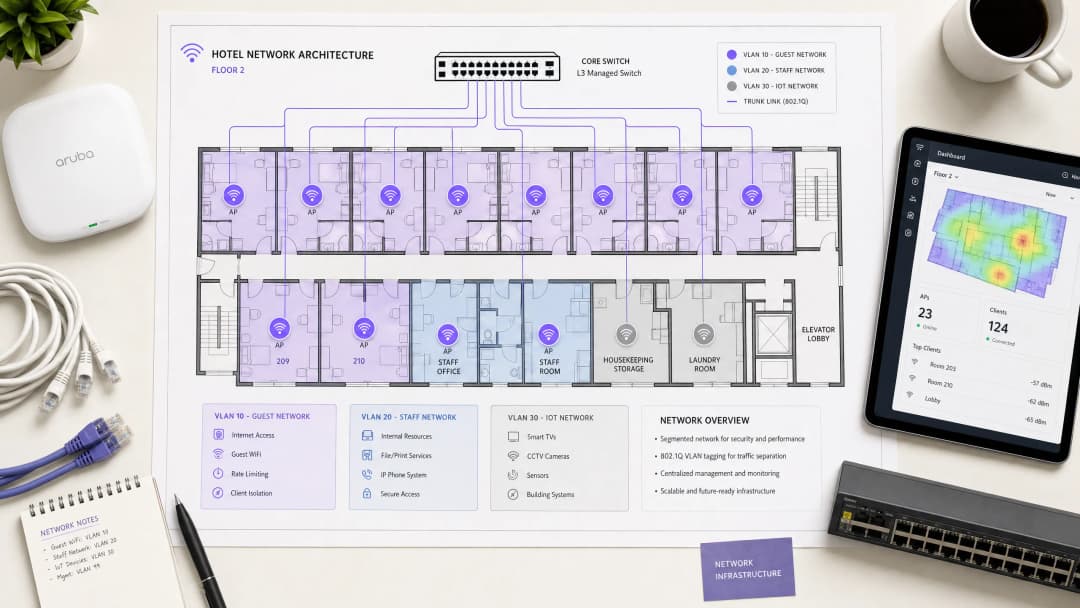
একটি হসপিটালিটি নেটওয়ার্ককে অবশ্যই কোনো নির্দিষ্ট গ্রুপের নিরাপত্তা বা পারফরম্যান্সের সাথে আপস না করে অতিথি, স্টাফ এবং অপারেশনাল টেকনোলজিকে একই সাথে পরিষেবা দিতে হবে। এর মূল ভিত্তিগত প্রয়োজনীয়তা হলো IEEE 802.1Q স্ট্যান্ডার্ড দ্বারা পরিচালিত Virtual Local Area Networks (VLANs) ব্যবহার করে লজিক্যাল পৃথকীকরণ।
আপনাকে অবশ্যই সুইচ স্তরে ট্রাফিক আলাদা করতে হবে। Guest WiFi-এর জন্য নিজস্ব VLAN প্রয়োজন, যা অভ্যন্তরীণ রিসোর্স থেকে সম্পূর্ণরূপে ফায়ারওয়াল দ্বারা সুরক্ষিত থাকবে। স্টাফদের অ্যাক্সেস একটি পৃথক VLAN-এ কাজ করা উচিত, যা একটি RADIUS সার্ভারের বিপরীতে 802.1X অথেন্টিকেশন দ্বারা সুরক্ষিত থাকবে (যা Microsoft Entra ID বা Okta-র মতো আইডেন্টিটি প্রোভাইডারদের সাথে একীভূত হয়)। একটি তৃতীয় VLAN অবশ্যই IoT ডিভাইসগুলোকে আলাদা করবে - যেমন স্মার্ট থার্মোস্ট্যাট, দরজার লক এবং CCTV। সবশেষে, PCI-DSS সম্মতি বজায় রাখতে যেকোনো পয়েন্ট-অফ-সেল সিস্টেমকে একটি আইসোলেটেড VLAN-এ রাখতে হবে। এই সেগমেন্টেশন ল্যাটারাল মুভমেন্ট অ্যাটাক ভেক্টরকে দূর করে, যা নিশ্চিত করে যে কোনো ম্যালওয়্যার আক্রান্ত গেস্ট ডিভাইস আপনার প্রোপার্টি ম্যানেজমেন্ট সিস্টেমগুলোকে পরীক্ষা করতে পারবে না।
ওয়্যারলেস লেয়ার এবং অ্যাক্সেস পয়েন্ট প্লেসমেন্ট
রেডিও ফ্রিকোয়েন্সি (RF) লেয়ারের জন্য, WiFi 6 (IEEE 802.11ax) হলো নতুন ডেপ্লয়মেন্টের জন্য বেসলাইন স্ট্যান্ডার্ড। এটি Orthogonal Frequency Division Multiple Access (OFDMA) চালু করে, যা একটি একক অ্যাক্সেস পয়েন্টকে একসাথে একাধিক ক্লায়েন্টকে পরিষেবা দেওয়ার অনুমতি দেয়। এটি WiFi 5 এর তুলনায় প্রায় চার গুণ বেশি থ্রুপুট ক্ষমতা প্রদান করে এবং হাই-ডেন্সিটি পরিবেশে ল্যাটেন্সি উল্লেখযোগ্যভাবে হ্রাস করে।
অ্যাক্সেস পয়েন্ট (APs) এর ফিজিক্যাল প্লেসমেন্ট পারফরম্যান্স নির্ধারণ করে। করিডোরে APs ডেপ্লয় করার প্রথাগত মডেলটি সিগন্যালকে গেস্টের কাছে পৌঁছানোর আগে মোটা ফায়ার ডোর এবং বাথরুমের প্লাম্বিং ভেদ করতে বাধ্য করে। আপনাকে একটি ইন-রুম AP মডেল ডেপ্লয় করতে হবে - প্রতি রুমে একটি AP, অথবা কমপক্ষে প্রতি দুটি রুমে একটি AP। প্রতিটি AP-এর জন্য একটি PoE সুইচের সাথে ওয়্যার্ড Cat 6A সংযোগ প্রয়োজন; এন্টারপ্রাইজ হসপিটালিটি পরিবেশের জন্য মেশ ব্যাকহল উপযুক্ত নয়।
Property Management System (PMS) ইন্টিগ্রেশন
PMS হলো হোটেল অপারেশনের সেন্ট্রাল সোর্স অব ট্রুথ। PMS-এর সাথে আপনার WiFi অথেন্টিকেশন লেয়ারকে ইন্টিগ্রেট করলে তা গেস্টের অভিজ্ঞতাকে বদলে দেয় এবং ডেটার গুণমান আমূল উন্নত করে।
FIAS এর মাধ্যমে অথেন্টিকেশন
যখন একজন গেস্ট নেটওয়ার্কের সাথে সংযুক্ত হন, তখন তাদের একটি Captive Portal-এ রিডাইরেক্ট করা হয়। একটি সাধারণ পাসওয়ার্ড বা একটি আনভেরিফাইড ইমেল ফর্মের উপর নির্ভর করার পরিবর্তে, PMS ইন্টিগ্রেশন গেস্টকে তাদের উপাধি এবং রুম নম্বর ব্যবহার করে অথেন্টিকেট করার অনুমতি দেয়। Captive Portal প্ল্যাটফর্মটি রিয়েল টাইমে PMS-কে কোয়েরি করে - সাধারণত Fidelio Interface Application Specification (FIAS) প্রোটোকল ব্যবহার করে - একটিভ রিজার্ভেশনের বিপরীতে ক্রেডেন্সিয়ালগুলো ভ্যালিড করার জন্য। এই API ভ্যালিডেশন ৫০০ মিলি-সেকেন্ডেরও কম সময়ে ঘটে।

সেশন ম্যানেজমেন্ট এবং ডেটার গুণমান
এই ইন্টিগ্রেশন সেশন লাইফসাইকেল অপ্টিমাইজ করে। যখন একজন গেস্ট চেক আউট করেন, তখন PMS একটি ইভেন্ট ট্রিগার করে যা অবিলম্বে WiFi অ্যাক্সেস বাতিল করে দেয়। যদি একজন গেস্ট তাদের থাকার মেয়াদ বাড়ান, তবে নেটওয়ার্ক সেশন স্বয়ংক্রিয়ভাবে বর্ধিত হয়।
আরও গুরুত্বপূর্ণ বিষয় হলো, PMS ইন্টিগ্রেশন ডেটার গুণমানের সমস্যার সমাধান করে। স্ট্যান্ডার্ড ইমেল ক্যাপচার ফর্মগুলোতে প্রায়ই ৩০% ভুলের হার দেখা যায়। PMS-এর বিপরীতে ভ্যালিড করার মাধ্যমে, আপনি নির্দিষ্ট থাকার ডেটার সাথে লিঙ্কযুক্ত একটি ভেরিফাইড গেস্ট রেকর্ড ক্যাপচার করতে পারেন। Purple ২০২৪ সালে ৪৪০ মিলিয়ন লগইন প্রসেস করেছে, এবং আমাদের ডেটা দেখায় যে PMS-ইন্টিগ্রেটেড captive portalsগুলো ৭০% থেকে ৮০% ভ্যালিডেশন রেট অর্জন করে। এই সম্মতিপ্রাপ্ত, ফার্স্ট-পার্টি ডেটা সরাসরি আপনার CRM-এ চলে যায়, যা লক্ষ্যযুক্ত WiFi Analytics এবং পোস্ট-স্টে মার্কেটিং সক্ষম করে।
আপনার নির্দিষ্ট সেটআপ নিয়ে কোনো প্রশ্ন আছে?
আমাদের টিম ৮০,০০০ ভেন্যুতে ভেন্যু অপারেটর, IT ম্যানেজার এবং নেটওয়ার্ক ইঞ্জিনিয়ারদের সাথে কাজ করে। একটি ২০ মিনিটের কল বুক করুন এবং আপনার মতো অন্যরা কীভাবে এর সমাধান করেছেন তা আমরা আপনাকে দেখাব।
Captive Portal ডিজাইন এবং সিকিউরিটি
Captive Portal হলো ডেটা ক্যাপচার এবং কমপ্লায়েন্সের জন্য আপনার প্রাথমিক প্রক্রিয়া। এটি গেস্ট ডিভাইসে একটি রেস্ট্রিক্টেড IP অ্যাড্রেস অ্যাসাইন করে এবং স্প্ল্যাশ পেজে HTTP ট্রাফিক রিডাইরেক্ট করতে একটি DNS ইন্টারসেপ্ট ব্যবহার করে কাজ করে। একবার গেস্ট অথেন্টিকেট করলে এবং শর্তাবলী স্বীকার করলে, RADIUS সার্ভার MAC অ্যাড্রেসকে অথরাইজ করে এবং সম্পূর্ণ ইন্টারনেট অ্যাক্সেস মঞ্জুর করা হয়।### GDPR এবং আনবান্ডেলড সম্মতি
আপনার captive portal-এ অবশ্যই স্পষ্ট ও বিস্তারিত সম্মতির বিকল্প থাকতে হবে। নেটওয়ার্ক ব্যবহারের সম্মতিকে মার্কেটিং যোগাযোগের সম্মতির সাথে একসাথে যুক্ত বা বান্ডেল করা যাবে না। Purple-এর প্ল্যাটফর্ম স্বভাবগতভাবেই এটি পরিচালনা করে, যা যাচাইযোগ্য সম্মতির রেকর্ডকে ব্যক্তিগত ইউজার প্রোফাইলের সাথে যুক্ত করে।
এনক্রিপশন এবং ক্লায়েন্ট আইসোলেশন
গেস্ট SSID-এ আপনাকে অবশ্যই ক্লায়েন্ট আইসোলেশন সক্রিয় করতে হবে। এটি পিয়ার-টু-পিয়ার যোগাযোগকে প্রতিরোধ করে, যা একটি গেস্ট ডিভাইস থেকে অন্য ডিভাইসে স্ক্যান করা বা অ্যাক্সেস করা বন্ধ করে দেয়। এনক্রিপশনের জন্য, WPA3 হল স্ট্যান্ডার্ড। যেখানে WPA3-Enterprise স্টাফ নেটওয়ার্ককে সুরক্ষিত করে, সেখানে গেস্ট নেটওয়ার্কের ক্ষেত্রে যেখানে সমর্থিত সেখানে Opportunistic Wireless Encryption (OWE) ব্যবহার করা উচিত, যা শেয়ার্ড পাসওয়ার্ডের প্রয়োজন ছাড়াই উন্মুক্ত নেটওয়ার্কের জন্য ব্যক্তিগতকৃত এনক্রিপশন প্রদান করে। সুরক্ষিত অ্যাক্সেসের আরও বিশদ বিবরণের জন্য, EAP Method WiFi: A Guide to Secure Network Access সম্পর্কিত আমাদের নির্দেশিকাটি দেখুন।
ব্যান্ডউইথ নিয়ন্ত্রণ এবং QoS
একটি স্থিতিশীল আর্কিটেকচারের শেষ ভিত্তি হল ব্যান্ডউইথ ব্যবস্থাপনা। গেস্টদের অভিযোগের প্রাথমিক কারণ হল কম ব্যবস্থার ইন্টারনেট আপলিংক।
আপলিংক প্রভিশন করা
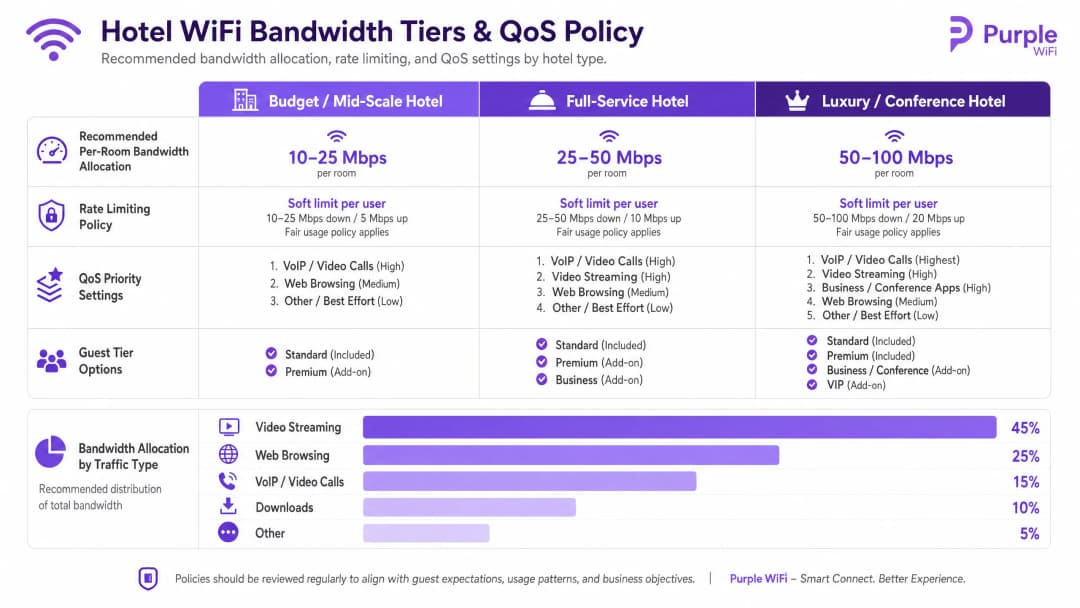
আপনাকে গড় ব্যবহারের ভিত্তিতে নয়, বরং পিক কনকারেন্ট চাহিদার ওপর ভিত্তি করে ব্যান্ডউইথ প্রভিশন করতে হবে। প্রস্তাবিত বরাদ্দগুলি হল:
- বাজেট / মিড-স্কেল: রুম প্রতি 10 - 25 Mbps
- ফুল-সার্ভিস: রুম প্রতি 25 - 50 Mbps
- লাক্সারি / কনফারেন্স: রুম প্রতি 50 - 100 Mbps
৮০% অকুপেন্সি সহ একটি ২০০-রুমের সম্পত্তির জন্য, রুম প্রতি ২৫ Mbps বরাদ্দ করতে ন্যূনতম ৪ Gbps-এর একটি ডেডিকেটেড আপলিংক প্রয়োজন। একটি ডেডিকেটেড লিজড লাইন বাধ্যতামূলক।
রেট লিমিটিং এবং QoS পলিসি
কোনো একক ব্যবহারকারী যাতে সম্পূর্ণ আপলিংক ব্যবহার করে শেষ না করে ফেলে, সেজন্য আপনাকে কন্ট্রোলার স্তরে প্রতি-ক্লায়েন্ট রেট লিমিটিং প্রয়োগ করতে হবে। আপনি Cisco Meraki, HPE Aruba, বা Ubiquiti UniFi যেটাই মোতায়েন করুন না কেন, প্রতি ডিভাইসের জন্য ডাউনস্ট্রিম এবং আপস্ট্রিম উভয় ট্রাফিকের উপর একটি হার্ড ক্যাপ কনফিগার করুন।
রেট লিমিটিং-এর উপরে থাকে কোয়ালিটি অফ সার্ভিস (QoS)। WMM (WiFi মাল্টিমিডিয়া) স্ট্যান্ডার্ড ব্যবহার করে, আপনাকে অবশ্যই ট্রাফিককে চারটি কিউতে অগ্রাধিকার দিতে হবে। VoIP এবং ভিডিও কলের জন্য উচ্চ অগ্রাধিকার প্রয়োজন, যা নিশ্চিত করে যে একজন গেস্টের Microsoft Teams কলটি অন্য কোনো গেস্টের বেস্ট-এফোর্ট কিউতে বড় ফাইল ডাউনলোড করার কারণে ব্যাহত হবে না।
বাস্তবায়ন নির্দেশিকা
একটি সফল মোতায়েনের জন্য এই সিকোয়েন্সটি অনুসরণ করুন:
- একটি RF সাইট সার্ভে পরিচালনা করুন: AP প্লেসমেন্টের পরিকল্পনা করার আগে হস্তক্ষেপের উৎসগুলি সনাক্ত করতে একটি স্পেকট্রাম অ্যানালাইজার নিয়ে সম্পত্তিটি ঘুরে দেখুন।
- VLAN আর্কিটেকচার ডিজাইন করুন: আপনার গেস্ট, স্টাফ, IoT এবং POS VLAN-গুলি নথিভুক্ত করুন। এগুলির মধ্যে স্পষ্ট ডিফল্ট-ডিনাই ফায়ারওয়াল নিয়মগুলি কনফিগার করুন।
- আপলিংকের সাইজ নির্ধারণ করুন: রুম প্রতি ২৫ Mbps বেসলাইনের উপর ভিত্তি করে পিক ডিমান্ড হিসাব করুন এবং একটি ডেডিকেটেড লিজড লাইন সংগ্রহ করুন।
- Captive Portal মোতায়েন করুন: আপনার PMS-এর সাথে পোর্টালটি সংহত করুন। iOS, Android, এবং Windows ডিভাইস জুড়ে প্রমাণীকরণ প্রবাহ, সম্মতি গ্রহণ এবং সেশন প্রত্যাহার পরীক্ষা করুন।5. মনিটর এবং অ্যাডজাস্ট করুন: স্থাপনের পরে, ডেড জোন বা ব্যান্ডউইথ আর্টকেল শনাক্ত করতে AP অ্যাসোসিয়েশন কাউন্ট এবং আপলিংক ব্যবহার মনিটর করুন।
ট্রাবলশুটিং এবং ঝুঁকি হ্রাস
হোটেল WiFi স্থাপনের ক্ষেত্রে সবচেয়ে ঘন ঘন ব্যর্থতার কারণগুলো হার্ডওয়্যার ব্যর্থতার চেয়ে দুর্বল পরিকল্পনার কারণে ঘটে থাকে।
- "ধীরগতির WiFi" অভিযোগ: এটি খুব কমই একটি RF সমস্যা। প্রথমত, আপনার ইন্টারনেট আপলিংক ব্যবহার পরীক্ষা করুন। যদি সার্কিটটি সম্পৃক্ত হয়ে যায়, তবে কোনো ধরনের AP টিউনিং এই সমস্যার সমাধান করবে না। দ্বিতীয়ত, AP জুড়ে ক্লায়েন্ট ডিস্ট্রিবিউশন পরীক্ষা করুন; যদি একটি AP-তে ৪০ জন ক্লায়েন্ট থাকে এবং একটি সংলগ্ন AP-তে ৫ জন থাকে, তবে আপনার ব্যান্ড স্টিয়ারিং কনফিগারেশন সামঞ্জস্য করা প্রয়োজন।
- "ডেটা সিলো" সমস্যা: ডাউনস্ট্রিম ইন্টিগ্রেশন ছাড়া একটি captive portal স্থাপন করা বিনিয়োগকে নষ্ট করে। লগইন করার সময় ক্যাপচার করা ডেটা অবশ্যই স্বয়ংক্রিয়ভাবে আপনার মার্কেটিং অটোমেশন টুলে প্রবাহিত হতে হবে যাতে তা Retail বা হসপিটালিটি লয়্যালটি প্রোগ্রামগুলোকে ত্বরান্বিত করতে পারে।
- ফ্ল্যাট নেটওয়ার্ক ঝুঁকি: ওয়্যার্ড নেটওয়ার্ককে সেগমেন্ট করতে ব্যর্থ হলে তা ওয়্যারলেস সুরক্ষাকে দুর্বল করে। যদি কোনো অতিথি কনফারেন্স রুমে একটি উন্মুক্ত ইথারনেট পোর্টে ল্যাপটপ প্লাগ ইন করেন এবং স্টাফ VLAN অ্যাক্সেস করেন, তবে আপনার আর্কিটেকচার ব্যর্থ হয়েছে। নিশ্চিত করুন যে পাবলিক এরিয়ার সুইচ পোর্টগুলো গেস্ট VLAN-এ অ্যাসাইন করা হয়েছে অথবা সম্পূর্ণ নিষ্ক্রিয় করা হয়েছে।
ROI এবং ব্যবসায়িক প্রভাব
এন্টারপ্রাইজ WiFi-এর জন্য উল্লেখযোগ্য মূলধনী ব্যয়ের প্রয়োজন হয়, তবে সঠিকভাবে আর্কিটেক্ট করা হলে এটি পরিমাপযোগ্য রিটার্ন প্রদান করে। ROI তিনটি চ্যানেলের মাধ্যমে অর্জিত হয়:
- অপারেশনাল দক্ষতা: PMS ইন্টিগ্রেশন ম্যানুয়াল ভাউচার জেনারেশন এবং ফ্রন্ট-ডেস্ক ট্রাবলশুটিং দূর করে, যা প্রতি সপ্তাহে কর্মীদের অনেক ঘণ্টার সময় বাঁচায়।
- ফার্স্ট-পার্টি ডেটা সংগ্রহ: একটি অথেনটিকেটেড captive portal যাচাইকৃত অতিথিদের প্রোফাইলের একটি ডাটাবেস তৈরি করে। এই ডেটা ডাইরেক্ট-বুকিং ক্যাম্পেইন পরিচালনা করতে সাহায্য করে, যা অনলাইন ট্রাভেল এজেন্সি (OTA) এবং তাদের সাথে সম্পর্কিত কমিশন ফি-র উপর নির্ভরতা কমায়।
- অতিথিদের সন্তুষ্টি: নির্ভরযোগ্য, উচ্চ-গতির WiFi হলো ইতিবাচক রিভিউর একটি প্রাথমিক চালিকাশক্তি। একটি সেগমেন্টেড, সঠিকভাবে প্রোভিশনড নেটওয়ার্ক সেইসব বাধা দূর করে যা নেতিবাচক প্রতিক্রিয়ার দিকে পরিচালিত করে, যা সরাসরি সম্পত্তির সুনাম এবং গড় দৈনিক হারকে প্রভাবিত করে।
মূল সংজ্ঞাসমূহ
VLAN (ভার্চুয়াল লোকাল এরিয়া নেটওয়ার্ক)
একটি লজিক্যাল সাবনেটওয়ার্ক যা একই ফিজিক্যাল অবকাঠামোতে থাকা ডিভাইসগুলির একটি সংগ্রহকে গ্রুপ করে, তাদের ব্রডকাস্ট ট্রাফিককে অন্যান্য VLAN থেকে আলাদা করে।
অভ্যন্তরীণ হোটেল সিস্টেম থেকে গেস্ট ট্রাফিক আলাদা করতে এবং PCI-DSS কমপ্লায়েন্স নিশ্চিত করতে অপরিহার্য।
Captive Portal
একটি ওয়েব পেজ যা নেটওয়ার্ক ট্রাফিককে বাধা দেয় এবং সম্পূর্ণ ইন্টারনেট অ্যাক্সেস দেওয়ার আগে ব্যবহারকারীদের অথেন্টিকেট করতে বা শর্তাবলীতে সম্মত হতে বাধ্য করে।
গেস্ট অথেন্টিকেশন, GDPR সম্মতি এবং ফার্স্ট-পার্টি ডেটা ক্যাপচারের জন্য প্রাথমিক টাচপয়েন্ট।
FIAS (ফিডেলিও ইন্টারফেস অ্যাপ্লিকেশন স্পেসিফিকেশন)
প্রপার্টি ম্যানেজমেন্ট সিস্টেম (যেমন Oracle Opera) দ্বারা থার্ড-পার্টি সিস্টেমের সাথে রিয়েল-টাইমে যোগাযোগ করার জন্য ব্যবহৃত একটি সার্বজনীন প্রোটোকল।
সক্রিয় PMS রেকর্ডের বিপরীতে অতিথির রুম নম্বর এবং উপাধি যাচাই করতে captive portal দ্বারা ব্যবহৃত হয়।
WPA3-Enterprise
WiFi নিরাপত্তার সর্বোচ্চ স্তর, যার জন্য একটি RADIUS সার্ভার (802.1X) এর মাধ্যমে অনন্য ক্রিডেনশিয়াল ব্যবহার করে পৃথক ব্যবহারকারী বা ডিভাইসগুলিকে অথেন্টিকেট করতে হয়।
হোটেলের মধ্যে স্টাফ নেটওয়ার্ক এবং কর্পোরেট ডিভাইস সুরক্ষিত করার জন্য বাধ্যতামূলক স্ট্যান্ডার্ড।
ক্লায়েন্ট আইসোলেশন
একটি ওয়্যারলেস কন্ট্রোলার বৈশিষ্ট্য যা একই SSID-তে সংযুক্ত ডিভাইসগুলিকে একে অপরের সাথে সরাসরি যোগাযোগ করতে বাধা দেয়।
পিয়ার-টু-পিয়ার আক্রমণ প্রতিরোধ করতে এবং অতিথিদের গোপনীয়তা রক্ষা করতে সমস্ত গেস্ট নেটওয়ার্কে অবশ্যই সক্রিয় থাকতে হবে।
রেট লিমিটিং
একটি পৃথক ক্লায়েন্ট ডিভাইসের জন্য উপলব্ধ সর্বোচ্চ ব্যান্ডউইথ (আপলোড এবং ডাউনলোড স্পিড) সীমিত করার প্রক্রিয়া।
কোনো একক গেস্টের বড় ফাইল ডাউনলোড করার কারণে যাতে অন্য সবার নেটওয়ার্ক অভিজ্ঞতা ব্যাহত না হয়, তা প্রতিরোধ করার জন্য অত্যন্ত গুরুত্বপূর্ণ।
QoS (কোয়ালিটি অফ সার্ভিস) / WMM
নেটওয়ার্ক মেকানিজম যা কম সময়-সংবেদনশীল ট্রাফিকের (যেমন ফাইল ডাউনলোড) তুলনায় নির্দিষ্ট ধরণের ট্রাফিককে (যেমন ভয়েস বা ভিডিও) অগ্রাধিকার দেয়।
নেটওয়ার্কে ভারী লোড থাকা অবস্থায়ও গেস্ট VoIP কল বা স্টাফ কমিউনিকেশন টুলগুলি যাতে নির্ভরযোগ্যভাবে কাজ করে তা নিশ্চিত করে।
OFDMA
Orthogonal Frequency Division Multiple Access; এটি একটি WiFi 6 ফিচার যা চ্যানেলগুলোকে ছোট ছোট সাব-চ্যানেলে বিভক্ত করে একটি অ্যাক্সেস পয়েন্টকে একই সাথে একাধিক ক্লায়েন্টকে সেবা দেওয়ার সুবিধা দেয়।
হোটেল কনফারেন্স রুম এবং লবির মতো উচ্চ-ঘনত্বপূর্ণ এলাকায় নাটকীয়ভাবে পারফরম্যান্স উন্নত করে এবং ল্যাটেন্সি হ্রাস করে।
সমাধানকৃত উদাহরণসমূহ
একটি ১৫০-রুমের ফুল-সার্ভিস হোটেলে সন্ধ্যার ব্যস্ত সময়ে (১৯:০০ - ২২:০০) ধীরগতির WiFi সম্পর্কে অতিথিদের ঘন ঘন অভিযোগের সম্মুখীন হতে হচ্ছে। প্রপার্টিটিতে বর্তমানে একটি ১ Gbps ব্রডব্যান্ড কানেকশন আছে এবং এটি একটি শেয়ার্ড WPA2 পাসওয়ার্ড সহ একটি একক ফ্ল্যাট নেটওয়ার্ক ব্যবহার করে।
১. ইন্টারনেট আপলিংকটি আপগ্রেড করে একটি ডেডিকেটেড লিজড লাইনে উন্নীত করুন যা কমপক্ষে ৩.৭৫ Gbps (১৫০টি রুম * ২৫ Mbps) প্রদান করে। ২. VLAN সেগমেন্টেশন বাস্তবায়ন করুন, অতিথিদের একটি আইসোলেটেড VLAN 10-এ স্থানান্তরিত করুন। ৩. FIAS-এর মাধ্যমে হোটেলের Oracle Opera PMS-এর সাথে ইন্টিগ্রেট করা একটি captive portal স্থাপন করুন, যা অতিথিদের রুম নম্বর এবং উপাধি দিয়ে অথেন্টিকেট করার অনুমতি দেয়। ৪. ওয়্যারলেস কন্ট্রোলারে প্রতি ক্লায়েন্টের জন্য ২৫ Mbps ডাউন / ১০ Mbps আপ রেট লিমিটিং প্রয়োগ করুন যাতে একক কোনো ডিভাইস আপলিংককে সম্পৃক্ত (স্যাচুরেট) করতে না পারে।
একটি লাক্সারি রিসোর্টের হাউসকিপিং এবং রক্ষণাবেক্ষণের কাজে ব্যবহৃত স্টাফ ট্যাবলেটগুলির জন্য নিরাপদ WiFi স্থাপন করা প্রয়োজন, এবং একই সাথে এটি নিশ্চিত করা দরকার যে অতিথিদের ডিভাইসগুলি যেন প্রপার্টি ম্যানেজমেন্ট সিস্টেমে অ্যাক্সেস করতে না পারে।
গেস্ট VLAN (VLAN 10) থেকে আলাদা একটি ডেডিকেটেড স্টাফ VLAN (VLAN 20) তৈরি করুন। স্টাফ SSID-টি WPA3-Enterprise ব্যবহার করার জন্য কনফিগার করুন, যা 802.1X ব্যবহার করে কর্পোরেট RADIUS সার্ভারের বিপরীতে ট্যাবলেটগুলিকে অথেন্টিকেট করবে। ফায়ারওয়ালে কঠোর ইন্টার-VLAN রাউটিং নিয়ম প্রয়োগ করুন: VLAN 10 এবং VLAN 20-এর মধ্যে সমস্ত ট্রাফিক ডিফল্ট-ডিনাই করুন, এবং VLAN 20-কে শুধুমাত্র হাউসকিপিং অ্যাপ্লিকেশনের জন্য প্রয়োজনীয় নির্দিষ্ট IP অ্যাড্রেস এবং পোর্টে পৌঁছানোর অনুমতি দিন।
অনুশীলনী প্রশ্নসমূহ
Q1. একটি হোটেলের অপারেশন ডিরেক্টর বিষয়টিকে সহজ রাখতে অতিথি এবং অতিথি কক্ষের নতুন স্মার্ট টিভি উভয়ের জন্যই একটি একক, ওপেন WiFi নেটওয়ার্ক বাস্তবায়ন করতে চান। নেটওয়ার্ক আর্কিটেক্ট হিসেবে আপনি কীভাবে প্রতিক্রিয়া জানাবেন?
ইঙ্গিত: পার্শ্ববর্তী মুভমেন্ট এবং ব্রডকাস্ট ডোমেন সাইজের প্রভাব বিবেচনা করুন।
মডেল উত্তর দেখুন
এই পদ্ধতির বিরুদ্ধে পরামর্শ দিন। অতিথি ডিভাইস এবং IoT ডিভাইস (স্মার্ট টিভি) অবশ্যই পৃথক VLAN এ বিভক্ত করতে হবে। এগুলোকে একই ওপেন নেটওয়ার্কে রাখলে টিভির ওপর অতিথি ডিভাইস থেকে সরাসরি অ্যাক্সেসের সুযোগ তৈরি হয়, যা একটি বড় ধরণের নিরাপত্তা দুর্বলতা সৃষ্টি করে। এছাড়া, এটি ব্রডকাস্ট ডোমেনকে বৃদ্ধি করে, যা সামগ্রিক নেটওয়ার্ক পারফরম্যান্স কমিয়ে দিতে পারে। টিভিগুলোকে কঠোর ফায়ারওয়াল নিয়মের সাথে একটি আইসোলেটেড IoT VLAN (যেমন, VLAN 30)-এ রাখা উচিত।
Q2. ৩০০ রুমের একটি নতুন প্রপার্টির সাইট সার্ভে করার সময়, ক্যাবলিং কন্ট্রাক্টর প্রতি চারটি রুমের জন্য করিডোরে একটি অ্যাক্সেস পয়েন্ট রেখে খরচ বাঁচানোর পরামর্শ দেন। এটি কেন সমস্যাযুক্ত?
ইঙ্গিত: একটি হোটেল পরিবেশে RF অ্যাটেনুয়েশন এবং শারীরিক বাধাগুলো সম্পর্কে ভাবুন।
মডেল উত্তর দেখুন
হোটেলের জন্য করিডোরে প্লেসমেন্ট একটি ত্রুটিপূর্ণ ডিজাইন। রুমে থাকা অতিথি ডিভাইসে পৌঁছানোর জন্য RF সিগন্যালকে ভারী ফায়ার ডোর, মিররড ওয়ারড্রোব এবং টাইলসযুক্ত বাথরুম ভেদ করতে হয়, যার ফলে মারাত্মক সিগন্যাল অ্যাটেনুয়েশন এবং দুর্বল পারফরম্যান্স ঘটে। সঠিক ডিজাইন হলো ইন-রুম AP মডেল - প্রতি রুমে একটি AP, অথবা কমপক্ষে প্রতি দুটি রুমে একটি - যাতে সরাসরি লাইন-অফ-সাইট বা ন্যূনতম বাধা সহ কভারেজ নিশ্চিত করা যায়।
Q3. মার্কেটিং টিম WiFi-এ লগ ইন করা প্রতিটি অতিথিকে হোটেলের সাপ্তাহিক প্রমোশনাল নিউজলেটারে স্বয়ংক্রিয়ভাবে সাবস্ক্রাইব করাতে চায়। এটি পরিচালনা করতে Captive Portal কীভাবে কনফিগার করা উচিত?
ইঙ্গিত: সম্মতি বান্ডলিং সম্পর্কিত GDPR প্রয়োজনীয়তাগুলো বিবেচনা করুন।
মডেল উত্তর দেখুন
Captive Portal অবশ্যই স্পষ্ট, আনবান্ডেলড সম্মতির বিকল্পগুলোর সাথে কনফিগার করতে হবে। GDPR অনুযায়ী, WiFi নেটওয়ার্ক অ্যাক্সেস করার সম্মতি মার্কেটিং যোগাযোগের সম্মতির ওপর শর্তযুক্ত হতে পারে না। স্প্ল্যাশ পেজে নিউজলেটারের জন্য একটি পৃথক, আনচেকড অপ্ট-ইন বক্স প্রদান করতে হবে। Purple এর প্ল্যাটফর্ম স্বাভাবিকভাবেই এই বিভাজন বজায় রাখে, যা যাচাইযোগ্য সম্মতির রেকর্ড ধারণ করার পাশাপাশি কমপ্লায়েন্স নিশ্চিত করে।
এই সিরিজে পড়া চালিয়ে যান
Ubiquiti UniFi গেস্ট পোর্টাল রিডাইরেক্ট হচ্ছে না: কারণ এবং সমাধান
এই নির্দেশিকাটি গেস্ট স্টেট, রিডাইরেক্ট, প্রি-অথোরাইজেশন রুট এবং কন্ট্রোলার অথোরাইজেশন ধারাবাহিকভাবে অনুসরণ করে একটি UniFi গেস্ট পোর্টাল রিডাইরেক্ট ব্যর্থতা আলাদা করে চিহ্নিত করে। এটি ভেন্যু আইটি টিমগুলোকে গেস্ট নেটওয়ার্ক বনাম Hotspot বিভ্রান্তি, এক্সটার্নাল পোর্টাল হ্যান্ড-অফ, বর্তমান UniFi OS অ্যাকাউন্ট প্রয়োজনীয়তা এবং DNS আইসোলেশন টেস্টিং সমাধানের জন্য একটি বিশ্বস্ত পদ্ধতি প্রদান করে।
Cisco Meraki splash page কাজ করছে না: একটি ট্রাবলশুটিং ফ্লোচার্ট
এই ব্যবহারিক ডে-টু গাইডটি সনাক্ত করে যে একটি Cisco Meraki splash ফ্লো কোথায় ব্যর্থ হয়েছে: ক্লায়েন্ট অথরাইজেশন, HTTP redirect ইনিশিয়েশন, walled-garden রিচিবিলিটি বা RADIUS sign-on। এটি ভেন্যু আইটি টিমকে একটি নিয়ন্ত্রিত প্রমাণের পথ প্রদান করে, যাতে তারা কোনো লাইভ এস্টেটে বড় ধরণের পরিবর্তন না করেই Guest WiFi পুনরুদ্ধার করতে পারে।
Enterprise Guest WiFi সেটআপ নির্দেশিকা: VLAN Segmentation, নিরাপত্তা এবং Captive Portals
এই প্রযুক্তিগত নির্দেশিকাটি IT টিমগুলোকে দেখায় কীভাবে VLAN segmentation, firewall policy এবং একটি captive portal ব্যবহার করে Guest WiFi-কে একটি নিয়ন্ত্রিত ইন্টারনেট-অ্যাক্সেস পরিষেবা হিসেবে সেট আপ করতে হয়। এটি আরও ব্যাখ্যা করে যে কীভাবে Purple-এর রেজিস্ট্রেশন ফর্ম এবং অনবোর্ডিং নিয়ন্ত্রণগুলো স্টাফ, পেমেন্ট এবং অপারেশনাল সিস্টেমের চারপাশের সীমানাকে দুর্বল না করে একটি আনুপাতিক ভিজিটর অভিজ্ঞতা প্রদান করতে সহায়তা করে।
আপনার নির্দিষ্ট সেটআপ নিয়ে কোনো প্রশ্ন আছে?
আমাদের টিম ৮০,০০০ ভেন্যুতে ভেন্যু অপারেটর, IT ম্যানেজার এবং নেটওয়ার্ক ইঞ্জিনিয়ারদের সাথে কাজ করে। একটি ২০ মিনিটের কল বুক করুন এবং আপনার মতো অন্যরা কীভাবে এর সমাধান করেছেন তা আমরা আপনাকে দেখাব।