
NHS स्टाफ WiFi: हेल्थकेअरमध्ये सुरक्षित वायरलेस नेटवर्क कसे तैनात करावे
हे तांत्रिक संदर्भ मार्गदर्शक NHS स्टाफ WiFi साठी आर्किटेक्चर, सुरक्षा प्रोटोकॉल आणि तैनाती धोरणांचे तपशील देते, ज्यामध्ये 802.1X प्रमाणीकरण, VLAN विभाजन, BYOD पॉलिसी आणि DSP Toolkit अनुपालनाचा समावेश आहे. हे IT लीडर्सना सुरक्षिततेशी तडजोड न करता सामायिक भौतिक पायाभूत सुविधांवर क्लिनिकल, प्रशासकीय आणि अतिथी युजर्सना सेवा देणारे एंटरप्राइझ-ग्रेड वायरलेस नेटवर्क तैनात करण्याबद्दल ठोस मार्गदर्शन प्रदान करते. तुम्ही नवीन तैनातीचे नियोजन करत असाल किंवा विद्यमान मालमत्ता अधिक मजबूत करत असाल, हे मार्गदर्शक या तिमाहीत कारवाई करण्यासाठी आवश्यक निर्णय फ्रेमवर्क आणि अंमलबजावणीच्या पायऱ्या प्रदान करते.
Video overview
हे मार्गदर्शक ऐका
पॉडकास्ट ट्रान्सक्रिप्ट पहा
आमच्या मुख्य मालिकेचा भाग: एंटरप्राइझ WiFi सुरक्षा मार्गदर्शक →

कार्यकारी सारांश (Executive Summary)
NHS मालमत्तांमध्ये सुरक्षित, विश्वसनीय WiFi तैनात करणे हे आता पर्यायी वैशिष्ट्य राहिलेले नाही - ती एक महत्त्वपूर्ण क्लिनिकल पायाभूत सुविधा (clinical infrastructure) आहे. मोबाईल-फर्स्ट रुग्ण सेवा, इलेक्ट्रॉनिक हेल्थ रेकॉर्ड्स (EHR), आणि जोडलेली वैद्यकीय उपकरणे यांकडे होणाऱ्या बदलामुळे अशा वायरलेस आर्किटेक्चरची आवश्यकता आहे जे कडक सुरक्षा नियंत्रणांसह अखंड रोमिंगचा समतोल राखते.
IT व्यवस्थापक, नेटवर्क आर्किटेक्ट्स आणि CTOs यांच्यासमोरील मुख्य आव्हान म्हणजे - सुरक्षा धोक्यात न आणता आणि NHS डेटा सिक्युरिटी अँड प्रोटेक्शन (DSP) टूलकिट आवश्यकतांची पूर्तता करत - एकाच सामायिक भौतिक पायाभूत सुविधेवर क्लिनिकल कर्मचारी, प्रशासकीय कर्मचारी, रुग्ण आणि अतिथी अशा विविध वापरकर्त्यांच्या गटांना सामावून घेणे. हे मार्गदर्शक NHS कर्मचाऱ्यांच्या WiFi साठीच्या तांत्रिक आवश्यकता तपशीलवार सांगते, ज्यामध्ये IEEE 802.1X सारखे मजबूत प्रमाणीकरण फ्रेमवर्क, VLANs द्वारे लॉजिकल नेटवर्क विभाजन आणि Bring Your Own Device (BYOD) एंडपॉइंट्सचे सुरक्षित ऑनबोर्डिंग यावर लक्ष केंद्रित केले आहे.
जुने प्री-शेअर्ड की (PSK) वापरणे बंद करून आणि ओळख-आधारित प्रवेश धोरणे (identity-driven access policies) अवलंबून, आरोग्य सेवा संस्था डेटा चोरीचे धोके कमी करू शकतात, कार्यात्मक अडचणी कमी करू शकतात आणि डिजिटल ट्रान्सफॉर्मेशन प्रोग्रामसाठी वायरलेस पाया प्रदान करू शकतात. याचा व्यावसायिक फायदा देखील तितकाच प्रभावी आहे: हेल्पडेस्कचा कमी होणारा भार, प्रमाणित DSP टूलकिट अनुपालन आणि संपूर्ण पायाभूत सुविधांची पुनर्रचना न करता भविष्यातील क्लिनिकल नवकल्पनांना समर्थन देण्यास सक्षम असलेले नेटवर्क.
तांत्रिक सखोल विश्लेषण
ऑथेंटिकेशन आणि ऍक्सेस कंट्रोल
सुरक्षित आरोग्य सेवा वायरलेस नेटवर्कचा पाया हा ओळख-आधारित ऍक्सेस कंट्रोल असतो. Pre-Shared Keys वापरणारे जुने WPA2-Personal नेटवर्क हे क्लिनिकल वातावरणासाठी मुळातच अयोग्य आहेत. ते वैयक्तिक जबाबदारी निश्चित करत नाहीत, कर्मचाऱ्यांनी नोकरी सोडल्यावर ऑफबोर्डिंग प्रक्रिया गुंतागुंतीची करतात आणि जर क्रेडेंशियल्स धोक्यात आले किंवा इच्छित गटाबाहेर सामायिक केले गेले, तर सुरक्षेमध्ये बिघाड होण्याचे एकच कारण बनतात.
आधुनिक NHS उपयोजनांमध्ये IEEE 802.1X ऑथेंटिकेशन वापरून WPA3-Enterprise (किंवा किमान संक्रमणकालीन स्थिती म्हणून WPA2-Enterprise) अनिवार्य करणे आवश्यक आहे. या फ्रेमवर्कनुसार नेटवर्क ऍक्सेस मंजूर होण्यापूर्वी प्रत्येक वापरकर्त्याने किंवा उपकरणाने अद्वितीय क्रेडेंशियल्स सादर करणे आवश्यक असते आणि त्या ऑथेंटिकेशनच्या निकालावरून हे ठरते की ते उपकरण कोणत्या लॉजिकल नेटवर्क सेगमेंटवर ठेवले जाईल.
आरोग्य सेवा उपयोजनांमध्ये दोन EAP पद्धती प्रमुख आहेत:
| EAP पद्धत | ऑथेंटिकेशन यंत्रणा | यासाठी सर्वोत्तम योग्य | सुरक्षा पातळी |
|---|---|---|---|
| EAP-TLS | क्लायंट-साइड डिजिटल प्रमाणपत्रे | कॉर्पोरेट-व्यवस्थापित क्लिनिकल उपकरणे | सर्वोच्च - फिशिंग करण्यासाठी कोणतेही पासवर्ड नाहीत |
| PEAP-MSCHAPv2 | एन्क्रिप्टेड बोगद्यामध्ये युझरनेम/पासवर्ड | BYOD, प्रशासकीय कर्मचारी, जुनी उपकरणे | उच्च - TLS द्वारे क्रेडेंशियल्स सुरक्षित केले जातात |
कॉर्पोरेट उपकरणांसाठी EAP-TLS हे सर्वोत्तम मानले जाते. मोबाइल डिव्हाइस मॅनेजमेंट (MDM) प्लॅटफॉर्मद्वारे प्रमाणपत्रे वितरीत केली जातात, ज्यामुळे झिरो-टच ऑथेंटिकेशन सक्षम होते - उपकरण पार्श्वभूमीत शांतपणे ऑथेंटिकेट होते. PEAP-MSCHAPv2 सुरक्षितपणे Active Directory किंवा Azure AD क्रेडेंशियल्स एन्क्रिप्टेड TLS सत्रात सुरक्षित ठेवते, ज्यामुळे ते अशा BYOD परिस्थितीसाठी योग्य बनते जेथे प्रमाणपत्र व्यवस्थापन अव्यवहार्य आहे.
संस्थेच्या केंद्रीय आयडेंटिटी प्रोव्हायडर (IdP) सोबत वायरलेस इन्फ्रास्ट्रक्चर समाकलित केल्याने हे सुनिश्चित होते की जेव्हा कर्मचाऱ्याचे AD खाते निष्क्रिय केले जाते, तेव्हा ऍक्सेस आपोआप रद्द होतो, ज्यामुळे ऍक्सेस लाइफसायकल व्यवस्थापनासाठीच्या DSP Toolkit आवश्यकता थेट पूर्ण होतात.
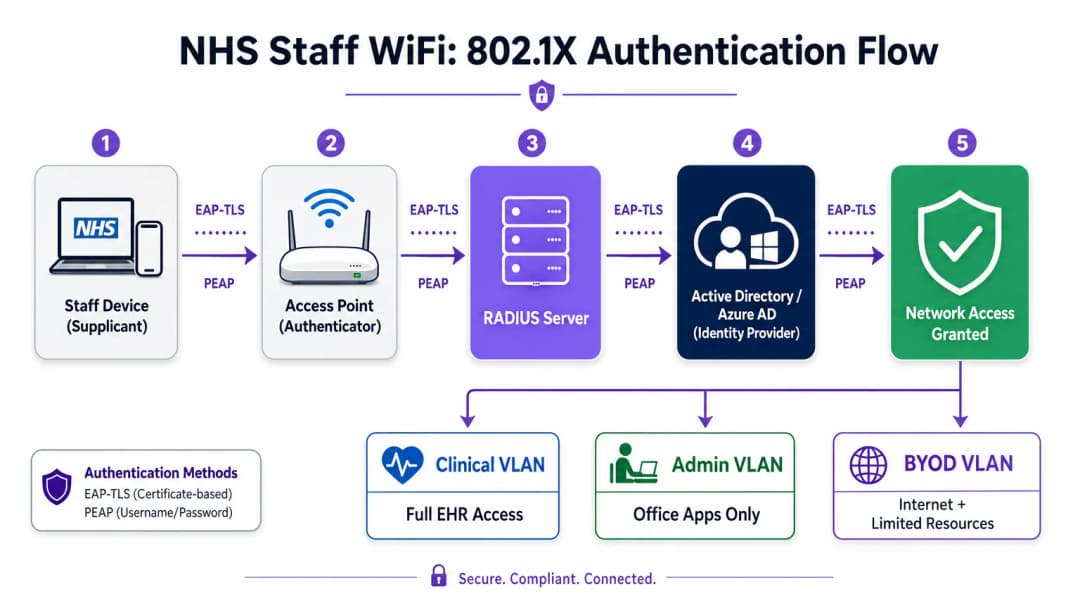
नेटवर्क सेगमेंटेशन आणि ट्रस्ट झोन
फिजिकल ऍक्सेस पॉइंट्स संपूर्ण हॉस्पिटलच्या फ्लोअरवर ब्रॉडकास्ट करतात, परंतु लॉजिकल सेगमेंटेशन हे सुनिश्चित करते की किमान विशेषाधिकाराच्या (least privilege) तत्त्वावर आधारित ट्रॅफिक वेगळे राहील. आरोग्य सेवा सेटिंगमध्ये फ्लॅट नेटवर्क आर्किटेक्चर ही एक गंभीर सुरक्षा असुरक्षितता आहे, ज्यामुळे एखादे तडजोड झालेले पाहुण्यांचे उपकरण किंवा असुरक्षित IoT सेन्सर क्लिनिकल सिस्टममध्ये प्रवेश करू शकतात.
सर्वोत्तम पद्धतीनुसार विशिष्ट SSID शी मॅप केलेले स्वतंत्र Virtual Local Area Networks (VLANs) तयार करणे आवश्यक आहे, ज्यामध्ये फायरवॉल नियम त्यांच्या दरम्यान ट्रॅफिकच्या मर्यादा लागू करतात:
| झोन | SSID | ऑथेंटिकेशन | ऍक्सेस | QoS प्राधान्य |
|---|---|---|---|---|
| क्लिनिकल | NHS-Clinical | EAP-TLS (प्रमाणपत्र) | EHR, PACS, क्लिनिकल मेसेजिंग | सर्वोच्च |
| प्रशासकीय | NHS-Staff | PEAP (AD क्रेडेंशियल्स) | ऑफिस ऍप्स, इंटरनेट | मध्यम |
| वैद्यकीय IoT | लपविलेले/MAB | MAC Authentication Bypass | केवळ डिव्हाइस कंट्रोलर | उच्च |
| पाहुणे / रुग्ण | NHS-Guest | Captive Portal | केवळ इंटरनेट | कमी |
| BYOD | NHS-BYOD | PEAP (AD क्रेडेंशियल) | इंटरनेट, मर्यादित VDI | कमी |
वैद्यकीय IoT VLAN कडे विशेष लक्ष देण्याची आवश्यकता आहे. अनेक कनेक्ट केलेले वैद्यकीय उपकरणे - इन्फ्युजन पंप, पेशंट मॉनिटर्स, वायरलेस कॉल सिस्टम - 802.1X ला सपोर्ट करू शकत नाहीत. MAC Authentication Bypass (MAB) हा पर्यायी मार्ग आहे, परंतु तो कठोर फायरवॉल Access Control Lists (ACLs) सोबत जोडलेला असावा जो या उपकरणांना केवळ त्यांच्या नियुक्त व्यवस्थापन सर्व्हरशी संवाद साधण्यापुरते मर्यादित करतो.
BYOD चे आव्हान
प्रशासकीय कर्मचारी आणि भेट देणाऱ्या क्लिनिशियन्ससाठी Bring Your Own Device पॉलिसीज अधिकाधिक सामान्य होत आहेत. तथापि, अनमॅनेज्ड वैयक्तिक उपकरणांना विश्वसनीय नेटवर्क विभागांवर प्रवेश दिल्यास मोठा धोका निर्माण होऊ शकतो.
एक सुरक्षित BYOD डिप्लॉयमेंट करण्यासाठी ही उपकरणे समर्पित BYOD VLAN वर ऑनबोर्ड करणे आवश्यक आहे. हा झोन सुरक्षित गेटवे किंवा Virtual Desktop Infrastructure (VDI) द्वारे इंटरनेट प्रवेश आणि विशिष्ट, गैर-संवेदनशील अंतर्गत संसाधनांमध्ये मर्यादित प्रवेश प्रदान करतो. क्लिनिकल सिस्टम किंवा रुग्णांच्या डेटा स्टोअर्समध्ये थेट राउटिंग करण्यास सक्त मनाई असणे आवश्यक आहे.

तुमच्या विशिष्ट सेटअपबद्दल काही प्रश्न आहेत का?
आमची टीम ८०,००० हून अधिक वेन्यूजमधील वेन्यू ऑपरेटर्स, IT मॅनेजर्स आणि नेटवर्क इंजिनिअर्ससोबत काम करते. २० मिनिटांचा कॉल बुक करा आणि तुमच्यासारख्या इतरांनी ही समस्या कशी सोडवली हे आम्ही तुम्हाला दाखवू.
अंमलबजावणी मार्गदर्शक
एक सुरक्षित NHS स्टाफ WiFi आर्किटेक्चर डिप्लॉय करण्यासाठी सुरू असलेल्या क्लिनिकल ऑपरेशन्समध्ये कमीत कमी व्यत्यय येईल अशा टप्प्याटप्प्याने मार्ग अवलंबणे आवश्यक आहे.
टप्पा १: मूल्यांकन आणि डिझाइन
सर्वसमावेशक वायरलेस साईट सर्वेक्षणाने सुरुवात करा. लीड-लाईन असलेल्या भिंती, अवजड मशिनरी आणि दाट गर्दीमुळे आरोग्यसेवा क्षेत्रातील वातावरण Radio Frequency (RF) प्रसारासाठी कठीण मानले जाते. हे डिझाइन केवळ कव्हरेज नाही, तर क्षमतेवर आधारित असणे आवश्यक आहे, ज्यामुळे आपत्कालीन विभाग आणि बाह्यरुग्ण क्लिनिक यांसारख्या जास्त गर्दीच्या ठिकाणी पुरेशी ॲक्सेस पॉईंट घनता सुनिश्चित होईल.
आवश्यक SSIDs परिभाषित करा आणि त्यांना संबंधित VLANs आणि सुरक्षा पॉलिसींशी मॅप करा. ब्रॉडकास्ट SSIDs ची संख्या कमीत कमी ठेवा - आदर्शपणे चारपेक्षा जास्त नसावी - जेणेकरून व्यवस्थापनाचा ताण कमी होईल आणि बीकन फ्रेमची गर्दी कमी होईल, ज्यामुळे एकूण नेटवर्कच्या कामगिरीत बिघाड होत नाही.
टप्पा २: इन्फ्रास्ट्रक्चर कॉन्फिगरेशन
परिभाषित VLANs ला सपोर्ट करण्यासाठी कोअर स्विचिंग आणि राउटिंग इन्फ्रास्ट्रक्चर कॉन्फिगर करा. कमीत कमी विशेषाधिकार लागू करण्यासाठी विभागांमधील सीमांवर फायरवॉल नियम लागू करा. RADIUS सर्व्हर सेटअप करा (उदा. Cisco ISE, Aruba ClearPass, किंवा क्लाउड-आधारित RADIUS-as-a-Service) आणि केंद्रीय ओळख प्रदात्याशी (Identity Provider) ते समाकलित करा. ज्या वातावरणात Purple चे प्लॅटफॉर्म डिप्लॉय केले आहे, तिथे या टप्प्यावर WiFi Analytics समाकलित केल्याने नेटवर्कचा वापर, रोमिंग पॅटर्न आणि क्षमता हॉटस्पॉट्सबद्दल स्पष्ट माहिती मिळते.
टप्पा ३: पॉलिसी अंमलबजावणी आणि ऑनबोर्डिंग
प्रमाणीकरण धोरणे लागू करा. कॉर्पोरेट उपकरणांसाठी, आवश्यक वायरलेस प्रोफाइल आणि क्लायंट प्रमाणपत्रे (EAP-TLS साठी) पुश करण्यासाठी MDM सोल्यूशन वापरा. हे व्यवस्थापित उपकरणे वापरकर्त्याच्या हस्तक्षेपाशिवाय आपोआप आणि सुरक्षितपणे जोडली जातील याची खात्री करते.
BYOD साठी, एक स्पष्ट ऑनबोर्डिंग कार्यप्रवाह स्थापित करा - सामान्यतः एक ऑनबोर्डिंग पोर्टल जे वापरकर्त्याला त्यांच्या कॉर्पोरेट क्रेडेंशियलसह प्रमाणित करण्यासाठी, स्वीकार्य वापर धोरण स्वीकारण्यासाठी आणि उपकरणाला सुरक्षित BYOD VLAN वर स्थानांतरित करण्यासाठी मार्गदर्शन करते. Purple चे Guest WiFi प्लॅटफॉर्म पेशंट आणि अतिथी SSID साठी Captive Portal स्तर म्हणून तैनात केले जाऊ शकते, जे मोठ्या प्रमाणावर GDPR-सुसंगत डेटा संकलन आणि अटींच्या मंजुरीचे व्यवस्थापन करते.
टप्पा 4: चाचणी आणि प्रमाणीकरण
थेट सुरू करण्यापूर्वी, प्रत्येक प्रमाणीकरण मार्ग, VLAN असाइनमेंट आणि फायरवॉल नियमांची एंड-टू-एंड चाचणी घ्या. चाचणी उपकरणासह क्लिनिकल मजल्यांवर फिरून रोमिंग वर्तनाचे प्रमाणीकरण करा, विशेषतः पुन्हा-प्रमाणीकरण इव्हेंटवर लक्ष ठेवा. जलद रोमिंग प्रोटोकॉल (802.11r आणि 802.11k) योग्यरित्या कार्य करत आहेत आणि ॲप्लिकेशन सेशन्स AP संक्रमणांदरम्यान सुरू राहत आहेत याची खात्री करा.
सर्वोत्तम पद्धती
प्री-शेअर्ड की काढून टाका. वैयक्तिक जबाबदारी आणि केंद्रीकृत प्रवेश नियंत्रण सुनिश्चित करण्यासाठी सर्व कर्मचारी आणि क्लिनिकल नेटवर्क्सना 802.1X प्रमाणीकरणावर स्थलांतरित करा. DSP Toolkit च्या सुसंगततेसाठी ही एक न-तडजोड करणारी आवश्यकता आहे.
कडक विभाजनाची अंमलबजावणी करा. अतिथी, BYOD, किंवा IoT ट्रॅफिकला क्लिनिकल डेटाच्या समान लॉजिकल सेगमेंटवर कधीही अनुमती देऊ नका. इंटर-VLAN राउटिंग नियंत्रित करण्यासाठी स्टेटफुल फायरवॉल वापरा, ज्यामध्ये डीफॉल्ट पॉलिसी म्हणून स्पष्ट नकार नियम असतील.
क्लिनिकल ट्रॅफिकला प्राधान्य द्या. विशेषतः जास्त गर्दीच्या काळात, अतिथी किंवा प्रशासकीय ट्रॅफिकपेक्षा क्लिनिकल ॲप्लिकेशन्सना - वॉइस ओव्हर WLAN, EHR प्रवेश - प्राधान्य देण्यासाठी वायरलेस कंट्रोलर्स आणि स्विचेसवर QoS धोरणे लागू करा.
जलद रोमिंग सक्षम करा. क्लिनिकल कर्मचारी ॲप्लिकेशन टाइमआउट किंवा तुटलेल्या कनेक्शनचा अनुभव न घेता सुविधेत फिरू शकतील याची खात्री करण्यासाठी 802.11r (जलद BSS संक्रमण) आणि 802.11k (रेडिओ रिसोर्स मापन) लागू करा.
सतत देखरेख. नेटवर्क आरोग्यावर देखरेख ठेवण्यासाठी, अनधिकृत ॲक्सेस पॉइंट्स ओळखण्यासाठी आणि वापरकर्त्याच्या रोमिंग वर्तनाचा मागोवा घेण्यासाठी विश्लेषण प्लॅटफॉर्म वापरा. लोकांची उपस्थिती आणि वापराचे नमुने समजून घेणे - जे तंत्र Retail आणि Hospitality वातावरणात सिद्ध झाले आहे - क्षमता नियोजन आणि समस्यानिवारणासाठी रुग्णालय वातावरणात देखील तितकेच मूल्यवान आहे.
नियमित ऑडिटिंग. लागू असेल तिथे DSP Toolkit, Cyber Essentials Plus आणि ISO 27001 चे सततचे पालन सुनिश्चित करण्यासाठी वार्षिक वायरलेस जोखीम मूल्यांकन करा.
समस्यानिवारण आणि जोखीम कमी करणे
प्रमाणीकरण टाइमआउट
उच्च क्लायंट-घनता असलेल्या वातावरणात, RADIUS सर्व्हर्स ओव्हरलोड होऊ शकतात, ज्यामुळे प्रमाणीकरण टाइमआउट आणि कनेक्शन खंडित होऊ शकतात. RADIUS पायाभूत सुविधा पुरेशा प्रमाणात स्केल केलेली आणि अत्यंत उपलब्ध असल्याची खात्री करा. अनेक प्रमाणीकरण सर्व्हर्समध्ये लोड बॅलेंसिंग लागू करा आणि प्रमुख ऑपरेशनल मेट्रिक म्हणून RADIUS प्रतिसाद वेळेचे परीक्षण करा.
Roaming च्या समस्या
वॉर्ड्स दरम्यान जलद गतीने फिरणाऱ्या क्लिनिकल कर्मचाऱ्यांचे वायरलेस इन्फ्रास्ट्रक्चर जलद Roaming प्रोटोकॉल्सना सपोर्ट करत नसल्यास कनेक्शन तुटू शकते. वायरलेस कंट्रोलर्सवर 802.11r आणि 802.11k सक्षम करा आणि क्लायंट डिव्हाइसेस या मानकांना सपोर्ट करत असल्याची खात्री करा. कव्हरेजमधील त्रुटी किंवा 'sticky client' च्या समस्या (जिथे एखादे डिव्हाइस जवळच्या AP कडे Roaming करण्याऐवजी दूरच्या, कमकुवत AP ला चिकटून राहते) शोधण्यासाठी आणि त्यांचे निराकरण करण्यासाठी पोस्ट-डिप्लॉयमेंट Roaming सर्व्हे करा.
जुन्या (Legacy) डिव्हाइसेसची विसंगतता
जुनी वैद्यकीय उपकरणे WPA3 किंवा 802.1X सारख्या आधुनिक सुरक्षा प्रोटोकॉल्सना सपोर्ट करू शकत नाहीत. MAB चा वापर करून या डिव्हाइसेसना एका समर्पित IoT VLAN वर वेगळे करा. त्यांचे संभाषण केवळ आवश्यक मॅनेजमेंट सर्व्हर्सपुरते मर्यादित ठेवण्यासाठी कडक फायरवॉल नियम लागू करा. ज्या गंभीर उपकरणांना मूळ स्वरूपात सुरक्षित केले जाऊ शकत नाही त्यांच्यासाठी हार्डवेअर अपग्रेड किंवा वायरलेस ब्रिजेसचा विचार करा.
प्रमाणपत्राची (Certificate) मुदत संपणे
EAP-TLS डिप्लॉयमेंट्स निश्चित वैधता कालावधी असलेल्या प्रमाणपत्रांवर अवलंबून असतात. जर प्रमाणपत्रांचे नूतनीकरण न होता त्यांची मुदत संपली, तर डिव्हाइसेस ऑथेंटिकेट होण्यात अपयशी ठरतील, ज्यामुळे मोठ्या प्रमाणावर क्लिनिकल व्यत्यय निर्माण होईल. MDM प्लॅटफॉर्मद्वारे SCEP (Simple Certificate Enrolment Protocol) च्या माध्यमातून स्वयंचलित प्रमाणपत्र नूतनीकरण लागू करा आणि प्रमाणपत्रांच्या समाप्ती तारखांवर सक्रियपणे लक्ष ठेवा.
ROI आणि व्यावसायिक प्रभाव
सुरक्षित, एंटरप्राइझ-ग्रेड वायरलेस आर्किटेक्चरमध्ये गुंतवणूक केल्याने क्लिनिकल, ऑपरेशनल आणि IT क्षेत्रांमध्ये मोजण्यायोग्य परतावा मिळतो.
क्लिनिकल कार्यक्षमता. विश्वासार्ह WiFi कनेक्टिव्हिटी हे सुनिश्चित करते की क्लिनिशियन्सना केअर पॉईंटवर रुग्णांच्या रेकॉर्ड्समध्ये त्वरित प्रवेश मिळेल, ज्यामुळे माहिती शोधण्यात किंवा कनेक्शन तुटण्याच्या समस्येचा सामना करण्यात जाणारा वेळ वाचतो. याचा थेट परिणाम रुग्णांच्या वहन क्षमतेवर आणि उपचारांच्या गुणवत्तेवर होतो.
कमी झालेला IT ओव्हरहेड. शेअर केलेले पासवर्ड्स आणि मॅन्युअल ऑनबोर्डिंग कडून स्वयंचलित, प्रमाणपत्र-आधारित ऑथेंटिकेशनकडे स्थलांतरित झाल्यामुळे पासवर्ड रिसेट आणि कनेक्टिव्हिटी समस्यांशी संबंधित हेल्पडेस्क तिकिटे लक्षणीयरीत्या कमी होतात. एका NHS ट्रस्टने 802.1X वर स्थलांतरित झाल्यानंतर वायरलेस-संबंधित हेल्पडेस्क कॉल्समध्ये 40% घट झाल्याची नोंद केली आहे.
जोखीम कमी करणे. DSP Toolkit च्या आवश्यकता पूर्ण करण्यासाठी कठोर सेगमेंटेशन आणि मजबूत ऑथेंटिकेशन मूलभूत आहेत, ज्यामुळे डेटा सुरक्षिततेचे उल्लंघन किंवा अनुपालन अपयशाशी संबंधित आर्थिक आणि प्रतिष्ठेच्या जोखमी कमी होतात. डेटा उल्लंघनाचा खर्च योग्यरित्या डिझाइन केलेल्या वायरलेस इस्टेटमधील गुंतवणुकीपेक्षा खूप जास्त असतो.
भविष्यासाठी सज्जता. एक उत्तम प्रकारे डिझाइन केलेले वायरलेस नेटवर्क भविष्यातील डिजिटल आरोग्य उपक्रमांसाठी - जसे की लोकेशन-बेस्ड सर्व्हिसेस, रिअल-टाइम ॲसेट ट्रॅकिंग, प्रगत टेलिहेल्थ ॲप्लिकेशन्स - पाया प्रदान करते. हे Healthcare आणि Transport सारख्या संबंधित क्षेत्रांमधील व्यापक धोरणात्मक उद्दिष्टांशी सुसंगत आहे, जिथे मोबाइल कनेक्टिव्हिटी ऑपरेशनल कार्यक्षमतेला बळ देते.या आर्किटेक्चरच्या अतिथी आणि रुग्ण WiFi स्तरामध्ये Purple चे प्लॅटफॉर्म कसे बसते हे समजून घेऊ इच्छिणाऱ्या संस्थांसाठी, Healthcare उद्योग पृष्ठ NHS-अनुपालक Captive Portal, विश्लेषणे आणि GDPR-अनुपालक डेटा हाताळणी क्षमतेचे तपशीलवार विहंगावलोकन प्रदान करते. Retail मध्ये ग्राहक प्रतिबद्धता वाढवणारी तीच विश्लेषण तत्त्वे थेट हॉस्पिटल इस्टेट टीम्ससाठी कार्यात्मक बुद्धिमत्तेमध्ये (operational intelligence) रूपांतरित होतात.
महत्वाच्या व्याख्या
IEEE 802.1X
पोर्ट-आधारित नेटवर्क ऍक्सेस कंट्रोल (PNAC) साठी एक IEEE मानक. हे LAN किंवा WLAN ला जोडू इच्छिणाऱ्या उपकरणांना प्रमाणीकरण यंत्रणा प्रदान करते, ज्यामध्ये प्रत्येक उपकरणाला प्रवेश मिळण्यापूर्वी क्रेडेंशियल सादर करणे आवश्यक असते.
कर्मचारी आणि क्लिनिकल उपकरणांसाठी असुरक्षित सामायिक पासवर्ड बदलून वैयक्तिक, ओळख-आधारित लॉगिन प्रदान करण्यासाठी हे अनिवार्य मानक आहे. हा DSP Toolkit-सुसंगत वायरलेस आर्किटेक्चरचा पाया आहे.
VLAN (Virtual Local Area Network)
एक लॉजिकल सबनेटवर्क जे वेगवेगळ्या भौतिक नेटवर्क विभागांमधील उपकरणांच्या संग्रहाला गटबद्ध करते. VLANs नेटवर्क प्रशासकांना वेगवेगळ्या वापरकर्ता गटांच्या कार्यात्मक आणि सुरक्षा आवश्यकतांशी जुळण्यासाठी एकाच स्विच केलेल्या नेटवर्कचे विभाजन करण्याची परवानगी देतात.
संभाव्य सुरक्षा उल्लंघनाचा प्रभाव मर्यादित करण्यासाठी आणि किमान विशेषाधिकाराच्या तत्त्वाची अंमलबजावणी करण्यासाठी अतिथी आणि प्रशासकीय ट्रॅफिकपासून क्लिनिकल ट्रॅफिक वेगळे करण्यासाठी VLANs आवश्यक आहेत.
RADIUS (Remote Authentication Dial-In User Service)
एक नेटवर्किंग प्रोटोकॉल जो नेटवर्क सेवा जोडणाऱ्या आणि वापरणाऱ्या वापरकर्त्यांसाठी केंद्रीकृत प्रमाणीकरण, अधिकृतता आणि लेखा (AAA) व्यवस्थापन प्रदान करतो.
RADIUS सर्व्हर वायरलेस ऍक्सेस पॉइंट्स आणि केंद्रीय ओळख डेटाबेस (Active Directory) दरम्यान निर्णय इंजिन म्हणून कार्य करतो, कोणाला प्रवेश मिळतो आणि त्यांना कोणत्या VLAN वर नियुक्त केले जाते हे ठरवतो.
EAP-TLS (Extensible Authentication Protocol - Transport Layer Security)
एक EAP पद्धत जी सुरक्षित, परस्पर प्रमाणित कनेक्शन स्थापित करण्यासाठी क्लायंट आणि सर्व्हर प्रमाणपत्रांवर अवलंबून असते. वैध प्रमाणपत्राशिवाय कोणताही पक्ष दुसऱ्यावर विश्वास ठेवत नाही.
रुग्णालयाच्या मालकीच्या उपकरणांचे प्रमाणीकरण करण्यासाठी सर्वात सुरक्षित पद्धत. MDM द्वारे वितरित केलेली प्रमाणपत्रे हे सुनिश्चित करतात की केवळ व्यवस्थापित, विश्वासू एंडपॉइंट्स क्लिनिकल नेटवर्कमध्ये प्रवेश करू शकतात, ज्यामध्ये फिश किंवा शेअर करण्यासाठी कोणताही पासवर्ड नसतो.
MAB (MAC Authentication Bypass)
उपकरणांच्या हार्डवेअर MAC पत्त्यावर आधारित त्यांचे प्रमाणीकरण करण्याची पद्धत, जी 802.1X चे समर्थन न करणाऱ्या उपकरणांसाठी पर्यायी व्यवस्था म्हणून वापरली जाते.
जुन्या वैद्यकीय IoT उपकरणांसाठी आवश्यक ज्यांना नेटवर्क प्रवेशाची आवश्यकता आहे परंतु ते जटिल प्रमाणीकरण प्रोटोकॉल हाताळू शकत नाहीत. उपकरणाला त्याच्या परवानगी असलेल्या संप्रेषण मार्गांपर्यंत मर्यादित ठेवण्यासाठी हे नेहमी कठोर फायरवॉल ACLs सह जोडलेले असणे आवश्यक आहे.
DSP Toolkit (Data Security and Protection Toolkit)
NHS इंग्लंडने अनिवार्य केलेले एक ऑनलाइन स्व-मूल्यांकन साधन जे सर्व संस्थांनी पूर्ण करणे आवश्यक आहे जर त्यांना NHS रुग्ण डेटा आणि प्रणालींमध्ये प्रवेश असेल. हे नॅशनल डेटा गार्डियनच्या दहा डेटा सुरक्षा मानकांशी सुसंगत आहे.
NHS संस्था आणि त्यांच्या पुरवठादारांसाठी DSP Toolkit चे पालन करणे अनिवार्य आहे. मजबूत वायरलेस सुरक्षा - ज्यामध्ये 802.1X, विभाजन आणि प्रवेश लाइफसायकल व्यवस्थापन समाविष्ट आहे - अनुपालन प्रदर्शित करण्याचा एक महत्त्वपूर्ण घटक आहे.
SSID (Service Set Identifier)
802.11 वायरलेस लोकल एरिया नेटवर्कशी संबंधित प्राथमिक नाव, जे क्लायंट उपकरणांना नेटवर्क ओळखण्यासाठी आणि कनेक्ट करण्यासाठी ऍक्सेस पॉइंट्सद्वारे प्रसारित केले जाते.
व्यवस्थापन ओव्हरहेड आणि RF ओव्हरहेड कमी करण्यासाठी रुग्णालयांनी ब्रॉडकास्ट SSIDs (उदा. NHS-Clinical, NHS-Guest) ची संख्या मर्यादित ठेवली पाहिजे. प्रत्येक SSID विशिष्ट सुरक्षा धोरण आणि VLAN शी जोडलेला असावा.
QoS (Quality of Service)
नेटवर्कवरील पॅकेट लॉस, लेटन्सी आणि जिटर कमी करण्यासाठी विशिष्ट प्रकारच्या रहदारीला इतरांपेक्षा प्राधान्य देऊन डेटा ट्रॅफिक व्यवस्थापित करणारे तंत्रज्ञान.
आरोग्य सेवेमध्ये हे सुनिश्चित करण्यासाठी अत्यंत महत्त्वपूर्ण आहे की जीवन-रक्षक क्लिनिकल ॲप्लिकेशन्स आणि व्हॉइस कम्युनिकेशन्सना नेहमी अतिथी व्हिडिओ स्ट्रीमिंग किंवा सॉफ्टवेअर अपडेट्स यांसारख्या कमी महत्त्वाच्या ट्रॅफिकपेक्षा प्राधान्य दिले जाईल.
802.11r (जलद BSS ट्रान्झिशन)
एक IEEE दुरुस्ती जी प्रत्यक्ष संक्रमण होण्यापूर्वी क्लायंटला लक्ष्य AP कडे पूर्व-प्रमाणित करून ॲक्सेस पॉइंट्स दरम्यान जलद रोमिंग सक्षम करते, ज्यामुळे रोमिंग लेटन्सी लक्षणीयरीत्या कमी होते.
कर्मचारी सतत फिरत असणाऱ्या क्लिनिकल वातावरणासाठी हे आवश्यक आहे. 802.11r शिवाय, उपकरणांना प्रत्येक AP संक्रमणावर संपूर्ण RADIUS पुन्हा-प्रमाणीकरण करावे लागते, ज्यामुळे ॲप्लिकेशन सेशन्स टाईम आऊट होऊ शकतात.
सोडवलेली उदाहरणे
एक NHS ट्रस्ट संपूर्ण वॉर्ड्समध्ये नवीन मोबाइल वर्कस्टेशन्स (Workstations on Wheels) तैनात करत आहे. परिचारिका वेगवेगळ्या ऍक्सेस पॉईंट्स दरम्यान फिरत असताना या उपकरणांचे कनेक्शन कायम राहील याची IT टीमला खात्री करणे आवश्यक आहे, तसेच इलेक्ट्रॉनिक हेल्थ रेकॉर्ड सिस्टम असलेल्या क्लिनिकल VLAN वर केवळ अधिकृत उपकरणेच प्रवेश करू शकतील याची हमी देखील द्यावी लागेल.
ट्रस्टने EAP-TLS वापरून 802.1X प्रमाणीकरण फ्रेमवर्क लागू केले पाहिजे. IT टीम त्यांच्या MDM सोल्यूशनचा वापर करून प्रत्येक वर्कस्टेशनवर एक युनिक क्लायंट प्रमाणपत्र आणि संबंधित वायरलेस प्रोफाइल पुश करेल. वायरलेस नियंत्रक या उपकरणांचे RADIUS सर्व्हरच्या माध्यमातून प्रमाणीकरण करण्यासाठी कॉन्फिगर केले जातील, जे अंतर्गत PKI च्या विरूद्ध प्रमाणपत्राची पडताळणी करतील. यशस्वी प्रमाणीकरण झाल्यावर, RADIUS सर्व्हर डायनॅमिकरित्या वर्कस्टेशनला RADIUS ऍट्रिब्युट (उदा. Tunnel-Private-Group-ID) द्वारे समर्पित क्लिनिकल VLAN मध्ये नियुक्त करतो. रोमिंगची आवश्यकता पूर्ण करण्यासाठी, वायरलेस इन्फ्रास्ट्रक्चरवर 802.11r (Fast BSS Transition) आणि 802.11k (Radio Resource Measurement) सक्षम केले पाहिजेत जेणेकरून प्रत्येक वेळी RADIUS सर्व्हरवर संपूर्ण प्रमाणीकरण चक्र पुन्हा न चालवता वर्कस्टेशन्सना ऍक्सेस पॉईंट्स दरम्यान अखंडपणे फिरता येईल.
एका हॉस्पिटलला त्यांच्या वैयक्तिक लॅपटॉप (BYOD) वापरून भेट देणाऱ्या हंगामी डॉक्टरांना (लोकम) इंटरनेट प्रवेश प्रदान करणे आवश्यक आहे. या डॉक्टरांना क्लाउड-आधारित वैद्यकीय संदर्भ साधनांमध्ये प्रवेश करणे आवश्यक आहे परंतु हॉस्पिटलच्या अंतर्गत रुग्ण डेटाबेसमध्ये प्रवेश करण्यास कठोरपणे मनाई असणे आवश्यक आहे.
हॉस्पिटलने आयसोलेटेड BYOD VLAN शी मॅप केलेले समर्पित BYOD SSID तैनात केले पाहिजे. PEAP-MSCHAPv2 चा वापर करून 802.1X द्वारे प्रमाणीकरण हाताळले गेले पाहिजे, ज्यामुळे हंगामी डॉक्टरांना आगमनानंतर HR कडून प्रदान केलेल्या तात्पुरत्या Active Directory क्रेडेंशियल्सचा वापर करून लॉग इन करण्याची अनुमती मिळेल. कोर फायरवॉल ACL सह कॉन्फिगर केले पाहिजे जे BYOD VLAN कडून क्लिनिकल किंवा प्रशासकीय VLANs कडील कोणत्याही राउटिंगला स्पष्टपणे नकार देते, आणि केवळ इंटरनेटवर जाणाऱ्या ट्रॅफिकला परवानगी देते. याव्यतिरिक्त, संपूर्ण इंटरनेट प्रवेश मंजूर करण्यापूर्वी स्वीकार्य वापर पॉलिसी (Acceptable Use Policy) लागू करण्यासाठी सुरुवातीच्या कनेक्शनवर Captive Portal चा वापर केला जाऊ शकतो. जेव्हा हंगामी डॉक्टरांचे तात्पुरते AD खाते त्यांच्या कामाच्या शेवटी निष्क्रिय केले जाईल, तेव्हा त्यांचा वायरलेस प्रवेश स्वयंचलितपणे रद्द केला जाईल.
सराव प्रश्न
Q1. रुग्णालयात एक नवीन विंग जोडली जात आहे आणि सुविधा टीमला औषध साठवणुकीच्या फ्रीजमध्ये वायरलेस तापमान सेन्सर्स तैनात करायचे आहेत. हे सेन्सर्स फक्त WPA2-Personal (Pre-Shared Key) ला सपोर्ट करतात आणि 802.1X वापरू शकत नाहीत. नेटवर्क आर्किटेक्टने हे सुरक्षितपणे कसे समाकलित करावे?
टीप: किमान विशेषाधिकाराच्या सिद्धांताचा विचार करा आणि क्लिनिकल सिस्टीमपासून नियमांचे पालन न करणारी उपकरणे कशी वेगळी करायची याचा विचार करा.
नमुना उत्तर पहा
आर्किटेक्टने एका विशिष्ट 'Facilities IoT' VLAN शी मॅप केलेले एक समर्पित, लपविलेले SSID तयार केले पाहिजे. सेन्सर्स PSK वापरून कनेक्ट होतील. महत्त्वाचे म्हणजे, या VLAN वर कठोर फायरवॉल ACLs लागू करणे आवश्यक आहे, ज्यामुळे सेन्सर्स केवळ त्यांच्या विशिष्ट केंद्रीय व्यवस्थापन सर्व्हरशी संवाद साधू शकतील आणि इतर सर्व रहदारीला - विशेषतः Clinical VLAN किंवा इंटरनेटवर जाण्यास नकार देतील. केवळ खरेदी केलेल्या सेन्सर्सच्या विशिष्ट MAC पत्त्यांना त्या VLAN वर परवानगी आहे याची खात्री करण्यासाठी MAC Authentication Bypass (MAB) देखील कॉन्फिगर केले पाहिजे, जेणेकरून इतर अनधिकृत उपकरणे त्याच PSK चा वापर करून जोडली जाण्यापासून रोखता येतील.
Q2. सकाळच्या गर्दीच्या शिफ्ट दरम्यान, परिचारिका तक्रार करतात की त्या वॉर्डमध्ये चालत असताना त्यांच्या टॅब्लेटचे EHR सिस्टीमसोबतचे कनेक्शन वारंवार खंडित होत आहे, ज्यामुळे त्यांना पुन्हा लॉग इन करावे लागत आहे. वायरलेस कव्हरेज सर्वेक्षण संपूर्ण वॉर्डमध्ये मजबूत सिग्नल सामर्थ्य दर्शवते. याचे संभाव्य कारण आणि उपाय काय आहे?
टीप: मजबूत सिग्नल ॲक्सेस पॉइंट्स दरम्यान अखंड संक्रमणाची हमी देत नाही. प्रत्येक AP संक्रमणावरील प्रमाणीकरणाच्या ओव्हरहेडचा विचार करा.
नमुना उत्तर पहा
याचे संभाव्य कारण म्हणजे जलद रोमिंग प्रोटोकॉलचा अभाव. टॅब्लेट एका AP च्या कव्हरेजमधून बाहेर पडून दुसऱ्याशी कनेक्ट होत असताना, त्याला RADIUS सर्व्हरच्या विरोधात संपूर्ण 802.1X पुन्हा-प्रमाणीकरण करण्यास भाग पाडले जात आहे, ज्यामुळे EHR ॲप्लिकेशन सेशन टाईम आऊट होण्याइतकी लेटन्सी निर्माण होते. यावर उपाय म्हणजे वायरलेस कंट्रोलर्सवर 802.11r (जलद BSS ट्रान्झिशन) सक्षम करणे, जे क्लायंटला संपूर्ण पुन्हा-प्रमाणीकरण सायकलच्या लेटन्सीशिवाय AP दरम्यान सुरक्षितपणे रोम करण्यास अनुमती देते. संक्रमण होण्यापूर्वी उपकरणाला इष्टतम लक्ष्य AP ओळखण्यात मदत करण्यासाठी 802.11k देखील सक्षम केले पाहिजे.
Q3. एक NHS Trust त्यांच्या वार्षिक DSP Toolkit मूल्यांकनाची तयारी करत आहे. ऑडिटरच्या लक्षात आले की प्रशासकीय कर्मचारी Staff WiFi नेटवर्कमध्ये प्रवेश करण्यासाठी सामायिक पासवर्ड वापरतात. येथे ओळखला गेलेला मुख्य धोका कोणता आहे आणि शिफारस केलेले उपाय काय आहेत?
टीप: जेव्हा कर्मचारी संस्था सोडतात तेव्हा वैयक्तिक जबाबदारी आणि ॲक्सेस लाइफसायकलवर लक्ष केंद्रित करा.
नमुना उत्तर पहा
मुख्य धोका म्हणजे वैयक्तिक जबाबदारीचा अभाव आणि खराब ॲक्सेस लाइफसायकल व्यवस्थापन. एखादा प्रशासकीय कर्मचारी Trust सोडत असल्यास, सामायिक केलेला पासवर्ड वैध राहतो, ज्यामुळे संभाव्यत: अनधिकृत प्रवेश मिळू शकतो. शिवाय, नेटवर्कवर कोणत्या विशिष्ट वापरकर्त्याने कृती केली याचे ऑडिट करणे अशक्य आहे. यावरील उपाय म्हणजे सामायिक केलेला पासवर्ड (PSK) नेटवर्क बंद करणे आणि प्रशासकीय कर्मचाऱ्यांना त्यांच्या Active Directory क्रेडेंशियल्ससह PEAP-MSCHAPv2 वापरून 802.1X प्रमाणित नेटवर्कवर स्थलांतरित करणे. यामुळे वैयक्तिक जबाबदारी आणि कर्मचारी सोडताना त्यांचे AD खाते निष्क्रिय केल्यावर स्वयंचलित ॲक्सेस रद्द होण्याची खात्री होते, जे थेट DSP Toolkit च्या ॲक्सेस नियंत्रण आणि ऑडिट लॉगिंगच्या आवश्यकतांची पूर्तता करते.
या मालिकेमध्ये पुढे वाचा
CIPA compliance: venue operators साठी compliance checklist
तुमचे WiFi CIPA च्या बंधनात येते की नाही हे तुम्ही ठरवू शकाल, त्यानंतर नेटवर्कचे वर्गीकरण करू शकाल, Purple Shield द्वारे DNS रूट करू शकाल आणि बायपास मार्ग बंद करू शकाल. Form 486 किंवा Form 479 प्रमाणपत्रासाठी कोणते पुरावे ठेवावे हे देखील तुम्हाला समजेल. ही checklist प्रत्येक आवश्यकतेला एक मालक नियुक्त करते, जेणेकरून तुमच्या पुढील फंडिंग वर्षाच्या प्रमाणपत्रात काहीही सुटणार नाही.
WPA3 transition mode कनेक्शन बिघाड: Cisco Meraki, HPE Aruba आणि Ruckus साठी एक उपयोजन चेकलिस्ट
डिव्हाइसेस WPA3 SAE transition mode SSID वर का अयशस्वी होत आहेत याचे निदान करण्यासाठी आणि ते Cisco Meraki, HPE Aruba किंवा Ruckus वर दुरुस्त करण्यासाठी या चेकलिस्टचा वापर करा. तुम्ही 802.11 स्टेटस कोडचे त्यांच्या कारणांशी मिलान कराल, PMF, 802.11r आणि 6GHz च्या समस्या वेगळ्या कराल आणि फक्त WPA3-only SSID वर कधी स्थलांतरित व्हायचे ते ठरवाल.
सर्वोत्तम DNS filtering: व्यवसायांसाठी एक व्यापक मार्गदर्शक
हे तांत्रिक संदर्भ मार्गदर्शक स्पष्ट करते की कशा प्रकारे एंटरप्राइझ DNS filtering हे कनेक्शन स्थापित होण्यापूर्वीच, रेझोल्युशन लेयरवर दुर्भावनापूर्ण डोमेन्स ब्लॉक करून सार्वजनिक नेटवर्क सुरक्षित करते. हे IT संचालक, नेटवर्क आर्किटेक्ट आणि वेन्यू ऑपरेशन्स टीम्सना डेप्युलॉयमेंट आर्किटेक्चर, फायरवॉल कॉन्फिगरेशन आणि आवश्यक कंप्लायन्स संदर्भ प्रदान करते जे त्यांना हॉस्पिटॅलिटी, रिटेल आणि सार्वजनिक क्षेत्रातील वातावरणात Guest WiFi सुरक्षित करण्यासाठी आवश्यक आहेत. Purple Shield हे 80,000 पेक्षा जास्त लाईव्ह वेन्यूजमध्ये DNS स्तरावर मालवेअर, बॉटनेट्स आणि अयोग्य कंटेंट ब्लॉक करते.
तुमच्या विशिष्ट सेटअपबद्दल काही प्रश्न आहेत का?
आमची टीम ८०,००० हून अधिक वेन्यूजमधील वेन्यू ऑपरेटर्स, IT मॅनेजर्स आणि नेटवर्क इंजिनिअर्ससोबत काम करते. २० मिनिटांचा कॉल बुक करा आणि तुमच्यासारख्या इतरांनी ही समस्या कशी सोडवली हे आम्ही तुम्हाला दाखवू.