
NHS Staff WiFi: come distribuire reti wireless sicure nel settore sanitario
Questa guida di riferimento tecnico descrive in dettaglio l'architettura, i protocolli di sicurezza e le strategie di implementazione per NHS Staff WiFi, coprendo l'autenticazione 802.1X, la segmentazione VLAN, le policy BYOD e la conformità al DSP Toolkit. Fornisce indicazioni pratiche per i leader IT sulla distribuzione di reti wireless di livello enterprise destinate a utenti clinici, amministrativi e ospiti su un'infrastruttura fisica condivisa senza compromettere la sicurezza. Sia che stiate pianificando una nuova implementazione o che stiate proteggendo un parco macchine esistente, questa guida offre i framework decisionali e le fasi di implementazione necessarie per agire in questo trimestre.
Video overview
Ascolta questa guida
Visualizza trascrizione del podcast
Parte della nostra serie principale: Guida alla sicurezza WiFi Enterprise →

Sintesi Esecutiva
Implementare una rete WiFi sicura e affidabile all'interno delle strutture del NHS non è più un'opzione facoltativa, ma un'infrastruttura clinica critica. Il passaggio a un'assistenza incentrata sui dispositivi mobili, alle cartelle cliniche elettroniche (EHR) e ai dispositivi medici connessi richiede un'architettura wireless in grado di bilanciare un roaming fluido con rigidi controlli di sicurezza.
Per i responsabili IT, i network architect e i CTO, la sfida principale consiste nell'accogliere diversi gruppi di utenti - personale clinico, personale amministrativo, pazienti e ospiti - su un'infrastruttura fisica condivisa senza compromettere la sicurezza, soddisfacendo al contempo i requisiti del NHS Data Security and Protection (DSP) Toolkit. Questa guida illustra dettagliatamente i requisiti tecnici per il WiFi del personale NHS, concentrandosi su solidi framework di autenticazione come IEEE 802.1X, sulla segmentazione logica della rete tramite VLAN e sull'onboarding sicuro dei dispositivi Bring Your Own Device (BYOD).
Abbandonando le chiavi precondivise (PSK) legacy e adottando policy di accesso basate sull'identità, le organizzazioni sanitarie possono mitigare i rischi di violazione, ridurre gli ostacoli operativi e fornire una base wireless per i programmi di trasformazione digitale. Il caso aziendale è altrettanto convincente: riduzione dei costi di gestione dell'helpdesk, conformità certificata al DSP Toolkit e una rete in grado di supportare le future innovazioni cliniche senza dover ricostruire completamente l'intera infrastruttura.
Approfondimento Tecnico
Autenticazione e Controllo degli Accessi
La base di una rete wireless sanitaria sicura è il controllo degli accessi basato sull'identità. Le reti legacy WPA2-Personal che utilizzano chiavi pre-condivise sono fondamentalmente inadatte agli ambienti clinici. Non offrono alcuna responsabilità individuale, complicano il processo di disattivazione quando il personale lascia la struttura e introducono un singolo punto di vulnerabilità se le credenziali vengono compromesse o condivise al di fuori del gruppo previsto.
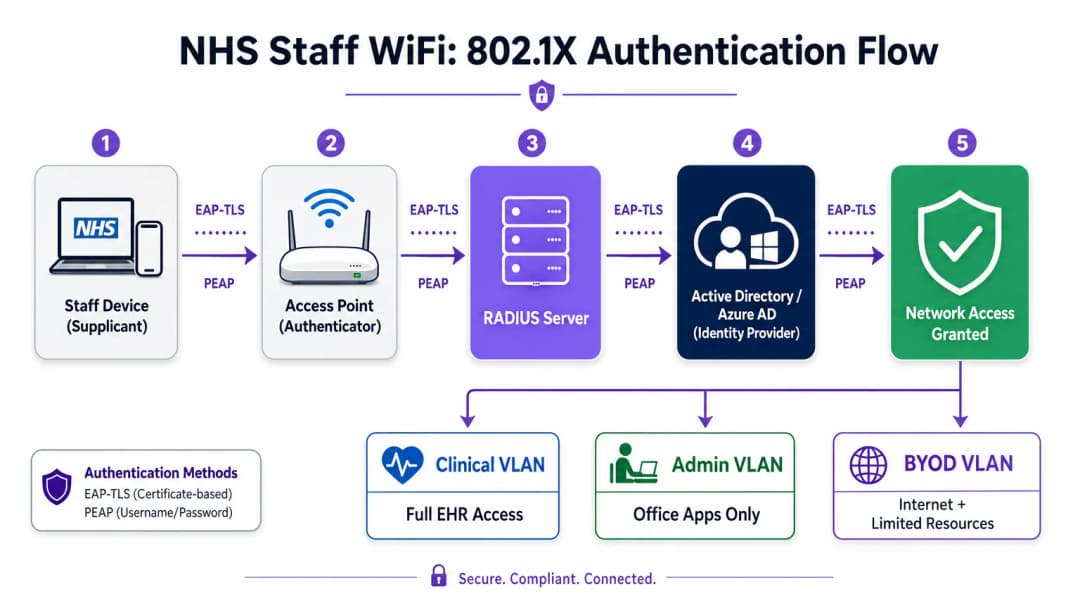
Le moderne distribuzioni del servizio sanitario nazionale (NHS) devono imporre lo standard WPA3-Enterprise (o WPA2-Enterprise come stato minimo di transizione) utilizzando l'autenticazione 802.1X. Questo framework richiede che ogni utente o dispositivo presenti credenziali uniche prima che venga concesso l'accesso alla rete, e l'esito di tale autenticazione determina in quale segmento di rete logico viene posizionato il dispositivo.
Due metodi EAP dominano le installazioni in ambito sanitario:
| Metodo EAP | Meccanismo di Autenticazione | Più Adatto Per | Livello di Sicurezza |
|---|---|---|---|
| EAP-TLS | Certificati digitali lato client | Dispositivi clinici gestiti dall'azienda | Massimo - nessuna password soggetta a phishing |
| PEAP-MSCHAPv2 | Nome utente/password in tunnel crittografato | BYOD, personale amministrativo, dispositivi legacy | Alto - credenziali protette da TLS |
Lo standard EAP-TLS rappresenta il gold standard per i dispositivi aziendali. I certificati vengono distribuiti tramite piattaforme di Mobile Device Management (MDM), consentendo un'autenticazione zero-touch - il dispositivo si autentica silenziosamente in background. Lo standard PEAP incanala in modo sicuro le credenziali di Active Directory o Azure AD all'interno di una sessione TLS crittografata, rendendolo adatto a scenari BYOD in cui la gestione dei certificati non è pratica.
L'integrazione dell'infrastruttura wireless con l'Identity Provider (IdP) centrale dell'organizzazione garantisce che l'accesso venga revocato automaticamente quando l'account AD di un membro del personale viene disabilitato, rispondendo direttamente ai requisiti del DSP Toolkit per la gestione del ciclo di vita degli accessi.
Segmentazione della Rete e Zone di Fiducia
Gli access point fisici trasmettono in tutti i reparti dell'ospedale, ma la segmentazione logica garantisce che il traffico rimanga isolato in base al principio del privilegio minimo. Un'architettura di rete piatta in un contesto sanitario rappresenta una grave vulnerabilità di sicurezza, che potrebbe consentire a un dispositivo ospite compromesso o a un sensore IoT vulnerabile di accedere ai sistemi clinici.
Le best practice impongono la creazione di VLAN separate mappate su SSID specifici, con regole firewall che impongono i confini del traffico tra di esse:
| Zona | SSID | Autenticazione | Accesso | Priorità QoS |
|---|---|---|---|---|
| Clinica | NHS-Clinical | EAP-TLS (Certificato) | EHR, PACS, messaggistica clinica | Massima |
| Amministrativa | NHS-Staff | PEAP (credenziali AD) | Applicazioni per ufficio, Internet | Media |
| IoT Medicale | Nascosto/MAB | MAC Authentication Bypass | Solo controller del dispositivo | Alto |
| Ospiti / Pazienti | NHS-Guest | Captive Portal | Solo Internet | Basso |
| BYOD | NHS-BYOD | PEAP (credenziali AD) | Internet, VDI limitata | Basso |
La VLAN IoT medicale merita una particolare attenzione. Molti dispositivi medici connessi - pompe di infusione, monitor dei pazienti, sistemi di chiamata wireless - non supportano lo standard 802.1X. Il MAC Authentication Bypass (MAB) rappresenta l'alternativa, ma deve essere associato a rigide liste di controllo degli accessi (ACL) del firewall che limitino la comunicazione di questi dispositivi esclusivamente con i server di gestione designati.
La sfida del BYOD
Le policy Bring Your Own Device sono sempre più diffuse tra il personale amministrativo e i medici in visita. Tuttavia, i dispositivi personali non gestiti rappresentano un rischio significativo se viene consentito loro l'accesso a segmenti di rete affidabili.
Una distribuzione BYOD sicura prevede l'onboarding di questi dispositivi su una VLAN BYOD dedicata. Questa zona fornisce l'accesso a Internet e, potenzialmente, un accesso limitato a risorse interne specifiche e non sensibili tramite un gateway sicuro o una Virtual Desktop Infrastructure (VDI). Il routing diretto verso i sistemi clinici o gli archivi di dati dei pazienti deve essere rigorosamente vietato.

Hai domande sulla tua configurazione specifica?
Il nostro team collabora con gestori di sedi, responsabili IT e ingegneri di rete in 80.000 sedi. Prenota una chiamata di 20 minuti e ti mostreremo come altri professionisti come te hanno risolto il problema.
Guida all'implementazione
La distribuzione di un'architettura WiFi sicura per il personale NHS richiede un approccio graduale per ridurre al minimo le interruzioni delle attività cliniche in corso.
Fase 1: Valutazione e progettazione
Iniziare con un rilevamento completo del sito wireless. Gli ambienti sanitari sono notoriamente difficili per la propagazione della radiofrequenza (RF) a causa di pareti schermate con piombo, macchinari pesanti e alta densità di persone. La progettazione deve concentrarsi sulla capacità, non solo sulla copertura, garantendo un'adeguata densità di access point nelle aree ad alto traffico come i reparti di emergenza e gli ambulatori.
Definire gli SSID necessari e associarli alle relative VLAN e policy di sicurezza. Ridurre al minimo il numero di SSID trasmessi - idealmente non più di quattro - per ridurre il sovraccarico di gestione e minimizzare la congestione dei frame di beacon, che compromette le prestazioni complessive della rete.
Fase 2: Configurazione dell'infrastruttura
Configurare l'infrastruttura di switching e routing di base per supportare le VLAN definite. Applicare le regole del firewall ai confini tra i segmenti per applicare il principio del privilegio minimo. Configurare il server RADIUS (ad esempio, Cisco ISE, Aruba ClearPass o RADIUS-as-a-Service basato su cloud) e integrarlo con l'Identity Provider centrale. Negli ambienti in cui è distribuita la piattaforma di Purple, l'integrazione di WiFi Analytics in questa fase offre visibilità sull'utilizzo della rete, sui pattern di roaming e sui punti critici di capacità.
Fase 3: Applicazione delle policy e onboarding
Implementa le policy di autenticazione. Per i dispositivi aziendali, utilizza la soluzione MDM per distribuire i profili wireless richiesti e i certificati client (per EAP-TLS). Questo garantisce che i dispositivi gestiti si connettano in modo automatico e sicuro senza l'intervento dell'utente.
Per il BYOD, stabilisci un flusso di lavoro di onboarding chiaro - solitamente un portale di registrazione che guida l'utente attraverso l'autenticazione con le proprie credenziali aziendali, l'accettazione della policy di utilizzo accettabile e il passaggio del dispositivo alla VLAN BYOD sicura. La piattaforma Guest WiFi di Purple può essere distribuita come livello di Captive Portal per l'SSID di pazienti e ospiti, gestendo l'acquisizione dei dati conforme al GDPR e l'accettazione dei termini su larga scala.
Fase 4: Test e Validazione
Prima del go-live, testa ogni percorso di autenticazione, assegnazione VLAN e regola del firewall end-to-end. Convalida il comportamento di roaming camminando per i reparti clinici con un dispositivo di test, monitorando specificamente gli eventi di riautenticazione. Conferma che i protocolli di roaming rapido (802.11r e 802.11k) funzionino correttamente e che le sessioni delle applicazioni persistano durante le transizioni tra AP.
Best Practice
Elimina le chiavi pre-condivise. Migra tutte le reti del personale e cliniche all'autenticazione 802.1X per garantire la responsabilità individuale e un controllo degli accessi centralizzato. Questo è un requisito non negoziabile per la conformità al DSP Toolkit.
Imponi una segmentazione rigorosa. Non consentire mai il traffico di ospiti, BYOD o IoT sullo stesso segmento logico dei dati clinici. Utilizza firewall stateful per controllare il routing inter-VLAN, con regole di diniego esplicito come policy predefinita.
Assegna la priorità al traffico clinico. Implementa policy QoS su controller wireless e switch per dare priorità alle applicazioni cliniche - Voice over WLAN, accesso EHR - rispetto al traffico degli ospiti o amministrativo, specialmente durante i periodi di massimo congestionamento.
Abilita il roaming rapido. Distribuisci 802.11r (Fast BSS Transition) e 802.11k (Radio Resource Measurement) per garantire che il personale clinico possa spostarsi all'interno della struttura senza riscontrare timeout delle applicazioni o disconnessioni.
Monitoraggio continuo. Utilizza piattaforme di analytics per monitorare lo stato della rete, identificare access point non autorizzati e tracciare il comportamento di roaming degli utenti. Comprendere l'afflusso e i modelli di utilizzo - una tecnica collaudata nei settori Retail e Hospitality - è altrettanto prezioso in un contesto ospedaliero per la pianificazione della capacità e la risoluzione dei problemi.
Audit regolari. Conduci valutazioni annuali dei rischi wireless per garantire la conformità continua con il DSP Toolkit, Cyber Essentials Plus e ISO 27001, ove applicabile.
Risoluzione dei problemi e mitigazione del rischio
Timeout di autenticazione
In ambienti ad alta densità di client, i server RADIUS possono sovraccaricarsi, causando timeout di autenticazione e disconnessioni. Assicurati che l'infrastruttura RADIUS sia adeguatamente dimensionata e altamente disponibile. Implementa il bilanciamento del carico su più server di autenticazione e monitora i tempi di risposta RADIUS come metrica operativa chiave.
Problemi di Roaming
Il personale clinico che si sposta rapidamente tra i reparti potrebbe riscontrare disconnessioni se l'infrastruttura wireless non supporta i protocolli di roaming rapido. Abilita 802.11r e 802.11k sui controller wireless e assicurati che i dispositivi client supportino questi standard. Esegui verifiche di roaming post-installazione per identificare e risolvere lacune di copertura o problemi di "sticky client", in cui un dispositivo rimane agganciato a un AP lontano e più debole invece di effettuare il roaming verso uno più vicino.
Incompatibilità dei Dispositivi Legacy
I dispositivi medici più vecchi potrebbero non supportare i moderni protocolli di sicurezza come WPA3 o 802.1X. Isola questi dispositivi su una VLAN IoT dedicata utilizzando MAB. Applica regole di firewall rigide per limitare la loro comunicazione ai soli server di gestione essenziali. Valuta aggiornamenti hardware o bridge wireless per i dispositivi critici che non possono essere protetti in modo nativo.
Scadenza dei Certificati
Le distribuzioni EAP-TLS si basano su certificati con periodi di validità definiti. Se i certificati scadono senza essere rinnovati, i dispositivi non riusciranno a autenticarsi, causando una diffusa interruzione delle attività cliniche. Implementa il rinnovo automatico dei certificati tramite SCEP (Simple Certificate Enrolment Protocol) attraverso la piattaforma MDM e monitora proattivamente le date di scadenza dei certificati.
ROI e Impatto Aziendale
Investire in un'architettura wireless sicura di livello enterprise offre ritorni misurabili in ambito clinico, operativo e IT.
Efficienza clinica. Una connettività affidabile garantisce ai medici un accesso istantaneo alle cartelle cliniche nel punto di cura, riducendo il tempo perso a cercare informazioni o a gestire connessioni interrotte. Questo influisce direttamente sul flusso dei pazienti e sulla qualità dell'assistenza fornita.
Riduzione dei costi operativi IT. Il passaggio da password condivise e onboarding manuale a un'autenticazione automatizzata basata su certificati riduce significativamente i ticket di assistenza relativi al ripristino delle password e ai problemi di connettività. Un Trust del NHS ha segnalato una riduzione del 40% delle chiamate all'helpdesk relative al WiFi a seguito della migrazione a 802.1X.
Mitigazione del rischio. Una segmentazione rigorosa e un'autenticazione robusta sono fondamentali per soddisfare i requisiti del DSP Toolkit, riducendo i rischi finanziari e reputazionali associati alle violazioni dei dati o alle mancate conformità. Il costo di una violazione dei dati supera di gran lunga l'investimento in un'infrastruttura wireless progettata correttamente.
Pronto per il futuro. Una rete WiFi ben progettata costituisce la base per le future iniziative di salute digitale - servizi basati sulla localizzazione, tracciamento delle risorse in tempo reale, applicazioni avanzate di telemedicina - allineandosi con i più ampi obiettivi strategici di settori correlati come la Sanità e i Trasporti dove la connettività mobile è alla base dell'efficienza operativa. Per le organizzazioni che desiderano comprendere come la piattaforma di Purple si integri nel livello WiFi per ospiti e pazienti di questa architettura, la pagina dedicata al settore Sanità offre una panoramica dettagliata delle funzionalità di Captive Portal conformi ai requisiti NHS, degli strumenti di analisi e della gestione dei dati in linea con il GDPR. Gli stessi principi di analisi che guidano il coinvolgimento dei clienti nel settore Retail si traducono direttamente in informazioni operative utili per i team di gestione delle strutture ospedaliere.
Definizioni chiave
IEEE 802.1X
Uno standard IEEE per il controllo dell'accesso alla rete basato su porta (PNAC). Fornisce un meccanismo di autenticazione per i dispositivi che desiderano connettersi a una LAN o WLAN, richiedendo a ciascun dispositivo di presentare le credenziali prima che gli venga concesso l'accesso.
Questo è lo standard obbligatorio per sostituire le password condivise non sicure con accessi individuali basati sull'identità per il personale e i dispositivi clinici. Rappresenta la pietra angolare di un'architettura wireless conforme al DSP Toolkit.
VLAN (Virtual Local Area Network)
Una sottorete logica che raggruppa un insieme di dispositivi provenienti da diversi segmenti di rete fisici. Le VLAN consentono agli amministratori di rete di partizionare una singola rete commutata per soddisfare i requisiti funzionali e di sicurezza di diversi gruppi di utenti.
Le VLAN sono essenziali per segmentare il traffico clinico dal traffico ospiti e amministrativo, limitando il raggio d'azione di una potenziale violazione della sicurezza e applicando il principio del privilegio minimo.
RADIUS (Remote Authentication Dial-In User Service)
Un protocollo di rete che fornisce una gestione centralizzata di autenticazione, autorizzazione e tracciamento (AAA - Authentication, Authorisation, and Accounting) per gli utenti che si connettono e utilizzano un servizio di rete.
Il server RADIUS funge da motore decisionale tra gli access point wireless e il database di identità centrale (Active Directory), decidendo chi ottiene l'accesso e a quale VLAN viene assegnato.
EAP-TLS (Extensible Authentication Protocol - Transport Layer Security)
Un metodo EAP che si basa su certificati client e server per stabilire una connessione sicura e reciprocamente autenticata. Nessuna delle due parti si fida dell'altra senza un certificato valido.
Il metodo più sicuro per autenticare i dispositivi di proprietà dell'ospedale. I certificati distribuiti tramite MDM garantiscono che solo gli endpoint gestiti e attendibili possano accedere alla rete clinica, senza alcuna password soggetta a phishing o condivisione.
MAB (MAC Authentication Bypass)
Un metodo di autenticazione dei dispositivi basato sul loro indirizzo MAC hardware, utilizzato come alternativa per i dispositivi che non supportano lo standard 802.1X.
Necessario per i dispositivi IoT medici legacy che richiedono l'accesso alla rete ma non possono gestire protocolli di autenticazione complessi. Deve sempre essere associato a rigide ACL del firewall per limitare il dispositivo ai percorsi di comunicazione consentiti.
DSP Toolkit (Data Security and Protection Toolkit)
Uno strumento di autovalutazione online imposto dal NHS England che tutte le organizzazioni devono compilare se hanno accesso ai dati e ai sistemi dei pazienti del NHS. Si allinea ai dieci standard di sicurezza dei dati del National Data Guardian.
La conformità con il DSP Toolkit è obbligatoria per le organizzazioni del NHS e i loro fornitori. Una solida sicurezza wireless - inclusi 802.1X, segmentazione e gestione del ciclo di vita degli accessi - è un componente critico per dimostrare la conformità.
SSID (Service Set Identifier)
Il nome principale associato a una rete locale wireless 802.11, trasmesso dagli access point per consentire ai dispositivi client di identificare e connettersi alla rete.
Gli ospedali dovrebbero ridurre al minimo il numero di SSID trasmessi (ad es., NHS-Clinical, NHS-Guest) per ridurre il sovraccarico di gestione e lo spettro delle radiofrequenze. Ciascun SSID dovrebbe corrispondere a una specifica policy di sicurezza e VLAN.
QoS (Quality of Service)
Tecnologie che gestiscono il traffico dati per ridurre la perdita di pacchetti, la latenza e il jitter su una rete, dando priorità a determinati tipi di traffico rispetto ad altri.
Cruciale nel settore sanitario per garantire che le applicazioni cliniche di vitale importanza e le comunicazioni vocali abbiano sempre la priorità rispetto a traffico meno importante, come lo streaming video degli ospiti o gli aggiornamenti software.
802.11r (Fast BSS Transition)
Un emendamento IEEE che consente il roaming rapido tra access point pre-autenticando il client sull'AP di destinazione prima che avvenga la transizione fisica, riducendo drasticamente la latenza di roaming.
Essenziale per gli ambienti clinici in cui il personale è costantemente in movimento. Senza 802.11r, i dispositivi devono eseguire una ri-autenticazione RADIUS completa a ogni passaggio da un AP all'altro, il che può causare il timeout delle sessioni applicative.
Esempi pratici
Un NHS Trust sta distribuendo nuove postazioni di lavoro mobili (Workstations on Wheels) in diversi reparti. Il team IT deve garantire che questi dispositivi mantengano la connettività mentre gli infermieri si spostano tra gli access point, garantendo al contempo che solo i dispositivi autorizzati possano accedere alla VLAN clinica contenente il sistema di cartella clinica elettronica.
Il Trust dovrebbe implementare un framework di autenticazione 802.1X utilizzando EAP-TLS. Il team IT utilizzerà la propria soluzione MDM per inviare un certificato client unico e il corrispondente profilo wireless a ciascuna postazione di lavoro. I controller wireless saranno configurati per autenticare questi dispositivi tramite un server RADIUS, che verifica il certificato rispetto alla PKI interna. Al momento dell'autenticazione riuscita, il server RADIUS assegna dinamicamente la postazione di lavoro alla VLAN clinica dedicata tramite un attributo RADIUS (ad esempio, Tunnel-Private-Group-ID). Per soddisfare il requisito di roaming, 802.11r (Fast BSS Transition) e 802.11k (Radio Resource Measurement) devono essere abilitati sull'infrastruttura wireless per consentire alle postazioni di lavoro di passare senza problemi da un access point all'altro senza eseguire ogni volta un ciclo completo di nuova autenticazione sul server RADIUS.
Un ospedale deve fornire l'accesso a Internet ai medici sostituti in visita che utilizzano i propri laptop personali (BYOD). Questi medici devono accedere a strumenti di riferimento medico basati su cloud, ma deve essere rigorosamente vietato loro l'accesso ai database interni dei pazienti dell'ospedale.
L'ospedale dovrebbe distribuire un SSID BYOD dedicato mappato su una VLAN BYOD isolata. L'autenticazione deve essere gestita tramite 802.1X utilizzando PEAP-MSCHAPv2, consentendo ai medici sostituti di accedere utilizzando credenziali Active Directory temporanee fornite dalle risorse umane al loro arrivo. Il firewall centrale deve essere configurato con una ACL che neghi esplicitamente qualsiasi instradamento dalla VLAN BYOD alle VLAN cliniche o amministrative, consentendo solo il traffico in uscita verso Internet. Inoltre, è possibile utilizzare un Captive Portal al momento della connessione iniziale per applicare una Acceptable Use Policy prima di concedere l'accesso completo a Internet. Quando l'account AD temporaneo del medico viene disattivato al termine del suo incarico, il suo accesso wireless viene revocato automaticamente.
Domande di esercitazione
Q1. Viene aggiunta una nuova ala all'ospedale e il team delle strutture desidera distribuire sensori di temperatura wireless nei frigoriferi per la conservazione dei farmaci. Questi sensori supportano solo WPA2-Personal (Pre-Shared Key) e non possono utilizzare l'autenticazione 802.1X. In che modo l'architetto di rete dovrebbe integrarli in modo sicuro?
Suggerimento: Considera il principio del privilegio minimo e come isolare i dispositivi non conformi dai sistemi clinici.
Visualizza risposta modello
L'architetto dovrebbe creare un SSID dedicato e nascosto, mappato su una VLAN specifica "Facilities IoT". I sensori si connetteranno utilizzando la PSK. Fondamentalmente, devono essere applicate regole ACL restrittive sul firewall a questa VLAN, consentendo ai sensori di comunicare solo con il loro server di gestione centrale specifico e negando tutto l'altro traffico - in particolare il routing verso la VLAN clinica o internet. Dovrebbe essere configurato anche il MAC Authentication Bypass (MAB) per garantire che solo gli indirizzi MAC specifici dei sensori acquistati siano autorizzati su quella VLAN, impedendo a dispositivi non autorizzati di connettersi utilizzando la stessa PSK.
Q2. Durante un turno mattutino intenso, gli infermieri segnalano che i loro tablet perdono frequentemente la connessione al sistema EHR mentre percorrono il reparto, richiedendo loro di effettuare nuovamente l'accesso. Il rilevamento della copertura wireless mostra una forte intensità del segnale in tutto il reparto. Qual è la causa probabile e la soluzione?
Suggerimento: Un segnale forte non garantisce transizioni fluide tra gli access point. Considera il sovraccarico di autenticazione a ogni transizione di AP.
Visualizza risposta modello
La causa probabile è l'assenza di protocolli di roaming rapido. Quando il tablet si sposta fuori dalla portata di un AP e si connette al successivo, è costretto a eseguire una ri-autenticazione 802.1X completa sul server RADIUS, il che introduce una latenza sufficiente a causare il timeout della sessione dell'applicazione EHR. La soluzione consiste nell'abilitare 802.11r (Fast BSS Transition) sui controller wireless, consentendo al client di effettuare il roaming in modo sicuro tra gli AP senza la latenza di un ciclo di autenticazione completo. Dovrebbe essere abilitato anche il protocollo 802.11k per aiutare il dispositivo a identificare l'AP di destinazione ottimale prima che avvenga la transizione.
Q3. Un Trust del NHS si sta preparando per la valutazione annuale del DSP Toolkit. L'auditor rileva che il personale amministrativo utilizza una password condivisa per accedere alla rete WiFi dello staff. Qual è il rischio principale identificato in questo caso e qual è la soluzione raccomandata?
Suggerimento: Concentrati sulla responsabilità individuale e sul ciclo di vita degli accessi quando il personale lascia l'organizzazione.
Visualizza risposta modello
Il rischio principale è la mancanza di responsabilità individuale e una gestione inadeguata del ciclo di vita degli accessi. Se un membro del personale amministrativo lascia il Trust, la password condivisa rimane valida, consentendo potenzialmente accessi non autorizzati. Inoltre, è impossibile verificare quale utente specifico abbia eseguito un'azione sulla rete. La soluzione consiste nel dismettere la rete con password condivisa (PSK) e migrare il personale amministrativo a una rete autenticata tramite 802.1X utilizzando PEAP-MSCHAPv2 con le proprie credenziali Active Directory. Ciò garantisce la responsabilità individuale e la revoca automatica dell'accesso quando il loro account AD viene disabilitato al momento della cessazione del rapporto, rispondendo direttamente ai requisiti del DSP Toolkit in materia di controllo degli accessi e tracciabilità dei log.
Continua a leggere questa serie
Conformità CIPA: checklist di conformità per i gestori di sedi
Sarai in grado di decidere se la conformità CIPA vincola il tuo WiFi, quindi segmentare le reti, instradare il DNS tramite Purple Shield e chiudere i percorsi di bypass. Saprai anche quali prove conservare per la certificazione del Form 486 o del Form 479. La checklist assegna ogni requisito a un responsabile, in modo che la certificazione del prossimo anno di finanziamento non presenti lacune.
Errori di connessione in modalità di transizione WPA3: una checklist di implementazione per Cisco Meraki, HPE Aruba e Ruckus
Usa questa checklist per diagnosticare il motivo per cui i dispositivi non riescono a connettersi a un SSID in modalità di transizione WPA3 SAE e risolvere il problema su Cisco Meraki, HPE Aruba o Ruckus. Imparerai a far corrispondere i codici di stato 802.11 alle relative cause, a isolare i problemi di PMF, 802.11r e 6GHz, e a decidere quando passare a un SSID solo WPA3.
Miglior filtraggio DNS: una guida completa per le aziende
Questa guida di riferimento tecnica spiega come il filtraggio DNS aziendale protegga le reti pubbliche bloccando i domini dannosi a livello di risoluzione - prima ancora che venga stabilita una connessione. Offre ai direttori IT, agli architetti di rete e ai team operativi delle strutture l'architettura di implementazione, la configurazione del firewall e il contesto di conformità necessari per proteggere il WiFi per gli ospiti nei settori dell'ospitalità, del retail e del settore pubblico. Purple Shield blocca malware, botnet e contenuti inappropriati a livello DNS in oltre 80.000 sedi attive.
Hai domande sulla tua configurazione specifica?
Il nostro team collabora con gestori di sedi, responsabili IT e ingegneri di rete in 80.000 sedi. Prenota una chiamata di 20 minuti e ti mostreremo come altri professionisti come te hanno risolto il problema.