
HIPAA-Compliant Staff WiFi: How to Deploy Secure Wireless Networks in Healthcare
This technical reference guide details the architecture, security protocols, and deployment strategies for hospital staff WiFi, covering 802.1X authentication, VLAN segmentation, BYOD policies, and HIPAA compliance. It provides actionable guidance for IT leaders on deploying enterprise-grade wireless networks that serve clinical, administrative, and guest users on shared physical infrastructure without compromising security. Whether you are planning a new deployment or hardening an existing estate, this guide delivers the decision frameworks and implementation steps needed to act this quarter.
Video overview
Listen to this guide
View podcast transcript
Part of our core series: Enterprise WiFi Security Guide →

Executive Summary
Deploying secure, reliable WiFi in NHS properties is no longer an optional feature - it is critical clinical infrastructure. The shift towards mobile-first patient care, Electronic Health Records (EHR), and connected medical devices demands a wireless architecture that balances seamless roaming with stringent security controls.
For IT managers, network architects, and CTOs, the key challenge is to accommodate different user groups - clinical staff, administrative personnel, patients, and guests - on a shared physical infrastructure without compromising security, while meeting HIPAA requirements. This guide details the technical requirements for NHS staff WiFi, focusing on robust authentication frameworks such as IEEE 802.1X, logical network segmentation via VLANs, and the secure onboarding of Bring Your Own Device (BYOD) endpoints.
By moving away from legacy Pre-Shared Keys (PSK) and adopting identity-driven access policies, healthcare organizations can mitigate breach risks, reduce operational friction, and provide a wireless foundation for digital transformation programs. The business case is equally compelling: reduced helpdesk overhead, certified HIPAA compliance, and a network capable of supporting future clinical innovations without a complete infrastructure rebuild.
Technical Deep Dive
Authentication and Access Control
The foundation of a secure healthcare wireless network is identity-based access control. Legacy WPA2-Personal networks using Pre-Shared Keys are fundamentally unsuitable for clinical environments. They offer no individual accountability, complicate the offboarding process when staff leave, and introduce a single point of failure if credentials are compromised or shared outside the intended group.
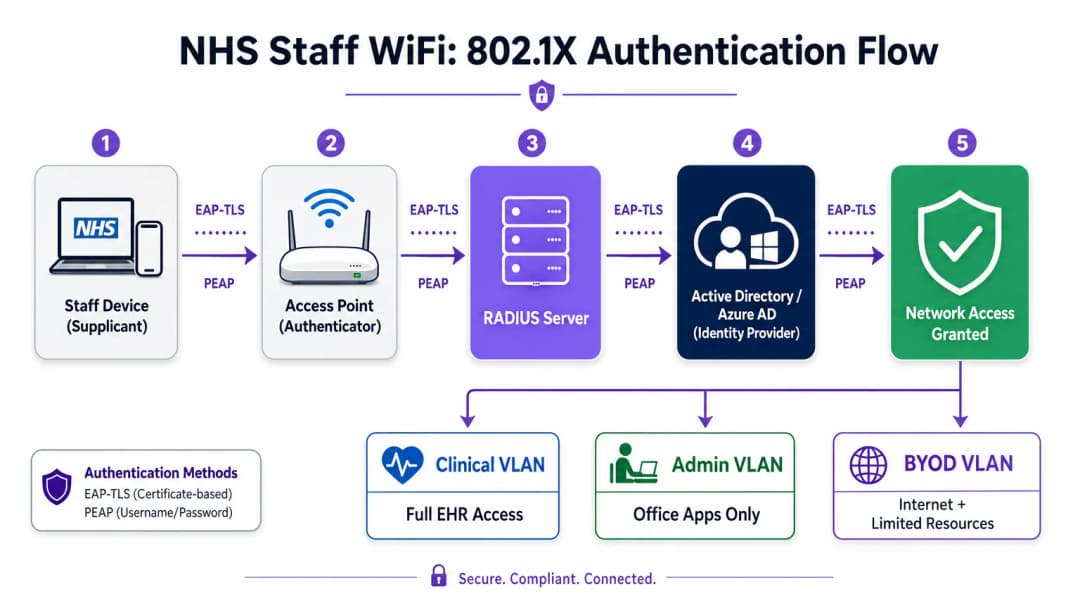
Modern hospital deployments must mandate WPA3-Enterprise (or WPA2-Enterprise as a minimum transitional state) using IEEE 802.1X authentication. This framework requires each user or device to present unique credentials before network access is granted, and the outcome of that authentication determines which logical network segment the device is placed on.
Two EAP methods dominate healthcare deployments:
| EAP Method | Authentication Mechanism | Best Suited For | Security Level |
|---|---|---|---|
| EAP-TLS | Client-side digital certificates | Corporate-managed clinical devices | Highest - no passwords to phish |
| PEAP-MSCHAPv2 | Username/password in encrypted tunnel | BYOD, administrative staff, legacy devices | High - credentials secured by TLS |
EAP-TLS is the gold standard for corporate devices. Certificates are distributed via Mobile Device Management (MDM) platforms, enabling zero-touch authentication - the device authenticates silently in the background. PEAP-MSCHAPv2 securely tunnels Active Directory or Azure AD credentials within an encrypted TLS session, making it suitable for BYOD scenarios where certificate management is impractical.
Integrating the wireless infrastructure with the organization's central Identity Provider (IdP) ensures that access is automatically revoked when a staff member's AD account is disabled, directly addressing HIPAA requirements for access lifecycle management.
Network Segmentation and Trust Zones
Physical access points broadcast across the hospital floor, but logical segmentation ensures that traffic remains isolated based on the principle of least privilege. A flat network architecture in a healthcare setting is a severe security vulnerability, potentially allowing a compromised guest device or vulnerable IoT sensor to access clinical systems.
Best practice dictates creating separate Virtual Local Area Networks (VLANs) mapped to specific SSIDs, with firewall rules enforcing traffic boundaries between them:
| Zone | SSID | Authentication | Access | QoS Priority |
|---|---|---|---|---|
| Clinical | Hosp-Clinical | EAP-TLS (Certificate) | EHR, PACS, clinical messaging | Highest |
| Administrative | Hosp-Staff | PEAP (AD credentials) | Office apps, Internet | Medium |
| Medical IoT | Hidden/MAB | MAC Authentication Bypass | Device controller only | High |
| Guest / Patient | NHS-Guest | Captive Portal | Internet only | Low |
| BYOD | NHS-BYOD | PEAP (AD credentials) | Internet, limited VDI | Low |
The medical IoT VLAN deserves special attention. Many connected medical devices - infusion pumps, patient monitors, wireless call systems - cannot support 802.1X. MAC Authentication Bypass (MAB) is the alternative, but it must be paired with strict firewall Access Control Lists (ACLs) that restrict these devices to communicating only with their designated management servers.
The BYOD Challenge
Bring Your Own Device policies are becoming increasingly common for administrative staff and visiting clinicians. However, unmanaged personal devices represent a significant risk if they are allowed onto trusted network segments.
A secure BYOD deployment involves onboarding these devices onto a dedicated BYOD VLAN. This zone provides Internet access and perhaps limited access to specific, non-sensitive internal resources via a secure gateway or Virtual Desktop Infrastructure (VDI). Direct routing to clinical systems or patient data stores must be strictly prohibited.

Got questions about your specific setup?
Our team works with venue operators, IT managers, and network engineers across 80,000 venues. Book a 20-minute call and we will show you how others like you solved it.
Implementation Guide
Deploying a secure NHS staff WiFi architecture requires a phased approach to minimize disruption to ongoing clinical operations.
Phase 1: Assessment and Design
Begin with a comprehensive wireless site survey. Healthcare environments are notoriously difficult for Radio Frequency (RF) propagation due to lead-lined walls, heavy machinery, and dense populations. The design must address capacity, not just coverage, ensuring adequate access point density in high-traffic areas such as emergency departments and outpatient clinics.
Define the required SSIDs and map them to the corresponding VLANs and security policies. Keep the number of broadcast SSIDs to a minimum - ideally no more than four - to reduce management overhead and minimize beacon frame congestion, which degrades overall network performance.
Phase 2: Infrastructure Configuration
Configure the core switching and routing infrastructure to support the defined VLANs. Apply firewall rules at the boundaries between segments to enforce least privilege. Set up the RADIUS server (e.g., Cisco ISE, Aruba ClearPass, or cloud-based RADIUS-as-a-Service) and integrate it with the central Identity Provider. In environments where Purple's platform is deployed, integrating WiFi Analytics at this stage provides visibility into network utilization, roaming patterns, and capacity hotspots.
Phase 3: Policy Enforcement and Onboarding
Deploy authentication policies. For corporate devices, use the MDM solution to push the required wireless profiles and client certificates (for EAP-TLS). This ensures managed devices connect automatically and securely without user intervention.
For BYOD, establish a clear onboarding workflow - typically an onboarding portal that guides the user through authenticating with their corporate credentials, accepting the acceptable use policy, and transitioning the device to the secure BYOD VLAN. Purple's Guest WiFi platform can be deployed as the Captive Portal layer for the patient and guest SSID, handling CCPA/CPRA-compliant data capture and terms acceptance at scale.
Phase 4: Testing and Validation
Prior to go-live, test each authentication path, VLAN assignment, and firewall rule end-to-end. Validate roaming behavior by walking the clinical floors with a test device, specifically monitoring re-authentication events. Confirm that fast roaming protocols (802.11r and 802.11k) are functioning correctly and that application sessions persist across AP transitions.
Best Practices
Eliminate Pre-Shared Keys. Migrate all staff and clinical networks to 802.1X authentication to ensure individual accountability and centralized access control. This is a non-negotiable requirement for HIPAA compliance.
Enforce strict segmentation. Never allow guest, BYOD, or IoT traffic on the same logical segment as clinical data. Use stateful firewalls to control inter-VLAN routing, with explicit deny rules as the default policy.
Prioritize clinical traffic. Implement QoS policies on wireless controllers and switches to prioritize clinical applications - Voice over WLAN, EHR access - over guest or administrative traffic, especially during peak congestion periods.
Enable fast roaming. Deploy 802.11r (Fast BSS Transition) and 802.11k (Radio Resource Measurement) to ensure clinical staff can move through the facility without experiencing application timeouts or dropped connections.
Continuous monitoring. Use analytics platforms to monitor network health, identify rogue access points, and track user roaming behavior. Understanding foot traffic and usage patterns - a technique proven in Retail and Hospitality environments - is equally valuable in a hospital setting for capacity planning and troubleshooting.
Regular auditing. Conduct annual wireless risk assessments to ensure ongoing compliance with HIPAA, SOC 2 Type II, and ISO 27001 where applicable.
Troubleshooting and Risk Mitigation
Authentication Timeouts
In high client-density environments, RADIUS servers can become overwhelmed, leading to authentication timeouts and dropped connections. Ensure the RADIUS infrastructure is adequately scaled and highly available. Implement load balancing across multiple authentication servers and monitor RADIUS response times as a key operational metric.
Roaming Issues
Clinical staff moving rapidly between wards may experience dropped connections if the wireless infrastructure does not support fast roaming protocols. Enable 802.11r and 802.11k on the wireless controllers and ensure client devices support these standards. Conduct post-deployment roaming surveys to identify and resolve coverage gaps or 'sticky client' issues, where a device clings to a distant, weaker AP rather than roaming to a closer one.
Legacy Device Incompatibility
Older medical devices may not support modern security protocols like WPA3 or 802.1X. Isolate these devices on a dedicated IoT VLAN using MAB. Apply strict firewall rules to restrict their communication to essential management servers only. Consider hardware upgrades or wireless bridges for critical devices that cannot be secured natively.
Certificate Expiration
EAP-TLS deployments rely on certificates with defined validity periods. If certificates expire without renewal, devices will fail to authenticate, causing widespread clinical disruption. Implement automated certificate renewal via SCEP (Simple Certificate Enrollment Protocol) through the MDM platform, and proactively monitor certificate expiration dates.
ROI and Business Impact
Investing in a secure, enterprise-grade wireless architecture delivers measurable returns across clinical, operational, and IT domains.
Clinical efficiency. Reliable connectivity ensures clinicians have instant access to patient records at the point of care, reducing time spent searching for information or dealing with dropped connections. This directly impacts patient throughput and the quality of care delivery.
Reduced IT overhead. Moving away from shared passwords and manual onboarding to automated, certificate-based authentication significantly reduces helpdesk tickets related to password resets and connectivity issues. One hospital system reported a 40% reduction in wireless-related helpdesk calls following migration to 802.1X.
Risk mitigation. Strict segmentation and robust authentication are fundamental to meeting HIPAA requirements, reducing the financial and reputational risks associated with data breaches or compliance failures. The cost of a data breach far outweighs the investment in a properly designed wireless estate.
Future-proofing. A well-designed wireless network provides the foundation for future digital health initiatives - location-based services, real-time asset tracking, advanced telehealth applications - aligning with broader strategic goals in related sectors like Healthcare and Transport where mobile connectivity underpins operational efficiency.
For organizations looking to understand how Purple's platform fits into the guest and patient WiFi layer of this architecture, the Healthcare industry page provides a detailed overview of HIPAA-compliant Captive Portal, analytics, and CCPA/CPRA-compliant data handling capabilities. The same analytics principles that drive customer engagement in Retail translate directly into operational intelligence for hospital estates teams.
Key Definitions
IEEE 802.1X
An IEEE standard for port-based Network Access Control (PNAC). It provides an authentication mechanism to devices wishing to attach to a LAN or WLAN, requiring each device to present credentials before being granted access.
This is the mandatory standard for replacing insecure shared passwords with individual, identity-based logins for staff and clinical devices. It is the cornerstone of a HIPAA-compliant wireless architecture.
VLAN (Virtual Local Area Network)
A logical subnetwork that groups a collection of devices from different physical network segments. VLANs allow network administrators to partition a single switched network to match the functional and security requirements of different user groups.
VLANs are essential for segmenting clinical traffic from guest and administrative traffic, limiting the blast radius of a potential security breach and enforcing the principle of least privilege.
RADIUS (Remote Authentication Dial-In User Service)
A networking protocol that provides centralized Authentication, Authorization, and Accounting (AAA) management for users who connect and use a network service.
The RADIUS server acts as the decision engine between the wireless access points and the central identity database (Active Directory), deciding who gets access and to which VLAN they are assigned.
EAP-TLS (Extensible Authentication Protocol - Transport Layer Security)
An EAP method that relies on client and server certificates to establish a secure, mutually authenticated connection. Neither party trusts the other without a valid certificate.
The most secure method for authenticating hospital-owned devices. Certificates distributed via MDM ensure that only managed, trusted endpoints can access the clinical network, with no password to phish or share.
MAB (MAC Authentication Bypass)
A method of authenticating devices based on their hardware MAC address, used as a fallback for devices that do not support 802.1X.
Necessary for legacy medical IoT devices that need network access but cannot handle complex authentication protocols. Must always be paired with strict firewall ACLs to contain the device to its permitted communication paths.
HIPAA
The Health Insurance Portability and Accountability Act, a US federal law that established national standards to protect sensitive patient health information from being disclosed without the patient's consent or knowledge.
Compliance with HIPAA is mandatory for US healthcare organizations and their business associates. Robust wireless security - including 802.1X, segmentation, and access lifecycle management - is a critical component of demonstrating compliance.
SSID (Service Set Identifier)
The primary name associated with an 802.11 wireless local area network, broadcast by access points to allow client devices to identify and connect to the network.
Hospitals should minimize the number of broadcast SSIDs (e.g., Hospital-Clinical, Hospital-Guest) to reduce management overhead and RF overhead. Each SSID should map to a specific security policy and VLAN.
QoS (Quality of Service)
Technologies that manage data traffic to reduce packet loss, latency, and jitter on a network by prioritizing certain types of traffic over others.
Crucial in healthcare to ensure that life-critical clinical applications and voice communications are always prioritized over less important traffic such as guest video streaming or software updates.
802.11r (Fast BSS Transition)
An IEEE amendment that enables fast roaming between access points by pre-authenticating the client to the target AP before the physical transition occurs, dramatically reducing roaming latency.
Essential for clinical environments where staff are constantly moving. Without 802.11r, devices must perform a full RADIUS re-authentication on every AP transition, which can cause application sessions to time out.
Worked Examples
A healthcare organization is deploying new mobile workstations (Workstations on Wheels) across multiple wards. The IT team needs to ensure these devices maintain connectivity as nurses move between access points, while also guaranteeing that only authorized devices can access the clinical VLAN containing the Electronic Health Record system.
The healthcare organization should implement an 802.1X authentication framework using EAP-TLS. The IT team will use their MDM solution to push a unique client certificate and the corresponding wireless profile to each workstation. The wireless controllers will be configured to authenticate these devices against a RADIUS server, which verifies the certificate against the internal PKI. Upon successful authentication, the RADIUS server dynamically assigns the workstation to the dedicated Clinical VLAN via a RADIUS attribute (e.g., Tunnel-Private-Group-ID). To address the roaming requirement, 802.11r (Fast BSS Transition) and 802.11k (Radio Resource Measurement) must be enabled on the wireless infrastructure to allow the workstations to transition seamlessly between access points without performing a full re-authentication cycle against the RADIUS server each time.
A hospital needs to provide internet access for visiting locum doctors using their personal laptops (BYOD). These doctors need to access cloud-based medical reference tools but must be strictly prohibited from accessing the hospital's internal patient databases.
The hospital should deploy a dedicated BYOD SSID mapped to an isolated BYOD VLAN. Authentication should be handled via 802.1X using PEAP-MSCHAPv2, allowing the locums to log in using temporary Active Directory credentials provided by HR upon arrival. The core firewall must be configured with an ACL that explicitly denies any routing from the BYOD VLAN to the Clinical or Administrative VLANs, permitting only outbound traffic to the internet. Additionally, a Captive Portal can be utilized upon initial connection to enforce an Acceptable Use Policy before granting full internet access. When the locum's temporary AD account is disabled at the end of their engagement, their wireless access is automatically revoked.
Practice Questions
Q1. A new wing is being added to the hospital, and the facilities team wants to deploy wireless temperature sensors in the medication storage refrigerators. These sensors only support WPA2-Personal (Pre-Shared Key) and cannot use 802.1X. How should the network architect integrate these securely?
Hint: Consider the principle of least privilege and how to isolate non-compliant devices from clinical systems.
View model answer
The architect should create a dedicated, hidden SSID mapped to a specific 'Facilities IoT' VLAN. The sensors will connect using the PSK. Crucially, strict firewall ACLs must be applied to this VLAN, allowing the sensors to communicate only with their specific central management server and denying all other traffic - particularly routing to the Clinical VLAN or the internet. MAC Authentication Bypass (MAB) should also be configured to ensure only the specific MAC addresses of the purchased sensors are permitted on that VLAN, preventing rogue devices from joining using the same PSK.
Q2. During a busy morning shift, nurses report that their tablets are frequently dropping connection to the EHR system as they walk the length of the ward, requiring them to log in again. The wireless coverage survey shows strong signal strength throughout the ward. What is the likely cause and solution?
Hint: Strong signal does not guarantee seamless transitions between access points. Consider the authentication overhead on each AP transition.
View model answer
The likely cause is a lack of fast roaming protocols. As the tablet moves out of range of one AP and connects to the next, it is being forced to perform a full 802.1X re-authentication against the RADIUS server, which introduces enough latency to cause the EHR application session to time out. The solution is to enable 802.11r (Fast BSS Transition) on the wireless controllers, which allows the client to securely roam between APs without the latency of a full re-authentication cycle. 802.11k should also be enabled to help the device identify the optimal target AP before the transition occurs.
Q3. A healthcare system is preparing for its annual HIPAA assessment. The auditor notes that the administrative staff use a shared password to access the Staff WiFi network. What is the primary risk identified here, and what is the recommended remediation?
Hint: Focus on individual accountability and the access lifecycle when staff leave the organization.
View model answer
The primary risk is a lack of individual accountability and poor access lifecycle management. If an administrative staff member leaves the organization, the shared password remains valid, potentially allowing unauthorized access. Furthermore, it is impossible to audit which specific user performed an action on the network. The remediation is to deprecate the shared password (PSK) network and migrate administrative staff to an 802.1X authenticated network using PEAP-MSCHAPv2 with their Active Directory credentials. This ensures individual accountability and automatic access revocation when their AD account is disabled upon leaving, directly addressing HIPAA's requirements for access control and audit logging.
Continue reading in this series
CIPA compliance: compliance checklist for venue operators
You will be able to decide whether CIPA binds your WiFi, then segment networks, route DNS through Purple Shield and close bypass routes. You will also know what evidence to keep for Form 486 or Form 479 certification. The checklist assigns every requirement an owner, so your next funding year certification has nothing missing.
WPA3 transition mode connection failures: a deployment checklist for Cisco Meraki, HPE Aruba and Ruckus
Use this checklist to diagnose why devices fail on a WPA3 SAE transition mode SSID and fix it on Cisco Meraki, HPE Aruba or Ruckus. You will match 802.11 status codes to causes, isolate PMF, 802.11r and 6GHz issues, and decide when to move to a WPA3-only SSID.
Best DNS filtering: a comprehensive guide for businesses
This technical reference guide explains how enterprise DNS filtering secures public networks by blocking malicious domains at the resolution layer - before a connection is ever established. It gives IT directors, network architects, and venue operations teams the deployment architecture, firewall configuration, and compliance context they need to protect Guest WiFi across hospitality, retail, and public-sector environments. Purple Shield blocks malware, botnets, and inappropriate content at the DNS level across 80,000+ live venues.
Got questions about your specific setup?
Our team works with venue operators, IT managers, and network engineers across 80,000 venues. Book a 20-minute call and we will show you how others like you solved it.