
WiFi ऑथेंटिकेशनसाठी RADIUS सर्व्हर कसा सेट करायचा
हे अधिकृत मार्गदर्शक आयटी लीडर्स आणि नेटवर्क आर्किटेक्ट्सना एंटरप्राइझ WiFi ऑथेंटिकेशनसाठी RADIUS सर्व्हर तैनात करण्यासाठी एक सर्वसमावेशक आराखडा प्रदान करते. यामध्ये ऑन-प्रिमाइस आणि क्लाउड-होस्टेड डिप्लॉयमेंट्समधील आर्किटेक्चरल तडजोड, EAP पद्धत निवड, Active Directory इंटिग्रेशन आणि डायनॅमिक VLAN असाइनमेंट समाविष्ट आहे. व्हेन्यू ऑपरेटर्स आणि आयटी टीम्सना या तिमाहीत असुरक्षित PSK वातावरणातून मजबूत 802.1X इन्फ्रास्ट्रक्चरवर जाण्यासाठी प्रत्यक्ष अंमलबजावणीच्या पायऱ्या, वास्तविक-जगातील केस स्टडीज आणि जोखीम कमी करण्याच्या धोरणे मिळतील.
हे मार्गदर्शक ऐका
पॉडकास्ट ट्रान्सक्रिप्ट पहा
आमच्या मुख्य मालिकेचा भाग: Enterprise WiFi Security Guide →
RADIUS Server Setup & 802.1X Architecture Configurator
Model your enterprise RADIUS deployment: configure Identity Provider sync, EAP authentication methods, dynamic VLAN attributes, and firewall ports.
Cloud-Native 802.1X Architecture
RadSec (TCP 2083 with TLS) & UDP 1812/1813Architecture Insight: Eliminate shared PSKs by pushing device certificates via Microsoft Intune or Jamf. EAP-TLS with Cloud RADIUS removes local server maintenance while enforcing strict role-based VLAN segmentation.
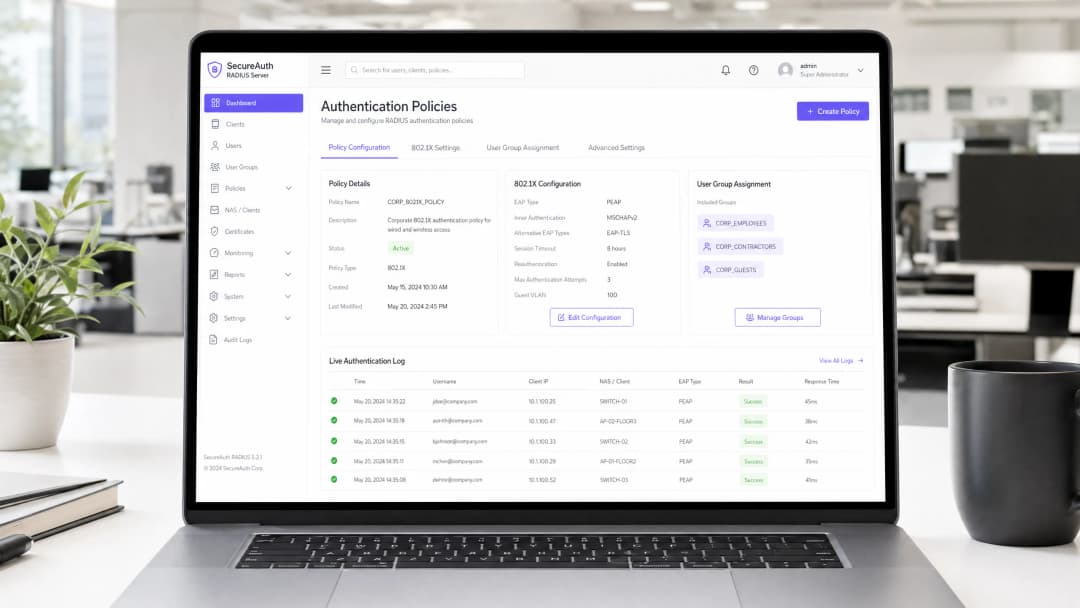
मुख्य सारांश
एंटरप्राइझ वातावरणासाठी - मग ते विस्तीर्ण युनिव्हर्सिटी कॅम्पस असो, उच्च-घनता असलेले स्टेडियम असो, किंवा एखादी विस्तृत रिटेल साखळी असो - WiFi प्रवेशासाठी Pre-Shared Key (PSK) वर अवलंबून राहणे ही एक मोठी सुरक्षा जोखीम आहे. केवळ एका क्रेडेंशियलशी तडजोड झाल्यास संपूर्ण नेटवर्क उघडे पडते आणि प्रवेश रद्द करण्यासाठी संपूर्ण मालमत्तेवरील प्रत्येक डिव्हाइसचा पासवर्ड बदलावा लागतो. RADIUS (Remote Authentication Dial-In User Service) सर्व्हरद्वारे 802.1X ऑथेंटिकेशन लागू केल्याने ही समस्या पूर्णपणे नाहीशी होते: प्रत्येक युजर स्वतंत्रपणे ऑथेंटिकेट करतो, प्रवेश त्वरित रद्द केला जाऊ शकतो आणि नेटवर्क सेगमेंटेशन डायनॅमिकपणे लागू केले जाते.
हे मार्गदर्शक IT व्यवस्थापक आणि नेटवर्क आर्किटेक्ट्सना RADIUS ऑथेंटिकेशन तैनात करण्यासाठी एक निश्चित रोडमॅप प्रदान करते. आम्ही ऑन-प्रिमाइसेस आणि क्लाउड-होस्टेड डिप्लॉयमेंट्समधील आर्किटेक्चरल तडजोड, Extensible Authentication Protocol (EAP) पद्धतींचे कॉन्फिगरेशन आणि Active Directory सारख्या डिरेक्टरी सर्व्हिसेससह एकत्रीकरण समाविष्ट करतो. तुमचे नेटवर्क एका बिझनेस इंटेलिजेंस मालमत्तेत रूपांतरित करणारे WiFi Analytics कॅप्चर करत असतानाच, अभ्यागतांना अखंड प्रवेश देण्यासाठी एक मजबूत ऑथेंटिकेशन लेअर Guest WiFi सोल्यूशन्ससह कसा समाकलित होतो हे देखील आम्ही दाखवतो.
तांत्रिक सखोल माहिती
802.1X आर्किटेक्चर
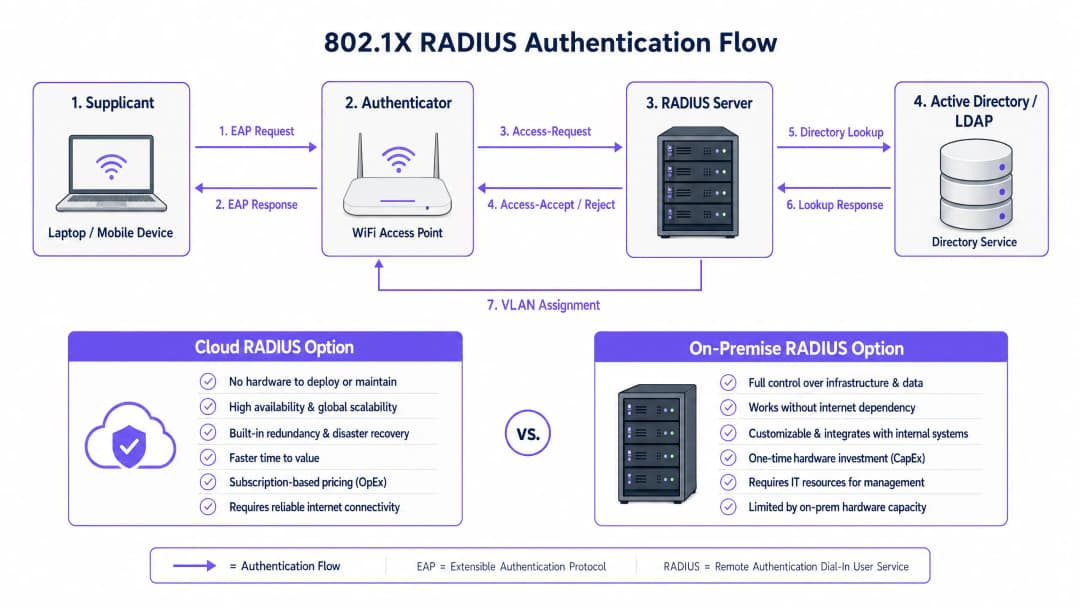
IEEE 802.1X मानक पोर्ट-आधारित Network Access Control (PNAC) परिभाषित करते. वायरलेस संदर्भात, यामध्ये एकत्रितपणे काम करणाऱ्या तीन प्राथमिक भूमिकांचा समावेश होतो:
| भूमिका | घटक | जबाबदारी |
|---|---|---|
| Supplicant | क्लायंट डिव्हाइस (लॅपटॉप, स्मार्टफोन) | नेटवर्क प्रवेशाची विनंती करण्यासाठी क्रेडेंशियल सादर करते |
| Authenticator | WiFi ऍक्सेस पॉईंट किंवा कंट्रोलर | ऍक्सेस कंट्रोल लागू करते; EAP संदेश रिले करते |
| Authentication Server | RADIUS सर्व्हर | क्रेडेंशियल प्रमाणित करते; स्वीकार/अस्वीकार आणि पॉलिसीचे गुणधर्म परत करते |
जेव्हा एखादा supplicant ऍक्सेस पॉईंटशी जोडला जातो, तेव्हा AP EAP (Extensible Authentication Protocol) संदेशांव्यतिरिक्त सर्व डेटा ट्रॅफिक ब्लॉक करतो. AP या EAP संदेशांना RADIUS पॅकेट्समध्ये समाविष्ट करतो आणि त्यांना RADIUS सर्व्हरकडे पाठवतो. सर्व्हर बॅकएंड डेटाबेस - सामान्यतः LDAP किंवा Active Directory - विरुद्ध क्रेडेंशियल पडताळतो आणि Access-Accept किंवा Access-Reject संदेश परत पाठवतो. स्वीकारल्यास, AP पोर्ट अनब्लॉक करतो आणि क्लायंटचे ट्रॅफिक मुक्तपणे वाहू लागते.
EAP पद्धत निवडणे
तुमच्या RADIUS डिप्लॉयमेंटची सुरक्षा ही निवडलेल्या EAP पद्धतीवर मोठ्या प्रमाणावर अवलंबून असते. एंटरप्राइझ डिप्लॉयमेंट्समध्ये खालील दोन सर्वात जास्त प्रचलित आहेत:
EAP-TLS (Transport Layer Security) हा सर्वोत्तम सुवर्णमानक पर्याय आहे. यासाठी RADIUS सर्व्हर आणि प्रत्येक क्लायंट डिव्हाइस दोन्हीवर डिजिटल प्रमाणपत्रांची आवश्यकता असते, ज्यामुळे पासवर्डची गरज पूर्णपणे नष्ट होते. जरी एखाद्या आक्रमणकर्त्याने संपूर्ण ऑथेंटिकेशन एक्सचेंज हस्तगत केले, तरीही मिळवण्यासाठी कोणतेही क्रेडेंशियल्स नसतात. यादरम्यान केवळ प्रशासकीय कामाचा बोजा वाढतो: क्लायंट प्रमाणपत्रे तैनात आणि व्यवस्थापित करण्यासाठी कार्यरत पब्लिक की इन्फ्रास्ट्रक्चर (PKI) आणि एंडपॉइंट्सवर प्रमाणपत्रे वितरित करण्यासाठी MDM सोल्यूशन (उदा. Microsoft Intune, Jamf) आवश्यक आहे.
PEAP-MSCHAPv2 (Protected EAP) ही प्रत्यक्षात सर्वात व्यापकपणे वापरली जाणारी पद्धत आहे. हे एनक्रिप्टेड TLS टनेल स्थापित करण्यासाठी सर्व्हर-साइड प्रमाणपत्राचा वापर करते, ज्याच्या आत क्लायंट युझरनेम आणि पासवर्डसह ऑथेंटिकेट करतो. हे EAP-TLS पेक्षा तैनात करणे लक्षणीयरीत्या सोपे आहे कारण केवळ एकाच प्रमाणपत्राचे - सर्व्हरच्या - व्यवस्थापन करावे लागते. तथापि, यामध्ये एक गंभीर चेतावणी आहे: जर क्लायंट डिव्हाइसेसना RADIUS सर्व्हरच्या प्रमाणपत्राची पडताळणी करण्यासाठी स्पष्टपणे कॉन्फिगर केले नसेल, तर ते बनावट ॲक्सेस पॉइंट्सद्वारे मॅन-इन-द-मिडल (MitM) हल्ल्यांना बळी पडू शकतात.
गंभीर सुरक्षा टीप: क्लायंट डिव्हाइसेसवर कठोर प्रमाणपत्र पडताळणी लागू न केल्यास PEAP-MSCHAPv2 चे सुरक्षा फायदे प्रभावीपणे निरर्थक ठरतात. आक्रमणकर्ता बनावट AP तैनात करू शकतो, बनावट प्रमाणपत्र सादर करू शकतो आणि युझर क्रेडेंशियल्स प्लेनटेक्स्ट स्वरूपात मिळवू शकतो. हा केवळ एक सैद्धांतिक धोका नाही - हा एक चांगल्या प्रकारे दस्तऐवजीकरण केलेला हल्ला आहे ज्याचा वास्तविक जगातील वातावरणात गैरफायदा घेतला गेला आहे.
अंमलबजावणी मार्गदर्शक
पायरी १: आर्किटेक्चरल निर्णय - ऑन-प्रिमाइसेस विरुद्ध क्लाउड RADIUS
पहिला निर्णय म्हणजे RADIUS इन्फ्रास्ट्रक्चर कुठे होस्ट करायचे. हा प्रामुख्याने कार्यात्मक आणि खर्चाचा प्रश्न आहे, सुरक्षेचा नाही - दोन्ही मॉडेल्स सुरक्षितपणे तैनात केले जाऊ शकतात.

ऑन-प्रिमाइसेस RADIUS (उदा. Microsoft NPS, FreeRADIUS, Cisco ISE) समर्पित आयटी कर्मचारी, सध्याचे ऑन-प्रिमाइसेस डिरेक्टरी इन्फ्रास्ट्रक्चर आणि कडक डेटा सार्वभौमत्व किंवा अनुपालन आवश्यकता असलेल्या संस्थांसाठी योग्य आहे. हे ऑथेंटिकेशनसाठी इंटरनेट कनेक्टिव्हिटीवर अवलंबून नसते, जे अशा वातावरणासाठी एक महत्त्वपूर्ण वैशिष्ट्य आहे जिथे इंटरनेट अपटाइमची हमी दिली जाऊ शकत नाही.
क्लाउड RADIUS हे वितरित वातावरणासाठी - किरकोळ विक्री साखळी, हॉस्पिटॅलिटी समूह आणि वाहतूक केंद्रे जिथे प्रत्येक ठिकाणी सर्व्हर तैनात करणे कार्यात्मकदृष्ट्या अव्यवहार्य आहे अशा ठिकाणी वाढत्या प्रमाणात पसंतीचे मॉडेल बनत आहे. क्लाउड RADIUS क्लाउड आयडेंटिटी प्रोव्हाइडर (Azure AD, Google Workspace, Okta) सोबत मूळ स्वरूपात समाकलित होते आणि अंगभूत उच्च उपलब्धता आणि जागतिक स्केलेबिलिटी प्रदान करते.
पायरी २: RADIUS सर्व्हर स्थापित आणि कॉन्फिगर करा
Microsoft NPS (Windows-केंद्रित वातावरणातील सर्वात सामान्य पर्याय) वापरून ऑन-प्रिमाइसेस तैनातीसाठी:
१. सर्व्हर व्यवस्थापकाद्वारे नेटवर्क पॉलिसी सर्व्हर रोल स्थापित करा. २. Active Directory मध्ये NPS सर्व्हरची नोंदणी करा जेणेकरून त्याला वापरकर्त्याच्या डायल-इन प्रॉपर्टीज वाचण्याची अनुमती मिळेल. ३. प्रत्येक ॲक्सेस पॉइंट किंवा वायरलेस कंट्रोलरसाठी एक RADIUS Client नोंदणी तयार करा, ज्यामध्ये AP चा IP ॲड्रेस आणि एक मजबूत, युनिक Shared Secret नमूद करा. ४. प्रवेशासाठीच्या अटी (उदा. युझर ग्रुपचे सदस्यत्व) आणि मर्यादा (उदा. EAP पद्धत, सेशन टाइमआउट) निश्चित करणारी Network Policy कॉन्फिगर करा. ५. स्थानिक पातळीवर विनंत्यांवर प्रक्रिया करण्यासाठी Connection Request Policy कॉन्फिगर करा.
Linux वरील FreeRADIUS साठी:
१. पॅकेज मॅनेजरद्वारे इंस्टॉल करा: sudo apt-get install freeradius freeradius-ldap.
२. RADIUS क्लायंट (APs) आणि त्यांचे shared secrets परिभाषित करण्यासाठी /etc/freeradius/3.0/clients.conf कॉन्फिगर करा.
३. तुमच्या Active Directory किंवा LDAP सर्व्हरकडे निर्देश करण्यासाठी /etc/freeradius/3.0/mods-available/ldap मधील LDAP मॉड्युल कॉन्फिगर करा.
४. LDAP मॉड्युल सक्षम करा: sudo ln -s /etc/freeradius/3.0/mods-available/ldap /etc/freeradius/3.0/mods-enabled/.
५. /etc/freeradius/3.0/mods-available/eap मध्ये EAP पद्धती परिभाषित करा.
पायरी ३: ॲक्सेस पॉइंट्स कॉन्फिगर करा
तुमच्या वायरलेस कंट्रोलर किंवा वैयक्तिक ॲक्सेस पॉइंट्सवर:
१. RADIUS सर्व्हरचा IP ॲड्रेस आणि ऑथेंटिकेशन पोर्ट परिभाषित करा (डीफॉल्ट: UDP 1812). २. Shared Secret कॉन्फिगर करा - किमान २२ कॅरेक्टर्स वापरा, ज्यामध्ये अक्षरे, अंक आणि विशेष चिन्हांचे मिश्रण असेल. प्रति स्थान किंवा AP ग्रुपसाठी युनिक सिक्रेट वापरा. ३. 802.1X की मॅनेजमेंटसह WPA2-Enterprise किंवा WPA3-Enterprise सुरक्षा मोड वापरण्यासाठी SSID कॉन्फिगर करा. ४. फेलओव्हरसाठी दुय्यम RADIUS सर्व्हर कॉन्फिगर करा.
पायरी ४: डिरेक्टरी इंटिग्रेशन
ऑन-प्रिमाइसेस AD इंटिग्रेशनसाठी, RADIUS सर्व्हर डोमेनमध्ये जोडलेला असावा किंवा त्याला LDAP रीड ॲक्सेस असावा. LDAP बाइंडिंगसाठी वापरल्या जाणाऱ्या सर्व्हिस अकाउंट्सना किमान आवश्यक परवानग्या असल्याची खात्री करा. क्लाउड RADIUS साठी, तुमच्या IdP सह API आधारित सिंक्रोनाइझेशन किंवा SAML/OIDC इंटिग्रेशन कॉन्फिगर करा.
तुमच्या डिरेक्टरीमध्ये स्पष्ट युझर ग्रुप्स परिभाषित करा, कारण हे ऑथरायझेशन पॉलिसी ठरवतील. शिफारस केलेली ग्रुप रचना:
| ग्रुप | VLAN | ॲक्सेस लेव्हल |
|---|---|---|
Corp_Staff |
VLAN 10 | संपूर्ण अंतर्गत नेटवर्क |
Corp_Contractors |
VLAN 20 | इंटरनेट + विशिष्ट अंतर्गत रिसोर्सेस |
Corp_IoT |
VLAN 30 | केवळ आयसोलेटेड, डिव्हाइस-विशिष्ट पोर्ट्स |
Corp_Guests |
VLAN 100 | केवळ Captive Portal द्वारे इंटरनेट |
पायरी ५: क्लायंट कॉन्फिगरेशन आणि सर्टिफिकेट व्हॅलिडेशन
ही कार्यप्रणालीच्या दृष्टीने सर्वात महत्त्वाची पायरी आहे. व्यवस्थापित डिव्हाइसेसवर कोणतीही सूचना न दाखवता WiFi कॉन्फिगरेशन पाठवण्यासाठी Windows साठी Group Policy (GPO) आणि macOS/iOS/Android साठी MDM प्रोफाइल वापरा. प्रोफाइलमध्ये खालील गोष्टी नमूद करणे आवश्यक आहे:
- RADIUS सर्व्हरचे सर्टिफिकेट जारी करणारा Root CA.
- अपेक्षित सर्व्हरचे नाव (सर्व्हर सर्टिफिकेटचे CN किंवा SAN).
- EAP पद्धत आणि अंतर्गत ऑथेंटिकेशन प्रोटोकॉल.
अव्यवस्थापित BYOD डिव्हाइसेससाठी, शक्यतो नेटवर्क ॲक्सेस कंट्रोल (NAC) पोर्टलद्वारे स्पष्ट सेल्फ-सर्व्हिस ऑनबोर्डिंग सूचना प्रदान करा.
पायरी ६: डायनॅमिक VLAN असाइनमेंट लागू करा
Access-Accept प्रतिसादात VLAN असाइनमेंट ॲट्रिब्युट्स परत मिळवण्यासाठी RADIUS सर्व्हर कॉन्फिगर करा:
Tunnel-Type=VLAN(13)Tunnel-Medium-Type=IEEE-802(6)Tunnel-Private-Group-Id=<VLAN ID>
ऍक्सेस पॉइंट या विशेषता वाचतो आणि ऑथेंटिकेट केलेल्या क्लायंटला निर्दिष्ट केलेल्या VLAN वर ठेवतो - वापरकर्त्यांनी भूमिका किंवा स्थाने बदलल्यास कोणत्याही मॅन्युअल रिकॉन्फिगरेशनची आवश्यकता नसते.
तुमच्या विशिष्ट सेटअपबद्दल काही प्रश्न आहेत का?
आमची टीम ८०,००० हून अधिक वेन्यूजमधील वेन्यू ऑपरेटर्स, IT मॅनेजर्स आणि नेटवर्क इंजिनिअर्ससोबत काम करते. २० मिनिटांचा कॉल बुक करा आणि तुमच्यासारख्या इतरांनी ही समस्या कशी सोडवली हे आम्ही तुम्हाला दाखवू.
सर्वोत्तम पद्धती
रिडंडन्सी तडजोड न करण्यायोग्य आहे. किमान दोन RADIUS सर्व्हर (प्राथमिक आणि दुय्यम) तैनात करा आणि स्वयंचलितपणे फेल ओव्हर करण्यासाठी सर्व ऍक्सेस पॉइंट्स कॉन्फिगर करा. ऑन-प्रिमाइसेस तैनातीसाठी, दुय्यम सर्व्हर वेगळ्या भौतिक ठिकाणी किंवा उपलब्धता झोनमध्ये ठेवण्याचा विचार करा. RADIUS आउटेज म्हणजे कोणीही ऑथेंटिकेट करू शकत नाही, ज्यामुळे 802.1X-संरक्षित SSID साठी संपूर्ण नेटवर्क बंद पडू शकते.
प्रमाणपत्राच्या कालबाह्यतेवर सक्रियपणे लक्ष ठेवा. RADIUS सर्व्हर प्रमाणपत्राची कालबाह्यता हे अचानक, मोठ्या प्रमाणावर ऑथेंटिकेशन अयशस्वी होण्याचे सर्वात सामान्य कारणांपैकी एक आहे. कालबाह्य होण्याच्या किमान 30 दिवस आधी प्रशासकांना अलर्ट करण्यासाठी मॉनिटरिंग लागू करा. हे सर्व्हर प्रमाणपत्र आणि साखळीतील कोणत्याही इंटरमीडिएट CA प्रमाणपत्रे या दोन्हीला लागू होते.
शेअर्ड सिक्रेटला अत्यंत महत्त्वाचे क्रेडेंशियल समजा. AP आणि RADIUS सर्व्हरमधील शेअर्ड सिक्रेट RADIUS पॅकेट्स एन्क्रिप्ट करते. प्रति स्थान किंवा AP ग्रुपसाठी अद्वितीय सिक्रेट्स वापरा, त्यांना सिक्रेट्स मॅनेजरमध्ये स्टोअर करा आणि वेळोवेळी ते बदला. अधिक व्यापक नेटवर्क सुरक्षा स्वच्छतेच्या शिफारसींसाठी आमचे Protect Your Network with Strong DNS and Security हे मार्गदर्शक पहा.
अनुपालन फ्रेमवर्कशी सुसंगत रहा. PCI-DSS च्या अधीन असलेल्या वातावरणासाठी (उदा., रिटेल पेमेंट नेटवर्क), 802.1X ऑथेंटिकेशन थेट नेटवर्क ऍक्सेस कंट्रोल आणि ऑडिट लॉगिंगच्या आवश्यकतांना समर्थन देते. GDPR अनुपालनासाठी, RADIUS अकाउंटिंग लॉग्स (पोर्ट 1813) नेटवर्कवर कोणी, कुठून आणि कधी प्रवेश केला याचा तपशीलवार ऑडिट ट्रेल प्रदान करतात - जे इन्सिडन्ट रिस्पॉन्ससाठी अत्यंत उपयुक्त आहे. Healthcare वातावरणासाठी, डायनॅमिक VLAN असाइनमेंटद्वारे नेटवर्कचे विभाजन करणे इलेक्ट्रॉनिक प्रोटेक्टेड हेल्थ इन्फॉर्मेशन (ePHI) चे रक्षण करण्यासाठी HIPAA आवश्यकतांना समर्थन देते.
ट्रबलशूटिंग आणि जोखीम कमी करणे
| बिघाडाचा प्रकार | लक्षण | उपाय |
|---|---|---|
| प्रमाणपत्र कालबाह्यता | अचानक मोठ्या प्रमाणावर ऑथेंटिकेशन अयशस्वी होणे | कालबाह्यतेवर लक्ष ठेवा; प्रमाणपत्राचे नूतनीकरण आणि पुन्हा तैनाती करा |
| NTP विसंगती | मधूनमधून EAP-TLS अयशस्वी होणे | RADIUS सर्व्हर आणि DC समान NTP स्त्रोताशी सिंक होत असल्याची खात्री करा |
| LDAP कनेक्टिव्हिटी गमावणे | AD पोहोचण्यायोग्य नसताना ऑथेंटिकेशन अयशस्वी होते | रिडंडंट DC तैनात करा; अलीकडील ऑथेंटिकेशन्स कॅशे करण्यासाठी RADIUS कॉन्फिगर करा |
| चुकीचे शेअर्ड सिक्रेट | AP लॉग्समध्ये RADIUS timeout किंवा Bad authenticator दिसते |
दोन्ही AP आणि RADIUS सर्व्हरवर सिक्रेट जुळत असल्याची पडताळणी करा |
| क्लायंट प्रमाणपत्र विसंगती | विशिष्ट डिव्हाइसेससाठी EAP-TLS अयशस्वी होणे | क्लायंट प्रमाणपत्र विश्वसनीय CA द्वारे जारी केले गेल्याची पडताळणी करा; प्रमाणपत्राच्या वैधतेचा कालावधी तपासा |
| VLAN नियुक्त न होणे | वापरकर्ता ऑथेंटिकेट झाला आहे परंतु चुकीच्या नेटवर्क सेगमेंटवर आहे | RADIUS विशेषता योग्यरित्या परत आल्याची पडताळणी करा; AP VLAN कॉन्फिगरेशन तपासा |
802.1X कॉन्फिगरेशन प्रक्रियेबद्दल अधिक तपशीलवार माहितीसाठी, How to Configure 802.1X WiFi Authentication: A Step-by-Step Guide हे विशिष्ट-व्हेंडरनुसार तपशीलवार कॉन्फिगरेशन मार्गदर्शक प्रदान करते.
-
ROI आणि व्यावसायिक प्रभाव
PSK कडून RADIUS-बॅक्ड 802.1X वर स्थलांतरित होण्यासाठी कॉन्फिगरेशनमध्ये सुरुवातीची गुंतवणूक आणि क्लाउड सोल्यूशन्ससाठी परवाना किंवा ऑन-प्रिमाइस उपयोजनांसाठी हार्डवेअरची आवश्यकता असू शकते. ROI चे गणित अगदी स्पष्ट आहे:
जोखीम कमी करणे: युनायटेड किंगडममध्ये डेटा ब्रीचचा सरासरी खर्च £3 दशलक्ष पेक्षा जास्त आहे (IBM Cost of a Data Breach Report). एक तडजोड केलेला PSK संपूर्ण नेटवर्क उघड करू शकतो. 802.1X त्याचा प्रभाव केवळ एका तडजोड केलेल्या वापरकर्ता खात्यापुरता मर्यादित करतो, जे डिरेक्टरीद्वारे काही सेकंदांत निष्क्रिय केले जाऊ शकते.
कार्यक्षमता: कर्मचारी त्यांच्या भूमिका बदलतात त्यानुसार डायनॅमिक VLAN असाइनमेंट मॅन्युअल नेटवर्क रीकॉन्फिगरेशनची आवश्यकता दूर करते. नवीन कर्मचाऱ्याला समाविष्ट करणे म्हणजे त्यांना योग्य AD ग्रुपमध्ये जोडणे - नेटवर्क ॲक्सेस स्वयंचलितपणे लागू होतो.
अनुपालन स्थिती: PCI-DSS, ISO 27001 किंवा Cyber Essentials Plus च्या अधीन असलेल्या संस्थांसाठी, 802.1X हे एक थेट नियंत्रण आहे जे ऑडिटर्सना पाहण्याची अपेक्षा असते. हे उपयोजित केल्याने तुमची अनुपालन स्थिती मजबूत होते आणि ऑडिट दुरुस्तीचा खर्च कमी होतो.
पाहुण्यांचा अनुभव आणि विश्लेषण: वेन्यू ऑपरेटर्ससाठी, कर्मचारी प्रमाणीकरणासाठी RADIUS ला व्हिजिटर ॲक्सेससाठी असणाऱ्या Purple च्या Guest WiFi प्लॅटफॉर्मसह समाकलित केल्याने एक युनिफाइड, टायर्ड ॲक्सेस मॉडेल तयार होते. कर्मचारी 802.1X द्वारे कोणतीही सूचना न मिळता प्रमाणीकृत होतात; पाहुणे ब्रँडेड कॅप्टिव्ह पोर्टलद्वारे कनेक्ट होतात. Purple चे WiFi Analytics प्लॅटफॉर्म नंतर व्हिजिटर्सचा थांबण्याचा वेळ, वारंवार येण्याचे प्रमाण आणि एंगेजमेंट मेट्रिक्सची रिअल-टाइम दृश्यमानता प्रदान करते - हा डेटा थेट मार्केटिंग खर्च आणि वेन्यू ऑपरेशन्सच्या निर्णयांना माहिती पुरवतो.
-
पुढील वाचनासाठी, पोर्तुगीज भाषेतील अंमलबजावणी मार्गदर्शनासाठी Como Configurar a Autenticação 802.1X WiFi: Um Guia Passo a Passo पहा, आणि मूळ कनेक्टिव्हिटी एंटरप्राइझ आवश्यकता पूर्ण करते याची खात्री करण्यासाठी What Is a Leased Line? Dedicated Business Internet पहा.
महत्वाच्या व्याख्या
RADIUS (Remote Authentication Dial-In User Service)
नेटवर्क सेवेशी जोडणाऱ्या युजर्ससाठी सेंट्रलाइज्ड प्रमाणीकरण (Authentication), अधिकृतीकरण (Authorisation), आणि अकाउंटिंग (Accounting) (AAA) व्यवस्थापन प्रदान करणारा एक नेटवर्किंग प्रोटोकॉल. हा RFC 2865 मध्ये परिभाषित केला आहे.
मुख्य सर्व्हर घटक जो WiFi प्रवेश देण्यापूर्वी डिरेक्टरीच्या विरोधात वापरकर्त्याचे क्रेडेंशियल्स सत्यापित करतो. 802.1X वापरणाऱ्या प्रत्येक एंटरप्राइझ WiFi डिप्लोयमेंटला RADIUS सर्व्हरची आवश्यकता असते.
802.1X
पोर्ट-आधारित नेटवर्क ऍक्सेस कंट्रोल (PNAC) साठीचे एक IEEE मानक. हे LAN किंवा WLAN शी जोडू इच्छिणाऱ्या डिव्हाइसेसना प्रमाणीकरण यंत्रणा प्रदान करते, आणि प्रमाणीकरण यशस्वी होईपर्यंत सर्व नॉन-EAP ट्रॅफिक ब्लॉक करते.
एक मुख्य फ्रेमवर्क मानक जे Supplicant, Authenticator, आणि प्रमाणीकरण सर्व्हर कशा प्रकारे संवाद साधतात हे परिभाषित करते. जेव्हा IT टीम्स "एंटरप्राइझ WiFi सुरक्षा" असा उल्लेख करतात, तेव्हा त्यांचा अर्थ सामान्यतः 802.1X सह असणारी WPA2/WPA3-Enterprise सुरक्षा असा असतो.
Supplicant
क्लायंट डिव्हाइस - किंवा अधिक अचूकपणे सांगायचे तर, त्या डिव्हाइसवरील 802.1X सॉफ्टवेअर स्टॅक - जे नेटवर्ककडे क्रेडेंशियल्स सादर करून प्रमाणीकरण प्रक्रिया सुरू करते.
Windows वर, इन-बिल्ट supplicant म्हणजे Wireless AutoConfig सेवा असते. macOS आणि iOS वर, हे OS मध्ये नेटिव्ह असते. Supplicant योग्यरित्या कॉन्फिगर केले असल्याची खात्री करणे (विशेषतः सर्टिफिकेट व्हॅलिडेशनसाठी) हा डिप्लॉयमेंटमधील अडचणींचा सर्वात सामान्य स्रोत आहे.
Authenticator
नेटवर्क डिव्हाइस - सामान्यतः एक WiFi ऍक्सेस पॉइंट किंवा वायरलेस कंट्रोलर - जे Supplicant आणि RADIUS सर्व्हर दरम्यान मध्यस्थ म्हणून काम करते, आणि प्रमाणीकरण निकालाच्या आधारे ऍक्सेस कंट्रोल लागू करते.
RADIUS सर्व्हरकडून Access-Accept मिळेपर्यंत AP पोर्टवरील सर्व डेटा ट्रॅफिक ब्लॉक करतो. हे Access-Accept प्रतिसादातून RADIUS ॲट्रिब्युट्स (उदा. VLAN असाइनमेंट) देखील वाचते आणि ते या सेशनवर लागू करते.
EAP (Extensible Authentication Protocol)
RFC 3748 मध्ये परिभाषित केलेले एक प्रमाणीकरण फ्रेमवर्क जे Supplicant आणि प्रमाणीकरण सर्व्हर दरम्यान विविध प्रमाणीकरण पद्धतींसाठी (TLS, PEAP, TTLS, इ.) एक मानकीकृत ट्रान्सपोर्ट यंत्रणा प्रदान करते.
EAP ही क्लायंट आणि RADIUS सर्व्हर दरम्यान बोलली जाणारी 'भाषा' आहे. EAP पद्धतीची निवड (EAP-TLS विरुद्ध PEAP) ही प्रमाणीकरण प्रणालीची सुरक्षा मजबूतता आणि डिप्लॉयमेंटची जटिलता ठरवते.
PEAP (Protected EAP)
एक EAP पद्धत जी प्रथम सर्व्हरचे सर्टिफिकेट वापरून TLS टनेल स्थापित करते, आणि नंतर त्या एन्क्रिप्टेड टनेलमध्ये दुय्यम प्रमाणीकरण (सामान्यतः युझरनेम/पासवर्डसह MSCHAPv2) करते.
सुरक्षा आणि डिप्लॉयमेंट सुलभतेच्या संतुलनामुळे ही सर्वात सामान्य एंटरप्राइझ WiFi प्रमाणीकरण पद्धत आहे. यासाठी केवळ सर्व्हर-साइड सर्टिफिकेटची आवश्यकता असते, ज्यामुळे हे EAP-TLS पेक्षा लागू करणे खूप सोपे होते.
Dynamic VLAN Assignment
एक RADIUS वैशिष्ट्य जिथे सर्व्हर Access-Accept प्रतिसादात VLAN-विशिष्ट ॲट्रिब्युट्स (Tunnel-Type, Tunnel-Medium-Type, Tunnel-Private-Group-Id) समाविष्ट करतो, आणि प्रमाणीकृत क्लायंटला एका विशिष्ट VLAN वर ठेवण्याचे निर्देश AP ला देतो.
विविध सुरक्षा आवश्यकता असलेल्या एकाधिक युझर समूहांना सेवा देण्यासाठी सिंगल SSID सक्षम करते. वेगवेगळ्या युझर ग्रुप्ससाठी मल्टिपल SSID ब्रॉडकास्ट करण्याची आवश्यकता दूर करते, ज्यामुळे RF ओव्हरहेड कमी होतो आणि युझरचा अनुभव सोपा होतो.
Shared Secret
फक्त Authenticator (AP) आणि RADIUS सर्व्हरला माहित असलेली पूर्व-कॉन्फिगर केलेली टेक्स्ट स्ट्रिंग, जी RADIUS पाकिटांवर स्वाक्षरी आणि एन्क्रिप्ट करण्यासाठी वापरली जाते, ज्यामुळे संवादाची अखंडता आणि सत्यता सुनिश्चित होते.
एक महत्त्वपूर्ण सुरक्षा कॉन्फिगरेशन घटक. जर shared secret कमकुवत असेल किंवा तडजोड झाली असेल, तर एखादा आक्रमणकर्ता बनावट RADIUS Access-Accept प्रतिसाद तयार करू शकतो, ज्यामुळे अनधिकृत नेटवर्क ऍक्सेस मिळू शकतो. प्रत्येक लोकेशनसाठी युनिक सिक्रेट्स वापरा आणि ती सिक्रेट्स मॅनेजरमध्ये स्टोअर करा.
MAC Authentication Bypass (MAB)
एक फॉलबॅक प्रमाणीकरण यंत्रणा जिथे डिव्हाइसचा MAC ॲड्रेस त्याची ओळख क्रेडेंशियल म्हणून वापरला जातो, ज्यामुळे 802.1X supplicants चे समर्थन न करणाऱ्या डिव्हाइसेसना नेटवर्क ऍक्सेस मिळतो.
हेडलेस डिव्हाइसेससाठी (प्रिंटर, IoT सेन्सर, IP कॅमेरा) वापरले जाते. MAC ॲड्रेस सार्वजनिकरित्या दृश्यमान असल्याने आणि ते सहजपणे स्पूफ केले जाऊ शकत असल्याने, MAB मजबूत प्रमाणीकरणाऐवजी डिव्हाइस ओळख प्रदान करते. हे नेहमी प्रतिबंधित VLAN असाइनमेंटसह जोडा.
सोडवलेली उदाहरणे
५०० ठिकाणे असलेल्या एका राष्ट्रीय रिटेल साखळीला स्टोअर मॅनेजर्सचे टॅब्लेट्स आणि POS टर्मिनल्ससाठी सुरक्षित WiFi लागू करायचे आहे. ते सध्या सर्व स्टोअर्समध्ये एकच PSK वापरतात, जो अनधिकृत कर्मचारी आणि कंत्राटदारांसोबत वारंवार शेअर केला जातो. ते आयडेंटिटी मॅनेजमेंटसाठी Azure AD वापरतात आणि त्यांच्याकडे शाखांच्या ठिकाणी कोणतेही समर्पित आयटी कर्मचारी नाहीत.
Azure AD सोबत थेट इंटिग्रेट केलेले Cloud RADIUS सोल्यूशन तैनात करा. यामुळे ५०० ठिकाणी ऑन-प्रिमाइस RADIUS सर्व्हर तैनात करण्याची आणि व्यवस्थापित करण्याची आवश्यकता संपुष्टात येते. आयटी टीम Microsoft Intune चा वापर करून PEAP-MSCHAPv2 साठी कॉन्फिगर केलेल्या सर्व स्टोअर मॅनेजर्सच्या टॅब्लेट्स आणि POS टर्मिनल्सवर WiFi प्रोफाइल पाठवते, ज्यामध्ये Cloud RADIUS सर्व्हरच्या सर्टिफिकेटच्या व्हॅलिडेशनची काटेकोरपणे अंमलबजावणी केली जाते. Cloud RADIUS पॉलिसी प्रवेश देण्यापूर्वी वापरकर्त्याचे Azure AD ग्रुप मेंबरशिप तपासते: 'Store_Managers' ग्रुपला VLAN 10 (पूर्ण POS आणि बॅक-ऑफिस प्रवेश) मिळतो, 'Contractors' ग्रुपला VLAN 20 (केवळ इंटरनेट) मिळतो. जेव्हा कंत्राटदाराचा कार्यकाळ संपतो, तेव्हा त्यांना Azure AD ग्रुपमधून काढून टाकल्याने सर्व ५०० ठिकाणी एकाच वेळी त्यांचा WiFi प्रवेश त्वरित रद्द होतो - कोणताही PSK बदलण्याची आवश्यकता नाही.
४०० खोल्यांच्या शहर-मध्यवर्ती हॉटेलला कर्मचारी (फ्रंट डेस्क, हाउसकीपिंग, मॅनेजमेंट) आणि अतिथी (गेस्ट) दोघांसाठी सुरक्षित WiFi प्रदान करणे आवश्यक आहे. कर्मचाऱ्यांना प्रॉपर्टी मॅनेजमेंट सिस्टम (PMS) आणि अंतर्गत सर्व्हरमध्ये प्रवेश आवश्यक आहे. अतिथींना केवळ इंटरनेट प्रवेश आवश्यक आहे. हॉटेलमध्ये एकच ऑन-प्रिमाइस Windows Server वातावरण आहे.
समर्पित Windows Server VM वर Microsoft NPS तैनात करा. वायरलेस इन्फ्रास्ट्रक्चरवर दोन SSIDs कॉन्फिगर करा: 'Hotel_Staff' (WPA2-Enterprise, 802.1X) आणि 'Hotel_Guest' (ओपन किंवा WPA2-Personal, जे Captive Portal कडे रिडायरेक्ट करते). स्टाफ SSID साठी, NPS हे Active Directory च्या विरोधात क्रेडेंशियल्स सत्यापित करते आणि डायनॅमिक VLAN असाइनमेंट्स परत करते: 'Management' AD ग्रुप -> VLAN 10 (पूर्ण प्रवेश), 'FrontDesk' -> VLAN 20 (PMS प्रवेश), 'Housekeeping' -> VLAN 30 (केवळ इंटरनेट + शेड्यूलिंग ॲप). अतिथींसाठी, ब्रँडेड लॉगिन अनुभव प्रदान करण्यासाठी, फर्स्ट-पार्टी डेटा (ईमेल, मार्केटिंग संमती) गोळा करण्यासाठी आणि ड्वेल टाईम व रिपीट व्हिजिट्सवर ॲनालिटिक्स मिळवण्यासाठी Captive Portal ला Purple च्या Guest WiFi प्लॅटफॉर्मसह इंटिग्रेट करा. दोन-SSID मॉडेल स्टाफ आणि अतिथींच्या ट्रॅफिकला नेटवर्क लेयरवर पूर्णपणे वेगळे ठेवते.
सराव प्रश्न
Q1. तुमची संस्था २,००० Windows लॅपटॉप्स सामायिक PSK वरून PEAP-MSCHAPv2 सह 802.1X वर स्थलांतरित करत आहे. तुमच्या सुरक्षा टीमने निदर्शनास आणले आहे की PEAP हे रोग (rogue) ॲक्सेस पॉइंट्सद्वारे क्रेडेंशियल हार्वेस्टिंगसाठी असुरक्षित आहे. हा धोका कमी करण्यासाठी सर्वात महत्त्वाची एकमेव कॉन्फिगरेशन पायरी कोणती आहे आणि तुम्ही ती मोठ्या प्रमाणावर कशी उपयोजित कराल?
टीप: एखाद्या क्लायंटला सेल्फ-साइन केलेले सर्टिफिकेट सादर करणाऱ्या फसव्या RADIUS सर्व्हरवर विश्वास ठेवण्यापासून कोणती गोष्ट रोखते याचा विचार करा.
नमुना उत्तर पहा
प्रत्येक क्लायंट डिव्हाइसवर कठोर सर्व्हर प्रमाणपत्र प्रमाणीकरण (strict server certificate validation) लागू करणे ही सर्वात महत्त्वाची पायरी आहे. Group Policy Objects (GPO) चा वापर करून, सर्व २,००० लॅपटॉप्सवर एक WiFi प्रोफाइल पाठवा जे हे निर्दिष्ट करते: (१) RADIUS सर्व्हरचे प्रमाणपत्र जारी करणारे अचूक Root CA प्रमाणपत्र, (२) अपेक्षित सर्व्हर नाव (CN/SAN), आणि (३) क्लायंटने नवीन प्रमाणपत्रांवर विश्वास ठेवण्यासाठी वापरकर्त्याला प्रॉम्प्ट करू नये. हे सुनिश्चित करते की जरी एखाद्या हल्लेखोराने फसव्या प्रमाणपत्रासह रोग AP उपयोजित केला, तरीही क्लायंट TLS हँडशेक नाकारेल आणि क्रेडेंशियल्स पाठवण्यास नकार देईल. या कॉन्फिगरेशनशिवाय, PEAP रोग AP हल्ल्यांविरुद्ध कोणताही अर्थपूर्ण संरक्षण प्रदान करत नाही.
Q2. एका हॉस्पिटलच्या IT संचालकांना ३०० वैद्यकीय IoT उपकरणांसाठी (इन्फ्युजन पंप, मॉनिटरिंग उपकरणे) नेटवर्क ॲक्सेस प्रदान करण्याची आवश्यकता आहे जी 802.1X ला सपोर्ट करत नाहीत. ही उपकरणे त्याच वायरलेस इन्फ्रास्ट्रक्चरवर कर्मचाऱ्यांच्या वर्कस्टेशन्ससह एकत्र कार्यरत आहेत. RADIUS इन्फ्रास्ट्रक्चरने या उपकरणांना कसे हाताळले पाहिजे आणि कोणती नेटवर्क नियंत्रणे लागू असणे आवश्यक आहे?
टीप: स्क्रीन नसलेल्या (headless) उपकरणांसाठी उपलब्ध असलेल्या प्रमाणीकरण पद्धतीचा आणि तिच्या अंगभूत कमकुवतपणाची भरपाई कशी करावी याचा विचार करा.
नमुना उत्तर पहा
या विशिष्ट उपकरणांसाठी RADIUS सर्व्हरवर MAC Authentication Bypass (MAB) कॉन्फिगर करा. प्रत्येक उपकरणाचा MAC पत्ता एका समर्पित Active Directory ग्रुप किंवा RADIUS डेटाबेसमध्ये नोंदवा. MAC पत्त्यांचे सहजपणे स्पूफिंग केले जाऊ शकत असल्याने, सर्व MAB-प्रमाणित उपकरणांना समर्पित, अत्यंत प्रतिबंधित VLAN (उदा. VLAN ३० - IoT) वर ठेवण्यासाठी RADIUS सर्व्हरने Dynamic VLAN Assignment चा वापर केला पाहिजे. केवळ विशिष्ट वैद्यकीय सर्व्हर IP पत्त्यांशी संवाद साधण्याची परवानगी देण्यासाठी आणि इंटरनेट ॲक्सेस आणि स्टाफ VLAN कडे लॅटरल हालचालींसह इतर सर्व ट्रॅफिक ब्लॉक करण्यासाठी या VLAN वर फायरवॉल असणे आवश्यक आहे. कर्मचारी वर्कस्टेशन्स 802.1X द्वारे प्रमाणित होतात आणि त्यांना वेगळ्या VLAN वर ठेवले जाते. हे आर्किटेक्चर ePHI-संबंधित उपकरणांसाठी HIPAA नेटवर्क सेगमेंटेशन आवश्यकता पूर्ण करते.
Q3. तुम्ही ५०-रेस्टॉरंट्सच्या साखळीसाठी नेटवर्क आर्किटेक्ट आहात. Cloud RADIUS चा वापर करून ४९ रेस्टॉरंट्समध्ये प्रमाणीकरण योग्यरित्या कार्य करत आहे, परंतु एका विशिष्ट रेस्टॉरंटमधून सर्व उपकरणांचे प्रमाणीकरण अयशस्वी होत असल्याचे कळवले आहे. Cloud RADIUS मॅनेजमेंट पोर्टल त्या रेस्टॉरंटमधून शून्य प्रमाणीकरण विनंत्या आल्याचे दर्शवत आहे. तुमचा निदानाचा दृष्टीकोन काय असेल?
टीप: जर RADIUS सर्व्हरला कोणतीही विनंती प्राप्त होत नसेल, तर समस्या Authenticator आणि सर्व्हरमधील कम्युनिकेशन पाथमध्ये आहे - स्वतः प्रमाणीकरण लॉजिकमध्ये नाही.
नमुना उत्तर पहा
RADIUS सर्व्हरला या रेस्टॉरंटमधून शून्य विनंत्या प्राप्त होत असल्याने, त्रुटी ॲक्सेस पॉइंट्स आणि क्लाउड RADIUS सर्व्हरच्या दरम्यान आहे. क्रमाने निदानाची पावले: (१) रेस्टॉरंटच्या APs किंवा वायरलेस कंट्रोलरवर कॉन्फिगर केलेला RADIUS सर्व्हर IP पत्ता आणि पोर्ट (UDP १८१२) तपासा - येथे स्पेलिंगची चूक हे सर्वात सामान्य कारण आहे. (२) क्लाउड RADIUS IP रेंजसाठी आउटबाउंड UDP १८१२ ट्रॅफिकला परवानगी आहे की नाही हे निश्चित करण्यासाठी त्या रेस्टॉरंटमधील स्थानिक फायरवॉल किंवा राउटर नियम तपासा. (३) APs वर कॉन्फिगर केलेले Shared Secret हे Cloud RADIUS पोर्टलमध्ये त्या रेस्टॉरंटसाठी कॉन्फिगर केलेल्या सीक्रेटशी जुळत असल्याचे तपासा - विसंगतीमुळे RADIUS सर्व्हर पॅकेट्स शांतपणे टाकून देतो. (४) रेस्टॉरंटचे इंटरनेट कनेक्शन कार्यरत आहे की नाही ते तपासा - क्लाउड RADIUS साठी विश्वासार्ह इंटरनेट कनेक्टिव्हिटी आवश्यक आहे. AP किंवा अपस्ट्रीम राउटरवर पॅकेट कॅप्चर रन केल्याने RADIUS पॅकेट्स पाठवले जात आहेत की नाही आणि प्रतिसाद प्राप्त होत आहेत की नाही याची पुष्टी होईल.
या मालिकेमध्ये पुढे वाचा
पाहुण्यांच्या WiFi साठी RADIUS प्रमाणीकरण कॉन्फिगर करण्यासाठी नेटवर्क ॲडमिनिस्ट्रेटरचे मार्गदर्शक
पाहुण्यांच्या WiFi साठी RADIUS प्रमाणीकरण उपयोजित करण्याबाबत नेटवर्क ॲडमिनिस्ट्रेटरसाठी एक सर्वसमावेशक तांत्रिक संदर्भ. यामध्ये आर्किटेक्चर, व्हेंडर-तटस्थ कॉन्फिगरेशन पायऱ्या, सुरक्षा सर्वोत्तम पद्धती आणि सामान्य उपयोजन त्रुटींचे ट्रबलशूटिंग समाविष्ट आहे.
उच्च शिक्षणामध्ये सुरक्षित BYOD आणि 802.1X WiFi साठी SCEP लागू करणे
हा तांत्रिक मार्गदर्शक दर्शवतो की उच्च शिक्षण आयटी टीम SCEP चा वापर करून हजारो BYOD उपकरणांसाठी 802.1X प्रमाणपत्र नोंदणी स्वयंचलित कशी करू शकतात. यामध्ये मॅन्युअल ऑनबोर्डिंगला सुरक्षित, झिरो-टच नेटवर्क ऍक्सेस मॉडेलसह बदलण्यासाठी आर्किटेक्चर, सुरक्षा फायदे आणि प्रत्यक्ष उपयोजन टप्पे समाविष्ट आहेत.
Guest आणि Staff WiFi नेटवर्क्ससाठी RADIUS Authentication कॉन्फिगर करणे
हे तांत्रिक संदर्भ मार्गदर्शक एंटरप्राइझ guest आणि staff WiFi नेटवर्क्ससाठी RADIUS authentication च्या आर्किटेक्चर, कॉन्फिगरेशन आणि डिप्लॉयमेंटची रूपरेषा स्पष्ट करते. हे नेटवर्क आर्किटेक्ट्स आणि IT मॅनेजर्सना सुरक्षित, स्केलेबल वायरलेस ॲक्सेस कंट्रोल सिस्टम्स तयार करण्यासाठी आवश्यक असलेले अचूक प्रोटोकॉल्स, सुरक्षा मानके आणि ट्रबलशूटिंग पद्धती प्रदान करते.
तुमच्या विशिष्ट सेटअपबद्दल काही प्रश्न आहेत का?
आमची टीम ८०,००० हून अधिक वेन्यूजमधील वेन्यू ऑपरेटर्स, IT मॅनेजर्स आणि नेटवर्क इंजिनिअर्ससोबत काम करते. २० मिनिटांचा कॉल बुक करा आणि तुमच्यासारख्या इतरांनी ही समस्या कशी सोडवली हे आम्ही तुम्हाला दाखवू.