
WiFi प्रमाणीकरण के लिए RADIUS सर्वर कैसे सेटअप करें
यह आधिकारिक मार्गदर्शिका IT लीडर्स और नेटवर्क आर्किटेक्ट्स को एंटरप्राइज WiFi प्रमाणीकरण के लिए RADIUS सर्वर तैनात करने के लिए एक व्यापक खाका प्रदान करती है। इसमें ऑन-प्रिमाइसेस और क्लाउड-होस्टेड परिनियोजन, EAP पद्धति चयन, Active Directory एकीकरण और गतिशील VLAN असाइनमेंट के बीच आर्किटेक्चरल समझौते शामिल हैं। वेन्यू ऑपरेटरों और IT टीमों को इस तिमाही में एक असुरक्षित PSK वातावरण से एक मजबूत 802.1X बुनियादी ढांचे में जाने के लिए व्यावहारिक कार्यान्वयन कदम, वास्तविक दुनिया के केस स्टडीज और जोखिम शमन रणनीतियाँ मिलेंगी।
इस गाइड को सुनें
पॉडकास्ट ट्रांसक्रिप्ट देखें
हमारी मुख्य श्रृंखला का हिस्सा: Enterprise WiFi Security Guide →
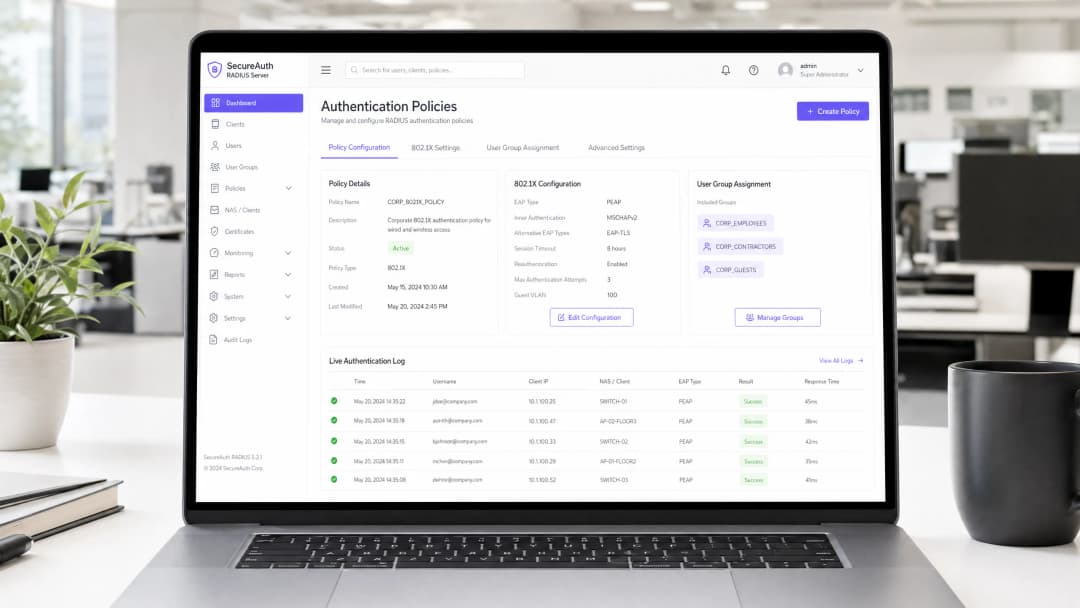
RADIUS Server Setup & 802.1X Architecture Configurator
Model your enterprise RADIUS deployment: configure Identity Provider sync, EAP authentication methods, dynamic VLAN attributes, and firewall ports.
Cloud-Native 802.1X Architecture
RadSec (TCP 2083 with TLS) & UDP 1812/1813Architecture Insight: Eliminate shared PSKs by pushing device certificates via Microsoft Intune or Jamf. EAP-TLS with Cloud RADIUS removes local server maintenance while enforcing strict role-based VLAN segmentation.
कार्यकारी सारांश (Executive Summary)
एंटरप्राइज वातावरण के लिए - चाहे वह एक फैला हुआ विश्वविद्यालय परिसर हो, एक उच्च-घनत्व वाला स्टेडियम हो, या एक वितरित रिटेल चेन हो - WiFi एक्सेस के लिए प्री-शेयर्ड की (PSK) पर भरोसा करना एक महत्वपूर्ण सुरक्षा जोखिम है। एक भी क्रेडेंशियल लीक होने से पूरा नेटवर्क असुरक्षित हो जाता है, और एक्सेस वापस लेने के लिए पूरे परिसर के हर डिवाइस का पासवर्ड बदलना पड़ता है। एक RADIUS (रिमोट ऑथेंटिकेशन डायल-इन यूजर सर्विस) सर्वर के माध्यम से 802.1X ऑथेंटिकेशन लागू करना इस समस्या को पूरी तरह से समाप्त कर देता है: प्रत्येक उपयोगकर्ता व्यक्तिगत रूप से ऑथेंटिकेट होता है, एक्सेस को तुरंत वापस लिया जा सकता है, और नेटवर्क सेगमेंटेशन को गतिशील रूप से लागू किया जाता है।
यह गाइड IT प्रबंधकों और नेटवर्क आर्किटेक्ट्स को RADIUS ऑथेंटिकेशन तैनात करने के लिए एक निश्चित रोडमैप प्रदान करती है। हम ऑन-प्रिमाइसेस और क्लाउड-होस्टेड डिप्लॉयमेंट के बीच आर्किटेक्चरल ट्रेड-ऑफ, एक्सटेंसिबल ऑथेंटिकेशन प्रोटोकॉल (EAP) विधियों के कॉन्फ़िगरेशन, और एक्टिव डायरेक्ट्री जैसी डायरेक्ट्री सेवाओं के साथ एकीकरण को कवर करते हैं। हम यह भी प्रदर्शित करते हैं कि कैसे एक मजबूत ऑथेंटिकेशन लेयर आगंतुकों के लिए निर्बाध एक्सेस प्रदान करने के लिए Guest WiFi समाधानों के साथ एकीकृत होती है, जबकि WiFi Analytics को कैप्चर करती है जो आपके नेटवर्क को एक बिजनेस इंटेलिजेंस एसेट में बदल देती है।
तकनीकी गहन विश्लेषण (Technical Deep-Dive)
802.1X आर्किटेक्चर
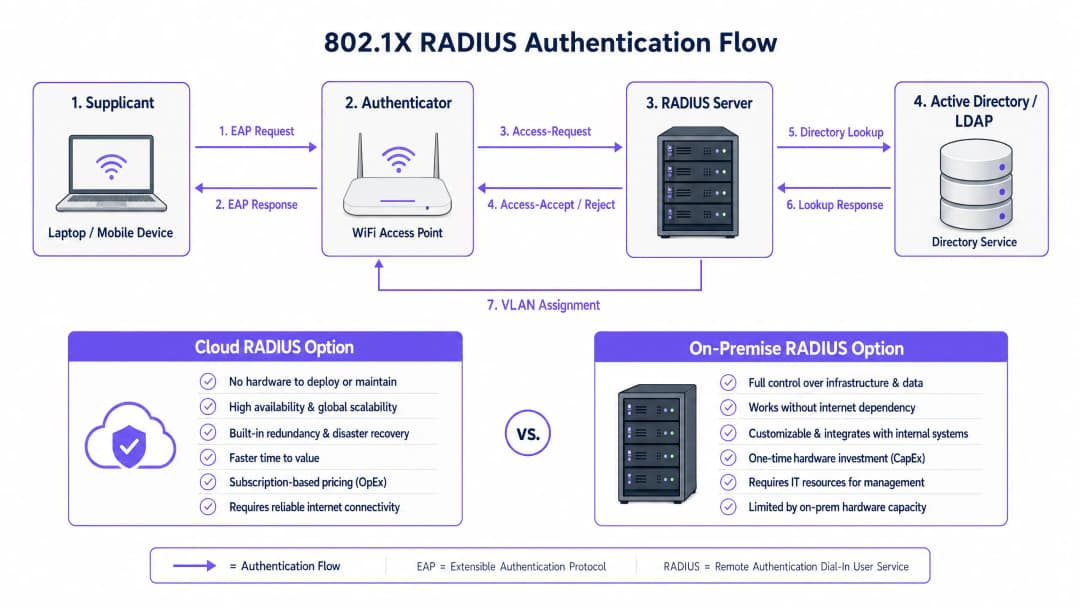
IEEE 802.1X मानक पोर्ट-आधारित नेटवर्क एक्सेस कंट्रोल (PNAC) को परिभाषित करता है। एक वायरलेस संदर्भ में, इसमें तीन प्राथमिक भूमिकाएं मिलकर काम करती हैं:
| भूमिका | घटक | जिम्मेदारी |
|---|---|---|
| सप्लिकेंट | क्लाइंट डिवाइस (लैपटॉप, स्मार्टफोन) | नेटवर्क एक्सेस का अनुरोध करने के लिए क्रेडेंशियल प्रस्तुत करता है |
| ऑथेंटिकेटर | WiFi एक्सेस पॉइंट या कंट्रोलर | एक्सेस कंट्रोल लागू करता है; EAP संदेशों को रिले करता है |
| ऑथेंटिकेशन सर्वर | RADIUS सर्वर | क्रेडेंशियल को मान्य करता है; स्वीकार/अस्वीकार और पॉलिसी एट्रिब्यूट वापस करता है |
जब एक सप्लिकेंट एक्सेस पॉइंट से जुड़ता है, तो AP EAP (एक्सटेंसिबल ऑथेंटिकेशन प्रोटोकॉल) संदेशों को छोड़कर सभी डेटा ट्रैफ़िक को ब्लॉक कर देता है। AP इन EAP संदेशों को RADIUS पैकेटों में एनकैप्सुलेट करता है और उन्हें RADIUS सर्वर पर भेज देता है। सर्वर एक बैकएंड डेटाबेस - आमतौर पर LDAP या एक्टिव डायरेक्ट्री - के खिलाफ क्रेडेंशियल की पुष्टि करता है और एक Access-Accept या Access-Reject संदेश वापस करता है। यदि स्वीकार कर लिया जाता है, तो AP पोर्ट को अनब्लॉक कर देता है और क्लाइंट का ट्रैफ़िक स्वतंत्र रूप से प्रवाहित होता है।
EAP विधि का चयन करना
आपके RADIUS डिप्लॉयमेंट की सुरक्षा काफी हद तक चुनी गई EAP विधि पर निर्भर करती है। एंटरप्राइज डिप्लॉयमेंट में दो सबसे प्रचलित विधियां हैं:
EAP-TLS (Transport Layer Security) सबसे उत्कृष्ट मानक है। इसके लिए RADIUS सर्वर और प्रत्येक क्लाइंट डिवाइस दोनों पर डिजिटल सर्टिफिकेट की आवश्यकता होती है, जिससे पासवर्ड की आवश्यकता पूरी तरह से समाप्त हो जाती है। भले ही कोई हमलावर पूर्ण प्रमाणीकरण एक्सचेंज को कैप्चर कर ले, लेकिन निकालने के लिए कोई क्रेडेंशियल नहीं होते हैं। इसका एकमात्र नुकसान प्रशासनिक ओवरहेड है: क्लाइंट सर्टिफिकेट को तैनात और प्रबंधित करने के लिए एक कार्यशील पब्लिक की इन्फ्रास्ट्रक्चर (PKI) और एंडपॉइंट्स पर सर्टिफिकेट वितरित करने के लिए एक MDM समाधान (जैसे, Microsoft Intune, Jamf) की आवश्यकता होती है।
PEAP-MSCHAPv2 (Protected EAP) व्यवहार में सबसे व्यापक रूप से तैनात की जाने वाली विधि है। यह एक एन्क्रिप्टेड TLS टनल स्थापित करने के लिए सर्वर-साइड सर्टिफिकेट का उपयोग करता है, जिसके अंदर क्लाइंट उपयोगकर्ता नाम और पासवर्ड के साथ प्रमाणित होता है। इसे EAP-TLS की तुलना में तैनात करना काफी आसान है क्योंकि केवल एक सर्टिफिकेट - सर्वर का - प्रबंधित करने की आवश्यकता होती है। हालांकि, इसमें एक गंभीर चेतावनी शामिल है: यदि क्लाइंट डिवाइसेस को विशेष रूप से RADIUS सर्वर के सर्टिफिकेट को मान्य करने के लिए कॉन्फ़िगर नहीं किया गया है, तो वे दुष्ट एक्सेस पॉइंट्स के माध्यम से मैन-इन-द-मिडल (MitM) हमलों के प्रति संवेदनशील होते हैं।
गंभीर सुरक्षा नोट: क्लाइंट डिवाइसेस पर सख्त सर्टिफिकेट सत्यापन लागू न करने से PEAP-MSCHAPv2 के सुरक्षा लाभ प्रभावी रूप से समाप्त हो जाते हैं। एक हमलावर एक दुष्ट AP तैनात कर सकता है, एक धोखाधड़ी वाला सर्टिफिकेट प्रस्तुत कर सकता है, और प्लेनटेक्स्ट में उपयोगकर्ता क्रेडेंशियल कैप्चर कर सकता है। यह कोई सैद्धांतिक जोखिम नहीं है - यह एक अच्छी तरह से प्रलेखित हमला वेक्टर है जिसका वास्तविक दुनिया के वातावरण में फायदा उठाया गया है।
कार्यान्वयन मार्गदर्शिका (Implementation Guide)
चरण 1: आर्किटेक्चरल निर्णय - ऑन-प्रिमाइसेस बनाम क्लाउड RADIUS
पहला निर्णय यह है कि RADIUS इन्फ्रास्ट्रक्चर को कहाँ होस्ट किया जाए। यह मुख्य रूप से एक परिचालन और लागत का प्रश्न है, सुरक्षा का नहीं - दोनों मॉडलों को सुरक्षित रूप से तैनात किया जा सकता है।
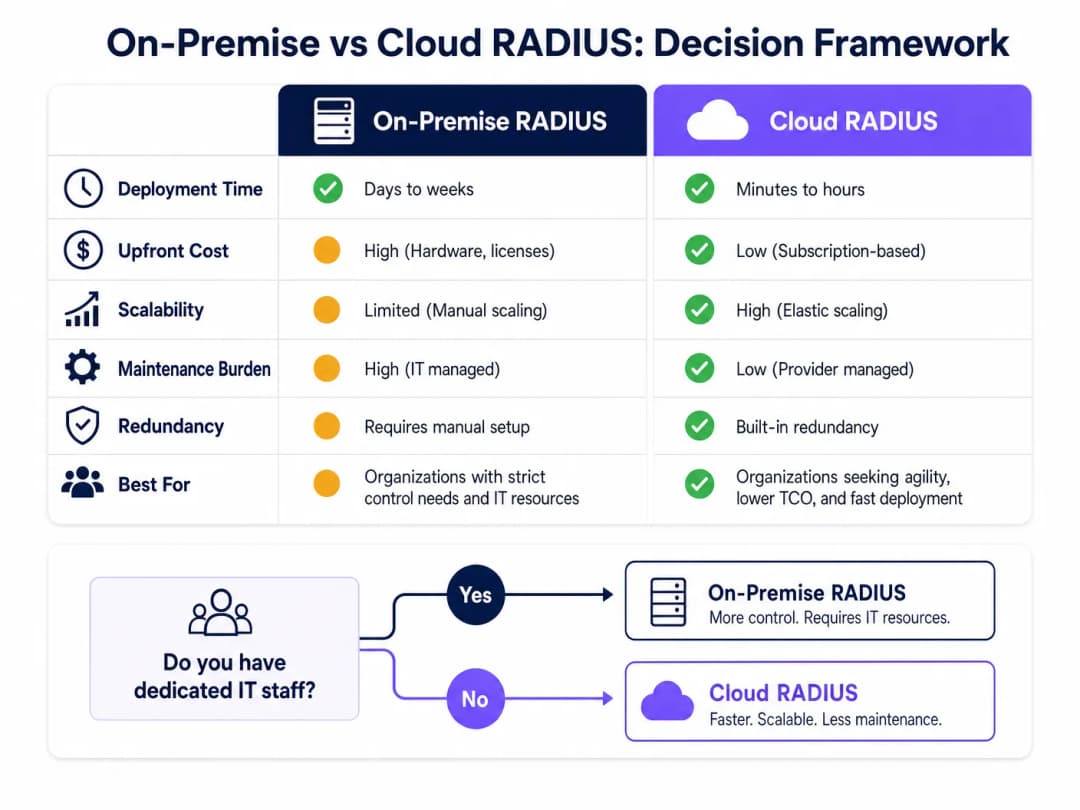
ऑन-प्रिमाइसेस RADIUS (जैसे, Microsoft NPS, FreeRADIUS, Cisco ISE) उन संगठनों के लिए उपयुक्त है जिनके पास समर्पित IT कर्मचारी, मौजूदा ऑन-प्रिमाइसेस डायरेक्टरी इन्फ्रास्ट्रक्चर और कड़े डेटा संप्रभुता या अनुपालन आवश्यकताएं हैं। यह प्रमाणीकरण के लिए इंटरनेट कनेक्टिविटी पर निर्भर नहीं करता है, जो उन वातावरणों के लिए एक सार्थक लाभ है जहां इंटरनेट अपटाइम की गारंटी नहीं दी जा सकती है।
क्लाउड RADIUS वितरित वातावरणों के लिए तेजी से पसंदीदा मॉडल बनता जा रहा है - रिटेल श्रृंखलाओं, हॉस्पिटैलिटी समूहों और परिवहन केंद्रों के लिए जहां हर स्थान पर सर्वर तैनात करना परिचालन रूप से अव्यावहारिक है। क्लाउड RADIUS क्लाउड पहचान प्रदाताओं (Azure AD, Google Workspace, Okta) के साथ मूल रूप से एकीकृत होता है और अंतर्निहित उच्च उपलब्धता और वैश्विक मापनीयता प्रदान करता है।
चरण 2: RADIUS सर्वर स्थापित और कॉन्फ़िगर करें
Microsoft NPS (Windows-केंद्रित वातावरणों में सबसे आम विकल्प) का उपयोग करके ऑन-प्रिमाइसेस परिनियोजन के लिए:
- सर्वर मैनेजर के माध्यम से नेटवर्क पॉलिसी सर्वर भूमिका स्थापित करें।
- NPS सर्वर को Active Directory में पंजीकृत करें ताकि इसे उपयोगकर्ता डायल-इन विशेषताओं को पढ़ने की अनुमति मिल सके।
- प्रत्येक एक्सेस पॉइंट या वायरलेस कंट्रोलर के लिए एक RADIUS Client प्रविष्टि बनाएं, जिसमें AP का IP पता और एक मजबूत, विशिष्ट Shared Secret निर्दिष्ट हो।
- एक्सेस के लिए शर्तों (जैसे, उपयोगकर्ता समूह सदस्यता) और बाधाओं (जैसे, EAP विधि, सत्र का समय समाप्त होना) को परिभाषित करने वाली एक Network Policy कॉन्फ़िगर करें।
- अनुरोधों को स्थानीय रूप से संसाधित करने के लिए Connection Request Policy को कॉन्फ़िगर करें।
Linux पर FreeRADIUS के लिए:
- पैकेज मैनेजर के माध्यम से इंस्टॉल करें:
sudo apt-get install freeradius freeradius-ldap। - RADIUS क्लाइंट (APs) और उनके Shared Secrets को परिभाषित करने के लिए
/etc/freeradius/3.0/clients.confको कॉन्फ़िगर करें। - अपने Active Directory या LDAP सर्वर को इंगित करने के लिए
/etc/freeradius/3.0/mods-available/ldapमें LDAP मॉड्यूल को कॉन्फ़िगर करें। - LDAP मॉड्यूल को सक्षम करें:
sudo ln -s /etc/freeradius/3.0/mods-available/ldap /etc/freeradius/3.0/mods-enabled/। /etc/freeradius/3.0/mods-available/eapमें EAP विधियों को परिभाषित करें।
चरण 3: एक्सेस पॉइंट्स कॉन्फ़िगर करें
अपने वायरलेस कंट्रोलर या व्यक्तिगत एक्सेस पॉइंट्स पर:
- RADIUS सर्वर का IP पता (या पते) और प्रमाणीकरण पोर्ट (डिफ़ॉल्ट: UDP 1812) परिभाषित करें।
- Shared Secret कॉन्फ़िगर करें - कम से कम 22 वर्णों का उपयोग करें, जिसमें अल्फ़ान्यूमेरिक और विशेष वर्णों का मिश्रण हो। प्रति स्थान या AP समूह के लिए एक विशिष्ट सीक्रेट का उपयोग करें।
- 802.1X कुंजी प्रबंधन के साथ WPA2-Enterprise या WPA3-Enterprise सुरक्षा मोड का उपयोग करने के लिए SSID कॉन्फ़िगर करें।
- फ़ेलओवर के लिए एक द्वितीयक RADIUS सर्वर कॉन्फ़िगर करें।
चरण 4: निर्देशिका एकीकरण
ऑन-प्रिमाइसेस AD एकीकरण के लिए, RADIUS सर्वर को डोमेन में शामिल होना चाहिए या उसके पास LDAP पढ़ने की पहुंच होनी चाहिए। सुनिश्चित करें कि LDAP बाइंडिंग के लिए उपयोग किए जाने वाले सेवा खातों के पास न्यूनतम आवश्यक अनुमतियां हों। क्लाउड RADIUS के लिए, अपने IdP के साथ API-आधारित सिंक्रनाइज़ेशन या SAML/OIDC एकीकरण को कॉन्फ़िगर करें।
अपनी निर्देशिका में स्पष्ट उपयोगकर्ता समूह परिभाषित करें, क्योंकि ये प्राधिकरण नीतियों को संचालित करेंगे। अनुशंसित समूह संरचना:
| समूह | VLAN | एक्सेस स्तर |
|---|---|---|
Corp_Staff |
VLAN 10 | पूर्ण आंतरिक नेटवर्क |
Corp_Contractors |
VLAN 20 | इंटरनेट + विशिष्ट आंतरिक संसाधन |
Corp_IoT |
VLAN 30 | केवल पृथक, डिवाइस-विशिष्ट पोर्ट |
Corp_Guests |
VLAN 100 | Captive Portal के माध्यम से केवल इंटरनेट |
चरण 5: क्लाइंट कॉन्फ़िगरेशन और प्रमाणपत्र सत्यापन
यह संचालन की दृष्टि से सबसे महत्वपूर्ण चरण है। प्रबंधित उपकरणों पर बिना किसी सूचना के WiFi कॉन्फ़िगरेशन भेजने के लिए Windows के लिए Group Policy (GPO) और macOS/iOS/Android के लिए MDM प्रोफ़ाइल का उपयोग करें। प्रोफ़ाइल में निम्नलिखित निर्दिष्ट होना चाहिए:
- Root CA जिसने RADIUS सर्वर का प्रमाणपत्र जारी किया था।
- अपेक्षित सर्वर नाम (सर्वर प्रमाणपत्र का CN या SAN)।
- EAP विधि और आंतरिक प्रमाणीकरण प्रोटोकॉल।
अप्रबंधित BYOD उपकरणों के लिए, स्पष्ट स्व-सेवा ऑनबोर्डिंग निर्देश प्रदान करें, आदर्श रूप से एक नेटवर्क एक्सेस कंट्रोल (NAC) पोर्टल के माध्यम से।
चरण 6: डायनेमिक VLAN असाइनमेंट लागू करें
RADIUS सर्वर को Access-Accept प्रतिक्रिया में VLAN असाइनमेंट विशेषताओं को वापस करने के लिए कॉन्फ़िगर करें:
Tunnel-Type=VLAN(13)Tunnel-Medium-Type=IEEE-802(6)Tunnel-Private-Group-Id=<VLAN ID>
एक्सेस पॉइंट इन एट्रिब्यूट्स को पढ़ता है और प्रमाणित क्लाइंट को निर्दिष्ट VLAN पर रखता है - उपयोगकर्ताओं के रोल या स्थान बदलने पर किसी मैन्युअल रीकॉन्फ़िगरेशन की आवश्यकता नहीं होती है।
अपने विशिष्ट सेटअप को लेकर कोई सवाल हैं?
हमारी टीम 80,000 से अधिक वेन्यू में वेन्यू ऑपरेटरों, IT मैनेजरों और नेटवर्क इंजीनियरों के साथ काम करती है। 20 मिनट का कॉल बुक करें और हम आपको दिखाएंगे कि आपके जैसे अन्य लोगों ने इसे कैसे हल किया।
सर्वोत्तम प्रथाएं (Best Practices)
रिडंडेंसी से कोई समझौता नहीं किया जा सकता। न्यूनतम दो RADIUS सर्वर (प्राथमिक और द्वितीयक) तैनात करें और स्वचालित रूप से फेल ओवर करने के लिए सभी एक्सेस पॉइंट्स को कॉन्फ़िगर करें। ऑन-प्रिमाइसेस डिप्लॉयमेंट के लिए, द्वितीयक सर्वर को एक अलग भौतिक स्थान या उपलब्धता क्षेत्र (availability zone) में रखने पर विचार करें। RADIUS आउटेज का अर्थ है कि कोई भी प्रमाणित नहीं हो सकता है, जो कि 802.1X-सुरक्षित SSIDs के लिए पूरी तरह से नेटवर्क आउटेज है।
प्रमाणपत्र की समाप्ति (certificate expiry) की सक्रिय रूप से निगरानी करें। RADIUS सर्वर प्रमाणपत्र की समाप्ति अचानक, व्यापक प्रमाणीकरण विफलताओं के सबसे सामान्य कारणों में से एक है। समाप्ति से कम से कम 30 दिन पहले प्रशासकों को सचेत करने के लिए निगरानी लागू करें। यह सर्वर प्रमाणपत्र और चेन में किसी भी मध्यवर्ती CA प्रमाणपत्र दोनों पर लागू होता है।
साझा रहस्य (Shared Secret) को एक महत्वपूर्ण क्रेडेंशियल मानें। AP और RADIUS सर्वर के बीच साझा रहस्य RADIUS पैकेट को एन्क्रिप्ट करता है। प्रति स्थान या AP समूह के लिए अद्वितीय रहस्यों का उपयोग करें, उन्हें एक सीक्रेट्स मैनेजर में संग्रहीत करें, और उन्हें समय-समय पर रोटेट करें। अधिक व्यापक नेटवर्क सुरक्षा स्वच्छता अनुशंसाओं के लिए हमारी गाइड मजबूत DNS और सुरक्षा के साथ अपने नेटवर्क को सुरक्षित रखें देखें।
अनुपालन ढांचे (compliance frameworks) के साथ संरेखित करें। PCI-DSS के अधीन वातावरण (जैसे, रिटेल भुगतान नेटवर्क) के लिए, 802.1X प्रमाणीकरण सीधे नेटवर्क एक्सेस कंट्रोल और ऑडिट लॉगिंग की आवश्यकताओं का समर्थन करता है। GDPR अनुपालन के लिए, RADIUS एकाउंटिंग लॉग (पोर्ट 1813) इस बात का विस्तृत ऑडिट ट्रेल प्रदान करते हैं कि किसने, कहाँ से, और कब नेटवर्क तक पहुँच प्राप्त की - जो घटना प्रतिक्रिया के लिए मूल्यवान है। Healthcare वातावरण के लिए, डायनामिक VLAN असाइनमेंट के माध्यम से नेटवर्क सेगमेंटेशन इलेक्ट्रॉनिक रूप से सुरक्षित स्वास्थ्य जानकारी (ePHI) की सुरक्षा के लिए HIPAA आवश्यकताओं का समर्थन करता है।
समस्या निवारण और जोखिम शमन
| विफलता मोड | लक्षण | समाधान |
|---|---|---|
| प्रमाणपत्र समाप्ति | अचानक बड़े पैमाने पर प्रमाणीकरण विफलताएं | समाप्ति की निगरानी करें; प्रमाणपत्र का नवीनीकरण और पुन: नियोजन करें |
| NTP डि-सिंक्रोनाइजेशन | रुक-रुक कर होने वाली EAP-TLS विफलताएं | सुनिश्चित करें कि RADIUS सर्वर और DCs एक ही NTP स्रोत से सिंक हों |
| LDAP कनेक्टिविटी हानि | AD के अनुपलब्ध होने पर प्रमाणीकरण विफल हो जाता है | रिडंडेंट DCs तैनात करें; हाल के प्रमाणीकरणों को कैश करने के लिए RADIUS को कॉन्फ़िगर करें |
| गलत साझा रहस्य (Shared Secret) | AP लॉग RADIUS timeout या Bad authenticator दिखाते हैं |
सत्यापित करें कि रहस्य AP और RADIUS सर्वर दोनों पर मेल खाता है |
| क्लाइंट प्रमाणपत्र बेमेल | विशिष्ट उपकरणों के लिए EAP-TLS विफलताएं | सत्यापित करें कि क्लाइंट प्रमाणपत्र विश्वसनीय CA द्वारा जारी किया गया है; प्रमाणपत्र वैधता अवधि की जांच करें |
| VLAN असाइन नहीं किया गया | उपयोगकर्ता प्रमाणित है लेकिन गलत नेटवर्क सेगमेंट पर है | सत्यापित करें कि RADIUS एट्रिब्यूट्स सही तरीके से लौटाए गए हैं; AP VLAN कॉन्फ़िगरेशन की जांच करें |
802.1X कॉन्फ़िगरेशन प्रक्रिया के बारे में अधिक गहराई से जानने के लिए, How to Configure 802.1X WiFi Authentication: A Step-by-Step Guide विक्रेता-विशिष्ट विस्तृत कॉन्फ़िगरेशन गाइड प्रदान करता है।
ROI और व्यावसायिक प्रभाव
PSK से RADIUS-समर्थित 802.1X पर स्विच करने के लिए कॉन्फ़िगरेशन में प्रारंभिक निवेश की आवश्यकता होती है, और संभवतः क्लाउड समाधानों के लिए लाइसेंसिंग या ऑन-प्रिमाइसेस डिप्लॉयमेंट के लिए हार्डवेयर की आवश्यकता होती है। ROI का मामला सीधा है:
जोखिम शमन (Risk mitigation): UK में डेटा ब्रीच की औसत लागत £3 मिलियन से अधिक है (IBM Cost of a Data Breach Report)। एक समझौता किया गया PSK पूरे नेटवर्क को खतरे में डाल सकता है। 802.1X प्रभाव के दायरे को केवल एक समझौता किए गए उपयोगकर्ता खाते तक सीमित करता है, जिसे निर्देशिका (directory) के माध्यम से सेकंडों में अक्षम किया जा सकता है।
परिचालन दक्षता: डायनामिक VLAN असाइनमेंट स्टाफ की भूमिकाएं बदलने पर मैन्युअल नेटवर्क रीकॉन्फ़िगरेशन की आवश्यकता को समाप्त करता है। एक नए कर्मचारी को शामिल करने का अर्थ है उन्हें सही AD समूह में जोड़ना - नेटवर्क एक्सेस स्वचालित रूप से लागू हो जाता है।
अनुपालन स्थिति (Compliance posture): PCI-DSS, ISO 27001, या Cyber Essentials Plus के अधीन संगठनों के लिए, 802.1X एक प्रत्यक्ष नियंत्रण है जिसे ऑडिटर्स देखने की अपेक्षा करते हैं। इसे तैनात करने से आपकी अनुपालन स्थिति मजबूत होती है और ऑडिट सुधार लागत कम होती है।
अतिथि अनुभव और एनालिटिक्स: वेन्यू ऑपरेटरों के लिए, स्टाफ प्रमाणीकरण के लिए RADIUS को विज़िटर एक्सेस के लिए Purple के Guest WiFi प्लेटफॉर्म के साथ एकीकृत करना एक एकीकृत, स्तरीय एक्सेस मॉडल बनाता है। कर्मचारी 802.1X के माध्यम से चुपचाप प्रमाणित होते हैं; अतिथि एक ब्रांडेड कैप्टिव पोर्टल के माध्यम से जुड़ते हैं। Purple का WiFi Analytics प्लेटफॉर्म तब विज़िटर के रुकने के समय, दोबारा आने की दर और जुड़ाव मेट्रिक्स पर रीयल-टाइम दृश्यता प्रदान करता है - वह डेटा जो सीधे मार्केटिंग खर्च और वेन्यू संचालन के निर्णयों को सूचित करता है।
आगे पढ़ने के लिए, पुर्तगाली भाषा में कार्यान्वयन मार्गदर्शन के लिए Como Configurar a Autenticação 802.1X WiFi: Um Guia Passo a Passo देखें, और यह सुनिश्चित करने के मार्गदर्शन के लिए कि अंतर्निहित कनेक्टिविटी उद्यम आवश्यकताओं को पूरा करती है, What Is a Leased Line? Dedicated Business Internet पढ़ें
मुख्य परिभाषाएं
RADIUS (Remote Authentication Dial-In User Service)
एक नेटवर्किंग प्रोटोकॉल जो किसी नेटवर्क सेवा से जुड़ने वाले उपयोगकर्ताओं के लिए केंद्रीकृत प्रमाणीकरण, प्राधिकरण और लेखांकन (AAA) प्रबंधन प्रदान करता है। RFC 2865 में परिभाषित।
मुख्य सर्वर घटक जो WiFi एक्सेस प्रदान करने से पहले निर्देशिका के विरुद्ध उपयोगकर्ता क्रेडेंशियल्स को सत्यापित करता है। 802.1X का उपयोग करने वाले प्रत्येक एंटरप्राइज WiFi परिनियोजन के लिए एक RADIUS सर्वर की आवश्यकता होती है।
802.1X
पोर्ट आधारित नेटवर्क एक्सेस कंट्रोल (PNAC) के लिए एक IEEE मानक। यह उन उपकरणों को प्रमाणीकरण तंत्र प्रदान करता है जो LAN या WLAN से जुड़ना चाहते हैं, और प्रमाणीकरण सफल होने तक सभी नॉन-EAP ट्रैफ़िक को ब्लॉक कर देता है।
एक व्यापक ढांचागत मानक जो यह परिभाषित करता है कि सप्लीकेंट (Supplicant), ऑथेंटिकेटर (Authenticator) और प्रमाणीकरण सर्वर कैसे संचार करते हैं। जब IT टीमें "एंटरप्राइज WiFi सुरक्षा" की बात करती हैं, तो उनका आमतौर पर मतलब 802.1X के साथ WPA2/WPA3-Enterprise से होता है।
Supplicant
क्लाइंट डिवाइस - या अधिक सटीक रूप से, उस डिवाइस पर 802.1X सॉफ़्टवेयर स्टैक - जो नेटवर्क पर क्रेडेंशियल प्रस्तुत करके प्रमाणीकरण प्रक्रिया शुरू करता है।
Windows पर, इन-बिल्ट supplicant, Wireless AutoConfig सेवा है। macOS और iOS पर, यह OS का मूल हिस्सा है। यह सुनिश्चित करना कि supplicant सही ढंग से कॉन्फ़िगर किया गया है (विशेष रूप से प्रमाणपत्र सत्यापन के लिए) परिनियोजन समस्याओं का सबसे आम स्रोत है।
Authenticator
वह नेटवर्क डिवाइस - आमतौर पर एक WiFi एक्सेस पॉइंट या वायरलेस कंट्रोलर - जो Supplicant और RADIUS सर्वर के बीच एक मध्यस्थ के रूप में कार्य करता है, प्रमाणीकरण परिणाम के आधार पर एक्सेस कंट्रोल लागू करता है।
AP पोर्ट पर सभी डेटा ट्रैफ़िक को तब तक ब्लॉक करता है जब तक उसे RADIUS सर्वर से Access-Accept प्राप्त नहीं हो जाता। यह Access-Accept प्रतिक्रिया से RADIUS विशेषताएँ (जैसे, VLAN असाइनमेंट) भी पढ़ता है और उन्हें सत्र पर लागू करता है।
EAP (Extensible Authentication Protocol)
RFC 3748 में परिभाषित एक प्रमाणीकरण ढांचा जो Supplicant और प्रमाणीकरण सर्वर के बीच विभिन्न प्रमाणीकरण विधियों (TLS, PEAP, TTLS, आदि) के लिए एक मानकीकृत परिवहन तंत्र प्रदान करता है।
EAP क्लाइंट और RADIUS सर्वर के बीच बोली जाने वाली 'भाषा' है। EAP पद्धति का चयन (EAP-TLS बनाम PEAP) प्रमाणीकरण प्रणाली की सुरक्षा शक्ति और परिनियोजन जटिलता को निर्धारित करता है।
PEAP (Protected EAP)
एक EAP विधि जो पहले सर्वर के प्रमाणपत्र का उपयोग करके एक TLS टनल स्थापित करती है, फिर उस एन्क्रिप्टेड टनल के अंदर एक द्वितीयक प्रमाणीकरण (आमतौर पर उपयोगकर्ता नाम/पासवर्ड के साथ MSCHAPv2) करती है।
सुरक्षा और परिनियोजन की सरलता के संतुलन के कारण सबसे आम एंटरप्राइज WiFi प्रमाणीकरण पद्धति। इसके लिए केवल सर्वर-साइड प्रमाणपत्र की आवश्यकता होती है, जिससे इसे EAP-TLS की तुलना में तैनात करना बहुत आसान हो जाता है।
Dynamic VLAN Assignment
एक RADIUS विशेषता जहाँ सर्वर Access-Accept प्रतिक्रिया में VLAN-विशिष्ट विशेषताओं (Tunnel-Type, Tunnel-Medium-Type, Tunnel-Private-Group-Id) को शामिल करता है, जो AP को प्रमाणित क्लाइंट को एक विशिष्ट VLAN पर रखने का निर्देश देता है।
एक ही SSID को विभिन्न सुरक्षा आवश्यकताओं वाले कई उपयोगकर्ता समूहों की सेवा करने में सक्षम बनाता है। विभिन्न उपयोगकर्ता समूहों के लिए कई SSID प्रसारित करने की आवश्यकता को समाप्त करता है, जिससे RF ओवरहेड कम होता है और उपयोगकर्ता अनुभव सरल होता है।
Shared Secret
एक पूर्व-कॉन्फ़िगर की गई टेक्स्ट स्ट्रिंग जो केवल Authenticator (AP) और RADIUS सर्वर को ज्ञात होती है, जिसका उपयोग RADIUS पैकेटों को साइन और एन्क्रिप्ट करने के लिए किया जाता है, जिससे संचार की अखंडता और प्रामाणिकता सुनिश्चित होती है।
एक महत्वपूर्ण सुरक्षा कॉन्फ़िगरेशन तत्व। यदि shared secret कमजोर है या उसके साथ समझौता किया गया है, तो एक हमलावर नकली RADIUS Access-Accept प्रतिक्रियाएं बना सकता है, जिससे अनधिकृत नेटवर्क एक्सेस प्राप्त हो सकता है। प्रति स्थान अद्वितीय सीक्रेट्स का उपयोग करें और उन्हें सीक्रेट्स मैनेजर में संग्रहीत करें।
MAC Authentication Bypass (MAB)
एक फॉलबैक प्रमाणीकरण तंत्र जहां डिवाइस के MAC पते का उपयोग उसके पहचान क्रेडेंशियल के रूप में किया जाता है, जो उन उपकरणों के लिए नेटवर्क एक्सेस सक्षम करता है जो 802.1X supplicants का समर्थन नहीं करते हैं।
बिना स्क्रीन वाले उपकरणों (प्रिंटर, IoT सेंसर, IP कैमरे) के लिए उपयोग किया जाता है। चूंकि MAC पते सार्वजनिक रूप से दिखाई देते हैं और आसानी से स्पूफ किए जा सकते हैं, इसलिए MAB मजबूत प्रमाणीकरण के बजाय केवल डिवाइस की पहचान प्रदान करता है। इसे हमेशा प्रतिबंधात्मक VLAN असाइनमेंट के साथ जोड़ें।
हल किए गए उदाहरण
500 स्थानों वाले एक राष्ट्रीय खुदरा स्टोर श्रृंखला को स्टोर प्रबंधकों के टैबलेट और POS टर्मिनलों के लिए सुरक्षित WiFi लागू करने की आवश्यकता है। वे वर्तमान में सभी स्टोरों में एक एकल PSK का उपयोग करते हैं, जिसे अक्सर अनधिकृत कर्मचारियों और ठेकेदारों के साथ साझा किया जाता है। वे पहचान प्रबंधन के लिए Azure AD का उपयोग करते हैं और शाखा स्थानों पर उनके पास कोई समर्पित IT कर्मचारी नहीं है।
सीधे Azure AD के साथ एकीकृत Cloud RADIUS समाधान तैनात करें। यह 500 स्थानों पर ऑन-प्रिमाइसेस RADIUS सर्वर तैनात करने और प्रबंधित करने की आवश्यकता को समाप्त करता है। IT टीम PEAP-MSCHAPv2 के लिए कॉन्फ़िगर किए गए सभी स्टोर प्रबंधकों के टैबलेट और POS टर्मिनलों पर WiFi प्रोफाइल पुश करने के लिए Microsoft Intune का उपयोग करती है, जो Cloud RADIUS सर्वर के प्रमाणपत्र के सत्यापन को कड़ाई से लागू करती है। Cloud RADIUS नीति एक्सेस देने से पहले उपयोगकर्ता की Azure AD समूह सदस्यता की जाँच करती है: 'Store_Managers' समूह को VLAN 10 (पूर्ण POS और बैक-ऑफिस एक्सेस) प्राप्त होता है, 'Contractors' समूह को VLAN 20 (केवल-इंटरनेट) प्राप्त होता है। जब किसी ठेकेदार का अनुबंध समाप्त होता है, तो उन्हें Azure AD समूह से हटाने से सभी 500 स्थानों पर एक साथ उनका WiFi एक्सेस तुरंत रद्द हो जाता है - किसी PSK बदलाव की आवश्यकता नहीं होती है।
एक 400 कमरों वाले शहर के केंद्र के होटल को कर्मचारियों (फ्रंट डेस्क, हाउसकीपिंग, प्रबंधन) और मेहमानों दोनों के लिए सुरक्षित WiFi प्रदान करने की आवश्यकता है। कर्मचारियों को संपत्ति प्रबंधन प्रणाली (PMS) और आंतरिक सर्वर तक पहुंच की आवश्यकता होती है। मेहमानों को केवल इंटरनेट एक्सेस की आवश्यकता होती है। होटल में एक एकल ऑन-प्रिमाइसेस Windows Server वातावरण है।
एक समर्पित Windows Server VM पर Microsoft NPS तैनात करें। वायरलेस इंफ्रास्ट्रक्चर पर दो SSID कॉन्फ़िगर करें: 'Hotel_Staff' (WPA2-Enterprise, 802.1X) और 'Hotel_Guest' (ओपन या WPA2-Personal, जो एक Captive Portal पर रीडायरेक्ट करता है)। स्टाफ SSID के लिए, NPS Active Directory के विरुद्ध क्रेडेंशियल्स को सत्यापित करता है और गतिशील VLAN असाइनमेंट लौटाता है: 'Management' AD समूह → VLAN 10 (पूर्ण एक्सेस), 'FrontDesk' → VLAN 20 (PMS एक्सेस), 'Housekeeping' → VLAN 30 (केवल इंटरनेट + शेड्यूलिंग ऐप)। मेहमानों के लिए, ब्रांडेड लॉगिन अनुभव प्रदान करने, प्रथम-पक्ष डेटा (ईमेल, मार्केटिंग सहमति) एकत्र करने और रुकने के समय व दोबारा आने वाले मेहमानों का विश्लेषण प्राप्त करने के लिए Captive Portal को Purple के गेस्ट WiFi प्लेटफॉर्म के साथ एकीकृत करें। दो-SSID मॉडल स्टाफ और गेस्ट ट्रैफ़िक को नेटवर्क लेयर पर पूरी तरह से अलग रखता है।
अभ्यास प्रश्न
Q1. आपका संगठन 2,000 Windows लैपटॉप को एक शेयर्ड PSK से PEAP-MSCHAPv2 के साथ 802.1X पर माइग्रेट कर रहा है। आपकी सुरक्षा टीम ने सचेत किया है कि PEAP में दुष्ट एक्सेस पॉइंट्स के माध्यम से क्रेडेंशियल हार्वेस्टिंग का खतरा है। इस जोखिम को कम करने के लिए सबसे महत्वपूर्ण कॉन्फ़िगरेशन चरण क्या है, और आप इसे बड़े पैमाने पर कैसे तैनात करते हैं?
संकेत: इस बात पर विचार करें कि क्लाइंट को स्व-हस्ताक्षरित (self-signed) प्रमाणपत्र प्रस्तुत करने वाले धोखाधड़ी वाले RADIUS सर्वर पर भरोसा करने से क्या रोकता है।
मॉडल उत्तर देखें
महत्वपूर्ण चरण प्रत्येक क्लाइंट डिवाइस पर सख्त सर्वर प्रमाणपत्र सत्यापन (strict server certificate validation) लागू करना है। Group Policy Objects (GPO) का उपयोग करके, सभी 2,000 लैपटॉप पर एक WiFi प्रोफ़ाइल पुश करें जो निर्दिष्ट करती है: (1) सटीक Root CA प्रमाणपत्र जिसने RADIUS सर्वर का प्रमाणपत्र जारी किया है, (2) अपेक्षित सर्वर नाम (CN/SAN), और (3) यह कि क्लाइंट को नए प्रमाणपत्रों पर भरोसा करने के लिए उपयोगकर्ता को संकेत नहीं देना चाहिए। यह सुनिश्चित करता है कि भले ही कोई हमलावर धोखाधड़ी वाले प्रमाणपत्र के साथ एक दुष्ट AP तैनात करता है, क्लाइंट TLS हैंडशेक को अस्वीकार कर देगा और क्रेडेंशियल भेजने से मना कर देगा। इस कॉन्फ़िगरेशन के बिना, PEAP दुष्ट AP हमलों के खिलाफ कोई सार्थक सुरक्षा प्रदान नहीं करता है।
Q2. एक अस्पताल के IT निदेशक को 300 मेडिकल IoT उपकरणों (इन्फ्यूजन पंप, मॉनिटरिंग उपकरण) के लिए नेटवर्क एक्सेस प्रदान करने की आवश्यकता है जो 802.1X का समर्थन नहीं करते हैं। ये उपकरण उसी वायरलेस इंफ्रास्ट्रक्चर पर स्टाफ वर्कस्टेशन के साथ काम करते हैं। RADIUS इंफ्रास्ट्रक्चर को इन उपकरणों को कैसे संभालना चाहिए, और कौन से नेटवर्क नियंत्रण लागू होने चाहिए?
संकेत: बिना स्क्रीन/कीबोर्ड वाले (headless) उपकरणों के लिए उपलब्ध प्रमाणीकरण विधि और इसकी अंतर्निहित कमजोरी की भरपाई कैसे करें, इसके बारे में सोचें।
मॉडल उत्तर देखें
इन विशिष्ट उपकरणों के लिए RADIUS सर्वर पर MAC Authentication Bypass (MAB) कॉन्फ़िगर करें। प्रत्येक डिवाइस के MAC एड्रेस को एक समर्पित Active Directory समूह या RADIUS डेटाबेस में पंजीकृत करें। चूंकि MAC एड्रेस को आसानी से स्पूफ (spoof) किया जा सकता है, इसलिए RADIUS सर्वर को सभी MAB-प्रमाणित उपकरणों को एक समर्पित, अत्यधिक प्रतिबंधित VLAN (जैसे, VLAN 30 - IoT) पर रखने के लिए Dynamic VLAN Assignment का उपयोग करना चाहिए। इस VLAN को केवल विशिष्ट मेडिकल सर्वर IP एड्रेस के साथ संचार की अनुमति देने और इंटरनेट एक्सेस और स्टाफ VLAN के समानांतर मूवमेंट सहित अन्य सभी ट्रैफ़िक को ब्लॉक करने के लिए फ़ायरवॉल किया जाना चाहिए। स्टाफ वर्कस्टेशन 802.1X के माध्यम से प्रमाणित होते हैं और उन्हें एक अलग VLAN पर रखा जाता है। यह आर्किटेक्चर ePHI-समीपवर्ती उपकरणों के लिए HIPAA नेटवर्क सेग्मेंटेशन आवश्यकताओं को पूरा करता है।
Q3. आप 50-स्थानों वाली एक रेस्तरां श्रृंखला के नेटवर्क आर्किटेक्ट हैं। Cloud RADIUS का उपयोग करके 49 स्थानों पर प्रमाणीकरण सही ढंग से काम कर रहा है, लेकिन एक विशिष्ट स्थान की रिपोर्ट है कि सभी डिवाइस प्रमाणित होने में विफल रहते हैं। Cloud RADIUS प्रबंधन पोर्टल दिखाता है कि उस स्थान से शून्य प्रमाणीकरण अनुरोध आ रहे हैं। आपका डायग्नोस्टिक दृष्टिकोण क्या है?
संकेत: यदि RADIUS सर्वर को कोई अनुरोध प्राप्त नहीं हो रहा है, तो समस्या ऑथेंटिकेटर और सर्वर के बीच संचार पथ में है - न कि स्वयं प्रमाणीकरण लॉजिक में।
मॉडल उत्तर देखें
चूंकि RADIUS सर्वर को इस स्थान से शून्य अनुरोध प्राप्त हो रहे हैं, इसलिए खराबी एक्सेस पॉइंट्स और क्लाउड RADIUS सर्वर के बीच है। क्रम में डायग्नोस्टिक चरण: (1) उस स्थान के APs या वायरलेस कंट्रोलर पर कॉन्फ़िगर किए गए RADIUS सर्वर IP एड्रेस और पोर्ट (UDP 1812) को सत्यापित करें - यहाँ एक टाइपो (लिखने की गलती) सबसे आम कारण है। (2) उस स्थान पर स्थानीय फ़ायरवॉल या राउटर नियमों की जाँच करके पुष्टि करें कि क्लाउड RADIUS IP रेंज के लिए आउटबाउंड UDP 1812 ट्रैफ़िक की अनुमति है। (3) सत्यापित करें कि APs पर कॉन्फ़िगर किया गया Shared Secret, Cloud RADIUS पोर्टल में उस स्थान के लिए कॉन्फ़िगर किए गए सीक्रेट से मेल खाता है - एक बेमेल होने के कारण RADIUS सर्वर बिना किसी सूचना के पैकेट को खारिज कर देता है। (4) जांचें कि क्या उस स्थान का इंटरनेट कनेक्शन काम कर रहा है - क्लाउड RADIUS को विश्वसनीय इंटरनेट कनेक्टिविटी की आवश्यकता होती है। AP या अपस्ट्रीम राउटर पर पैकेट कैप्चर चलाने से यह पुष्टि होगी कि क्या RADIUS पैकेट भेजे जा रहे हैं और क्या प्रतिक्रियाएं प्राप्त हो रही हैं।
इस श्रृंखला में आगे पढ़ें
गैस्ट WiFi के लिए RADIUS ऑथेंटिकेशन कॉन्फ़िगर करने के लिए एक नेटवर्क एडमिनिस्ट्रेटर की गाइड
गैस्ट WiFi के लिए RADIUS ऑथेंटिकेशन को डिप्लॉय करने पर नेटवर्क एडमिनिस्ट्रेटर के लिए एक व्यापक तकनीकी संदर्भ। इसमें आर्किटेक्चर, वेंडर-न्यूट्रल कॉन्फ़िगरेशन स्टेप्स, सुरक्षा के सर्वोत्तम तरीके और सामान्य डिप्लॉयमेंट विफलताओं को हल करना शामिल है।
उच्च शिक्षा में सुरक्षित BYOD और 802.1X WiFi के लिए SCEP लागू करना
यह तकनीकी मार्गदर्शिका विस्तार से बताती है कि कैसे उच्च शिक्षा IT टीमें SCEP का उपयोग करके हजारों BYOD उपकरणों के लिए 802.1X प्रमाणपत्र नामांकन को स्वचालित कर सकती हैं। इसमें आर्किटेक्चर, सुरक्षा लाभ और मैनुअल ऑनबोर्डिंग को एक सुरक्षित, जीरो-टच नेटवर्क एक्सेस मॉडल से बदलने के व्यावहारिक तैनाती कदम शामिल हैं।
अतिथि और स्टाफ WiFi नेटवर्क के लिए RADIUS ऑथेंटिकेशन को कॉन्फ़िगर करना
यह तकनीकी संदर्भ गाइड एंटरप्राइज़ अतिथि और स्टाफ WiFi नेटवर्क के लिए RADIUS ऑथेंटिकेशन के आर्किटेक्चर, कॉन्फ़िगरेशन और डिप्लॉयमेंट की रूपरेखा तैयार करती है। यह नेटवर्क आर्किटेक्ट्स और IT प्रबंधकों को सुरक्षित, स्केलेबल वायरलेस एक्सेस कंट्रोल सिस्टम बनाने के लिए आवश्यक सटीक प्रोटोकॉल, सुरक्षा मानक और ट्रबलशूटिंग कार्यप्रणाली प्रदान करती है।
अपने विशिष्ट सेटअप को लेकर कोई सवाल हैं?
हमारी टीम 80,000 से अधिक वेन्यू में वेन्यू ऑपरेटरों, IT मैनेजरों और नेटवर्क इंजीनियरों के साथ काम करती है। 20 मिनट का कॉल बुक करें और हम आपको दिखाएंगे कि आपके जैसे अन्य लोगों ने इसे कैसे हल किया।