
如何為 WiFi 驗證設定 RADIUS 伺服器:逐步 802.1X 指南
為企業級 802.1X WiFi 驗證設定 FreeRADIUS、Windows Server NPS 和 Cloud RADIUS。逐步指南涵蓋共用秘密、EAP-TLS 憑證、動態 VLAN 分配以及 Microsoft Entra ID 整合。
Video overview
收聽此指南
查看播客逐字稿
核心系列的一部分:企業級 WiFi 安全指南 →
RADIUS server setup & 802.1X architecture configurator
Model your enterprise RADIUS deployment: configure Identity Provider sync, EAP authentication methods, dynamic VLAN attributes, and firewall ports.
Cloud-Native 802.1X Architecture
RadSec (TCP 2083 with TLS) & UDP 1812/1813Architecture Insight: Eliminate shared PSKs by pushing device certificates via Microsoft Intune or Jamf. EAP-TLS with Cloud RADIUS removes local server maintenance while enforcing strict role-based VLAN segmentation.
執行摘要
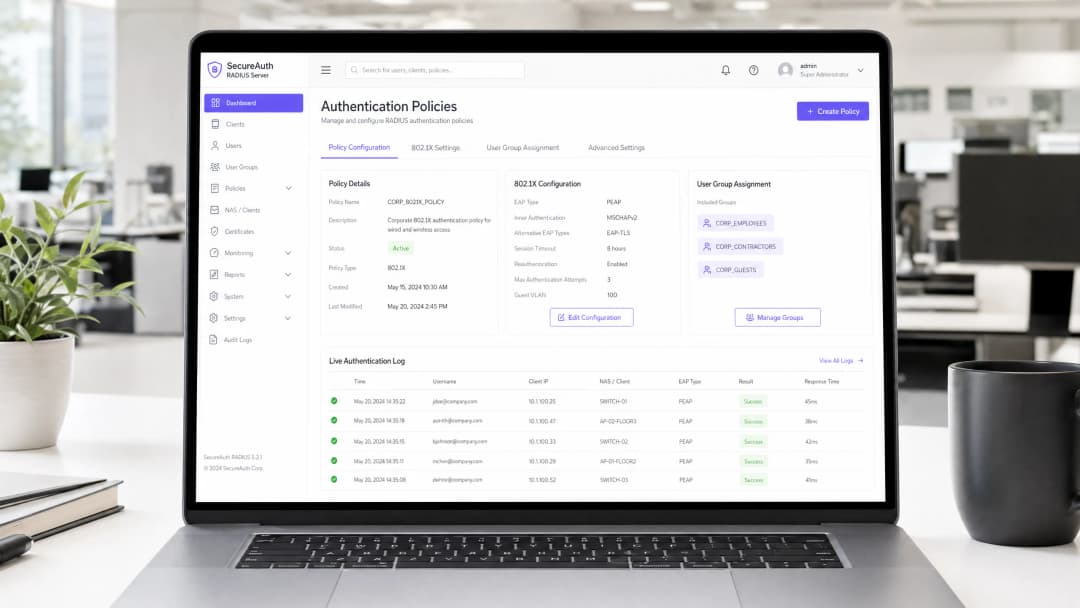
企業級無線網路需要集中式的身分識別管理、基於角色的分段以及強大的密碼學保護。依賴共享的預共用金鑰(PSK)會讓組織面臨憑證洩露、未授權裝置存取,以及每當員工離職時管理上的災難。
設定 **RADIUS(遠端用戶撥入驗證服務)**伺服器可啟用 IEEE 802.1X 企業級驗證。每個連線的裝置與使用者都會針對中央目錄(例如 Microsoft Entra ID、Google Workspace、Okta 或本地 Active Directory)進行個別驗證。
本技術指南提供了為企業 WiFi 設定 RADIUS 伺服器的逐步佈署說明。我們涵蓋了 Linux FreeRADIUS 設定、Windows Server 網路原則伺服器(NPS)設定、現代 Cloud RADIUS 架構、動態 VLAN 分配以及 BlastRADIUS 安全強化。
802.1X 與 RADIUS 架構總覽
IEEE 802.1X 框架將網路存取劃分為三個不同的實體:
- 要求方(Supplicant): 執行 802.1X 用戶端軟體並提供身分憑證的用戶端終端裝置(筆記型電腦、智慧型手機或平板電腦)。
- 驗證方(Authenticator): 控制網路實體存取並轉發驗證訊息的無線存取點(AP)或無線區域網路控制器(WLC)。
- 驗證伺服器(Authentication Server): 針對身分識別目錄驗證憑證並傳回網路授權原則的 RADIUS 伺服器。
+---------------+        EAP over LAN (EAPoL)        +-------------------+
|  Supplicant   | <================================> |   Authenticator   |
| (Client Device)|                                    | (AP / Controller) |
+---------------+                                    +-------------------+
                                                               ||
                                                               || RADIUS Protocol
                                                               || (UDP 1812 / TCP 2083)
                                                               \/
                                                     +-------------------+
                                                     |   RADIUS Server   |
                                                     |  (FreeRADIUS/NPS) |
                                                     +-------------------+
                                                               ||
                                                               || Identity Lookup
                                                               \/
                                                     +-------------------+
                                                     | Identity Provider |
                                                     | (Entra ID / LDAP) |
                                                     +-------------------+
RADIUS 通訊流程
- 關聯: 用戶端與企業級 SSID(WPA2-Enterprise 或 WPA3-Enterprise)建立關聯。
- EAP 啟動: AP 阻擋所有資料流量,並向用戶端發送 EAP-Request/Identity 訊框。
- 識別回應: 用戶端回傳 EAP-Response/Identity 訊框。
- RADIUS 封裝: AP 將 EAP 載荷封裝進 RADIUS Access-Request 封包中,並將其轉發至 RADIUS 伺服器。
- EAP 協商: 用戶端與 RADIUS 伺服器協商加密驗證方法(例如 EAP-TLS 或 PEAP)。
- 授權與 Access-Accept: 驗證成功後,RADIUS 伺服器會發送包含成對主金鑰 (PMK) 和選用動態 VLAN 分配屬性的 RADIUS Access-Accept 封包。
- 連接埠開啟: AP 解除虛擬連接埠的阻擋,並啟動 4 向交握以對無線空中傳輸流量進行加密。
如需更深入的架構概念,請參閱我們的 Enterprise WiFi Security Guide 和 Captive Portal Guide。
逐步設定:Linux 上的 FreeRADIUS
FreeRADIUS 是全球開放原始碼 RADIUS 套件標準。以下是 Ubuntu 24.04 LTS / Debian 12 的組態順序。
步驟 1:安裝 FreeRADIUS 套件
sudo apt update
sudo apt install -y freeradius freeradius-utils freeradius-ldap ssl-cert
步驟 2:定義網路存取伺服器 (NAS) 用戶端
編輯 /etc/freeradius/3.0/clients.conf 以授權您的無線存取點並設定共用金鑰:
client enterprise_wlan {
  ipaddr: 192.168.10.0/24
  secret: Str0ngSh@redSecr3t2026!
  shortname: branch-aps
  nas_type: other
  require_message_authenticator: yes
}
注意:請務必強制執行 RFC 2869 Message-Authenticator 屬性,以防禦 BlastRADIUS 偽造攻擊。
步驟 3:設定 EAP 驗證模組
開啟 /etc/freeradius/3.0/mods-available/eap 並設定預設 EAP 方法:
eap {
  default_eap_type: tls
  timer_expire: 60
  ignore_unknown_eap_types: no
  cisco_accounting_username_bug: no
  max_sessions: 4096

  tls-config tls-common {
    certdir: ${confdir}/certs
    cadir: ${confdir}/certs
    private_key_file: ${certdir}/radius-server.key
    certificate_file: ${certdir}/radius-server.crt
    ca_file: ${cadir}/ca.crt
    cipher_list: HIGH:!aNULL:!eNULL:!EXPORT:!DES:!RC4:!MD5:!PSK:!aECDH:!EDH
    tls_min_version: 1.2
  }
}
步驟 4:在偵錯模式下測試
在作為系統服務執行之前,先停止精靈程序並在前台偵錯模式下啟動:
sudo systemctl stop freeradius
sudo freeradius -X
使用 radtest 測試本機驗證:
radtest testuser Password123 127.0.0.1 0 testing123
成功的響應將會傳回 Received Access-Accept Id 1。
逐步設定:Windows Server NPS
Microsoft Network Policy Server (NPS) 是專為連接至 Active Directory 網域服務 (AD DS) 的 Windows Server 環境所提供的內建 RADIUS 伺服器角色。
+-------------------------------------------------------------------------+
|                  Windows Server Network Policy Server                   |
|                                                                         |
|  [RADIUS 客戶端 (AP / WLC)] ---> [連線要求原則]                           |
|                                                  |                      |
|                                                  v                      |
|  [Active Directory DS / PKI] <--- [網路原則 (VLAN / EAP-TLS)]            |
+-------------------------------------------------------------------------+
步驟 1:安裝網路原則和存取服務
以系統管理員身分開啟 PowerShell:
Install-WindowsFeature NPAS -IncludeManagementTools
Register-ActiveDirectoryServer -Server nps01.corp.local
步驟 2:登錄 RADIUS 客戶端 (無線基地台)
- 開啟 Network Policy Server (nps.msc)。
- 展開 RADIUS 客戶端和伺服器 > 以右鍵按一下 RADIUS 客戶端 > 新增。
- 輸入易記名稱:
Cisco-Catalyst-AP-Cluster。 - 輸入 IP 位址或子網路 CIDR (例如
10.50.0.0/24)。 - 產生並輸入強密碼共用金鑰 (最少 24 個英數字元)。
步驟 3:建立 WiFi 驗證的網路原則
- 在 原則 > 網路原則下,按一下右鍵並選擇 新增。
- 原則名稱:
Staff-WiFi-802.1X-Policy。網路存取伺服器類型:未指定。 - 條件:
- 新增 Windows 群組:
CORP\WiFi-Authorised-Users - 新增 NAS 連接埠類型:
無線 - IEEE 802.11或無線 - 其他
- 新增 Windows 群組:
- 存取權限: 選擇
已授與存取權。 - 驗證方法:
- 取消選取較不安全的方法。
- 在 EAP 類型下,新增 Microsoft: 智慧卡或其他憑證 (EAP-TLS)。
- 編輯該方法,並從您的 Active Directory 憑證服務 (AD CS) 企業 CA 中選擇已核發的 RADIUS 伺服器憑證。
- 限制: 將閒置逾時設定為 30 分鐘,工作階段逾時設定為 8 小時。
對於您的特定設置有任何疑問嗎?
我們的團隊與超過 80,000 個場域的場域營運商、IT 經理和網路工程師合作。立即預約 20 分鐘的通話,我們將向您展示其他與您相似的用戶是如何解決此問題的。
Cloud RADIUS:現代零信任架構
傳統的本地端 RADIUS 伺服器面臨著重大的營運挑戰:
- 高昂的伺服器授權與修補程式維護成本。
- 缺乏針對 Microsoft Entra ID 或 Google Workspace 等雲端身分識別目錄的原生驗證 API。
- 容易受到跨分公司 WAN 斷線的影響。
現代企業網路部署 Cloud RADIUS,以實現零本地端伺服器足跡的集中化驗證。
| 功能 | 傳統 Windows NPS / FreeRADIUS | Cloud RADIUS 架構 |
|---|---|---|
| 目錄整合 | 本地端 LDAP / Kerberos | 原生 Microsoft Entra ID, Google Workspace, Okta |
| 傳輸安全 | 未加密的 UDP 1812/1813 | 透過 TCP 2083 進行 RadSec (RFC 6614) TLS |
| 憑證自動化 | 手動 SCEP / NDES 設定 | 自動化 Intune 與 Jamf PKI 連接器 |
| 高可用性 | 手動主從式備援 (Active-Passive Failover) | 多區域全球 Anycast 備援 |
| 維護 | 作業系統修補與 OS 授權 | 持續更新的託管雲端服務 |
若要規劃您的架構,請參閱我們的 多租戶 WiFi 指南 與 員工 WiFi 解決方案。
動態 VLAN 分配設定
動態 VLAN 分配(定義於 RFC 2868 與 RFC 3580)允許單一企業級 SSID 根據使用者的目錄群組成員資格,動態地將使用者細分為不同的網路子網段。
                          [Enterprise Staff SSID]
                                     |
              +----------------------+----------------------+
              |                      |                      |
              v                      v                      v
        [VLAN 10: Exec]       [VLAN 20: Engineering]  [VLAN 30: Contractors]
        (10.10.10.0/24)        (10.10.20.0/24)        (10.10.30.0/24)
所需的標準 RADIUS 屬性
當 RADIUS 伺服器驗證憑證時,會將這些屬性附加到 Access-Accept 回應中:
Tunnel-Type = 13 (VLAN)
Tunnel-Medium-Type = 6 (802 - includes all 802 media plus Ethernet canonical format)
Tunnel-Private-Group-ID = 20 (or VLAN Name "CORP_ENG")
FreeRADIUS 動態 VLAN 對應範例
位於 /etc/freeradius/3.0/users:
DEFAULT Group == "Engineering-Team"
  Tunnel-Type: 13
  Tunnel-Medium-Type: 6
  Tunnel-Private-Group-ID: "20"

DEFAULT Group == "Contractors"
  Tunnel-Type: 13
  Tunnel-Medium-Type: 6
  Tunnel-Private-Group-ID: "30"
網路防火牆規則與連接埠設定
確保網路防火牆允許無線基地台與 RADIUS 伺服器之間的通訊:
| 協定 | 連接埠號碼 | 說明 | 來源 | 目的地 |
|---|---|---|---|---|
| UDP | 1812 |
RADIUS 認證 (RFC 2865) | 無線基地台 / WLC | RADIUS 伺服器 |
| UDP | 1813 |
RADIUS 計費 (RFC 2866) | 無線基地台 / WLC | RADIUS 伺服器 |
| TCP | 2083 |
RadSec - 經由 TLS 的 RADIUS (RFC 6614) | 無線基地台 / WLC | Cloud RADIUS |
| UDP | 1645 / 1646 |
舊版 RADIUS 認證 / 計費 (已過時) | 舊版 NAS 裝置 | RADIUS 伺服器 |
安全強化與 BlastRADIUS 緩解措施
緩解 BlastRADIUS (CVE-2024-3596)
在 2024 年 7 月,研究人員披露了 BlastRADIUS,這是 RADIUS 協定中的 MD5 碰撞漏洞,它允許位於無線基地台與 RADIUS 伺服器之間的攻擊者偽造 Access-Accept 回應。
若要確保您的部署安全:
- 強制執行 Message-Authenticator: 在所有 Access-Request 與 Access-Accept 封包上要求
Message-Authenticator屬性 (RFC 2869)。 - 過渡至 EAP-TLS: 基於憑證的 EAP-TLS 在密碼學上可免疫代理偽造,因為 TLS 金鑰是在用戶端與 RADIUS 伺服器之間進行端到端衍生。
- 部署 RadSec (RFC 6614): 將 RADIUS 流量封裝在 TLS 隧道內,以防止中間人封包篡改。
排除 802.1X 驗證失敗的故障
| 錯誤症狀 | 根本原因 | 技術補救措施 |
|---|---|---|
| 用戶端立即收到連線失敗 | AP 與 RADIUS 伺服器之間的共用金鑰不相符 | 驗證 AP 控制器與 RADIUS 設定中的共用金鑰字串。 |
| 10 - 15 秒後驗證逾時 | 防火牆封鎖 UDP 連接埠 1812 或遺失路由 | 驗證防火牆 ACL,並確認 AP 可以透過管理 VLAN Ping 通 RADIUS 伺服器 IP。 |
| RADIUS 記錄:「未知的 CA」或「憑證不受信任」 | 用戶端或 RADIUS 伺服器遺失根 CA 憑證 | 將中間和根 CA 憑證安裝到用戶端信任存放區與 RADIUS 伺服器憑證目錄中。 |
| 用戶端通過驗證但收到 APIPA IP (169.254.x.x) | AP 交換器 Trunk 連接埠上不存在動態 VLAN ID | 驗證交換器 Trunk 設定是否包含 Tunnel-Private-Group-ID 中指定的目標 VLAN ID。 |
| RADIUS 記錄:「遺失 Message-Authenticator」 | NAS 用戶端不支援 RFC 2869 或缺少韌體更新 | 更新 AP 控制器韌體或在 NAS 設定檔上啟用強制 Message-Authenticator。 |
常見問題
RADIUS 伺服器使用哪個連接埠進行 WiFi 驗證?
標準 RADIUS 驗證運作於 UDP 連接埠 1812,記帳運作於 UDP 連接埠 1813。舊版實作使用 UDP 連接埠 1645 和 1646。現代 Cloud RADIUS 部署則利用 TCP 連接埠 2083 上的 RadSec 並搭配 TLS 加密。
我應該選擇 FreeRADIUS 還是 Windows Server NPS?
如果您的組織嚴格依賴內部部署的 Active Directory 網域服務,請選擇 Windows Server NPS。如果需要高效能、開放原始碼的彈性以及 Linux 環境,請選擇 FreeRADIUS。如果您的組織使用 Microsoft Entra ID 或 Google Workspace 等雲端身分識別提供者,請選擇 Cloud RADIUS。
如何將 Microsoft Entra ID (Azure AD) 連線至 RADIUS 伺服器?
Microsoft Entra ID 原生不支援舊版的內部部署 LDAP 或 NTLM 驗證協定。若要將 Entra ID 連線至企業級 WiFi,請部署 Cloud RADIUS 並搭配 Microsoft Intune SCEP 憑證部署,以使用 EAP-TLS 驗證終端裝置。
為什麼 EAP-TLS 比 PEAP-MSCHAPv2 更受青睞?
EAP-TLS 使用雙向 X.509 憑證驗證,用戶端和伺服器雙方都會驗證密碼學身分。PEAP-MSCHAPv2 則依賴 TLS 隧道內的使用者密碼,這會使網路容易受到密碼噴灑、網路釣魚以及惡意 AP 憑證竊取的攻擊。
關鍵定義
RADIUS (RFC 2865)
遠端用戶撥接驗證服務。一種網路用戶端 - 伺服器通訊協定,提供集中式的驗證、授權和計費 (AAA) 管理。
作為驗證伺服器,驗證透過無線存取點提交的裝置和使用者認證。
IEEE 802.1X
一項用於連接埠型網路存取控制 (PNAC) 的 IEEE 標準,為嘗試連接到 LAN 或 WLAN 的裝置提供受保護的驗證。
定義 supplicant (終端裝置) 與 authenticator (存取點) 之間 EAP 框架的封裝。
EAP-TLS (RFC 5216)
可延伸驗證通訊協定 - 傳輸層安全。雙向憑證型驗證通訊協定,RADIUS 伺服器和用戶端皆需驗證數位憑證。
企業零信任 WiFi 的業界標準驗證方法,可消除密碼。
RadSec (RFC 6614)
RADIUS over TLS。一項將傳統 UDP RADIUS 封包封裝在安全的 TCP 連接埠 2083 TLS 通道內的標準。
保護在本地存取點與 Cloud RADIUS 伺服器之間傳輸於不受信任的公共 WAN 連結之上的 RADIUS 驗證流量。
Dynamic VLAN Assignment (RFC 3580)
一種根據使用者角色或裝置狀態,在 Access-Accept 回應中傳回 VLAN ID 的 RADIUS 機制。
使單一企業 SSID 能夠動態地將使用者分配到隔離的網路區段。
範例
網路工程師需要設定 FreeRADIUS,以驗證透過子網路 10.20.0.0/24 上的 12 台 Cisco Catalyst 存取點連接的無線用戶端,並使用共用秘密 SecretAuthKey2026。必須在 clients.conf 中放入什麼設定?
client branch_aps { ipaddr = 10.20.0.0/24 secret = SecretAuthKey2026 nas_type = cisco require_message_authenticator = yes }
IT 部門正將 2,000 台企業 Windows 11 筆記型電腦從 Active Directory 遷移到 Microsoft Entra ID 和 Intune。應如何更新 RADIUS 基礎架構,以支援無密碼 WiFi 驗證,且無需保留地端網域控制站 (Domain Controllers)?
- 部署具有原生 Microsoft Entra ID 整合功能的 Cloud RADIUS。2. 設定 Microsoft Intune SCEP 或 PKCS 憑證設定檔,自動向託管的筆記型電腦發放用戶端憑證。3. 設定無線控制器,使用 RadSec (TLS 連接埠 2083) 將 802.1X 驗證導向 Cloud RADIUS 伺服器。4. 在 Intune WiFi 組態設定檔中強制執行 EAP-TLS 作為主要驗證方法。
練習題
Q1. 在無線 802.1X 部署期間,用戶端裝置成功連接並通過驗證,但它們在預設的原生 VLAN 上取得 IP 位址,而不是被分配的企業 VLAN。伺服器必須傳回哪些 RADIUS 屬性?
提示:檢閱 RFC 2868 和 RFC 3580 通道屬性。
查看標準答案
RADIUS 伺服器必須在 Access-Accept 回應中傳回三個特定屬性:1. Tunnel-Type = 13 (VLAN),2. Tunnel-Medium-Type = 6 (802),3. Tunnel-Private-Group-ID = [VLAN_ID_或名稱]。存取點交換器連接埠也必須設定為承載該 VLAN 的 trunk 連接埠。
Q2. 在 BYOD 網路上部署 PEAP-MSCHAPv2,若未在用戶端裝置上強制執行 RADIUS 伺服器根 CA 憑證,會帶來什麼安全風險?
提示:考慮惡意存取點和邪惡雙生 (evil twin) 攻擊。
查看標準答案
如果用戶端裝置未驗證 RADIUS 伺服器憑證,攻擊者便可部署廣播相同 SSID 的惡意無線基地台。當用戶端連線時,惡意伺服器會擷取 MS-CHAPv2 挑戰回應握手,讓攻擊者能夠使用 asleap 等工具進行離線密碼破解。
Q3. 使用 RadSec 與標準 RADIUS 時,地端無線基地台和 Cloud RADIUS 伺服器之間必須開啟哪些防火牆連接埠?
提示:比較傳統的 UDP 連接埠與現代經 TLS 封裝的 RADIUS。
查看標準答案
標準 RADIUS 需要開啟輸出 UDP 連接埠 1812(驗證)和 UDP 連接埠 1813(帳務)。RadSec 則需要開啟具備 TLS 加密的輸出 TCP 連接埠 2083,以提供雙向憑證驗證,並消除透過公開網際網路進行的明文 UDP 傳輸。
繼續閱讀本系列
網路管理員指南:如何為訪客 WiFi 設定 RADIUS 驗證
為網路管理員提供部署訪客 WiFi RADIUS 驗證的全面技術參考。涵蓋架構、不限廠商的設定步驟、安全最佳實作,以及常見部署失敗的疑難排解。
在高教機構中為安全 BYOD 與 802.1X WiFi 部署 SCEP
本技術指南詳細介紹高等教育 IT 團隊如何使用 SCEP 為數萬台 BYOD 裝置自動進行 802.1X 憑證登錄。內容涵蓋架構、安全效益以及實際部署步驟,旨在以安全、零接觸的網路存取模式取代手動上線。
為訪客與員工 WiFi 網路配置 RADIUS 驗證
本技術參考指南概述了企業訪客和員工 WiFi 網路的 RADIUS 驗證架構、配置與部署。它為網路架構師和 IT 經理提供了構建安全、可擴展的無線存取控制系統所需的確切協定、安全標準與疑難排解方法。
對於您的特定設置有任何疑問嗎?
我們的團隊與超過 80,000 個場域的場域營運商、IT 經理和網路工程師合作。立即預約 20 分鐘的通話,我們將向您展示其他與您相似的用戶是如何解決此問題的。