
WiFi অথেন্টিকেশনের জন্য কীভাবে একটি RADIUS সার্ভার সেট আপ করবেন
এই নির্ভরযোগ্য গাইডটি IT লিডার এবং নেটওয়ার্ক আর্কিটেক্টদের এন্টারপ্রাইজ WiFi অথেন্টিকেশনের জন্য একটি RADIUS সার্ভার ডেপ্লয় করার একটি বিস্তৃত ব্লুপ্রিন্ট প্রদান করে। এটি অন-প্রেমিস এবং ক্লাউড-হোস্টেড ডেপ্লয়মেন্টের মধ্যে আর্কিটেকচারাল সুবিধা-অসুবিধা, EAP মেথড নির্বাচন, Active Directory ইন্টিগ্রেশন এবং ডাইনামিক VLAN অ্যাসাইনমেন্ট কভার করে। ভেন্যু অপারেটর এবং IT টিমগুলো এই কোয়ার্টারে একটি অসুরক্ষিত PSK পরিবেশ থেকে একটি শক্তিশালী 802.1X ইনফ্রাস্ট্রাকচারে স্থানান্তরিত হওয়ার জন্য কার্যকর ইমপ্লিমেন্টেশন ধাপ, বাস্তব-জগতের কেস স্টাডি এবং ঝুঁকি প্রশমন কৌশল খুঁজে পাবেন।
এই গাইডটি শুনুন
পডকাস্ট ট্রান্সক্রিপ্ট দেখুন
আমাদের মূল সিরিজের অংশ: Enterprise WiFi Security Guide →
RADIUS Server Setup & 802.1X Architecture Configurator
Model your enterprise RADIUS deployment: configure Identity Provider sync, EAP authentication methods, dynamic VLAN attributes, and firewall ports.
Cloud-Native 802.1X Architecture
RadSec (TCP 2083 with TLS) & UDP 1812/1813Architecture Insight: Eliminate shared PSKs by pushing device certificates via Microsoft Intune or Jamf. EAP-TLS with Cloud RADIUS removes local server maintenance while enforcing strict role-based VLAN segmentation.
এক্সিকিউটিভ সামারি
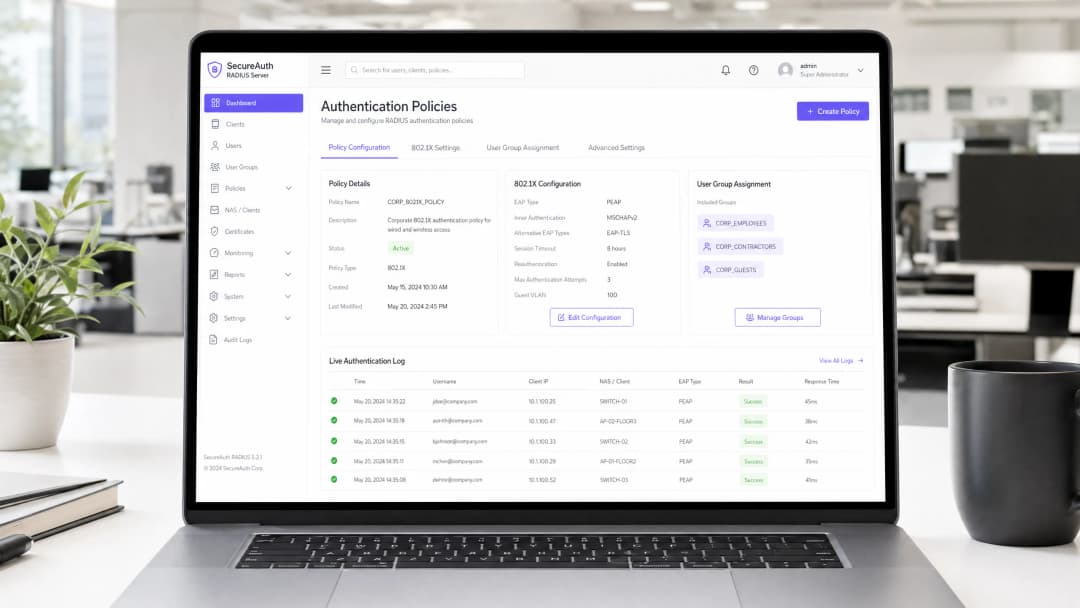
এন্টারপ্রাইজ পরিবেশের জন্য — তা কোনো বিশাল বিশ্ববিদ্যালয় ক্যাম্পাস, উচ্চ-ঘনত্বের স্টেডিয়াম বা কোনো বিস্তৃত রিটেইল চেইনই হোক না কেন — WiFi অ্যাক্সেসের জন্য একটি Pre-Shared Key (PSK)-এর ওপর নির্ভর করা একটি বড় ধরনের নিরাপত্তা ঝুঁকি। একটিমাত্র আপোসকৃত ক্রেডেনশিয়াল পুরো নেটওয়ার্ককে ঝুঁকির মুখে ফেলে দেয় এবং অ্যাক্সেস বাতিল করার জন্য এস্টেটের প্রতিটি ডিভাইসের পাসওয়ার্ড পরিবর্তন করতে হয়। একটি RADIUS (Remote Authentication Dial-In User Service) সার্ভারের মাধ্যমে 802.1X অথেন্টিকেশন বাস্তবায়ন করলে এই সমস্যাটি সম্পূর্ণ দূর হয়: প্রতিটি ব্যবহারকারী আলাদাভাবে অথেন্টিকেট হন, অ্যাক্সেস তাৎক্ষণিকভাবে বাতিল করা যায় এবং নেটওয়ার্ক সেগমেন্টেশন ডাইনামিকভাবে প্রয়োগ করা হয়।
এই গাইডটি IT ম্যানেজার এবং নেটওয়ার্ক আর্কিটেক্টদের জন্য RADIUS অথেন্টিকেশন ডেপ্লয় করার একটি সুনির্দিষ্ট রোডম্যাপ প্রদান করে। আমরা অন-প্রেমিস এবং ক্লাউড-হোস্টেড ডেপ্লয়মেন্টের মধ্যে আর্কিটেকচারাল সুবিধা-অসুবিধা, Extensible Authentication Protocol (EAP) মেথডগুলোর কনফিগারেশন এবং Active Directory-এর মতো ডিরেক্টরি সার্ভিসগুলোর সাথে ইন্টিগ্রেশন কভার করেছি। আমরা আরও দেখিয়েছি কীভাবে একটি শক্তিশালী অথেন্টিকেশন লেয়ার Guest WiFi সলিউশনের সাথে ইন্টিগ্রেট হয়ে ভিজিটরদের নিরবচ্ছিন্ন অ্যাক্সেস প্রদান করে, পাশাপাশি WiFi Analytics ক্যাপচার করে যা আপনার নেটওয়ার্ককে একটি বিজনেস ইন্টেলিজেন্স অ্যাসেটে পরিণত করে।
টেকনিক্যাল ডিপ-ডাইভ
802.1X আর্কিটেকচার
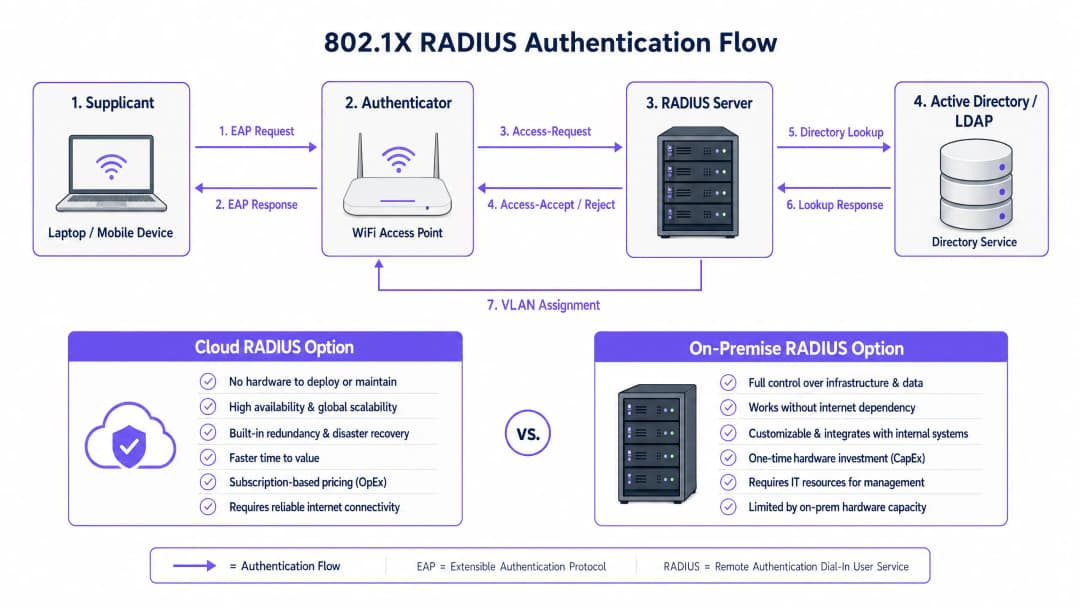
IEEE 802.1X স্ট্যান্ডার্ড পোর্ট-ভিত্তিক Network Access Control (PNAC) সংজ্ঞায়িত করে। একটি ওয়্যারলেস প্রেক্ষাপটে, এতে তিনটি প্রাথমিক ভূমিকা একসাথে কাজ করে:
| ভূমিকা | উপাদান | দায়িত্ব |
|---|---|---|
| Supplicant | ক্লায়েন্ট ডিভাইস (ল্যাপটপ, স্মার্টফোন) | নেটওয়ার্ক অ্যাক্সেসের অনুরোধ করতে ক্রেডেনশিয়াল পেশ করে |
| Authenticator | WiFi অ্যাক্সেস পয়েন্ট বা কন্ট্রোলার | অ্যাক্সেস কন্ট্রোল প্রয়োগ করে; EAP মেসেজ রিলে করে |
| Authentication Server | RADIUS সার্ভার | ক্রেডেনশিয়াল যাচাই করে; accept/reject এবং পলিসি অ্যাট্রিবিউট ফেরত পাঠায় |
যখন একটি supplicant একটি অ্যাক্সেস পয়েন্টের সাথে যুক্ত হয়, তখন AP, EAP (Extensible Authentication Protocol) মেসেজ ছাড়া অন্য সব ডেটা ট্রাফিক ব্লক করে দেয়। AP এই EAP মেসেজগুলোকে RADIUS প্যাকেটে এনক্যাপসুলেট করে এবং RADIUS সার্ভারে ফরোয়ার্ড করে। সার্ভারটি একটি ব্যাকএন্ড ডেটাবেস — সাধারণত LDAP বা Active Directory — এর বিপরীতে ক্রেডেনশিয়ালগুলো যাচাই করে এবং একটি Access-Accept বা Access-Reject মেসেজ ফেরত পাঠায়। যদি গৃহীত হয়, AP পোর্টটি আনব্লক করে দেয় এবং ক্লায়েন্টের ট্রাফিক অবাধে প্রবাহিত হয়।
একটি EAP মেথড নির্বাচন করা
আপনার RADIUS ডেপ্লয়মেন্টের নিরাপত্তা মূলত নির্বাচিত EAP মেথডের ওপর নির্ভর করে। এন্টারপ্রাইজ ডেপ্লয়মেন্টে সবচেয়ে প্রচলিত দুটি মেথড হলো:
EAP-TLS (Transport Layer Security) হলো গোল্ড স্ট্যান্ডার্ড। এর জন্য RADIUS সার্ভার এবং প্রতিটি ক্লায়েন্ট ডিভাইস উভয় ক্ষেত্রেই ডিজিটাল সার্টিফিকেটের প্রয়োজন হয়, যা পাসওয়ার্ডের প্রয়োজনীয়তা সম্পূর্ণ দূর করে। এমনকি কোনো আক্রমণকারী যদি সম্পূর্ণ অথেন্টিকেশন এক্সচেঞ্জ ক্যাপচারও করে ফেলে, তবুও এক্সট্র্যাক্ট করার মতো কোনো ক্রেডেনশিয়াল থাকে না। এর একমাত্র অসুবিধা হলো অ্যাডমিনিস্ট্রেটিভ ওভারহেড: ক্লায়েন্ট সার্টিফিকেট ডেপ্লয় এবং ম্যানেজ করার জন্য একটি কার্যকর Public Key Infrastructure (PKI) এবং এন্ডপয়েন্টগুলোতে সার্টিফিকেট বিতরণ করার জন্য একটি MDM সলিউশন (যেমন, Microsoft Intune, Jamf) প্রয়োজন।
PEAP-MSCHAPv2 (Protected EAP) হলো বাস্তবে সবচেয়ে বেশি ব্যবহৃত মেথড। এটি একটি এনক্রিপ্টেড TLS টানেল তৈরি করতে একটি সার্ভার-সাইড সার্টিফিকেট ব্যবহার করে, যার ভেতরে ক্লায়েন্ট একটি ইউজারনেম এবং পাসওয়ার্ড দিয়ে অথেন্টিকেট হয়। এটি EAP-TLS-এর চেয়ে ডেপ্লয় করা অনেক সহজ কারণ এখানে কেবল একটি সার্টিফিকেট — সার্ভারেরটি — ম্যানেজ করতে হয়। তবে, এর একটি গুরুতর সীমাবদ্ধতা রয়েছে: যদি ক্লায়েন্ট ডিভাইসগুলো RADIUS সার্ভারের সার্টিফিকেট যাচাই করার জন্য স্পষ্টভাবে কনফিগার করা না থাকে, তবে সেগুলো ক্ষতিকারক অ্যাক্সেস পয়েন্টের মাধ্যমে Man-in-the-Middle (MitM) আক্রমণের শিকার হতে পারে।
গুরুত্বপূর্ণ নিরাপত্তা নোট: ক্লায়েন্ট ডিভাইসগুলোতে কঠোর সার্টিফিকেট যাচাইকরণ প্রয়োগ করতে ব্যর্থ হলে তা PEAP-MSCHAPv2-এর নিরাপত্তা সুবিধাকে কার্যকরভাবে বাতিল করে দেয়। একজন আক্রমণকারী একটি ক্ষতিকারক AP ডেপ্লয় করতে পারে, একটি জাল সার্টিফিকেট প্রদর্শন করতে পারে এবং প্লেইনটেক্সটে ব্যবহারকারীর ক্রেডেনশিয়াল ক্যাপচার করতে পারে। এটি কোনো তাত্ত্বিক ঝুঁকি নয় — এটি একটি সুপ্রতিষ্ঠিত অ্যাটাক ভেক্টর যা বাস্তব-বিশ্বের পরিবেশে ব্যবহৃত হয়েছে।
ইমপ্লিমেন্টেশন গাইড
ধাপ ১: আর্কিটেকচারাল সিদ্ধান্ত — On-Premise বনাম ক্লাউড RADIUS
প্রথম সিদ্ধান্তটি হলো RADIUS ইনফ্রাস্ট্রাকচার কোথায় হোস্ট করা হবে। এটি মূলত একটি অপারেশনাল এবং খরচ সংক্রান্ত প্রশ্ন, কোনো নিরাপত্তা সংক্রান্ত প্রশ্ন নয় — উভয় মডেলই নিরাপদে ডেপ্লয় করা সম্ভব।
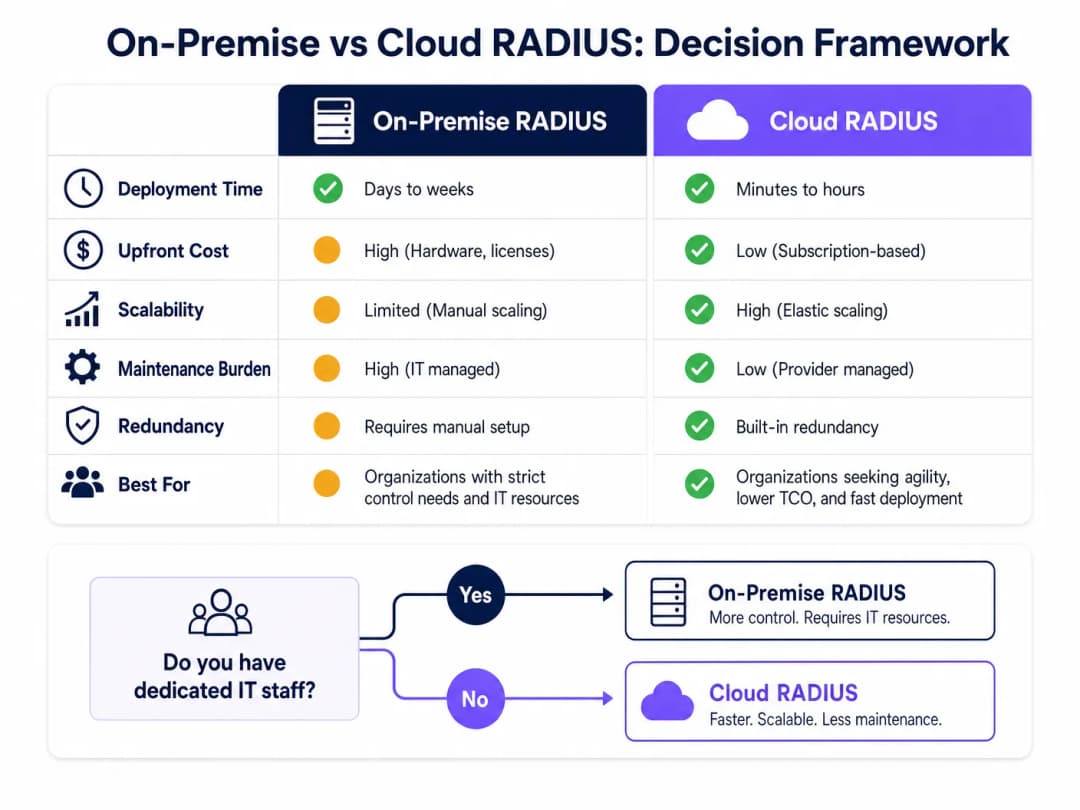
On-Premise RADIUS (যেমন, Microsoft NPS, FreeRADIUS, Cisco ISE) ডেডিকেটেড IT স্টাফ, বিদ্যমান অন-প্রেমিস ডিরেক্টরি ইনফ্রাস্ট্রাকচার এবং কঠোর ডেটা সার্বভৌমত্ব বা কমপ্লায়েন্সের প্রয়োজনীয়তা রয়েছে এমন সংস্থাগুলোর জন্য উপযুক্ত। এটি অথেন্টিকেশনের জন্য ইন্টারনেট সংযোগের ওপর নির্ভর করে না, যা এমন পরিবেশের জন্য একটি উল্লেখযোগ্য সুবিধা যেখানে ইন্টারনেটের আপটাইম নিশ্চিত করা যায় না।
Cloud RADIUS ক্রমশ বিতরণকৃত পরিবেশের জন্য পছন্দের মডেল হয়ে উঠছে — যেমন Retail চেইন, Hospitality গ্রুপ এবং Transport হাব, যেখানে প্রতিটি লোকেশনে সার্ভার ডেপ্লয় করা অপারেশনালভাবে অবাস্তব। Cloud RADIUS ক্লাউড আইডেন্টিটি প্রোভাইডারদের (Azure AD, Google Workspace, Okta) সাথে নেটিভভাবে ইন্টিগ্রেট হয় এবং বিল্ট-ইন হাই অ্যাভেলেবিলিটি ও গ্লোবাল স্কেলেবিলিটি প্রদান করে।
ধাপ ২: RADIUS সার্ভার ইনস্টল এবং কনফিগার করা
Windows-কেন্দ্রিক পরিবেশে সবচেয়ে সাধারণ পছন্দ Microsoft NPS ব্যবহার করে একটি অন-প্রেমিস ডেপ্লয়মেন্টের জন্য:
- Server Manager-এর মাধ্যমে Network Policy Server রোলটি ইনস্টল করুন।
- Active Directory-তে NPS সার্ভারটি রেজিস্টার করুন যাতে এটি ব্যবহারকারীর ডায়াল-ইন প্রোপার্টিজ পড়তে পারে।
- প্রতিটি অ্যাক্সেস পয়েন্ট বা ওয়্যারলেস কন্ট্রোলারের জন্য একটি RADIUS Client এন্ট্রি তৈরি করুন, যেখানে AP-এর IP অ্যাড্রেস এবং একটি শক্তিশালী, অনন্য Shared Secret উল্লেখ থাকবে।
- অ্যাক্সেসের শর্তাবলী (যেমন, ইউজার গ্রুপ মেম্বারশিপ) এবং সীমাবদ্ধতা (যেমন, EAP মেথড, সেশন টাইমআউট) নির্ধারণ করে একটি Network Policy কনফিগার করুন।
- অনুরোধগুলো স্থানীয়ভাবে প্রসেস করার জন্য Connection Request Policy কনফিগার করুন।
Linux-এ FreeRADIUS-এর জন্য:
- প্যাকেজ ম্যানেজারের মাধ্যমে ইনস্টল করুন:
sudo apt-get install freeradius freeradius-ldap। - RADIUS ক্লায়েন্ট (APs) এবং তাদের shared secrets সংজ্ঞায়িত করতে
/etc/freeradius/3.0/clients.confকনফিগার করুন। - আপনার Active Directory বা LDAP সার্ভারকে নির্দেশ করতে
/etc/freeradius/3.0/mods-available/ldap-এ LDAP মডিউলটি কনফিগার করুন। - LDAP মডিউলটি সক্রিয় করুন:
sudo ln -s /etc/freeradius/3.0/mods-available/ldap /etc/freeradius/3.0/mods-enabled/। /etc/freeradius/3.0/mods-available/eap-এ EAP মেথডগুলো সংজ্ঞায়িত করুন।
ধাপ ৩: অ্যাক্সেস পয়েন্টগুলো কনফিগার করা
আপনার ওয়্যারলেস কন্ট্রোলার বা পৃথক অ্যাক্সেস পয়েন্টগুলোতে:
- RADIUS সার্ভারের IP অ্যাড্রেস এবং অথেন্টিকেশন পোর্ট (ডিফল্ট: UDP 1812) নির্ধারণ করুন।
- Shared Secret কনফিগার করুন — আলফানিউমেরিক এবং বিশেষ অক্ষরের মিশ্রণে ন্যূনতম ২২টি অক্ষর ব্যবহার করুন। প্রতি লোকেশন বা AP গ্রুপের জন্য একটি অনন্য সিক্রেট ব্যবহার করুন।
- 802.1X কী ম্যানেজমেন্ট সহ WPA2-Enterprise বা WPA3-Enterprise সিকিউরিটি মোড ব্যবহার করতে SSID কনফিগার করুন।
- ফেইলওভারের জন্য একটি সেকেন্ডারি RADIUS সার্ভার কনফিগার করুন।
ধাপ ৪: ডিরেক্টরি ইন্টিগ্রেশন
অন-প্রেমিস AD ইন্টিগ্রেশনের জন্য, RADIUS সার্ভারটিকে অবশ্যই ডোমেনে যুক্ত হতে হবে অথবা LDAP রিড অ্যাক্সেস থাকতে হবে। নিশ্চিত করুন যে LDAP বাইন্ডিংয়ের জন্য ব্যবহৃত সার্ভিস অ্যাকাউন্টগুলোর ন্যূনতম প্রয়োজনীয় পারমিশন রয়েছে। ক্লাউড RADIUS-এর জন্য, আপনার IdP-এর সাথে API-ভিত্তিক সিঙ্ক্রোনাইজেশন বা SAML/OIDC ইন্টিগ্রেশন কনফিগার করুন।
আপনার ডিরেক্টরিতে স্পষ্ট ইউজার গ্রুপ সংজ্ঞায়িত করুন, কারণ এগুলো অথরাইজেশন পলিসি পরিচালনা করবে। প্রস্তাবিত গ্রুপ স্ট্রাকচার:
| গ্রুপ | VLAN | অ্যাক্সেস লেভেল |
|---|---|---|
Corp_Staff |
VLAN 10 | সম্পূর্ণ ইন্টারনাল নেটওয়ার্ক |
Corp_Contractors |
VLAN 20 | ইন্টারনেট + নির্দিষ্ট ইন্টারনাল রিসোর্স |
Corp_IoT |
VLAN 30 | আইসোলেটেড, কেবল ডিভাইস-নির্দিষ্ট পোর্ট |
Corp_Guests |
VLAN 100 | কেবল ক্যাপটিভ পোর্টাল-এর মাধ্যমে ইন্টারনেট |
ধাপ ৫: ক্লায়েন্ট কনফিগারেশন এবং সার্টিফিকেট যাচাইকরণ
এটি অপারেশনাল দিক থেকে সবচেয়ে গুরুত্বপূর্ণ ধাপ। ম্যানেজড ডিভাইসগুলোতে ব্যাকগ্রাউন্ডে নিরবচ্ছিন্নভাবে WiFi কনফিগারেশন পুশ করতে Windows-এর জন্য Group Policy (GPO) এবং macOS/iOS/Android-এর জন্য MDM প্রোফাইল ব্যবহার করুন। প্রোফাইলে অবশ্যই নিম্নলিখিত বিষয়গুলো উল্লেখ থাকতে হবে:
- যে Root CA RADIUS সার্ভারের সার্টিফিকেট ইস্যু করেছে।
- প্রত্যাশিত সার্ভারের নাম (সার্ভার সার্টিফিকেটের CN বা SAN)।
- EAP মেথড এবং ভেতরের অথেন্টিকেশন প্রোটোকল।
আনম্যানেজড BYOD ডিভাইসগুলোর জন্য, স্পষ্ট সেলফ-সার্ভিস অনবোর্ডিং নির্দেশনা প্রদান করুন, আদর্শভাবে একটি Network Access Control (NAC) পোর্টালের মাধ্যমে।
ধাপ ৬: ডাইনামিক VLAN অ্যাসাইনমেন্ট বাস্তবায়ন করা
Access-Accept রেসপন্সে VLAN অ্যাসাইনমেন্ট অ্যাট্রিবিউট ফেরত দেওয়ার জন্য RADIUS সার্ভারটি কনফিগার করুন:
Tunnel-Type=VLAN(13)Tunnel-Medium-Type=IEEE-802(6)Tunnel-Private-Group-Id=<VLAN ID>
অ্যাক্সেস পয়েন্ট এই অ্যাট্রিবিউটগুলো পড়ে এবং অথেন্টিকেটেড ক্লায়েন্টকে নির্দিষ্ট VLAN-এ স্থাপন করে — ব্যবহারকারীরা তাদের রোল বা লোকেশন পরিবর্তন করলেও কোনো ম্যানুয়াল রিকনফিগারেশনের প্রয়োজন হয় না।
আপনার নির্দিষ্ট সেটআপ নিয়ে কোনো প্রশ্ন আছে?
আমাদের টিম ৮০,০০০ ভেন্যুতে ভেন্যু অপারেটর, IT ম্যানেজার এবং নেটওয়ার্ক ইঞ্জিনিয়ারদের সাথে কাজ করে। একটি ২০ মিনিটের কল বুক করুন এবং আপনার মতো অন্যরা কীভাবে এর সমাধান করেছেন তা আমরা আপনাকে দেখাব।
বেস্ট প্র্যাকটিস
রেডান্ডান্সি নিয়ে কোনো আপোস করা যাবে না। ন্যূনতম দুটি RADIUS সার্ভার (প্রাইমারি এবং সেকেন্ডারি) ডেপ্লয় করুন এবং স্বয়ংক্রিয়ভাবে ফেইলওভার করার জন্য সমস্ত অ্যাক্সেস পয়েন্ট কনফিগার করুন। অন-প্রেমিস ডেপ্লয়মেন্টের জন্য, সেকেন্ডারি সার্ভারটিকে একটি ভিন্ন ফিজিক্যাল লোকেশন বা অ্যাভেলেবিলিটি জোনে রাখার কথা বিবেচনা করুন। একটি RADIUS বিভ্রাট মানে কেউ অথেন্টিকেট হতে পারবে না, যা 802.1X-সুরক্ষিত SSID-গুলোর জন্য সম্পূর্ণ নেটওয়ার্ক বিভ্রাট।
সার্টিফিকেটের মেয়াদ শেষ হওয়ার বিষয়টি প্রোঅ্যাক্টিভলি মনিটর করুন। একটি RADIUS সার্ভার সার্টিফিকেটের মেয়াদ শেষ হওয়া হঠাৎ এবং ব্যাপক অথেন্টিকেশন ব্যর্থতার অন্যতম সাধারণ কারণ। মেয়াদ শেষ হওয়ার কমপক্ষে ৩০ দিন আগে অ্যাডমিনিস্ট্রেটরদের সতর্ক করার জন্য মনিটরিং ব্যবস্থা চালু করুন। এটি সার্ভার সার্টিফিকেট এবং চেইনের যেকোনো ইন্টারমিডিয়েট CA সার্টিফিকেট উভয়ের ক্ষেত্রেই প্রযোজ্য।
Shared Secret-কে একটি অত্যন্ত গুরুত্বপূর্ণ ক্রেডেনশিয়াল হিসেবে বিবেচনা করুন। AP এবং RADIUS সার্ভারের মধ্যকার shared secret, RADIUS প্যাকেটগুলোকে এনক্রিপ্ট করে। প্রতি লোকেশন বা AP গ্রুপের জন্য অনন্য সিক্রেট ব্যবহার করুন, সেগুলো একটি সিক্রেটস ম্যানেজারে সংরক্ষণ করুন এবং পর্যায়ক্রমে পরিবর্তন করুন। আরও ব্যাপক নেটওয়ার্ক সিকিউরিটি হাইজিন সুপারিশের জন্য আমাদের Protect Your Network with Strong DNS and Security গাইডটি দেখুন।
কমপ্লায়েন্স ফ্রেমওয়ার্কের সাথে সামঞ্জস্যপূর্ণ রাখুন। PCI-DSS-এর আওতাধীন পরিবেশের জন্য (যেমন, রিটেইল পেমেন্ট নেটওয়ার্ক), 802.1X অথেন্টিকেশন সরাসরি নেটওয়ার্ক অ্যাক্সেস কন্ট্রোল এবং অডিট লগিংয়ের প্রয়োজনীয়তাগুলোকে সমর্থন করে। GDPR কমপ্লায়েন্সের জন্য, RADIUS অ্যাকাউন্টিং লগ (পোর্ট ১৮১৩) কে, কোথা থেকে এবং কখন নেটওয়ার্ক অ্যাক্সেস করেছে তার একটি বিস্তারিত অডিট ট্রেইল প্রদান করে — যা ইনসিডেন্ট রেসপন্সের জন্য অত্যন্ত মূল্যবান। Healthcare পরিবেশের জন্য, ডাইনামিক VLAN অ্যাসাইনমেন্টের মাধ্যমে নেটওয়ার্ক সেগমেন্টেশন ইলেকট্রনিক প্রটেক্টেড হেলথ ইনফরমেশন (ePHI) সুরক্ষার জন্য HIPAA প্রয়োজনীয়তাগুলোকে সমর্থন করে।
ট্রাবলশুটিং এবং ঝুঁকি প্রশমন
| ব্যর্থতার ধরন | লক্ষণ | সমাধান |
|---|---|---|
| সার্টিফিকেটের মেয়াদ শেষ | হঠাৎ ব্যাপক অথেন্টিকেশন ব্যর্থতা | মেয়াদ মনিটর করুন; সার্টিফিকেট রিনিউ এবং রি-ডেপ্লয় করুন |
| NTP ডি-সিঙ্ক্রোনাইজেশন | মাঝে মাঝে EAP-TLS ব্যর্থতা | RADIUS সার্ভার এবং DC-গুলো একই NTP সোর্সের সাথে সিঙ্ক করা নিশ্চিত করুন |
| LDAP কানেক্টিভিটি লস | AD অ্যাক্সেস করা না গেলে অথেন্টিকেশন ব্যর্থ হয় | রেডান্ড্যান্ট DC ডেপ্লয় করুন; সাম্প্রতিক অথেন্টিকেশনগুলো ক্যাশ করতে RADIUS কনফিগার করুন |
| ভুল Shared Secret | AP লগে RADIUS timeout বা Bad authenticator দেখায় |
AP এবং RADIUS সার্ভার উভয় ক্ষেত্রেই সিক্রেট মিলছে কিনা তা যাচাই করুন |
| ক্লায়েন্ট সার্টিফিকেট অমিল | নির্দিষ্ট ডিভাইসের জন্য EAP-TLS ব্যর্থতা | ক্লায়েন্ট সার্টিফিকেট বিশ্বস্ত CA দ্বারা ইস্যু করা হয়েছে কিনা তা যাচাই করুন; সার্টিফিকেটের মেয়াদের সময়সীমা পরীক্ষা করুন |
| VLAN অ্যাসাইন করা হয়নি | ব্যবহারকারী অথেন্টিকেটেড কিন্তু ভুল নেটওয়ার্ক সেগমেন্টে আছেন | RADIUS অ্যাট্রিবিউটগুলো সঠিকভাবে ফেরত আসছে কিনা তা যাচাই করুন; AP VLAN কনফিগারেশন পরীক্ষা করুন |
802.1X কনফিগারেশন প্রক্রিয়া সম্পর্কে আরও বিস্তারিত জানতে, How to Configure 802.1X WiFi Authentication: A Step-by-Step Guide গাইডটি সুনির্দিষ্ট এবং ভেন্ডর-ভিত্তিক কনফিগারেশন নির্দেশিকা প্রদান করে।
ROI এবং ব্যবসায়িক প্রভাব
PSK থেকে RADIUS-ভিত্তিক 802.1X-এ স্থানান্তরের জন্য কনফিগারেশনে প্রাথমিক বিনিয়োগ এবং ক্লাউড সলিউশনের জন্য সম্ভাব্য লাইসেন্সিং বা অন-প্রেমিস ডেপ্লয়মেন্টের জন্য হার্ডওয়্যারের প্রয়োজন হয়। এর ROI-এর হিসাবটি অত্যন্ত স্পষ্ট:
ঝুঁকি প্রশমন: যুক্তরাজ্যে একটি ডেটা ব্রিচের গড় খরচ ৩ মিলিয়ন পাউন্ডের বেশি (IBM Cost of a Data Breach Report)। একটি আপোসকৃত PSK পুরো নেটওয়ার্ককে ঝুঁকির মুখে ফেলতে পারে। 802.1X ক্ষয়ক্ষতির পরিধিকে কেবল একটি আপোসকৃত ইউজার অ্যাকাউন্টের মধ্যে সীমাবদ্ধ রাখে, যা ডিরেক্টরির মাধ্যমে কয়েক সেকেন্ডের মধ্যে নিষ্ক্রিয় করা যেতে পারে।
অপারেশনাল দক্ষতা: ডাইনামিক VLAN অ্যাসাইনমেন্ট কর্মীদের রোল পরিবর্তনের সাথে সাথে ম্যানুয়াল নেটওয়ার্ক রিকনফিগারেশনের প্রয়োজনীয়তা দূর করে। একজন নতুন কর্মচারীকে অনবোর্ড করার অর্থ হলো তাকে সঠিক AD গ্রুপে যুক্ত করা — নেটওয়ার্ক অ্যাক্সেস স্বয়ংক্রিয়ভাবে কার্যকর হয়ে যায়।
কমপ্লায়েন্সের অবস্থা: PCI-DSS, ISO 27001 বা Cyber Essentials Plus-এর আওতাধীন সংস্থাগুলোর জন্য, 802.1X হলো একটি সরাসরি কন্ট্রোল যা অডিটররা দেখতে আশা করেন। এটি ডেপ্লয় করলে আপনার কমপ্লায়েন্সের অবস্থা শক্তিশালী হয় এবং অডিট সংশোধনের খরচ কমে যায়।
ভিজিটর অভিজ্ঞতা এবং অ্যানালিটিক্স: ভেন্যু অপারেটরদের জন্য, ভিজিটর অ্যাক্সেসের জন্য Purple-এর Guest WiFi প্ল্যাটফর্মের সাথে স্টাফ অথেন্টিকেশনের জন্য RADIUS ইন্টিগ্রেট করলে একটি ইউনিফাইড, টায়ার্ড অ্যাক্সেস মডেল তৈরি হয়। কর্মীরা 802.1X-এর মাধ্যমে ব্যাকগ্রাউন্ডে অথেন্টিকেট হন; অতিথিরা একটি ব্র্যান্ডেড ক্যাপটিভ পোর্টাল-এর মাধ্যমে সংযুক্ত হন। Purple-এর WiFi Analytics প্ল্যাটফর্ম তখন ভিজিটরদের থাকার সময় (dwell times), বারবার আসার হার (repeat visit rates) এবং এনগেজমেন্ট মেট্রিক্সের রিয়েল-টাইম ভিজিবিলিটি প্রদান করে — এই ডেটা সরাসরি মার্কেটিং খরচ এবং ভেন্যু অপারেশন সংক্রান্ত সিদ্ধান্ত গ্রহণে সাহায্য করে।
আরও পড়ার জন্য, পর্তুগিজ ভাষার ইমপ্লিমেন্টেশন নির্দেশিকার জন্য Como Configurar a Autenticação 802.1X WiFi: Um Guia Passo a Passo এবং অন্তর্নিহিত কানেক্টিভিটি এন্টারপ্রাইজের প্রয়োজনীয়তা পূরণ করছে কিনা তা নিশ্চিত করার নির্দেশিকার জন্য What Is a Leased Line? Dedicated Business Internet দেখুন।
মূল সংজ্ঞাসমূহ
RADIUS (Remote Authentication Dial-In User Service)
একটি নেটওয়ার্কিং প্রোটোকল যা একটি নেটওয়ার্ক সার্ভিসের সাথে সংযুক্ত ব্যবহারকারীদের জন্য সেন্ট্রালাইজড Authentication, Authorization, and Accounting (AAA) ম্যানেজমেন্ট প্রদান করে। RFC 2865-এ সংজ্ঞায়িত।
মূল সার্ভার উপাদান যা WiFi অ্যাক্সেস দেওয়ার আগে একটি ডিরেক্টরির বিপরীতে ব্যবহারকারীর ক্রেডেনশিয়াল যাচাই করে। 802.1X ব্যবহার করে প্রতিটি এন্টারপ্রাইজ WiFi ডেপ্লয়মেন্টের জন্য একটি RADIUS সার্ভার প্রয়োজন।
802.1X
পোর্ট-ভিত্তিক Network Access Control (PNAC)-এর জন্য একটি IEEE স্ট্যান্ডার্ড। এটি LAN বা WLAN-এর সাথে যুক্ত হতে চাওয়া ডিভাইসগুলোকে একটি অথেন্টিকেশন মেকানিজম প্রদান করে, অথেন্টিকেশন সফল না হওয়া পর্যন্ত সমস্ত নন-EAP ট্রাফিক ব্লক করে।
সার্বিক ফ্রেমওয়ার্ক স্ট্যান্ডার্ড যা সংজ্ঞায়িত করে কীভাবে Supplicant, Authenticator এবং Authentication Server যোগাযোগ করে। IT টিমগুলো যখন 'এন্টারপ্রাইজ WiFi সিকিউরিটি' উল্লেখ করে, তখন তারা সাধারণত 802.1X সহ WPA2/WPA3-Enterprise-কে বোঝায়।
Supplicant
ক্লায়েন্ট ডিভাইস - বা আরও সুনির্দিষ্টভাবে, সেই ডিভাইসের 802.1X সফটওয়্যার স্ট্যাক - যা নেটওয়ার্কে ক্রেডেনশিয়াল পেশ করে অথেন্টিকেশন প্রক্রিয়া শুরু করে।
Windows-এ, বিল্ট-ইন supplicant হলো Wireless AutoConfig সার্ভিস। macOS এবং iOS-এ, এটি OS-এর নেটিভ ফিচার। supplicant সঠিকভাবে কনফিগার করা নিশ্চিত করা (বিশেষ করে সার্টিফিকেট যাচাইকরণের জন্য) ডেপ্লয়মেন্ট সমস্যার সবচেয়ে সাধারণ উৎস।
Authenticator
নেটওয়ার্ক ডিভাইস - সাধারণত একটি WiFi অ্যাক্সেস পোস্ট বা ওয়্যারলেস কন্ট্রোলার - যা Supplicant এবং RADIUS সার্ভারের মধ্যে মধ্যস্থতাকারী হিসেবে কাজ করে, অথেন্টিকেশন ফলাফলের ওপর ভিত্তি করে অ্যাক্সেস কন্ট্রোল প্রয়োগ করে।
RADIUS সার্ভার থেকে একটি Access-Accept না পাওয়া পর্যন্ত AP পোর্টের সমস্ত ডেটা ট্রাফিক ব্লক করে। এটি Access-Accept রেসপন্স থেকে RADIUS অ্যাট্রিবিউটগুলোও (যেমন, VLAN অ্যাসাইনমেন্ট) পড়ে এবং সেশনে প্রয়োগ করে।
EAP (Extensible Authentication Protocol)
RFC 3748-এ সংজ্ঞায়িত একটি অথেন্টিকেশন ফ্রেমওয়ার্ক যা Supplicant এবং Authentication Server-এর মধ্যে বিভিন্ন অথেন্টিকেশন মেথডের (TLS, PEAP, TTLS ইত্যাদি) জন্য একটি স্ট্যান্ডার্ডাইজড ট্রান্সপোর্ট মেকানিজম প্রদান করে।
EAP হলো ক্লায়েন্ট এবং RADIUS সার্ভারের মধ্যে যোগাযোগের 'ভাষা'। EAP মেথডের পছন্দ (EAP-TLS বনাম PEAP) অথেন্টিকেশন সিস্টেমের নিরাপত্তার শক্তি এবং ডেপ্লয়মেন্টের জটিলতা নির্ধারণ করে।
PEAP (Protected EAP)
একটি EAP মেথড যা প্রথমে সার্ভারের সার্টিফিকেট ব্যবহার করে একটি TLS টানেল স্থাপন করে, তারপর সেই এনক্রিপ্টেড টানেলের ভেতরে একটি সেকেন্ডারি অথেন্টিকেশন (সাধারণত ইউজারনেম/পাসওয়ার্ড সহ MSCHAPv2) সম্পন্ন করে।
নিরাপত্তা এবং ডেপ্লয়মেন্টের সহজতার ভারসাম্যের কারণে সবচেয়ে সাধারণ এন্টারপ্রাইজ WiFi অথেন্টিকেশন মেথড। কেবল একটি সার্ভার-সাইড সার্টিফিকেটের প্রয়োজন হয়, যা এটিকে EAP-TLS-এর চেয়ে চালু করা অনেক সহজ করে তোলে।
Dynamic VLAN Assignment
একটি RADIUS ফিচার যেখানে সার্ভার Access-Accept রেসপন্সে VLAN-নির্দিষ্ট অ্যাট্রিবিউট (Tunnel-Type, Tunnel-Medium-Type, Tunnel-Private-Group-Id) অন্তর্ভুক্ত করে, যা AP-কে অথেন্টিকেটেড ক্লায়েন্টকে একটি নির্দিষ্ট VLAN-এ স্থাপন করার নির্দেশ দেয়।
ভিন্ন ভিন্ন নিরাপত্তার প্রয়োজনীয়তা সহ একাধিক ব্যবহারকারী গোষ্ঠীকে সেবা দিতে একটি একক SSID-কে সক্ষম করে। বিভিন্ন ইউজার গ্রুপের জন্য একাধিক SSID ব্রডকাস্ট করার প্রয়োজনীয়তা দূর করে, যা RF ওভারহেড কমায় এবং ব্যবহারকারীর অভিজ্ঞতা সহজ করে।
Shared Secret
একটি প্রি-কনফিগার করা টেক্সট স্ট্রিং যা কেবল Authenticator (AP) এবং RADIUS সার্ভার জানে, যা RADIUS প্যাকেটগুলোতে স্বাক্ষর এবং এনক্রিপ্ট করতে ব্যবহৃত হয়, যা যোগাযোগের সততা এবং সত্যতা নিশ্চিত করে।
একটি অত্যন্ত গুরুত্বপূর্ণ সিকিউরিটি কনফিগারেশন উপাদান। যদি shared secret দুর্বল বা আপোসকৃত হয়, তবে একজন আক্রমণকারী জাল RADIUS Access-Accept রেসপন্স তৈরি করতে পারে, যা অননুমোদিত নেটওয়ার্ক অ্যাক্সেস প্রদান করে। প্রতি লোকেশনের জন্য অনন্য সিক্রেট ব্যবহার করুন এবং সেগুলো একটি সিক্রেটস ম্যানেজারে সংরক্ষণ করুন।
MAC Authentication Bypass (MAB)
একটি ফলব্যাক অথেন্টিকেশন মেকানিজম যেখানে একটি ডিভাইসের MAC অ্যাড্রেসকে তার আইডেন্টিটি ক্রেডেনশিয়াল হিসেবে ব্যবহার করা হয়, যা 802.1X supplicants সমর্থন করে না এমন ডিভাইসগুলোর জন্য নেটওয়ার্ক অ্যাক্সেস সক্ষম করে।
হেডলেস ডিভাইসগুলোর (প্রিন্টার, IoT সেন্সর, IP ক্যামেরা) জন্য ব্যবহৃত হয়। যেহেতু MAC অ্যাড্রেসগুলো সর্বজনীনভাবে দৃশ্যমান এবং সহজেই স্পুফ করা যায়, তাই MAB শক্তিশালী অথেন্টিকেশনের পরিবর্তে ডিভাইস আইডেন্টিফিকেশন প্রদান করে। সর্বদা সীমাবদ্ধ VLAN অ্যাসাইনমেন্টের সাথে যুক্ত করুন।
সমাধানকৃত উদাহরণসমূহ
৫০০টি লোকেশন বিশিষ্ট একটি জাতীয় রিটেইল চেইনের স্টোর ম্যানেজারদের ট্যাবলেট এবং POS টার্মিনালগুলোর জন্য সুরক্ষিত WiFi বাস্তবায়ন করা প্রয়োজন। তারা বর্তমানে সমস্ত স্টোরে একটি একক PSK ব্যবহার করে, যা প্রায়শই অননুমোদিত কর্মী এবং ঠিকাদারদের সাথে শেয়ার করা হয়। তারা আইডেন্টিটি ম্যানেজমেন্টের জন্য Azure AD ব্যবহার করে এবং ব্রাঞ্চ লোকেশনগুলোতে কোনো ডেডিকেটেড IT স্টাফ নেই।
সরাসরি Azure AD-এর সাথে ইন্টিগ্রেটেড একটি Cloud RADIUS সলিউশন ডেপ্লয় করুন। এটি ৫০০টি লোকেশনে অন-প্রেমিস RADIUS সার্ভার ডেপ্লয় এবং ম্যানেজ করার প্রয়োজনীয়তা দূর করে। IT টিম PEAP-MSCHAPv2-এর জন্য কনফিগার করা সমস্ত স্টোর ম্যানেজারের ট্যাবলেট এবং POS টার্মিনালে একটি WiFi প্রোফাইল পুশ করতে Microsoft Intune ব্যবহার করে, যা Cloud RADIUS সার্ভারের সার্টিফিকেটের কঠোর যাচাইকরণ প্রয়োগ করে। Cloud RADIUS পলিসি অ্যাক্সেস দেওয়ার আগে ব্যবহারকারীর Azure AD গ্রুপ মেম্বারশিপ পরীক্ষা করে: 'Store_Managers' গ্রুপ VLAN 10 (সম্পূর্ণ POS এবং ব্যাক-অফিস অ্যাক্সেস) পায়, 'Contractors' গ্রুপ VLAN 20 (কেবল ইন্টারনেট) পায়। যখন কোনো ঠিকাদারের চুক্তির মেয়াদ শেষ হয়, তখন তাকে Azure AD গ্রুপ থেকে সরিয়ে দিলে তাৎক্ষণিকভাবে ৫০০টি লোকেশনে তার WiFi অ্যাক্সেস বাতিল হয়ে যায় - কোনো PSK পরিবর্তনের প্রয়োজন হয় না।
একটি ৪০০ রুমের সিটি-সেন্টার হোটেলের স্টাফ (ফ্রন্ট ডেস্ক, হাউসকিপিং, ম্যানেজমেন্ট) এবং গেস্ট উভয়ের জন্যই সুরক্ষিত WiFi প্রদান করা প্রয়োজন। স্টাফদের প্রোপার্টি ম্যানেজমেন্ট সিস্টেম (PMS) এবং ইন্টারনাল সার্ভারে অ্যাক্সেস প্রয়োজন। গেস্টদের কেবল ইন্টারনেট অ্যাক্সেস প্রয়োজন। হোটেলের একটি একক অন-প্রেমিস Windows Server পরিবেশ রয়েছে।
একটি ডেডিকেটেড Windows Server VM-এ Microsoft NPS ডেপ্লয় করুন। ওয়্যারলেস ইনফ্রাস্ট্রাকচারে দুটি SSID কনফিগার করুন: 'Hotel_Staff' (WPA2-Enterprise, 802.1X) এবং 'Hotel_Guest' (ওপেন বা WPA2-Personal, যা একটি ক্যাপটিভ পোর্টাল-এ রিডাইরেক্ট করে)। স্টাফ SSID-এর জন্য, NPS Active Directory-এর বিপরীতে ক্রেডেনশিয়াল যাচাই করে এবং ডাইনামিক VLAN অ্যাসাইনমেন্ট ফেরত পাঠায়: 'Management' AD গ্রুপ → VLAN 10 (সম্পূর্ণ অ্যাক্সেস), 'FrontDesk' → VLAN 20 (PMS অ্যাক্সেস), 'Housekeeping' → VLAN 30 (কেবল ইন্টারনেট + শিডিউলিং অ্যাপ)। গেস্টদের জন্য, একটি ব্র্যান্ডেড লগইন অভিজ্ঞতা প্রদান করতে, ফার্স্ট-পার্টি ডেটা (ইমেল, মার্কেটিং সম্মতি) সংগ্রহ করতে এবং থাকার সময় ও বারবার আসার হারের ওপর অ্যানালিটিক্স পেতে ক্যাপটিভ পোর্টালটিকে Purple-এর Guest WiFi প্ল্যাটফর্মের সাথে ইন্টিগ্রেট করুন। এই দুটি SSID-এর মডেল নেটওয়ার্ক লেয়ারে স্টাফ এবং গেস্ট ট্রাফিককে সম্পূর্ণ আলাদা রাখে।
অনুশীলনী প্রশ্নসমূহ
Q1. আপনার সংস্থা ২,০০০টি Windows ল্যাপটপ একটি শেয়ার্ড PSK থেকে PEAP-MSCHAPv2 সহ 802.1X-এ স্থানান্তরিত করছে। আপনার সিকিউরিটি টিম চিহ্নিত করেছে যে PEAP ক্ষতিকারক অ্যাক্সেস পয়েন্টের মাধ্যমে ক্রেডেনশিয়াল হার্ভেস্টিংয়ের জন্য ঝুঁকিপূর্ণ। এই ঝুঁকি প্রশমিত করার জন্য সবচেয়ে গুরুত্বপূর্ণ একক কনফিগারেশন ধাপটি কী এবং কীভাবে আপনি এটি স্কেলে ডেপ্লয় করবেন?
ইঙ্গিত: একটি সেলফ-সাইনড সার্টিফিকেট প্রদর্শনকারী একটি জাল RADIUS সার্ভারকে বিশ্বাস করা থেকে একটি ক্লায়েন্টকে কী বাধা দেয় তা বিবেচনা করুন।
মডেল উত্তর দেখুন
গুরুত্বপূর্ণ ধাপটি হলো প্রতিটি ক্লায়েন্ট ডিভাইসে কঠোর সার্ভার সার্টিফিকেট যাচাইকরণ প্রয়োগ করা। Group Policy Objects (GPO) ব্যবহার করে, সমস্ত ২,০০০টি ল্যাপটপে একটি WiFi প্রোফাইল পুশ করুন যা নির্দিষ্ট করে: (১) সঠিক Root CA সার্টিফিকেট যা RADIUS সার্ভারের সার্টিফিকেট ইস্যু করেছে, (২) প্রত্যাশিত সার্ভারের নাম (CN/SAN), এবং (৩) ক্লায়েন্ট যেন ব্যবহারকারীকে নতুন সার্টিফিকেট বিশ্বাস করার জন্য অনুরোধ না করে। এটি নিশ্চিত করে যে কোনো আক্রমণকারী যদি একটি জাল সার্টিফিকেট সহ একটি ক্ষতিকারক AP ডেপ্লয়ও করে, তবুও ক্লায়েন্ট TLS হ্যান্ডশেক প্রত্যাখ্যান করবে এবং ক্রেডেনশিয়াল পাঠাতে অস্বীকার করবে। এই কনফিগারেশন ছাড়া, PEAP ক্ষতিকারক AP আক্রমণের বিরুদ্ধে কোনো অর্থপূর্ণ সুরক্ষা প্রদান করে না।
Q2. একটি হাসপাতালের IT ডিরেক্টরের ৩০০টি মেডিকেল IoT ডিভাইসের (ইনফিউশন পাম্প, মনিটরিং সরঞ্জাম) জন্য নেটওয়ার্ক অ্যাক্সেস প্রদান করা প্রয়োজন যা 802.1X সমর্থন করে না। এই ডিভাইসগুলো একই ওয়্যারলেস ইনফ্রাস্ট্রাকচারে স্টাফ ওয়ার্কস্টেশনের পাশাপাশি থাকে। RADIUS ইনফ্রাস্ট্রাকচারের কীভাবে এই ডিভাইসগুলো পরিচালনা করা উচিত এবং কী কী নেটওয়ার্ক কন্ট্রোল থাকতে হবে?
ইঙ্গিত: হেডলেস ডিভাইসগুলোর জন্য উপলব্ধ অথেন্টিকেশন মেথড এবং এর অন্তর্নিহিত দুর্বলতা কীভাবে পূরণ করা যায় তা নিয়ে ভাবুন।
মডেল উত্তর দেখুন
এই নির্দিষ্ট ডিভাইসগুলোর জন্য RADIUS সার্ভারে MAC Authentication Bypass (MAB) কনফিগার করুন। প্রতিটি ডিভাইসের MAC অ্যাড্রেস একটি ডেডিকেটেড Active Directory গ্রুপ বা RADIUS ডেটাবেসে রেজিস্টার করুন। যেহেতু MAC অ্যাড্রেসগুলো সহজেই স্পুফ করা যায়, তাই RADIUS সার্ভারকে অবশ্যই সমস্ত MAB-অথেন্টিকেটেড ডিভাইসকে একটি ডেডিকেটেড, অত্যন্ত সীমাবদ্ধ VLAN-এ (যেমন, VLAN 30 - IoT) স্থাপন করতে ডাইনামিক VLAN অ্যাসাইনমেন্ট ব্যবহার করতে হবে। এই VLAN-এ ফায়ারওয়াল থাকা উচিত যাতে কেবল নির্দিষ্ট মেডিকেল সার্ভার IP অ্যাড্রেসের সাথে যোগাযোগের অনুমতি দেওয়া হয় এবং ইন্টারনেট অ্যাক্সেস এবং স্টাফ VLAN-এ ল্যাটারাল মুভমেন্ট সহ অন্য সব ট্রাফিক ব্লক করা হয়। স্টাফ ওয়ার্কস্টেশনগুলো 802.1X-এর মাধ্যমে অথেন্টিকেট হয় এবং একটি পৃথক VLAN-এ স্থাপন করা হয়। এই আর্কিটেকচারটি ePHI-সংলগ্ন ডিভাইসগুলোর জন্য HIPAA নেটওয়ার্ক সেগমেন্টেশনের প্রয়োজনীয়তা পূরণ করে।
Q3. আপনি একটি ৫০টি ভেন্যু বিশিষ্ট রেস্তোরাঁ চেইনের নেটওয়ার্ক আর্কিটেক্ট। Cloud RADIUS ব্যবহার করে ৪৯টি ভেন্যুতে অথেন্টিকেশন সঠিকভাবে কাজ করছে, কিন্তু একটি নির্দিষ্ট ভেন্যু রিপোর্ট করেছে যে সমস্ত ডিভাইস অথেন্টিকেট হতে ব্যর্থ হচ্ছে। Cloud RADIUS ম্যানেজমেন্ট পোর্টাল সেই ভেন্যু থেকে শূন্য অথেন্টিকেশন অনুরোধ আসার কথা দেখাচ্ছে। আপনার ডায়াগনস্টিক পদ্ধতি কী হবে?
ইঙ্গিত: যদি RADIUS সার্ভার কোনো অনুরোধই না পায়, তবে সমস্যাটি Authenticator এবং সার্ভারের মধ্যকার যোগাযোগ পথে - অথেন্টিকেশন লজিকে নয়।
মডেল উত্তর দেখুন
যেহেতু RADIUS সার্ভার এই ভেন্যু থেকে কোনো অনুরোধ পাচ্ছে না, তাই ত্রুটিটি অ্যাক্সেস পয়েন্ট এবং ক্লাউড RADIUS সার্ভারের মধ্যে রয়েছে। ক্রমানুসারে ডায়াগনস্টিক ধাপগুলো: (১) ভেন্যুর AP বা ওয়্যারলেস কন্ট্রোলারে কনফিগার করা RADIUS সার্ভারের IP অ্যাড্রেস এবং পোর্ট (UDP 1812) যাচাই করুন - এখানে একটি টাইপো সবচেয়ে সাধারণ কারণ। (২) ক্লাউড RADIUS IP রেঞ্জে আউটবাউন্ড UDP 1812 ট্রাফিকের অনুমতি দেওয়া আছে কিনা তা নিশ্চিত করতে সেই ভেন্যুর স্থানীয় ফায়ারওয়াল বা রাউটার নিয়মগুলো পরীক্ষা করুন। (৩) AP-তে কনফিগার করা Shared Secret ক্লাউড RADIUS পোর্টালে সেই ভেন্যুর জন্য কনফিগার করা সিক্রেটের সাথে মিলছে কিনা তা যাচাই করুন - অমিল হলে RADIUS সার্ভার নীরবে প্যাকেটগুলো বাতিল করে দেয়। (৪) ভেন্যুর ইন্টারনেট সংযোগ কাজ করছে কিনা তা পরীক্ষা করুন - ক্লাউড RADIUS-এর জন্য নির্ভরযোগ্য ইন্টারনেট কানেক্টিভিটি প্রয়োজন। AP বা আপস্ট্রিম রাউটারে একটি প্যাকেট ক্যাপচার চালালে নিশ্চিত হওয়া যাবে যে RADIUS প্যাকেটগুলো পাঠানো হচ্ছে কিনা এবং রেসপন্সগুলো পাওয়া যাচ্ছে কিনা।
এই সিরিজে পড়া চালিয়ে যান
গেস্ট WiFi-এর জন্য RADIUS প্রমাণীকরণ কনফিগার করার বিষয়ে একজন নেটওয়ার্ক অ্যাডমিনিস্ট্রেটরের গাইড
গেস্ট WiFi-এর জন্য RADIUS প্রমাণীকরণ ব্যবহারের বিষয়ে নেটওয়ার্ক অ্যাডমিনিস্ট্রেটরদের জন্য একটি ব্যাপক প্রযুক্তিগত রেফারেন্স। এতে আর্কিটেকচার, ভেন্ডর-নিরপেক্ষ কনফিগারেশন ধাপ, নিরাপত্তা বিষয়ক সর্বোত্তম অনুশীলন এবং সাধারণ ডেপ্লয়মেন্ট ব্যর্থতার সমস্যা সমাধান অন্তর্ভুক্ত রয়েছে।
উচ্চশিক্ষায় নিরাপদ BYOD এবং 802.1X WiFi-এর জন্য SCEP বাস্তবায়ন করা
এই টেকনিক্যাল গাইডটিতে বিস্তারিত জানানো হয়েছে কীভাবে উচ্চশিক্ষা প্রতিষ্ঠানের IT টিমগুলো SCEP ব্যবহার করে হাজার হাজার BYOD ডিভাইসের জন্য 802.1X সার্টিফিকেট এনরোলমেন্ট স্বয়ংক্রিয় করতে পারে। ম্যানুয়াল অনবোর্ডিং সরিয়ে একটি নিরাপদ, জিরো-টাচ নেটওয়ার্ক অ্যাক্সেস মডেল চালু করার জন্য এর আর্কিটেকচার, সিকিউরিটি সুবিধা এবং বাস্তবসম্মত ডিপ্লয়মেন্ট ধাপগুলো এখানে আলোচনা করা হয়েছে।
Guest এবং Staff WiFi নেটওয়ার্কের জন্য RADIUS Authentication কনফিগার করা
এই টেকনিক্যাল রেফারেন্স গাইডটি এন্টারপ্রাইজ guest এবং staff WiFi নেটওয়ার্কের জন্য RADIUS authentication-এর আর্কিটেকচার, কনফিগারেশন এবং ডিপ্লয়মেন্টের রূপরেখা প্রদান করে। এটি নেটওয়ার্ক আর্কিটেক্ট এবং IT ম্যানেজারদের সুরক্ষিত, স্কেলযোগ্য ওয়্যারলেস অ্যাক্সেস কন্ট্রোল সিস্টেম তৈরি করার জন্য প্রয়োজনীয় সঠিক প্রোটোকল, সিকিউরিটি স্ট্যান্ডার্ড এবং ট্রাবলশুটিং মেথডোলজি প্রদান করে।
আপনার নির্দিষ্ট সেটআপ নিয়ে কোনো প্রশ্ন আছে?
আমাদের টিম ৮০,০০০ ভেন্যুতে ভেন্যু অপারেটর, IT ম্যানেজার এবং নেটওয়ার্ক ইঞ্জিনিয়ারদের সাথে কাজ করে। একটি ২০ মিনিটের কল বুক করুন এবং আপনার মতো অন্যরা কীভাবে এর সমাধান করেছেন তা আমরা আপনাকে দেখাব।