
802.1X সহ iOS এবং macOS-এ কীভাবে Enterprise WiFi সেট আপ করবেন
এই নির্ভরযোগ্য গাইডটি সিনিয়র IT লিডারদের iOS এবং macOS ডিভাইসে 802.1X enterprise WiFi স্থাপনের জন্য কার্যকরী পদক্ষেপ প্রদান করে। এটি BYOD উদ্যোগকে সমর্থন করার পাশাপাশি কর্পোরেট নেটওয়ার্কগুলিকে সুরক্ষিত করতে সার্টিফিকেট-ভিত্তিক প্রমাণীকরণ (EAP-TLS), MDM কনফিগারেশন প্রোফাইল এবং আর্কিটেকচার ইন্টিগ্রেশন কভার করে।
আমাদের মূল সিরিজের অংশ: Enterprise WiFi Security Guide →

এক্সিকিউটিভ সামারি
hospitality, retail এবং transport হাবের মতো বড় বড় ভেন্যু পরিচালনাকারী CTO এবং নেটওয়ার্ক আর্কিটেক্টদের জন্য এন্টারপ্রাইজ ওয়্যারলেস এজ সুরক্ষিত করা অত্যন্ত গুরুত্বপূর্ণ। কর্মী এবং কর্পোরেট ডিভাইসের অ্যাক্সেসের জন্য Pre-Shared Keys (PSK) বা ঐতিহ্যবাহী Captive Portals-এর উপর নির্ভর করা নেটওয়ার্ককে ক্রেডেনশিয়াল চুরি এবং কমপ্লায়েন্স ব্যর্থতার ঝুঁকিতে ফেলে দেয়।
এই টেকনিক্যাল রেফারেন্সে Apple ডিভাইসের (iOS এবং macOS) জন্য EAP-TLS (Extensible Authentication Protocol-Transport Layer Security) ব্যবহার করে 802.1X ইমপ্লিমেন্টেশনের বিস্তারিত বিবরণ দেওয়া হয়েছে। সার্টিফিকেট-ভিত্তিক অথেনটিকেশন বাধ্যতামূলক করার মাধ্যমে, এন্টারপ্রাইজগুলো পাসওয়ার্ড সংক্রান্ত নিরাপত্তা ঝুঁকি দূর করতে পারে, Jamf এবং Intune-এর মতো Mobile Device Management (MDM) প্ল্যাটফর্মের মাধ্যমে ডিভাইস অনবোর্ডিং সহজ করতে পারে এবং শক্তিশালী নেটওয়ার্ক সেগ্রিগেশন নিশ্চিত করতে পারে। যেখানে Guest WiFi সলিউশনগুলো পাবলিক অ্যাক্সেস এবং ডেটা ক্যাপচার পরিচালনা করে, সেখানে একটি সুপরিকল্পিত 802.1X ডিপ্লয়মেন্ট অভ্যন্তরীণ রিসোর্সগুলোকে সুরক্ষিত করে এবং PCI-DSS ও GDPR-এর প্রয়োজনীয়তাগুলোর সাথে কমপ্লায়েন্স নিশ্চিত করে।
আর্কিটেকচার এবং সাধারণ ভুলত্রুটিগুলোর একটি দ্রুত ওভারভিউ পেতে নিচের ১০ মিনিটের টেকনিক্যাল ব্রিফিং পডকাস্টটি শুনুন।
টেকনিক্যাল ডিপ-ডাইভ
802.1X আর্কিটেকচার
IEEE 802.1X স্ট্যান্ডার্ডটি Port-Based Network Access Control (PNAC) সংজ্ঞায়িত করে। ওয়্যারলেস প্রেক্ষাপটে, একটি RADIUS সার্ভার (অথেনটিকেশন সার্ভার) যতক্ষণ না ক্লায়েন্টের (সাপ্লিক্যান্ট) পরিচয় যাচাই করছে, ততক্ষণ এটি ওয়্যারলেস অ্যাক্সেস পয়েন্টের (অথেনটিকেটর) মাধ্যমে ক্লায়েন্টকে ট্রাফিক পাস করা থেকে ব্লক করে রাখে।
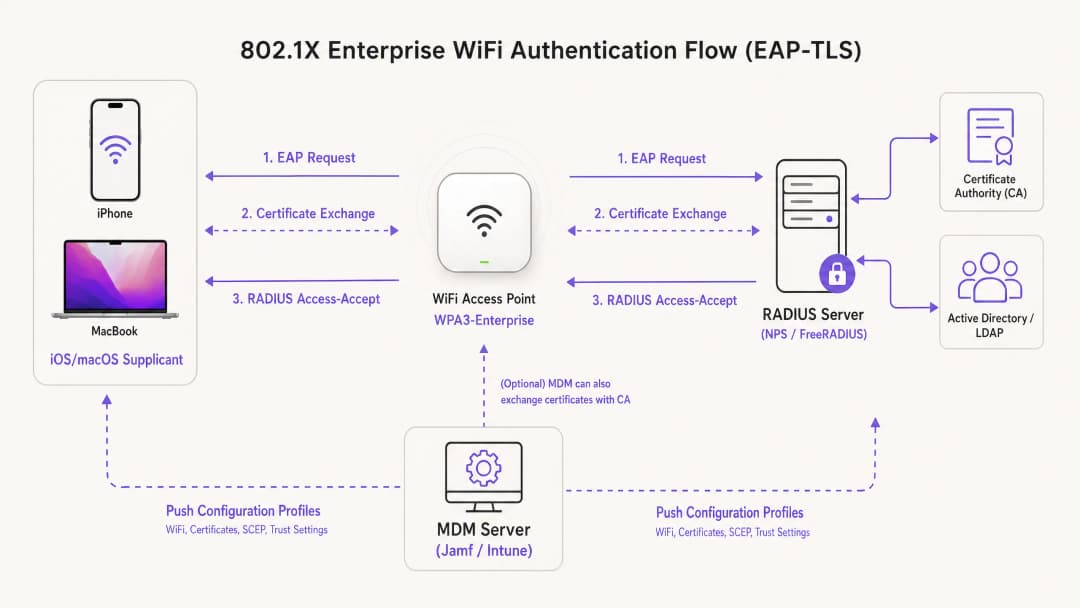
Apple ইকোসিস্টেমের মধ্যে ডিপ্লয়মেন্টের জন্য EAP-TLS হলো একটি ইন্ডাস্ট্রি স্ট্যান্ডার্ড। PEAP বা TTLS-এর মতো নয়, যা ব্যবহারকারীর ক্রেডেনশিয়ালের উপর নির্ভর করে যা নিরাপত্তা হুমকির প্রতি সংবেদনশীল, EAP-TLS-এর ক্ষেত্রে RADIUS সার্ভার এবং ক্লায়েন্ট ডিভাইস উভয়কেই ডিজিটাল সার্টিফিকেট প্রদর্শন করতে হয়। এই পারস্পরিক অথেনটিকেশন প্রক্রিয়াটি নিশ্চিত করে যে ডিভাইসটি অনুমোদিত এবং এটি যে নেটওয়ার্কের সাথে সংযুক্ত হচ্ছে তা বৈধ, যা রোগ AP আক্রমণ থেকে রক্ষা করে।
Apple কনফিগারেশন প্রোফাইল
Apple ডিভাইসগুলো এক্সটার্নাল ম্যানেজমেন্ট ছাড়া নেটিভভাবে স্বয়ংক্রিয় সার্টিফিকেট এনরোলমেন্ট সমর্থন করে না। স্কেলে EAP-TLS ডিপ্লয় করতে, IT টিমকে অবশ্যই কনফিগারেশন প্রোফাইল (.mobileconfig ফাইল) ব্যবহার করতে হবে। এই XML ফাইলগুলোতে নির্দিষ্ট পে-লোড থাকে:
- WiFi পে-লোড: SSID, সিকিউরিটি টাইপ (WPA3-Enterprise) এবং সমর্থিত EAP টাইপ সংজ্ঞায়িত করে।
- Certificate payload: RADIUS server-কে বিশ্বাস করার জন্য প্রয়োজনীয় root CA এবং যেকোনো intermediate CA সরবরাহ করে।
- SCEP/ACME payload: Certificate Authority (CA) থেকে একটি অনন্য ক্লায়েন্ট সার্টিফিকেট অনুরোধ করার জন্য ব্যবহৃত প্রোটোকল কনফিগার করে।
আপনার AP ইনফ্রাস্ট্রাকচার সুরক্ষিত করার বিষয়ে আরও বিস্তারিত জানতে, আমাদের গাইডটি দেখুন: Access Point Security: Your 2026 Enterprise Guide।
আপনার নির্দিষ্ট সেটআপ নিয়ে কোনো প্রশ্ন আছে?
আমাদের টিম ৮০,০০০ ভেন্যুতে ভেন্যু অপারেটর, IT ম্যানেজার এবং নেটওয়ার্ক ইঞ্জিনিয়ারদের সাথে কাজ করে। একটি ২০ মিনিটের কল বুক করুন এবং আপনার মতো অন্যরা কীভাবে এর সমাধান করেছেন তা আমরা আপনাকে দেখাব।
Implementation Guide
Step 1: PKI and RADIUS Preparation
MDM কনফিগারেশন শুরু করার আগে, আপনার Public Key Infrastructure (PKI) এবং RADIUS server (যেমন Cisco ISE, Aruba ClearPass বা FreeRADIUS) সার্টিফিকেট ইস্যু এবং যাচাই করার জন্য সেট আপ করা থাকতে হবে। নিশ্চিত করুন যে আপনার RADIUS server সার্টিফিকেটটি একটি বিশ্বস্ত ইন্টারনাল বা পাবলিক CA দ্বারা সাইন করা হয়েছে, এবং Subject Alternative Name (SAN) যেন সার্ভারের FQDN-এর সাথে মেলে।
Step 2: MDM Payload Configuration (Jamf / Intune)
স্কেলেবল এন্টারপ্রাইজ স্থাপনার জন্য, MDM ভিত্তিক স্থাপনা বাধ্যতামূলক।
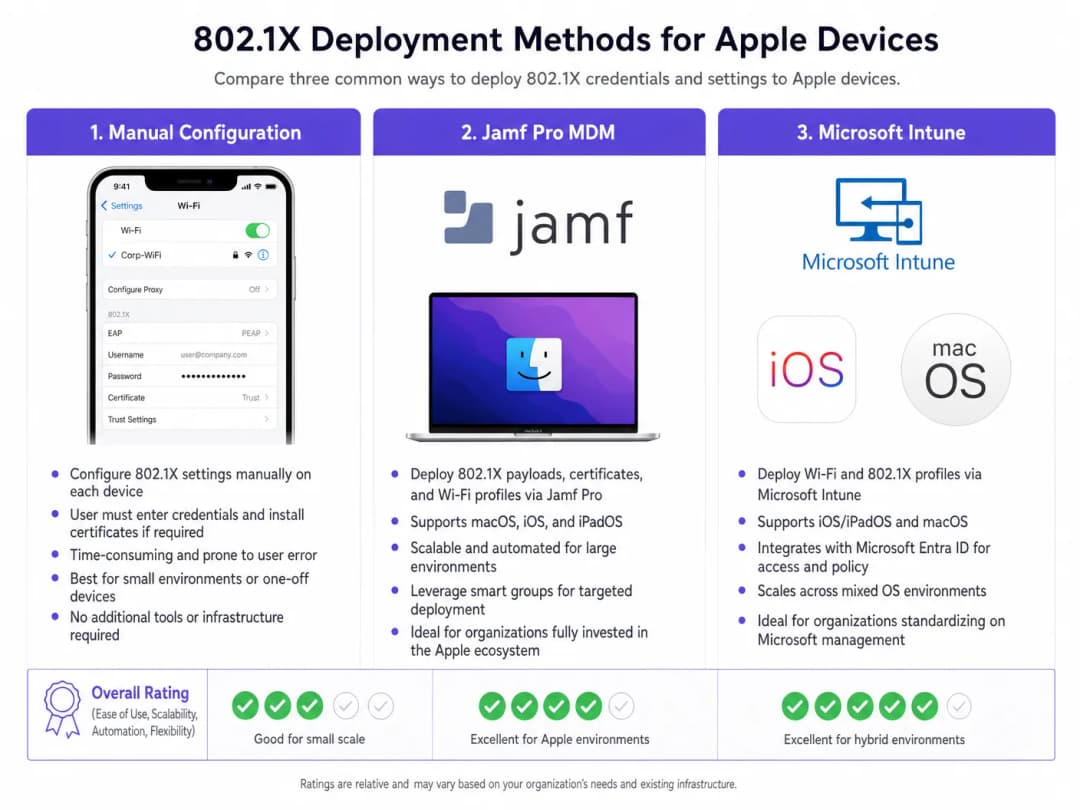
প্রোফাইল তৈরি করা:
- Trust settings: এই ধাপটি অত্যন্ত গুরুত্বপূর্ণ। WiFi পেলোডে, আপনাকে অবশ্যই RADIUS server-এর জন্য ট্রাস্ট অ্যাঙ্কর হিসেবে root CA সার্টিফিকেটটি (একই প্রোফাইলের মধ্যে একটি পৃথক পেলোড হিসেবে নিয়োজিত) স্পষ্টভাবে নির্বাচন করতে হবে। অতিরিক্তভাবে, "Trusted Server Certificate Names" ফিল্ডে RADIUS server-এর সঠিক Common Name (CN) বা SAN উল্লেখ করুন। এটি করতে ব্যর্থ হলে iOS/macOS ব্যবহারকারীকে ম্যানুয়ালি সার্টিফিকেটটি বিশ্বাস করার জন্য অনুরোধ জানাবে, যা জিরো-টাচ ডিপ্লয়মেন্ট মডেলটিকে ব্যাহত করবে।
- Identity certificate: WiFi পেলোডটিকে SCEP বা ACME পেলোডের সাথে লিঙ্ক করুন যাতে ডিভাইসটি জানতে পারে যে EAP-TLS হ্যান্ডশেকের সময় কোন সার্টিফিকেটটি উপস্থাপন করতে হবে।
Step 3: Network Segregation
802.1X-এর মাধ্যমে প্রমাণিত কর্পোরেট ডিভাইসগুলোকে ডেডিকেটেড VLAN-এ রাখতে হবে, যা পাবলিক অ্যাক্সেস নেটওয়ার্ক থেকে সম্পূর্ণ বিচ্ছিন্ন। Purple-এর WiFi Analytics ব্যবহার করা ভেন্যুগুলোর জন্য, গেস্ট SSID সমান্তরালভাবে কাজ করে, যা নিশ্চিত করে যে কর্পোরেট ট্রাফিক এবং গেস্ট অ্যানালিটিক্স ডেটা কখনই একে অপরকে অতিক্রম না করে।
মিক্সড ডিভাইস ফ্লিট বিশিষ্ট পরিবেশের জন্য, আপনি How to Set Up Enterprise WiFi on Android Devices with EAP-TLS গাইডটিও দেখতে পারেন।
Best Practices
- Enforce WPA3-Enterprise: ১৯২-বিট ক্রিপ্টোগ্রাফিক শক্তির সুবিধা নিতে সমস্ত নতুন স্থাপনার জন্য WPA3 বাধ্যতামূলক করুন। ব্যবসায়িক কার্যক্রমের জন্য যেখানে একেবারেই প্রয়োজন কেবল সেখানেই লিগ্যাসি ডিভাইসের সামঞ্জস্যতা নিশ্চিত করুন।
- Automate certificate renewal: মেয়াদ শেষ হওয়ার অন্তত ১৪ দিন আগে ক্লায়েন্ট সার্টিফিকেট স্বয়ংক্রিয়ভাবে পুনর্নবীকরণ করতে SCEP পেলোড কনফিগার করুন।
- Disable MAC randomisation: MDM-এর মাধ্যমে পুশ করা কর্পোরেট SSID-এর জন্য, নেটওয়ার্ক ম্যানেজমেন্ট টুলগুলোতে ধারাবাহিক ট্র্যাকিং এবং নীতি প্রয়োগ নিশ্চিত করতে "Private Wi-Fi Address" (iOS) নিষ্ক্রিয় করুন।* DNS সুরক্ষার সুবিধা নিন: কর্পোরেট ডিভাইসের সাথে কমান্ড-এন্ড-কন্ট্রোল সার্ভারের সংযোগ প্রতিরোধ করতে শক্তিশালী DNS ফিল্টারিংয়ের সাথে 802.1X যুক্ত করুন। বাস্তবায়নের বিস্তারিত জানতে, Protecting Your Network Through Robust DNS and Security দেখুন।
ট্রাবলশুটিং এবং ঝুঁকি হ্রাস
"সাইলেন্ট ফেইলর" দৃশ্যপট
iOS/macOS 802.1X ডিপ্লয়মেন্টে সবচেয়ে সাধারণ সমস্যা হলো সাইলেন্ট ফেইলর, যেখানে ডিভাইসটি ব্যবহারকারীকে কোনো প্রম্পট না জানিয়েই সংযোগ করতে অস্বীকার করে। এটি প্রায় সবসময়ই ট্রাস্ট চেইনের সমস্যার কারণে ঘটে। যদি RADIUS সার্ভারের সার্টিফিকেট রিনিউ করা হয়ে থাকে এবং পরিবর্তনের আগে নতুন রুট/ইন্টারমিডিয়েট সার্টিফিকেট অথরিটি (CA) ডিভাইসে পুশ করা না হয়, তাহলে Apple ডিভাইসগুলো ম্যান-ইন-দ্য-মিডল আক্রমণ থেকে রক্ষা করতে EAP হ্যান্ডশেক বাতিল করবে।
ঝুঁকি হ্রাস: RADIUS সার্টিফিকেটের জন্য একটি কঠোর পরিবর্তন ব্যবস্থাপনা প্রক্রিয়া বাস্তবায়ন করুন। RADIUS সার্ভার আপডেট করার অন্তত এক সপ্তাহ আগে MDM-এর মাধ্যমে সর্বদা নতুন CA চেইন ডিপ্লয় করুন।
SCEP এনরোলমেন্ট টাইমআউট
ডিভাইসগুলো যদি তাদের ক্লায়েন্ট সার্টিফিকেট পেতে ব্যর্থ হয়, তবে SCEP চ্যালেঞ্জ পাসওয়ার্ড যাচাই করুন এবং নিশ্চিত করুন যে MDM সার্ভার প্রয়োজনীয় পোর্টের মাধ্যমে NDES/CA সার্ভারের সাথে যোগাযোগ করতে পারছে।
ROI এবং ব্যবসায়িক প্রভাব
EAP-TLS সহ 802.1X ডিপ্লয় করার জন্য PKI এবং MDM আর্কিটেকচারে প্রাথমিক বিনিয়োগের প্রয়োজন হয়, তবে ঝুঁকি হ্রাস এবং কর্মক্ষম দক্ষতার মাধ্যমে ROI অর্জিত হয়। পাসওয়ার্ড রিসেট করার ঝামেলা দূর করে এবং ডিভাইস অনবোর্ডিং স্বয়ংক্রিয় করে, WiFi অ্যাক্সেস সংক্রান্ত IT হেল্প-ডেস্ক টিকিট সাধারণত ৬০-৮০% কমে যায়। তাছাড়া, সাইবার-সিকিউরিটি ইন্স্যুরেন্স পলিসি এবং PCI-DSS কমপ্লায়েন্সের জন্য কঠোর নেটওয়ার্ক সেগমেন্টেশন অর্জন করা প্রায়শই একটি বাধ্যতামূলক প্রয়োজনীয়তা, যা সুরক্ষার লঙ্ঘনের ফলে হওয়া মারাত্মক আর্থিক জরিমানা থেকে সংস্থাকে রক্ষা করে।
মূল সংজ্ঞাসমূহ
EAP-TLS
Extensible Authentication Protocol-Transport Layer Security. একটি প্রমাণীকরণ ফ্রেমওয়ার্ক যার জন্য ক্লায়েন্ট এবং প্রমাণীকরণ সার্ভার উভয় ক্ষেত্রেই ডিজিটাল সার্টিফিকেটের প্রয়োজন হয়।
সবচেয়ে নিরাপদ 802.1X পদ্ধতি হিসাবে বিবেচিত, যা পাসওয়ার্ডের প্রয়োজনীয়তা দূর করে এবং শংসাপত্র চুরি থেকে রক্ষা করে।
Supplicant
নেটওয়ার্কে অ্যাক্সেসের জন্য অনুরোধকারী এন্ড-ইউজার ডিভাইস (যেমন, iPhone, MacBook)।
802.1X হ্যান্ডশেকের সময় সঠিক সার্টিফিকেট উপস্থাপন এবং সঠিক সার্ভারকে বিশ্বাস করার জন্য supplicant-টিকে MDM এর মাধ্যমে কনফিগার করতে হবে।
Authenticator
নেটওয়ার্ক ডিভাইস, সাধারণত একটি WiFi অ্যাক্সেস পয়েন্ট বা সুইচ, যা supplicant প্রমাণীকৃত না হওয়া পর্যন্ত ট্রাফিক ব্লক করে।
AP মধ্যস্থতাকারী হিসাবে কাজ করে, যা supplicant এবং RADIUS সার্ভারের মধ্যে EAP বার্তাগুলি আদান-প্রদান করে।
RADIUS Server
Remote Authentication Dial-In User Service. সার্ভার যা supplicant-এর শংসাপত্র (সার্টিফিকেট) যাচাই করে এবং অ্যাক্সেস অনুমোদন করে।
এন্টারপ্রাইজ নেটওয়ার্ক অ্যাক্সেসের প্রধান সিদ্ধান্তকারী ইঞ্জিন, যা প্রায়শই Active Directory এবং PKI এর সাথে একীভূত থাকে।
MDM Configuration Profile
সেটিংস প্রয়োগ, সার্টিফিকেট স্থাপন এবং নেটওয়ার্ক অ্যাক্সেস কনফিগার করতে Apple ডিভাইসে পুশ করা একটি XML ফাইল (.mobileconfig)।
iOS এবং macOS-এ জিরো-টাচ 802.1X স্থাপনা অর্জনের জন্য অপরিহার্য ডেলিভারি প্রক্রিয়া।
SCEP
Simple Certificate Enrolment Protocol. ডিভাইসে স্বয়ংক্রিয়ভাবে সার্টিফিকেট অনুরোধ এবং ইনস্টল করতে MDM সিস্টেম দ্বারা ব্যবহৃত একটি প্রোটোকল।
EAP-TLS এর জন্য প্রয়োজনীয় ক্লায়েন্ট সার্টিফিকেটের লাইফসাইকেল স্বয়ংক্রিয় করার জন্য অত্যন্ত গুরুত্বপূর্ণ।
SAN (Subject Alternative Name)
একটি X.509 সার্টিফিকেটের এক্সটেনশন যা একাধিক মানকে (যেমন FQDN বা IP অ্যাড্রেস) সার্টিফিকেটের সাথে যুক্ত করার অনুমতি দেয়।
Apple ডিভাইসগুলো তাদের কনফিগারেশন প্রোফাইলে সংজ্ঞায়িত বিশ্বস্ত নামগুলোর বিপরীতে RADIUS সার্ভার সার্টিফিকেটের SAN কঠোরভাবে পরীক্ষা করে।
WPA3-Enterprise
সর্বশেষ WiFi সিকিউরিটি সার্টিফিকেশন যার জন্য 192-বিট ক্রিপ্টোগ্রাফিক শক্তি এবং বাধ্যতামূলক Protected Management Frames (PMF) প্রয়োজন।
নতুন এন্টারপ্রাইজ ডেপ্লয়মেন্টের জন্য প্রস্তাবিত সিকিউরিটি স্ট্যান্ডার্ড, যা ইভসড্রপিংয়ের বিরুদ্ধে উল্লেখযোগ্য সুরক্ষা প্রদান করে।
সমাধানকৃত উদাহরণসমূহ
একটি বিশ্বব্যাপী রিটেইল চেইন ৫০০ জন স্টোর ম্যানেজারের জন্য কর্পোরেট iPad স্থাপন করছে। তারা বর্তমানে একটি PSK সহ একটি লুকানো SSID ব্যবহার করে, যা লিকেজ হয়ে গেছে। ম্যানেজারদের ম্যানুয়ালি শংসাপত্রগুলি প্রবেশ করার প্রয়োজন ছাড়াই Microsoft Intune ব্যবহার করে তাদের নেটওয়ার্কটি সুরক্ষিত করতে হবে।
১. একটি Enterprise CA স্থাপন করুন এবং Intune এর সাথে NDES/SCEP ইন্টিগ্রেশন কনফিগার করুন। ২. RADIUS সার্ভারের জন্য Root CA ধারণকারী Intune-এ একটি Trusted Certificate প্রোফাইল তৈরি করুন। ৩. অনন্য ক্লায়েন্ট সার্টিফিকেট ইস্যু করতে iPad গুলিকে লক্ষ্য করে একটি SCEP Certificate প্রোফাইল তৈরি করুন। ৪. Intune-এ একটি WiFi প্রোফাইল তৈরি করুন। সিকিউরিটি টাইপ WPA2/WPA3-Enterprise এবং EAP টাইপ EAP-TLS সেট করুন। ক্লায়েন্ট সার্টিফিকেট হিসেবে SCEP প্রোফাইল এবং সার্ভার যাচাইকরণের জন্য Trusted Certificate প্রোফাইল লিঙ্ক করুন। RADIUS সার্ভারের নামগুলি নির্দিষ্ট করুন। ৫. প্রোফাইলগুলিকে একটি টেস্ট গ্রুপে পুশ করুন, কানেক্টিভিটি যাচাই করুন, তারপর সমস্ত ৫০০টি ডিভাইসে রোল আউট করুন।
একটি বিশ্ববিদ্যালয় তার নেটওয়ার্ক অবকাঠামো আপডেট করছে এবং Jamf Pro দ্বারা পরিচালিত ফ্যাকাল্টি MacBook গুলি যাতে নির্বিঘ্নে একটি নতুন RADIUS সার্ভার ক্লাস্টারে স্থানান্তরিত হতে পারে তা নিশ্চিত করতে হবে।
১. নতুন RADIUS সার্ভার ক্লাস্টারের Root এবং Intermediate সার্টিফিকেটগুলি এক্সপোর্ট করুন। ২. Jamf Pro-তে, পুরানো সার্টিফিকেটগুলির পাশাপাশি নতুন CA সার্টিফিকেটগুলি অন্তর্ভুক্ত করতে বিদ্যমান কনফিগারেশন প্রোফাইল আপডেট করুন (অথবা একটি ট্রানজিশন প্রোফাইল তৈরি করুন)। ৩. নতুন RADIUS সার্ভারগুলির FQDN অন্তর্ভুক্ত করতে WiFi পে-লোডে "Trusted Server Certificate Names" আপডেট করুন। ৪. সমস্ত MacBook-এ আপডেট করা প্রোফাইলটি পুশ করুন। ৫. প্রোফাইলটি পুরো ডিভাইসের ফ্লীটে সফলভাবে ইনস্টল করা নিশ্চিত হয়ে গেলে, নেটওয়ার্ক অবকাঠামোটি নতুন RADIUS সার্ভারগুলিতে স্থানান্তর করুন।
অনুশীলনী প্রশ্নসমূহ
Q1. আপনার প্রতিষ্ঠান সমস্ত কর্পোরেট MacBook-এ WPA3-Enterprise রোল আউট করছে। টেস্টিংয়ের সময়, ব্যবহারকারীরা রিপোর্ট করেন যে তাদের ডিভাইসগুলো Jamf-এর মাধ্যমে প্রোফাইল পুশ করা সত্ত্বেও বারবার RADIUS সার্ভারের জন্য 'Verify Certificate' করতে বলছে। সবচেয়ে সম্ভাব্য কনফিগারেশন ত্রুটি কোনটি?
ইঙ্গিত: Apple ডিভাইসটির নীরবে সার্ভারকে বিশ্বাস করার জন্য ঠিক কোন সুনির্দিষ্ট তথ্যের প্রয়োজন তা বিবেচনা করুন।
মডেল উত্তর দেখুন
কনফিগারেশন প্রোফাইলে স্পষ্ট ট্রাস্ট ম্যাপিং অনুপস্থিত। ডিভাইসে Root CA ইনস্টল করা থাকলেও, WiFi পেলোডে অবশ্যই 'Trusted Server Certificate Names' ফিল্ডে RADIUS সার্ভারের FQDN স্পষ্টভাবে তালিকাভুক্ত থাকতে হবে, এবং Root CA-টিকে সেই নির্দিষ্ট WiFi নেটওয়ার্কের জন্য বিশ্বস্ত অ্যাঙ্কর হিসেবে নির্বাচন করতে হবে। এটি ছাড়া, macOS ব্যবহারকারীকে ম্যানুয়ালি সার্টিফিকেটটি যাচাই এবং বিশ্বাস করতে বলবে।
Q2. একটি হোটেল চেইন একটি captive portal-এর মাধ্যমে সর্বজনীন অ্যাক্সেস দেওয়া অব্যাহত রাখার পাশাপাশি 802.1X ব্যবহার করে তাদের ব্যাক-অফ-হাউস অপারেশন (স্টাফদের iPad) সুরক্ষিত করতে চায়। নিরাপদে উভয় প্রয়োজনীয়তা সমর্থন করার জন্য কীভাবে নেটওয়ার্ক আর্কিটেকচার ডিজাইন করা উচিত?
ইঙ্গিত: অ্যাক্সেস পয়েন্ট এবং সুইচ লেভেলে লজিক্যাল সেপারেশন বা যৌক্তিক পৃথকীকরণের কথা চিন্তা করুন।
মডেল উত্তর দেখুন
আর্কিটেকচারটিতে একই অ্যাক্সেস পয়েন্ট থেকে ব্রডকাস্ট হওয়া দুটি পৃথক SSID ব্যবহার করা উচিত। ব্যাক-অফ-হাউস SSID-টি WPA3-Enterprise (802.1X) এর জন্য কনফিগার করা হবে, যা EAP-TLS-এর মাধ্যমে স্টাফদের iPad অথেন্টিকেট করবে এবং সেগুলোকে একটি নিরাপদ, অভ্যন্তরীণ VLAN-এ রাখবে। পাবলিক SSID-টি ওপেন থাকবে, যা ব্যবহারকারীদের Purple Guest WiFi captive portal-এ রিডাইরেক্ট করবে এবং অথেন্টিকেট হওয়া অতিথিদের একটি অত্যন্ত সীমাবদ্ধ, শুধুমাত্র ইন্টারনেট-চালিত VLAN-এ যুক্ত করবে। এটি কর্পোরেট এবং গেস্ট ট্রাফিকের সম্পূর্ণ পৃথকীকরণ নিশ্চিত করে।
Q3. আপনার RADIUS ইনফ্রাস্ট্রাকচার একটি অন-প্রেমিস Cisco ISE ডেপ্লয়মেন্ট থেকে একটি ক্লাউড-ভিত্তিক RADIUS প্রোভাইডারে স্থানান্তরিত করছেন। নতুন প্রোভাইডারটি একটি ভিন্ন পাবলিক Certificate Authority ব্যবহার করে। অ্যাক্সেস পয়েন্টগুলোতে RADIUS কনফিগারেশন পরিবর্তন করার আগে গুরুত্বপূর্ণ প্রথম ধাপটি কী?
ইঙ্গিত: ক্লায়েন্ট ডিভাইসগুলোর জন্য সংযোগের সম্পূর্ণ ক্ষতি রোধ করতে অপারেশনের ক্রম বিবেচনা করুন।
মডেল উত্তর দেখুন
গুরুত্বপূর্ণ প্রথম ধাপটি হলো সমস্ত Apple ডিভাইসে একটি আপডেটেড MDM কনফিগারেশন প্রোফাইল পুশ করা যাতে ক্লাউড RADIUS প্রোভাইডার দ্বারা ব্যবহৃত নতুন পাবলিক CA-এর Root এবং Intermediate সার্টিফিকেট অন্তর্ভুক্ত থাকে। AP-গুলো নতুন RADIUS সার্ভারে স্থানান্তর করার আগেই সাপ্লিক্যান্টগুলোতে এই ট্রাস্ট চেইন স্থাপন করতে হবে; অন্যথায়, ডিভাইসগুলো নতুন সার্ভার সার্টিফিকেট প্রত্যাখ্যান করবে এবং সংযোগ করতে ব্যর্থ হবে।
এই সিরিজে পড়া চালিয়ে যান
গেস্ট WiFi-এর জন্য RADIUS প্রমাণীকরণ কনফিগার করার বিষয়ে একজন নেটওয়ার্ক অ্যাডমিনিস্ট্রেটরের গাইড
গেস্ট WiFi-এর জন্য RADIUS প্রমাণীকরণ ব্যবহারের বিষয়ে নেটওয়ার্ক অ্যাডমিনিস্ট্রেটরদের জন্য একটি ব্যাপক প্রযুক্তিগত রেফারেন্স। এতে আর্কিটেকচার, ভেন্ডর-নিরপেক্ষ কনফিগারেশন ধাপ, নিরাপত্তা বিষয়ক সর্বোত্তম অনুশীলন এবং সাধারণ ডেপ্লয়মেন্ট ব্যর্থতার সমস্যা সমাধান অন্তর্ভুক্ত রয়েছে।
উচ্চশিক্ষায় নিরাপদ BYOD এবং 802.1X WiFi-এর জন্য SCEP বাস্তবায়ন করা
এই টেকনিক্যাল গাইডটিতে বিস্তারিত জানানো হয়েছে কীভাবে উচ্চশিক্ষা প্রতিষ্ঠানের IT টিমগুলো SCEP ব্যবহার করে হাজার হাজার BYOD ডিভাইসের জন্য 802.1X সার্টিফিকেট এনরোলমেন্ট স্বয়ংক্রিয় করতে পারে। ম্যানুয়াল অনবোর্ডিং সরিয়ে একটি নিরাপদ, জিরো-টাচ নেটওয়ার্ক অ্যাক্সেস মডেল চালু করার জন্য এর আর্কিটেকচার, সিকিউরিটি সুবিধা এবং বাস্তবসম্মত ডিপ্লয়মেন্ট ধাপগুলো এখানে আলোচনা করা হয়েছে।
Guest এবং Staff WiFi নেটওয়ার্কের জন্য RADIUS Authentication কনফিগার করা
এই টেকনিক্যাল রেফারেন্স গাইডটি এন্টারপ্রাইজ guest এবং staff WiFi নেটওয়ার্কের জন্য RADIUS authentication-এর আর্কিটেকচার, কনফিগারেশন এবং ডিপ্লয়মেন্টের রূপরেখা প্রদান করে। এটি নেটওয়ার্ক আর্কিটেক্ট এবং IT ম্যানেজারদের সুরক্ষিত, স্কেলযোগ্য ওয়্যারলেস অ্যাক্সেস কন্ট্রোল সিস্টেম তৈরি করার জন্য প্রয়োজনীয় সঠিক প্রোটোকল, সিকিউরিটি স্ট্যান্ডার্ড এবং ট্রাবলশুটিং মেথডোলজি প্রদান করে।
আপনার নির্দিষ্ট সেটআপ নিয়ে কোনো প্রশ্ন আছে?
আমাদের টিম ৮০,০০০ ভেন্যুতে ভেন্যু অপারেটর, IT ম্যানেজার এবং নেটওয়ার্ক ইঞ্জিনিয়ারদের সাথে কাজ করে। একটি ২০ মিনিটের কল বুক করুন এবং আপনার মতো অন্যরা কীভাবে এর সমাধান করেছেন তা আমরা আপনাকে দেখাব।