
802.1X के साथ iOS और macOS पर Enterprise WiFi कैसे सेट अप करें
यह आधिकारिक गाइड वरिष्ठ IT लीडर्स को iOS और macOS डिवाइसों पर 802.1X enterprise WiFi को तैनात करने के लिए व्यावहारिक कदम प्रदान करती है। इसमें BYOD पहलों का समर्थन करते हुए कॉर्पोरेट नेटवर्क को सुरक्षित करने के लिए सर्टिफिकेट-आधारित ऑथेंटिकेशन (EAP-TLS), MDM कॉन्फ़िगरेशन प्रोफाइल और आर्किटेक्चर इंटीग्रेशन शामिल हैं।
हमारी मुख्य श्रृंखला का हिस्सा: Enterprise WiFi Security Guide →

कार्यकारी सारांश (Executive Summary)
बड़े परिसरों का प्रबंधन करने वाले CTOs और नेटवर्क आर्किटेक्ट्स के लिए - हॉस्पिटैलिटी और रिटेल से लेकर ट्रांसपोर्ट हब तक - एंटरप्राइज वायरलेस एज को सुरक्षित करना सर्वोपरि है। कर्मचारियों और कॉर्पोरेट डिवाइस एक्सेस के लिए प्री-शेयर्ड कीज़ (PSK) या लीगेसी Captive Portals पर भरोसा करना नेटवर्क को क्रेडेंशियल चोरी और अनुपालन विफलताओं के जोखिम में डालता है।
यह तकनीकी संदर्भ Apple डिवाइसेस (iOS और macOS) के लिए EAP-TLS (एक्स्टेंसिबल ऑथेंटिकेशन प्रोटोकॉल - ट्रांसपोर्ट लेयर सिक्योरिटी) का उपयोग करके 802.1X के कार्यान्वयन का विवरण देता है। सर्टिफिकेट-आधारित ऑथेंटिकेशन को लागू करके, एंटरप्राइज पासवर्ड से जुड़े सुरक्षा खतरों को समाप्त कर सकते हैं, Jamf और Intune जैसे मोबाइल डिवाइस मैनेजमेंट (MDM) प्लेटफॉर्म के माध्यम से डिवाइस ऑनबोर्डिंग को सुव्यवस्थित कर सकते हैं और मजबूत नेटवर्क अलगाव सुनिश्चित कर सकते हैं। जहां Guest WiFi समाधान सार्वजनिक पहुंच और डेटा कैप्चर को संभालते हैं, वहीं एक अच्छी तरह से आर्किटेक्ट किया गया 802.1X परिनियोजन आंतरिक संसाधनों की सुरक्षा करता है, जिससे PCI-DSS और GDPR आवश्यकताओं का अनुपालन सुनिश्चित होता है।
आर्किटेक्चर और सामान्य कमियों के त्वरित अवलोकन के लिए नीचे दिया गया 10 मिनट का तकनीकी ब्रीफिंग पॉडकास्ट सुनें।
तकनीकी गहन-विश्लेषण (Technical Deep-Dive)
802.1X आर्किटेक्चर
IEEE 802.1X मानक पोर्ट-आधारित नेटवर्क एक्सेस कंट्रोल (PNAC) को परिभाषित करता है। वायरलेस संदर्भ में, यह क्लाइंट (सप्लिकेंट) को वायरलेस एक्सेस पॉइंट (ऑथेंटिकेटर) के माध्यम से तब तक ट्रैफ़िक पास करने से रोकता है जब तक कि एक RADIUS सर्वर (ऑथेंटिकेशन सर्वर) ने उसकी पहचान की पुष्टि न कर दी हो।
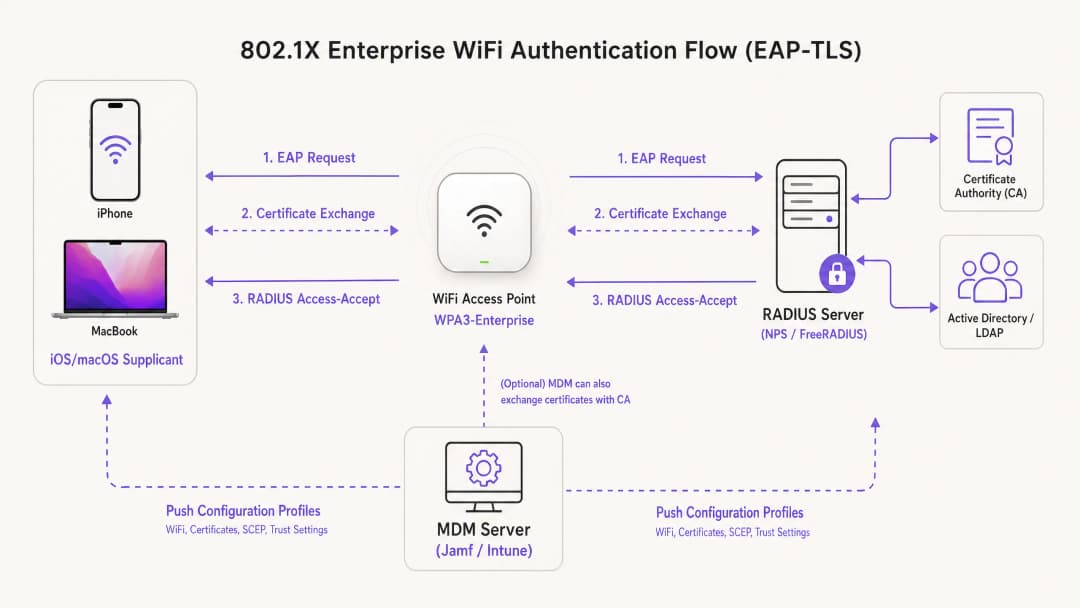
Apple इकोसिस्टम के भीतर परिनियोजन के लिए, EAP-TLS उद्योग मानक है। PEAP या TTLS के विपरीत, जो उन उपयोगकर्ता क्रेडेंशियल्स पर भरोसा करते हैं जो सुरक्षा खतरों के प्रति संवेदनशील हैं, EAP-TLS के लिए RADIUS सर्वर और क्लाइंट डिवाइस दोनों को डिजिटल सर्टिफिकेट प्रस्तुत करने की आवश्यकता होती है। यह पारस्परिक ऑथेंटिकेशन प्रक्रिया सुनिश्चित करती है कि डिवाइस अधिकृत है और जिस नेटवर्क से वह कनेक्ट हो रहा है वह वैध है, जिससे नकली AP हमलों से सुरक्षा मिलती है।
Apple कॉन्फ़िगरेशन प्रोफ़ाइल
Apple डिवाइसेस बाहरी प्रबंधन के बिना मूल रूप से स्वचालित सर्टिफिकेट नामांकन का समर्थन नहीं करते हैं। बड़े पैमाने पर EAP-TLS को परिनियोजित करने के लिए, IT टीमों को कॉन्फ़िगरेशन प्रोफ़ाइल (.mobileconfig फ़ाइलें) का उपयोग करना चाहिए। इन XML फ़ाइलों में विशिष्ट पेलोड होते हैं:
- WiFi पेलोड: SSID, सुरक्षा प्रकार (WPA3-Enterprise) और समर्थित EAP प्रकारों को परिभाषित करता है।
- सर्टिफिकेट पेलोड: RADIUS सर्वर पर भरोसा करने के लिए आवश्यक रूट CA और किसी भी मध्यवर्ती CA को डिलीवर करता है।
- SCEP/ACME पेलोड: सर्टिफिकेट अथॉरिटी (CA) से एक विशिष्ट क्लाइंट सर्टिफिकेट का अनुरोध करने के लिए उपयोग किए जाने वाले प्रोटोकॉल को कॉन्फ़िगर करता है।
अपने AP इंफ्रास्ट्रक्चर को सुरक्षित करने के बारे में अधिक जानकारी के लिए, हमारा गाइड देखें: Access Point Security: Your 2026 Enterprise Guide।
अपने विशिष्ट सेटअप को लेकर कोई सवाल हैं?
हमारी टीम 80,000 से अधिक वेन्यू में वेन्यू ऑपरेटरों, IT मैनेजरों और नेटवर्क इंजीनियरों के साथ काम करती है। 20 मिनट का कॉल बुक करें और हम आपको दिखाएंगे कि आपके जैसे अन्य लोगों ने इसे कैसे हल किया।
कार्यान्वयन गाइड
चरण 1: PKI और RADIUS तैयारी
MDM कॉन्फ़िगरेशन शुरू करने से पहले, सर्टिफिकेट जारी करने और सत्यापित करने के लिए आपका पब्लिक की इंफ्रास्ट्रक्चर (PKI) और RADIUS सर्वर (जैसे Cisco ISE, Aruba ClearPass या FreeRADIUS) सेटअप होना चाहिए। सुनिश्चित करें कि आपका RADIUS सर्वर सर्टिफिकेट किसी विश्वसनीय आंतरिक या सार्वजनिक CA द्वारा हस्ताक्षरित हो, और सब्जेक्ट अल्टरनेटिव नेम (SAN) सर्वर के FQDN से मेल खाता हो।
चरण 2: MDM पेलोड कॉन्फ़िगरेशन (Jamf / Intune)
स्केलेबल एंटरप्राइज डिप्लॉयमेंट के लिए, MDM-आधारित डिप्लॉयमेंट अनिवार्य है।
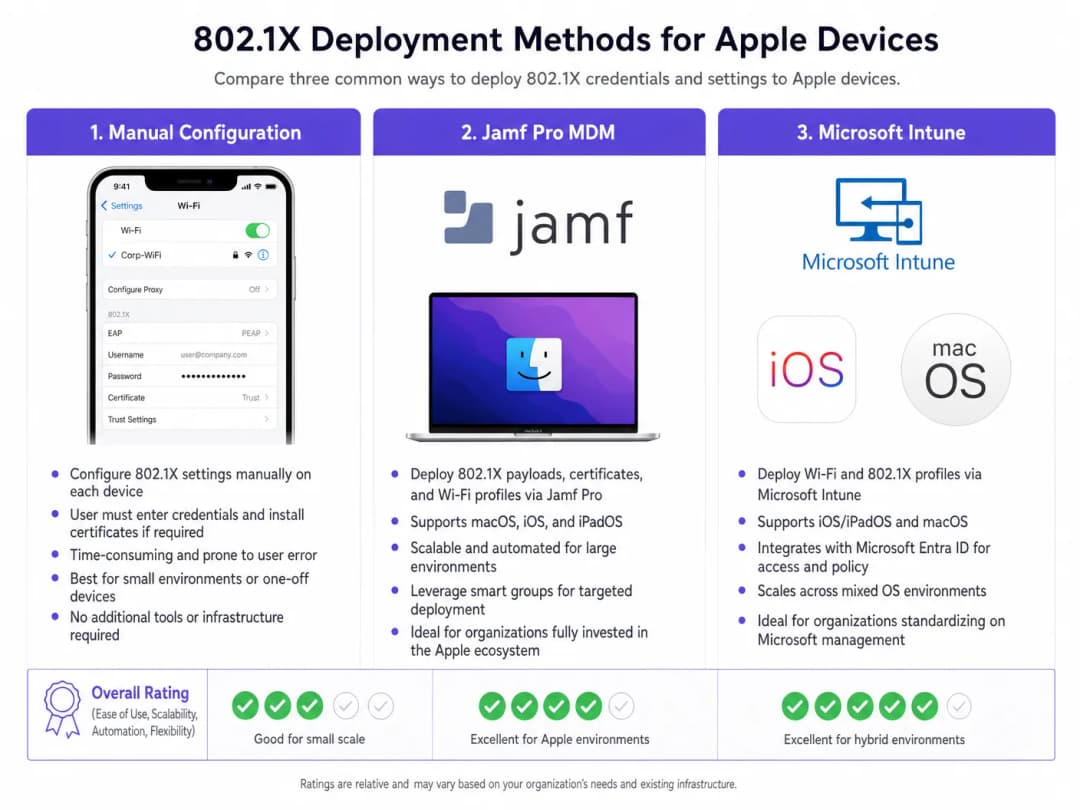
प्रोफाइल बनाना:
- ट्रस्ट सेटिंग्स: यह चरण महत्वपूर्ण है। WiFi पेलोड में, आपको RADIUS सर्वर के लिए ट्रस्ट एंकर के रूप में रूट CA सर्टिफिकेट (उसी प्रोफाइल के भीतर एक अलग पेलोड के रूप में डिप्लॉय किया गया) को स्पष्ट रूप से चुनना होगा। इसके अतिरिक्त, "Trusted Server Certificate Names" फ़ील्ड में RADIUS सर्वर का सटीक कॉमन नेम (CN) या SAN निर्दिष्ट करें। ऐसा न करने पर iOS/macOS यूजर को मैन्युअल रूप से सर्टिफिकेट पर भरोसा करने के लिए कहेगा, जिससे जीरो-टच डिप्लॉयमेंट मॉडल टूट जाएगा।
- पहचान सर्टिफिकेट: WiFi पेलोड को SCEP या ACME पेलोड से लिंक करें ताकि डिवाइस को पता चल सके कि EAP-TLS हैंडशेक के दौरान कौन सा सर्टिफिकेट प्रस्तुत करना है।
चरण 3: नेटवर्क पृथक्करण
802.1X के माध्यम से प्रमाणित कॉर्पोरेट डिवाइसेज को समर्पित VLANs पर रखा जाना चाहिए, जो सार्वजनिक एक्सेस नेटवर्क से पूरी तरह से अलग हों। Purple के WiFi Analytics का उपयोग करने वाले स्थानों के लिए, गेस्ट SSID समानांतर में काम करता है, जिससे यह सुनिश्चित होता है कि कॉर्पोरेट ट्रैफ़िक और गेस्ट एनालिटिक्स डेटा कभी आपस में न मिलें।
मिश्रित डिवाइस वाले वातावरण के लिए, आप How to Set Up Enterprise WiFi on Android Devices with EAP-TLS भी देख सकते हैं।
सर्वोत्तम प्रथाएं
- WPA3-Enterprise लागू करें: 192-बिट क्रिप्टोग्राफिक ताकत का लाभ उठाने के लिए सभी नए डिप्लॉयमेंट के लिए WPA3 अनिवार्य करें। व्यावसायिक संचालन के लिए केवल वहीं लीगेसी डिवाइस अनुकूलता सुनिश्चित करें जहां अत्यंत आवश्यक हो।
- सर्टिफिकेट रिन्यूअल को ऑटोमेट करें: समाप्त होने से कम से कम 14 दिन पहले क्लाइंट सर्टिफिकेट को स्वचालित रूप से रिन्यू करने के लिए SCEP पेलोड को कॉन्फ़िगर करें।
- MAC रैंडमाइजेशन को अक्षम करें: MDM के माध्यम से पुश किए गए कॉर्पोरेट SSIDs के लिए, नेटवर्क प्रबंधन टूल में निरंतर ट्रैकिंग और नीति प्रवर्तन सुनिश्चित करने के लिए "Private Wi-Fi Address" (iOS) को अक्षम करें।* DNS सुरक्षा का लाभ उठाएं: सुरक्षित कॉर्पोरेट उपकरणों को कमांड-एंड-कंट्रोल सर्वर से कनेक्ट होने से रोकने के लिए 802.1X को मजबूत DNS फ़िल्टरिंग के साथ जोड़ें। कार्यान्वयन विवरण के लिए, Protecting Your Network Through Robust DNS and Security देखें।
समस्या निवारण और जोखिम न्यूनीकरण
"मौन विफलता" (साइलेंट फेलियर) परिदृश्य
iOS/macOS 802.1X परिनियोजन में सबसे आम समस्या मौन विफलता है, जहां उपकरण उपयोगकर्ता को संकेत दिए बिना कनेक्ट होने से इनकार कर देता है। यह लगभग हमेशा ट्रस्ट चेन की समस्या की ओर इशारा करता है। यदि RADIUS सर्वर का प्रमाणपत्र नवीनीकृत किया गया है और नया रूट/मध्यवर्ती प्रमाणपत्र प्राधिकरण (CA) स्विचओवर से पहले उपकरणों पर पुश नहीं किया गया था, तो Apple उपकरण मैन-इन-द-मिडल हमलों से बचाने के लिए EAP हैंडशेक को बीच में ही रोक देंगे।
न्यूनीकरण: RADIUS प्रमाणपत्रों के लिए एक सख्त परिवर्तन प्रबंधन प्रक्रिया लागू करें। RADIUS सर्वर को अपडेट करने से कम से कम एक सप्ताह पहले MDM के माध्यम से हमेशा नया CA चेन तैनात करें।
SCEP नामांकन टाइमआउट
यदि उपकरण अपने क्लाइंट प्रमाणपत्र प्राप्त करने में विफल रहते हैं, तो SCEP चुनौती पासवर्ड सत्यापित करें और सुनिश्चित करें कि MDM सर्वर आवश्यक पोर्ट पर NDES/CA सर्वर के साथ संचार कर सकता है।
ROI और व्यावसायिक प्रभाव
EAP-TLS के साथ 802.1X को तैनात करने के लिए PKI और MDM आर्किटेक्चर में अग्रिम निवेश की आवश्यकता होती है, लेकिन ROI जोखिम न्यूनीकरण और परिचालन दक्षता के माध्यम से प्राप्त होता है। पासवर्ड रीसेट को समाप्त करके और डिवाइस ऑनबोर्डिंग को स्वचालित करके, WiFi एक्सेस से संबंधित IT हेल्प-डेस्क टिकटों में आमतौर पर 60-80% की गिरावट आती है। इसके अलावा, सख्त नेटवर्क सेगमेंटेशन प्राप्त करना अक्सर साइबर सुरक्षा बीमा पॉलिसियों और PCI-DSS अनुपालन के लिए एक अनिवार्य आवश्यकता होती है, जो संगठन को सुरक्षा उल्लंघनों के परिणामस्वरूप होने वाले विनाशकारी वित्तीय दंड से बचाती है।
मुख्य परिभाषाएं
EAP-TLS
Extensible Authentication Protocol-Transport Layer Security. एक ऑथेंटिकेशन फ्रेमवर्क जिसके लिए क्लाइंट और ऑथेंटिकेशन सर्वर दोनों पर डिजिटल सर्टिफिकेट की आवश्यकता होती है।
इसे सबसे सुरक्षित 802.1X तरीका माना जाता है, जो पासवर्ड की आवश्यकता को समाप्त करता है और क्रेडेंशियल चोरी से बचाता है।
Supplicant
नेटवर्क तक पहुंच का अनुरोध करने वाला एंड-यूज़र डिवाइस (जैसे, iPhone, MacBook)।
802.1X हैंडशेक के दौरान सही सर्टिफिकेट प्रस्तुत करने और सही सर्वर पर भरोसा करने के लिए MDM के माध्यम से supplicant को कॉन्फ़िगर किया जाना चाहिए।
Authenticator
नेटवर्क डिवाइस, आमतौर पर एक WiFi एक्सेस पॉइंट या स्विच, जो supplicant के ऑथेंटिकेट होने तक ट्रैफ़िक को ब्लॉक करता है।
AP एक मध्यस्थ के रूप में कार्य करता है, जो supplicant और RADIUS सर्वर के बीच EAP संदेशों को पास करता है।
RADIUS Server
Remote Authentication Dial-In User Service. वह सर्वर जो supplicant के क्रेडेंशियल (सर्टिफिकेट) को सत्यापित करता है और पहुंच को अधिकृत करता है।
एंटरप्राइज नेटवर्क एक्सेस के लिए कोर डिसीजन इंजन, जो अक्सर Active Directory और PKI के साथ एकीकृत होता है।
MDM Configuration Profile
सेटिंग्स लागू करने, सर्टिफिकेट तैनात करने और नेटवर्क एक्सेस को कॉन्फ़िगर करने के लिए Apple डिवाइसों पर पुश की जाने वाली एक XML फाइल (.mobileconfig)।
iOS और macOS पर जीरो-टच 802.1X डिप्लॉयमेंट प्राप्त करने के लिए आवश्यक डिलीवरी मैकेनिज्म।
SCEP
Simple Certificate Enrolment Protocol. MDM सिस्टम द्वारा डिवाइसों पर स्वचालित रूप से सर्टिफिकेट का अनुरोध करने और इंस्टॉल करने के लिए उपयोग किया जाने वाला एक प्रोटोकॉल।
EAP-TLS के लिए आवश्यक क्लाइंट सर्टिफिकेट के लाइफसाइकल को ऑटोमेट करने के लिए महत्वपूर्ण।
SAN (Subject Alternative Name)
एक X.509 सर्टिफिकेट का विस्तार जो कई मानों (जैसे FQDNs या IP एड्रेस) को सर्टिफिकेट के साथ संबद्ध करने की अनुमति देता है।
Apple डिवाइसेस अपने कॉन्फ़िगरेशन प्रोफाइल में परिभाषित विश्वसनीय नामों के खिलाफ RADIUS सर्वर सर्टिफिकेट के SAN की कड़ाई से जांच करते हैं।
WPA3-Enterprise
नवीनतम WiFi सुरक्षा सर्टिफिकेशन जिसमें 192-बिट क्रिप्टोग्राफिक ताकत और अनिवार्य Protected Management Frames (PMF) की आवश्यकता होती है।
नए एंटरप्राइज़ डिप्लॉयमेंट के लिए अनुशंसित सुरक्षा मानक, जो ईव्सड्रॉपिंग (जासूसी) के खिलाफ महत्वपूर्ण सुरक्षा प्रदान करता है।
हल किए गए उदाहरण
एक वैश्विक रिटेल चेन 500 स्टोर मैनेजरों को कॉर्पोरेट iPads वितरित कर रही है। वे वर्तमान में PSK के साथ एक छिपे हुए SSID का उपयोग करते हैं, जो लीक हो गया है। उन्हें मैनेजर्स से मैन्युअल रूप से क्रेडेंशियल दर्ज कराए बिना Microsoft Intune का उपयोग करके नेटवर्क को सुरक्षित करने की आवश्यकता है।
- एक Enterprise CA तैनात करें और Intune के साथ NDES/SCEP इंटीग्रेशन को कॉन्फ़िगर करें।
- Intune में एक Trusted Certificate प्रोफाइल बनाएं जिसमें RADIUS सर्वर के लिए Root CA शामिल हो।
- यूनीक क्लाइंट सर्टिफिकेट जारी करने के लिए iPads को लक्षित करते हुए एक SCEP Certificate प्रोफाइल बनाएं।
- Intune में एक WiFi प्रोफाइल बनाएं। सिक्योरिटी टाइप को WPA2/WPA3-Enterprise, EAP टाइप को EAP-TLS पर सेट करें। SCEP प्रोफाइल को क्लाइंट सर्टिफिकेट के रूप में और Trusted Certificate प्रोफाइल को सर्वर वैलिडेशन के लिए लिंक करें। RADIUS सर्वर के नाम निर्दिष्ट करें।
- प्रोफाइल को एक टेस्ट ग्रुप पर पुश करें, कनेक्टिविटी सत्यापित करें, फिर सभी 500 डिवाइसों पर लागू करें।
एक विश्वविद्यालय अपने नेटवर्क इन्फ्रास्ट्रक्चर को अपडेट कर रहा है और यह सुनिश्चित करना चाहता है कि Jamf Pro द्वारा प्रबंधित फैकल्टी MacBooks बिना किसी रुकावट के एक नए RADIUS सर्वर क्लस्टर पर ट्रांजिशन कर सकें।
- नए RADIUS सर्वर क्लस्टर के Root और Intermediate सर्टिफिकेट एक्सपोर्ट करें।
- Jamf Pro में, पुराने सर्टिफिकेट के साथ नए CA सर्टिफिकेट को शामिल करने के लिए मौजूदा Configuration Profile को अपडेट करें (या एक ट्रांजिशन प्रोफाइल बनाएं)।
- नए RADIUS सर्वरों के FQDNs को शामिल करने के लिए WiFi पेलोड में "Trusted Server Certificate Names" को अपडेट करें।
- अपडेट किए गए प्रोफाइल को सभी MacBooks पर पुश करें।
- एक बार जब पूरे फ्लीट में प्रोफाइल के इंस्टॉल होने की पुष्टि हो जाती है, तो नेटवर्क इन्फ्रास्ट्रक्चर को नए RADIUS सर्वरों पर स्विच कर दें।
अभ्यास प्रश्न
Q1. आपका संगठन सभी कॉर्पोरेट MacBooks पर WPA3-Enterprise लागू कर रहा है। टेस्टिंग के दौरान, उपयोगकर्ता रिपोर्ट करते हैं कि उनके डिवाइस उन्हें RADIUS सर्वर के लिए बार-बार 'Verify Certificate' करने का संकेत दे रहे हैं, भले ही प्रोफाइल को Jamf के माध्यम से पुश किया गया था। सबसे संभावित कॉन्फ़िगरेशन त्रुटि क्या है?
संकेत: विचार करें कि Apple डिवाइस को चुपचाप सर्वर पर भरोसा करने के लिए किस विशिष्ट जानकारी की आवश्यकता होती है।
मॉडल उत्तर देखें
कॉन्फ़िगरेशन प्रोफाइल में स्पष्ट ट्रस्ट मैपिंग गायब है। हालांकि डिवाइस पर Root CA इंस्टॉल हो सकता है, लेकिन WiFi पेलोड को 'Trusted Server Certificate Names' फ़ील्ड में RADIUS सर्वर के FQDN को स्पष्ट रूप से सूचीबद्ध करना चाहिए, और Root CA को उस विशिष्ट WiFi नेटवर्क के लिए विश्वसनीय एंकर के रूप में चुना जाना चाहिए। इसके बिना, macOS उपयोगकर्ता को सर्टिफिकेट को मैन्युअल रूप से सत्यापित और ट्रस्ट करने के लिए संकेत देगा।
Q2. एक होटल श्रृंखला अपने बैक-ऑफ़-हाउस संचालन (कर्मचारी iPads) को 802.1X का उपयोग करके सुरक्षित करना चाहती है, जबकि कैप्टिव पोर्टल के माध्यम से सार्वजनिक पहुंच प्रदान करना जारी रखना चाहती है। दोनों आवश्यकताओं को सुरक्षित रूप से पूरा करने के लिए नेटवर्क आर्किटेक्चर को कैसे डिज़ाइन किया जाना चाहिए?
संकेत: एक्सेस पॉइंट और स्विच स्तर पर तार्किक अलगाव के बारे में सोचें।
मॉडल उत्तर देखें
आर्किटेक्चर को एक ही एक्सेस पॉइंट्स से प्रसारित दो अलग-अलग SSID का उपयोग करना चाहिए। बैक-ऑफ़-हाउस SSID को WPA3-Enterprise (802.1X) के लिए कॉन्फ़िगर किया जाएगा, जो EAP-TLS के माध्यम से स्टाफ iPads को प्रमाणित करेगा और उन्हें एक सुरक्षित, आंतरिक VLAN पर रखेगा। सार्वजनिक SSID खुला होगा, जो उपयोगकर्ताओं को Purple Guest WiFi कैप्टिव पोर्टल पर रीडायरेक्ट करेगा, और प्रमाणित मेहमानों को अत्यधिक प्रतिबंधित, केवल-इंटरनेट VLAN पर डाल देगा। यह कॉर्पोरेट और गेस्ट ट्रैफ़िक का पूर्ण अलगाव सुनिश्चित करता है।
Q3. आप अपने RADIUS इन्फ्रास्ट्रक्चर को ऑन-प्रीमिस Cisco ISE डिप्लॉयमेंट से क्लाउड-आधारित RADIUS प्रदाता पर माइग्रेट कर रहे हैं। नया प्रदाता एक अलग सार्वजनिक सर्टिफिकेट अथॉरिटी का उपयोग करता है। एक्सेस पॉइंट्स पर RADIUS कॉन्फ़िगरेशन बदलने से पहले महत्वपूर्ण पहला कदम क्या है?
संकेत: क्लाइंट डिवाइसेस के लिए कनेक्टिविटी के पूर्ण नुकसान को रोकने के लिए संचालन के क्रम पर विचार करें।
मॉडल उत्तर देखें
महत्वपूर्ण पहला कदम सभी Apple डिवाइसेस पर एक अपडेटेड MDM कॉन्फ़िगरेशन प्रोफाइल पुश करना है जिसमें क्लाउड RADIUS प्रदाता द्वारा उपयोग किए जाने वाले नए सार्वजनिक CA के Root और Intermediate सर्टिफिकेट शामिल हों। APs को नए RADIUS सर्वरों पर स्विच करने से पहले सप्लिकेंट्स पर यह ट्रस्ट चेन स्थापित होनी चाहिए; अन्यथा, डिवाइस नए सर्वर सर्टिफिकेट को अस्वीकार कर देंगे और कनेक्ट करने में विफल रहेंगे।
इस श्रृंखला में आगे पढ़ें
गैस्ट WiFi के लिए RADIUS ऑथेंटिकेशन कॉन्फ़िगर करने के लिए एक नेटवर्क एडमिनिस्ट्रेटर की गाइड
गैस्ट WiFi के लिए RADIUS ऑथेंटिकेशन को डिप्लॉय करने पर नेटवर्क एडमिनिस्ट्रेटर के लिए एक व्यापक तकनीकी संदर्भ। इसमें आर्किटेक्चर, वेंडर-न्यूट्रल कॉन्फ़िगरेशन स्टेप्स, सुरक्षा के सर्वोत्तम तरीके और सामान्य डिप्लॉयमेंट विफलताओं को हल करना शामिल है।
उच्च शिक्षा में सुरक्षित BYOD और 802.1X WiFi के लिए SCEP लागू करना
यह तकनीकी मार्गदर्शिका विस्तार से बताती है कि कैसे उच्च शिक्षा IT टीमें SCEP का उपयोग करके हजारों BYOD उपकरणों के लिए 802.1X प्रमाणपत्र नामांकन को स्वचालित कर सकती हैं। इसमें आर्किटेक्चर, सुरक्षा लाभ और मैनुअल ऑनबोर्डिंग को एक सुरक्षित, जीरो-टच नेटवर्क एक्सेस मॉडल से बदलने के व्यावहारिक तैनाती कदम शामिल हैं।
अतिथि और स्टाफ WiFi नेटवर्क के लिए RADIUS ऑथेंटिकेशन को कॉन्फ़िगर करना
यह तकनीकी संदर्भ गाइड एंटरप्राइज़ अतिथि और स्टाफ WiFi नेटवर्क के लिए RADIUS ऑथेंटिकेशन के आर्किटेक्चर, कॉन्फ़िगरेशन और डिप्लॉयमेंट की रूपरेखा तैयार करती है। यह नेटवर्क आर्किटेक्ट्स और IT प्रबंधकों को सुरक्षित, स्केलेबल वायरलेस एक्सेस कंट्रोल सिस्टम बनाने के लिए आवश्यक सटीक प्रोटोकॉल, सुरक्षा मानक और ट्रबलशूटिंग कार्यप्रणाली प्रदान करती है।
अपने विशिष्ट सेटअप को लेकर कोई सवाल हैं?
हमारी टीम 80,000 से अधिक वेन्यू में वेन्यू ऑपरेटरों, IT मैनेजरों और नेटवर्क इंजीनियरों के साथ काम करती है। 20 मिनट का कॉल बुक करें और हम आपको दिखाएंगे कि आपके जैसे अन्य लोगों ने इसे कैसे हल किया।