
How to Set Up Enterprise WiFi on iOS and macOS with 802.1X
This authoritative guide provides senior IT leaders with actionable steps for deploying 802.1X enterprise WiFi on iOS and macOS devices. It covers certificate-based authentication (EAP-TLS), MDM configuration profiles, and architecture integration to secure corporate networks while supporting BYOD initiatives.
Video overview
Part of our core series: Enterprise WiFi Security Guide →

Executive Summary
For CTOs and network architects managing large venues - from hospitality and retail to transportation hubs - securing the enterprise wireless edge is paramount. Relying on Pre-Shared Keys (PSK) or legacy Captive Portals for staff and corporate device access exposes the network to credential theft and compliance failures.
This technical reference details the implementation of 802.1X using EAP-TLS (Extensible Authentication Protocol-Transport Layer Security) for Apple devices (iOS and macOS). By enforcing certificate-based authentication, enterprises can eliminate password-related security vulnerabilities, streamline device onboarding through Mobile Device Management (MDM) platforms such as Jamf and Intune, and ensure robust network segregation. While Guest WiFi solutions handle public access and data capture, a well-architected 802.1X deployment protects internal resources, ensuring compliance with PCI DSS and GDPR requirements.
Listen to the 10-minute technical briefing podcast below for a quick overview of the architecture and common pitfalls.
Technical Deep-Dive
The 802.1X Architecture
The IEEE 802.1X standard defines Port-Based Network Access Control (PNAC). In a wireless context, it blocks the client (supplicant) from passing traffic through the wireless access point (authenticator) until a RADIUS server (authentication server) has verified its identity.
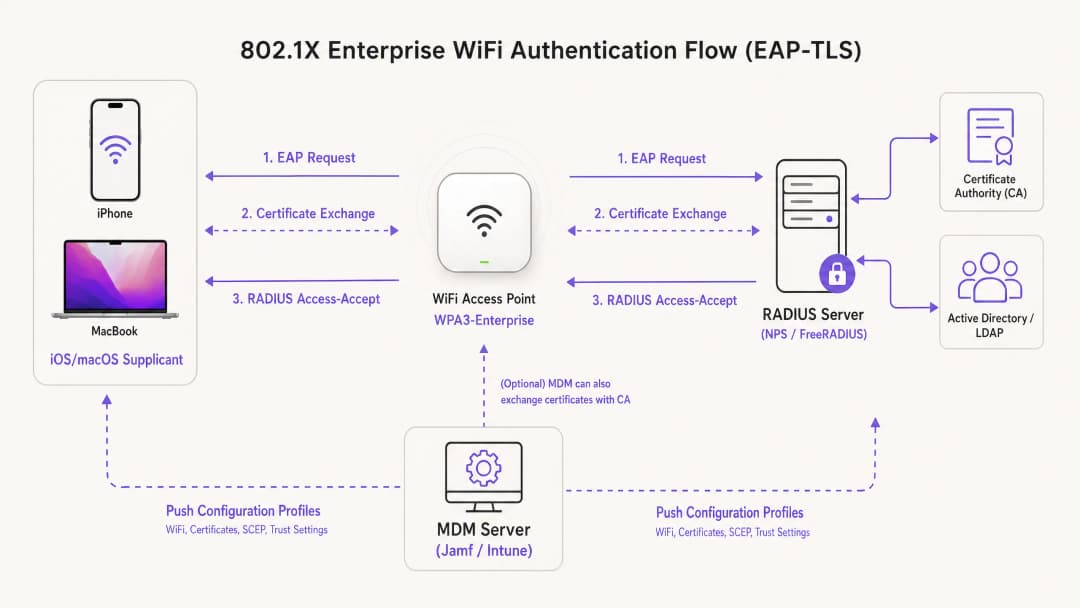
For deployments within the Apple ecosystem, EAP-TLS is the industry standard. Unlike PEAP or TTLS, which rely on user credentials that are vulnerable to security threats, EAP-TLS requires both the RADIUS server and the client device to present digital certificates. This mutual authentication process ensures the device is authorized and that the network it is connecting to is legitimate, protecting against rogue AP attacks.
Apple Configuration Profiles
Apple devices do not natively support automated certificate enrollment without external management. To deploy EAP-TLS at scale, IT teams must use Configuration Profiles (.mobileconfig files). These XML files contain specific payloads:
- WiFi payload: Defines the SSID, security type (WPA3-Enterprise) and supported EAP types.
- Certificate payload: Delivers the root CA and any intermediate CAs required to trust the RADIUS server.
- SCEP/ACME payload: Configures the protocol used to request a unique client certificate from the Certificate Authority (CA).
For a deeper look at securing your AP infrastructure, see our guide: Access Point Security: Your 2026 Enterprise Guide.
Got questions about your specific setup?
Our team works with venue operators, IT managers, and network engineers across 80,000 venues. Book a 20-minute call and we will show you how others like you solved it.
Implementation Guide
Step 1: PKI and RADIUS Preparation
Before beginning MDM configuration, your Public Key Infrastructure (PKI) and RADIUS server (such as Cisco ISE, Aruba ClearPass, or FreeRADIUS) must be set up to issue and validate certificates. Ensure your RADIUS server certificate is signed by a trusted internal or public CA, and that the Subject Alternative Name (SAN) matches the server's FQDN.
Step 2: MDM Payload Configuration (Jamf / Intune)
For scalable enterprise deployments, MDM-based deployment is mandatory.
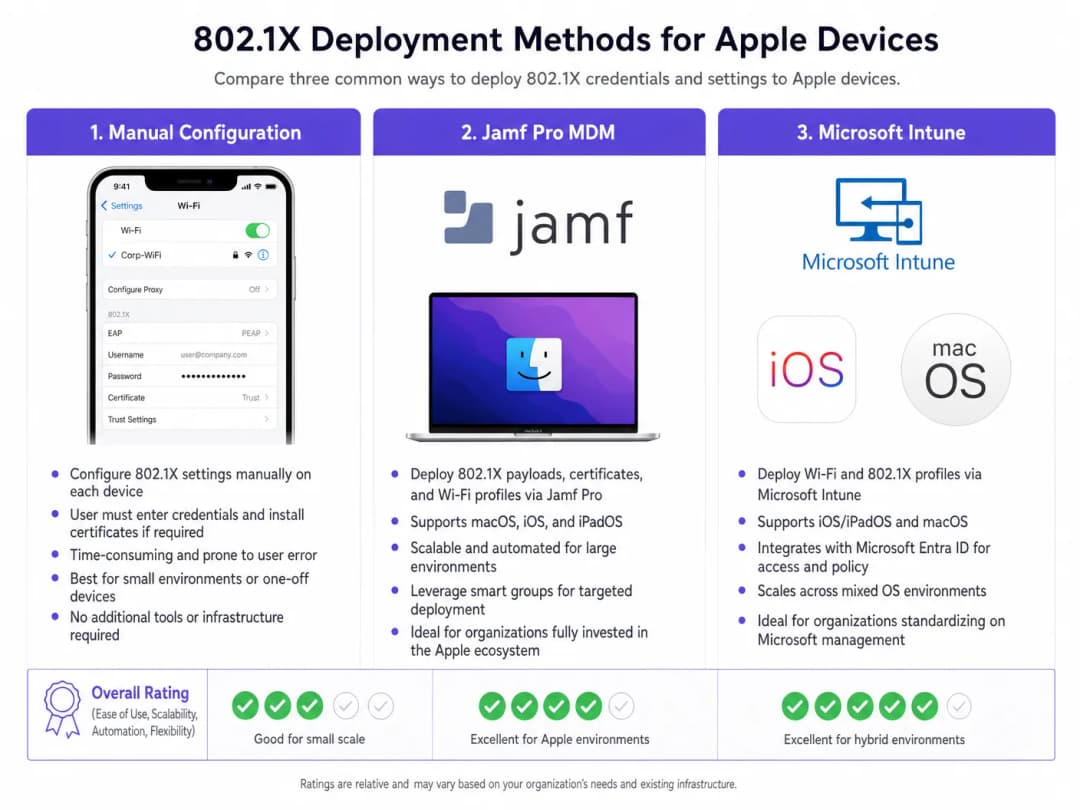
Creating the profile:
- Trust settings: This step is critical. In the WiFi payload, you must explicitly select the root CA certificate (deployed as a separate payload within the same profile) as the trust anchor for the RADIUS server. Additionally, specify the exact Common Name (CN) or SAN of the RADIUS server in the "Trusted Server Certificate Names" field. Failure to do this will cause iOS/macOS to prompt the user to trust the certificate manually, breaking the zero-touch deployment model.
- Identity certificate: Link the WiFi payload to the SCEP or ACME payload so the device knows which certificate to present during the EAP-TLS handshake.
Step 3: Network Segregation
Corporate devices authenticated via 802.1X must be placed on dedicated VLANs, fully isolated from public access networks. For venues using Purple's WiFi Analytics, the guest SSID operates in parallel, ensuring corporate traffic and guest analytics data never cross.
For environments with mixed device fleets, you may also want to consult How to Set Up Enterprise WiFi on Android Devices with EAP-TLS.
Best Practices
- Enforce WPA3-Enterprise: Mandate WPA3 for all new deployments to leverage 192-bit cryptographic strength. Only ensure legacy device compatibility where absolutely necessary for business operations.
- Automate certificate renewal: Configure the SCEP payload to renew client certificates automatically at least 14 days before expiration.
- Disable MAC randomization: For corporate SSIDs pushed via MDM, disable "Private Wi-Fi Address" (iOS) to ensure consistent tracking and policy enforcement in network management tools.
- Leverage DNS security: Combine 802.1X with robust DNS filtering to prevent compromised corporate devices from connecting to command-and-control servers. For implementation details, see Protecting Your Network Through Robust DNS and Security.
Troubleshooting and Risk Mitigation
The "Silent Failure" Scenario
The most common issue in iOS/macOS 802.1X deployments is silent failure, where the device refuses to connect without prompting the user. This almost always points to a trust chain issue. If the RADIUS server's certificate has been renewed and the new root/intermediate Certificate Authority (CA) was not pushed to devices before the switchover, Apple devices will abort the EAP handshake to protect against man-in-the-middle attacks.
Mitigation: Implement a strict change management process for RADIUS certificates. Always deploy the new CA chain via MDM at least one week before updating the RADIUS server.
SCEP Enrollment Timeouts
If devices fail to receive their client certificates, verify the SCEP challenge password and ensure the MDM server can communicate with the NDES/CA server over the required ports.
ROI and Business Impact
Deploying 802.1X with EAP-TLS requires an upfront investment in PKI and MDM architecture, but the ROI is realized through risk mitigation and operational efficiency. By eliminating password resets and automating device onboarding, IT help-desk tickets related to WiFi access typically drop by 60-80%. Furthermore, achieving strict network segmentation is frequently a mandatory requirement for cybersecurity insurance policies and PCI-DSS compliance, protecting the organization from catastrophic financial penalties resulting from security breaches.
Key Definitions
EAP-TLS
Extensible Authentication Protocol-Transport Layer Security. An authentication framework requiring digital certificates on both the client and the authentication server.
Considered the most secure 802.1X method, eliminating the need for passwords and protecting against credential theft.
Supplicant
The end-user device (e.g., iPhone, MacBook) requesting access to the network.
The supplicant must be configured via MDM to present the correct certificate and trust the correct server during the 802.1X handshake.
Authenticator
The network device, typically a WiFi Access Point or switch, that blocks traffic until the supplicant is authorized.
The AP acts as a middleman, passing EAP messages between the supplicant and the RADIUS server.
RADIUS Server
Remote Authentication Dial-In User Service. The server that verifies the supplicant's credentials (certificates) and authorizes access.
The core decision engine for enterprise network access, often integrated with Active Directory and PKI.
MDM Configuration Profile
An XML file (.mobileconfig) pushed to Apple devices to enforce settings, deploy certificates, and configure network access.
The essential delivery mechanism for achieving zero-touch 802.1X deployments on iOS and macOS.
SCEP
Simple Certificate Enrollment Protocol. A protocol used by MDM systems to automatically request and install certificates on devices.
Crucial for automating the lifecycle of the client certificates required for EAP-TLS.
SAN (Subject Alternative Name)
An extension to an X.509 certificate that allows multiple values (like FQDNs or IP addresses) to be associated with the certificate.
Apple devices strictly check the SAN of the RADIUS server certificate against the trusted names defined in their configuration profile.
WPA3-Enterprise
The latest WiFi security certification requiring 192-bit cryptographic strength and mandatory Protected Management Frames (PMF).
The recommended security standard for new enterprise deployments, offering significant protection against eavesdropping.
Worked Examples
A global retail chain is deploying corporate iPads to 500 store managers. They currently use a hidden SSID with a PSK, which has been leaked. They need to secure the network using Microsoft Intune without requiring managers to manually enter credentials.
- Deploy an Enterprise CA and configure NDES/SCEP integration with Intune.
- Create a Trusted Certificate profile in Intune containing the Root CA for the RADIUS server.
- Create a SCEP Certificate profile targeting the iPads to issue unique client certificates.
- Create a WiFi profile in Intune. Set the security type to WPA2/WPA3-Enterprise, EAP type to EAP-TLS. Link the SCEP profile as the client certificate and the Trusted Certificate profile for server validation. Specify the RADIUS server names.
- Push the profiles to a test group, verify connectivity, then roll out to all 500 devices.
A university is updating its network infrastructure and needs to ensure that faculty MacBooks managed by Jamf Pro transition seamlessly to a new RADIUS server cluster.
- Export the Root and Intermediate certificates of the new RADIUS server cluster.
- In Jamf Pro, update the existing Configuration Profile (or create a transition profile) to include the new CA certificates alongside the old ones.
- Update the "Trusted Server Certificate Names" in the WiFi payload to include the FQDNs of the new RADIUS servers.
- Push the updated profile to all MacBooks.
- Once the profile is confirmed installed across the fleet, cut over the network infrastructure to the new RADIUS servers.
Practice Questions
Q1. Your organization is rolling out WPA3-Enterprise to all corporate MacBooks. During testing, users report that their devices are repeatedly prompting them to 'Verify Certificate' for the RADIUS server, even though the profile was pushed via Jamf. What is the most likely configuration error?
Hint: Consider what specific information the Apple device needs to trust the server silently.
View model answer
The Configuration Profile is missing the explicit trust mapping. While the Root CA might be installed on the device, the WiFi payload must explicitly list the RADIUS server's FQDN in the 'Trusted Server Certificate Names' field, and the Root CA must be selected as the trusted anchor for that specific WiFi network. Without this, macOS will prompt the user to manually verify and trust the certificate.
Q2. A hotel chain wants to secure its back of house operations (staff iPads) using 802.1X, while continuing to offer public access via a captive portal. How should the network architecture be designed to support both requirements securely?
Hint: Think about logical separation at the access point and switch level.
View model answer
The architecture should utilize two distinct SSIDs broadcast from the same Access Points. The back of house SSID will be configured for WPA3-Enterprise (802.1X), authenticating staff iPads via EAP-TLS and placing them on a secure, internal VLAN. The public SSID will be open, redirecting users to the Purple Guest WiFi captive portal, and dropping authenticated guests onto a heavily restricted, internet-only VLAN. This ensures complete segregation of corporate and guest traffic.
Q3. You are migrating your RADIUS infrastructure from an on-premise Cisco ISE deployment to a cloud-based RADIUS provider. The new provider uses a different public Certificate Authority. What is the critical first step before changing the RADIUS configuration on the Access Points?
Hint: Consider the order of operations to prevent a complete loss of connectivity for the client devices.
View model answer
The critical first step is to push an updated MDM Configuration Profile to all Apple devices that includes the Root and Intermediate certificates of the new public CA used by the cloud RADIUS provider. This trust chain must be established on the supplicants before the APs are cut over to the new RADIUS servers; otherwise, the devices will reject the new server certificates and fail to connect.
Continue reading in this series
A Network Administrator’s Guide to Configuring RADIUS Authentication for Guest WiFi
A comprehensive technical reference for network administrators on deploying RADIUS authentication for guest WiFi. Covers architecture, vendor-neutral configuration steps, security best practices, and troubleshooting common deployment failures.
Implementing SCEP for Secure BYOD and 802.1X WiFi in Higher Education
This technical guide details how higher education IT teams can automate 802.1X certificate enrollment for thousands of BYOD devices using SCEP. It covers the architecture, security benefits, and practical deployment steps to replace manual onboarding with a secure, zero-touch network access model.
Configuring RADIUS Authentication for Guest and Staff WiFi Networks
This technical reference guide outlines the architecture, configuration, and deployment of RADIUS authentication for enterprise guest and staff WiFi networks. It provides network architects and IT managers with the exact protocols, security standards, and troubleshooting methodologies required to build secure, scalable wireless access control systems.
Got questions about your specific setup?
Our team works with venue operators, IT managers, and network engineers across 80,000 venues. Book a 20-minute call and we will show you how others like you solved it.