
如何使用 802.1X 在 iOS 和 macOS 上設定企業級 WiFi
本權威指南為高階 IT 主管提供在 iOS 和 macOS 裝置上部署 802.1X 企業級 WiFi 的實作步驟。內容涵蓋憑證驗證 (EAP-TLS)、MDM 組態設定檔以及架構整合,旨在確保企業網路安全,同時支援 BYOD 方案。
Video overview
核心系列的一部分:企業級 WiFi 安全指南 →
Apple enterprise WiFi & 802.1X profile architect
Model your iOS, iPadOS, and macOS wireless deployment. Evaluate EAP-TLS certificate security, generate Apple .mobileconfig XML profiles, and eliminate Private WiFi MAC address authentication drops.
Mutual certificate-based EAP-TLS with device-bound private keys and no password to capture.
Recommended Apple Deployment Milestones
- Activate Purple Cloud RADIUS and federate with Microsoft Entra ID or Okta directory
- Configure a Microsoft Intune SCEP or Cloud PKI certificate profile for the Apple device group
- Deploy Root and Intermediate CA certificates via MDM Trusted Certificate payload
- Deploy com.apple.wifi.managed payload referencing client identity UUID and pinning radius.purple.ai
- Enforce DisableAssociationMACRandomization=true to retain consistent hardware MAC for switch port telemetry
Deploy zero-touch Apple WiFi with Purple Cloud RADIUS
Purple Cloud RADIUS connects Microsoft Entra ID and Okta to your Apple MDM fleet. Automate EAP-TLS certificate distribution, eliminate password prompts, and isolate corporate MacBooks from guest traffic.

執行摘要
對於管理大型場地(從 餐飲旅宿、零售 到 交通 樞紐)的 CTO 和網路架構師而言,保障企業無線邊緣的安全至關重要。依賴預共用金鑰 (PSK) 或傳統的 Captive Portals 來供員工和企業裝置存取,會使網路面臨憑證遭竊取和合規性失效的風險。
本技術參考詳細介紹了針對 Apple 裝置(iOS 和 macOS)使用 EAP-TLS (Extensible Authentication Protocol-Transport Layer Security) 實作 802.1X 的方法。藉由強制執行基於憑證的驗證,企業可以消除與密碼相關的安全漏洞、透過 Jamf 和 Intune 等行動裝置管理 (MDM) 平台簡化裝置註冊,並確保強固的網路隔離。雖然 Guest WiFi 解決方案負責處理公共存取和資料收集,但架構完善的 802.1X 部署能保護內部資源,確保符合 PCI-DSS 和 GDPR 的要求。
請收聽下方 10 分鐘的技術簡報 Podcast,快速了解架構和常見陷阱。
技術深度解析
802.1X 架構
IEEE 802.1X 標準定義了基於連接埠的網路存取控制 (PNAC)。在無線情境中,它會阻止用戶端(要求者)透過無線存取點(驗證者)傳送流量,直到 RADIUS 伺服器(驗證伺服器)驗證其身分。
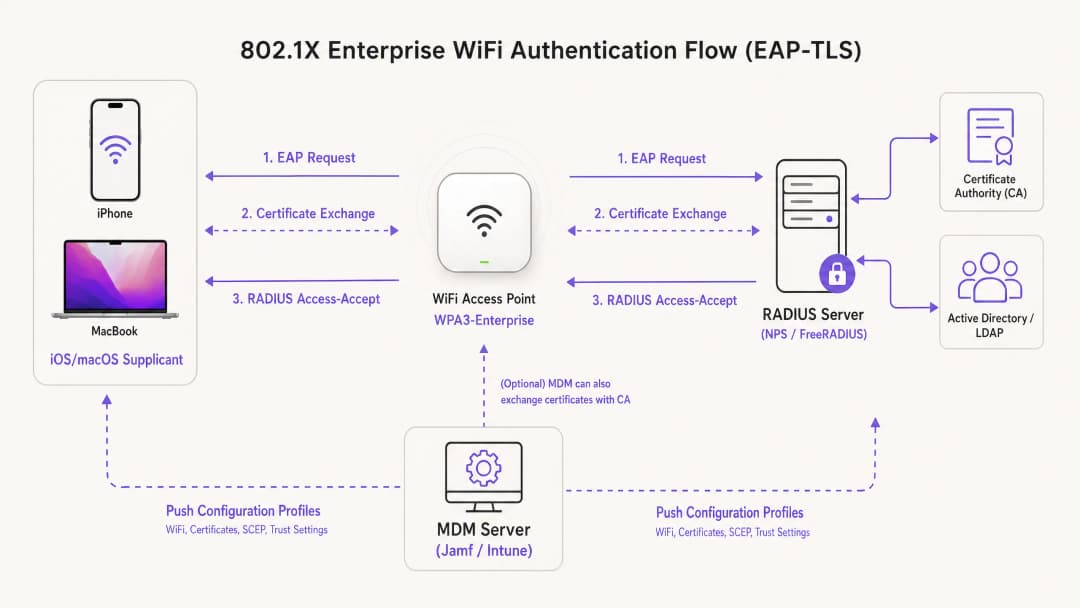
對於 Apple 生態系統中的部署,EAP-TLS 是產業標準。與依賴易受安全威脅影響之使用者憑證的 PEAP 或 TTLS 不同,EAP-TLS 要求 RADIUS 伺服器和用戶端裝置皆須出示數位憑證。這種雙向驗證程序可確保裝置獲得授權,且其連線的網路是合法的,從而防範惡意 AP 攻擊。
Apple 設定描述檔
Apple 裝置原生不支援無外部管理的自動憑證註冊。若要大規模部署 EAP-TLS,IT 團隊必須使用設定描述檔 (.mobileconfig 檔案)。這些 XML 檔案包含特定的承載資料:
- WiFi 承載資料:定義 SSID、安全性類型 (WPA3-Enterprise) 以及支援的 EAP 類型。
- 憑證承載資料:傳遞信任 RADIUS 伺服器所需的根 CA 及任何中繼 CA。
- SCEP/ACME 承載資料:設定用於向憑證授權單位 (CA) 請求唯一用戶端憑證的協定。
如需深入瞭解如何保障您的 AP 基礎架構安全,請參閱我們的指南:Access Point Security: Your 2026 Enterprise Guide。
實作指南
步驟 1:PKI 與 RADIUS 準備
在開始 MDM 設定之前,您的公開金鑰基礎建設 (PKI) 與 RADIUS 伺服器 (例如 Cisco ISE、Aruba ClearPass 或 FreeRADIUS) 必須先設定完成,以便發行和驗證憑證。請確保您的 RADIUS 伺服器憑證已由受信任的內部或公開 CA 簽署,且主體替代名稱 (SAN) 與伺服器的 FQDN 相符。
步驟 2:MDM 承載資料設定 (Jamf / Intune)
針對具備擴充性的企業部署,必須使用基於 MDM 的部署方式。
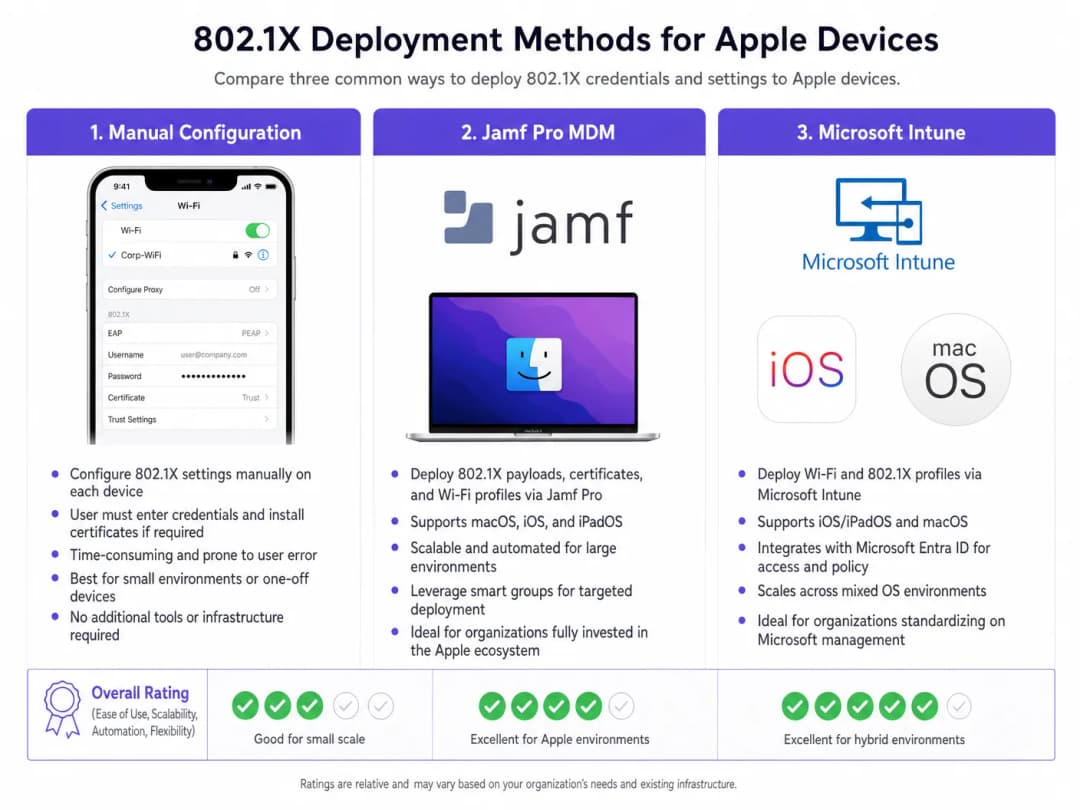
建立描述檔:
- 信任設定:此步驟至關重要。在 WiFi 承載資料中,您必須明確選擇根 CA 憑證 (部署為同一描述檔中的獨立承載資料) 作為 RADIUS 伺服器的信任錨點。此外,在「信任的伺服器憑證名稱」欄位中指定 RADIUS 伺服器的確切通用名稱 (CN) 或 SAN。若未執行此操作,將導致 iOS/macOS 提示使用者手動信任憑證,從而破壞零接觸 (zero-touch) 部署模式。
- 身分憑證:將 WiFi 承載資料連結至 SCEP 或 ACME 承載資料,以便裝置在進行 EAP-TLS 握手期間知道要出示哪張憑證。
步驟 3:網路隔離
透過 802.1X 驗證的企業裝置必須置於專屬的 VLAN,與公用存取網路完全隔離。對於使用 Purple 的 WiFi Analytics 的場域,訪客 SSID 會平行運作,確保企業流量與訪客分析數據絕不交叉。
對於混合裝置類型的環境,您可能也需要參考 How to Set Up Enterprise WiFi on Android Devices with EAP-TLS。
最佳實踐
- 強制執行 WPA3-Enterprise:所有新部署均強制要求 WPA3,以利用 192 位元密碼編譯強度。僅在業務營運絕對必要時,才確保舊版裝置的相容性。
- 自動化憑證更新:設定 SCEP 承載資料,使其在到期前至少 14 天自動更新用戶端憑證。
- 停用 MAC 隨機化:對於透過 MDM 推送的企業 SSID,停用「專用 WiFi 位址」(iOS) 以確保網路管理工具中一致的追蹤與原則執行。* 利用 DNS 安全性:將 802.1X 與強大的 DNS 過濾相結合,以防止受損的公司裝置連線至命令與控制伺服器。如需實作詳細資訊,請參閱 透過強大的 DNS 與安全性保護您的網路。
疑難排解與風險緩解
「無聲失敗」情境
iOS/macOS 802.1X 部署中最常見的問題是無聲失敗(silent failure),即裝置拒絕連線且未向使用者顯示任何提示。這幾乎大機率指向信任鏈問題。如果 RADIUS 伺服器的憑證已更新,且在切換之前未將新的根/中繼憑證授權單位 (CA) 推送至裝置,Apple 裝置將會中止 EAP 握手,以防止中間人攻擊。
緩解措施:針對 RADIUS 憑證實施嚴格的變更管理流程。務必在更新 RADIUS 伺服器前至少一週,透過 MDM 部署新的 CA 鏈。
SCEP 註冊逾時
如果裝置無法接收其用戶端憑證,請驗證 SCEP 挑戰密碼,並確保 MDM 伺服器能透過所需的連接埠與 NDES/CA 伺服器進行通訊。
ROI 與企業影響
部署採用 EAP-TLS 的 802.1X 需要對 PKI 與 MDM 架構進行前期投資,但其投資報酬率(ROI)可透過風險緩解與營運效率來實現。藉由消除密碼重設並將裝置上線自動化,與 WiFi 存取相關的 IT 服務台工單通常可減少 60 - 80%。此外,實現嚴格的網路分割通常是網路安全保險政策與 PCI-DSS 合規性的強制性要求,進而保護企業免受因安全性漏洞所導致的災難性財務處罰。
關鍵定義
EAP-TLS
Extensible Authentication Protocol-Transport Layer Security (可延伸驗證通訊協定 - 傳輸層安全)。一種在用戶端和驗證伺服器上都需要數位憑證的驗證架構。
被視為最安全的 802.1X 方法,無需密碼,並可防止憑證遭竊。
Supplicant
要求存取網路的終端使用者裝置 (例如:iPhone、MacBook)。
必須透過 MDM 設定 Supplicant,以便在 802.1X 握手期間呈現正確的憑證並信任正確的伺服器。
Authenticator
網路裝置 (通常是 WiFi 存取點或交換器),在 Supplicant 通過驗證之前會阻擋流量。
AP 充當中間人,在 Supplicant 與 RADIUS 伺服器之間傳遞 EAP 訊息。
RADIUS Server
Remote Authentication Dial-In User Service (遠端用戶撥入驗證服務)。用於驗證 Supplicant 憑證並授權存取的伺服器。
企業網路存取的決策核心引擎,通常與 Active Directory 和 PKI 整合。
MDM Configuration Profile
發送到 Apple 裝置以強制執行設定、部署憑證和配置網路存取的 XML 檔案 (.mobileconfig)。
在 iOS 和 macOS 上實現零接觸 802.1X 部署的重要傳遞機制。
SCEP
Simple Certificate Enrolment Protocol (簡單憑證註冊協定)。MDM 系統用於自動請求並在裝置上安裝憑證的協定。
對於自動化 EAP-TLS 所需之用戶端憑證生命週期至關重要。
SAN (Subject Alternative Name)
X.509 憑證的延伸屬性,允許將多個值(例如 FQDN 或 IP 地址)與該憑證關聯。
Apple 裝置會嚴格對照其組態設定檔中定義的信任名稱,來檢查 RADIUS 伺服器憑證的 SAN。
WPA3-Enterprise
最新的 WiFi 安全認證,要求 192 位元加密強度並強制執行保護管理畫面(PMF)。
推薦用於新企業部署的安全標準,能針對竊聽提供極佳的保護力。
範例
一家全球零售連鎖店正在向 500 位分店經理部署企業級 iPad。他們目前使用隱藏的 SSID 搭配 PSK,但該密鑰已被外洩。他們需要使用 Microsoft Intune 來保護網路安全,且無需經理手動輸入憑證。
- 部署企業級 CA 並設定 NDES/SCEP 與 Intune 整合。
- 在 Intune 中建立「信任的憑證」設定檔,其中包含 RADIUS 伺服器的根 CA。
- 建立針對 iPad 的 SCEP 憑證設定檔,以核發唯一的用戶端憑證。
- 在 Intune 中建立 WiFi 設定檔。將安全類型設為 WPA2/WPA3-Enterprise,EAP 類型設為 EAP-TLS。將 SCEP 設定檔連結為用戶端憑證,並將「信任的憑證」設定檔連結用於伺服器驗證。指定 RADIUS 伺服器名稱。
- 將設定檔發送至測試群組,驗證連線能力,然後部署至所有 500 台裝置。
一所大學正在更新其網路基礎架構,需要確保由 Jamf Pro 管理的教職員 MacBook 能無縫轉移到新的 RADIUS 伺服器叢集。
- 匯出新 RADIUS 伺服器叢集的根憑證與中繼憑證。
- 在 Jamf Pro 中,更新現有的組態設定檔 (或建立過渡設定檔),將新的 CA 憑證與舊憑證並列。
- 更新 WiFi 承載資料中的「信任的伺服器憑證名稱」,以包含新 RADIUS 伺服器的 FQDN。
- 將更新後的設定檔發送至所有 MacBook。
- 確認整批裝置皆已安裝設定檔後,將網路基礎架構切換至新的 RADIUS 伺服器。
練習題
Q1. 您的組織正在向所有企業 MacBook 推送 WPA3-Enterprise。在測試期間,使用者回報其裝置不斷跳出要求為 RADIUS 伺服器「驗證憑證」的提示,即使該設定檔已透過 Jamf 推送。最可能的設定錯誤是什麼?
提示:思考 Apple 裝置需要哪些特定資訊才能在背景自動信任伺服器。
查看標準答案
組態設定檔缺少明確的信任對應。雖然裝置上可能已安裝根 CA,但 WiFi 負載必須在「信任的伺服器憑證名稱」欄位中明確列出 RADIUS 伺服器的 FQDN,且必須選取該根 CA 作為該特定 WiFi 網路的信任錨點。若無此設定,macOS 將會提示使用者手動驗證並信任憑證。
Q2. 某家連鎖飯店希望使用 802.1X 來保護其後勤作業(員工 iPad),同時繼續透過 Captive Portal 提供公共存取。應如何設計網路架構以安全地支援這兩種需求?
提示:思考存取點(AP)和交換器層級的邏輯隔離。
查看標準答案
該架構應利用從相同存取點廣播的兩個不同 SSID。後勤 SSID 將設定為 WPA3-Enterprise (802.1X),透過 EAP-TLS 驗證員工 iPad,並將其置於安全的內部 VLAN。公共 SSID 將維持開放,將使用者重導至 Purple Guest WiFi 的 Captive Portal,並將已驗證的訪客置於受到嚴格限制、僅限網際網路的 VLAN 中。這可確保企業與訪客流量完全隔離。
Q3. 您正在將 RADIUS 基礎架構從本地端 Cisco ISE 部署轉移至雲端 RADIUS 供應商。新供應商使用不同的公用憑證授權單位(CA)。在變更存取點上的 RADIUS 設定之前,關鍵的第一步是什麼?
提示:考慮作業順序,以防止用戶端裝置完全中斷連線。
查看標準答案
關鍵的第一步是向所有 Apple 裝置推送更新的 MDM 組態設定檔,其中包含雲端 RADIUS 供應商所使用之新公用 CA 的根憑證和中間憑證。在 AP 切換至新 RADIUS 伺服器之前,必須在請求方(supplicants)上建立此信任鏈;否則,裝置將拒絕新的伺服器憑證並導致連線失敗。
常見問題
Which 802.1X authentication protocol is recommended for Apple enterprise fleets?
EAP-TLS (RFC 5216) is the gold standard authentication protocol for enterprise Apple fleets running iOS, iPadOS, and macOS. EAP-TLS replaces vulnerable usernames and passwords with mutual X.509 digital certificate authentication. Private keys are generated on-device and locked inside the Apple Secure Enclave or macOS Keychain, making client credentials physically impossible to export and immune to rogue access point (Evil Twin) harvesting.
How does Apple Private Wi-Fi MAC address randomization affect 802.1X corporate networks?
Starting in iOS 14 and macOS 14 Sonoma, Apple devices enable Private Wi-Fi Addresses by default, rotating or randomizing MAC addresses to prevent tracking. In enterprise networks relying on MAC filtering or switch port security, this causes IP address churn and DHCP pool exhaustion. IT administrators resolve this by pushing an MDM configuration profile with DisableAssociationMACRandomization set to true for corporate SSIDs, or by transitioning access policies to validate cryptographic certificate identities rather than hardware MACs.
How do Microsoft Intune and Jamf Pro silently deploy 802.1X profiles to Apple devices?
Microsoft Intune and Jamf Pro deliver 802.1X settings using Apple configuration profiles (.mobileconfig) containing com.apple.wifi.managed payloads. The MDM deploys the Root CA certificate anchor, initiates SCEP or ACME enrollment to issue a client identity certificate into the hardware keychain, and references that certificate via PayloadCertificateUUID. The profile also defines TLSTrustedServerNames to ensure Apple devices only negotiate with verified RADIUS servers.
Why does an iOS or macOS device fail 802.1X authentication with a certificate trust alert?
Certificate trust alerts or silent connection drops occur when the Apple device cannot establish a complete, unbroken trust chain to the RADIUS server certificate. Common root causes include missing intermediate CA certificates in the RADIUS server TLS handshake, a mismatch between the RADIUS server certificate Common Name (CN)/SAN and the TLSTrustedServerNames array in the MDM profile, or client clock skew exceeding certificate validity windows.
What is the difference between a System profile and a User profile on macOS?
On macOS, 802.1X profiles can be scoped at the System level or the User level. System-level profiles install in the system keychain and authenticate before user login, enabling FileVault network unlock, Active Directory domain binding, and remote management over WiFi. User-level profiles authenticate only after a specific user logs into the desktop, causing WiFi to disconnect when logging out or switching accounts.
How does Purple Cloud RADIUS simplify Apple fleet WiFi onboarding?
Purple Cloud RADIUS provides zero-touch cloud AAA that federates with Microsoft Entra ID, Okta, and Google Workspace without requiring on-premises NPS servers or Active Directory domain controllers. Purple integrates directly with Jamf Pro, Microsoft Intune, and Kandji to automate SCEP certificate issuance, enforce dynamic VLAN network segmentation, and revoke wireless access instantly when employees leave the organisation.
繼續閱讀本系列
網路管理員指南:如何為訪客 WiFi 設定 RADIUS 驗證
為網路管理員提供部署訪客 WiFi RADIUS 驗證的全面技術參考。涵蓋架構、不限廠商的設定步驟、安全最佳實作,以及常見部署失敗的疑難排解。
在高教機構中為安全 BYOD 與 802.1X WiFi 部署 SCEP
本技術指南詳細介紹高等教育 IT 團隊如何使用 SCEP 為數萬台 BYOD 裝置自動進行 802.1X 憑證登錄。內容涵蓋架構、安全效益以及實際部署步驟,旨在以安全、零接觸的網路存取模式取代手動上線。
為訪客與員工 WiFi 網路配置 RADIUS 驗證
本技術參考指南概述了企業訪客和員工 WiFi 網路的 RADIUS 驗證架構、配置與部署。它為網路架構師和 IT 經理提供了構建安全、可擴展的無線存取控制系統所需的確切協定、安全標準與疑難排解方法。
對於您的特定設置有任何疑問嗎?
我們的團隊與超過 80,000 個場域的場域營運商、IT 經理和網路工程師合作。立即預約 20 分鐘的通話,我們將向您展示其他與您相似的用戶是如何解決此問題的。