

PKI म्हणजे काय? पब्लिक की इन्फ्रास्ट्रक्चर WiFi सिक्युरिटीला कसे सक्षम करते
This authoritative technical reference guide explains Public Key Infrastructure (PKI) and its critical role in securing enterprise WiFi networks across hospitality, retail, and public-sector venues. Designed for IT managers, network architects, and CTOs, it provides actionable guidance on certificate-based authentication, IEEE 802.1X deployment with EAP-TLS, and how Purple's platform leverages these standards for scalable, compliant connectivity. Readers will leave with a concrete deployment roadmap, real-world case studies, and a clear understanding of how PKI eliminates the vulnerabilities of shared-secret WiFi.
🎧 हे मार्गदर्शक ऐका
ट्रान्सक्रिप्ट पहा
एक्झिक्युटिव्ह समरी
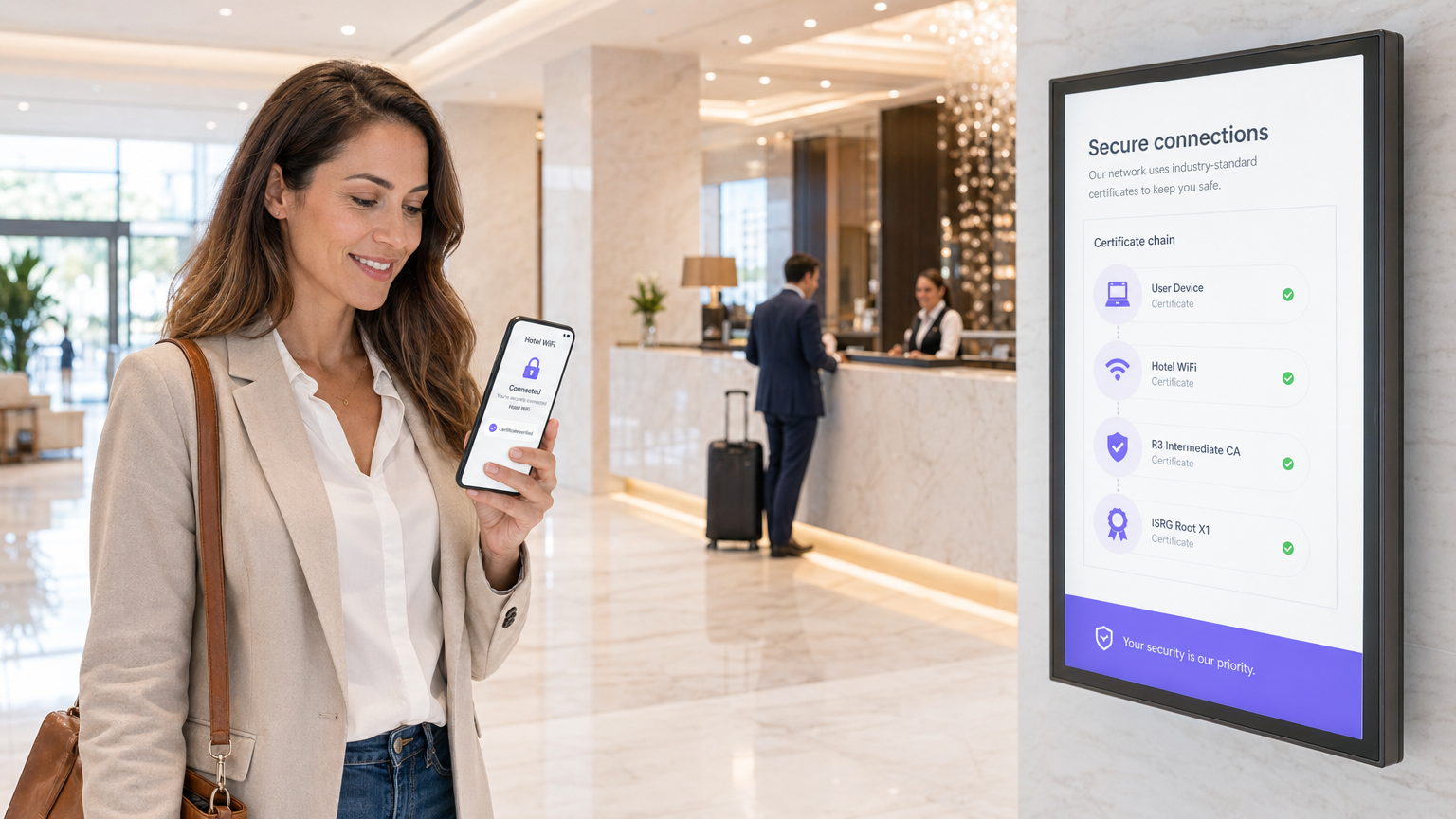
हॉस्पिटॅलिटी, रिटेल किंवा सार्वजनिक क्षेत्रातील मोठ्या प्रमाणावरील डिप्लॉयमेंट्स व्यवस्थापित करणाऱ्या एंटरप्राइझ IT लीडर्ससाठी, वायरलेस ॲक्सेस सुरक्षित करणे ही एक मूलभूत आवश्यकता आहे — पर्यायी अपग्रेड नाही. कॉर्पोरेट वातावरणासाठी पारंपारिक प्री-शेअर्ड की (PSKs) अपुरे आहेत: ते कोणतीही वैयक्तिक जबाबदारी प्रदान करत नाहीत, त्यांचे ऑडिट केले जाऊ शकत नाही आणि रोटेट केल्यावर महत्त्वपूर्ण ऑपरेशनल ओव्हरहेड तयार करतात. पब्लिक की इन्फ्रास्ट्रक्चर (PKI) मजबूत, स्केलेबल नेटवर्क सुरक्षेसाठी आवश्यक क्रिप्टोग्राफिक पाया प्रदान करते. हे मार्गदर्शक PKI म्हणजे काय, ते सर्टिफिकेट-आधारित ऑथेंटिकेशनद्वारे एंटरप्राइझ WiFi सुरक्षेला कसे सक्षम करते आणि EAP-TLS सह IEEE 802.1X डिप्लॉय करण्यासाठी आवश्यक असलेल्या ठोस पायऱ्यांचे तपशील देते. PKI-समर्थित आर्किटेक्चरकडे वळल्याने, संस्था क्रेडेंशियल चोरी दूर करू शकतात, डिव्हाइस ऑनबोर्डिंग स्वयंचलित करू शकतात आणि PCI DSS, GDPR आणि ISO 27001 च्या आवश्यकता पूर्ण करताना कॉर्पोरेट डिव्हाइसेस आणि अतिथी दोघांसाठी अखंड, सुरक्षित ॲक्सेस सुनिश्चित करू शकतात.
तांत्रिक सखोल माहिती: एंटरप्राइझ WiFi मधील PKI समजून घेणे
पब्लिक की इन्फ्रास्ट्रक्चर (PKI) हे डिजिटल सर्टिफिकेट्स तयार करण्यासाठी, व्यवस्थापित करण्यासाठी, वितरित करण्यासाठी, वापरण्यासाठी, संचयित करण्यासाठी आणि रद्द करण्यासाठी आणि पब्लिक-की एन्क्रिप्शन व्यवस्थापित करण्यासाठी आवश्यक असलेले हार्डवेअर, सॉफ्टवेअर, धोरणे आणि प्रक्रियांचे फ्रेमवर्क आहे. एंटरप्राइझ WiFi च्या संदर्भात, PKI हे इंजिन आहे जे ओळख पडताळणी आणि एन्क्रिप्शन चालवते — असुरक्षित शेअर्ड पासवर्डच्या जागी प्रत्येक डिव्हाइस किंवा वापरकर्त्यासाठी अद्वितीय असलेली क्रिप्टोग्राफिक ओळख प्रदान करते.
PKI चे मुख्य घटक
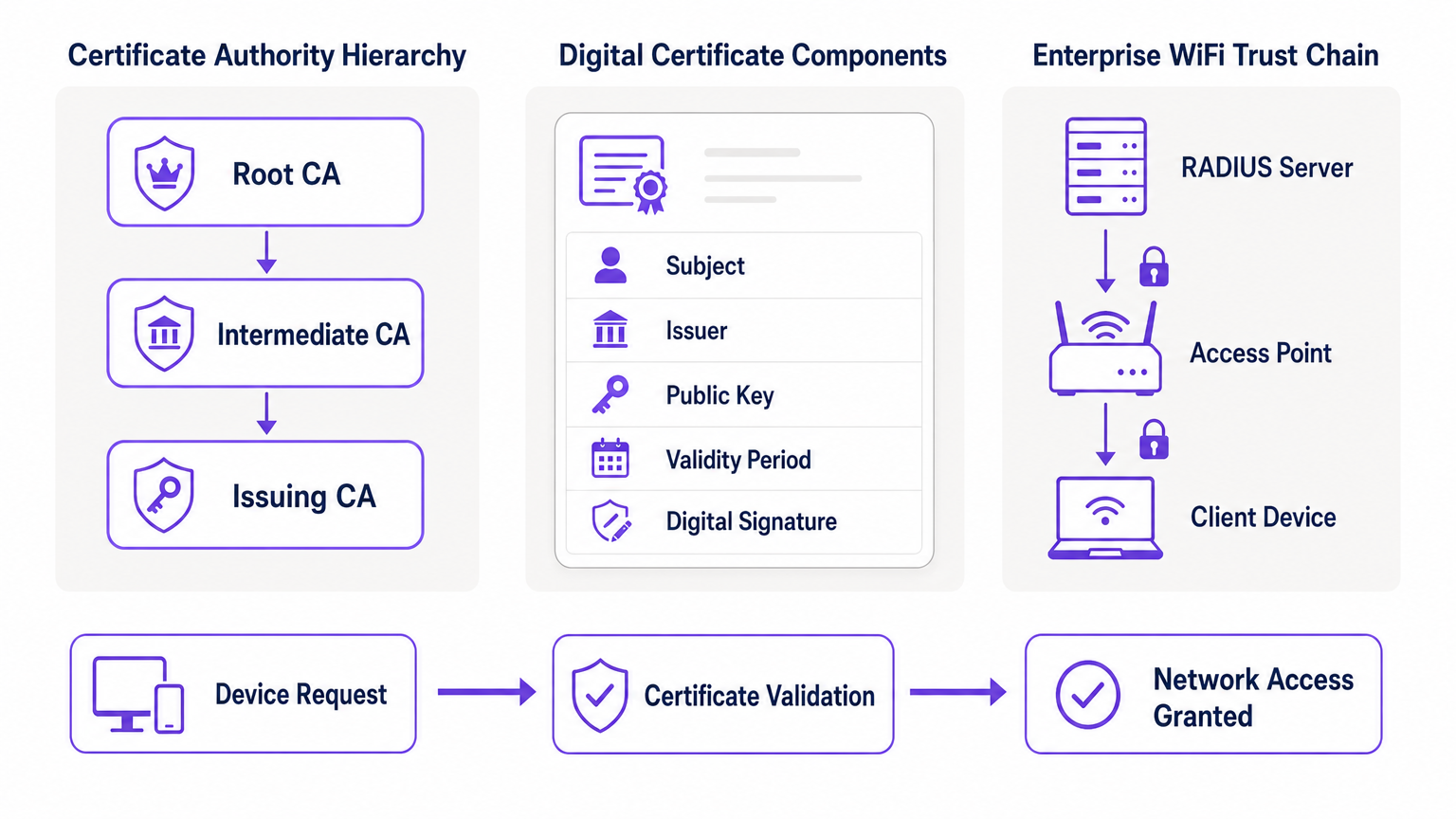
मुळात, PKI असिमेट्रिक क्रिप्टोग्राफीवर अवलंबून असते, जिथे दोन गणितीयदृष्ट्या संबंधित की वापरल्या जातात: एक पब्लिक की (उघडपणे शेअर केलेली) आणि एक प्रायव्हेट की (गुप्त ठेवली जाणारी). पब्लिक की ने एन्क्रिप्ट केलेला डेटा फक्त संबंधित प्रायव्हेट की द्वारे डिक्रिप्ट केला जाऊ शकतो आणि याउलट. PKI डिप्लॉयमेंटचे प्राथमिक घटक खालीलप्रमाणे आहेत.
| घटक | भूमिका | एंटरप्राइझ WiFi संदर्भ |
|---|---|---|
| सर्टिफिकेट ऑथॉरिटी (CA) | डिजिटल सर्टिफिकेट्स जारी करते आणि साईन करते | तुमच्या नेटवर्कसाठी विश्वासाचा मूळ स्रोत; सर्व डिव्हाइसेसनी CA वर विश्वास ठेवला पाहिजे |
| डिजिटल सर्टिफिकेट (X.509) | पब्लिक की ला ओळखीशी जोडते | प्रत्येक कॉर्पोरेट डिव्हाइसवर इन्स्टॉल केलेले; 802.1X ऑथेंटिकेशन दरम्यान सादर केले जाते |
| RADIUS सर्व्हर | सर्टिफिकेट्स प्रमाणित करते आणि नेटवर्क ॲक्सेस मंजूर करते | निर्णय घेणारे इंजिन जे कनेक्शन विनंत्या स्वीकारते किंवा नाकारते |
| रजिस्ट्रेशन ऑथॉरिटी (RA) | सर्टिफिकेट जारी करण्यापूर्वी ओळख पडताळते | स्वयंचलित डिप्लॉयमेंट्समध्ये अनेकदा MDM/UEM द्वारे हाताळले जाते |
| CRL / OCSP | सर्टिफिकेट रद्द केले आहे का ते तपासते | तडजोड केलेली किंवा चोरीला गेलेली डिव्हाइसेस रिअल-टाइममध्ये ब्लॉक करण्यासाठी महत्त्वपूर्ण |
PKI 802.1X आणि EAP-TLS ला कसे सक्षम करते
एंटरप्राइझ WiFi सुरक्षा पोर्ट-आधारित नेटवर्क ॲक्सेस कंट्रोलसाठी IEEE 802.1X मानकावर अवलंबून असते. जेव्हा एक्स्टेंसिबल ऑथेंटिकेशन प्रोटोकॉल (EAP), विशेषतः EAP-TLS (ट्रान्सपोर्ट लेयर सिक्युरिटी) सह एकत्रित केले जाते, तेव्हा PKI वायरलेस सुरक्षेची सर्वोच्च पातळी प्रदान करते: म्युच्युअल ऑथेंटिकेशन.
EAP-TLS डिप्लॉयमेंटमध्ये, क्लायंट डिव्हाइस आपली ओळख सिद्ध करण्यासाठी नेटवर्कला आपले डिजिटल सर्टिफिकेट सादर करते आणि RADIUS सर्व्हर क्लायंटला आपले सर्टिफिकेट सादर करतो, हे सिद्ध करतो की नेटवर्क कायदेशीर आहे आणि कोणताही धोकादायक "इव्हिल ट्विन" ॲक्सेस पॉईंट नाही. हा परस्पर विश्वास प्रस्थापित होतो कारण दोन्ही पक्ष सर्टिफिकेट्स जारी करणाऱ्या रूट CA वर विश्वास ठेवतात. एकदा ऑथेंटिकेट झाल्यानंतर, वाटाघाटी केलेल्या TLS सायफर सूटचा वापर करून सेशन एन्क्रिप्ट केले जाते, ज्यामुळे इव्हसड्रॉपिंग आणि मॅन-इन-द-मिडल हल्ले टळतात.
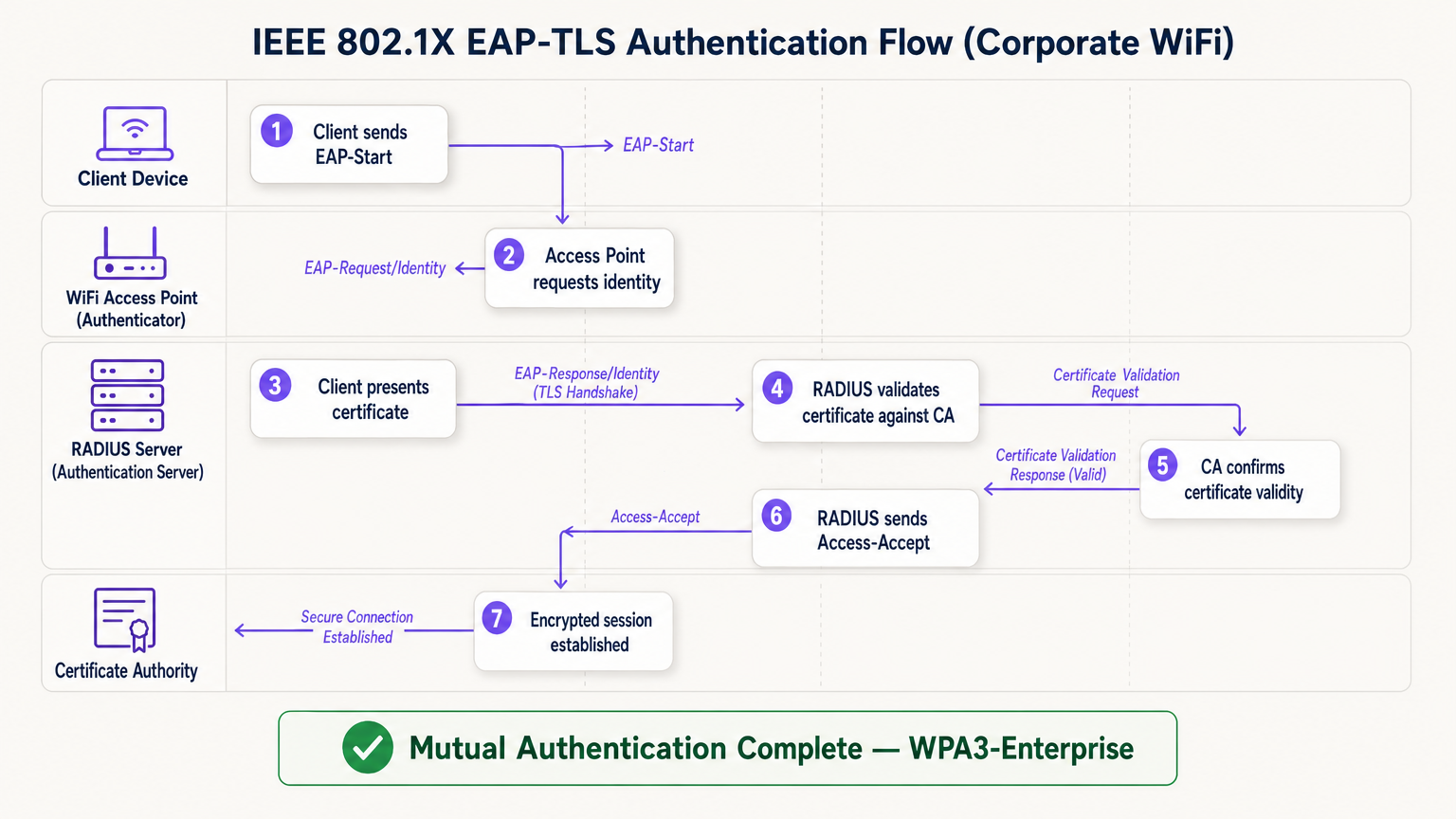
EAP-TLS फ्लो चार लॉजिकल घटकांमध्ये कार्य करतो: क्लायंट डिव्हाइस (सप्लिकंट), ॲक्सेस पॉईंट (ऑथेंटिकेटर), RADIUS सर्व्हर (ऑथेंटिकेशन सर्व्हर), आणि सर्टिफिकेट ऑथॉरिटी. ॲक्सेस पॉईंट पारदर्शक रिले म्हणून काम करतो — तो स्वतः ऑथेंटिकेशनचा निर्णय घेत नाही. तो निर्णय पूर्णपणे RADIUS सर्व्हरवर अवलंबून असतो, जो विश्वसनीय रूट CA पर्यंत सर्टिफिकेट चेन प्रमाणित करतो.
अंमलबजावणी मार्गदर्शक: सर्टिफिकेट-आधारित WiFi डिप्लॉय करणे
PKI-समर्थित WiFi आर्किटेक्चरकडे वळण्यासाठी चार टप्प्यांमध्ये काळजीपूर्वक नियोजन करणे आवश्यक आहे.
टप्पा 1: आर्किटेक्चर आणि CA निवड
अंतर्गत PKI (उदा. मायक्रोसॉफ्ट ॲक्टिव्ह डिरेक्टरी सर्टिफिकेट सर्व्हिसेस) तयार करायचे की व्यवस्थापित क्लाउड PKI प्रदाता वापरायचा हे ठरवा. मोठ्या प्रमाणावरील आधुनिक डिप्लॉयमेंट्ससाठी, क्लाउड PKI प्रशासकीय ओव्हरहेड लक्षणीयरीत्या कमी करते आणि अंगभूत उच्च उपलब्धता प्रदान करते. निवडलेला CA तुमच्या मोबाईल डिव्हाइस मॅनेजमेंट (MDM) किंवा युनिफाईड एंडपॉईंट मॅनेजमेंट (UEM) सोल्यूशनसह अखंडपणे इंटिग्रेट होत असल्याची खात्री करा. Guest WiFi वापरणाऱ्या वातावरणासाठी, RADIUS इन्फ्रास्ट्रक्चर कॉर्पोरेट 802.1X ट्रॅफिक आणि अतिथी Captive Portal ऑथेंटिकेशन दोन्ही स्वतंत्र SSIDs वर हाताळण्यासाठी डिझाइन केलेले असल्याची खात्री करा.
टप्पा 2: RADIUS सर्व्हर कॉन्फिगरेशन
एक मजबूत RADIUS सर्व्हर डिप्लॉय करा — पर्यायांमध्ये FreeRADIUS, Cisco ISE, Aruba ClearPass किंवा क्लाउड-नेटिव्ह RADIUS-as-a-Service समाविष्ट आहेत. तुमच्या CA द्वारे जारी केलेल्या स्वतःच्या सर्व्हर सर्टिफिकेटसह RADIUS सर्व्हर कॉन्फिगर करा. हे अत्यंत महत्त्वाचे आहे: वैध सर्व्हर सर्टिफिकेटशिवाय, क्लायंट म्युच्युअल ऑथेंटिकेशन करू शकत नाही आणि इव्हिल ट्विन हल्ल्यांना बळी पडू शकतो. मोठ्या ठिकाणांच्या डिप्लॉयमेंट्ससाठी, साइट्स दरम्यान रोमिंगला सपोर्ट करण्यासाठी RADIUS प्रॉक्सी कॉन्फिगरेशन्सचा विचार करा. WiFi Analytics प्लॅटफॉर्म्स डिप्लॉय करणाऱ्या ठिकाणांनी अचूक सेशन ॲट्रिब्यूशनसाठी RADIUS अकाउंटिंग डेटा ॲनालिटिक्स पाईपलाईनमध्ये फीड होत असल्याची खात्री केली पाहिजे.
टप्पा 3: स्वयंचलित सर्टिफिकेट प्रोव्हिजनिंग
मॅन्युअल सर्टिफिकेट इन्स्टॉलेशन हे अनस्केलेबल आणि त्रुटी-प्रवण आहे. कॉर्पोरेट डिव्हाइसेसवर सर्टिफिकेट्स सायलेंटली पुश करण्यासाठी तुमच्या MDM द्वारे SCEP (सिम्पल सर्टिफिकेट एनरोलमेंट प्रोटोकॉल) किंवा EST (एनरोलमेंट ओव्हर सिक्युर ट्रान्सपोर्ट) सारख्या प्रोटोकॉल्सचा लाभ घ्या. BYOD परिस्थितींसाठी, प्रारंभिक ओळख पडताळणीनंतर वापरकर्त्याच्या डिव्हाइसवर सुरक्षितपणे सर्टिफिकेट प्रोव्हिजन करणारे ऑनबोर्डिंग पोर्टल लागू करा. हेडलेस IoT डिव्हाइसेससाठी — जसे की वैद्यकीय उपकरणे, पॉईंट-ऑफ-सेल टर्मिनल्स किंवा डिजिटल साइनेज — डिप्लॉयमेंटपूर्वी डिव्हाइस स्टेजिंग टप्प्यात सर्टिफिकेट्स प्रोव्हिजन करणे आवश्यक आहे.
टप्पा 4: नेटवर्क पॉलिसी एन्फोर्समेंट
कॉर्पोरेट SSID वर 802.1X लागू करण्यासाठी तुमचे वायरलेस कंट्रोलर्स आणि ॲक्सेस पॉईंट्स कॉन्फिगर करा. RADIUS ॲट्रिब्यूट्स वापरून सर्टिफिकेट ॲट्रिब्यूट्स (जसे की सब्जेक्ट अल्टरनेटिव्ह नेम किंवा OU फील्ड) विशिष्ट VLANs किंवा फायरवॉल पॉलिसीजवर मॅप करा, ज्यामुळे लीस्ट-प्रिव्हिलेज नेटवर्क ॲक्सेस सुनिश्चित होतो. विशिष्ट व्हेंडर्सचे हार्डवेअर वापरणाऱ्या ठिकाणांसाठी, प्लॅटफॉर्म-विशिष्ट कॉन्फिगरेशन पायऱ्यांसाठी Your Guide to a Wireless Access Point Ruckus सारख्या उत्पादक-विशिष्ट मार्गदर्शकांचा संदर्भ घ्या.
एंटरप्राइझ PKI साठी सर्वोत्तम पद्धती
रूट CA चे संरक्षण करा. अंतर्गत PKI वापरत असल्यास, रूट CA ऑफलाइन आणि भौतिकदृष्ट्या सुरक्षित ठेवला पाहिजे. फक्त इंटरमीडिएट CAs ऑनलाइन असावेत आणि सक्रियपणे सर्टिफिकेट्स जारी करत असावेत. तडजोड केलेला रूट CA तुमचे संपूर्ण PKI अवैध ठरवतो.
मजबूत रिव्होकेशन चेकिंग लागू करा. तुमचे RADIUS सर्व्हर्स सक्रियपणे CRLs तपासतात किंवा प्रत्येक ऑथेंटिकेशन प्रयत्नावर सर्टिफिकेट स्थिती सत्यापित करण्यासाठी OCSP वापरतात याची खात्री करा. ॲक्सेस ब्लॉक करण्यासाठी तडजोड केलेल्या डिव्हाइसचे सर्टिफिकेट त्वरित रद्द केले जाणे आवश्यक आहे. CRL प्रतिसादांना खूप जास्त काळ कॅशे करण्यासाठी RADIUS कॉन्फिगर केल्याने धोक्याची शक्यता निर्माण होते.
कालबाह्य होण्यापूर्वी नूतनीकरण स्वयंचलित करा. सर्टिफिकेट्स कालबाह्य होतात. कालबाह्य झालेल्या सर्टिफिकेट्समुळे होणारे नेटवर्क आउटेज टाळण्यासाठी सर्टिफिकेटच्या वैधतेच्या 60-70% कालावधीत ट्रिगर होणाऱ्या स्वयंचलित नूतनीकरण प्रक्रिया लागू करा. एंटरप्राइझ वातावरणात अनियोजित WiFi आउटेजच्या सर्वात सामान्य कारणांपैकी एक सर्टिफिकेट कालबाह्य होणे हे आहे.
सार्वजनिक ठिकाणांसाठी OpenRoaming चा अवलंब करा. Hospitality , Retail , Transport , आणि Healthcare ठिकाणांसाठी, OpenRoaming मध्ये सहभागी झाल्याने मोठ्या प्रमाणावर अखंड, सुरक्षित अतिथी कनेक्टिव्हिटी मिळते. Purple कनेक्ट लायसन्स अंतर्गत OpenRoaming साठी मोफत आयडेंटिटी प्रोव्हायडर म्हणून काम करते, ज्यामुळे विद्यमान प्रोफाईल्स असलेल्या वापरकर्त्यांना Captive Portal किंवा पासवर्डशिवाय सुरक्षितपणे कनेक्ट होण्याची अनुमती मिळते — जे या मार्गदर्शकामध्ये वर्णन केलेल्या त्याच PKI ट्रस्ट मॉडेलवर आधारित आहे.
ट्रबलशूटिंग आणि जोखीम निवारण
काळजीपूर्वक नियोजन करूनही, PKI डिप्लॉयमेंट्समध्ये अंदाजित बिघाड येऊ शकतात. खालील तक्ता सर्वात सामान्य समस्या आणि त्यांचे निराकरण सारांशित करतो.
| बिघाड प्रकार | लक्षण | मूळ कारण | निराकरण |
|---|---|---|---|
| टाइम सिंक बिघाड | सर्व डिव्हाइसेसवर सर्टिफिकेट व्हॅलिडेशन त्रुटी | क्लायंट किंवा RADIUS वर NTP मिसकॉन्फिगरेशन | MDM आणि नेटवर्क इन्फ्रास्ट्रक्चरद्वारे NTP पॉलिसी लागू करा |
| ट्रस्ट चेन बिघाड | विशिष्ट डिव्हाइस प्रकार (उदा. Android) कनेक्ट होऊ शकत नाहीत | डिव्हाइसच्या विश्वसनीय रूट स्टोअरमध्ये रूट CA नाही | MDM प्रोफाईलद्वारे रूट CA पुश करा |
| CRL अनरिचेबल | अधूनमधून ऑथेंटिकेशन अपयश | फायरवॉल CRL/OCSP एंडपॉईंट्स ब्लॉक करत आहे | CA डिस्ट्रिब्युशन पॉईंट्ससाठी फायरवॉल नियम उघडा |
| सर्टिफिकेट कालबाह्य | अचानक मोठ्या प्रमाणावर डिस्कनेक्शन | नूतनीकरण ऑटोमेशन कॉन्फिगर केलेले नाही | 60% वैधतेवर MDM-ट्रिगर्ड नूतनीकरण लागू करा |
| RADIUS सर्टिफिकेट मिसमॅच | सर्व क्लायंट्स म्युच्युअल ऑथेंटिकेशनमध्ये अपयशी | RADIUS सर्व्हर सर्टिफिकेट कालबाह्य किंवा चुकीचा CA | RADIUS सर्व्हर सर्टिफिकेटचे नूतनीकरण करा आणि पुन्हा डिप्लॉय करा |
विशेषतः हेल्थकेअर वातावरणासाठी, जिथे नेटवर्क डाउनटाइमचा थेट रुग्णांच्या सुरक्षिततेवर परिणाम होतो, क्लिनिकल-ग्रेड रेझिलियन्स शिफारसींसाठी WiFi in Hospitals: A Guide to Secure Clinical Networks चा संदर्भ घ्या.
ROI आणि व्यावसायिक प्रभाव
WiFi सुरक्षेसाठी PKI लागू केल्याने तीन आयामांमध्ये मोजता येण्याजोगे व्यावसायिक मूल्य मिळते.
जोखीम कमी करणे आणि अनुपालन. शेअर्ड पासवर्ड्स काढून टाकल्याने लॅटरल नेटवर्क मूव्हमेंटसाठी सर्वात सामान्य मार्ग दूर होतो. सर्टिफिकेट-आधारित ऑथेंटिकेशन थेट PCI DSS (आवश्यकता 8.6), GDPR (कलम 32 तांत्रिक उपाय), आणि ISO 27001 (परिशिष्ट A.9) अंतर्गत आवश्यकता पूर्ण करते. जेव्हा एखादा कर्मचारी नोकरी सोडतो किंवा डिव्हाइस चोरीला जाते तेव्हा त्वरित सर्टिफिकेट रद्द करण्याची क्षमता एक ऑडिट करण्यायोग्य, प्रात्यक्षिक नियंत्रण प्रदान करते जे शेअर्ड-की वातावरण देऊ शकत नाही.
ऑपरेशनल कार्यक्षमता. MDM द्वारे स्वयंचलित सर्टिफिकेट प्रोव्हिजनिंग WiFi कनेक्टिव्हिटी समस्यांशी संबंधित IT हेल्पडेस्क तिकिटे — पासवर्ड रीसेट, की रोटेशन्स आणि ऑनबोर्डिंग विलंब — लक्षणीय फरकाने कमी करते. जास्त कर्मचारी उलाढाल असलेल्या रिटेल वातावरणात, याचा थेट अर्थ IT सपोर्ट खर्च कमी होणे आणि डिव्हाइस डिप्लॉयमेंटचा वेळ वाचणे असा होतो.
वर्धित वापरकर्ता आणि अतिथी अनुभव. सर्टिफिकेट-आधारित ऑथेंटिकेशन अंतिम वापरकर्त्यासाठी अदृश्य असते. कॉर्पोरेट कर्मचारी कोणत्याही मॅन्युअल पायऱ्यांशिवाय स्वयंचलितपणे आणि सुरक्षितपणे कनेक्ट होतात. अतिथींसाठी, Purple च्या Guest WiFi सोल्यूशनसारखे प्लॅटफॉर्म्स व्यवस्थापित कॉर्पोरेट ॲक्सेस आणि अतिथी ऑनबोर्डिंगमधील पृथक्करण हाताळतात, कोणत्याही नेटवर्कवरील सुरक्षेशी तडजोड न करता प्रत्येक प्रेक्षकाला योग्य ऑथेंटिकेशन अनुभव मिळेल याची खात्री करतात.
महत्त्वाच्या संज्ञा आणि व्याख्या
Public Key Infrastructure (PKI)
The comprehensive framework of roles, policies, hardware, and software used to manage digital certificates and public-key encryption. It establishes the trust relationships that allow devices and servers to verify each other's identities cryptographically.
The foundational architecture required to move away from shared passwords and towards identity-based network security. Every enterprise WiFi deployment using 802.1X depends on a PKI.
Certificate Authority (CA)
A trusted entity that issues, signs, and manages digital certificates. It acts as the root of trust in a PKI: any certificate signed by the CA is trusted by all parties that trust the CA.
The central pillar of your network security. If the CA is compromised, all certificates it has issued are potentially compromised. Protecting the Root CA is the single most important security control in a PKI deployment.
X.509
The ITU-T standard defining the format of public key certificates. X.509 certificates contain fields including Subject, Issuer, Public Key, Validity Period, and the CA's Digital Signature.
When configuring RADIUS server policies, IT teams map specific X.509 fields — such as the Subject Alternative Name (SAN) or Organisational Unit (OU) — to VLAN assignments and access policies.
IEEE 802.1X
The IEEE standard for port-based Network Access Control (PNAC). It provides an authentication mechanism that blocks all network traffic at the access point until the connecting device's identity has been verified by an authentication server.
The protocol that enforces certificate-based authentication at the wireless access point. Without 802.1X, a device can connect to the SSID without proving its identity.
EAP-TLS (Extensible Authentication Protocol - Transport Layer Security)
An EAP method that uses client and server certificates to establish a mutually authenticated, encrypted TLS session. It is the most secure EAP method available for enterprise WiFi.
The gold standard for corporate WiFi authentication. Unlike PEAP or EAP-TTLS, which use passwords inside a TLS tunnel, EAP-TLS eliminates passwords entirely, replacing them with cryptographic certificates.
RADIUS (Remote Authentication Dial-In User Service)
A networking protocol providing centralised Authentication, Authorisation, and Accounting (AAA) management. In 802.1X deployments, the RADIUS server receives the client's certificate from the access point, validates it against the CA, and returns an access decision.
The decision engine of the enterprise WiFi authentication stack. RADIUS also handles dynamic VLAN assignment, enabling network segmentation based on device identity or user role.
Certificate Revocation List (CRL)
A periodically published list of certificates that have been revoked by the issuing CA before their scheduled expiration date. RADIUS servers check the CRL to ensure they are not granting access to compromised or decommissioned devices.
Critical for maintaining security when devices are lost, stolen, or decommissioned. CRL checking must be configured on the RADIUS server — it does not happen automatically.
Mutual Authentication
A security process in which both parties in a communication link authenticate each other simultaneously. In EAP-TLS, the client authenticates to the network and the network authenticates to the client.
Prevents 'Evil Twin' attacks where a hacker sets up a rogue access point with the same SSID as the corporate network to intercept credentials. Without mutual authentication, the client has no way to verify it is connecting to the legitimate network.
SCEP (Simple Certificate Enrollment Protocol)
A protocol that enables automated, scalable distribution of digital certificates to devices via an MDM or network device management system.
The mechanism that makes enterprise PKI deployments operationally viable at scale. Without SCEP or a similar automated enrollment protocol, certificate provisioning to thousands of devices would require manual intervention.
केस स्टडीज
A large retail chain with 500 stores needs to secure its corporate WiFi for employee point-of-sale (POS) tablets and inventory scanners. They currently use a single WPA2-PSK across all stores, which is frequently shared with non-employees and cannot be audited. How should they redesign their authentication architecture?
The retail chain must migrate to WPA3-Enterprise using 802.1X and EAP-TLS. Step 1: Select a cloud-managed PKI provider and integrate it with the existing MDM solution managing the POS tablets and scanners. Step 2: Configure SCEP to automatically push unique, device-bound digital certificates to every corporate device via MDM. Step 3: Deploy a Cloud RADIUS service and configure it to validate certificates against the PKI, with OCSP checking enabled. Step 4: Reconfigure the wireless controllers at each store to enforce 802.1X authentication on the corporate SSID. Step 5: Retire the PSK network. Step 6: Configure VLAN assignment via RADIUS attributes to segment POS devices from general staff devices at the network layer.
A major hospital network is deploying new wireless medical infusion pumps across three sites. These devices lack a user interface to input credentials or accept captive portal prompts. How can they be securely connected to the clinical WiFi network without creating a shared-key vulnerability?
Implement a PKI-based architecture specifically for headless IoT medical devices. Step 1: Generate device-specific X.509 certificates for each infusion pump, using the device serial number as the Subject Common Name. Step 2: Install the certificates on the pumps during the staging and provisioning phase, before clinical deployment. Step 3: Configure the clinical WiFi SSID for 802.1X EAP-TLS. Step 4: Configure the RADIUS server to map the device certificate's Subject CN to a specific VLAN dedicated to medical devices. Step 5: Implement CRL checking to allow instant revocation if a device is decommissioned or recalled.
परिस्थिती विश्लेषण
Q1. Your organisation is migrating from PEAP (username/password) to EAP-TLS (certificates) for the corporate SSID. During testing, Windows laptops successfully connect, but Android devices consistently fail. The RADIUS logs show the Android devices are rejecting the server's certificate during the TLS handshake. What is the most likely cause, and how do you resolve it?
💡 संकेत:Consider the concept of mutual authentication and the trust chain. What does the Android device need in order to trust the RADIUS server's certificate?
शिफारस केलेला दृष्टिकोन दाखवा
The Android devices do not have the Root CA certificate installed in their trusted root store. Windows laptops receive the Root CA via Group Policy automatically, but Android devices require the Root CA to be pushed via an MDM profile. Without the Root CA in the trusted store, the Android device cannot verify the RADIUS server's certificate chain, causing it to reject the server certificate and abort the TLS handshake. Resolution: create an MDM configuration profile that installs the Root CA certificate into the trusted root store on all managed Android devices, then re-test.
Q2. A recently terminated employee's corporate laptop is still successfully connecting to the enterprise WiFi network two days after their Active Directory account was disabled. The network uses EAP-TLS. Why is this happening, and what must be done to prevent it?
💡 संकेत:Disabling an Active Directory account does not automatically invalidate a cryptographic certificate. Consider what the RADIUS server is actually validating.
शिफारस केलेला दृष्टिकोन दाखवा
The RADIUS server is validating the certificate, not the Active Directory account status. Because the certificate is still mathematically valid and has not been revoked, the RADIUS server grants access. To resolve immediately, the specific certificate issued to that laptop must be revoked in the Certificate Authority. To prevent this systematically, integrate the HR offboarding process with the MDM and PKI: when an employee is terminated, the MDM should automatically revoke the device certificate and unenroll the device. Additionally, ensure the RADIUS server is configured to check OCSP or the CRL on every authentication attempt — not just periodically — so revocation takes effect immediately.
Q3. You are designing the network architecture for a large stadium that wants to offer seamless, secure WiFi to 60,000 attendees without requiring each person to go through a captive portal. The venue also wants to support corporate exhibitors who need 802.1X-secured access for their POS equipment. How does PKI factor into both requirements?
💡 संकेत:Consider that there are two distinct audiences with different authentication needs. OpenRoaming addresses one; a dedicated corporate SSID with 802.1X addresses the other.
शिफारस केलेला दृष्टिकोन दाखवा
Two separate SSIDs are required. For the 60,000 attendees, implement OpenRoaming. The stadium's network must be configured to trust the OpenRoaming Root CAs. When a visitor's device — provisioned by an identity provider like Purple or a mobile carrier — connects, it presents a certificate. The RADIUS server validates this against the OpenRoaming trust chain and grants secure, encrypted access without a captive portal. For corporate exhibitors with POS equipment, deploy a separate 802.1X SSID using EAP-TLS. Exhibitors are issued temporary device certificates during their accreditation process, which are automatically revoked after the event. RADIUS attributes assign POS devices to a dedicated VLAN, satisfying PCI DSS network segmentation requirements.




