

Cos'è la PKI? Come l'infrastruttura a chiave pubblica alimenta la sicurezza WiFi
Questa guida tecnica di riferimento autorevole spiega l'infrastruttura a chiave pubblica (PKI) e il suo ruolo critico nella protezione delle reti WiFi aziendali in settori come l'ospitalità, la vendita al dettaglio e gli enti pubblici. Progettata per responsabili IT, architetti di rete e CTO, fornisce indicazioni pratiche sull'autenticazione basata su certificati, l'implementazione IEEE 802.1X con EAP-TLS e come la piattaforma di Purple sfrutta questi standard per una connettività scalabile e conforme. I lettori otterranno una roadmap di implementazione concreta, casi di studio reali e una chiara comprensione di come la PKI elimini le vulnerabilità del WiFi basato su segreti condivisi.
🎧 Ascolta questa guida
Visualizza trascrizione
Riepilogo Esecutivo
Per i responsabili IT aziendali che gestiscono implementazioni su larga scala in settori come l'ospitalità, la vendita al dettaglio o gli enti pubblici, la protezione dell'accesso wireless è un requisito fondamentale, non un aggiornamento opzionale. Le chiavi pre-condivise tradizionali (PSK) sono inadeguate per gli ambienti aziendali: non offrono responsabilità individuale, non possono essere sottoposte a audit e creano un significativo sovraccarico operativo quando vengono ruotate. L'infrastruttura a chiave pubblica (PKI) fornisce le basi crittografiche necessarie per una sicurezza di rete robusta e scalabile. Questa guida descrive cos'è la PKI, come alimenta la sicurezza WiFi aziendale tramite l'autenticazione basata su certificati e i passaggi concreti necessari per implementare IEEE 802.1X con EAP-TLS. Transitando a un'architettura basata su PKI, le organizzazioni possono eliminare il furto di credenziali, automatizzare l'onboarding dei dispositivi e garantire un accesso sicuro e senza interruzioni sia per i dispositivi aziendali che per gli ospiti, soddisfacendo al contempo i requisiti di PCI DSS, GDPR e ISO 27001.
Approfondimento Tecnico: Comprendere la PKI nel WiFi Aziendale
L'infrastruttura a chiave pubblica (PKI) è il framework di hardware, software, politiche e procedure necessarie per creare, gestire, distribuire, utilizzare, archiviare e revocare certificati digitali e gestire la crittografia a chiave pubblica. Nel contesto del WiFi aziendale, la PKI è il motore che guida la verifica dell'identità e la crittografia, sostituendo la password condivisa intrinsecamente insicura con un'identità crittografica unica per ogni dispositivo o utente.
I Componenti Chiave della PKI
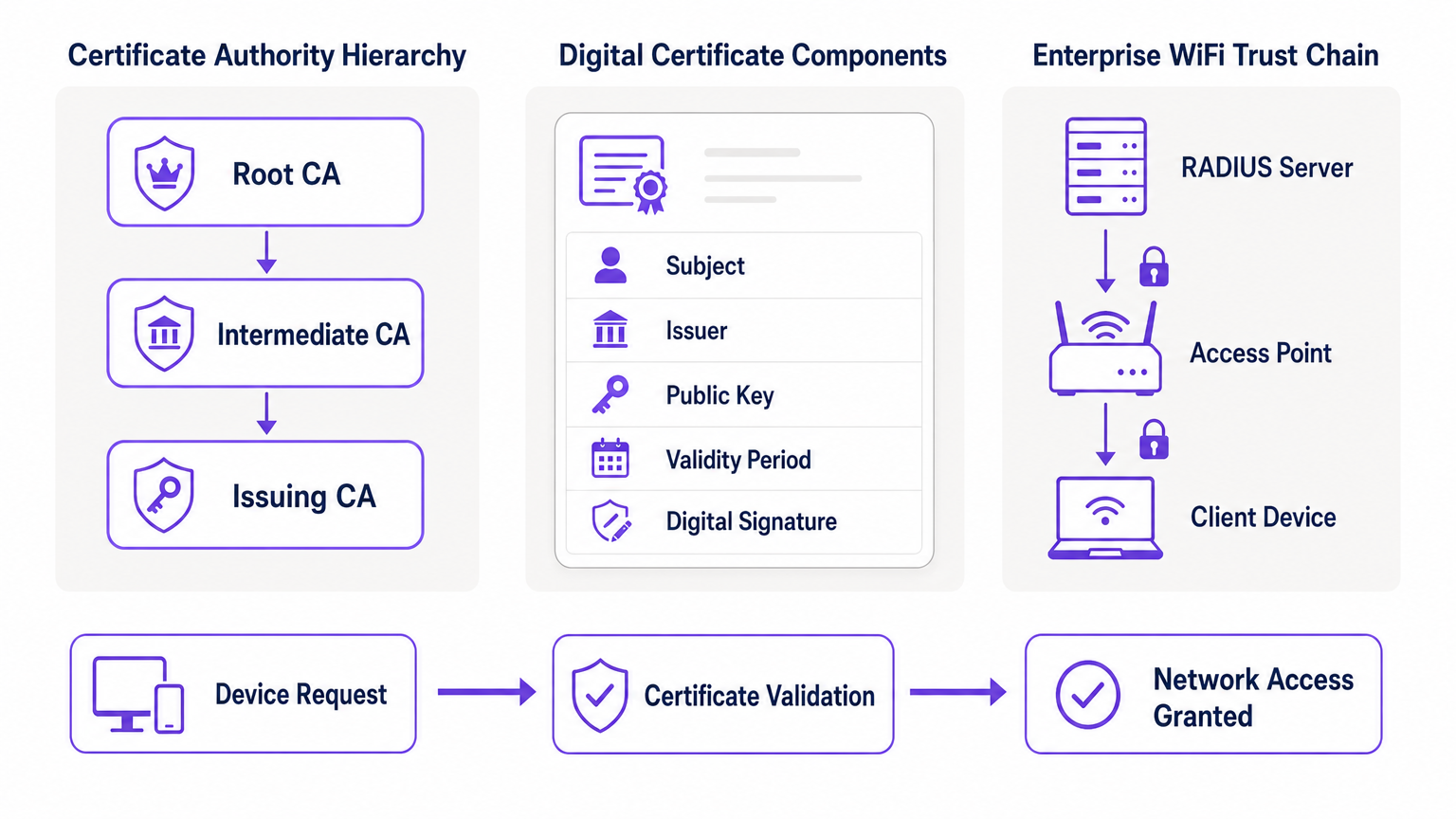
Al suo cuore, la PKI si basa sulla crittografia asimmetrica, dove vengono utilizzate due chiavi matematicamente correlate: una chiave pubblica (condivisa apertamente) e una chiave privata (mantenuta segreta). I dati crittografati con la chiave pubblica possono essere decrittografati solo dalla chiave privata corrispondente, e viceversa. I componenti principali di un'implementazione PKI sono i seguenti.
| Componente | Ruolo | Contesto WiFi Aziendale |
|---|---|---|
| Certificate Authority (CA) | Emette e firma certificati digitali | La radice di fiducia per la tua rete; tutti i dispositivi devono fidarsi della CA |
| Certificato Digitale (X.509) | Collega una chiave pubblica a un'identità | Installato su ogni dispositivo aziendale; presentato durante l'autenticazione 802.1X |
| RADIUS Server | Convalida i certificati e concede l'accesso alla rete | Il motore decisionale che accetta o rifiuta le richieste di connessione |
| Registration Authority (RA) | Verifica l'identità prima dell'emissione del certificato | Spesso gestita da MDM/UEM in implementazioni automatizzate |
| CRL / OCSP | Verifica se un certificato è stato revocato | Critico per bloccare dispositivi compromessi o rubati in tempo reale |
Come la PKI alimenta 802.1X ed EAP-TLS
La sicurezza WiFi aziendale si basa sullo standard IEEE 802.1X per il controllo dell'accesso alla rete basato su porta. Se combinata con l'Extensible Authentication Protocol (EAP), in particolare EAP-TLS (Transport Layer Security), la PKI offre il massimo livello di sicurezza wireless: l'autenticazione reciproca.
In un'implementazione EAP-TLS, il dispositivo client presenta il suo certificato digitale alla rete per dimostrare la propria identità, e il server RADIUS presenta il suo certificato al client, provando che la rete è legittima e non un access point "evil twin" (gemello malvagio) non autorizzato. Questa fiducia reciproca è stabilita perché entrambe le parti si fidano della Root CA che ha emesso i certificati. Una volta autenticata, la sessione viene crittografata utilizzando la suite di cifratura TLS negoziata, prevenendo intercettazioni e attacchi man-in-the-middle.
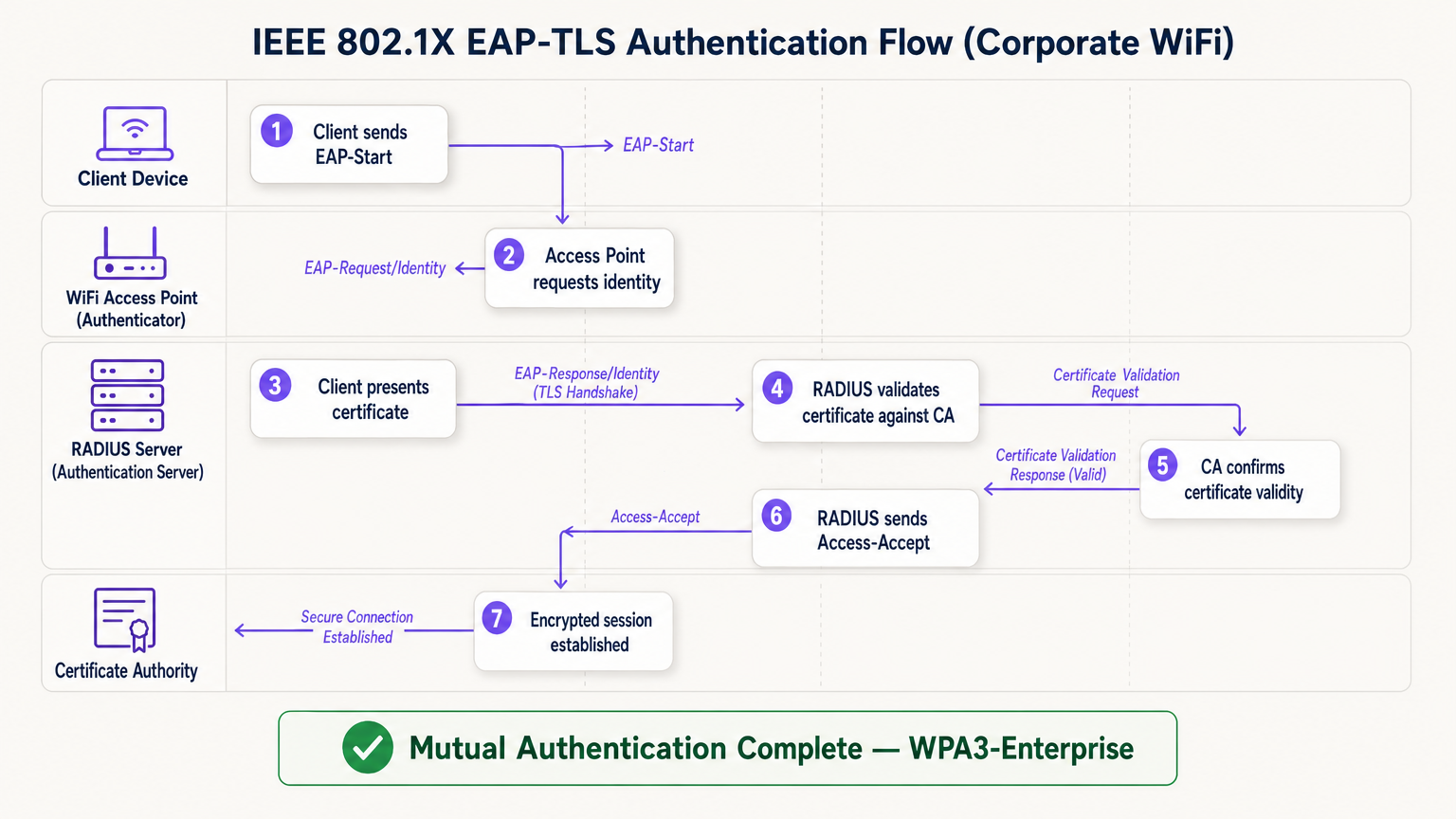
Il flusso EAP-TLS opera attraverso quattro entità logiche: il Dispositivo Client (supplicante), l'Access Point (autenticatore), il Server RADIUS (server di autenticazione) e la Certificate Authority. L'access point agisce come un relè trasparente — non prende la decisione di autenticazione autonomamente. Tale decisione spetta interamente al server RADIUS, che convalida la catena di certificati fino alla Root CA fidata.
Guida all'Implementazione: Distribuire WiFi basato su Certificati
La transizione a un'architettura WiFi basata su PKI richiede un'attenta pianificazione attraverso quattro fasi.
Fase 1: Architettura e Selezione della CA
Decidi se costruire una PKI interna (ad esempio, Microsoft Active Directory Certificate Services) o utilizzare un provider PKI cloud gestito. Per le implementazioni moderne su larga scala, la PKI cloud riduce significativamente il sovraccarico amministrativo e fornisce alta disponibilità integrata. Assicurati che la CA scelta si integri perfettamente con la tua soluzione di Mobile Device Management (MDM) o Unified Endpoint Management (UEM). Per gli ambienti che utilizzano Guest WiFi , assicurati che l'infrastruttura RADIUS sia progettata per gestire sia il traffico 802.1X aziendale che l'autenticazione del captive portal per gli ospiti su SSID separati.
Fase 2: Configurazione del Server RADIUS
Implementa un server RADIUS robusto — le opzioni includono FreeRADIUS, Cisco ISE, Aruba ClearPass o un RADIUS-as-a-Service cloud-native. Configura il server RADIUS con il proprio certificato server emesso dalla tua CA. Questo è fondamentale: senza un certificato server valido, il client non può eseguire l'autenticazione reciproca e sarà vulnerabile agli attacchi evil twin. Per implementazioni in grandi sedi, considera le configurazioni proxy RADIUS per supportare il roaming tra i siti. Le sedi che implementano piattaforme di WiFi Analytics dovrebbero assicurarsi che i dati di accounting RADIUS confluiscano nella pipeline di analisi per un'attribuzione accurata delle sessioni.
Fase 3: Provisioning Automatico dei Certificati
L'installazione manuale dei certificati non è scalabile e soggetta a errori. Sfrutta protoccome SCEP (Simple Certificate Enrollment Protocol) o EST (Enrollment over Secure Transport) tramite il tuo MDM per distribuire silenziosamente i certificati ai dispositivi aziendali. Per gli scenari BYOD, implementa un portale di onboarding che distribuisca in modo sicuro un certificato al dispositivo dell'utente dopo la verifica iniziale dell'identità. Per i dispositivi IoT headless — come apparecchiature mediche, terminali punto vendita o segnaletica digitale — i certificati devono essere forniti durante la fase di staging del dispositivo prima dell'implementazione.
Fase 4: Applicazione delle policy di rete
Configura i tuoi controller wireless e gli access point per applicare 802.1X sulla SSID aziendale. Mappa gli attributi del certificato (come il Subject Alternative Name o il campo OU) a VLAN o policy firewall specifiche utilizzando gli attributi RADIUS, garantendo un accesso alla rete con il minimo privilegio. Per le sedi che utilizzano hardware di fornitori specifici, consulta le guide specifiche del produttore, come La tua guida a un Access Point Wireless Ruckus , per i passaggi di configurazione specifici della piattaforma.
Best Practice per la PKI aziendale
Proteggi la Root CA. Se utilizzi una PKI interna, la Root CA deve essere mantenuta offline e fisicamente protetta. Solo le CA intermedie dovrebbero essere online e rilasciare attivamente certificati. Una Root CA compromessa invalida l'intera tua PKI.
Implementa un robusto controllo di revoca. Assicurati che i tuoi server RADIUS controllino attivamente le CRL o utilizzino OCSP per verificare lo stato del certificato ad ogni tentativo di autenticazione. Un dispositivo compromesso deve avere il suo certificato revocato immediatamente per bloccare l'accesso. La configurazione di RADIUS per memorizzare nella cache le risposte CRL per troppo tempo crea una finestra di esposizione.
Automatizza i rinnovi prima della scadenza. I certificati scadono. Implementa processi di rinnovo automatizzati attivati al 60-70% del periodo di validità del certificato per prevenire interruzioni di rete causate da certificati scaduti. La scadenza dei certificati è una delle cause più comuni di interruzioni WiFi non pianificate negli ambienti aziendali.
Adotta OpenRoaming per le sedi pubbliche. Per le sedi di Ospitalità , Retail , Trasporto e Sanità , la partecipazione a OpenRoaming offre connettività ospite sicura e senza interruzioni su larga scala. Purple agisce come fornitore di identità gratuito per OpenRoaming sotto la licenza Connect, consentendo agli utenti con profili esistenti di connettersi in modo sicuro senza un captive portal o una password — supportato dallo stesso modello di fiducia PKI descritto in questa guida.
Risoluzione dei problemi e Mitigazione del rischio
Anche con un'attenta pianificazione, le implementazioni PKI incontrano modalità di errore prevedibili. La tabella seguente riassume i problemi più comuni e le loro soluzioni.
| Modalità di errore | Sintomo | Causa principale | Risoluzione |
|---|---|---|---|
| Errore di sincronizzazione oraria | Errori di convalida del certificato su tutti i dispositivi | Errata configurazione NTP sul client o RADIUS | Applica la policy NTP tramite MDM e infrastruttura di rete |
| Errore della catena di fiducia | Tipi specifici di dispositivi (es. Android) non riescono a connettersi | Root CA non presente nell'archivio radice attendibile del dispositivo | Invia la Root CA tramite profilo MDM |
| CRL irraggiungibile | Errori di autenticazione intermittenti | Firewall che blocca gli endpoint CRL/OCSP | Apri le regole del firewall per i punti di distribuzione CA |
| Scadenza del certificato | Disconnessione di massa improvvisa | Automazione del rinnovo non configurata | Implementa il rinnovo attivato da MDM al 60% di validità |
| Mancata corrispondenza certificato RADIUS | Tutti i client falliscono l'autenticazione reciproca | Certificato del server RADIUS scaduto o CA errata | Rinnova il certificato del server RADIUS e ridistribuisci |
Per gli ambienti sanitari in particolare, dove i tempi di inattività della rete hanno implicazioni dirette sulla sicurezza dei pazienti, consulta WiFi negli ospedali: una guida alle reti cliniche sicure per raccomandazioni sulla resilienza di livello clinico.
ROI e Impatto sul Business
L'implementazione della PKI per la sicurezza WiFi offre un valore aziendale misurabile su tre dimensioni.
Riduzione del rischio e conformità. L'eliminazione delle password condivise rimuove il vettore più comune per il movimento laterale nella rete. L'autenticazione basata su certificati soddisfa direttamente i requisiti di PCI DSS (Requisito 8.6), GDPR (Articolo 32 misure tecniche) e ISO 27001 (Allegato A.9). La capacità di revocare istantaneamente un certificato quando un dipendente lascia l'azienda o un dispositivo viene rubato fornisce un controllo verificabile e dimostrabile che gli ambienti con chiavi condivise semplicemente non possono eguagliare.
Efficienza operativa. Il provisioning automatizzato dei certificati tramite MDM riduce in modo significativo i ticket dell'helpdesk IT relativi a problemi di connettività WiFi — reimpostazioni di password, rotazioni di chiavi e ritardi nell'onboarding. Negli ambienti retail con un elevato turnover del personale, questo si traduce direttamente in costi di supporto IT ridotti e tempi di implementazione dei dispositivi più rapidi.
Esperienza utente e ospite migliorata. L'autenticazione basata su certificati è invisibile all'utente finale. I dipendenti aziendali si connettono automaticamente e in modo sicuro senza passaggi manuali. Per gli ospiti, piattaforme come la soluzione Guest WiFi di Purple gestiscono la separazione tra l'accesso aziendale gestito e l'onboarding degli ospiti, garantendo che ogni pubblico ottenga l'esperienza di autenticazione appropriata senza compromettere la sicurezza su nessuna delle due reti.
Termini chiave e definizioni
Public Key Infrastructure (PKI)
The comprehensive framework of roles, policies, hardware, and software used to manage digital certificates and public-key encryption. It establishes the trust relationships that allow devices and servers to verify each other's identities cryptographically.
The foundational architecture required to move away from shared passwords and towards identity-based network security. Every enterprise WiFi deployment using 802.1X depends on a PKI.
Certificate Authority (CA)
A trusted entity that issues, signs, and manages digital certificates. It acts as the root of trust in a PKI: any certificate signed by the CA is trusted by all parties that trust the CA.
The central pillar of your network security. If the CA is compromised, all certificates it has issued are potentially compromised. Protecting the Root CA is the single most important security control in a PKI deployment.
X.509
The ITU-T standard defining the format of public key certificates. X.509 certificates contain fields including Subject, Issuer, Public Key, Validity Period, and the CA's Digital Signature.
When configuring RADIUS server policies, IT teams map specific X.509 fields — such as the Subject Alternative Name (SAN) or Organisational Unit (OU) — to VLAN assignments and access policies.
IEEE 802.1X
The IEEE standard for port-based Network Access Control (PNAC). It provides an authentication mechanism that blocks all network traffic at the access point until the connecting device's identity has been verified by an authentication server.
The protocol that enforces certificate-based authentication at the wireless access point. Without 802.1X, a device can connect to the SSID without proving its identity.
EAP-TLS (Extensible Authentication Protocol - Transport Layer Security)
An EAP method that uses client and server certificates to establish a mutually authenticated, encrypted TLS session. It is the most secure EAP method available for enterprise WiFi.
The gold standard for corporate WiFi authentication. Unlike PEAP or EAP-TTLS, which use passwords inside a TLS tunnel, EAP-TLS eliminates passwords entirely, replacing them with cryptographic certificates.
RADIUS (Remote Authentication Dial-In User Service)
A networking protocol providing centralised Authentication, Authorisation, and Accounting (AAA) management. In 802.1X deployments, the RADIUS server receives the client's certificate from the access point, validates it against the CA, and returns an access decision.
The decision engine of the enterprise WiFi authentication stack. RADIUS also handles dynamic VLAN assignment, enabling network segmentation based on device identity or user role.
Certificate Revocation List (CRL)
A periodically published list of certificates that have been revoked by the issuing CA before their scheduled expiration date. RADIUS servers check the CRL to ensure they are not granting access to compromised or decommissioned devices.
Critical for maintaining security when devices are lost, stolen, or decommissioned. CRL checking must be configured on the RADIUS server — it does not happen automatically.
Mutual Authentication
A security process in which both parties in a communication link authenticate each other simultaneously. In EAP-TLS, the client authenticates to the network and the network authenticates to the client.
Prevents 'Evil Twin' attacks where a hacker sets up a rogue access point with the same SSID as the corporate network to intercept credentials. Without mutual authentication, the client has no way to verify it is connecting to the legitimate network.
SCEP (Simple Certificate Enrollment Protocol)
A protocol that enables automated, scalable distribution of digital certificates to devices via an MDM or network device management system.
The mechanism that makes enterprise PKI deployments operationally viable at scale. Without SCEP or a similar automated enrollment protocol, certificate provisioning to thousands of devices would require manual intervention.
Casi di studio
A large retail chain with 500 stores needs to secure its corporate WiFi for employee point-of-sale (POS) tablets and inventory scanners. They currently use a single WPA2-PSK across all stores, which is frequently shared with non-employees and cannot be audited. How should they redesign their authentication architecture?
The retail chain must migrate to WPA3-Enterprise using 802.1X and EAP-TLS. Step 1: Select a cloud-managed PKI provider and integrate it with the existing MDM solution managing the POS tablets and scanners. Step 2: Configure SCEP to automatically push unique, device-bound digital certificates to every corporate device via MDM. Step 3: Deploy a Cloud RADIUS service and configure it to validate certificates against the PKI, with OCSP checking enabled. Step 4: Reconfigure the wireless controllers at each store to enforce 802.1X authentication on the corporate SSID. Step 5: Retire the PSK network. Step 6: Configure VLAN assignment via RADIUS attributes to segment POS devices from general staff devices at the network layer.
A major hospital network is deploying new wireless medical infusion pumps across three sites. These devices lack a user interface to input credentials or accept captive portal prompts. How can they be securely connected to the clinical WiFi network without creating a shared-key vulnerability?
Implement a PKI-based architecture specifically for headless IoT medical devices. Step 1: Generate device-specific X.509 certificates for each infusion pump, using the device serial number as the Subject Common Name. Step 2: Install the certificates on the pumps during the staging and provisioning phase, before clinical deployment. Step 3: Configure the clinical WiFi SSID for 802.1X EAP-TLS. Step 4: Configure the RADIUS server to map the device certificate's Subject CN to a specific VLAN dedicated to medical devices. Step 5: Implement CRL checking to allow instant revocation if a device is decommissioned or recalled.
Analisi degli scenari
Q1. Your organisation is migrating from PEAP (username/password) to EAP-TLS (certificates) for the corporate SSID. During testing, Windows laptops successfully connect, but Android devices consistently fail. The RADIUS logs show the Android devices are rejecting the server's certificate during the TLS handshake. What is the most likely cause, and how do you resolve it?
💡 Suggerimento:Consider the concept of mutual authentication and the trust chain. What does the Android device need in order to trust the RADIUS server's certificate?
Mostra l'approccio consigliato
The Android devices do not have the Root CA certificate installed in their trusted root store. Windows laptops receive the Root CA via Group Policy automatically, but Android devices require the Root CA to be pushed via an MDM profile. Without the Root CA in the trusted store, the Android device cannot verify the RADIUS server's certificate chain, causing it to reject the server certificate and abort the TLS handshake. Resolution: create an MDM configuration profile that installs the Root CA certificate into the trusted root store on all managed Android devices, then re-test.
Q2. A recently terminated employee's corporate laptop is still successfully connecting to the enterprise WiFi network two days after their Active Directory account was disabled. The network uses EAP-TLS. Why is this happening, and what must be done to prevent it?
💡 Suggerimento:Disabling an Active Directory account does not automatically invalidate a cryptographic certificate. Consider what the RADIUS server is actually validating.
Mostra l'approccio consigliato
The RADIUS server is validating the certificate, not the Active Directory account status. Because the certificate is still mathematically valid and has not been revoked, the RADIUS server grants access. To resolve immediately, the specific certificate issued to that laptop must be revoked in the Certificate Authority. To prevent this systematically, integrate the HR offboarding process with the MDM and PKI: when an employee is terminated, the MDM should automatically revoke the device certificate and unenroll the device. Additionally, ensure the RADIUS server is configured to check OCSP or the CRL on every authentication attempt — not just periodically — so revocation takes effect immediately.
Q3. You are designing the network architecture for a large stadium that wants to offer seamless, secure WiFi to 60,000 attendees without requiring each person to go through a captive portal. The venue also wants to support corporate exhibitors who need 802.1X-secured access for their POS equipment. How does PKI factor into both requirements?
💡 Suggerimento:Consider that there are two distinct audiences with different authentication needs. OpenRoaming addresses one; a dedicated corporate SSID with 802.1X addresses the other.
Mostra l'approccio consigliato
Two separate SSIDs are required. For the 60,000 attendees, implement OpenRoaming. The stadium's network must be configured to trust the OpenRoaming Root CAs. When a visitor's device — provisioned by an identity provider like Purple or a mobile carrier — connects, it presents a certificate. The RADIUS server validates this against the OpenRoaming trust chain and grants secure, encrypted access without a captive portal. For corporate exhibitors with POS equipment, deploy a separate 802.1X SSID using EAP-TLS. Exhibitors are issued temporary device certificates during their accreditation process, which are automatically revoked after the event. RADIUS attributes assign POS devices to a dedicated VLAN, satisfying PCI DSS network segmentation requirements.




