

¿Qué es PKI? Cómo la infraestructura de clave pública impulsa la seguridad WiFi
Esta guía de referencia técnica autorizada explica la infraestructura de clave pública (PKI) y su papel fundamental en la seguridad de las redes WiFi empresariales en entornos de hostelería, comercio minorista y sector público. Diseñada para gerentes de TI, arquitectos de red y CTOs, ofrece orientación práctica sobre autenticación basada en certificados, implementación de IEEE 802.1X con EAP-TLS y cómo la plataforma de Purple aprovecha estos estándares para una conectividad escalable y conforme. Los lectores obtendrán una hoja de ruta de implementación concreta, estudios de caso reales y una comprensión clara de cómo PKI elimina las vulnerabilidades del WiFi de clave compartida.
🎧 Escucha esta guía
Ver transcripción
Resumen Ejecutivo
Para los líderes de TI empresariales que gestionan implementaciones a gran escala en entornos de hostelería, comercio minorista o sector público, asegurar el acceso inalámbrico es un requisito fundamental, no una mejora opcional. Las claves precompartidas (PSK) tradicionales son inadecuadas para entornos corporativos: no ofrecen responsabilidad individual, no pueden ser auditadas y generan una sobrecarga operativa significativa al rotarlas. La infraestructura de clave pública (PKI) proporciona la base criptográfica necesaria para una seguridad de red robusta y escalable. Esta guía detalla qué es PKI, cómo impulsa la seguridad WiFi empresarial a través de la autenticación basada en certificados y los pasos concretos necesarios para implementar IEEE 802.1X con EAP-TLS. Al hacer la transición a una arquitectura respaldada por PKI, las organizaciones pueden eliminar el robo de credenciales, automatizar la incorporación de dispositivos y garantizar un acceso fluido y seguro tanto para dispositivos corporativos como para invitados, al tiempo que cumplen con los requisitos de PCI DSS, GDPR e ISO 27001.
Análisis Técnico Detallado: Comprensión de PKI en WiFi Empresarial
La infraestructura de clave pública (PKI) es el marco de hardware, software, políticas y procedimientos necesarios para crear, gestionar, distribuir, usar, almacenar y revocar certificados digitales y gestionar el cifrado de clave pública. En el contexto del WiFi empresarial, PKI es el motor que impulsa la verificación de identidad y el cifrado, reemplazando la contraseña compartida inherentemente insegura con una identidad criptográfica única para cada dispositivo o usuario.
Los Componentes Centrales de PKI
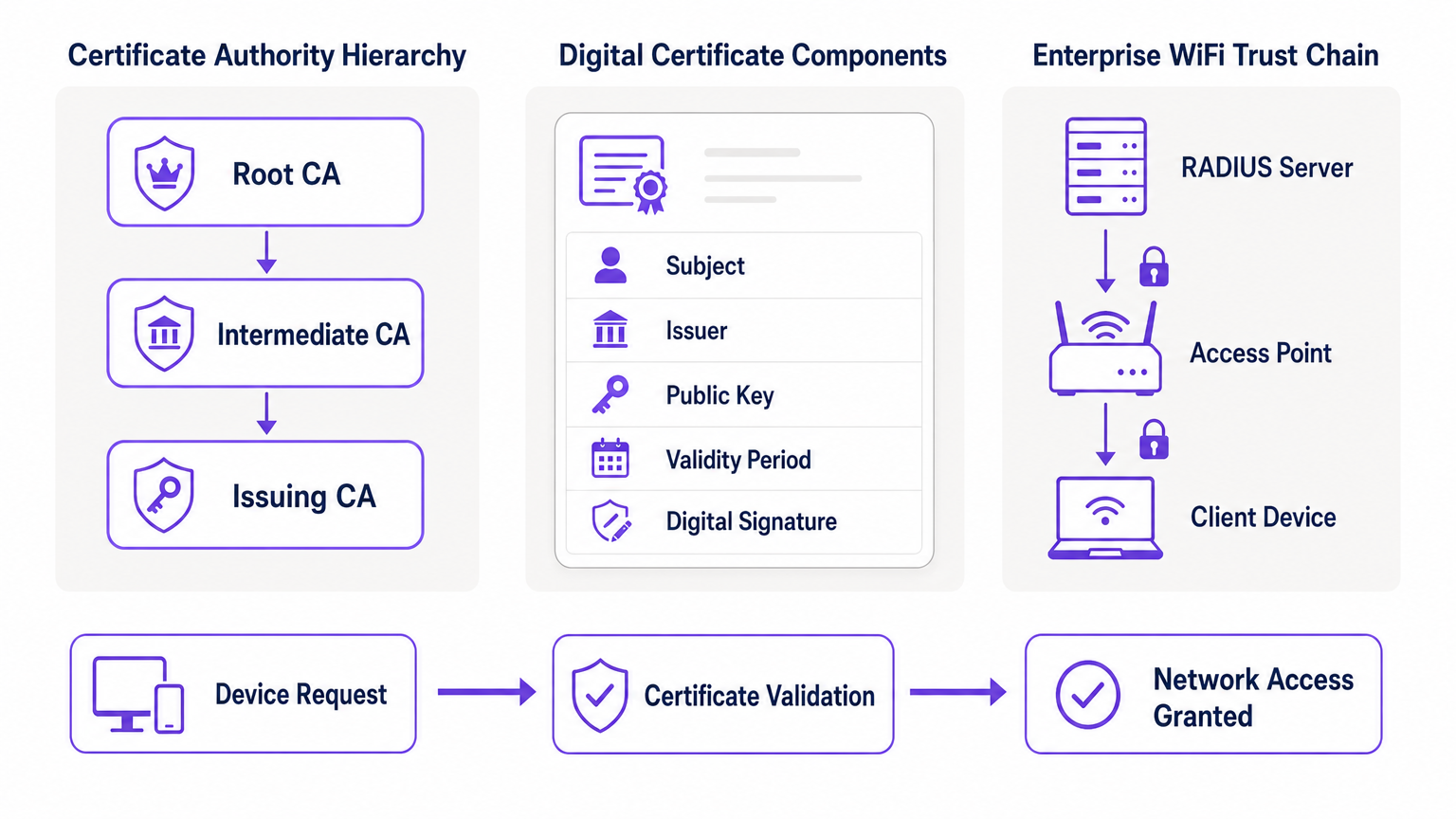
En su esencia, PKI se basa en la criptografía asimétrica, donde se utilizan dos claves matemáticamente relacionadas: una clave pública (compartida abiertamente) y una clave privada (mantenida en secreto). Los datos cifrados con la clave pública solo pueden ser descifrados por la clave privada correspondiente, y viceversa. Los componentes principales de una implementación de PKI son los siguientes.
| Componente | Función | Contexto WiFi Empresarial |
|---|---|---|
| Autoridad de Certificación (CA) | Emite y firma certificados digitales | La raíz de confianza para su red; todos los dispositivos deben confiar en la CA |
| Certificado Digital (X.509) | Vincula una clave pública a una identidad | Instalado en cada dispositivo corporativo; presentado durante la autenticación 802.1X |
| Servidor RADIUS | Valida certificados y otorga acceso a la red | El motor de decisión que acepta o rechaza las solicitudes de conexión |
| Autoridad de Registro (RA) | Verifica la identidad antes de la emisión del certificado | A menudo gestionado por MDM/UEM en implementaciones automatizadas |
| CRL / OCSP | Comprueba si un certificado ha sido revocado | Crítico para bloquear dispositivos comprometidos o robados en tiempo real |
Cómo PKI Impulsa 802.1X y EAP-TLS
La seguridad WiFi empresarial se basa en el estándar IEEE 802.1X para el control de acceso a la red basado en puertos. Cuando se combina con el Protocolo de Autenticación Extensible (EAP), específicamente EAP-TLS (Transport Layer Security), PKI ofrece el nivel más alto de seguridad inalámbrica: autenticación mutua.
En una implementación de EAP-TLS, el dispositivo cliente presenta su certificado digital a la red para probar su identidad, y el servidor RADIUS presenta su certificado al cliente, demostrando que la red es legítima y no un punto de acceso "evil twin" (gemelo malvado) no autorizado. Esta confianza mutua se establece porque ambas partes confían en la CA raíz que emitió los certificados. Una vez autenticada, la sesión se cifra utilizando el conjunto de cifrado TLS negociado, lo que previene la escucha y los ataques de intermediario (man-in-the-middle).
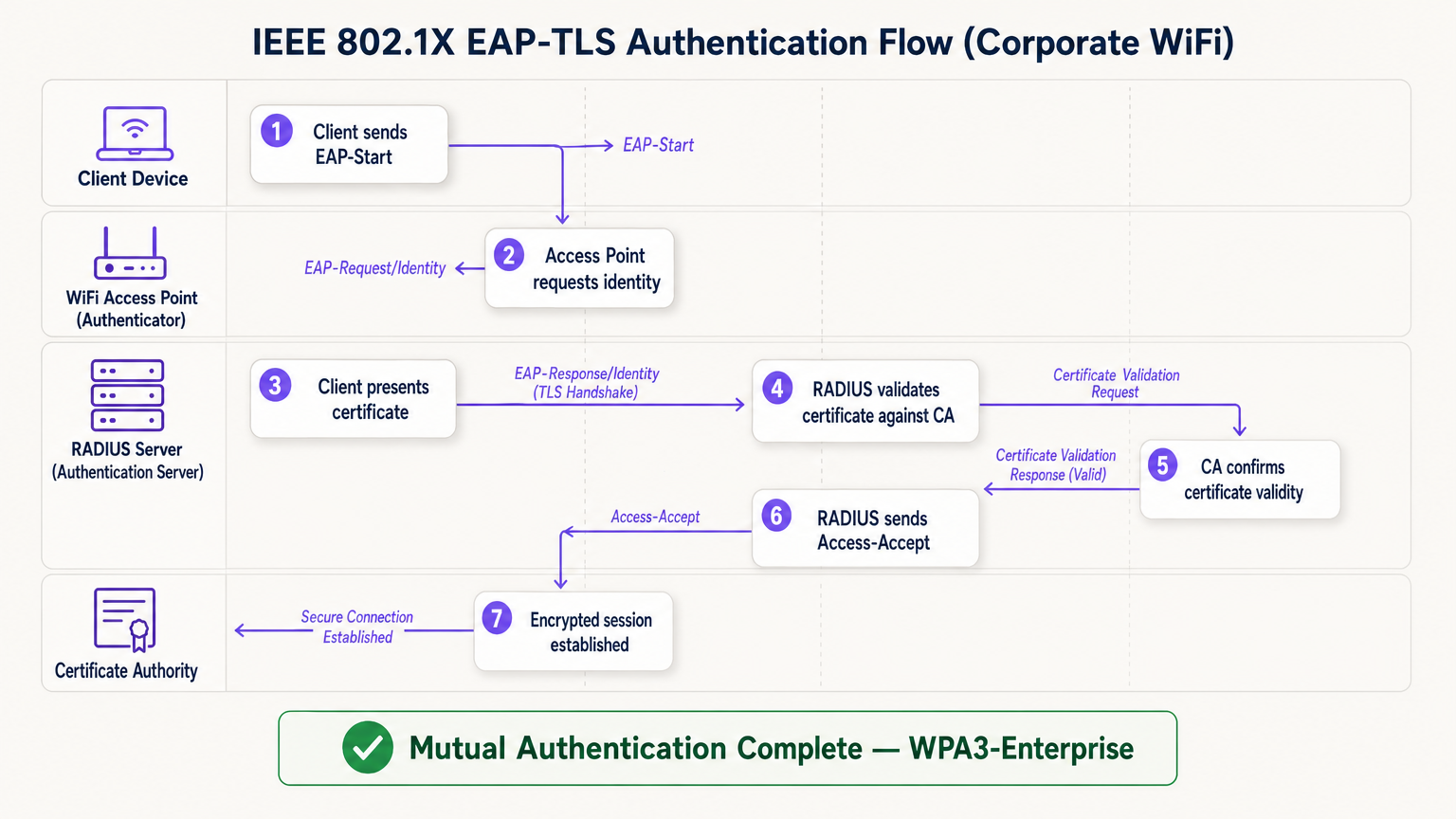
El flujo EAP-TLS opera a través de cuatro entidades lógicas: el Dispositivo Cliente (solicitante), el Punto de Acceso (autenticador), el Servidor RADIUS (servidor de autenticación) y la Autoridad de Certificación. El punto de acceso actúa como un relé transparente; no toma la decisión de autenticación por sí mismo. Esa decisión recae completamente en el servidor RADIUS, que valida la cadena de certificados hasta la CA raíz de confianza.
Guía de Implementación: Despliegue de WiFi Basado en Certificados
La transición a una arquitectura WiFi respaldada por PKI requiere una planificación cuidadosa en cuatro fases.
Fase 1: Arquitectura y Selección de CA
Decida si construir una PKI interna (por ejemplo, Microsoft Active Directory Certificate Services) o utilizar un proveedor de PKI en la nube gestionado. Para implementaciones modernas a escala, la PKI en la nube reduce significativamente la sobrecarga administrativa y proporciona alta disponibilidad integrada. Asegúrese de que la CA elegida se integre sin problemas con su solución de Gestión de Dispositivos Móviles (MDM) o Gestión Unificada de Puntos Finales (UEM). Para entornos que utilizan Guest WiFi , asegúrese de que la infraestructura RADIUS esté diseñada para manejar tanto el tráfico corporativo 802.1X como la autenticación de Captive Portal para invitados en SSIDs separados.
Fase 2: Configuración del Servidor RADIUS
Implemente un servidor RADIUS robusto; las opciones incluyen FreeRADIUS, Cisco ISE, Aruba ClearPass o un RADIUS-as-a-Service nativo de la nube. Configure el servidor RADIUS con su propio certificado de servidor emitido por su CA. Esto es crítico: sin un certificado de servidor válido, el cliente no puede realizar la autenticación mutua y será vulnerable a ataques de tipo "evil twin". Para implementaciones en grandes recintos, considere configuraciones de proxy RADIUS para soportar el roaming entre sitios. Los recintos que implementan plataformas de WiFi Analytics deben asegurarse de que los datos de contabilidad RADIUS se integren en el pipeline de análisis para una atribución precisa de las sesiones.
Fase 3: Aprovisionamiento Automatizado de Certificados
La instalación manual de certificados no es escalable y es propensa a errores. Aproveche protocherramientas como SCEP (Simple Certificate Enrollment Protocol) o EST (Enrollment over Secure Transport) a través de su MDM para enviar certificados de forma silenciosa a los dispositivos corporativos. Para escenarios BYOD, implemente un portal de incorporación que aprovisione de forma segura un certificado al dispositivo del usuario después de la verificación inicial de identidad. Para dispositivos IoT sin interfaz de usuario —como equipos médicos, terminales de punto de venta o señalización digital—, los certificados deben aprovisionarse durante la fase de preparación del dispositivo antes de la implementación.
Fase 4: Aplicación de políticas de red
Configure sus controladores inalámbricos y puntos de acceso para aplicar 802.1X en el SSID corporativo. Asigne atributos de certificado (como el Nombre alternativo del sujeto o el campo OU) a VLANs específicas o políticas de firewall utilizando atributos RADIUS, asegurando un acceso a la red con el mínimo privilegio. Para lugares que utilizan hardware de proveedores específicos, consulte las guías específicas del fabricante, como Su guía para un punto de acceso inalámbrico Ruckus , para conocer los pasos de configuración específicos de la plataforma.
Mejores prácticas para PKI empresarial
Proteja la CA raíz. Si utiliza una PKI interna, la CA raíz debe mantenerse fuera de línea y protegida físicamente. Solo las CA intermedias deben estar en línea y emitiendo certificados activamente. Una CA raíz comprometida invalida toda su PKI.
Implemente una verificación de revocación robusta. Asegúrese de que sus servidores RADIUS verifiquen activamente las CRL o utilicen OCSP para verificar el estado del certificado en cada intento de autenticación. Un dispositivo comprometido debe tener su certificado revocado inmediatamente para bloquear el acceso. Configurar RADIUS para almacenar en caché las respuestas CRL durante demasiado tiempo crea una ventana de exposición.
Automatice las renovaciones antes del vencimiento. Los certificados caducan. Implemente procesos de renovación automatizados que se activen al 60-70% del período de validez del certificado para evitar interrupciones de la red causadas por certificados caducados. La caducidad de los certificados es una de las causas más comunes de interrupciones no planificadas de WiFi en entornos empresariales.
Adopte OpenRoaming para lugares públicos. Para lugares de Hostelería , Comercio minorista , Transporte y Atención médica , participar en OpenRoaming ofrece conectividad de invitados segura y sin interrupciones a escala. Purple actúa como un proveedor de identidad gratuito para OpenRoaming bajo la licencia Connect, permitiendo a los usuarios con perfiles existentes conectarse de forma segura sin un captive portal o contraseña, respaldado por el mismo modelo de confianza PKI descrito en esta guía.
Solución de problemas y mitigación de riesgos
Incluso con una planificación cuidadosa, las implementaciones de PKI encuentran modos de falla predecibles. La siguiente tabla resume los problemas más comunes y sus resoluciones.
| Modo de falla | Síntoma | Causa raíz | Resolución |
|---|---|---|---|
| Falla de sincronización de tiempo | Errores de validación de certificados en todos los dispositivos | Mala configuración de NTP en el cliente o RADIUS | Aplicar política de NTP a través de MDM e infraestructura de red |
| Falla de cadena de confianza | Tipos de dispositivos específicos (ej., Android) no pueden conectarse | CA raíz no está en el almacén de confianza del dispositivo | Enviar CA raíz a través del perfil MDM |
| CRL inalcanzable | Fallas de autenticación intermitentes | Firewall bloqueando los puntos finales de CRL/OCSP | Abrir reglas de firewall para los puntos de distribución de CA |
| Vencimiento de certificado | Desconexión masiva repentina | Automatización de renovación no configurada | Implementar renovación activada por MDM al 60% de validez |
| Desajuste de certificado RADIUS | Todos los clientes fallan la autenticación mutua | Certificado del servidor RADIUS caducado o CA incorrecta | Renovar certificado del servidor RADIUS y volver a implementar |
Para entornos de atención médica específicamente, donde el tiempo de inactividad de la red tiene implicaciones directas para la seguridad del paciente, consulte WiFi en hospitales: una guía para redes clínicas seguras para obtener recomendaciones de resiliencia de grado clínico.
ROI e impacto empresarial
La implementación de PKI para la seguridad WiFi ofrece un valor empresarial medible en tres dimensiones.
Reducción de riesgos y cumplimiento. La eliminación de contraseñas compartidas elimina el vector más común para el movimiento lateral de la red. La autenticación basada en certificados satisface directamente los requisitos de PCI DSS (Requisito 8.6), GDPR (Artículo 32 medidas técnicas) e ISO 27001 (Anexo A.9). La capacidad de revocar instantáneamente un certificado cuando un empleado se va o un dispositivo es robado proporciona un control auditable y demostrable que los entornos de clave compartida simplemente no pueden igualar.
Eficiencia operativa. El aprovisionamiento automatizado de certificados a través de MDM reduce significativamente los tickets de soporte de TI relacionados con problemas de conectividad WiFi —restablecimientos de contraseña, rotaciones de claves y retrasos en la incorporación—. En entornos minoristas con alta rotación de personal, esto se traduce directamente en una reducción de los costos de soporte de TI y tiempos de implementación de dispositivos más rápidos.
Experiencia mejorada para usuarios e invitados. La autenticación basada en certificados es invisible para el usuario final. Los empleados corporativos se conectan de forma automática y segura sin ningún paso manual. Para los invitados, plataformas como la solución Guest WiFi de Purple gestionan la separación entre el acceso corporativo administrado y la incorporación de invitados, asegurando que cada audiencia obtenga la experiencia de autenticación adecuada sin comprometer la seguridad en ninguna de las redes.
Términos clave y definiciones
Public Key Infrastructure (PKI)
The comprehensive framework of roles, policies, hardware, and software used to manage digital certificates and public-key encryption. It establishes the trust relationships that allow devices and servers to verify each other's identities cryptographically.
The foundational architecture required to move away from shared passwords and towards identity-based network security. Every enterprise WiFi deployment using 802.1X depends on a PKI.
Certificate Authority (CA)
A trusted entity that issues, signs, and manages digital certificates. It acts as the root of trust in a PKI: any certificate signed by the CA is trusted by all parties that trust the CA.
The central pillar of your network security. If the CA is compromised, all certificates it has issued are potentially compromised. Protecting the Root CA is the single most important security control in a PKI deployment.
X.509
The ITU-T standard defining the format of public key certificates. X.509 certificates contain fields including Subject, Issuer, Public Key, Validity Period, and the CA's Digital Signature.
When configuring RADIUS server policies, IT teams map specific X.509 fields — such as the Subject Alternative Name (SAN) or Organisational Unit (OU) — to VLAN assignments and access policies.
IEEE 802.1X
The IEEE standard for port-based Network Access Control (PNAC). It provides an authentication mechanism that blocks all network traffic at the access point until the connecting device's identity has been verified by an authentication server.
The protocol that enforces certificate-based authentication at the wireless access point. Without 802.1X, a device can connect to the SSID without proving its identity.
EAP-TLS (Extensible Authentication Protocol - Transport Layer Security)
An EAP method that uses client and server certificates to establish a mutually authenticated, encrypted TLS session. It is the most secure EAP method available for enterprise WiFi.
The gold standard for corporate WiFi authentication. Unlike PEAP or EAP-TTLS, which use passwords inside a TLS tunnel, EAP-TLS eliminates passwords entirely, replacing them with cryptographic certificates.
RADIUS (Remote Authentication Dial-In User Service)
A networking protocol providing centralised Authentication, Authorisation, and Accounting (AAA) management. In 802.1X deployments, the RADIUS server receives the client's certificate from the access point, validates it against the CA, and returns an access decision.
The decision engine of the enterprise WiFi authentication stack. RADIUS also handles dynamic VLAN assignment, enabling network segmentation based on device identity or user role.
Certificate Revocation List (CRL)
A periodically published list of certificates that have been revoked by the issuing CA before their scheduled expiration date. RADIUS servers check the CRL to ensure they are not granting access to compromised or decommissioned devices.
Critical for maintaining security when devices are lost, stolen, or decommissioned. CRL checking must be configured on the RADIUS server — it does not happen automatically.
Mutual Authentication
A security process in which both parties in a communication link authenticate each other simultaneously. In EAP-TLS, the client authenticates to the network and the network authenticates to the client.
Prevents 'Evil Twin' attacks where a hacker sets up a rogue access point with the same SSID as the corporate network to intercept credentials. Without mutual authentication, the client has no way to verify it is connecting to the legitimate network.
SCEP (Simple Certificate Enrollment Protocol)
A protocol that enables automated, scalable distribution of digital certificates to devices via an MDM or network device management system.
The mechanism that makes enterprise PKI deployments operationally viable at scale. Without SCEP or a similar automated enrollment protocol, certificate provisioning to thousands of devices would require manual intervention.
Casos de éxito
A large retail chain with 500 stores needs to secure its corporate WiFi for employee point-of-sale (POS) tablets and inventory scanners. They currently use a single WPA2-PSK across all stores, which is frequently shared with non-employees and cannot be audited. How should they redesign their authentication architecture?
The retail chain must migrate to WPA3-Enterprise using 802.1X and EAP-TLS. Step 1: Select a cloud-managed PKI provider and integrate it with the existing MDM solution managing the POS tablets and scanners. Step 2: Configure SCEP to automatically push unique, device-bound digital certificates to every corporate device via MDM. Step 3: Deploy a Cloud RADIUS service and configure it to validate certificates against the PKI, with OCSP checking enabled. Step 4: Reconfigure the wireless controllers at each store to enforce 802.1X authentication on the corporate SSID. Step 5: Retire the PSK network. Step 6: Configure VLAN assignment via RADIUS attributes to segment POS devices from general staff devices at the network layer.
A major hospital network is deploying new wireless medical infusion pumps across three sites. These devices lack a user interface to input credentials or accept captive portal prompts. How can they be securely connected to the clinical WiFi network without creating a shared-key vulnerability?
Implement a PKI-based architecture specifically for headless IoT medical devices. Step 1: Generate device-specific X.509 certificates for each infusion pump, using the device serial number as the Subject Common Name. Step 2: Install the certificates on the pumps during the staging and provisioning phase, before clinical deployment. Step 3: Configure the clinical WiFi SSID for 802.1X EAP-TLS. Step 4: Configure the RADIUS server to map the device certificate's Subject CN to a specific VLAN dedicated to medical devices. Step 5: Implement CRL checking to allow instant revocation if a device is decommissioned or recalled.
Análisis de escenarios
Q1. Your organisation is migrating from PEAP (username/password) to EAP-TLS (certificates) for the corporate SSID. During testing, Windows laptops successfully connect, but Android devices consistently fail. The RADIUS logs show the Android devices are rejecting the server's certificate during the TLS handshake. What is the most likely cause, and how do you resolve it?
💡 Sugerencia:Consider the concept of mutual authentication and the trust chain. What does the Android device need in order to trust the RADIUS server's certificate?
Mostrar enfoque recomendado
The Android devices do not have the Root CA certificate installed in their trusted root store. Windows laptops receive the Root CA via Group Policy automatically, but Android devices require the Root CA to be pushed via an MDM profile. Without the Root CA in the trusted store, the Android device cannot verify the RADIUS server's certificate chain, causing it to reject the server certificate and abort the TLS handshake. Resolution: create an MDM configuration profile that installs the Root CA certificate into the trusted root store on all managed Android devices, then re-test.
Q2. A recently terminated employee's corporate laptop is still successfully connecting to the enterprise WiFi network two days after their Active Directory account was disabled. The network uses EAP-TLS. Why is this happening, and what must be done to prevent it?
💡 Sugerencia:Disabling an Active Directory account does not automatically invalidate a cryptographic certificate. Consider what the RADIUS server is actually validating.
Mostrar enfoque recomendado
The RADIUS server is validating the certificate, not the Active Directory account status. Because the certificate is still mathematically valid and has not been revoked, the RADIUS server grants access. To resolve immediately, the specific certificate issued to that laptop must be revoked in the Certificate Authority. To prevent this systematically, integrate the HR offboarding process with the MDM and PKI: when an employee is terminated, the MDM should automatically revoke the device certificate and unenroll the device. Additionally, ensure the RADIUS server is configured to check OCSP or the CRL on every authentication attempt — not just periodically — so revocation takes effect immediately.
Q3. You are designing the network architecture for a large stadium that wants to offer seamless, secure WiFi to 60,000 attendees without requiring each person to go through a captive portal. The venue also wants to support corporate exhibitors who need 802.1X-secured access for their POS equipment. How does PKI factor into both requirements?
💡 Sugerencia:Consider that there are two distinct audiences with different authentication needs. OpenRoaming addresses one; a dedicated corporate SSID with 802.1X addresses the other.
Mostrar enfoque recomendado
Two separate SSIDs are required. For the 60,000 attendees, implement OpenRoaming. The stadium's network must be configured to trust the OpenRoaming Root CAs. When a visitor's device — provisioned by an identity provider like Purple or a mobile carrier — connects, it presents a certificate. The RADIUS server validates this against the OpenRoaming trust chain and grants secure, encrypted access without a captive portal. For corporate exhibitors with POS equipment, deploy a separate 802.1X SSID using EAP-TLS. Exhibitors are issued temporary device certificates during their accreditation process, which are automatically revoked after the event. RADIUS attributes assign POS devices to a dedicated VLAN, satisfying PCI DSS network segmentation requirements.




