

What Is PKI? How Public Key Infrastructure Powers WiFi Security
This authoritative technical reference guide explains Public Key Infrastructure (PKI) and its critical role in securing enterprise WiFi networks across hospitality, retail, and public-sector venues. Designed for IT managers, network architects, and CTOs, it provides actionable guidance on certificate-based authentication, IEEE 802.1X deployment with EAP-TLS, and how Purple's platform leverages these standards for scalable, compliant connectivity. Readers will leave with a concrete deployment roadmap, real-world case studies, and a clear understanding of how PKI eliminates the vulnerabilities of shared-secret WiFi.
🎧 Listen to this Guide
View Transcript
Executive Summary
For enterprise IT leaders managing large-scale deployments across hospitality, retail, or public-sector venues, securing wireless access is a fundamental requirement — not an optional upgrade. Traditional pre-shared keys (PSKs) are inadequate for corporate environments: they provide no individual accountability, cannot be audited, and create significant operational overhead when rotated. Public Key Infrastructure (PKI) provides the cryptographic foundation necessary for robust, scalable network security. This guide details what PKI is, how it powers enterprise WiFi security through certificate-based authentication, and the concrete steps required to deploy IEEE 802.1X with EAP-TLS. By transitioning to a PKI-backed architecture, organisations can eliminate credential theft, automate device onboarding, and ensure seamless, secure access for both corporate devices and guests — while satisfying the requirements of PCI DSS, GDPR, and ISO 27001.
Technical Deep-Dive: Understanding PKI in Enterprise WiFi
Public Key Infrastructure (PKI) is the framework of hardware, software, policies, and procedures required to create, manage, distribute, use, store, and revoke digital certificates and manage public-key encryption. In the context of enterprise WiFi, PKI is the engine that drives identity verification and encryption — replacing the inherently insecure shared password with a cryptographic identity that is unique to each device or user.
The Core Components of PKI
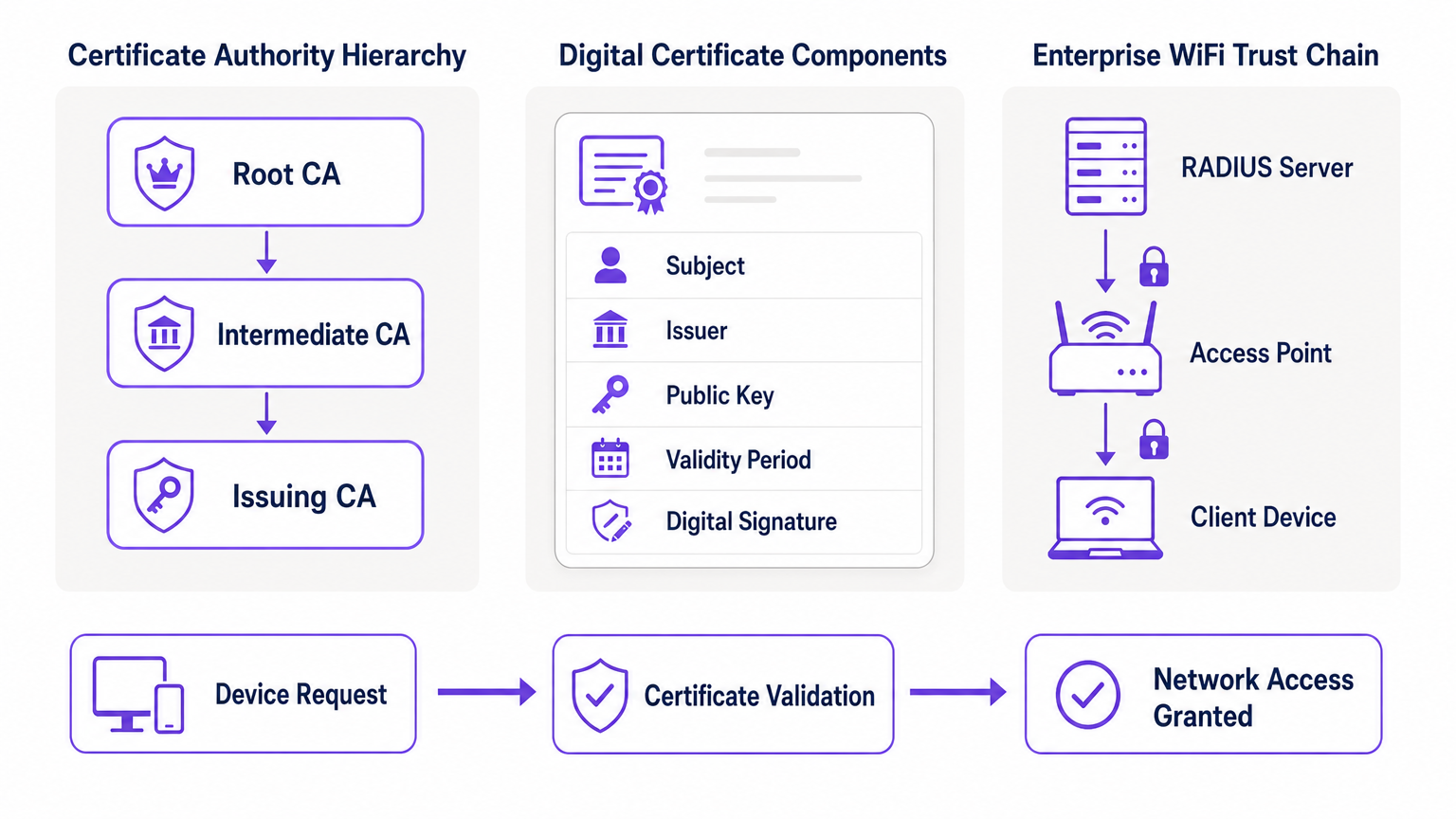
At its heart, PKI relies on asymmetric cryptography, where two mathematically related keys are used: a public key (shared openly) and a private key (kept secret). Data encrypted with the public key can only be decrypted by the corresponding private key, and vice versa. The primary components of a PKI deployment are as follows.
| Component | Role | Enterprise WiFi Context |
|---|---|---|
| Certificate Authority (CA) | Issues and signs digital certificates | The root of trust for your network; all devices must trust the CA |
| Digital Certificate (X.509) | Binds a public key to an identity | Installed on each corporate device; presented during 802.1X authentication |
| RADIUS Server | Validates certificates and grants network access | The decision engine that accepts or rejects connection requests |
| Registration Authority (RA) | Verifies identity before certificate issuance | Often handled by MDM/UEM in automated deployments |
| CRL / OCSP | Checks if a certificate has been revoked | Critical for blocking compromised or stolen devices in real time |
How PKI Powers 802.1X and EAP-TLS
Enterprise WiFi security relies on the IEEE 802.1X standard for port-based network access control. When combined with the Extensible Authentication Protocol (EAP), specifically EAP-TLS (Transport Layer Security), PKI delivers the highest level of wireless security: mutual authentication.
In an EAP-TLS deployment, the client device presents its digital certificate to the network to prove its identity, and the RADIUS server presents its certificate to the client, proving the network is legitimate and not a rogue "evil twin" access point. This mutual trust is established because both parties trust the Root CA that issued the certificates. Once authenticated, the session is encrypted using the negotiated TLS cipher suite, preventing eavesdropping and man-in-the-middle attacks.
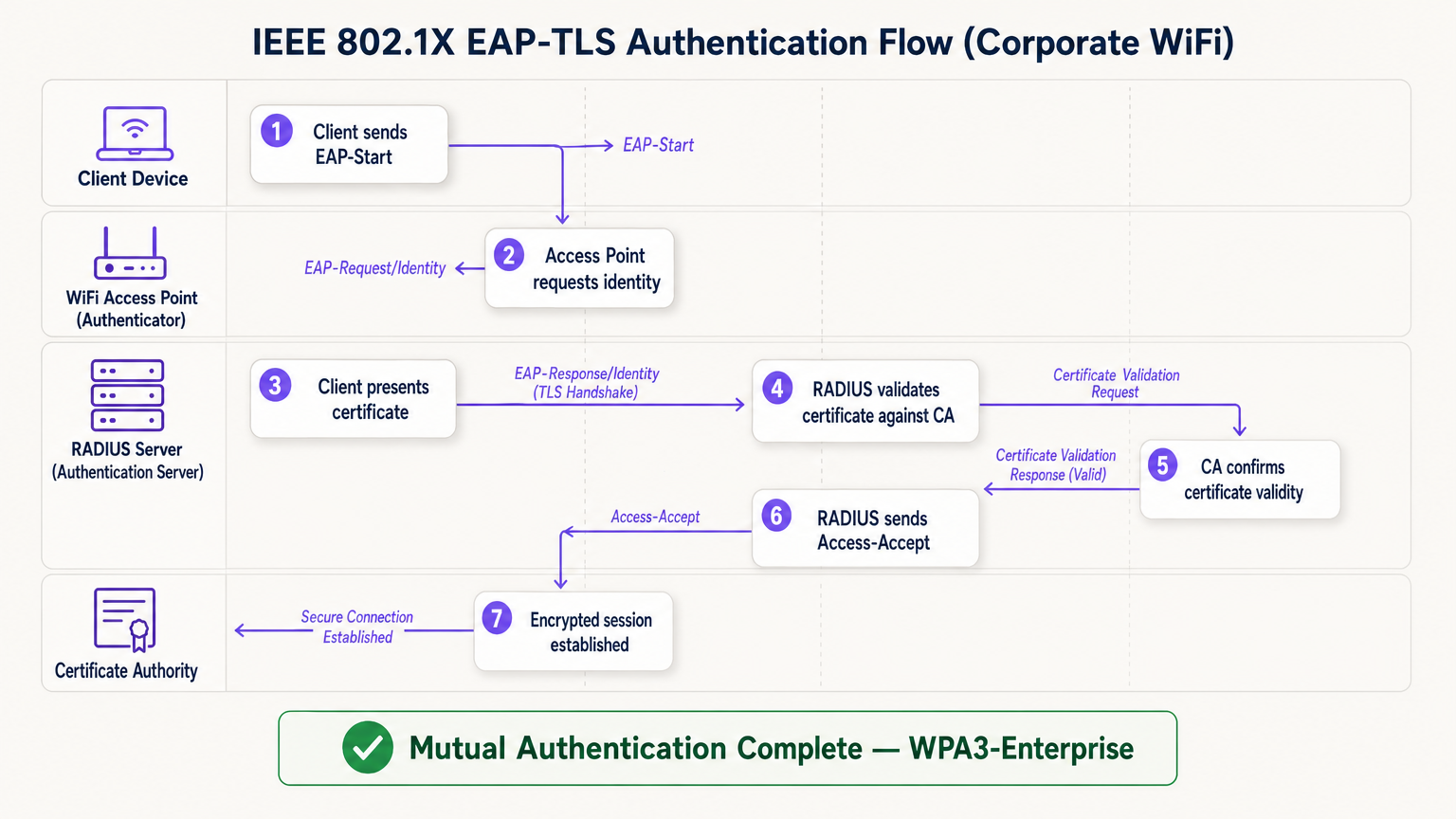
The EAP-TLS flow operates across four logical entities: the Client Device (supplicant), the Access Point (authenticator), the RADIUS Server (authentication server), and the Certificate Authority. The access point acts as a transparent relay — it does not make the authentication decision itself. That decision rests entirely with the RADIUS server, which validates the certificate chain back to the trusted Root CA.
Implementation Guide: Deploying Certificate-Based WiFi
Transitioning to a PKI-backed WiFi architecture requires careful planning across four phases.
Phase 1: Architecture and CA Selection
Decide whether to build an internal PKI (e.g., Microsoft Active Directory Certificate Services) or use a managed cloud PKI provider. For modern deployments at scale, cloud PKI significantly reduces administrative overhead and provides built-in high availability. Ensure the chosen CA integrates seamlessly with your Mobile Device Management (MDM) or Unified Endpoint Management (UEM) solution. For environments utilising Guest WiFi , ensure the RADIUS infrastructure is designed to handle both corporate 802.1X traffic and guest captive portal authentication on separate SSIDs.
Phase 2: RADIUS Server Configuration
Deploy a robust RADIUS server — options include FreeRADIUS, Cisco ISE, Aruba ClearPass, or a cloud-native RADIUS-as-a-Service. Configure the RADIUS server with its own server certificate issued by your CA. This is critical: without a valid server certificate, the client cannot perform mutual authentication and will be vulnerable to evil twin attacks. For large venue deployments, consider RADIUS proxy configurations to support roaming between sites. Venues deploying WiFi Analytics platforms should ensure the RADIUS accounting data feeds into the analytics pipeline for accurate session attribution.
Phase 3: Automated Certificate Provisioning
Manual certificate installation is unscalable and error-prone. Leverage protocols like SCEP (Simple Certificate Enrollment Protocol) or EST (Enrollment over Secure Transport) via your MDM to silently push certificates to corporate devices. For BYOD scenarios, implement an onboarding portal that securely provisions a certificate to the user's device after initial identity verification. For headless IoT devices — such as medical equipment, point-of-sale terminals, or digital signage — certificates must be provisioned during the device staging phase before deployment.
Phase 4: Network Policy Enforcement
Configure your wireless controllers and access points to enforce 802.1X on the corporate SSID. Map certificate attributes (such as the Subject Alternative Name or OU field) to specific VLANs or firewall policies using RADIUS attributes, ensuring least-privilege network access. For venues using hardware from specific vendors, refer to manufacturer-specific guides such as Your Guide to a Wireless Access Point Ruckus for platform-specific configuration steps.
Best Practices for Enterprise PKI
Protect the Root CA. If using an internal PKI, the Root CA must be kept offline and physically secured. Only Intermediate CAs should be online and actively issuing certificates. A compromised Root CA invalidates your entire PKI.
Implement robust revocation checking. Ensure your RADIUS servers actively check CRLs or use OCSP to verify certificate status on every authentication attempt. A compromised device must have its certificate revoked immediately to block access. Configuring RADIUS to cache CRL responses for too long creates a window of exposure.
Automate renewals before expiry. Certificates expire. Implement automated renewal processes triggered at 60–70% of the certificate's validity period to prevent network outages caused by expired certificates. Certificate expiry is one of the most common causes of unplanned WiFi outages in enterprise environments.
Embrace OpenRoaming for public venues. For Hospitality , Retail , Transport , and Healthcare venues, participating in OpenRoaming delivers seamless, secure guest connectivity at scale. Purple acts as a free identity provider for OpenRoaming under the Connect licence, allowing users with existing profiles to connect securely without a captive portal or password — underpinned by the same PKI trust model described in this guide.
Troubleshooting & Risk Mitigation
Even with careful planning, PKI deployments encounter predictable failure modes. The table below summarises the most common issues and their resolutions.
| Failure Mode | Symptom | Root Cause | Resolution |
|---|---|---|---|
| Time sync failure | Certificate validation errors across all devices | NTP misconfiguration on client or RADIUS | Enforce NTP policy via MDM and network infrastructure |
| Trust chain failure | Specific device types (e.g., Android) cannot connect | Root CA not in device's trusted root store | Push Root CA via MDM profile |
| CRL unreachable | Intermittent authentication failures | Firewall blocking CRL/OCSP endpoints | Open firewall rules for CA distribution points |
| Certificate expiry | Sudden mass disconnection | Renewal automation not configured | Implement MDM-triggered renewal at 60% validity |
| RADIUS cert mismatch | All clients fail mutual auth | RADIUS server cert expired or wrong CA | Renew RADIUS server cert and redeploy |
For healthcare environments specifically, where network downtime has direct patient safety implications, refer to WiFi in Hospitals: A Guide to Secure Clinical Networks for clinical-grade resilience recommendations.
ROI & Business Impact
Implementing PKI for WiFi security delivers measurable business value across three dimensions.
Risk reduction and compliance. Eliminating shared passwords removes the most common vector for lateral network movement. Certificate-based authentication directly satisfies requirements under PCI DSS (Requirement 8.6), GDPR (Article 32 technical measures), and ISO 27001 (Annex A.9). The ability to instantly revoke a certificate when an employee leaves or a device is stolen provides an auditable, demonstrable control that shared-key environments simply cannot match.
Operational efficiency. Automated certificate provisioning via MDM reduces IT helpdesk tickets related to WiFi connectivity issues — password resets, key rotations, and onboarding delays — by a significant margin. In retail environments with high staff turnover, this translates directly to reduced IT support costs and faster device deployment times.
Enhanced user and guest experience. Certificate-based authentication is invisible to the end user. Corporate employees connect automatically and securely without any manual steps. For guests, platforms like Purple's Guest WiFi solution handle the separation between managed corporate access and guest onboarding, ensuring each audience gets the appropriate authentication experience without compromising security on either network.
Key Terms & Definitions
Public Key Infrastructure (PKI)
The comprehensive framework of roles, policies, hardware, and software used to manage digital certificates and public-key encryption. It establishes the trust relationships that allow devices and servers to verify each other's identities cryptographically.
The foundational architecture required to move away from shared passwords and towards identity-based network security. Every enterprise WiFi deployment using 802.1X depends on a PKI.
Certificate Authority (CA)
A trusted entity that issues, signs, and manages digital certificates. It acts as the root of trust in a PKI: any certificate signed by the CA is trusted by all parties that trust the CA.
The central pillar of your network security. If the CA is compromised, all certificates it has issued are potentially compromised. Protecting the Root CA is the single most important security control in a PKI deployment.
X.509
The ITU-T standard defining the format of public key certificates. X.509 certificates contain fields including Subject, Issuer, Public Key, Validity Period, and the CA's Digital Signature.
When configuring RADIUS server policies, IT teams map specific X.509 fields — such as the Subject Alternative Name (SAN) or Organisational Unit (OU) — to VLAN assignments and access policies.
IEEE 802.1X
The IEEE standard for port-based Network Access Control (PNAC). It provides an authentication mechanism that blocks all network traffic at the access point until the connecting device's identity has been verified by an authentication server.
The protocol that enforces certificate-based authentication at the wireless access point. Without 802.1X, a device can connect to the SSID without proving its identity.
EAP-TLS (Extensible Authentication Protocol - Transport Layer Security)
An EAP method that uses client and server certificates to establish a mutually authenticated, encrypted TLS session. It is the most secure EAP method available for enterprise WiFi.
The gold standard for corporate WiFi authentication. Unlike PEAP or EAP-TTLS, which use passwords inside a TLS tunnel, EAP-TLS eliminates passwords entirely, replacing them with cryptographic certificates.
RADIUS (Remote Authentication Dial-In User Service)
A networking protocol providing centralised Authentication, Authorisation, and Accounting (AAA) management. In 802.1X deployments, the RADIUS server receives the client's certificate from the access point, validates it against the CA, and returns an access decision.
The decision engine of the enterprise WiFi authentication stack. RADIUS also handles dynamic VLAN assignment, enabling network segmentation based on device identity or user role.
Certificate Revocation List (CRL)
A periodically published list of certificates that have been revoked by the issuing CA before their scheduled expiration date. RADIUS servers check the CRL to ensure they are not granting access to compromised or decommissioned devices.
Critical for maintaining security when devices are lost, stolen, or decommissioned. CRL checking must be configured on the RADIUS server — it does not happen automatically.
Mutual Authentication
A security process in which both parties in a communication link authenticate each other simultaneously. In EAP-TLS, the client authenticates to the network and the network authenticates to the client.
Prevents 'Evil Twin' attacks where a hacker sets up a rogue access point with the same SSID as the corporate network to intercept credentials. Without mutual authentication, the client has no way to verify it is connecting to the legitimate network.
SCEP (Simple Certificate Enrollment Protocol)
A protocol that enables automated, scalable distribution of digital certificates to devices via an MDM or network device management system.
The mechanism that makes enterprise PKI deployments operationally viable at scale. Without SCEP or a similar automated enrollment protocol, certificate provisioning to thousands of devices would require manual intervention.
Case Studies
A large retail chain with 500 stores needs to secure its corporate WiFi for employee point-of-sale (POS) tablets and inventory scanners. They currently use a single WPA2-PSK across all stores, which is frequently shared with non-employees and cannot be audited. How should they redesign their authentication architecture?
The retail chain must migrate to WPA3-Enterprise using 802.1X and EAP-TLS. Step 1: Select a cloud-managed PKI provider and integrate it with the existing MDM solution managing the POS tablets and scanners. Step 2: Configure SCEP to automatically push unique, device-bound digital certificates to every corporate device via MDM. Step 3: Deploy a Cloud RADIUS service and configure it to validate certificates against the PKI, with OCSP checking enabled. Step 4: Reconfigure the wireless controllers at each store to enforce 802.1X authentication on the corporate SSID. Step 5: Retire the PSK network. Step 6: Configure VLAN assignment via RADIUS attributes to segment POS devices from general staff devices at the network layer.
A major hospital network is deploying new wireless medical infusion pumps across three sites. These devices lack a user interface to input credentials or accept captive portal prompts. How can they be securely connected to the clinical WiFi network without creating a shared-key vulnerability?
Implement a PKI-based architecture specifically for headless IoT medical devices. Step 1: Generate device-specific X.509 certificates for each infusion pump, using the device serial number as the Subject Common Name. Step 2: Install the certificates on the pumps during the staging and provisioning phase, before clinical deployment. Step 3: Configure the clinical WiFi SSID for 802.1X EAP-TLS. Step 4: Configure the RADIUS server to map the device certificate's Subject CN to a specific VLAN dedicated to medical devices. Step 5: Implement CRL checking to allow instant revocation if a device is decommissioned or recalled.
Scenario Analysis
Q1. Your organisation is migrating from PEAP (username/password) to EAP-TLS (certificates) for the corporate SSID. During testing, Windows laptops successfully connect, but Android devices consistently fail. The RADIUS logs show the Android devices are rejecting the server's certificate during the TLS handshake. What is the most likely cause, and how do you resolve it?
💡 Hint:Consider the concept of mutual authentication and the trust chain. What does the Android device need in order to trust the RADIUS server's certificate?
Show Recommended Approach
The Android devices do not have the Root CA certificate installed in their trusted root store. Windows laptops receive the Root CA via Group Policy automatically, but Android devices require the Root CA to be pushed via an MDM profile. Without the Root CA in the trusted store, the Android device cannot verify the RADIUS server's certificate chain, causing it to reject the server certificate and abort the TLS handshake. Resolution: create an MDM configuration profile that installs the Root CA certificate into the trusted root store on all managed Android devices, then re-test.
Q2. A recently terminated employee's corporate laptop is still successfully connecting to the enterprise WiFi network two days after their Active Directory account was disabled. The network uses EAP-TLS. Why is this happening, and what must be done to prevent it?
💡 Hint:Disabling an Active Directory account does not automatically invalidate a cryptographic certificate. Consider what the RADIUS server is actually validating.
Show Recommended Approach
The RADIUS server is validating the certificate, not the Active Directory account status. Because the certificate is still mathematically valid and has not been revoked, the RADIUS server grants access. To resolve immediately, the specific certificate issued to that laptop must be revoked in the Certificate Authority. To prevent this systematically, integrate the HR offboarding process with the MDM and PKI: when an employee is terminated, the MDM should automatically revoke the device certificate and unenroll the device. Additionally, ensure the RADIUS server is configured to check OCSP or the CRL on every authentication attempt — not just periodically — so revocation takes effect immediately.
Q3. You are designing the network architecture for a large stadium that wants to offer seamless, secure WiFi to 60,000 attendees without requiring each person to go through a captive portal. The venue also wants to support corporate exhibitors who need 802.1X-secured access for their POS equipment. How does PKI factor into both requirements?
💡 Hint:Consider that there are two distinct audiences with different authentication needs. OpenRoaming addresses one; a dedicated corporate SSID with 802.1X addresses the other.
Show Recommended Approach
Two separate SSIDs are required. For the 60,000 attendees, implement OpenRoaming. The stadium's network must be configured to trust the OpenRoaming Root CAs. When a visitor's device — provisioned by an identity provider like Purple or a mobile carrier — connects, it presents a certificate. The RADIUS server validates this against the OpenRoaming trust chain and grants secure, encrypted access without a captive portal. For corporate exhibitors with POS equipment, deploy a separate 802.1X SSID using EAP-TLS. Exhibitors are issued temporary device certificates during their accreditation process, which are automatically revoked after the event. RADIUS attributes assign POS devices to a dedicated VLAN, satisfying PCI DSS network segmentation requirements.




