

Was ist PKI? Wie die Public Key Infrastructure die WiFi-Sicherheit stärkt
Dieser maßgebliche technische Leitfaden erklärt die Public Key Infrastructure (PKI) und ihre entscheidende Rolle bei der Sicherung von Unternehmens-WiFi-Netzwerken in Gastgewerbe, Einzelhandel und öffentlichen Einrichtungen. Er wurde für IT-Manager, Netzwerkarchitekten und CTOs entwickelt und bietet umsetzbare Anleitungen zur zertifikatbasierten Authentifizierung, zur Implementierung von IEEE 802.1X mit EAP-TLS und dazu, wie die Plattform von Purple diese Standards für skalierbare, konforme Konnektivität nutzt. Leser erhalten eine konkrete Implementierungs-Roadmap, Fallstudien aus der Praxis und ein klares Verständnis dafür, wie PKI die Schwachstellen von Shared-Secret WiFi eliminiert.
🎧 Diesen Leitfaden anhören
Transkript anzeigen
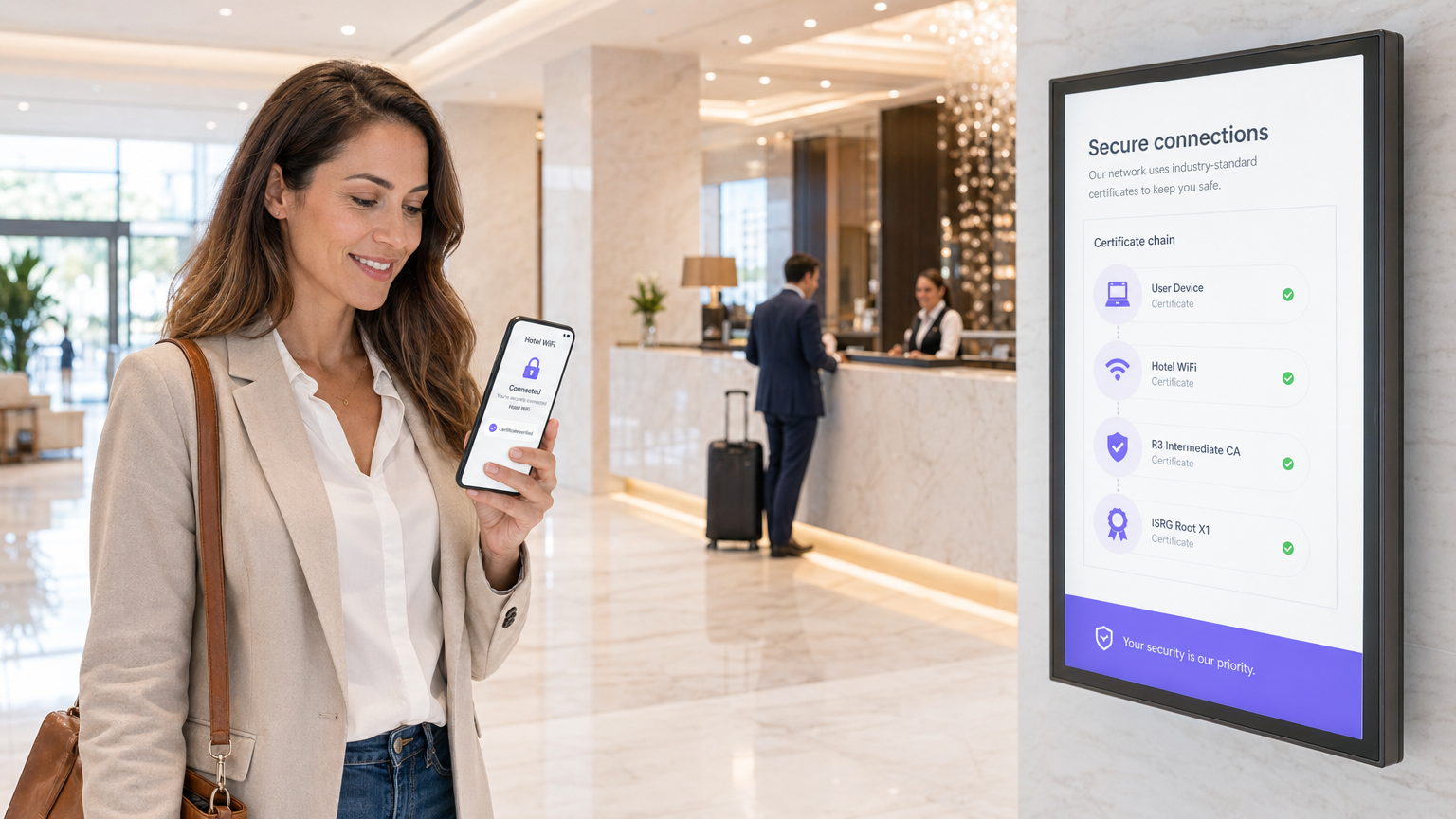
Kurzzusammenfassung
Für IT-Führungskräfte in Unternehmen, die große Implementierungen in Gastgewerbe, Einzelhandel oder öffentlichen Einrichtungen verwalten, ist die Sicherung des drahtlosen Zugangs eine grundlegende Anforderung – keine optionale Aufrüstung. Herkömmliche Pre-Shared Keys (PSKs) sind für Unternehmensumgebungen unzureichend: Sie bieten keine individuelle Verantwortlichkeit, können nicht geprüft werden und verursachen bei Rotation einen erheblichen Betriebsaufwand. Die Public Key Infrastructure (PKI) bietet die kryptografische Grundlage, die für eine robuste, skalierbare Netzwerksicherheit erforderlich ist. Dieser Leitfaden beschreibt, was PKI ist, wie sie die Unternehmens-WiFi-Sicherheit durch zertifikatbasierte Authentifizierung stärkt und welche konkreten Schritte zur Implementierung von IEEE 802.1X mit EAP-TLS erforderlich sind. Durch den Übergang zu einer PKI-gestützten Architektur können Organisationen den Diebstahl von Anmeldeinformationen eliminieren, die Geräteintegration automatisieren und einen nahtlosen, sicheren Zugang sowohl für Unternehmensgeräte als auch für Gäste gewährleisten – und dabei die Anforderungen von PCI DSS, GDPR und ISO 27001 erfüllen.
Technischer Deep-Dive: PKI im Unternehmens-WiFi verstehen
Die Public Key Infrastructure (PKI) ist das Framework aus Hardware, Software, Richtlinien und Verfahren, das zur Erstellung, Verwaltung, Verteilung, Nutzung, Speicherung und zum Widerruf digitaler Zertifikate sowie zur Verwaltung der Public-Key-Verschlüsselung erforderlich ist. Im Kontext von Unternehmens-WiFi ist PKI der Motor, der die Identitätsprüfung und Verschlüsselung antreibt – sie ersetzt das von Natur aus unsichere gemeinsame Passwort durch eine kryptografische Identität, die für jedes Gerät oder jeden Benutzer einzigartig ist.
Die Kernkomponenten der PKI
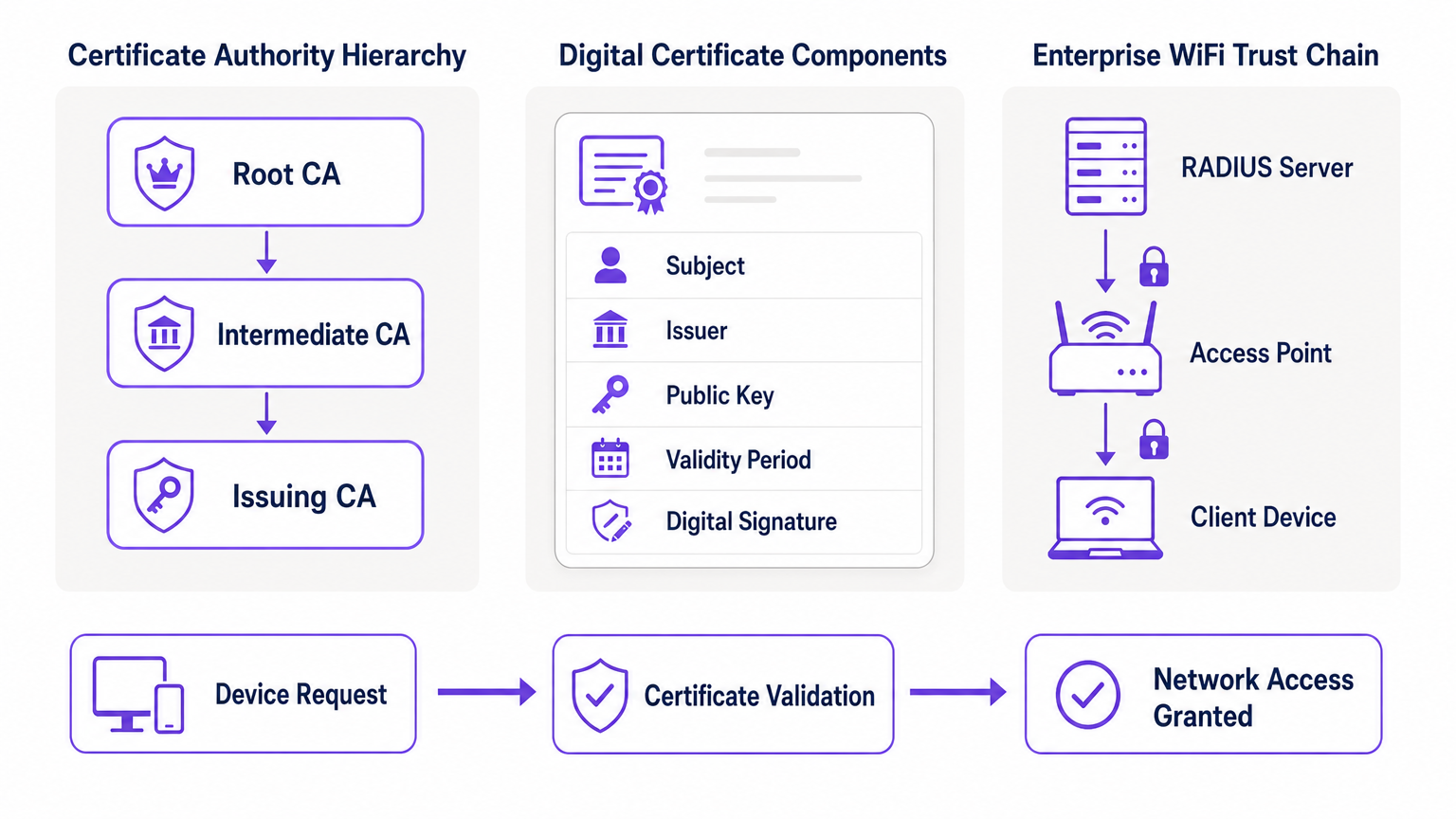
Im Kern basiert PKI auf asymmetrischer Kryptografie, bei der zwei mathematisch verwandte Schlüssel verwendet werden: ein öffentlicher Schlüssel (offen geteilt) und ein privater Schlüssel (geheim gehalten). Daten, die mit dem öffentlichen Schlüssel verschlüsselt wurden, können nur mit dem entsprechenden privaten Schlüssel entschlüsselt werden und umgekehrt. Die Hauptkomponenten einer PKI-Implementierung sind wie folgt.
| Component | Role | Enterprise WiFi Context |
|---|---|---|
| Certificate Authority (CA) | Stellt digitale Zertifikate aus und signiert sie | Die Vertrauenswurzel für Ihr Netzwerk; alle Geräte müssen der CA vertrauen |
| Digital Certificate (X.509) | Verbindet einen öffentlichen Schlüssel mit einer Identität | Auf jedem Unternehmensgerät installiert; wird während der 802.1X-Authentifizierung präsentiert |
| RADIUS Server | Validiert Zertifikate und gewährt Netzwerkzugang | Die Entscheidungsinstanz, die Verbindungsanfragen annimmt oder ablehnt |
| Registration Authority (RA) | Überprüft die Identität vor der Zertifikatsausstellung | Wird oft von MDM/UEM in automatisierten Implementierungen gehandhabt |
| CRL / OCSP | Prüft, ob ein Zertifikat widerrufen wurde | Entscheidend für das Blockieren kompromittierter oder gestohlener Geräte in Echtzeit |
Wie PKI 802.1X und EAP-TLS stärkt
Die Unternehmens-WiFi-Sicherheit basiert auf dem IEEE 802.1X-Standard für die portbasierte Netzwerkzugriffskontrolle. In Kombination mit dem Extensible Authentication Protocol (EAP), insbesondere EAP-TLS (Transport Layer Security), bietet PKI das höchste Maß an drahtloser Sicherheit: die gegenseitige Authentifizierung.
Bei einer EAP-TLS-Implementierung präsentiert das Client-Gerät sein digitales Zertifikat dem Netzwerk, um seine Identität zu beweisen, und der RADIUS-Server präsentiert sein Zertifikat dem Client, um zu beweisen, dass das Netzwerk legitim und kein bösartiger "Evil Twin"-Access Point ist. Dieses gegenseitige Vertrauen wird hergestellt, weil beide Parteien der Root CA vertrauen, die die Zertifikate ausgestellt hat. Nach der Authentifizierung wird die Sitzung mit der ausgehandelten TLS-Cipher-Suite verschlüsselt, wodurch Abhören und Man-in-the-Middle-Angriffe verhindert werden.
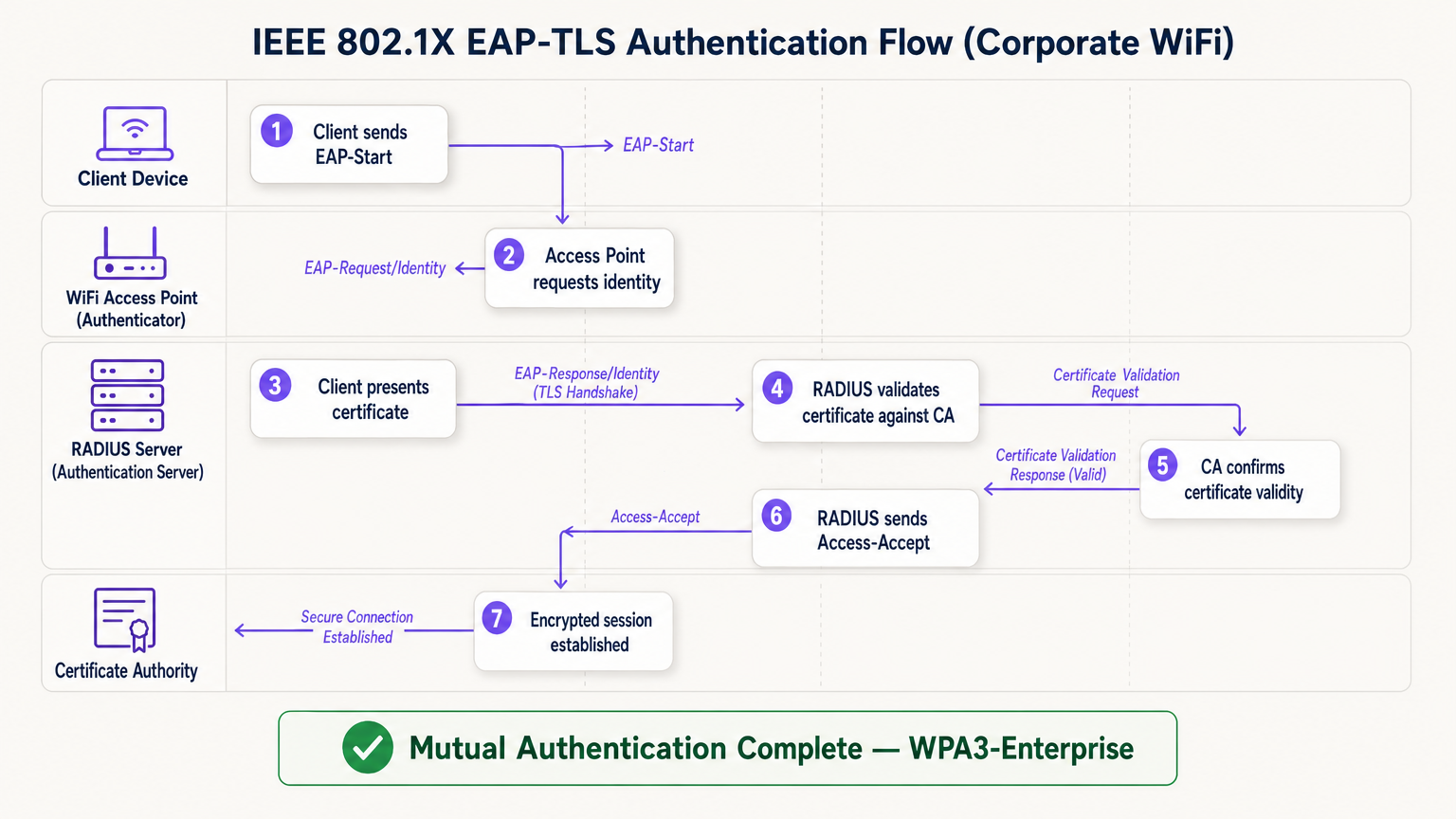
Der EAP-TLS-Fluss erstreckt sich über vier logische Entitäten: das Client-Gerät (Supplicant), den Access Point (Authenticator), den RADIUS-Server (Authentifizierungsserver) und die Certificate Authority. Der Access Point fungiert als transparentes Relais – er trifft die Authentifizierungsentscheidung nicht selbst. Diese Entscheidung liegt vollständig beim RADIUS-Server, der die Zertifikatskette bis zur vertrauenswürdigen Root CA validiert.
Implementierungsleitfaden: Bereitstellung von zertifikatbasiertem WiFi
Der Übergang zu einer PKI-gestützten WiFi-Architektur erfordert eine sorgfältige Planung in vier Phasen.
Phase 1: Architektur und CA-Auswahl
Entscheiden Sie, ob Sie eine interne PKI aufbauen (z. B. Microsoft Active Directory Certificate Services) oder einen verwalteten Cloud-PKI-Anbieter nutzen möchten. Für moderne, skalierbare Implementierungen reduziert Cloud-PKI den administrativen Aufwand erheblich und bietet integrierte Hochverfügbarkeit. Stellen Sie sicher, dass die gewählte CA nahtlos in Ihre Mobile Device Management (MDM)- oder Unified Endpoint Management (UEM)-Lösung integriert ist. Für Umgebungen, die Guest WiFi nutzen, stellen Sie sicher, dass die RADIUS-Infrastruktur so konzipiert ist, dass sie sowohl den Unternehmens-802.1X-Verkehr als auch die Captive Portal-Authentifizierung für Gäste auf separaten SSIDs verarbeitet.
Phase 2: RADIUS-Server-Konfiguration
Implementieren Sie einen robusten RADIUS-Server – Optionen umfassen FreeRADIUS, Cisco ISE, Aruba ClearPass oder einen Cloud-nativen RADIUS-as-a-Service. Konfigurieren Sie den RADIUS-Server mit einem eigenen Serverzertifikat, das von Ihrer CA ausgestellt wurde. Dies ist entscheidend: Ohne ein gültiges Serverzertifikat kann der Client keine gegenseitige Authentifizierung durchführen und ist anfällig für Evil-Twin-Angriffe. Für Implementierungen in großen Veranstaltungsorten sollten RADIUS-Proxy-Konfigurationen in Betracht gezogen werden, um Roaming zwischen Standorten zu unterstützen. Veranstaltungsorte, die WiFi Analytics -Plattformen einsetzen, sollten sicherstellen, dass die RADIUS-Accounting-Daten in die Analyse-Pipeline eingespeist werden, um eine genaue Sitzungszuordnung zu ermöglichen.
Phase 3: Automatisierte Zertifikatsbereitstellung
Die manuelle Zertifikatsinstallation ist nicht skalierbar und fehleranfällig. Nutzen Sie protocTools wie SCEP (Simple Certificate Enrollment Protocol) oder EST (Enrollment over Secure Transport) über Ihr MDM, um Zertifikate stillschweigend auf Unternehmensgeräte zu übertragen. Für BYOD-Szenarien implementieren Sie ein Onboarding-Portal, das ein Zertifikat nach der anfänglichen Identitätsprüfung sicher auf dem Gerät des Benutzers bereitstellt. Für kopflose IoT-Geräte — wie medizinische Geräte, Kassenterminals oder Digital Signage — müssen Zertifikate während der Gerätestaging-Phase vor der Bereitstellung bereitgestellt werden.
Phase 4: Durchsetzung der Netzwerkrichtlinien
Konfigurieren Sie Ihre Wireless Controller und Access Points, um 802.1X auf der Unternehmens-SSID durchzusetzen. Ordnen Sie Zertifikatsattribute (wie den Subject Alternative Name oder das OU-Feld) bestimmten VLANs oder Firewall-Richtlinien unter Verwendung von RADIUS-Attributen zu, um den Netzwerkzugriff mit den geringsten Rechten zu gewährleisten. Für Standorte, die Hardware bestimmter Anbieter verwenden, beachten Sie herstellerspezifische Anleitungen wie Ihr Leitfaden zu einem Wireless Access Point Ruckus für plattformspezifische Konfigurationsschritte.
Best Practices für Enterprise PKI
Schützen Sie die Root CA. Bei Verwendung einer internen PKI muss die Root CA offline und physisch gesichert aufbewahrt werden. Nur Intermediate CAs sollten online sein und aktiv Zertifikate ausstellen. Eine kompromittierte Root CA macht Ihre gesamte PKI ungültig.
Implementieren Sie eine robuste Widerrufsprüfung. Stellen Sie sicher, dass Ihre RADIUS-Server aktiv CRLs prüfen oder OCSP verwenden, um den Zertifikatsstatus bei jedem Authentifizierungsversuch zu überprüfen. Ein kompromittiertes Gerät muss sein Zertifikat sofort widerrufen lassen, um den Zugriff zu blockieren. Die Konfiguration von RADIUS, CRL-Antworten zu lange zu cachen, schafft ein Zeitfenster für Angriffe.
Automatisieren Sie Verlängerungen vor dem Ablauf. Zertifikate laufen ab. Implementieren Sie automatisierte Verlängerungsprozesse, die bei 60–70 % der Gültigkeitsdauer des Zertifikats ausgelöst werden, um Netzwerkausfälle durch abgelaufene Zertifikate zu verhindern. Der Ablauf von Zertifikaten ist eine der häufigsten Ursachen für ungeplante WiFi-Ausfälle in Unternehmensumgebungen.
Nutzen Sie OpenRoaming für öffentliche Orte. Für Standorte im Gastgewerbe , Einzelhandel , Transport und Gesundheitswesen bietet die Teilnahme an OpenRoaming eine nahtlose, sichere Gastkonnektivität in großem Maßstab. Purple fungiert als kostenloser Identitätsanbieter für OpenRoaming unter der Connect-Lizenz, wodurch Benutzer mit bestehenden Profilen sicher ohne Captive Portal oder Passwort eine Verbindung herstellen können — unterstützt durch dasselbe PKI-Vertrauensmodell, das in diesem Leitfaden beschrieben wird.
Fehlerbehebung & Risikominderung
Selbst bei sorgfältiger Planung treten bei PKI-Implementierungen vorhersehbare Fehler auf. Die folgende Tabelle fasst die häufigsten Probleme und deren Lösungen zusammen.
| Fehlermodus | Symptom | Grundursache | Lösung |
|---|---|---|---|
| Zeit-Synchronisationsfehler | Zertifikatsvalidierungsfehler auf allen Geräten | NTP-Fehlkonfiguration auf Client oder RADIUS | NTP-Richtlinie über MDM und Netzwerkinfrastruktur durchsetzen |
| Vertrauenskette-Fehler | Spezifische Gerätetypen (z.B. Android) können keine Verbindung herstellen | Root CA nicht im vertrauenswürdigen Root-Speicher des Geräts | Root CA über MDM-Profil übertragen |
| CRL unerreichbar | Intermittierende Authentifizierungsfehler | Firewall blockiert CRL/OCSP-Endpunkte | Firewall-Regeln für CA-Verteilungspunkte öffnen |
| Zertifikatsablauf | Plötzliche Massentrennung | Verlängerungsautomatisierung nicht konfiguriert | MDM-gesteuerte Verlängerung bei 60% Gültigkeit implementieren |
| RADIUS-Zertifikatskonflikt | Alle Clients scheitern bei der gegenseitigen Authentifizierung | RADIUS-Server-Zertifikat abgelaufen oder falsche CA | RADIUS-Server-Zertifikat erneuern und neu bereitstellen |
Speziell für Umgebungen im Gesundheitswesen, wo Netzwerkausfallzeiten direkte Auswirkungen auf die Patientensicherheit haben, beachten Sie WiFi in Krankenhäusern: Ein Leitfaden für sichere klinische Netzwerke für Empfehlungen zur Ausfallsicherheit auf klinischem Niveau.
ROI & Geschäftsauswirkungen
Die Implementierung von PKI für die WiFi-Sicherheit liefert messbaren Geschäftswert in drei Dimensionen.
Risikoreduzierung und Compliance. Die Eliminierung gemeinsamer Passwörter beseitigt den häufigsten Vektor für laterale Netzwerkbewegungen. Die zertifikatbasierte Authentifizierung erfüllt direkt die Anforderungen von PCI DSS (Anforderung 8.6), GDPR (Artikel 32 technische Maßnahmen) und ISO 27001 (Anhang A.9). Die Möglichkeit, ein Zertifikat sofort zu widerrufen, wenn ein Mitarbeiter das Unternehmen verlässt oder ein Gerät gestohlen wird, bietet eine auditierbare, nachweisbare Kontrolle, die Umgebungen mit gemeinsamen Schlüsseln einfach nicht erreichen können.
Betriebliche Effizienz. Die automatisierte Zertifikatsbereitstellung über MDM reduziert IT-Helpdesk-Tickets im Zusammenhang mit WiFi-Konnektivitätsproblemen — Passwort-Resets, Schlüsselrotationen und Onboarding-Verzögerungen — erheblich. In Einzelhandelsumgebungen mit hoher Personalfluktuation führt dies direkt zu reduzierten IT-Supportkosten und schnelleren Gerätebereitstellungszeiten.
Verbessertes Benutzer- und Gasterlebnis. Die zertifikatbasierte Authentifizierung ist für den Endbenutzer unsichtbar. Unternehmensmitarbeiter verbinden sich automatisch und sicher ohne manuelle Schritte. Für Gäste handhaben Plattformen wie Purples Gast-WiFi -Lösung die Trennung zwischen verwaltetem Unternehmenszugang und Gast-Onboarding, wodurch sichergestellt wird, dass jede Zielgruppe das passende Authentifizierungserlebnis erhält, ohne die Sicherheit in einem der Netzwerke zu gefährden.
Schlüsselbegriffe & Definitionen
Public Key Infrastructure (PKI)
The comprehensive framework of roles, policies, hardware, and software used to manage digital certificates and public-key encryption. It establishes the trust relationships that allow devices and servers to verify each other's identities cryptographically.
The foundational architecture required to move away from shared passwords and towards identity-based network security. Every enterprise WiFi deployment using 802.1X depends on a PKI.
Certificate Authority (CA)
A trusted entity that issues, signs, and manages digital certificates. It acts as the root of trust in a PKI: any certificate signed by the CA is trusted by all parties that trust the CA.
The central pillar of your network security. If the CA is compromised, all certificates it has issued are potentially compromised. Protecting the Root CA is the single most important security control in a PKI deployment.
X.509
The ITU-T standard defining the format of public key certificates. X.509 certificates contain fields including Subject, Issuer, Public Key, Validity Period, and the CA's Digital Signature.
When configuring RADIUS server policies, IT teams map specific X.509 fields — such as the Subject Alternative Name (SAN) or Organisational Unit (OU) — to VLAN assignments and access policies.
IEEE 802.1X
The IEEE standard for port-based Network Access Control (PNAC). It provides an authentication mechanism that blocks all network traffic at the access point until the connecting device's identity has been verified by an authentication server.
The protocol that enforces certificate-based authentication at the wireless access point. Without 802.1X, a device can connect to the SSID without proving its identity.
EAP-TLS (Extensible Authentication Protocol - Transport Layer Security)
An EAP method that uses client and server certificates to establish a mutually authenticated, encrypted TLS session. It is the most secure EAP method available for enterprise WiFi.
The gold standard for corporate WiFi authentication. Unlike PEAP or EAP-TTLS, which use passwords inside a TLS tunnel, EAP-TLS eliminates passwords entirely, replacing them with cryptographic certificates.
RADIUS (Remote Authentication Dial-In User Service)
A networking protocol providing centralised Authentication, Authorisation, and Accounting (AAA) management. In 802.1X deployments, the RADIUS server receives the client's certificate from the access point, validates it against the CA, and returns an access decision.
The decision engine of the enterprise WiFi authentication stack. RADIUS also handles dynamic VLAN assignment, enabling network segmentation based on device identity or user role.
Certificate Revocation List (CRL)
A periodically published list of certificates that have been revoked by the issuing CA before their scheduled expiration date. RADIUS servers check the CRL to ensure they are not granting access to compromised or decommissioned devices.
Critical for maintaining security when devices are lost, stolen, or decommissioned. CRL checking must be configured on the RADIUS server — it does not happen automatically.
Mutual Authentication
A security process in which both parties in a communication link authenticate each other simultaneously. In EAP-TLS, the client authenticates to the network and the network authenticates to the client.
Prevents 'Evil Twin' attacks where a hacker sets up a rogue access point with the same SSID as the corporate network to intercept credentials. Without mutual authentication, the client has no way to verify it is connecting to the legitimate network.
SCEP (Simple Certificate Enrollment Protocol)
A protocol that enables automated, scalable distribution of digital certificates to devices via an MDM or network device management system.
The mechanism that makes enterprise PKI deployments operationally viable at scale. Without SCEP or a similar automated enrollment protocol, certificate provisioning to thousands of devices would require manual intervention.
Fallstudien
A large retail chain with 500 stores needs to secure its corporate WiFi for employee point-of-sale (POS) tablets and inventory scanners. They currently use a single WPA2-PSK across all stores, which is frequently shared with non-employees and cannot be audited. How should they redesign their authentication architecture?
The retail chain must migrate to WPA3-Enterprise using 802.1X and EAP-TLS. Step 1: Select a cloud-managed PKI provider and integrate it with the existing MDM solution managing the POS tablets and scanners. Step 2: Configure SCEP to automatically push unique, device-bound digital certificates to every corporate device via MDM. Step 3: Deploy a Cloud RADIUS service and configure it to validate certificates against the PKI, with OCSP checking enabled. Step 4: Reconfigure the wireless controllers at each store to enforce 802.1X authentication on the corporate SSID. Step 5: Retire the PSK network. Step 6: Configure VLAN assignment via RADIUS attributes to segment POS devices from general staff devices at the network layer.
A major hospital network is deploying new wireless medical infusion pumps across three sites. These devices lack a user interface to input credentials or accept captive portal prompts. How can they be securely connected to the clinical WiFi network without creating a shared-key vulnerability?
Implement a PKI-based architecture specifically for headless IoT medical devices. Step 1: Generate device-specific X.509 certificates for each infusion pump, using the device serial number as the Subject Common Name. Step 2: Install the certificates on the pumps during the staging and provisioning phase, before clinical deployment. Step 3: Configure the clinical WiFi SSID for 802.1X EAP-TLS. Step 4: Configure the RADIUS server to map the device certificate's Subject CN to a specific VLAN dedicated to medical devices. Step 5: Implement CRL checking to allow instant revocation if a device is decommissioned or recalled.
Szenarioanalyse
Q1. Your organisation is migrating from PEAP (username/password) to EAP-TLS (certificates) for the corporate SSID. During testing, Windows laptops successfully connect, but Android devices consistently fail. The RADIUS logs show the Android devices are rejecting the server's certificate during the TLS handshake. What is the most likely cause, and how do you resolve it?
💡 Hinweis:Consider the concept of mutual authentication and the trust chain. What does the Android device need in order to trust the RADIUS server's certificate?
Empfohlenen Ansatz anzeigen
The Android devices do not have the Root CA certificate installed in their trusted root store. Windows laptops receive the Root CA via Group Policy automatically, but Android devices require the Root CA to be pushed via an MDM profile. Without the Root CA in the trusted store, the Android device cannot verify the RADIUS server's certificate chain, causing it to reject the server certificate and abort the TLS handshake. Resolution: create an MDM configuration profile that installs the Root CA certificate into the trusted root store on all managed Android devices, then re-test.
Q2. A recently terminated employee's corporate laptop is still successfully connecting to the enterprise WiFi network two days after their Active Directory account was disabled. The network uses EAP-TLS. Why is this happening, and what must be done to prevent it?
💡 Hinweis:Disabling an Active Directory account does not automatically invalidate a cryptographic certificate. Consider what the RADIUS server is actually validating.
Empfohlenen Ansatz anzeigen
The RADIUS server is validating the certificate, not the Active Directory account status. Because the certificate is still mathematically valid and has not been revoked, the RADIUS server grants access. To resolve immediately, the specific certificate issued to that laptop must be revoked in the Certificate Authority. To prevent this systematically, integrate the HR offboarding process with the MDM and PKI: when an employee is terminated, the MDM should automatically revoke the device certificate and unenroll the device. Additionally, ensure the RADIUS server is configured to check OCSP or the CRL on every authentication attempt — not just periodically — so revocation takes effect immediately.
Q3. You are designing the network architecture for a large stadium that wants to offer seamless, secure WiFi to 60,000 attendees without requiring each person to go through a captive portal. The venue also wants to support corporate exhibitors who need 802.1X-secured access for their POS equipment. How does PKI factor into both requirements?
💡 Hinweis:Consider that there are two distinct audiences with different authentication needs. OpenRoaming addresses one; a dedicated corporate SSID with 802.1X addresses the other.
Empfohlenen Ansatz anzeigen
Two separate SSIDs are required. For the 60,000 attendees, implement OpenRoaming. The stadium's network must be configured to trust the OpenRoaming Root CAs. When a visitor's device — provisioned by an identity provider like Purple or a mobile carrier — connects, it presents a certificate. The RADIUS server validates this against the OpenRoaming trust chain and grants secure, encrypted access without a captive portal. For corporate exhibitors with POS equipment, deploy a separate 802.1X SSID using EAP-TLS. Exhibitors are issued temporary device certificates during their accreditation process, which are automatically revoked after the event. RADIUS attributes assign POS devices to a dedicated VLAN, satisfying PCI DSS network segmentation requirements.




