

Qu'est-ce que la PKI ? Comment l'infrastructure à clé publique renforce la sécurité du WiFi
Ce guide de référence technique faisant autorité explique l'infrastructure à clé publique (PKI) et son rôle essentiel dans la sécurisation des réseaux WiFi d'entreprise dans les secteurs de l'hôtellerie, du commerce de détail et des lieux publics. Conçu pour les responsables informatiques, les architectes réseau et les CTO, il offre des conseils pratiques sur l'authentification basée sur les certificats, le déploiement de l'IEEE 802.1X avec EAP-TLS, et la manière dont la plateforme de Purple exploite ces standards pour une connectivité évolutive et conforme. Les lecteurs repartiront avec une feuille de route de déploiement concrète, des études de cas réelles et une compréhension claire de la façon dont la PKI élimine les vulnérabilités du WiFi à secret partagé.
🎧 Écouter ce guide
Voir la transcription
Résumé Exécutif
Pour les leaders informatiques d'entreprise gérant des déploiements à grande échelle dans les secteurs de l'hôtellerie, du commerce de détail ou des lieux publics, la sécurisation de l'accès sans fil est une exigence fondamentale — et non une mise à niveau facultative. Les clés pré-partagées (PSK) traditionnelles sont inadéquates pour les environnements d'entreprise : elles n'offrent aucune responsabilisation individuelle, ne peuvent pas être auditées et génèrent une surcharge opérationnelle importante lors de leur rotation. L'infrastructure à clé publique (PKI) fournit la base cryptographique nécessaire à une sécurité réseau robuste et évolutive. Ce guide détaille ce qu'est la PKI, comment elle renforce la sécurité du WiFi d'entreprise grâce à l'authentification basée sur les certificats, et les étapes concrètes requises pour déployer l'IEEE 802.1X avec EAP-TLS. En passant à une architecture basée sur la PKI, les organisations peuvent éliminer le vol d'identifiants, automatiser l'intégration des appareils et garantir un accès fluide et sécurisé pour les appareils d'entreprise et les invités — tout en satisfaisant aux exigences de PCI DSS, GDPR et ISO 27001.
Plongée Technique : Comprendre la PKI dans le WiFi d'Entreprise
L'infrastructure à clé publique (PKI) est le cadre de matériel, de logiciel, de politiques et de procédures requis pour créer, gérer, distribuer, utiliser, stocker et révoquer les certificats numériques et gérer le chiffrement à clé publique. Dans le contexte du WiFi d'entreprise, la PKI est le moteur qui assure la vérification d'identité et le chiffrement — remplaçant le mot de passe partagé intrinsèquement non sécurisé par une identité cryptographique unique à chaque appareil ou utilisateur.
Les Composants Clés de la PKI
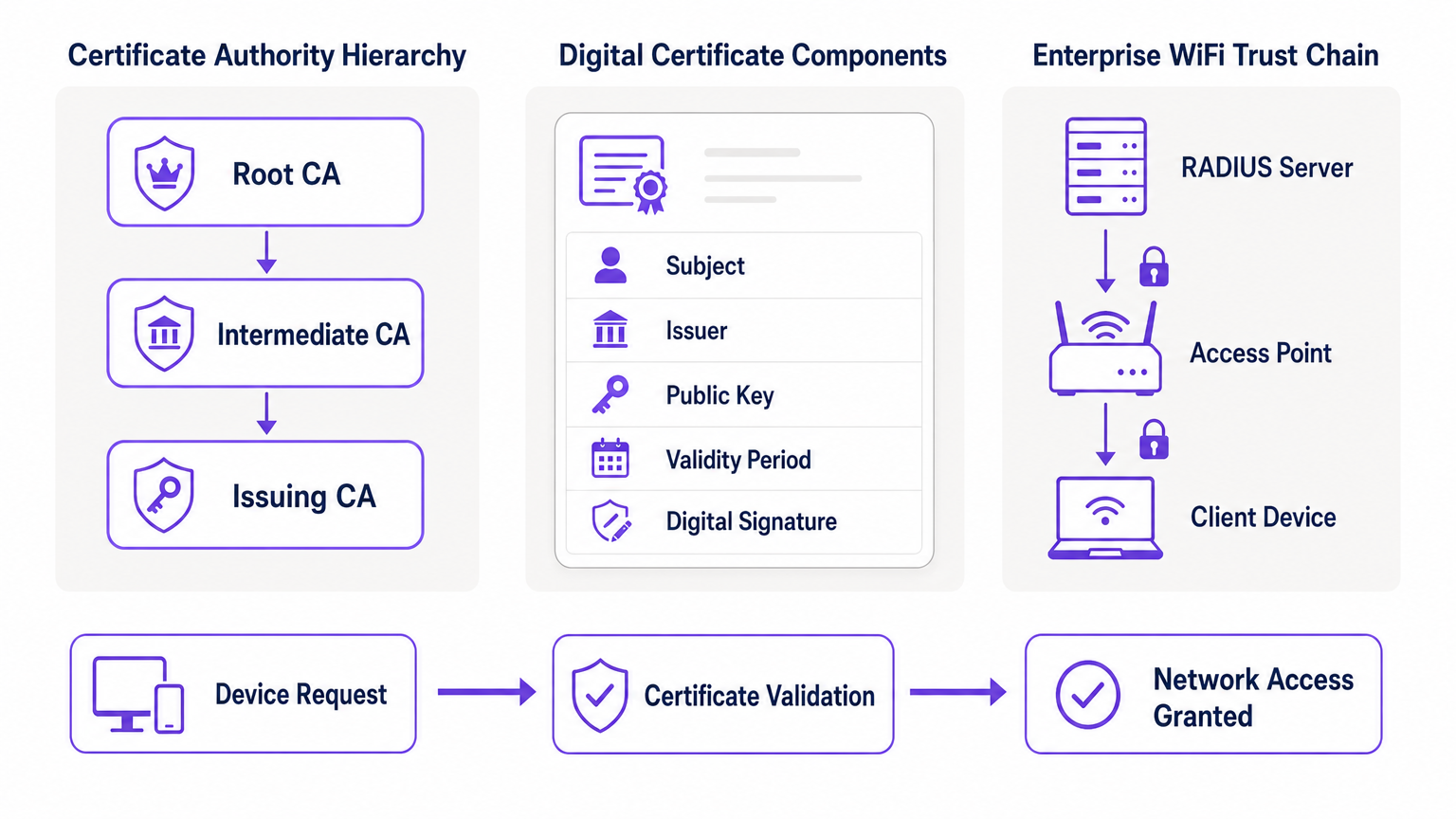
En son cœur, la PKI repose sur la cryptographie asymétrique, où deux clés mathématiquement liées sont utilisées : une clé publique (partagée ouvertement) et une clé privée (gardée secrète). Les données chiffrées avec la clé publique ne peuvent être déchiffrées que par la clé privée correspondante, et vice versa. Les principaux composants d'un déploiement PKI sont les suivants.
| Composant | Rôle | Contexte WiFi d'Entreprise |
|---|---|---|
| Autorité de Certification (CA) | Émet et signe les certificats numériques | La racine de confiance de votre réseau ; tous les appareils doivent faire confiance à la CA |
| Certificat Numérique (X.509) | Lie une clé publique à une identité | Installé sur chaque appareil d'entreprise ; présenté lors de l'authentification 802.1X |
| Serveur RADIUS | Valide les certificats et accorde l'accès au réseau | Le moteur de décision qui accepte ou rejette les demandes de connexion |
| Autorité d'Enregistrement (RA) | Vérifie l'identité avant l'émission du certificat | Souvent géré par MDM/UEM dans les déploiements automatisés |
| CRL / OCSP | Vérifie si un certificat a été révoqué | Essentiel pour bloquer les appareils compromis ou volés en temps réel |
Comment la PKI renforce 802.1X et EAP-TLS
La sécurité du WiFi d'entreprise repose sur la norme IEEE 802.1X pour le contrôle d'accès réseau basé sur les ports. Lorsqu'elle est combinée avec le protocole d'authentification extensible (EAP), spécifiquement EAP-TLS (Transport Layer Security), la PKI offre le plus haut niveau de sécurité sans fil : l'authentification mutuelle.
Dans un déploiement EAP-TLS, l'appareil client présente son certificat numérique au réseau pour prouver son identité, et le serveur RADIUS présente son certificat au client, prouvant que le réseau est légitime et non un point d'accès "evil twin" malveillant. Cette confiance mutuelle est établie parce que les deux parties font confiance à l'autorité de certification racine (Root CA) qui a émis les certificats. Une fois authentifiée, la session est chiffrée à l'aide de la suite de chiffrement TLS négociée, empêchant l'écoute clandestine et les attaques de l'homme du milieu.
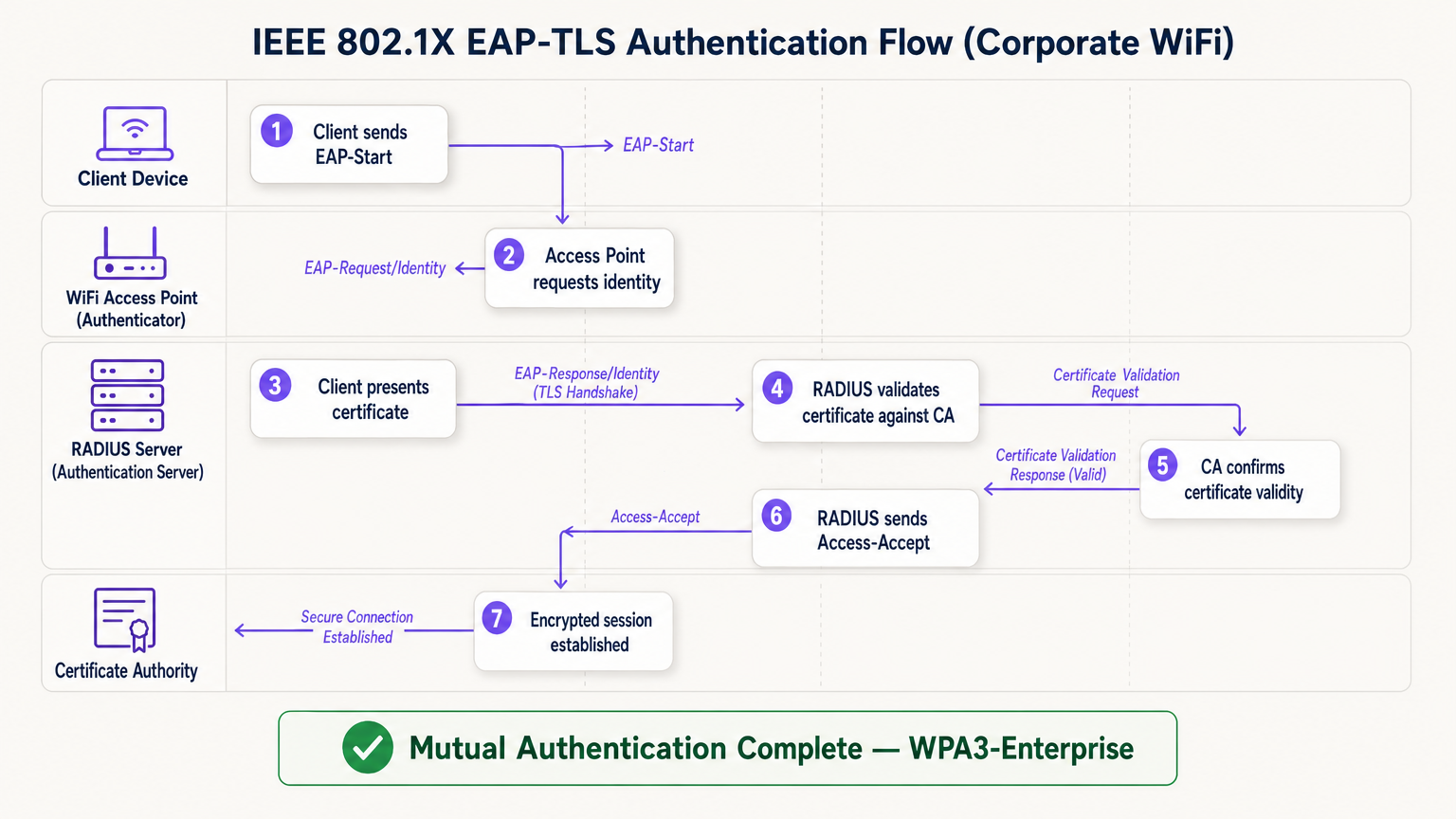
Le flux EAP-TLS opère à travers quatre entités logiques : l'Appareil Client (demandeur), le Point d'Accès (authentificateur), le Serveur RADIUS (serveur d'authentification) et l'Autorité de Certification. Le point d'accès agit comme un relais transparent — il ne prend pas la décision d'authentification lui-même. Cette décision incombe entièrement au serveur RADIUS, qui valide la chaîne de certificats jusqu'à l'autorité de certification racine (Root CA) de confiance.
Guide d'Implémentation : Déployer le WiFi Basé sur les Certificats
La transition vers une architecture WiFi basée sur la PKI nécessite une planification minutieuse en quatre phases.
Phase 1 : Architecture et Sélection de l'Autorité de Certification
Décidez de construire une PKI interne (par exemple, Microsoft Active Directory Certificate Services) ou d'utiliser un fournisseur de PKI cloud gérée. Pour les déploiements modernes à grande échelle, la PKI cloud réduit considérablement la charge administrative et offre une haute disponibilité intégrée. Assurez-vous que l'autorité de certification choisie s'intègre parfaitement à votre solution de gestion des appareils mobiles (MDM) ou de gestion unifiée des terminaux (UEM). Pour les environnements utilisant le Guest WiFi , assurez-vous que l'infrastructure RADIUS est conçue pour gérer à la fois le trafic 802.1X d'entreprise et l'authentification du Captive Portal pour les invités sur des SSIDs distincts.
Phase 2 : Configuration du Serveur RADIUS
Déployez un serveur RADIUS robuste — les options incluent FreeRADIUS, Cisco ISE, Aruba ClearPass, ou un RADIUS-as-a-Service natif du cloud. Configurez le serveur RADIUS avec son propre certificat de serveur émis par votre autorité de certification. C'est essentiel : sans un certificat de serveur valide, le client ne peut pas effectuer d'authentification mutuelle et sera vulnérable aux attaques de type "evil twin". Pour les déploiements dans de grands lieux, envisagez des configurations de proxy RADIUS pour prendre en charge l'itinérance entre les sites. Les lieux déployant des plateformes WiFi Analytics doivent s'assurer que les données de comptabilité RADIUS alimentent le pipeline d'analyse pour une attribution précise des sessions.
Phase 3 : Provisionnement Automatisé des Certificats
L'installation manuelle des certificats est non évolutive et sujette aux erreurs. Exploitez les protoctels que SCEP (Simple Certificate Enrollment Protocol) ou EST (Enrollment over Secure Transport) via votre MDM pour pousser silencieusement les certificats vers les appareils d'entreprise. Pour les scénarios BYOD, implémentez un portail d'intégration qui provisionne en toute sécurité un certificat sur l'appareil de l'utilisateur après la vérification initiale de l'identité. Pour les appareils IoT sans interface — tels que les équipements médicaux, les terminaux de point de vente ou l'affichage numérique — les certificats doivent être provisionnés pendant la phase de préparation de l'appareil avant le déploiement.
Phase 4 : Application de la politique réseau
Configurez vos contrôleurs sans fil et points d'accès pour appliquer le 802.1X sur le SSID d'entreprise. Mappez les attributs de certificat (tels que le nom alternatif du sujet ou le champ OU) à des VLAN ou des politiques de pare-feu spécifiques à l'aide des attributs RADIUS, garantissant un accès réseau à privilège minimum. Pour les sites utilisant du matériel de fournisseurs spécifiques, consultez les guides spécifiques au fabricant, tels que Votre guide pour un point d'accès sans fil Ruckus pour les étapes de configuration spécifiques à la plateforme.
Bonnes pratiques pour une PKI d'entreprise
Protégez l'autorité de certification racine (Root CA). Si vous utilisez une PKI interne, la Root CA doit être maintenue hors ligne et sécurisée physiquement. Seules les autorités de certification intermédiaires (Intermediate CAs) doivent être en ligne et émettre activement des certificats. Une Root CA compromise invalide l'ensemble de votre PKI.
Mettez en œuvre une vérification de révocation robuste. Assurez-vous que vos serveurs RADIUS vérifient activement les CRL ou utilisent OCSP pour vérifier le statut des certificats à chaque tentative d'authentification. Un appareil compromis doit voir son certificat révoqué immédiatement pour bloquer l'accès. Configurer RADIUS pour mettre en cache les réponses CRL trop longtemps crée une fenêtre d'exposition.
Automatisez les renouvellements avant l'expiration. Les certificats expirent. Mettez en œuvre des processus de renouvellement automatisés déclenchés à 60-70 % de la période de validité du certificat pour éviter les pannes réseau causées par des certificats expirés. L'expiration des certificats est l'une des causes les plus courantes de pannes WiFi imprévues dans les environnements d'entreprise.
Adoptez OpenRoaming pour les lieux publics. Pour les sites Hôtellerie , Commerce de détail , Transport et Santé , la participation à OpenRoaming offre une connectivité invité transparente et sécurisée à grande échelle. Purple agit comme un fournisseur d'identité gratuit pour OpenRoaming sous la licence Connect, permettant aux utilisateurs avec des profils existants de se connecter en toute sécurité sans Captive Portal ni mot de passe — soutenu par le même modèle de confiance PKI décrit dans ce guide.
Dépannage et atténuation des risques
Même avec une planification minutieuse, les déploiements PKI rencontrent des modes de défaillance prévisibles. Le tableau ci-dessous résume les problèmes les plus courants et leurs résolutions.
| Mode de défaillance | Symptôme | Cause première | Résolution |
|---|---|---|---|
| Échec de synchronisation horaire | Erreurs de validation de certificat sur tous les appareils | Mauvaise configuration NTP sur le client ou RADIUS | Appliquer la politique NTP via MDM et l'infrastructure réseau |
| Échec de la chaîne de confiance | Certains types d'appareils (ex. Android) ne peuvent pas se connecter | Root CA non présente dans le magasin de racines de confiance de l'appareil | Pousser la Root CA via le profil MDM |
| CRL inaccessible | Échecs d'authentification intermittents | Pare-feu bloquant les points d'accès CRL/OCSP | Ouvrir les règles de pare-feu pour les points de distribution CA |
| Expiration du certificat | Déconnexion massive soudaine | Automatisation du renouvellement non configurée | Mettre en œuvre le renouvellement déclenché par MDM à 60 % de validité |
| Inadéquation du certificat RADIUS | Tous les clients échouent l'authentification mutuelle | Certificat du serveur RADIUS expiré ou mauvaise CA | Renouveler le certificat du serveur RADIUS et redéployer |
Pour les environnements de santé spécifiquement, où les temps d'arrêt du réseau ont des implications directes sur la sécurité des patients, consultez WiFi dans les hôpitaux : Un guide pour des réseaux cliniques sécurisés pour des recommandations de résilience de qualité clinique.
Retour sur investissement et impact commercial
La mise en œuvre d'une PKI pour la sécurité WiFi apporte une valeur commerciale mesurable selon trois dimensions.
Réduction des risques et conformité. L'élimination des mots de passe partagés supprime le vecteur le plus courant de mouvement latéral sur le réseau. L'authentification par certificat satisfait directement aux exigences de PCI DSS (Exigence 8.6), GDPR (Article 32 mesures techniques) et ISO 27001 (Annexe A.9). La capacité de révoquer instantanément un certificat lorsqu'un employé quitte l'entreprise ou qu'un appareil est volé offre un contrôle auditable et démontrable que les environnements à clé partagée ne peuvent tout simplement pas égaler.
Efficacité opérationnelle. Le provisionnement automatisé des certificats via MDM réduit considérablement les tickets du support informatique liés aux problèmes de connectivité WiFi — réinitialisations de mots de passe, rotations de clés et retards d'intégration. Dans les environnements de vente au détail avec un fort taux de rotation du personnel, cela se traduit directement par une réduction des coûts de support informatique et des délais de déploiement des appareils plus rapides.
Expérience utilisateur et invité améliorée. L'authentification par certificat est invisible pour l'utilisateur final. Les employés de l'entreprise se connectent automatiquement et en toute sécurité sans aucune étape manuelle. Pour les invités, des plateformes comme la solution Guest WiFi de Purple gèrent la séparation entre l'accès d'entreprise géré et l'intégration des invités, garantissant que chaque public bénéficie de l'expérience d'authentification appropriée sans compromettre la sécurité sur l'un ou l'autre réseau.
Termes clés et définitions
Public Key Infrastructure (PKI)
The comprehensive framework of roles, policies, hardware, and software used to manage digital certificates and public-key encryption. It establishes the trust relationships that allow devices and servers to verify each other's identities cryptographically.
The foundational architecture required to move away from shared passwords and towards identity-based network security. Every enterprise WiFi deployment using 802.1X depends on a PKI.
Certificate Authority (CA)
A trusted entity that issues, signs, and manages digital certificates. It acts as the root of trust in a PKI: any certificate signed by the CA is trusted by all parties that trust the CA.
The central pillar of your network security. If the CA is compromised, all certificates it has issued are potentially compromised. Protecting the Root CA is the single most important security control in a PKI deployment.
X.509
The ITU-T standard defining the format of public key certificates. X.509 certificates contain fields including Subject, Issuer, Public Key, Validity Period, and the CA's Digital Signature.
When configuring RADIUS server policies, IT teams map specific X.509 fields — such as the Subject Alternative Name (SAN) or Organisational Unit (OU) — to VLAN assignments and access policies.
IEEE 802.1X
The IEEE standard for port-based Network Access Control (PNAC). It provides an authentication mechanism that blocks all network traffic at the access point until the connecting device's identity has been verified by an authentication server.
The protocol that enforces certificate-based authentication at the wireless access point. Without 802.1X, a device can connect to the SSID without proving its identity.
EAP-TLS (Extensible Authentication Protocol - Transport Layer Security)
An EAP method that uses client and server certificates to establish a mutually authenticated, encrypted TLS session. It is the most secure EAP method available for enterprise WiFi.
The gold standard for corporate WiFi authentication. Unlike PEAP or EAP-TTLS, which use passwords inside a TLS tunnel, EAP-TLS eliminates passwords entirely, replacing them with cryptographic certificates.
RADIUS (Remote Authentication Dial-In User Service)
A networking protocol providing centralised Authentication, Authorisation, and Accounting (AAA) management. In 802.1X deployments, the RADIUS server receives the client's certificate from the access point, validates it against the CA, and returns an access decision.
The decision engine of the enterprise WiFi authentication stack. RADIUS also handles dynamic VLAN assignment, enabling network segmentation based on device identity or user role.
Certificate Revocation List (CRL)
A periodically published list of certificates that have been revoked by the issuing CA before their scheduled expiration date. RADIUS servers check the CRL to ensure they are not granting access to compromised or decommissioned devices.
Critical for maintaining security when devices are lost, stolen, or decommissioned. CRL checking must be configured on the RADIUS server — it does not happen automatically.
Mutual Authentication
A security process in which both parties in a communication link authenticate each other simultaneously. In EAP-TLS, the client authenticates to the network and the network authenticates to the client.
Prevents 'Evil Twin' attacks where a hacker sets up a rogue access point with the same SSID as the corporate network to intercept credentials. Without mutual authentication, the client has no way to verify it is connecting to the legitimate network.
SCEP (Simple Certificate Enrollment Protocol)
A protocol that enables automated, scalable distribution of digital certificates to devices via an MDM or network device management system.
The mechanism that makes enterprise PKI deployments operationally viable at scale. Without SCEP or a similar automated enrollment protocol, certificate provisioning to thousands of devices would require manual intervention.
Études de cas
A large retail chain with 500 stores needs to secure its corporate WiFi for employee point-of-sale (POS) tablets and inventory scanners. They currently use a single WPA2-PSK across all stores, which is frequently shared with non-employees and cannot be audited. How should they redesign their authentication architecture?
The retail chain must migrate to WPA3-Enterprise using 802.1X and EAP-TLS. Step 1: Select a cloud-managed PKI provider and integrate it with the existing MDM solution managing the POS tablets and scanners. Step 2: Configure SCEP to automatically push unique, device-bound digital certificates to every corporate device via MDM. Step 3: Deploy a Cloud RADIUS service and configure it to validate certificates against the PKI, with OCSP checking enabled. Step 4: Reconfigure the wireless controllers at each store to enforce 802.1X authentication on the corporate SSID. Step 5: Retire the PSK network. Step 6: Configure VLAN assignment via RADIUS attributes to segment POS devices from general staff devices at the network layer.
A major hospital network is deploying new wireless medical infusion pumps across three sites. These devices lack a user interface to input credentials or accept captive portal prompts. How can they be securely connected to the clinical WiFi network without creating a shared-key vulnerability?
Implement a PKI-based architecture specifically for headless IoT medical devices. Step 1: Generate device-specific X.509 certificates for each infusion pump, using the device serial number as the Subject Common Name. Step 2: Install the certificates on the pumps during the staging and provisioning phase, before clinical deployment. Step 3: Configure the clinical WiFi SSID for 802.1X EAP-TLS. Step 4: Configure the RADIUS server to map the device certificate's Subject CN to a specific VLAN dedicated to medical devices. Step 5: Implement CRL checking to allow instant revocation if a device is decommissioned or recalled.
Analyse de scénario
Q1. Your organisation is migrating from PEAP (username/password) to EAP-TLS (certificates) for the corporate SSID. During testing, Windows laptops successfully connect, but Android devices consistently fail. The RADIUS logs show the Android devices are rejecting the server's certificate during the TLS handshake. What is the most likely cause, and how do you resolve it?
💡 Astuce :Consider the concept of mutual authentication and the trust chain. What does the Android device need in order to trust the RADIUS server's certificate?
Afficher l'approche recommandée
The Android devices do not have the Root CA certificate installed in their trusted root store. Windows laptops receive the Root CA via Group Policy automatically, but Android devices require the Root CA to be pushed via an MDM profile. Without the Root CA in the trusted store, the Android device cannot verify the RADIUS server's certificate chain, causing it to reject the server certificate and abort the TLS handshake. Resolution: create an MDM configuration profile that installs the Root CA certificate into the trusted root store on all managed Android devices, then re-test.
Q2. A recently terminated employee's corporate laptop is still successfully connecting to the enterprise WiFi network two days after their Active Directory account was disabled. The network uses EAP-TLS. Why is this happening, and what must be done to prevent it?
💡 Astuce :Disabling an Active Directory account does not automatically invalidate a cryptographic certificate. Consider what the RADIUS server is actually validating.
Afficher l'approche recommandée
The RADIUS server is validating the certificate, not the Active Directory account status. Because the certificate is still mathematically valid and has not been revoked, the RADIUS server grants access. To resolve immediately, the specific certificate issued to that laptop must be revoked in the Certificate Authority. To prevent this systematically, integrate the HR offboarding process with the MDM and PKI: when an employee is terminated, the MDM should automatically revoke the device certificate and unenroll the device. Additionally, ensure the RADIUS server is configured to check OCSP or the CRL on every authentication attempt — not just periodically — so revocation takes effect immediately.
Q3. You are designing the network architecture for a large stadium that wants to offer seamless, secure WiFi to 60,000 attendees without requiring each person to go through a captive portal. The venue also wants to support corporate exhibitors who need 802.1X-secured access for their POS equipment. How does PKI factor into both requirements?
💡 Astuce :Consider that there are two distinct audiences with different authentication needs. OpenRoaming addresses one; a dedicated corporate SSID with 802.1X addresses the other.
Afficher l'approche recommandée
Two separate SSIDs are required. For the 60,000 attendees, implement OpenRoaming. The stadium's network must be configured to trust the OpenRoaming Root CAs. When a visitor's device — provisioned by an identity provider like Purple or a mobile carrier — connects, it presents a certificate. The RADIUS server validates this against the OpenRoaming trust chain and grants secure, encrypted access without a captive portal. For corporate exhibitors with POS equipment, deploy a separate 802.1X SSID using EAP-TLS. Exhibitors are issued temporary device certificates during their accreditation process, which are automatically revoked after the event. RADIUS attributes assign POS devices to a dedicated VLAN, satisfying PCI DSS network segmentation requirements.




