

O que é PKI? Como a Infraestrutura de Chave Pública Impulsiona a Segurança WiFi
Este guia de referência técnica e autoritário explica a Infraestrutura de Chave Pública (PKI) e seu papel crítico na segurança de redes WiFi corporativas em locais de hospitalidade, varejo e setor público. Projetado para gerentes de TI, arquitetos de rede e CTOs, ele fornece orientação prática sobre autenticação baseada em certificado, implantação IEEE 802.1X com EAP-TLS e como a plataforma da Purple aproveita esses padrões para conectividade escalável e compatível. Os leitores sairão com um roteiro de implantação concreto, estudos de caso reais e uma compreensão clara de como a PKI elimina as vulnerabilidades do WiFi de segredo compartilhado.
🎧 Ouça este Guia
Ver Transcrição
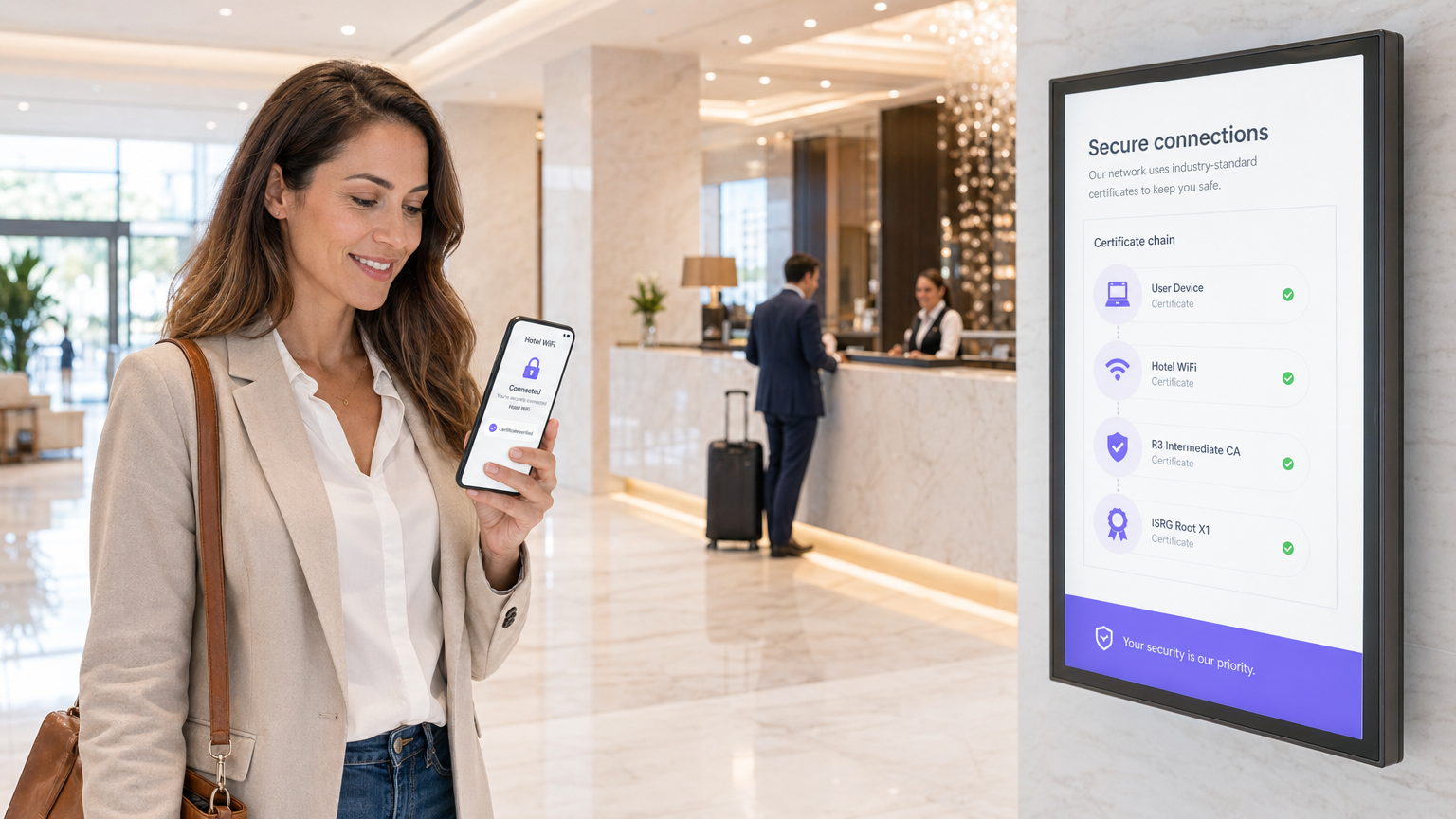
Resumo Executivo
Para líderes de TI corporativos que gerenciam implantações em larga escala em locais de hospitalidade, varejo ou setor público, proteger o acesso sem fio é um requisito fundamental — não uma atualização opcional. As chaves pré-compartilhadas (PSKs) tradicionais são inadequadas para ambientes corporativos: elas não fornecem responsabilidade individual, não podem ser auditadas e criam uma sobrecarga operacional significativa quando rotacionadas. A Infraestrutura de Chave Pública (PKI) fornece a base criptográfica necessária para uma segurança de rede robusta e escalável. Este guia detalha o que é PKI, como ela impulsiona a segurança WiFi corporativa por meio da autenticação baseada em certificado e as etapas concretas necessárias para implantar IEEE 802.1X com EAP-TLS. Ao fazer a transição para uma arquitetura baseada em PKI, as organizações podem eliminar o roubo de credenciais, automatizar o onboarding de dispositivos e garantir acesso contínuo e seguro para dispositivos corporativos e convidados — ao mesmo tempo em que satisfazem os requisitos do PCI DSS, GDPR e ISO 27001.
Análise Técnica Aprofundada: Entendendo a PKI no WiFi Corporativo
A Infraestrutura de Chave Pública (PKI) é a estrutura de hardware, software, políticas e procedimentos necessários para criar, gerenciar, distribuir, usar, armazenar e revogar certificados digitais e gerenciar a criptografia de chave pública. No contexto do WiFi corporativo, a PKI é o motor que impulsiona a verificação de identidade e a criptografia — substituindo a senha compartilhada inerentemente insegura por uma identidade criptográfica que é única para cada dispositivo ou usuário.
Os Componentes Principais da PKI
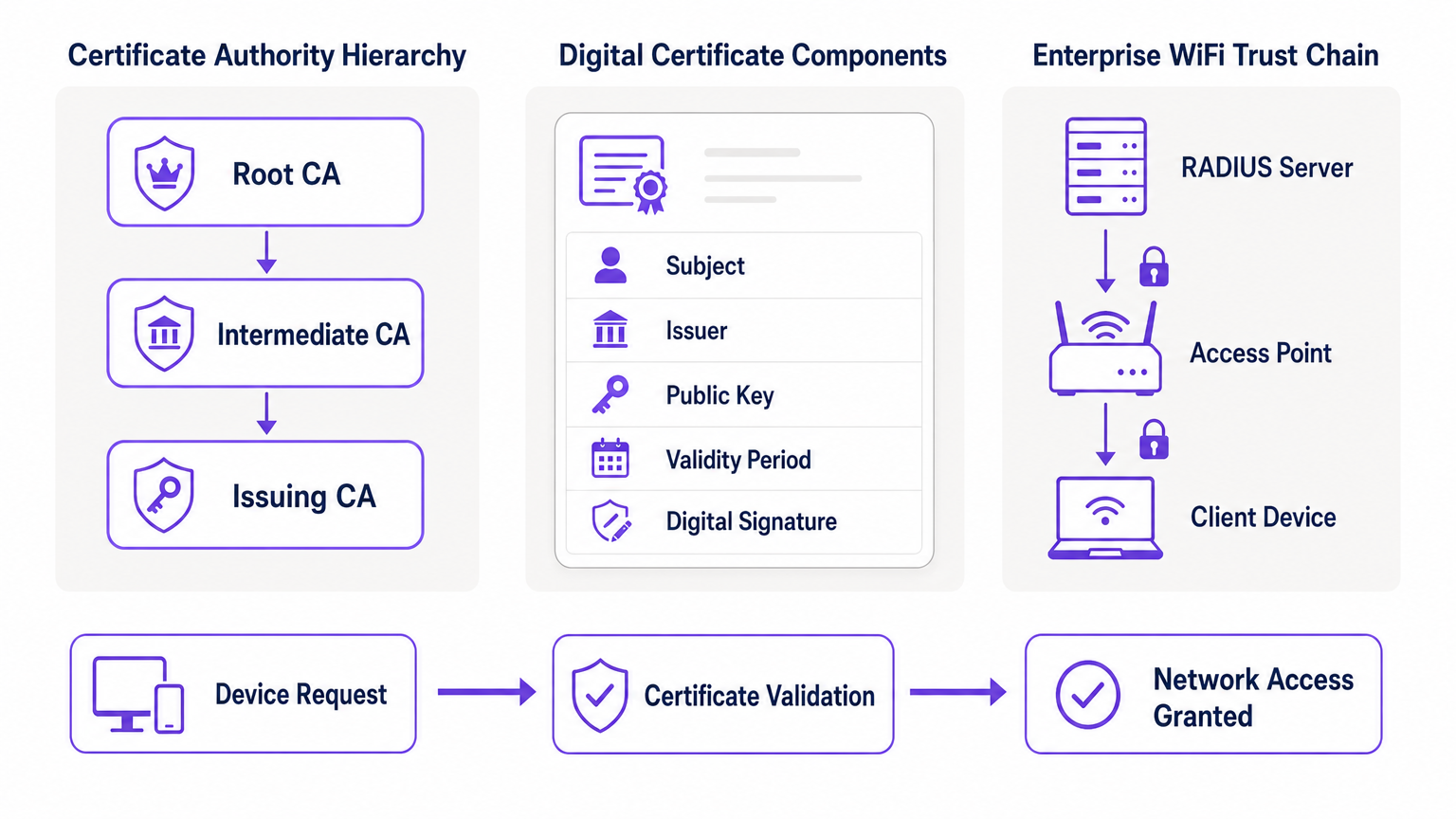
Em sua essência, a PKI depende da criptografia assimétrica, onde duas chaves matematicamente relacionadas são usadas: uma chave pública (compartilhada abertamente) e uma chave privada (mantida em segredo). Dados criptografados com a chave pública só podem ser descriptografados pela chave privada correspondente, e vice-versa. Os componentes primários de uma implantação de PKI são os seguintes.
| Componente | Função | Contexto WiFi Corporativo |
|---|---|---|
| Autoridade Certificadora (CA) | Emite e assina certificados digitais | A raiz de confiança para sua rede; todos os dispositivos devem confiar na CA |
| Certificado Digital (X.509) | Vincula uma chave pública a uma identidade | Instalado em cada dispositivo corporativo; apresentado durante a autenticação 802.1X |
| Servidor RADIUS | Valida certificados e concede acesso à rede | O motor de decisão que aceita ou rejeita solicitações de conexão |
| Autoridade de Registro (RA) | Verifica a identidade antes da emissão do certificado | Frequentemente gerenciado por MDM/UEM em implantações automatizadas |
| CRL / OCSP | Verifica se um certificado foi revogado | Crítico para bloquear dispositivos comprometidos ou roubados em tempo real |
Como a PKI Impulsiona 802.1X e EAP-TLS
A segurança WiFi corporativa depende do padrão IEEE 802.1X para controle de acesso à rede baseado em porta. Quando combinada com o Extensible Authentication Protocol (EAP), especificamente EAP-TLS (Transport Layer Security), a PKI oferece o mais alto nível de segurança sem fio: autenticação mútua.
Em uma implantação EAP-TLS, o dispositivo cliente apresenta seu certificado digital à rede para provar sua identidade, e o servidor RADIUS apresenta seu certificado ao cliente, provando que a rede é legítima e não um ponto de acesso "evil twin" malicioso. Essa confiança mútua é estabelecida porque ambas as partes confiam na CA Raiz que emitiu os certificados. Uma vez autenticada, a sessão é criptografada usando o conjunto de cifras TLS negociado, prevenindo escutas e ataques man-in-the-middle.
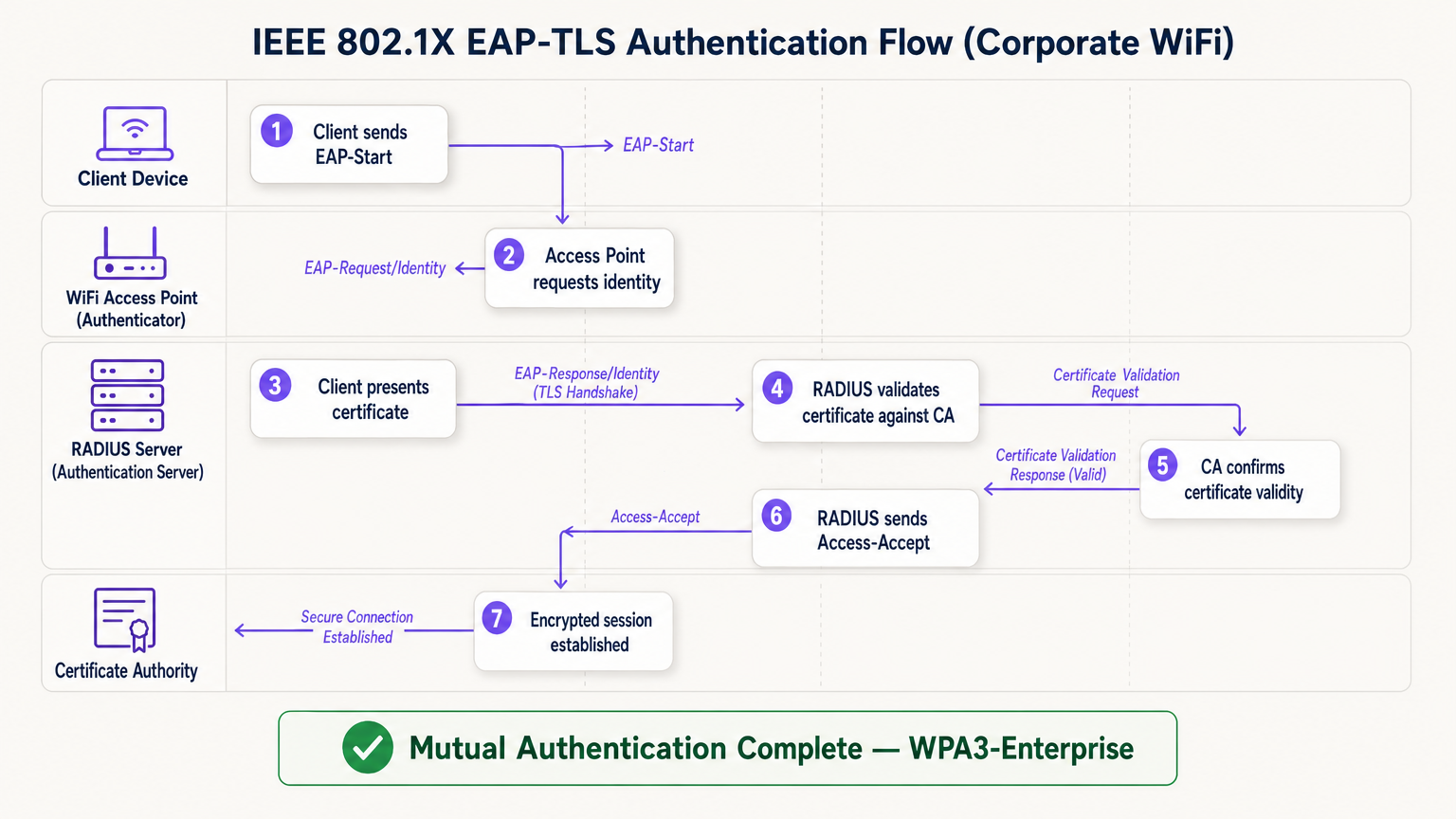
O fluxo EAP-TLS opera em quatro entidades lógicas: o Dispositivo Cliente (suplicante), o Ponto de Acesso (autenticador), o Servidor RADIUS (servidor de autenticação) e a Autoridade Certificadora. O ponto de acesso atua como um relé transparente — ele não toma a decisão de autenticação por si só. Essa decisão recai inteiramente sobre o servidor RADIUS, que valida a cadeia de certificados de volta à CA Raiz confiável.
Guia de Implementação: Implantando WiFi Baseado em Certificado
A transição para uma arquitetura WiFi baseada em PKI requer planejamento cuidadoso em quatro fases.
Fase 1: Arquitetura e Seleção da CA
Decida se irá construir uma PKI interna (por exemplo, Microsoft Active Directory Certificate Services) ou usar um provedor de PKI em nuvem gerenciado. Para implantações modernas em escala, a PKI em nuvem reduz significativamente a sobrecarga administrativa e oferece alta disponibilidade integrada. Garanta que a CA escolhida se integre perfeitamente com sua solução de Gerenciamento de Dispositivos Móveis (MDM) ou Gerenciamento Unificado de Endpoints (UEM). Para ambientes que utilizam Guest WiFi , garanta que a infraestrutura RADIUS seja projetada para lidar tanto com o tráfego corporativo 802.1X quanto com a autenticação de portal cativo de convidados em SSIDs separados.
Fase 2: Configuração do Servidor RADIUS
Implante um servidor RADIUS robusto — as opções incluem FreeRADIUS, Cisco ISE, Aruba ClearPass ou um RADIUS-as-a-Service nativo da nuvem. Configure o servidor RADIUS com seu próprio certificado de servidor emitido pela sua CA. Isso é crítico: sem um certificado de servidor válido, o cliente não pode realizar a autenticação mútua e estará vulnerável a ataques evil twin. Para implantações em grandes locais, considere configurações de proxy RADIUS para suportar o roaming entre sites. Locais que implantam plataformas de WiFi Analytics devem garantir que os dados de contabilidade RADIUS alimentem o pipeline de análise para atribuição precisa da sessão.
Fase 3: Provisionamento Automatizado de Certificados
A instalação manual de certificados não é escalável e está sujeita a erros. Aproveite o protocferramentas como SCEP (Simple Certificate Enrollment Protocol) ou EST (Enrollment over Secure Transport) via seu MDM para enviar certificados silenciosamente para dispositivos corporativos. Para cenários BYOD, implemente um portal de integração que provisione um certificado de forma segura para o dispositivo do usuário após a verificação inicial de identidade. Para dispositivos IoT sem interface — como equipamentos médicos, terminais de ponto de venda ou sinalização digital — os certificados devem ser provisionados durante a fase de preparação do dispositivo antes da implantação.
Fase 4: Aplicação de Políticas de Rede
Configure seus controladores sem fio e pontos de acesso para aplicar 802.1X no SSID corporativo. Mapeie atributos de certificado (como o Subject Alternative Name ou o campo OU) para VLANs específicas ou políticas de firewall usando atributos RADIUS, garantindo acesso à rede com privilégio mínimo. Para locais que utilizam hardware de fornecedores específicos, consulte guias específicos do fabricante, como Seu Guia para um Ponto de Acesso Sem Fio Ruckus para etapas de configuração específicas da plataforma.
Melhores Práticas para PKI Corporativa
Proteja a CA Raiz. Se estiver usando uma PKI interna, a CA Raiz deve ser mantida offline e fisicamente segura. Apenas as CAs Intermediárias devem estar online e emitindo certificados ativamente. Uma CA Raiz comprometida invalida toda a sua PKI.
Implemente uma verificação de revogação robusta. Garanta que seus servidores RADIUS verifiquem ativamente as CRLs ou usem OCSP para verificar o status do certificado em cada tentativa de autenticação. Um dispositivo comprometido deve ter seu certificado revogado imediatamente para bloquear o acesso. Configurar o RADIUS para armazenar em cache as respostas CRL por muito tempo cria uma janela de exposição.
Automatize as renovações antes do vencimento. Os certificados expiram. Implemente processos de renovação automatizados acionados em 60–70% do período de validade do certificado para evitar interrupções de rede causadas por certificados expirados. O vencimento de certificados é uma das causas mais comuns de interrupções não planejadas de WiFi em ambientes corporativos.
Adote o OpenRoaming para locais públicos. Para locais de Hotelaria , Varejo , Transporte e Saúde , a participação no OpenRoaming oferece conectividade de convidado contínua e segura em escala. Purple atua como um provedor de identidade gratuito para OpenRoaming sob a licença Connect, permitindo que usuários com perfis existentes se conectem com segurança sem um captive portal ou senha — sustentado pelo mesmo modelo de confiança PKI descrito neste guia.
Solução de Problemas e Mitigação de Riscos
Mesmo com planejamento cuidadoso, as implantações de PKI encontram modos de falha previsíveis. A tabela abaixo resume os problemas mais comuns e suas resoluções.
| Modo de Falha | Sintoma | Causa Raiz | Resolução |
|---|---|---|---|
| Falha de sincronização de tempo | Erros de validação de certificado em todos os dispositivos | Má configuração de NTP no cliente ou RADIUS | Aplique a política de NTP via MDM e infraestrutura de rede |
| Falha na cadeia de confiança | Tipos de dispositivos específicos (por exemplo, Android) não conseguem conectar | CA Raiz não está no armazenamento de raiz confiável do dispositivo | Envie a CA Raiz via perfil MDM |
| CRL inalcançável | Falhas de autenticação intermitentes | Firewall bloqueando endpoints CRL/OCSP | Abra as regras de firewall para pontos de distribuição de CA |
| Vencimento do certificado | Desconexão em massa súbita | Automação de renovação não configurada | Implemente renovação acionada por MDM com 60% de validade |
| Incompatibilidade de certificado RADIUS | Todos os clientes falham na autenticação mútua | Certificado do servidor RADIUS expirado ou CA errada | Renove o certificado do servidor RADIUS e reimplemente |
Para ambientes de saúde especificamente, onde o tempo de inatividade da rede tem implicações diretas na segurança do paciente, consulte WiFi em Hospitais: Um Guia para Redes Clínicas Seguras para recomendações de resiliência de nível clínico.
ROI e Impacto nos Negócios
A implementação de PKI para segurança WiFi oferece valor de negócio mensurável em três dimensões.
Redução de riscos e conformidade. A eliminação de senhas compartilhadas remove o vetor mais comum para movimento lateral na rede. A autenticação baseada em certificado satisfaz diretamente os requisitos do PCI DSS (Requisito 8.6), GDPR (Artigo 32 medidas técnicas) e ISO 27001 (Anexo A.9). A capacidade de revogar instantaneamente um certificado quando um funcionário sai ou um dispositivo é roubado oferece um controle auditável e demonstrável que ambientes de chave compartilhada simplesmente não conseguem igualar.
Eficiência operacional. O provisionamento automatizado de certificados via MDM reduz significativamente os tickets de helpdesk de TI relacionados a problemas de conectividade WiFi — redefinições de senha, rotações de chave e atrasos na integração. Em ambientes de varejo com alta rotatividade de pessoal, isso se traduz diretamente em custos de suporte de TI reduzidos e tempos de implantação de dispositivos mais rápidos.
Experiência aprimorada para usuários e convidados. A autenticação baseada em certificado é invisível para o usuário final. Funcionários corporativos se conectam automaticamente e com segurança sem nenhuma etapa manual. Para convidados, plataformas como a solução Guest WiFi da Purple lidam com a separação entre o acesso corporativo gerenciado e a integração de convidados, garantindo que cada público obtenha a experiência de autenticação apropriada sem comprometer a segurança em nenhuma das redes.
Termos-Chave e Definições
Public Key Infrastructure (PKI)
The comprehensive framework of roles, policies, hardware, and software used to manage digital certificates and public-key encryption. It establishes the trust relationships that allow devices and servers to verify each other's identities cryptographically.
The foundational architecture required to move away from shared passwords and towards identity-based network security. Every enterprise WiFi deployment using 802.1X depends on a PKI.
Certificate Authority (CA)
A trusted entity that issues, signs, and manages digital certificates. It acts as the root of trust in a PKI: any certificate signed by the CA is trusted by all parties that trust the CA.
The central pillar of your network security. If the CA is compromised, all certificates it has issued are potentially compromised. Protecting the Root CA is the single most important security control in a PKI deployment.
X.509
The ITU-T standard defining the format of public key certificates. X.509 certificates contain fields including Subject, Issuer, Public Key, Validity Period, and the CA's Digital Signature.
When configuring RADIUS server policies, IT teams map specific X.509 fields — such as the Subject Alternative Name (SAN) or Organisational Unit (OU) — to VLAN assignments and access policies.
IEEE 802.1X
The IEEE standard for port-based Network Access Control (PNAC). It provides an authentication mechanism that blocks all network traffic at the access point until the connecting device's identity has been verified by an authentication server.
The protocol that enforces certificate-based authentication at the wireless access point. Without 802.1X, a device can connect to the SSID without proving its identity.
EAP-TLS (Extensible Authentication Protocol - Transport Layer Security)
An EAP method that uses client and server certificates to establish a mutually authenticated, encrypted TLS session. It is the most secure EAP method available for enterprise WiFi.
The gold standard for corporate WiFi authentication. Unlike PEAP or EAP-TTLS, which use passwords inside a TLS tunnel, EAP-TLS eliminates passwords entirely, replacing them with cryptographic certificates.
RADIUS (Remote Authentication Dial-In User Service)
A networking protocol providing centralised Authentication, Authorisation, and Accounting (AAA) management. In 802.1X deployments, the RADIUS server receives the client's certificate from the access point, validates it against the CA, and returns an access decision.
The decision engine of the enterprise WiFi authentication stack. RADIUS also handles dynamic VLAN assignment, enabling network segmentation based on device identity or user role.
Certificate Revocation List (CRL)
A periodically published list of certificates that have been revoked by the issuing CA before their scheduled expiration date. RADIUS servers check the CRL to ensure they are not granting access to compromised or decommissioned devices.
Critical for maintaining security when devices are lost, stolen, or decommissioned. CRL checking must be configured on the RADIUS server — it does not happen automatically.
Mutual Authentication
A security process in which both parties in a communication link authenticate each other simultaneously. In EAP-TLS, the client authenticates to the network and the network authenticates to the client.
Prevents 'Evil Twin' attacks where a hacker sets up a rogue access point with the same SSID as the corporate network to intercept credentials. Without mutual authentication, the client has no way to verify it is connecting to the legitimate network.
SCEP (Simple Certificate Enrollment Protocol)
A protocol that enables automated, scalable distribution of digital certificates to devices via an MDM or network device management system.
The mechanism that makes enterprise PKI deployments operationally viable at scale. Without SCEP or a similar automated enrollment protocol, certificate provisioning to thousands of devices would require manual intervention.
Estudos de Caso
A large retail chain with 500 stores needs to secure its corporate WiFi for employee point-of-sale (POS) tablets and inventory scanners. They currently use a single WPA2-PSK across all stores, which is frequently shared with non-employees and cannot be audited. How should they redesign their authentication architecture?
The retail chain must migrate to WPA3-Enterprise using 802.1X and EAP-TLS. Step 1: Select a cloud-managed PKI provider and integrate it with the existing MDM solution managing the POS tablets and scanners. Step 2: Configure SCEP to automatically push unique, device-bound digital certificates to every corporate device via MDM. Step 3: Deploy a Cloud RADIUS service and configure it to validate certificates against the PKI, with OCSP checking enabled. Step 4: Reconfigure the wireless controllers at each store to enforce 802.1X authentication on the corporate SSID. Step 5: Retire the PSK network. Step 6: Configure VLAN assignment via RADIUS attributes to segment POS devices from general staff devices at the network layer.
A major hospital network is deploying new wireless medical infusion pumps across three sites. These devices lack a user interface to input credentials or accept captive portal prompts. How can they be securely connected to the clinical WiFi network without creating a shared-key vulnerability?
Implement a PKI-based architecture specifically for headless IoT medical devices. Step 1: Generate device-specific X.509 certificates for each infusion pump, using the device serial number as the Subject Common Name. Step 2: Install the certificates on the pumps during the staging and provisioning phase, before clinical deployment. Step 3: Configure the clinical WiFi SSID for 802.1X EAP-TLS. Step 4: Configure the RADIUS server to map the device certificate's Subject CN to a specific VLAN dedicated to medical devices. Step 5: Implement CRL checking to allow instant revocation if a device is decommissioned or recalled.
Análise de Cenário
Q1. Your organisation is migrating from PEAP (username/password) to EAP-TLS (certificates) for the corporate SSID. During testing, Windows laptops successfully connect, but Android devices consistently fail. The RADIUS logs show the Android devices are rejecting the server's certificate during the TLS handshake. What is the most likely cause, and how do you resolve it?
💡 Dica:Consider the concept of mutual authentication and the trust chain. What does the Android device need in order to trust the RADIUS server's certificate?
Mostrar Abordagem Recomendada
The Android devices do not have the Root CA certificate installed in their trusted root store. Windows laptops receive the Root CA via Group Policy automatically, but Android devices require the Root CA to be pushed via an MDM profile. Without the Root CA in the trusted store, the Android device cannot verify the RADIUS server's certificate chain, causing it to reject the server certificate and abort the TLS handshake. Resolution: create an MDM configuration profile that installs the Root CA certificate into the trusted root store on all managed Android devices, then re-test.
Q2. A recently terminated employee's corporate laptop is still successfully connecting to the enterprise WiFi network two days after their Active Directory account was disabled. The network uses EAP-TLS. Why is this happening, and what must be done to prevent it?
💡 Dica:Disabling an Active Directory account does not automatically invalidate a cryptographic certificate. Consider what the RADIUS server is actually validating.
Mostrar Abordagem Recomendada
The RADIUS server is validating the certificate, not the Active Directory account status. Because the certificate is still mathematically valid and has not been revoked, the RADIUS server grants access. To resolve immediately, the specific certificate issued to that laptop must be revoked in the Certificate Authority. To prevent this systematically, integrate the HR offboarding process with the MDM and PKI: when an employee is terminated, the MDM should automatically revoke the device certificate and unenroll the device. Additionally, ensure the RADIUS server is configured to check OCSP or the CRL on every authentication attempt — not just periodically — so revocation takes effect immediately.
Q3. You are designing the network architecture for a large stadium that wants to offer seamless, secure WiFi to 60,000 attendees without requiring each person to go through a captive portal. The venue also wants to support corporate exhibitors who need 802.1X-secured access for their POS equipment. How does PKI factor into both requirements?
💡 Dica:Consider that there are two distinct audiences with different authentication needs. OpenRoaming addresses one; a dedicated corporate SSID with 802.1X addresses the other.
Mostrar Abordagem Recomendada
Two separate SSIDs are required. For the 60,000 attendees, implement OpenRoaming. The stadium's network must be configured to trust the OpenRoaming Root CAs. When a visitor's device — provisioned by an identity provider like Purple or a mobile carrier — connects, it presents a certificate. The RADIUS server validates this against the OpenRoaming trust chain and grants secure, encrypted access without a captive portal. For corporate exhibitors with POS equipment, deploy a separate 802.1X SSID using EAP-TLS. Exhibitors are issued temporary device certificates during their accreditation process, which are automatically revoked after the event. RADIUS attributes assign POS devices to a dedicated VLAN, satisfying PCI DSS network segmentation requirements.




