
उच्च - घनता असलेल्या MDU इमारतींमधील WiFi व्यत्यय सोडवणे
हे तांत्रिक संदर्भ मार्गदर्शक IT व्यवस्थापक आणि मालमत्ता ऑपरेटर्सना उच्च - घनता असलेल्या Multi-Dwelling Unit (MDU) इमारतींमधील WiFi व्यत्यय दूर करण्यासाठी अंमलबजावणीयोग्य धोरणे प्रदान करते. यामध्ये को - चॅनेल आणि लगतच्या - चॅनेलच्या व्यत्ययाची मूळ कारणे, मध्यवर्ती व्यवस्थापित WLAN पायाभूत सुविधांकडे जाणारे आर्किटेक्चरल बदल आणि सुरक्षित भाडेकरू अलगाव तंत्रे समाविष्ट आहेत. या धोरणांची अंमलबजावणी केल्याने सपोर्ट ओव्हरहेड कमी होतो, भाडेकरूंचे समाधान सुधारते आणि कनेक्टिव्हिटीचे रूपांतर महसूल निर्माण करणाऱ्या उपयुक्ततेमध्ये होते.
Video overview
हे मार्गदर्शक ऐका
पॉडकास्ट ट्रान्सक्रिप्ट पहा
आमच्या मुख्य मालिकेचा भाग: मल्टी - भाडेकरू WiFi मार्गदर्शक →

कार्यकारी सारांश (Executive Summary)
हाय-डेन्सिटी मल्टी-ड्वेलिंग युनिट्स (MDUs) - जसे की अपार्टमेंट कॉम्प्लेक्स, स्टुडंट हाऊसिंग आणि लक्झरी रिसॉर्ट्स चालवणाऱ्या IT मॅनेजर्स आणि व्हेन्यू ऑपरेशन्स डायरेक्टर्ससाठी - अनमॅनेज्ड WiFi हा एक गंभीरOperational अडथळा आहे. जेव्हा शेकडो भाडेकरू एकमेकांच्या अगदी जवळ ग्राहक-दर्जाचे (consumer-grade) राउटर इन्स्टॉल करतात, तेव्हा निर्माण होणारे को-चॅनेल आणि लगतचे-चॅनेल इंटरफेयरेन्स (co-channel and adjacent-channel interference) संपूर्ण मालमत्तेवरील कामगिरी खराब करतात. हा मार्गदर्शक अराजक, भाडेकरू-व्यवस्थापित नेटवर्कवरून केंद्रीय नियंत्रित, एंटरप्राइझ-दर्जाच्या WiFi इन्फ्रास्ट्रक्चरमध्ये संक्रमण करण्यासाठी आवश्यक असलेले तांत्रिक आर्किटेक्चर स्पष्ट करतो. डायनॅमिक RF मॅनेजमेंट, आक्रमक बँड स्टीयरिंग आणि Private Pre-Shared Keys (PPSK) द्वारे सुरक्षित मायक्रो-सेगमेंटेशन लागू करून, ऑपरेटर इंटरफेयरेन्स कमी करू शकतात, सपोर्टचा अतिरिक्त खर्च कमी करू शकतात आणि WiFi ला तक्रारींच्या सततच्या स्रोताऐवजी मूल्यवर्धित सुविधेत रूपांतरित करू शकतात. हा दृष्टिकोन Hospitality आणि Retail मधील व्यापक कनेक्टिव्हिटी धोरणांशी सुसंगत आहे, जिथे अखंड, विश्वासार्ह कनेक्टिव्हिटी हा अतिथींच्या अनुभवाचा पाया आहे आणि थेट कमाईवर परिणाम करतो.
सखोल तांत्रिक माहिती (Technical Deep-Dive)
हाय-डेन्सिटी MDU वातावरणातील मूलभूत आव्हानांचे निराकरण करण्यासाठी RF प्रोपॅगेशन फिजिक्स आणि 802.11 प्रोटोकॉल मर्यादांचे परस्परसंबंध समजून घेणे ही पूर्वअट आहे.
2.4GHz चा पेच: एक गर्दीचे स्पेक्ट्रम
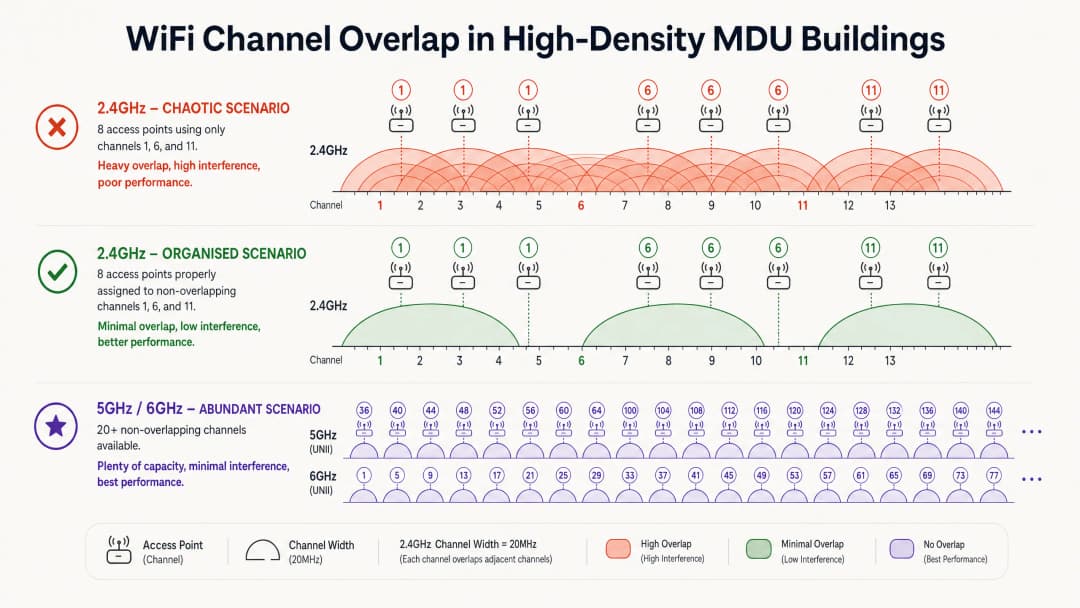
अनमॅनेज्ड परिस्थितींमध्ये, भाडेकरूंचे राउटर सामान्यतः 2.4GHz बँडवर जास्तीत जास्त ट्रान्समिट पॉवरवर डीफॉल्ट असतात. केवळ तीन नॉन-ओव्हरलॅपिंग चॅनेल्स उपलब्ध असल्याने - चॅनेल 1, 6 आणि 11 - ऍक्सेस पॉईंट्स अनिवार्यपणे स्पेक्ट्रम सामायिक करतात. जेव्हा एकाधिक APs एकमेकांच्या रेडिओ रेंजमध्ये एकाच चॅनेलवर कार्यरत असतात, तेव्हा ते Co-Channel Interference (CCI) तयार करतात.
कारण WiFi हे CSMA/CA (Carrier Sense Multiple Access with Collision Avoidance) वापरते - एक "बोलण्यापूर्वी ऐका" (listen-before-talk) प्रोटोकॉल - डिव्हाइसेसना ट्रान्समिट करण्यापूर्वी चॅनेल मोकळे होण्याची प्रतीक्षा करावी लागते. ज्या इमारतीमध्ये साठ राउटर चॅनेल 6 वर एअरटाइमसाठी स्पर्धा करत आहेत, तिथे डिव्हाइसेस ट्रान्समिट करण्यापेक्षा प्रतीक्षा करण्यात अधिक वेळ घालवतात. ही स्पर्धा, केवळ सिग्नल नॉईज नसून, अपार्टमेंट बिल्डिंग WiFi इंटरफेयरेन्स प्रकरणांमध्ये कमी झालेल्या थ्रूपुटचे प्राथमिक कारण आहे.
फ्रिक्वेन्सी बँड कसे एकमेकांशी संवाद साधतात याच्या सखोल माहितीसाठी, आमचा Wi Fi Frequencies: A Guide to Wi-Fi Frequencies in 2026 हा मार्गदर्शक वाचा.
अधिक ऍक्सेस पॉईंट्स जोडल्याने परिस्थिती अधिक खराब का होते
कव्हरेज सुधारण्यासाठी आणखी APs जोडणे हा एक सामान्य विचार आहे. हाय - डेन्सिटी MDUs मध्ये, हे सहसा उलट परिणाम करते. आधीच गर्दी असलेल्या चॅनेलवर ब्रॉडकास्ट करणारा प्रत्येक अतिरिक्त AP एकूण हस्तक्षेपात (interference) वाढ करतो. याचे समाधान हार्डवेअरची संख्या वाढवणे हे नसून; RF एन्व्हायरनमेंटवर नियंत्रण (control of the RF environment) मिळवणे हे आहे.
आर्किटेक्चरल बदल: अनमॅनेज्ड ते सेंट्रली कंट्रोल्ड
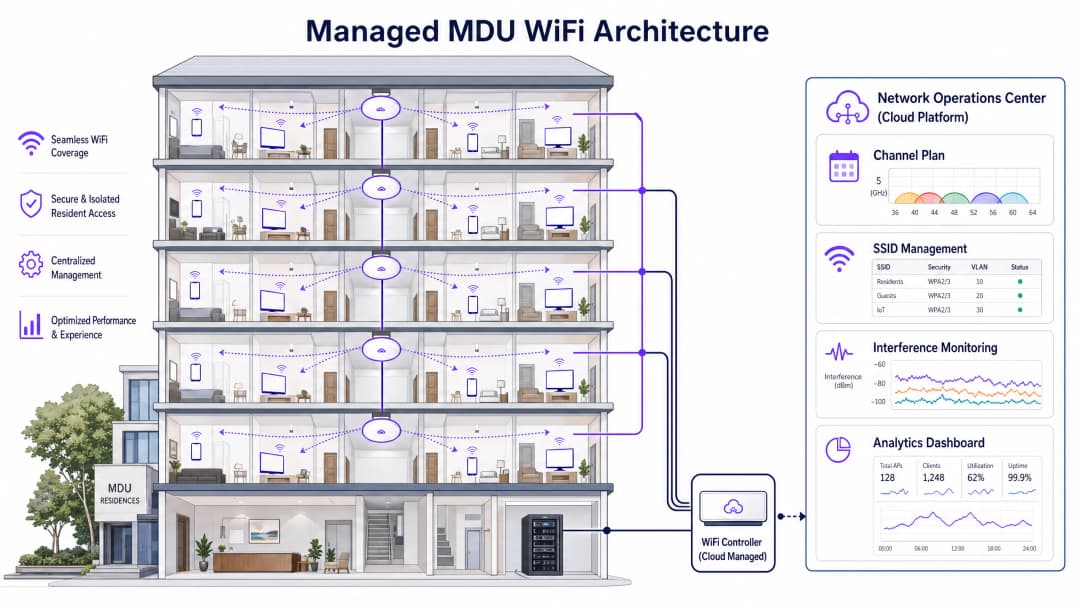
योग्य पद्धतीसाठी स्वतंत्र भाडेकरूंचे राउटर काढून टाकणे आणि त्याऐवजी एक युनिफाइड, सेंट्रली मॅनेज्ड WLAN आर्किटेक्चर वापरणे आवश्यक आहे. एंटरप्राइझ - ग्रेड APs तैनात करणे - सामान्यतः प्रति युनिट एक किंवा भिंतीच्या अडथळ्यानुसार दर दुसऱ्या युनिटमध्ये एक - सेंट्रल कंट्रोलरला संपूर्ण RF एन्व्हायरनमेंट व्यवस्थापित करण्याची परवानगी देतो.
मॅनेज्ड MDU डिप्लॉयमेंटच्या मुख्य आर्किटेक्चरल घटकांमध्ये खालील गोष्टींचा समावेश होतो.
| घटक | भूमिका | प्रभाव |
|---|---|---|
| डायनॅमिक रेडिओ मॅनेजमेंट (DRM) | RF चे सतत निरीक्षण करते आणि चॅनेल असाइनमेंट आणि ट्रान्समिट पॉवर समायोजित करते | लगतचे APs कधीही चॅनेल शेअर करणार नाहीत याची खात्री करून CCI काढून टाकते |
| बँड स्टिअरिंग | ड्युअल - बँड क्लायंट्सना 5GHz/6GHz कडे पुश करते | सॅच्युरेटेड 2.4GHz बँडवरील गर्दी कमी करते |
| 2.4GHz चेकरबोर्ड प्रूनिंग | एकाआड एक APs वरील 2.4GHz रेडिओ निष्क्रिय करते | IoT उपकरणांसाठी कव्हरेज राखताना 2.4GHz CCI ला प्रतिबंधित करते |
| प्रायव्हेट प्री - शेअर कीज (PPSK) | प्रत्येक भाडेकरूसाठी स्वतंत्र VLANs शी मॅप केलेले युनिक पासफ्रेजेस नियुक्त करते | सामायिक इन्फ्रास्ट्रक्चरवर सुरक्षित "होम नेटवर्क" चा अनुभव देते |
| मिनिमम बेसिक रेट ट्यूनिंग | किमान कनेक्शन डेटा रेट वाढवते (उदा. 12 किंवा 24 Mbps वर) | स्टिकी क्लायंट्सना जवळच्या APs वर रोमिंग करण्यास भाग पाडते, ज्यामुळे एअरटाइम मोकळा होतो |
5GHz आणि 6GHz: पुढील मार्ग
5GHz बँड लक्षणीयरित्या अधिक नॉन - ओव्हरलॅपिंग चॅनेल्स ऑफर करतो - UNII-1, UNII-2 आणि UNII-3 बँड्समध्ये 25 पर्यंत. Wi-Fi 6E आणि Wi-Fi 7 हे अधिक पुढे नेत 6GHz बँडपर्यंत विस्तारतात, ज्यामुळे 59 पर्यंत अतिरिक्त 20MHz चॅनेल्सचे क्लीन, अक्षरशः हस्तक्षेप-मुक्त स्पेक्ट्रम मिळते. तथापि, उच्च फ्रिक्वेन्सी भिंती आणि छतांमधून वेगाने कमी होतात, ज्यामुळे डिप्लॉयमेंटपूर्वी MDU च्या विशिष्ट बांधकाम साहित्याचे मॉडेलिंग करणारे प्रेडिक्टिव्ह साइट सर्व्हे करणे आवश्यक ठरते.
तुमच्या विशिष्ट सेटअपबद्दल काही प्रश्न आहेत का?
आमची टीम ८०,००० हून अधिक वेन्यूजमधील वेन्यू ऑपरेटर्स, IT मॅनेजर्स आणि नेटवर्क इंजिनिअर्ससोबत काम करते. २० मिनिटांचा कॉल बुक करा आणि तुमच्यासारख्या इतरांनी ही समस्या कशी सोडवली हे आम्ही तुम्हाला दाखवू.
इम्प्लीमेंटेशन गाईड
पायरी 1: RF ऑडिट आणि प्रेडिक्टिव्ह डिझाइन
AP माउंट करण्यापूर्वी, स्पेक्ट्रम ॲनालायझर वापरून सध्याच्या एअरस्पेसचे संपूर्ण RF ऑडिट करा. प्रत्येक SSID, चॅनेल आणि सिग्नल स्ट्रेंथची नोंद करा. त्यानंतर, इमारतीच्या बांधकामासाठी विशिष्ट भिंत क्षीणन (wall attenuation) मूल्ये विचारात घेऊन AP प्लेसमेंट मॉडेल करण्यासाठी प्रेडिक्टिव्ह साइट सर्व्हे टूल्स (Ekahau, Hamina) वापरा. केवळ कव्हरेजसाठी नाही, तर कॅपॅसिटीसाठी डिझाइन करा.
पायरी 2: PPSK सह टेनंट मायक्रो - सेगमेंटेशन
भाडेकरू अशी अपेक्षा करतात की त्यांचे डिव्हाइसेस — स्मार्ट टीव्ही, वायरलेस स्पीकर्स, IoT गॅजेट्स — स्थानिक पातळीवर संवाद साधू शकतील, अगदी त्यांच्या घरच्या राऊटरसारखेच. PPSK किंवा Multiple PSK (MPSK) लागू करणे अत्यंत महत्त्वाचे आहे. प्रत्येक भाडेकरूला एक युनिक पासफ्रेज मिळतो; कंट्रोलर याचा वापर करून त्यांचे सर्व डिव्हाइसेस एका आयसोलेटेड VLAN वर डायनॅमिकली असाइन करतो. यामुळे शेअर्ड इन्फ्रास्ट्रक्चरवर शेकडो स्वतंत्र SSIDs ब्रॉडकास्ट न करता होम नेटवर्कचा अनुभव मिळतो, ज्याने अन्यथा व्यवस्थापनाचा मोठा ताण निर्माण झाला असता. हा दृष्टिकोन Explain what is audit trail for IT Security in 2026 मध्ये चर्चा केलेल्या अनुपालन बाबींना देखील मदत करतो.
पायरी ३: AP प्लेसमेंट आणि रेडिओ कॉन्फिगरेशन
काँक्रीटच्या भिंती असलेल्या इमारतींसाठी, APs हॉलवेऐवजी युनिटच्या आत ठेवा. जेथे युझर्स जास्त वेळ असतात अशा ठिकाणी APs ठेवल्याने सिग्नल कमी करणाऱ्या मटेरियलमधून प्रवास करण्याचे अंतर कमी होते. खालील गोष्टी कॉन्फिगर करा:
- चॅनल विड्थ: 2.4GHz वर 20MHz; स्टँडर्ड डेंसिटीमध्ये 5GHz वर 40MHz; नॉन-ओव्हरलॅपिंग चॅनल्सची संख्या जास्तीत जास्त करण्यासाठी अत्यंत दाट डेंसिटीमध्ये 5GHz वर 20MHz.
- ट्रान्समिट पॉवर: ऑटो किंवा मिडियमवर सेट करा. हाय पॉवरमुळे इंटरफेअरेन्सची रेंज वाढते; लोअर पॉवर योग्य क्लायंट रोमिंगला प्रोत्साहन देते.
- 802.11k/v/r: क्लायंट्स कनेक्शन न तुटता APs दरम्यान सुरळीतपणे ट्रांझिशन करू शकतील याची खात्री करण्यासाठी हे रोमिंग असिस्टन्स प्रोटोकॉल्स सक्षम करा.
पायरी ४: सतत देखरेख आणि ऑप्टिमायझेशन
कंट्रोलरच्या अंगभूत टूल्सचा किंवा समर्पित प्लॅटफॉर्मचा वापर करून सतत RF देखरेख स्थापित करा. ट्रॅक करण्यासाठी महत्त्वाच्या मेट्रिक्समध्ये प्रति चॅनेल एअरटाइम युटिलायझेशन (अलर्ट थ्रेशोल्ड: >७०%), क्लायंट SNR डिस्ट्रिब्युशन आणि रोग AP ची संख्या समाविष्ट आहे. WiFi Analytics ऑफर करणारे प्लॅटफॉर्म्स पाहुण्यांच्या वर्तनाच्या डेटासोबत हे इनसाइट्स हायलाइट करू शकतात, ज्यामुळे एक युनिफाइड ऑपरेशनल व्ह्यू मिळतो.
सर्वोत्तम पद्धती
भविष्यातील तयारीसाठी 6GHz चा लाभ घ्या. बजेट परवानगी देत असल्यास, WiFi 6E किंवा WiFi 7 APs तैनात करा. 6GHz बँड सध्या जुन्या डिव्हाइसेसच्या इंटरफेअरेन्सपासून मुक्त आहे, ज्यामुळे तो हाय-बँडविड्थ, लेटन्सी-सेन्सिटिव्ह ॲप्लिकेशन्ससाठी आदर्श बनतो.
तैनात करण्यापूर्वी DFS चॅनल्सचे ऑडिट करा. 5GHz बँडमध्ये, Dynamic Frequency Selection (DFS) चॅनल्स अतिरिक्त क्षमता देतात परंतु रडार ॲक्टिव्हिटी आढळल्यास APs ना चॅनल त्वरित रिकामे करणे आवश्यक असते. विमानतळ किंवा हवामान केंद्रांजवळील शहरी वातावरणात, DFS मुळे वारंवार क्लायंटचे कनेक्शन खंडित होऊ शकते. प्रोडक्शनमध्ये DFS चॅनल्स सक्षम करण्यापूर्वी नेहमी रडारसाठी मॉनिटर करा.
स्वीकार्य वापर धोरणे (acceptable use policies) लागू करा. मॅनेज्ड नेटवर्क असले तरीही, भाडेकरू स्वतःचे राऊटर प्लग इन करण्याचा प्रयत्न करू शकतात. रोग APs शोधण्यासाठी आणि त्यांचे वर्गीकरण करण्यासाठी Wireless Intrusion Prevention System (WIPS) क्षमतेचा वापर करा. भाडेकरूंच्या डिव्हाइसेसचे ॲक्टिव्ह डी-ऑथेंटिकेशन कायदेशीर प्रश्न निर्माण करू शकते, तरीही डेटा पॉलिसी असणे हे अंमलबजावणीसाठी एक आधार प्रदान करते. अनुपालन मानकांचे पालन करा. सार्वजनिक क्षेत्रातील MDUs किंवा सामायिक अतिथी प्रवेश प्रदान करणाऱ्यांसाठी, नेटवर्क आर्किटेक्चर हे IWF Compliance for Public WiFi Networks in the UK आणि संबंधित GDPR डेटा हाताळणीच्या दायित्वांच्या सुसंगत असल्याची खात्री करा. स्पॅनिश भाषिक बाजारपेठांसाठी, Cumplimiento IWF para redes WiFi públicas en el Reino Unido पहा.
त्रुटी निवारण आणि जोखीम कमी करणे
स्टीकी क्लायंट समस्या. जर क्लायंट जवळील APs कडे रोमिंग करत नसतील, तर त्याचे मुख्य कारण सामान्यतः ट्रान्समिट पॉवर खूप जास्त असणे हे असते. एखादा क्लायंट कमी डेटा रेटवर असला तरीही, जोपर्यंत तो दूरच्या AP कडून सिग्नल प्राप्त करू शकतो तोपर्यंत तो त्याच्याशी जोडलेला राहील. AP ची ट्रान्समिट पॉवर कमी करा आणि 802.11v BSS ट्रान्झिशन मॅनेजमेंट सक्षम असल्याची पडताळणी करा.
कमी क्लायंटसह उच्च एअरटाइम वापर. जर एखादे चॅनल केवळ काही कनेक्ट केलेल्या क्लायंटसह 80%+ पेक्षा जास्त वापर दर्शवत असेल, तर त्याचे कारण निश्चितपणे रोग APs किंवा शेजारच्या व्यवस्थापित नेटवर्कमधील CCI आहे. हस्तक्षेपाचे स्रोत ओळखण्यासाठी स्पेक्ट्रम ॲनालायझर वापरा आणि त्यानुसार चॅनल वाटप समायोजित करा.
IoT डिव्हाइस कनेक्टिव्हिटी बिघाड. अनेक स्मार्ट होम डिव्हाइसेस केवळ 2.4GHz ला सपोर्ट करतात आणि WPA3 ला सपोर्ट करत नाहीत. WPA2 सुसंगतता मोड सक्षम असलेले एक समर्पित 2.4GHz SSID ठेवा, परंतु या SSID चा हस्तक्षेप मर्यादित करण्यासाठी ते केवळ निवडक APs वरूनच ब्रॉडकास्ट केले जाईल याची खात्री करा. व्यापक नेटवर्क सुरक्षा आर्किटेक्चरच्या विचारांसाठी, Office Wi Fi: Optimise Your Modern Office Wi-Fi Network मध्ये रेखाटलेली तत्त्वे MDU वातावरणाला देखील तितकीच लागू होतात.
ROI आणि व्यावसायिक प्रभाव
व्यवस्थापित MDU WiFi सोल्यूशनवर स्थलांतरित केल्याने कनेक्टिव्हिटीचे रूपांतर एका खर्च केंद्राकडून महसूल मिळवून देणाऱ्या उपयुक्ततेमध्ये होते. त्याची आर्थिक पायाभरणी तीन स्तंभांवर आधारित आहे.
| मूल्य चालक | मेट्रिक | सामान्य परिणाम |
|---|---|---|
| कमी झालेला सपोर्ट OpEx | मासिक कनेक्टिव्हिटी तक्रारी | तैनातीनंतर 80-94% घट |
| भाडेकरू धारणा | लीज नूतनीकरण दर | रहिवासी सर्वेक्षणांमध्ये WiFi गुणवत्ता हा टॉप-3 धारणा घटकांपैकी एक आहे |
| महसूल निर्मिती | श्रेणीबद्ध बँडविड्थ पॅकेजेस | £5 - £15/महिना प्रीमियम श्रेणी अवलंबनाचा दर 20-35% |
| मालमत्ता मूल्य | स्मार्ट बिल्डिंग प्रमाणीकरण | व्यवस्थापित कनेक्टिव्हिटी BREEAM आणि WELL Building Standard क्रेडिट्सना समर्थन देते |
रुग्णालयातील वॉर्ड किंवा ट्रान्झिट हब यांसारख्या MDU-शैलीतील वातावरणाचे व्यवस्थापन करणाऱ्या Healthcare आणि Transport ऑपरेटरसाठी, अनुपालन आणि ऑपरेशनल फायदे तितकेच प्रभावी आहेत. व्यवस्थापित नेटवर्क नियामक अनुपालनासाठी आवश्यक असणारे ऑडिट ट्रेल्स आणि प्रवेश नियंत्रणे प्रदान करते, तर Guest WiFi प्लॅटफॉर्म डेटा कॅप्चर आणि प्रतिबद्धता क्षमतांचा एक स्तर जोडतात जे मोजण्यायोग्य व्यावसायिक परतावा मिळवून देतात.
महत्वाच्या व्याख्या
Co-Channel Interference (CCI)
जेव्हा मल्टिपल ऍक्सेस पॉइंट्स आणि क्लायंट अगदी एकाच फ्रिक्वेन्सी चॅनेलवर कार्य करतात तेव्हा होणारे इंटरफरन्स, ज्यामुळे त्यांना CSMA/CA द्वारे एअरटाइमसाठी स्पर्धा करावी लागते.
व्यवस्थापन न केलेल्या MDU मधील संथ WiFi चे मुख्य कारण, जेथे डझनभर राउटर डीफॉल्टनुसार चॅनेल ६ वर असतात. कनेक्ट केलेल्या क्लायंटची संख्या कमी असूनही जास्त एअरटाइम वापरामुळे हाय CCI ओळखले जाते.
शेजारील-चॅनेल इंटरफरन्स (ACI)
फ्रिक्वेन्सीमध्ये पूर्णपणे वेगळे नसलेल्या चॅनेल्सच्या ओव्हरलॅपिंग सिग्नलमुळे होणारे इंटरफरन्स (उदा. 2.4GHz मध्ये एकाच वेळी चॅनेल ४ आणि चॅनेल ६ वापरणे).
हे सहसा भाडेकरूंनी मॅन्युअली चॅनेल्स निवडल्यामुळे होते जे त्यांना 'गर्दी नसलेले' वाटतात परंतु प्रत्यक्षात ते मानक नॉन-ओव्हरलॅपिंग चॅनेल्सशी अर्धवट ओव्हरलॅप होतात.
Private Pre-Shared Key (PPSK)
एक सुरक्षा यंत्रणा जिथे एकाच SSID वर मल्टिपल युनिक पासफ्रेजेस कॉन्फिगर केल्या जातात. वापरकर्त्याने प्रविष्ट केलेल्या विशिष्ट पासफ्रेजचा वापर करून कंट्रोलर त्यांच्या डिव्हाइसेसना डायनॅमिकली पूर्वनिर्धारित VLAN ला असाइन करतो.
शकडो स्वतंत्र SSIDs प्रसारित न करता सामायिक इन्फ्रास्ट्रक्चरवर सुरक्षित, वेगळे प्रति-भाडेकरू नेटवर्क प्रदान करण्यासाठी MDU डिप्लॉयमेंटसाठी आवश्यक.
CSMA/CA (Carrier Sense Multiple Access with Collision Avoidance)
802.11 WiFi चे मूलभूत मीडियम ऍक्सेस प्रोटोकॉल. डिव्हाइस चॅनेल ऐकते; जर त्याला दुसरे ट्रान्समिशन ऐकू आले, तर ते ट्रान्समिट करण्याचा प्रयत्न करण्यापूर्वी एका रँडम बॅकऑफ कालावधीची वाट पाहते.
सामायिक चॅनेलवर हाय AP डेन्सिटीमुळे संथपणा का येतो हे स्पष्ट करते: डिव्हाइसेस प्रत्यक्ष डेटा ट्रान्समिट करण्यापेक्षा मोकळ्या एअरटाइमची वाट पाहण्यात जास्त वेळ घालवतात.
Band Steering
एक कंट्रोलर किंवा AP वैशिष्ट्य जे ड्युअल-बँड सक्षम क्लायंटना प्रोब रिस्पॉन्स देण्यास उशीर करून किंवा रोखून 2.4GHz बँडशी कनेक्ट होण्यापासून परावृत्त करते, ज्यामुळे त्यांना कमी गर्दी असलेल्या 5GHz किंवा 6GHz रेडिओशी जोडण्यास प्रोत्साहन मिळते.
MDU मध्ये 2.4GHz गर्दी कमी करण्याचे एक महत्त्वाचे साधन. केवळ 2.4GHz वर चालणाऱ्या IoT डिव्हाइसेसची कनेक्टिव्हिटी खंडित होऊ नये म्हणून काळजीपूर्वक लागू केले पाहिजे.
Dynamic Frequency Selection (DFS)
काही विशिष्ट 5GHz चॅनेल्स (UNII-2 आणि UNII-2 Extended) मध्ये कार्यरत असलेल्या 802.11 डिव्हाइसेसना रडार सिग्नल शोधणे आणि १० सेकंदांच्या आत चॅनेल रिकामे करून पर्यायी चॅनेलवर स्विच करणे आवश्यक असणारी एक नियामक आवश्यकता.
क्षमतेसाठी अतिरिक्त 5GHz चॅनेल्समध्ये प्रवेश प्रदान करते, परंतु विमानतळ, लष्करी संस्था किंवा हवामान रडार स्टेशन जवळ डिप्लॉय केल्यास क्लायंटचे कनेक्शन खंडित करू शकते.
किमान बेसिक रेट
सर्वात कमी डेटा रेट ज्यावर एखादा AP क्लायंट असोसिएशन स्वीकारेल किंवा मॅनेजमेंट फ्रेम्स ट्रान्समिट करेल. हे मूल्य वाढवल्यास (उदा. 1 Mbps वरून 12 किंवा 24 Mbps) कमी डेटा रेटवर चालणाऱ्या क्लायंटना डिस्कनेक्ट होण्यास आणि जवळच्या AP वर रोम करण्यास भाग पाडले जाते.
हाय-डेन्सिटी डिप्लॉयमेंटसाठी एक महत्त्वपूर्ण ट्यूनिंग पॅरामीटर. कमी दराचे क्लायंट असमप्रमाणितपणे एअरटाइम वापरतात, ज्यामुळे चॅनेलवरील इतर सर्व वापरकर्त्यांची कामगिरी खालावते.
एअरटाइम वापर
विशिष्ट WiFi चॅनेल ट्रान्समिशन (डेटा, मॅनेजमेंट फ्रेम्स किंवा इंटरफरन्स) द्वारे व्यापलेल्या वेळेची टक्केवारी. प्रत्येक AP वरील प्रति रेडिओ मोजली जाते.
MDU इंटरफरन्सच्या निदानासाठी सर्वात महत्त्वाचा मॅट्रिक. कोणत्याही चॅनेलवर ७०% पेक्षा जास्त वापर गंभीर गर्दी दर्शवतो. ९०% पेक्षा जास्त वापर चॅनेलला प्रभावीपणे निरुपयोगी बनवतो.
Dynamic Radio Management (DRM)
एक कंट्रोलर वैशिष्ट्य जे रिअल-टाइम RF पर्यावरण मॉनिटरिंगच्या आधारे मॅनेज्ड AP चे चॅनेल असाइनमेंट्स आणि ट्रान्समिट पॉवर लेव्हल्स आपोआप आणि सतत ऍडजस्ट करते.
मॅनेज्ड MDU डिप्लॉयमेंटचे इंजिन. DRM मुळे मॅन्युअल चॅनेल प्लॅनिंगची गरज उरत नाही आणि ते RF वातावरणातील बदलांशी (उदा. नवीन अनधिकृत AP दिसणे) जुळवून घेते.
Wireless Intrusion Prevention System (WIPS)
एक सिस्टीम जी अनधिकृत किंवा फसव्या ऍक्सेस पॉइंट्स आणि क्लायंटसाठी वायरलेस एअरस्पेसचे मॉनिटरिंग करते, त्यांचे वर्गीकरण करते आणि नेटवर्क ऍडमिनिस्ट्रेटरसाठी अलर्ट निर्माण करते.
MDU वातावरणात भाडेकरूंनी डिप्लॉय केलेले अनधिकृत राउटर शोधण्यासाठी वापरले जाते जे व्यवस्थापित चॅनेल प्लॅनला हानी पोहोचवतात आणि इंटरफरन्स निर्माण करतात.
सोडवलेली उदाहरणे
एक ३०० - युनिटची लक्झरी अपार्टमेंट इमारत संध्याकाळच्या पीक अवर्समध्ये (संध्याकाळी ६ ते रात्री १०) गंभीर कनेक्टिव्हिटी समस्यांना तोंड देत आहे. भाडेकरू ISP - प्रदाता राउटर्स वापरत आहेत, ज्यातील बहुतांश २.४GHz वर डीफॉल्ट आहेत. एक RF ऑडिट केवळ चॅनेल ६ वर ४७ युनिक SSID प्रकट करते. मालमत्ता व्यवस्थापकाला भाडेकरूंना त्यांची उपकरणे बदलण्याची आवश्यकता नसताना व्यवस्थापित उपाय तैनात करायचा आहे.
टप्पा १ - RF डिझाइन: इमारतीच्या विशिष्ट भिंतीच्या क्षीणतेचे (ड्रायवॉल विरूद्ध काँक्रीट) मॉडेलिंग करून, Ekahau चा वापर करून अंदाज वर्तवणारे साइट सर्वेक्षण कमिशन करा. प्रति युनिट एक AP साठी डिझाइन करा, जे युनिटच्या आत मुख्य लिव्हिंग एरियाजवळ ठेवले जाईल. टप्पा २ - हार्डवेअरDeployment: ड्युअल - बँड WiFi ६ APs तैनात करा. सर्व APs एका मध्यवर्ती क्लाउड - व्यवस्थापित कंट्रोलरशी कनेक्ट करा. टप्पा ३ - रेडिओ कॉन्फिगरेशन: ५०% APs वरील २.४GHz रेडिओ एका डळमळीत चेकरबोर्ड पॅटर्नमध्ये अक्षम करा. ५GHz चॅनेलची रुंदी ४०MHz वर सेट करा. चॅनेल्स आणि पॉवर लेव्हल्स ऑटो - असाइन करण्यासाठी कंट्रोलरचे Dynamic Radio Management कॉन्फिगर करा. टप्पा ४ - भाडेकरू विभागणी: PPSK लागू करा. प्रत्येक भाडेकरूला एक युनिक पासफ्रेज जारी करा. सर्व भाडेकरूंची उपकरणे एकाच SSID वर ऑथेंटिकेट होतात परंतु वेगळ्या केलेल्या VLANs वर डायनॅमिकली नियुक्त केली जातात. टप्पा ५ - संक्रमण: भाडेकरूंना कळवा की इमारतीचे WiFi आता सेवा शुल्कामध्ये समाविष्ट आहे. त्यांची उपकरणे कनेक्ट करण्यासाठी एक सोपे मार्गदर्शक प्रदान करा. टप्पा ६ - देखरेख: कोणत्याही चॅनेलवर एअरटाइम वापर ७०% पेक्षा जास्त झाल्यास अलर्ट सेट करा. पहिल्या महिन्यासाठी दर आठवड्याला रोग AP अहवालांचे पुनरावलोकन करा.
एक ४५० - बेडचा विद्यार्थी निवास प्रदाता तक्रारी प्राप्त करत आहे की WiFi गती दिवसा स्वीकार्य आहे परंतु रात्री ९ नंतर निरुपयोगी होते. विद्यमान पायाभूत सुविधा फ्लॅट - रेट चॅनेल प्लॅनवर हॉलवे - माउंटेड APs वापरतात. खोलीच्या दरम्यान इमारतीत काँक्रीटच्या भिंती आहेत.
हॉलवे AP प्लेसमेंट ही मुख्य आर्किटेक्चरल त्रुटी आहे. काँक्रीटच्या भिंती AP आणि विद्यार्थ्याच्या उपकरणादरम्यान सिग्नल कमी करत आहेत, ज्यामुळे कमी डेटा दरांवर कनेक्शन सक्तीने जोडले जात आहे. कमी डेटा दर कनेक्शन अवाजवी एअरटाइम वापरतात, ज्यामुळे चॅनेलवरील सर्व वापरकर्त्यांसाठी कार्यप्रदर्शन खालावते. शिफारस केलेले उपाय: १. APs खोल्यांच्या आत स्थानांतरित करा (खोलीच्या आकारानुसार प्रति खोली एक किंवा प्रति दोन खोल्यांसाठी एक). २. क्लायंटला उच्च डेटा दरांवर सक्ती करण्यासाठी किमान मूळ दर २४ Mbps पर्यंत वाढवा. ३. ५GHz - सक्षम उपकरणांना गर्दीच्या २.४GHz बँडवरून बाजूला ढकलण्यासाठी बँड स्टीयरिंग लागू करा. ४. खोलीतील APs दरम्यान रोमिंगला मदत करण्यासाठी ८०२.११k/v सक्षम करा. ५. खोल्यांच्या दरम्यान उपकरण शोधणे रोखण्यासाठी PPSK - आधारित प्रति - खोली VLAN रचना लागू करा.
सराव प्रश्न
Q1. तुम्ही खोल्यांच्या दरम्यान जाड काँक्रीटच्या भिंती असलेल्या १० मजली विद्यार्थ्यांच्या निवासगृहात WiFi तैनात करत आहात. तुमची सुरुवातीची रचना कॉरिडॉरमध्ये प्रति मजला एक याप्रमाणे AP ठेवते. रहिवासी त्यांच्या खोल्यांच्या आत कमी स्पीड मिळत असल्याची तक्रार करत आहेत. याचे मूळ कारण काय आहे आणि यावर योग्य उपाय काय आहे?
टीप: सिग्नलची ताकद आणि डेटा रेटवर काँक्रीटच्या भिंतींच्या अडथळ्याच्या प्रभावाचा विचार करा आणि कमी डेटा रेट सामायिक एअरटाइमवर कसा परिणाम करतात ते पहा.
नमुना उत्तर पहा
मूळ कारण म्हणजे काँक्रीटच्या भिंती कॉरिडॉरमधील AP आणि विद्यार्थ्यांच्या डिव्हाइसमधील सिग्नल गंभीरपणे कमकुवत (attenuate) करत आहेत. खोल्यांमधील डिव्हाइसेस अतिशय कमी डेटा दराने (उदा. ६ Mbps किंवा त्याहून कमी) कनेक्ट होत आहेत. WiFi हे एक सामायिक माध्यम असल्याने, ६ Mbps वर ट्रान्समिट करणारे डिव्हाइस ३०० Mbps वरील डिव्हाइसपेक्षा खूप जास्त एअरटाइम वापरते, ज्यामुळे त्या AP वरील सर्व युजर्सची कामगिरी खालावते. यावर योग्य उपाय म्हणजे AP खोल्यांच्या आत स्थलांतरित करणे (इन-रूम डिप्लॉयमेंट), ज्यामुळे AP क्लायंट जिथे आहेत तिथे ठेवला जाईल आणि मुख्य सिग्नलच्या मार्गातून काँक्रीटची भिंत दूर होईल. याव्यतिरिक्त, कमी-दराचे असोसिएशन रोखण्यासाठी किमान मूळ दर २४ Mbps पर्यंत वाढवा आणि ५GHz-सक्षम डिव्हाइसेसना २.४GHz बँडवरून दूर नेण्यासाठी बँड स्टिअरिंग सक्षम करा.
Q2. एका प्रॉपर्टी मॅनेजरला 'होम नेटवर्क'चा अनुभव द्यायचा आहे जिथे भाडेकरू त्यांच्या फोनवरून त्यांच्या Apple TV वर कास्ट करू शकेल आणि त्यांचा स्मार्ट प्लग नियंत्रित करू शकेल, परंतु भाडेकरू A ला भाडेकरू B ची डिव्हाइसेस दिसू किंवा ॲक्सेस करता येऊ नयेत. प्रॉपर्टीमध्ये एकच व्यवस्थापित SSID आहे. कोणती टेक्नॉलॉजी लागू करणे आवश्यक आहे आणि ती कशी काम करते?
टीप: शेकडो स्वतंत्र SSID न बनवता एकाच सामायिक वायरलेस इन्फ्रास्ट्रक्चरवर युजर्सचे वर्गीकरण कसे करावे याचा विचार करा.
नमुना उत्तर पहा
Private Pre-Shared Keys (PPSK) किंवा Multiple PSK (MPSK) लागू करा. प्रॉपर्टी एकच SSID ब्रॉडकास्ट करते. प्रत्येक भाडेकरूला एक युनिक पासफ्रेज दिला जातो. जेव्हा एखाद्या भाडेकरूचे डिव्हाइस कनेक्ट होते आणि त्यांचा पासफ्रेज प्रविष्ट करते, तेव्हा कंट्रोलर त्याचे प्रमाणीकरण करतो आणि तो पासफ्रेज वापरणाऱ्या सर्व डिव्हाइसेसना डायनॅमिकपणे एका समर्पित, वेगळ्या VLAN कडे सोपवतो. एकाच VLAN मधील डिव्हाइसेस स्थानिक पातळीवर संवाद साधू शकतात (ज्यामुळे कास्टिंग आणि स्मार्ट होम नियंत्रण सक्षम होते), तर वेगवेगळ्या VLAN मधील डिव्हाइसेस Layer 2 वर एकमेकांपासून वेगळी ठेवली जातात. हे शेकडो स्वतंत्र SSID व्यवस्थापित करण्याचा ताण न घेता आणि एकाच सामायिक पासफ्रेजच्या सुरक्षिततेचा धोका न पत्करता होम नेटवर्कचा अनुभव प्रदान करते.
Q3. २०० युनिट्सच्या अपार्टमेंट बिल्डिंगच्या पूर्व विंगमध्ये चॅनेल ६ वर केवळ ८ क्लायंट तुमच्या व्यवस्थापित AP शी सक्रियपणे कनेक्ट केलेले असतानाही, तुमचे कंट्रोलर डॅशबोर्ड ८७% एअरटाइम युटिलायझेशन दर्शवत आहे. याचे बहुधा काय कारण असू शकते आणि तुमची पुढील दोन निदानात्मक पावले कोणती आहेत?
टीप: एअरटाइम युटिलायझेशन चॅनेलवरील सर्व 802.11 ॲक्टिव्हिटी दर्शवते, केवळ तुमच्या व्यवस्थापित क्लायंटच्या ट्रॅफिकचे नाही.
नमुना उत्तर पहा
याचे बहुधा कारण म्हणजे पूर्व विंगमध्ये चॅनेल ६ वर कार्यरत असलेल्या अनधिकृत AP - भाडेकरूंच्या मालकीचे राऊटर्स - कडून होणारा तीव्र Co-Channel Interference (CCI) आहे. तुमचे व्यवस्थापित AP हे अनधिकृत ट्रान्समिशन ऐकत आहेत आणि CSMA/CA द्वारे स्वतःचे ट्रान्समिशन पुढे ढकलत आहेत, ज्यामुळे काही मोजकेच सक्रिय व्यवस्थापित क्लायंट असूनही युटिलायझेशन वाढत आहे. निदानात्मक पाऊल १: पूर्व विंगमध्ये चॅनेल ६ वर कार्यरत असलेल्या अनधिकृत AP चा शोध घेण्यासाठी आणि त्यांची संख्या मोजण्यासाठी कंट्रोलरचे WIPS किंवा स्पेक्ट्रम ॲनालायझर वापरा. निदानात्मक पाऊल २: हस्तक्षेपापासून वाचण्यासाठी पूर्व विंगमधील तुमच्या व्यवस्थापित AP ला चॅनेल १ किंवा चॅनेल ११ वर पुन्हा नियुक्त करण्यासाठी कंट्रोलरच्या डायनॅमिक रेडिओ मॅनेजमेंटला निर्देशित करा. चॅनेल बदलल्यानंतर सुधारणेची पुष्टी करण्यासाठी एअरटाइम युटिलायझेशनचे निरीक्षण करा.
Q4. प्रादेशिक विमानतळापासून २ किमी अंतरावर असलेल्या १८० युनिट्सच्या अपार्टमेंट कॉम्प्लेक्समध्ये क्षमता वाढवण्यासाठी ५GHz बँडमध्ये DFS चॅनेल सक्षम करावेत की नाही याबद्दल तुम्ही एका प्रॉपर्टी मॅनेजरला सल्ला देत आहात. तुमची शिफारस काय आहे आणि का?
टीप: DFS च्या नियामक आवश्यकता आणि रडार-ट्रिगर चॅनेल बदलांच्या ऑपरेशनल प्रभावाचा विचार करा.
नमुना उत्तर पहा
एअरस्पेसचे ४८ - ७२ तास पॅसिव्ह रडार मॉनिटरिंग स्कॅन केल्याशिवाय DFS चॅनेल्स सुरू न करण्याचा सल्ला द्यावा. DFS चॅनेल्स (UNII-2 आणि UNII-2 Extended) साठी APs ने रडार क्रियाकलाप आढळल्यास १० सेकंदांच्या आत चॅनेल रिकामे करणे आवश्यक आहे. २ किमी अंतरावर असलेले प्रादेशिक विमानतळ रडार रिटर्न्स जनरेट करण्याची दाट शक्यता आहे ज्यामुळे DFS इव्हेंट्स ट्रिगर होतील. प्रत्येक DFS हिटमुळे त्या चॅनेलवरील सर्व क्लायंट्स डिस्कनेक्ट होतात आणि नवीन चॅनेलवर पुन्हा कनेक्ट होतात, ज्यामुळे वापरकर्त्याचा अनुभव खराब होतो. यासाठी प्रथम नॉन-DFS 5GHz चॅनेल्स (UNII-1: चॅनेल्स ३६, ४०, ४४, ४८) आणि WiFi 6E APs तैनात असल्यास 6GHz बँडचा वापर जास्तीत जास्त वाढवण्याची शिफारस केली जाते. रडार मॉनिटरिंगद्वारे एअरस्पेस सुरक्षित असल्याची खात्री झाल्यानंतरच DFS चॅनेल्स सुरू करा.
या मालिकेमध्ये पुढे वाचा
बहुभाडेकरू कार्यालयीन इमारतींसाठी WiFi नेटवर्कचे डिझाइन करणे
हे मार्गदर्शक IT व्यवस्थापक, नेटवर्क आर्किटेक्ट आणि CTOs ना बहुभाडेकरू कार्यालयीन इमारतींमध्ये स्केलेबल, सुरक्षित आणि वेगळे केलेले WiFi नेटवर्क डिझाइन करण्यासाठी विक्रेता-तटस्थ ब्लू प्रिंट प्रदान करते. यामध्ये IEEE 802.1Q अंतर्गत VLAN विभाजन, 802.1X आणि RADIUS द्वारे डायनॅमिक VLAN असाइनमेंट, हाय-डेन्सिटी वातावरणासाठी RF नियोजन, आणि GDPR आणि PCI-DSS अंतर्गत अनुपालन बाबींचा समावेश आहे. स्थळ संचालक आणि इमारत व्यवस्थापकांना प्रत्यक्ष उपयोजनापूर्वी उपयुक्त आर्किटेक्चर मार्गदर्शन, वास्तविक-जगातील केस स्टडीज आणि टाळण्यासारख्या कॉन्फिगरेशन त्रुटी मिळतील.
Mean time to innocence: WiFi चे दोषारोपण कसे टाळायचे
Mean time to innocence (MTTI) हा एक महत्त्वाचा मेट्रिक आहे जो नेटवर्कची समस्या ही त्यांची चूक नाही हे सिद्ध करण्यासाठी आयटी टीम्स किती वेळ घालवतात हे ठरवतो. हा मार्गदर्शक मल्टी-टेनंट वातावरणात एकमेकांवर दोषारोप करणे टाळण्यासाठी आणि सरासरी रिझोल्यूशन वेळ (MTTR) कमी करण्यासाठी सामायिक पुराव्यांच्या मदतीने पाच-पाच पायऱ्यांची एक ऑब्झर्वेबिलिटी कार्यपद्धती तपशीलवार सांगतो.
सामायिक WiFi इन्फ्रास्ट्रक्चरसाठी कायदेशीर आणि अनुपालन आवश्यकता
हे अधिकृत तांत्रिक संदर्भ मार्गदर्शक सामायिक WiFi इन्फ्रास्ट्रक्चर उपयोजित आणि व्यवस्थापित करण्यासाठी महत्त्वाच्या कायदेशीर, नियामक आणि आर्किटेक्चरल आवश्यकतांचे वर्णन करते. हे IT व्यवस्थापक, नेटवर्क आर्किटेक्ट आणि वेन्यू ऑपरेटर्सना मजबूत डेटा संरक्षण, कठोर पेमेंट सुरक्षा अनुपालन आणि एंटरप्राइझ मानके वापरून उच्च-कार्यक्षमता भाडेकरू अलगाव सुनिश्चित करण्यासाठी कृती करण्यायोग्य फ्रेमवर्क प्रदान करते.
तुमच्या विशिष्ट सेटअपबद्दल काही प्रश्न आहेत का?
आमची टीम ८०,००० हून अधिक वेन्यूजमधील वेन्यू ऑपरेटर्स, IT मॅनेजर्स आणि नेटवर्क इंजिनिअर्ससोबत काम करते. २० मिनिटांचा कॉल बुक करा आणि तुमच्यासारख्या इतरांनी ही समस्या कशी सोडवली हे आम्ही तुम्हाला दाखवू.