
Behebung von WiFi-Interferenzen in hochgradig dichten MDU-Gebäuden
Dieser technische Leitfaden bietet IT-Managern und Immobilienbetreibern praktische Strategien zur Behebung von WiFi-Interferenzen in hochgradig dichten Multi-Dwelling Unit (MDU) Gebäuden. Er behandelt die Grundursachen von Gleichkanal- und Nachbarkanalleistungs-Interferenzen, den architektonischen Wechsel zu einer zentral verwalteten WLAN-Infrastruktur sowie sichere Verfahren zur Isolierung von Mietern. Die Implementierung dieser Strategien senkt den Supportaufwand, steigert die Mieterzufriedenheit und verwandelt Konnektivität in eine umsatzgenerierende Dienstleistung.
Diesen Leitfaden anhören
Podcast-Transkript ansehen
📚 Teil unserer Kernserie: Multi-Tenant WiFi Guide →

Executive Summary
Für IT-Manager und Betriebsleiter in hochverdichteten Wohnanlagen (MDUs) - wie Apartmentkomplexen, Studentenwohnheimen und Luxusresorts - ist unmanaged WiFi ein erhebliches betriebliches Risiko. Wenn Hunderte von Mietern Router für Endverbraucher in unmittelbarer Nähe installieren, beeinträchtigen die daraus resultierenden Co-Channel- und Adjacent-Channel-Interferenzen die Leistung auf dem gesamten Gelände. Dieser Leitfaden beschreibt die technische Architektur, die für den Übergang von chaotischen, vom Mieter verwalteten Netzwerken zu einer zentral gesteuerten WiFi Infrastruktur der Enterprise-Klasse erforderlich ist. Durch die Implementierung von dynamischem RF-Management, aggressivem Band Steering und sicherer Mikrosegmentierung über Private Pre-Shared Keys (PPSK) können Betreiber Interferenzen abmildern, den Support-Aufwand reduzieren und WiFi von einer ständigen Quelle von Beschwerden in einen echten Mehrwert verwandeln. Dieser Ansatz deckt sich mit umfassenderen Konnektivitätsstrategien im Bereich Hospitality und Retail , wo eine nahtlose, zuverlässige Konnektivität der Grundstein für das Gästeerlebnis ist und sich direkt auf den Umsatz auswirkt.
Technischer Deep-Dive
Das Verständnis der Schnittstelle zwischen der Physik der RF-Ausbreitung und den Einschränkungen des 802.11-Protokolls ist die Voraussetzung für die Lösung der grundlegenden Herausforderung in hochverdichteten MDU-Umgebungen.
Das 2,4-GHz-Dilemma: Ein überlastetes Spektrum
In unmanaged Szenarien senden die Router der Mieter standardmäßig mit maximaler Sendeleistung im 2,4-GHz-Band. Da nur drei überschneidungsfreie Kanäle zur Verfügung stehen - die Kanäle 1, 6 und 11 -, teilen sich Access Points zwangsläufig das Spektrum. Wenn mehrere APs auf demselben Kanal innerhalb der Funkreichweite voneinander betrieben werden, verursachen sie Co-Channel-Interferenzen (CCI).
Da WiFi CSMA/CA (Carrier Sense Multiple Access with Collision Avoidance) verwendet - ein "Listen-before-talk"-Protokoll -, müssen Geräte warten, bis der Kanal frei ist, bevor sie senden. In einem Gebäude, in dem sechzig Router auf Kanal 6 um Sendezeit konkurrieren, verbringen die Geräte mehr Zeit mit Warten als mit Senden. Dieser Konflikt und nicht nur das bloße Signalrauschen ist die Hauptursache für den verringerten Durchsatz bei WiFi Interferenzen in Wohngebäuden.
Für einen tieferen Einblick in das Zusammenspiel von Frequenzbändern lesen Sie unseren Leitfaden über Wi Fi Frequencies: A Guide to Wi-Fi Frequencies in 2026 .
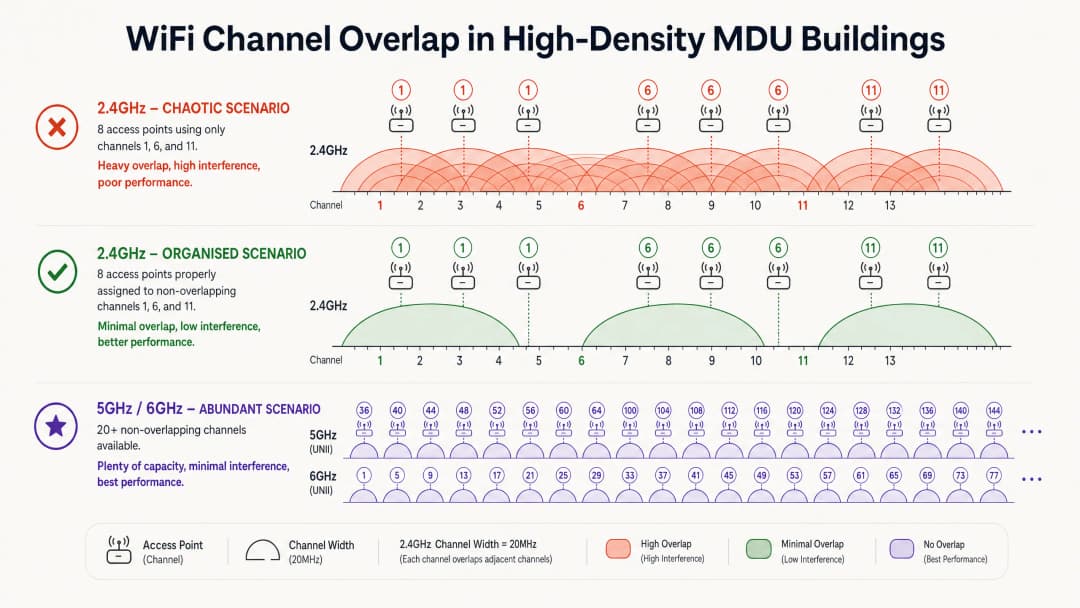
Warum das Hinzufügen von mehr Access Points alles nur noch schlimmer macht
\nDas Hinzufügen weiterer APs zur Verbesserung der Abdeckung ist ein häufiger Reflex. In hochverdichteten MDUs geht dies oft nach hinten los. Jeder zusätzliche AP, der auf einem bereits überlasteten Kanal sendet, erhöht das allgemeine Interferenzniveau. Die Lösung ist nicht die Hardwaredichte, sondern die Kontrolle der HF-Umgebung.
Architektonischer Wandel: Von unmanaged zu zentral gesteuert
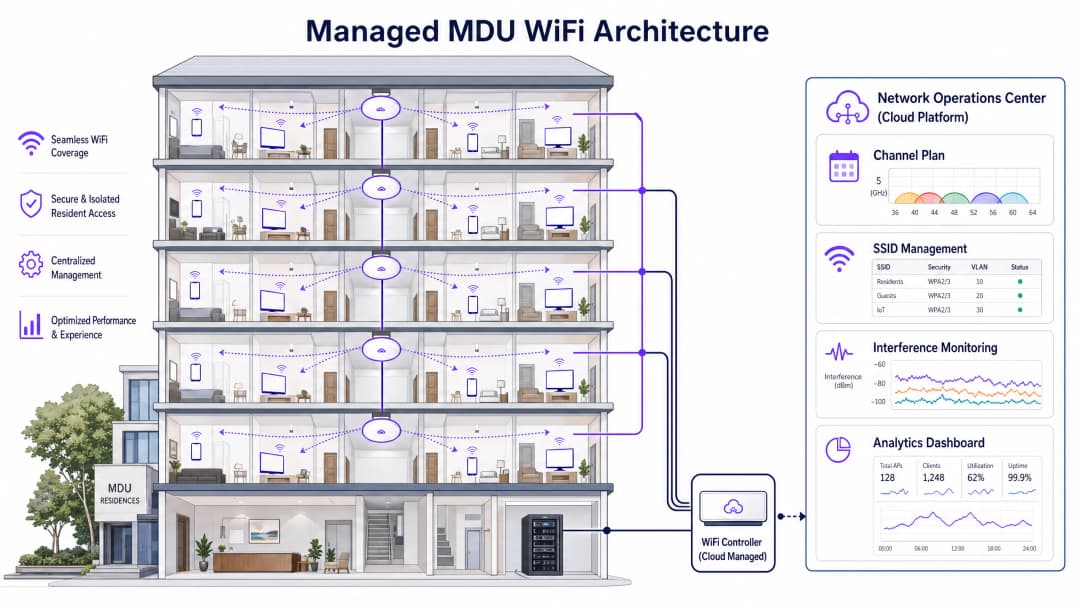
Die richtige Methodik erfordert den Verzicht auf individuelle Router der Mieter zugunsten einer einheitlichen, zentral verwalteten WLAN-Architektur. Der Einsatz von APs der Enterprise-Klasse - je nach Wanddämpfung typischerweise einer pro Wohneinheit oder einer pro zweiter Wohneinheit - ermöglicht es einem zentralen Controller, die gesamte HF-Umgebung zu steuern.
Zu den wichtigsten architektonischen Elementen einer verwalteten MDU-Bereitstellung gehören die folgenden:
| Element | Rolle | Auswirkung |
|---|---|---|
| Dynamic Radio Management (DRM) | Überwacht kontinuierlich die HF-Umgebung und passt Kanalbelegung sowie Sendeleistung an | Eliminiert CCI, indem sichergestellt wird, dass benachbarte APs niemals denselben Kanal nutzen |
| Band Steering | Drängt Dual-Band-Clients auf 5GHz/6GHz | Reduziert die Überlastung im gesättigten 2.4GHz-Band |
| 2.4GHz-Schachbrett-Deaktivierung | Deaktiviert 2.4GHz-Funkmodule auf abwechselnden APs | Verhindert 2.4GHz-CCI bei gleichzeitiger Aufrechterhaltung der Abdeckung für IoT-Geräte |
| Private Pre-Shared Keys (PPSK) | Weist jedem Mieter eindeutige Passphrasen zu, die isolierten VLANs zugeordnet sind | Bietet ein sicheres „Heimnetzwerk“-Erlebnis auf einer gemeinsam genutzten Infrastruktur |
| Minimum Basic Rate Tuning | Erhöht die minimale Verbindungsdatenrate (z. B. auf 12 oder 24 Mbps) | Zwingt „Sticky Clients“ zum Roaming zu näher gelegenen APs, was Sendezeit freisetzt |
5GHz und 6GHz: Der Weg in die Zukunft
Das 5GHz-Band bietet deutlich mehr überschneidungsfreie Kanäle - bis zu 25 in den Bändern UNII-1, UNII-2 und UNII-3. Wi-Fi 6E und Wi-Fi 7 erweitern dies noch weiter in das 6GHz-Band und bieten bis zu 59 zusätzliche 20MHz-Kanäle in einem sauberen, praktisch interferenzfreien Spektrum. Höhere Frequenzen werden jedoch durch Wände und Decken schneller gedämpft, was eine vorausschauende Standortvermessung (Predictive Site Survey), die die spezifischen Baumaterialien des MDU modelliert, vor der Bereitstellung unerlässlich macht.
Haben Sie Fragen zu Ihrem spezifischen Setup?
Unser Team arbeitet mit Standortbetreibern, IT-Managern und Netzwerktechnikern an über 80.000 Standorten zusammen. Buchen Sie ein 20-minütiges Gespräch und wir zeigen Ihnen, wie andere diese Herausforderungen gelöst haben.
Implementierungsleitfaden
Schritt 1: HF-Audit und vorausschauende Planung
Führen Sie vor der Montage eines APs ein vollständiges HF-Audit des vorhandenen Luftraums mit einem Spektrumanalysator durch. Dokumentieren Sie jede SSID, jeden Kanal und jede Signalstärke. Verwenden Sie anschließend Tools zur vorausschauenden Standortvermessung (Ekahau, Hamina), um die AP-Platzierung zu modellieren, und berücksichtigen Sie dabei die spezifischen Wanddämpfungswerte für die Bauweise des Gebäudes. Planen Sie für Kapazität, nicht nur für Abdeckung.
Schritt 2: Mieter-Mikrosegmentierung mit PPSK
Mieter erwarten, dass ihre Geräte - Smart-TVs, kabellose Lautsprecher, IoT-Geräte - lokal kommunizieren, genau wie bei einem Heimrouter. Die Implementierung von PPSK oder Multiple PSK (MPSK) ist von entscheidender Bedeutung. Jeder Mieter erhält ein einzigartiges Passwort; der Controller nutzt dieses, um alle seine Geräte dynamisch einem isolierten VLAN zuzuweisen. Dies ermöglicht ein Heimnetzwerk-Erlebnis auf einer gemeinsam genutzten Infrastruktur, ohne Hunderte von einzelnen SSIDs auszustrahlen, was andernfalls einen erheblichen Verwaltungsaufwand bedeuten würde. Dieser Ansatz unterstützt auch die Compliance-Überlegungen, die in Explain what is audit trail for IT Security in 2026 besprochen werden.
Schritt 3: AP-Platzierung und Funkkonfiguration
Bei Gebäuden mit Betonwänden platzieren Sie APs innerhalb der Wohneinheit statt im Flur. Die Platzierung von APs dort, wo sich die Clients befinden, minimiert Signalwege durch dämpfende Materialien. Konfigurieren Sie Folgendes:
- Kanalbreite: 20MHz auf 2,4GHz; 40MHz auf 5GHz bei Standarddichte; 20MHz auf 5GHz bei extrem hoher Dichte, um die Anzahl der überlappungsfreien Kanäle zu maximieren.
- Sendeleistung: Auf Auto oder Mittel einstellen. Hohe Leistung erhöht die Interferenzreichweite; geringere Leistung fördert ein ordnungsgemäßes Client-Roaming.
- 802.11k/v/r: Aktivieren Sie diese Roaming-Unterstützungsprotokolle, um sicherzustellen, dass Clients reibungslos und ohne Verbindungsabbrüche zwischen APs wechseln können.
Schritt 4: Kontinuierliche Überwachung und Optimierung
Richten Sie eine kontinuierliche HF-Überwachung mit den integrierten Tools des Controllers oder einer dedizierten Plattform ein. Zu den wichtigsten Kennzahlen, die verfolgt werden sollten, gehören die Airtime-Auslastung pro Kanal (Warnschwelle: >70 %), die SNR-Verteilung der Clients und die Anzahl nicht autorisierter APs. Plattformen, die WiFi Analytics bieten, können diese Erkenntnisse zusammen mit Daten zum Gästeverhalten hervorheben und so eine einheitliche betriebliche Sichtweise bieten.
Best Practices
Nutzen Sie 6GHz für die Zukunftssicherheit. Wo es das Budget erlaubt, sollten Sie WiFi 6E oder WiFi 7 APs bereitstellen. Das 6GHz-Band ist derzeit frei von Störungen durch ältere Geräte und eignet sich daher ideal für Anwendungen mit hoher Bandbreite und geringer Latenz.
Überprüfen Sie DFS-Kanäle vor der Bereitstellung. Im 5GHz-Band bieten DFS-Kanäle (Dynamic Frequency Selection) zusätzliche Kapazität, erfordern jedoch, dass APs den Kanal sofort verlassen, wenn Radaraktivitäten erkannt werden. In städtischen Umgebungen in der Nähe von Flughäfen oder Wetterstationen können DFS-Treffer zu häufigen Verbindungsabbrüchen bei Clients führen. Überwachen Sie die Umgebung vor der Aktivierung von DFS-Kanälen im Produktivbetrieb immer auf Radar.
Setzen Sie Richtlinien zur angemessenen Nutzung durch. Selbst bei einem verwalteten Netzwerk versuchen Mieter möglicherweise, eigene Router anzuschließen. Nutzen Sie die Funktionen des Wireless Intrusion Prevention System (WIPS), um nicht autorisierte APs zu erkennen und zu klassifizieren. Während eine aktive Deauthentifizierung von Mietergeräten rechtliche Fragen aufwirft, bietet eine Datenrichtlinie die Grundlage für die Durchsetzung.Einhaltung von Compliance-Standards. Stellen Sie bei MDUs im öffentlichen Sektor oder solchen, die einen gemeinsamen Gastzugang anbieten, sicher, dass die Netzwerkarchitektur mit der IWF Compliance für öffentliche WiFi Netzwerke in Großbritannien und den relevanten GDPR-Datenverarbeitungspflichten übereinstimmt. Für spanischsprachige Märkte siehe Cumplimiento IWF para redes WiFi públicas en el Reino Unido .
Fehlerbehebung und Risikominderung
Sticky-Client-Problem. Wenn Clients kein Roaming zu nahegelegenen APs durchführen, liegt die Hauptursache meist an einer zu hoch eingestellten Sendeleistung. Ein Client bleibt so lange mit einem weit entfernten AP verbunden, wie er ihn hören kann, selbst bei einer niedrigen Datenrate. Reduzieren Sie die Sendeleistung des APs und überprüfen Sie, ob 802.11v BSS Transition Management aktiviert ist.
Hohe Airtime-Auslastung bei wenigen Clients. Wenn ein Kanal eine Auslastung von über 80 % bei nur wenigen verbundenen Clients aufweist, ist die Ursache fast sicher CCI durch Rogue APs oder benachbarte verwaltete Netzwerke. Verwenden Sie einen Spektrumanalysator, um Störquellen zu identifizieren, und passen Sie die Kanalbelegungen entsprechend an.
Verbindungsfehler bei IoT-Geräten. Viele Smart-Home-Geräte unterstützen nur 2,4 GHz und kein WPA3. Richten Sie eine dedizierte 2,4 GHz SSID mit aktiviertem WPA2-Kompatibilitätsmodus ein, aber stellen Sie sicher, dass diese SSID nur von ausgewählten APs im Schachbrettmuster ausgestrahlt wird, um deren Interferenzbereich zu begrenzen. Für allgemeinere Überlegungen zur Netzwerksicherheitsarchitektur gelten die in Office Wi Fi: Optimise Your Modern Office Wi-Fi Network dargelegten Prinzipien gleichermaßen für MDU-Umgebungen.
ROI und geschäftliche Auswirkungen
Der Übergang zu einer verwalteten MDU-WiFi-Lösung verwandelt die Konnektivität von einem Kostenfaktor in einen umsatzgenerierenden Dienst. Das finanzielle Fundament basiert auf drei Säulen.
| Werttreiber | Kennzahl | Typisches Ergebnis |
|---|---|---|
| Reduzierte Support-OpEx | Monatliche Konnektivitätsbeschwerden | 80-94 % Reduzierung nach der Bereitstellung |
| Mieterbindung | Mietvertragsverlängerungsrate | Die WiFi-Qualität gehört in Bewohnerbefragungen zu den Top-3-Faktoren für die Bindung |
| Umsatzgenerierung | Gestaffelte Bandbreitenpakete | 20-35 % Akzeptanzrate der Premium-Stufe für 5 - 15 £/Monat |
| Immobilienwert | Smart-Building-Zertifizierung | Verwaltete Konnektivität unterstützt BREEAM- und WELL-Building-Standard-Punkte |
Für Betreiber im Bereich Healthcare und Transport , die MDU-ähnliche Umgebungen wie Krankenhausstationen oder Verkehrsknotenpunkte verwalten, sind die Compliance- und Betriebsvorteile gleichermaßen überzeugend. Ein verwaltetes Netzwerk bietet die für die regulatorische Compliance erforderlichen Audit-Trails und Zugriffskontrollen, während Guest WiFi -Plattformen eine zusätzliche Ebene für Datenerfassung und Engagement-Funktionen bieten, die messbare kommerzielle Erträge generieren.
Schlüsseldefinitionen
Gleichkanal-Interferenz (CCI)
Interferenz, die entsteht, wenn mehrere Access Points und Clients auf genau demselben Frequenzkanal arbeiten und somit gezwungen sind, über CSMA/CA um Sendezeit zu konkurrieren.
Die Hauptursache für langsames WiFi in unmanaged MDUs, wenn Dutzende von Routern standardmäßig auf Kanal 6 eingestellt sind. Eine hohe CCI wird durch eine hohe Airtime-Auslastung bei nur wenigen verbundenen Clients identifiziert.
Adjacent-Channel Interference (ACI)
Interferenz, die durch überlappende Signale von Kanälen verursacht wird, die frequenztechnisch nicht vollständig voneinander getrennt sind (z. B. die gleichzeitige Nutzung von Kanal 4 und Kanal 6 im 2,4-GHz-Band).
Häufig verursacht durch Mieter, die manuell Kanäle auswählen, die sie für "nicht überlastet" halten, die sich jedoch tatsächlich teilweise mit den standardmäßigen, überschneidungsfreien Kanälen überschneiden.
Private Pre-Shared Key (PPSK)
Ein Sicherheitsmechanismus, bei dem mehrere eindeutige Passphrasen auf einer einzigen SSID konfiguriert werden. Der Controller verwendet die vom Benutzer eingegebene spezifische Passphrase, um dessen Geräte dynamisch einem vordefinierten VLAN zuzuweisen.
Unerlässlich für MDU-Bereitstellungen, um sichere, isolierte Netzwerke pro Mieter auf einer gemeinsam genutzten Infrastruktur bereitzustellen, ohne Hunderte von separaten SSIDs auszustrahlen.
CSMA/CA (Carrier Sense Multiple Access with Collision Avoidance)
Das grundlegende Medienzugriffsprotokoll von 802.11 WiFi. Ein Gerät prüft den Kanal; hört es eine andere Übertragung, wartet es eine zufällige Backoff-Zeit ab, bevor es versucht zu senden.
Erklärt, warum eine hohe AP-Dichte auf einem gemeinsam genutzten Kanal zu Langsamkeit führt: Geräte verbringen mehr Zeit damit, auf freie Sendezeit zu warten, als tatsächlich Daten zu übertragen.
Band Steering
Eine Funktion des Controllers oder APs, die Dualband-fähige Clients davon abhält, sich mit dem 2,4-GHz-Band zu verbinden, indem Probe-Antworten verzögert oder zurückgehalten werden, um sie zu ermutigen, sich stattdessen mit dem weniger ausgelasteten 5-GHz- oder 6-GHz-Band zu verbinden.
Ein wichtiges Werkzeug zur Reduzierung der Überlastung im 2,4-GHz-Band in MDUs. Muss sorgfältig implementiert werden, um Verbindungsabbrüche bei IoT-Geräten zu vermeiden, die nur 2,4 GHz unterstützen.
Dynamic Frequency Selection (DFS)
Eine regulatorische Anforderung für 802.11-Geräte, die in bestimmten 5-GHz-Kanälen (UNII-2 und UNII-2 Extended) arbeiten, Radarsignale zu erkennen, den Kanal innerhalb von 10 Sekunden freizugeben und auf einen alternativen Kanal zu wechseln.
Ermöglicht den Zugriff auf zusätzliche 5-GHz-Kanäle für mehr Kapazität, kann jedoch zu Client-Verbindungsabbrüchen führen, wenn es in der Nähe von Flughäfen, militärischen Einrichtungen oder Wetterradarstationen eingesetzt wird.
Minimum Basic Rate
Die niedrigste Datenrate, bei der ein AP eine Client-Assoziierung akzeptiert oder Management-Frames überträgt. Das Erhöhen dieses Werts (z. B. von 1 Mbps auf 12 oder 24 Mbps) zwingt Clients, die mit niedrigen Datenraten arbeiten, die Verbindung zu trennen und zu einem näher gelegenen AP zu wechseln.
Ein kritischer Tuning-Parameter für Bereitstellungen mit hoher Dichte. Clients mit niedrigen Datenraten verbrauchen überproportional viel Sendezeit, was die Leistung für alle anderen Benutzer auf dem Kanal beeinträchtigt.
Airtime-Auslastung
Der prozentuale Anteil der Zeit, in dem ein bestimmter WiFi-Kanal durch Übertragungen (Daten, Management-Frames oder Interferenzen) belegt ist. Gemessen pro Funkmodul auf jedem AP.
Die wichtigste Metrik zur Diagnose von MDU-Interferenzen. Eine Auslastung von über 70 % auf einem beliebigen Kanal deutet auf eine schwere Überlastung hin. Eine Auslastung von über 90 % macht den Kanal praktisch unbrauchbar.
Dynamic Radio Management (DRM)
Eine Controller-Funktion, die die Kanalzuweisungen und Sendeleistungspegel von verwalteten APs basierend auf einer Echtzeit-Überwachung der HF-Umgebung automatisch und kontinuierlich anpasst.
Das Herzstück einer verwalteten MDU-Bereitstellung. DRM macht eine manuelle Kanalplanung überflüssig und passt sich an Änderungen der HF-Umgebung an (z. B. das Auftauchen neuer fremder APs).
Wireless Intrusion Prevention System (WIPS)
Ein System, das den drahtlosen Luftraum auf nicht autorisierte oder fremde Access Points und Clients überwacht, diese klassifiziert und Warnmeldungen für Netzwerkadministratoren generiert.
Wird in MDU-Umgebungen eingesetzt, um von Mietern installierte, nicht autorisierte Router zu erkennen, die den verwalteten Kanalplan untergraben und Interferenzen verursachen.
Ausgearbeitete Beispiele
In einem Luxusapartmentgebäude mit 300 Einheiten kommt es während der Hauptverkehrszeiten am Abend (18:00 - 22:00 Uhr) zu massiven Konnektivitätsproblemen. Die Mieter nutzen von den ISPs bereitgestellte Router, von denen die meisten standardmäßig im 2.4GHz-Band arbeiten. Ein RF-Audit zeigt allein auf Kanal 6 insgesamt 47 eindeutige SSIDs. Der Immobilienverwalter möchte eine verwaltete Lösung einführen, ohne dass die Mieter ihre Geräte wechseln müssen.
Phase 1 - RF-Design: Erstellung einer prädiktiven Standortanalyse mit Ekahau unter Berücksichtigung der spezifischen Wanddämpfung des Gebäudes (Trockenbau vs. Beton). Planung eines AP pro Einheit, der innerhalb der Einheit in der Nähe des Hauptwohnbereichs platziert wird. Phase 2 - Hardware-Bereitstellung: Installation von Dual-Band WiFi 6 APs. Verbindung aller APs mit einem zentralen, in der Cloud verwalteten Controller. Phase 3 - Funkkonfiguration: Deaktivierung des 2.4GHz-Funks auf 50 % der APs in einem versetzten Schachbrettmuster. Einstellung der 5GHz-Kanalbreiten auf 40MHz. Konfiguration des Dynamic Radio Management des Controllers für die automatische Zuweisung von Kanälen und Leistungsstufen. Phase 4 - Segmentierung der Mieter: Implementierung von PPSK. Ausgabe einer eindeutigen Passphrase an jeden Mieter. Alle Mietergeräte authentifizieren sich an einer einzigen SSID, werden jedoch dynamisch isolierten VLANs zugewiesen. Phase 5 - Übergang: Mitteilung an die Mieter, dass das Gebäude-WiFi nun in den Nebenkosten enthalten ist. Bereitstellung einer einfachen Anleitung zur Verbindung ihrer Geräte. Phase 6 - Überwachung: Einrichtung von Warnmeldungen bei einer Airtime-Auslastung von über 70 % auf einem beliebigen Kanal. Wöchentliche Überprüfung der Berichte über unerlaubte APs im ersten Monat.
Ein Anbieter von Studentenunterkünften mit 450 Betten erhält Beschwerden, dass die WiFi-Geschwindigkeiten tagsüber akzeptabel, aber nach 21:00 Uhr unbrauchbar sind. Die bestehende Infrastruktur nutzt auf den Fluren montierte APs mit einem starren Kanalplan. Das Gebäude hat Betonwände zwischen den Zimmern.
Die Platzierung der APs im Flur ist der primäre architektonische Fehler. Betonwände dämpfen das Signal zwischen dem AP und dem Gerät des Studenten, was Verbindungen mit niedrigen Datenraten erzwingt. Verbindungen mit niedriger Datenrate verbrauchen unverhältnismäßig viel Airtime und beeinträchtigen die Leistung für alle Nutzer auf dem Kanal. Empfohlene Behebung: 1. Verlegung der APs in die Zimmer (ein AP pro Zimmer oder ein AP für zwei Zimmer, je nach Zimmergröße). 2. Erhöhung der minimalen Basisdatenrate auf 24 Mbps, um Clients zu höheren Datenraten zu zwingen. 3. Implementierung von Band Steering, um 5GHz-fähige Geräte aus dem überlasteten 2.4GHz-Band zu verlagern. 4. Aktivierung von 802.11k/v zur Unterstützung des Roamings zwischen den APs im Zimmer. 5. Einführung einer auf PPSK basierenden VLAN-Struktur pro Zimmer, um die geräteübergreifende Erkennung zwischen den Zimmern zu verhindern.
Übungsfragen
Q1. Sie stellen WiFi in einem 10-stöckigen Studentenwohnheim mit dicken Betonwänden zwischen den Zimmern bereit. Ihr ursprünglicher Entwurf sieht APs in den Fluren vor, einer pro Etage. Die Bewohner beklagen sich über schlechte Geschwindigkeiten in ihren Zimmern. Was ist die Hauptursache und was ist die richtige Behebung?
Hinweis: Berücksichtigen Sie die Auswirkungen der Dämpfung durch Betonwände auf die Signalstärke und die Datenrate sowie die Frage, wie sich niedrige Datenraten auf die gemeinsam genutzte Sendezeit auswirken.
Musterlösung anzeigen
Die Hauptursache ist, dass Betonwände das Signal zwischen dem Flur-AP und dem Gerät des Studenten stark dämpfen. Geräte in den Zimmern verbinden sich mit sehr niedrigen Datenraten (z. B. 6 Mbps oder weniger). Da WiFi ein gemeinsam genutztes Medium ist, verbraucht ein Gerät, das mit 6 Mbps überträgt, viel mehr Airtime als ein Gerät mit 300 Mbps, was die Leistung für alle Benutzer an diesem AP verschlechtert. Die richtige Behebung besteht darin, die APs in die Zimmer zu verlegen (In-Room-Bereitstellung), um den AP dort zu platzieren, wo sich die Clients befinden, und die Betonwand aus dem primären Signalpfad zu entfernen. Erhöhen Sie außerdem die minimale Basisrate auf 24 Mbps, um Verbindungen mit niedrigen Raten zu verhindern, und aktivieren Sie Band-Steering, um 5GHz-fähige Geräte aus dem 2.4GHz-Band zu drängen.
Q2. Ein Hausverwalter möchte ein "Heimnetzwerk"-Erlebnis anbieten, bei dem ein Mieter von seinem Telefon auf seinen Apple TV streamen und seine intelligente Steckdose steuern kann, aber Mieter A darf die Geräte von Mieter B nicht sehen oder darauf zugreifen können. Das Gebäude verfügt über eine einzige verwaltete SSID. Welche Technologie muss implementiert werden und wie funktioniert sie?
Hinweis: Überlegen Sie, wie Sie Benutzer auf einer einzigen, gemeinsam genutzten drahtlosen Infrastruktur segmentieren können, ohne Hunderte von separaten SSIDs zu erstellen.
Musterlösung anzeigen
Implementieren Sie PPSK (Private Pre-Shared Keys) oder MPSK (Multiple PSK). Das Gebäude strahlt eine einzige SSID aus. Jedem Mieter wird eine eindeutige Passphrase zugewiesen. Wenn sich das Gerät eines Mieters verbindet und seine Passphrase eingibt, validiert der Controller diese und weist alle Geräte, die diese Passphrase verwenden, dynamisch einem dedizierten, isolierten VLAN zu. Geräte innerhalb desselben VLANs können lokal kommunizieren (was Streaming und Smart-Home-Steuerung ermöglicht), während Geräte in verschiedenen VLANs auf Layer 2 voneinander isoliert sind. Dies bietet das Heimnetzwerk-Erlebnis ohne den Verwaltungsaufwand von Hunderten separater SSIDs und ohne das Sicherheitsrisiko einer einzigen gemeinsam genutzten Passphrase.
Q3. Ihr Controller-Dashboard zeigt eine Airtime-Auslastung von 87% auf Kanal 6 im Ostflügel eines Apartmentgebäudes mit 200 Einheiten, obwohl nur 8 Clients aktiv mit Ihren verwalteten APs auf diesem Kanal verbunden sind. Was ist die wahrscheinlichste Ursache und was sind Ihre nächsten zwei Diagnoseschritte?
Hinweis: Die Airtime-Auslastung spiegelt alle 802.11-Aktivitäten auf dem Kanal wider, nicht nur den Datenverkehr von Ihren verwalteten Clients.
Musterlösung anzeigen
Die wahrscheinlichste Ursache sind schwere Co-Kanal-Interferenzen (CCI) durch fremde APs - im Besitz der Mieter befindliche Router -, die auf Kanal 6 im Ostflügel betrieben werden. Ihre verwalteten APs hören diese fremden Übertragungen und verzögern ihre eigenen Übertragungen über CSMA/CA, was die Auslastung selbst bei wenigen aktiven verwalteten Clients in die Höhe treibt. Diagnoseschritt 1: Verwenden Sie das WIPS des Controllers oder einen Spektrumanalysator, um fremde APs zu identifizieren und zu zählen, die auf Kanal 6 im Ostflügel betrieben werden. Diagnoseschritt 2: Weisen Sie das Dynamic Radio Management des Controllers an, Ihre verwalteten APs im Ostflügel auf Kanal 1 oder Kanal 11 umzustellen, um der Interferenz zu entgehen. Überwachen Sie die Airtime-Auslastung nach dem Kanalwechsel, um die Verbesserung zu bestätigen.
Q4. Sie beraten einen Hausverwalter bei der Frage, ob DFS-Kanäle im 5GHz-Band aktiviert werden sollen, um die Kapazität in einem Apartmentkomplex mit 180 Einheiten zu erhöhen, der sich 2 km von einem Regionalflughafen entfernt befindet. Was ist Ihre Empfehlung und warum?
Hinweis: Berücksichtigen Sie die regulatorischen Anforderungen von DFS und die betrieblichen Auswirkungen von radar-ausgelösten Kanalwechseln.
Musterlösung anzeigen
Es wird dringend davon abgeraten, DFS-Kanäle zu aktivieren, ohne vorher eine 48 bis 72-stündige passive Radar-Überwachung des Luftraums durchzuführen. DFS-Kanäle (UNII-2 und UNII-2 Extended) erfordern, dass APs den Kanal innerhalb von 10 Sekunden verlassen, wenn Radar-Aktivitäten erkannt werden. Ein regionaler Flughafen in 2 km Entfernung wird mit hoher Wahrscheinlichkeit Radar-Rückwürfe erzeugen, die DFS-Ereignisse auslösen. Jeder DFS-Treffer zwingt alle Clients auf diesem Kanal zur Trennung und zum erneuten Verbinden auf einem neuen Kanal, was zu einer schlechten Benutzererfahrung führt. Die Empfehlung lautet, zunächst die Nutzung von Nicht-DFS-5GHz-Kanälen (UNII-1: Kanäle 36, 40, 44, 48) und dem 6GHz-Band zu maximieren, falls WiFi 6E APs bereitgestellt werden. Aktivieren Sie DFS-Kanäle erst, wenn die Radar-Überwachung bestätigt, dass der Luftraum sauber ist.
Weiterlesen in dieser Reihe
Entwurf von WiFi Netzwerken für Bürogebäude mit mehreren Mietern
Dieser Leitfaden bietet IT-Managern, Netzwerkarchitekten und CTOs ein herstellerneutrales Konzept für den Entwurf skalierbarer, sicherer und isolierter WiFi Netzwerke in Bürogebäuden mit mehreren Mietern. Er behandelt VLAN-Segmentierung nach IEEE 802.1Q, dynamische VLAN-Zuweisung über 802.1X und RADIUS, RF-Planung für Umgebungen mit hoher Dichte sowie Compliance-Anforderungen unter GDPR und PCI-DSS. Betreiber von Veranstaltungsorten und Gebäudemanager finden hier praxisnahe Architektur-Richtlinien, reale Fallstudien und Konfigurationsfehler, die es vor der Bereitstellung zu vermeiden gilt.
Mean Time to Innocence: Wie Sie beweisen, dass es nicht am WiFi liegt
Die Mean Time to Innocence (MTTI) ist die entscheidende Kennzahl dafür, wie viel Zeit IT-Teams damit verbringen, zu beweisen, dass ein Netzwerkproblem nicht ihre Schuld ist. Dieser Leitfaden beschreibt eine fünfstufige Observability-Methodik, um gegenseitige Schuldzuweisungen in Multi-Tenant-Umgebungen zu eliminieren und das Fingerzeigen durch gemeinsame Beweise zu ersetzen, um die Mean Time to Resolution (MTTR) zu senken.
Rechtliche und Compliance-Anforderungen für gemeinsam genutzte WiFi-Infrastrukturen
Dieser maßgebliche technische Leitfaden beschreibt die kritischen rechtlichen, regulatorischen und architektonischen Anforderungen für die Bereitstellung und Verwaltung gemeinsam genutzter WiFi-Infrastrukturen. Er bietet IT-Managern, Netzwerkarchitekten und Standortbetreibern praxisnahe Frameworks zur Gewährleistung eines robusten Datenschutzes, strenger Compliance bei der Zahlungssicherheit und einer leistungsstarken Mandantentrennung unter Verwendung von Enterprise-Standards.
Haben Sie Fragen zu Ihrem spezifischen Setup?
Unser Team arbeitet mit Standortbetreibern, IT-Managern und Netzwerktechnikern an über 80.000 Standorten zusammen. Buchen Sie ein 20-minütiges Gespräch und wir zeigen Ihnen, wie andere diese Herausforderungen gelöst haben.