
Resolución de interferencias de WiFi en edificios MDU de alta densidad
Esta guía de referencia técnica proporciona a los responsables de TI y operadores de propiedades estrategias prácticas para eliminar las interferencias de WiFi en edificios multifamiliares (MDU) de alta densidad. Cubre las causas fundamentales de la interferencia de cocanal y de canal adyacente, el cambio de arquitectura hacia una infraestructura WLAN gestionada de forma centralizada y las técnicas seguras de aislamiento de inquilinos. La implementación de estas estrategias reduce los costes de soporte, mejora la satisfacción de los inquilinos y transforma la conectividad en un servicio que genera ingresos.
Escuchar esta guía
Ver transcripción del podcast
📚 Parte de nuestra serie principal: Multi-Tenant WiFi Guide →

Resumen ejecutivo
Para los responsables de TI y directores de operaciones de instalaciones que gestionan unidades plurifamiliares (MDU) de alta densidad (como complejos de apartamentos, residencias de estudiantes y complejos turísticos de lujo), un sistema WiFi no gestionado representa una grave responsabilidad operativa. Cuando cientos de inquilinos instalan routers de consumo en estrecha proximidad, la interferencia resultante en canales adyacentes y cocanal degrada el rendimiento en toda la propiedad. Esta guía detalla la arquitectura técnica necesaria para realizar la transición de redes caóticas gestionadas por los inquilinos a una infraestructura WiFi empresarial de control centralizado. Al implementar una gestión dinámica de RF, una redirección de banda agresiva y una microsegmentación segura a través de claves privadas compartidas previamente (PPSK), los operadores pueden mitigar las interferencias, reducir los costes de soporte y transformar el WiFi de ser una fuente constante de quejas a un servicio de valor añadido. Este enfoque se alinea con las estrategias de conectividad más amplias en los sectores de Hostelería y Retail , donde una conectividad fluida y fiable es la piedra angular de la experiencia del huésped e impacta directamente en los ingresos.
Análisis técnico detallado
Comprender la intersección entre la física de propagación de RF y las limitaciones del protocolo 802.11 es el requisito previo para resolver el desafío fundamental en entornos MDU de alta densidad.
El dilema de los 2.4GHz: un espectro congestionado
En escenarios no gestionados, los routers de los inquilinos suelen configurarse por defecto a la máxima potencia de transmisión en la banda de 2.4GHz. Con solo tres canales que no se superponen disponibles (los canales 1, 6 y 11), los puntos de acceso inevitablemente comparten el espectro. Cuando varios AP funcionan en el mismo canal dentro del alcance de radio de los demás, crean interferencia cocanal (CCI).
Debido a que el WiFi utiliza CSMA/CA (Carrier Sense Multiple Access with Collision Avoidance) (un protocolo de "escuchar antes de hablar"), los dispositivos deben esperar a que el canal esté libre antes de transmitir. En un edificio donde sesenta routers compiten por el tiempo de emisión en el canal 6, los dispositivos pasan más tiempo esperando que transmitiendo. Esta disputa, más que el simple ruido de la señal, es el principal factor de la degradación del rendimiento en los escenarios de interferencia de WiFi en edificios de apartamentos.
Para profundizar en cómo interactúan las bandas de frecuencia, lea nuestra guía sobre Frecuencias de WiFi: una guía de frecuencias de WiFi en 2026 .
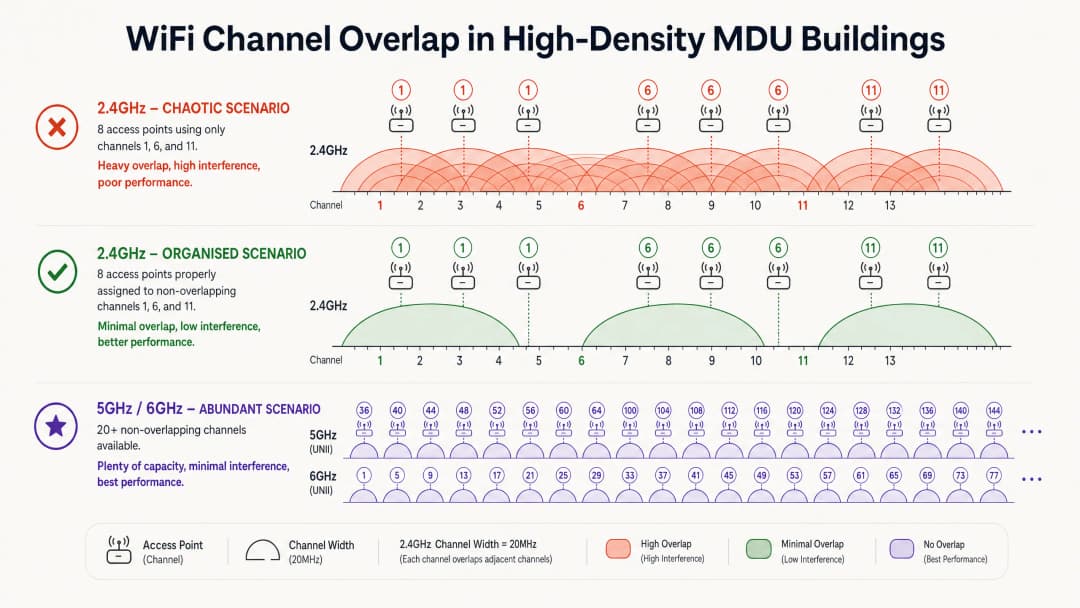
Por qué añadir más puntos de acceso empeora la situación
Añadir más AP para mejorar la cobertura es un instinto común. En los MDU de alta densidad, esto suele ser contraproducente. Cada AP adicional que transmite en un canal ya congestionado aumenta el umbral de interferencia global. La solución no es la densidad de hardware, sino el control del entorno de RF.
Cambio arquitectónico: De no gestionado a controlado de forma centralizada
La metodología correcta requiere descartar los routers individuales de los inquilinos en favor de una arquitectura WLAN unificada y gestionada de forma centralizada. El despliegue de AP de nivel empresarial - normalmente uno por unidad o uno cada dos unidades, dependiendo de la atenuación de las paredes - permite a un controlador central gestionar todo el entorno de RF.
Los elementos arquitectónicos clave de un despliegue de MDU gestionado incluyen los siguientes.
| Elemento | Función | Impacto |
|---|---|---|
| Gestión Dinámica de Radio (DRM) | Monitoriza continuamente la RF y ajusta la asignación de canales y la potencia de transmisión | Elimina la CCI garantizando que los AP adyacentes nunca compartan canal |
| Band Steering | Empuja a los clientes de doble banda a 5GHz/6GHz | Reduce la congestión en la saturada banda de 2.4GHz |
| Poda en tablero de ajedrez de 2.4GHz | Desactiva las radios de 2.4GHz en AP alternos | Evita la CCI de 2.4GHz mientras mantiene la cobertura para dispositivos IoT |
| Private Pre-Shared Keys (PPSK) | Asigna frases de contraseña únicas para cada inquilino, mapeadas a VLANs aisladas | Ofrece una experiencia de "red doméstica" segura en una infraestructura compartida |
| Ajuste de la tasa básica mínima | Aumenta la tasa de datos de conexión mínima (por ejemplo, a 12 o 24 Mbps) | Obliga a los clientes persistentes a realizar roaming a los AP más cercanos, liberando tiempo de aire |
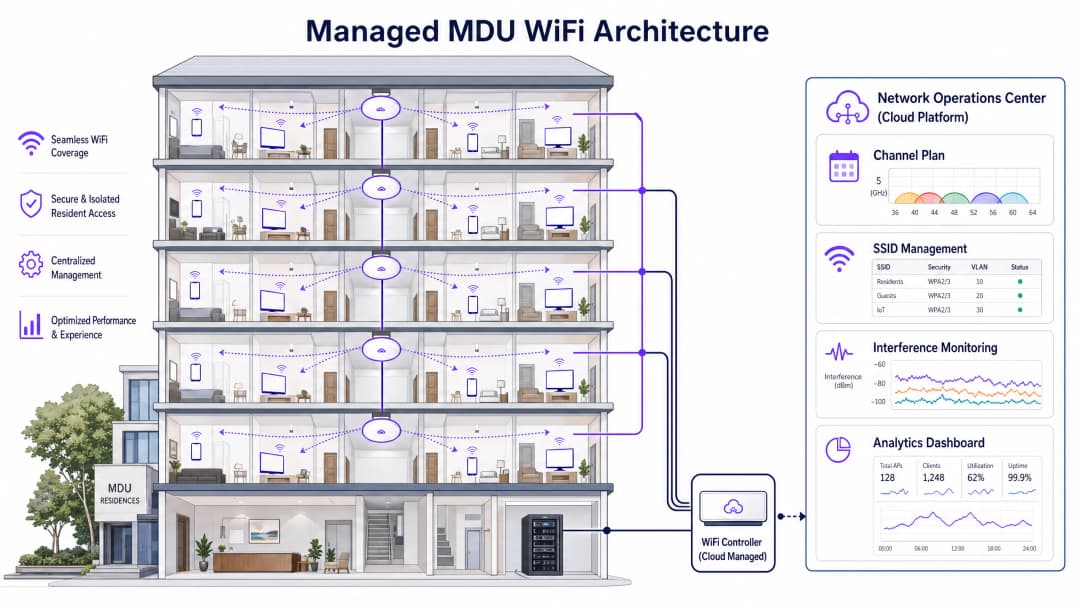
5GHz y 6GHz: El camino a seguir
La banda de 5GHz ofrece significativamente más canales no superpuestos - hasta 25 en las bandas UNII-1, UNII-2 y UNII-3. Wi-Fi 6E y Wi-Fi 7 amplían esto aún más en la banda de 6GHz, proporcionando hasta 59 canales adicionales de 20MHz de espectro limpio y prácticamente libre de interferencias. Sin embargo, las frecuencias más altas se atenúan más rápido a través de paredes y suelos, por lo que es esencial realizar un estudio predictivo del sitio que modele los materiales de construcción específicos del MDU antes del despliegue.
¿Tiene preguntas sobre su configuración específica?
Nuestro equipo trabaja con operadores de recintos, responsables de TI e ingenieros de redes en 80 000 espacios. Reserve una llamada de 20 minutos y le mostraremos cómo lo han solucionado otros profesionales como usted.
Guía de implementación
Paso 1: Auditoría de RF y diseño predictivo
Antes de montar un AP, realice una auditoría completa de RF del espacio aéreo existente utilizando un analizador de espectro. Documente cada SSID, canal y fuerza de señal. A continuación, utilice herramientas de estudio predictivo del sitio (Ekahau, Hamina) para modelar la ubicación de los AP, teniendo en cuenta los valores específicos de atenuación de las paredes para la construcción del edificio. Diseñe para la capacidad, no solo para la cobertura.
Paso 2: Microsegmentación de inquilinos con PPSK
Los inquilinos esperan que sus dispositivos (televisores inteligentes, altavoces inalámbricos, dispositivos IoT) se comuniquen localmente, tal como lo harían en un router doméstico. Implementar PPSK o Multiple PSK (MPSK) es extremadamente crucial. Cada inquilino recibe una contraseña única; el controlador la utiliza para asignar dinámicamente todos sus dispositivos a una VLAN aislada. Esto ofrece una experiencia de red doméstica en una infraestructura compartida sin necesidad de transmitir cientos de SSIDs individuales, lo que de otro modo crearía una carga de gestión significativa. Este enfoque también respalda las consideraciones de cumplimiento analizadas en Explain what is audit trail for IT Security in 2026 .
Paso 3: Ubicación de los AP y configuración de radio
En edificios con paredes de hormigón, coloque los AP dentro de la vivienda en lugar de en el pasillo. Colocar los AP donde se encuentran los clientes minimiza la trayectoria de la señal a través de materiales atenuantes. Configure lo siguiente:
- Ancho de canal: 20MHz en 2.4GHz; 40MHz en 5GHz en densidad estándar; 20MHz en 5GHz en densidad extrema para maximizar el número de canales que no se superponen.
- Potencia de transmisión: Establézcala en Auto o Media. Una potencia alta aumenta el rango de interferencia; una potencia más baja fomenta una itinerancia adecuada de los clientes.
- 802.11k/v/r: Habilite estos protocolos de asistencia a la itinerancia para garantizar que los clientes puedan realizar la transición de manera fluida entre los AP sin caídas de conexión.
Paso 4: Monitorización y optimización continuas
Establezca una monitorización de RF continua utilizando las herramientas integradas del controlador o una plataforma dedicada. Las métricas clave que se deben seguir incluyen la utilización del tiempo de aire por canal (umbral de alerta: >70%), la distribución de la SNR del cliente y el recuento de AP no autorizados. Las plataformas que ofrecen WiFi Analytics pueden destacar estos datos junto con la información sobre el comportamiento de los invitados, proporcionando una vista operativa unificada.
Buenas prácticas
Aproveche la banda de 6GHz para prepararse para el futuro. Siempre que el presupuesto lo permita, implemente AP con WiFi 6E o WiFi 7. Actualmente, la banda de 6GHz está libre de interferencias de dispositivos heredados, lo que la hace ideal para aplicaciones de gran ancho de banda y sensibles a la latencia.
Audite los canales DFS antes de la implementación. En la banda de 5GHz, los canales de Selección Dinámica de Frecuencia (DFS) ofrecen capacidad adicional, pero requieren que los AP abandonen el canal de inmediato si se detecta actividad de radar. En entornos urbanos cercanos a aeropuertos o estaciones meteorológicas, las detecciones de DFS pueden provocar desconexiones frecuentes de los clientes. Supervise siempre la presencia de radares antes de habilitar los canales DFS en producción.
Aplique políticas de uso aceptable. Incluso con una red gestionada, los inquilinos pueden intentar conectar sus propios routers. Utilice las funciones del Sistema de Prevención de Intrusiones Inalámbricas (WIPS) para detectar y clasificar los AP no autorizados. Aunque la desautenticación activa de los dispositivos de los inquilinos plantea consideraciones legales, contar con una política de datos proporciona una base para su cumplimiento.Cumpla con las normas de conformidad. En el caso de las MDU del sector público o aquellas que ofrecen acceso compartido para invitados, asegúrese de que la arquitectura de red se ajuste al Cumplimiento IWF para redes WiFi públicas en el Reino Unido y a las obligaciones pertinentes de tratamiento de datos de la GDPR. Para los mercados de habla hispana, consulte Cumplimiento IWF para redes WiFi públicas en el Reino Unido .
Resolución de problemas y mitigación de riesgos
Problema de clientes pegajosos (sticky clients). Si los clientes no realizan roaming a los AP cercanos, la causa principal suele ser que la potencia de transmisión está configurada demasiado alta. Un cliente permanecerá asociado a un AP lejano mientras pueda escucharlo, incluso a una tasa de datos baja. Reduzca la potencia de transmisión del AP y verifique que el protocolo 802.11v BSS Transition Management esté habilitado.
Alta utilización de tiempo de aire con pocos clientes. Si un canal muestra una utilización superior al 80% con solo unos pocos clientes conectados, la causa es casi seguro la interferencia de canal adyacente o cocanal (CCI) procedente de AP no autorizados o redes gestionadas vecinas. Utilice un analizador de espectro para identificar las fuentes de interferencia y ajuste la asignación de canales en consecuencia.
Fallo de conectividad de dispositivos IoT. Muchos dispositivos domésticos inteligentes solo admiten 2.4GHz y no son compatibles con WPA3. Mantenga un SSID dedicado de 2.4GHz con el modo de compatibilidad WPA2 habilitado, pero asegúrese de que este SSID solo se transmita desde AP seleccionados en un patrón alterno para limitar su huella de interferencia. Para consideraciones más amplias sobre la arquitectura de seguridad de la red, los principios descritos en Office Wi Fi: Optimise Your Modern Office Wi-Fi Network se aplican igualmente a los entornos MDU.
ROI e impacto empresarial
La transición a una solución de WiFi gestionada para MDU convierte la conectividad de un centro de costes en un servicio que genera ingresos. Su base financiera se asienta sobre tres pilares.
| Impulsor de valor | Métrica | Resultado típico |
|---|---|---|
| OpEx de soporte reducido | Reclamaciones de conectividad mensuales | Reducción del 80-94% tras el despliegue |
| Retención de inquilinos | Tasa de renovación de contratos de alquiler | La calidad del WiFi es uno de los 3 factores de retención principales en las encuestas a residentes |
| Generación de ingresos | Paquetes de ancho de banda por niveles | Tasa de adopción del nivel premium de 5 a 15 £/mes del 20-35% |
| Valor de la propiedad | Certificación de edificio inteligente | La conectividad gestionada respalda los créditos BREEAM y WELL Building Standard |
Para los operadores de Sanidad y Transporte que gestionan entornos de tipo MDU, como salas de hospitales o centros de tránsito, las ventajas operativas y de cumplimiento son igualmente atractivas. Una red gestionada proporciona los registros de auditoría y los controles de acceso necesarios para el cumplimiento normativo, mientras que las plataformas de Guest WiFi añaden una capa de captura de datos y funciones de interacción que generan retornos comerciales cuantificables.
Definiciones clave
Interferencia de cocanal (CCI)
Interferencia causada cuando múltiples puntos de acceso y clientes funcionan en el mismo canal de frecuencia exacto, obligándoles a competir por el tiempo de aire a través de CSMA/CA.
La causa principal de un WiFi lento en MDU no gestionados donde docenas de routers se configuran por defecto en el canal 6. Un CCI alto se identifica por una alta utilización de tiempo de aire con pocos clientes conectados.
Interferencia de canal adyacente (ACI)
Interferencia causada por señales solapadas de canales que no están totalmente separados en frecuencia (por ejemplo, usar el canal 4 y el canal 6 simultáneamente en 2.4GHz).
A menudo causada por inquilinos que seleccionan manualmente canales que creen que están "libres" pero que en realidad se solapan parcialmente con los canales estándar no solapados.
Private Pre-Shared Key (PPSK)
Un mecanismo de seguridad en el que se configuran múltiples contraseñas únicas en un único SSID. El controlador utiliza la contraseña específica introducida por un usuario para asignar dinámicamente sus dispositivos a una VLAN predefinida.
Esencial para despliegues en MDU para proporcionar redes seguras y aisladas por inquilino en una infraestructura compartida sin transmitir cientos de SSID independientes.
CSMA/CA (Carrier Sense Multiple Access with Collision Avoidance)
El protocolo de acceso al medio fundamental de la norma 802.11 WiFi. Un dispositivo escucha el canal; si detecta otra transmisión, espera un periodo de retroceso aleatorio antes de intentar transmitir.
Explica por qué una alta densidad de AP en un canal compartido causa lentitud: los dispositivos pasan más tiempo esperando a que el tiempo de aire esté libre que transmitiendo datos realmente.
Band Steering
Una función del controlador o del AP que desaconseja a los clientes compatibles con doble banda conectarse a la banda de 2.4GHz retrasando o reteniendo las respuestas de sondeo, animándolos a asociarse con la radio de 5GHz o 6GHz menos congestionada.
Una herramienta clave para reducir la congestión de 2.4GHz en MDU. Debe implementarse con cuidado para evitar romper la conectividad de los dispositivos IoT que solo soportan 2.4GHz.
Dynamic Frequency Selection (DFS)
Un requisito regulatorio para los dispositivos 802.11 que funcionan en ciertos canales de 5GHz (UNII-2 y UNII-2 Extended) para detectar señales de radar y abandonar el canal en un plazo de 10 segundos, cambiando a un canal alternativo.
Proporciona acceso a canales de 5GHz adicionales para obtener más capacidad, pero puede causar desconexiones de clientes si se despliega cerca de aeropuertos, instalaciones militares o estaciones de radar meteorológico.
Tasa básica mínima
La tasa de datos más baja a la que un AP aceptará la asociación de un cliente o transmitirá tramas de gestión. Aumentar este valor (por ejemplo, de 1 Mbps a 12 o 24 Mbps) obliga a los clientes que funcionan a tasas de datos bajas a desconectarse y realizar roaming a un AP más cercano.
Un parámetro de ajuste crítico para despliegues de alta densidad. Los clientes con tasas bajas consumen tiempo de aire de manera desproporcionada, degradando el rendimiento para todos los demás usuarios del canal.
Utilización del tiempo de aire
El porcentaje de tiempo que un canal de WiFi específico está ocupado por transmisiones (datos, tramas de gestión o interferencias). Se mide por radio en cada AP.
La métrica más importante para diagnosticar interferencias en MDU. Una utilización superior al 70% en cualquier canal indica una congestión grave. Una utilización superior al 90% hace que el canal sea prácticamente inutilizable.
Dynamic Radio Management (DRM)
Una función del controlador que ajusta de forma automática y continua las asignaciones de canales y los niveles de potencia de transmisión de los AP gestionados en función de la monitorización en tiempo real del entorno de RF.
El motor de un despliegue gestionado de MDU. DRM elimina la necesidad de planificar los canales manualmente y se adapta a los cambios en el entorno de RF (por ejemplo, la aparición de nuevos AP no autorizados).
Wireless Intrusion Prevention System (WIPS)
Un sistema que monitoriza el espacio aéreo inalámbrico en busca de puntos de acceso y clientes no autorizados, clasificándolos y generando alertas para los administradores de red.
Se utiliza en entornos MDU para detectar routers no autorizados instalados por los inquilinos que perjudican el plan de canales gestionado y generan interferencias.
Ejemplos prácticos
Un edificio de apartamentos de lujo de 300 unidades experimenta graves problemas de conectividad durante las horas punta de la tarde (de 18:00 a 22:00). Los inquilinos utilizan routers proporcionados por sus ISP, la mayoría configurados por defecto en 2.4GHz. Una auditoría de RF revela 47 SSID únicos solo en el canal 6. El administrador de la propiedad desea desplegar una solución gestionada sin obligar a los inquilinos a cambiar sus dispositivos.
Fase 1 - Diseño de RF: Realizar un estudio predictivo de cobertura utilizando Ekahau, modelando la atenuación específica de las paredes del edificio (pladur frente a hormigón). Diseñar para un AP por unidad, ubicado dentro de la vivienda cerca de la sala de estar principal. Fase 2 - Despliegue de hardware: Desplegar APs de doble banda WiFi 6. Conectar todos los APs a un controlador central gestionado en la nube. Fase 3 - Configuración de radio: Desactivar la radio de 2.4GHz en el 50% de los APs siguiendo un patrón alterno de tablero de ajedrez. Configurar el ancho de canal de 5GHz a 40MHz. Configurar la gestión de radio dinámica del controlador para asignar automáticamente los canales y los niveles de potencia. Fase 4 - Segmentación de inquilinos: Implementar PPSK. Emitir una frase de contraseña única para cada inquilino. Todos los dispositivos de los inquilinos se autentican en un único SSID pero se asignan dinámicamente a VLANs aisladas. Fase 5 - Transición: Comunicar a los inquilinos que el WiFi del edificio ahora está incluido en los gastos de comunidad. Proporcionar una guía sencilla para conectar sus dispositivos. Fase 6 - Monitorización: Configurar alertas para cuando la utilización del tiempo de aire supere el 70% en cualquier canal. Revisar los informes de APs no autorizados semanalmente durante el primer mes.
Un proveedor de alojamiento para estudiantes con 450 camas recibe quejas de que la velocidad de la WiFi es aceptable durante el día pero inutilizable después de las 21:00. La infraestructura existente utiliza APs instalados en los pasillos con un plan de canales de tarifa plana. El edificio tiene paredes de hormigón entre las habitaciones.
La ubicación de los APs en los pasillos es el principal fallo arquitectónico. Las paredes de hormigón atenúan la señal entre el AP y el dispositivo del estudiante, forzando conexiones a bajas tasas de datos. Las conexiones con bajas tasas de datos consumen un tiempo de aire desproporcionado, degradando el rendimiento para todos los usuarios del canal. Solución recomendada: 1. Reubicar los APs dentro de las habitaciones (uno por habitación o uno cada dos habitaciones, según el tamaño de la habitación). 2. Aumentar la tasa básica mínima a 24 Mbps para obligar a los clientes a conectarse a tasas de datos más altas. 3. Implementar band steering para desviar los dispositivos compatibles con 5GHz de la congestionada banda de 2.4GHz. 4. Habilitar 802.11k/v para facilitar el roaming entre los APs de las habitaciones. 5. Introducir una estructura de VLAN por habitación basada en PPSK para evitar la detección de dispositivos entre habitaciones.
Preguntas de práctica
Q1. Está desplegando WiFi en un bloque de alojamiento para estudiantes de 10 plantas con gruesas paredes de hormigón entre las habitaciones. Su diseño inicial sitúa los AP en los pasillos, uno por planta. Los residentes se quejan de la baja velocidad dentro de sus habitaciones. ¿Cuál es la causa original y cuál es la solución correcta?
Sugerencia: Tenga en cuenta el impacto de la atenuación de las paredes de hormigón en la fuerza de la señal y la tasa de datos, y cómo las tasas de datos bajas afectan al tiempo de aire compartido de aire.
Ver respuesta modelo
La causa original es que las paredes de hormigón atenúan gravemente la señal entre el AP del pasillo y el dispositivo del estudiante. Los dispositivos dentro de las habitaciones se conectan a tasas de datos muy bajas (por ejemplo, 6 Mbps o menos). Dado que el WiFi es un medio compartido, un dispositivo que transmite a 6 Mbps consume mucho más tiempo de aire que uno a 300 Mbps, degradando el rendimiento para todos los usuarios de ese AP. La solución correcta es reubicar los AP dentro de las habitaciones (despliegue en la habitación), colocando el AP donde están los clientes y eliminando la pared de hormigón de la ruta principal de la señal. Además, se debe aumentar la tasa básica mínima a 24 Mbps para evitar asociaciones de baja velocidad y habilitar la redirección de banda (band steering) para desplazar los dispositivos compatibles con 5GHz fuera de la banda de 2.4GHz.
Q2. Un administrador de fincas quiere ofrecer una experiencia de "red doméstica" en la que un inquilino pueda transmitir desde su teléfono a su Apple TV y controlar su enchufe inteligente, pero el Inquilino A no debe poder ver ni acceder a los dispositivos del Inquilino B. La propiedad tiene un único SSID gestionado. ¿Qué tecnología se debe implementar y cómo funciona?
Sugerencia: Piense en cómo segmentar a los usuarios en una única infraestructura inalámbrica compartida sin crear cientos de SSID independientes.
Ver respuesta modelo
Implemente claves precompartidas privadas (PPSK) o PSK múltiple (MPSK). La propiedad emite un único SSID. A cada inquilino se le asigna una contraseña única. Cuando el dispositivo de un inquilino se conecta e introduce su contraseña, el controlador la valida y asigna dinámicamente todos los dispositivos que utilizan esa contraseña a una VLAN dedicada y aislada. Los dispositivos dentro de la misma VLAN pueden comunicarse localmente (lo que permite la transmisión y el control del hogar inteligente), mientras que los dispositivos de diferentes VLAN están aislados entre sí en la Capa 2. Esto proporciona la experiencia de red doméstica sin la sobrecarga de gestión de cientos de SSID independientes y sin el riesgo de seguridad de una única contraseña compartida.
Q3. El panel de control de su controlador muestra una utilización del tiempo de aire del 87% en el canal 6 en el ala este de un edificio de apartamentos de 200 viviendas, a pesar de que solo hay 8 clientes conectados activamente a sus AP gestionados en ese canal. ¿Cuál es la causa más probable y cuáles son sus dos siguientes pasos de diagnóstico?
Sugerencia: La utilización del tiempo de aire refleja toda la actividad 802.11 en el canal, no solo el tráfico de sus clientes gestionados.
Ver respuesta modelo
La causa más probable es una grave interferencia de canal compartido (CCI) procedente de AP no autorizados -routers propiedad de los inquilinos- que operan en el canal 6 en el ala este. Sus AP gestionados escuchan estas transmisiones no autorizadas y aplazan sus propias transmisiones mediante CSMA/CA, lo que eleva la utilización incluso con pocos clientes gestionados activos. Paso de diagnóstico 1: Utilice el WIPS del controlador o un analizador de espectro para identificar y contar los AP no autorizados que operan en el canal 6 en el ala este. Paso de diagnóstico 2: Indique a la gestión de radio dinámica del controlador que reasigne sus AP gestionados en el ala este al canal 1 o al canal 11 para escapar de la interferencia. Supervise la utilización del tiempo de aire después del cambio de canal para confirmar la mejora.
Q4. Está asesorando a un administrador de fincas sobre si habilitar los canales DFS en la banda de 5GHz para aumentar la capacidad en un complejo de apartamentos de 180 viviendas situado a 2 km de un aeropuerto regional. ¿Cuál es su recomendación y por qué?
Sugerencia: Considere los requisitos normativos de DFS y el impacto operativo de los cambios de canal provocados por radares.
Ver respuesta modelo
Recomiende no activar canales DFS sin realizar antes un escaneo pasivo de monitorización de radar del espacio aéreo durante 48 a 72 horas. Los canales DFS (UNII-2 y UNII-2 Extended) requieren que los AP abandonen el canal en un plazo de 10 segundos tras detectar actividad de radar. Es muy probable que un aeropuerto regional a 2 km de distancia genere ecos de radar que activen eventos DFS. Cada impacto de DFS obliga a todos los clientes de ese canal a desconectarse y volver a conectarse en un nuevo canal, lo que genera una mala experiencia de usuario. La recomendación es maximizar primero el uso de canales de 5GHz que no sean DFS (UNII-1: canales 36, 40, 44, 48) y la banda de 6GHz si se despliegan AP con WiFi 6E. Active los canales DFS solo si la monitorización de radar confirma que el espacio aéreo está limpio.
Continúe leyendo esta serie
Diseño de redes WiFi para edificios de oficinas multi-inquilino
Esta guía proporciona a directores de TI, arquitectos de redes y CTO una hoja de ruta neutral respecto al proveedor para diseñar redes WiFi escalables, seguras y aisladas en edificios de oficinas multi-inquilino. Cubre la segmentación de VLAN bajo IEEE 802.1Q, la asignación dinámica de VLAN mediante 802.1X y RADIUS, la planificación de RF para entornos de alta densidad y consideraciones de cumplimiento normativo bajo GDPR y PCI-DSS. Los operadores de recintos y gestores de edificios encontrarán orientación arquitectónica práctica, casos de estudio reales y errores de configuración que deben evitar antes de la implementación.
Mean time to innocence: cómo demostrar que no es el WiFi
El Mean time to innocence (MTTI) es la métrica fundamental que define cuánto tiempo dedican los equipos de TI a demostrar que un problema de red no es culpa suya. Esta guía detalla una metodología de observabilidad en cinco pasos para acabar con el juego de las acusaciones en entornos multi-tenant, sustituyendo los reproches por pruebas compartidas para reducir el tiempo medio de resolución (MTTR).
Requisitos legales y de cumplimiento para la infraestructura de WiFi compartido
Esta guía de referencia técnica autorizada describe los requisitos legales, normativos y de arquitectura críticos para implementar y gestionar infraestructuras de WiFi compartido. Proporciona a los responsables de TI, arquitectos de red y operadores de recintos marcos de trabajo prácticos para garantizar una sólida protección de datos, un estricto cumplimiento de la seguridad de los pagos y un aislamiento de inquilinos de alto rendimiento utilizando estándares empresariales.
¿Tiene preguntas sobre su configuración específica?
Nuestro equipo trabaja con operadores de recintos, responsables de TI e ingenieros de redes en 80 000 espacios. Reserve una llamada de 20 minutos y le mostraremos cómo lo han solucionado otros profesionales como usted.