
উচ্চ-ঘনত্বের MDU বিল্ডিংয়ে WiFi ইন্টারফারেন্স সমাধান করা
এই টেকনিক্যাল রেফারেন্স গাইডটি IT ম্যানেজার এবং প্রপার্টি অপারেটরদের উচ্চ-ঘনত্বের Multi-Dwelling Unit (MDU) বিল্ডিংয়ে WiFi ইন্টারফারেন্স দূর করার জন্য কার্যকরী কৌশল প্রদান করে। এটি কো-চ্যানেল এবং অ্যাডজাসেন্ট-চ্যানেল ইন্টারফারেন্সের মূল কারণ, সেন্ট্রালি ম্যানেজড WLAN ইনফ্রাস্ট্রাকচারে আর্কিটেকচারাল রূপান্তর এবং সুরক্ষিত টেন্যান্ট আইসোলেশন টেকনিকগুলি কভার করে। এই কৌশলগুলি বাস্তবায়ন করলে সাপোর্ট ওভারহেড হ্রাস পায়, টেন্যান্টদের সন্তুষ্টি উন্নত হয় এবং কানেক্টিভিটি একটি রেভিনিউ-জেনারেটিং ইউটিলিটিতে রূপান্তরিত হয়।
এই গাইডটি শুনুন
পডকাস্ট ট্রান্সক্রিপ্ট দেখুন
আমাদের মূল সিরিজের অংশ: Multi-Tenant WiFi Guide →

এক্সিকিউটিভ সামারি
উচ্চ-ঘনত্বের মাল্টি-ডুয়েলিং ইউনিট (MDU) — যেমন অ্যাপার্টমেন্ট কমপ্লেক্স, স্টুডেন্ট হাউজিং, লাক্সারি রিসোর্ট — পরিচালনাকারী আইটি ম্যানেজার এবং ভেন্যু অপারেশন ডিরেক্টরদের জন্য, আনম্যানেজড WiFi একটি গুরুতর অপারেশনাল দায়। যখন শত শত ভাড়াটিয়া কাছাকাছি দূরত্বের মধ্যে কনজিউমার-গ্রেড রাউটার স্থাপন করে, তখন এর ফলে সৃষ্ট কো-চ্যানেল এবং অ্যাডজাসেন্ট-চ্যানেল ইন্টারফারেন্স পুরো প্রপার্টির পারফরম্যান্সকে ব্যাহত করে। এই গাইডটি বিশৃঙ্খল, ভাড়াটিয়া-পরিচালিত নেটওয়ার্ক থেকে একটি কেন্দ্রীয়ভাবে নিয়ন্ত্রিত, এন্টারপ্রাইজ-গ্রেড WiFi ইনফ্রাস্ট্রাকচারে রূপান্তরের জন্য প্রয়োজনীয় টেকনিক্যাল আর্কিটেকচারের রূপরেখা দেয়। ডায়নামিক RF ম্যানেজমেন্ট, অ্যাগ্রেসিভ ব্যান্ড স্টিয়ারিং এবং প্রাইভেট প্রি-শেয়ার্ড কিস (PPSK)-এর মাধ্যমে সুরক্ষিত মাইক্রো-সেগমেন্টেশন বাস্তবায়নের মাধ্যমে, অপারেটররা ইন্টারফারেন্স কমাতে, সাপোর্ট ওভারহেড হ্রাস করতে এবং WiFi-কে একটি চিরস্থায়ী অভিযোগের বিষয় থেকে একটি ভ্যালু-অ্যাড ইউটিলিটিতে রূপান্তর করতে পারে। এই পদ্ধতিটি Hospitality এবং Retail-এর বৃহত্তর কানেক্টিভিটি কৌশলগুলির সাথে সামঞ্জস্যপূর্ণ, যেখানে নিরবচ্ছিন্ন, নির্ভরযোগ্য কানেক্টিভিটি অতিথিদের অভিজ্ঞতার ভিত্তি এবং সরাসরি আয়ের উপর প্রভাব ফেলে।
টেকনিক্যাল ডিপ-ডাইভ
উচ্চ-ঘনত্বের MDU পরিবেশে মৌলিক চ্যালেঞ্জ হলো RF প্রোপাগেশন ফিজিক্স এবং 802.11 প্রোটোকলের সীমাবদ্ধতার ছেদ। এটি সমাধান করার পূর্বশর্ত হলো এই বিষয়টি বোঝা।
2.4GHz সমস্যা: একটি অবরুদ্ধ স্পেকট্রাম
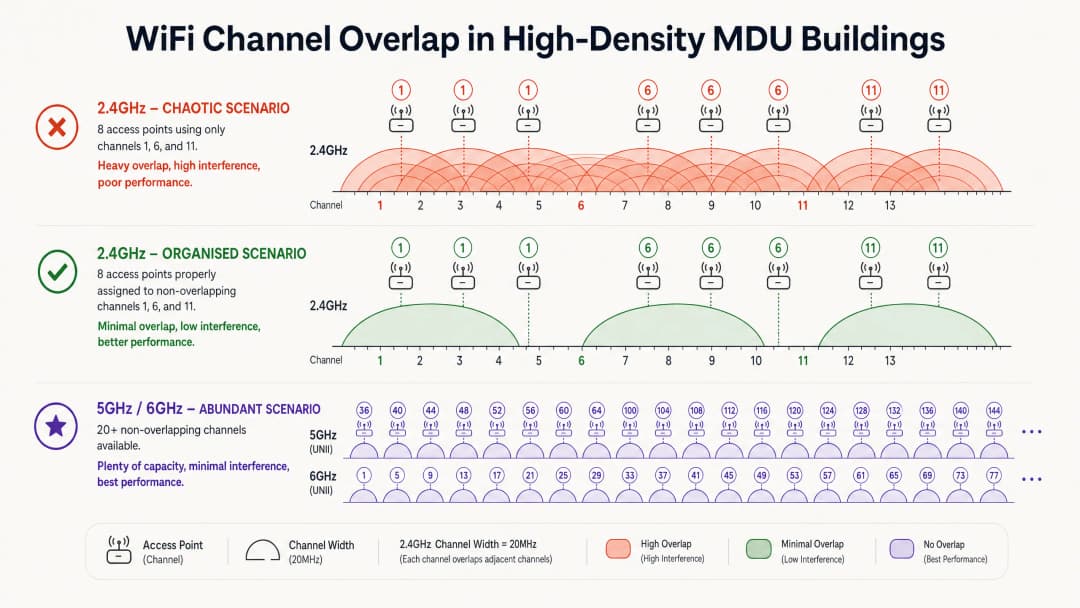
আনম্যানেজড পরিস্থিতিতে, ভাড়াটিয়াদের রাউটারগুলি সাধারণত 2.4GHz ব্যান্ডে সর্বোচ্চ传输 পাওয়ারে ডিফল্ট থাকে। মাত্র তিনটি নন-ওভারল্যাপিং চ্যানেল — চ্যানেল 1, 6 এবং 11 — উপলব্ধ থাকায়, অ্যাক্সেস পয়েন্টগুলি অনিবার্যভাবে স্পেকট্রাম শেয়ার করে। যখন একাধিক AP একে অপরের রেডিও রেঞ্জের মধ্যে একই চ্যানেলে কাজ করে, তখন তারা কো-চ্যানেল ইন্টারফারেন্স (CCI) তৈরি করে।
যেহেতু WiFi CSMA/CA (ক্যারিয়ার সেন্স মাল্টিপল অ্যাক্সেস উইথ কলিশন অ্যাভয়েডেন্স) — একটি "লিসেন-বিফোর-টক" প্রোটোকল — ব্যবহার করে, তাই ট্রান্সমিট করার আগে ডিভাইসগুলিকে চ্যানেলটি ক্লিয়ার হওয়ার জন্য অপেক্ষা করতে হয়। এমন একটি ভবনে যেখানে ষাটটি রাউটার চ্যানেল 6-এ এয়ারটাইমের জন্য প্রতিযোগিতা করছে, সেখানে ডিভাইসগুলি ট্রান্সমিট করার চেয়ে অপেক্ষা করতেই বেশি সময় ব্যয় করে। এই প্রতিযোগিতা, কেবল সিগন্যাল নয়েজ নয়, অ্যাপার্টমেন্ট ভবনে WiFi ইন্টারফারেন্সের পরিস্থিতিতে থ্রুপুট কমার প্রধান কারণ।
ফ্রিকোয়েন্সি ব্যান্ডগুলি কীভাবে ইন্টারঅ্যাক্ট করে সে সম্পর্কে আরও গভীরভাবে জানতে, Wi Fi Frequencies: A Guide to Wi-Fi Frequencies in 2026-এ আমাদের গাইডটি দেখুন।
কেন আরও অ্যাক্সেস পয়েন্ট যোগ করলে পরিস্থিতি আরও খারাপ হয়
কভারেজ উন্নত করার জন্য আরও AP যোগ করা একটি সাধারণ প্রবৃত্তি। উচ্চ-ঘনত্বের MDU-তে, এটি প্রায়শই বিপরীত ফল দেয়। ইতিমধ্যে কনজেস্টেড একটি চ্যানেলে সম্প্রচারকারী প্রতিটি অতিরিক্ত AP মোট ইন্টারফারেন্স ফ্লোর বাড়িয়ে দেয়। এর সমাধান হার্ডওয়্যারের ঘনত্ব নয়; এটি হলো RF পরিবেশের নিয়ন্ত্রণ।
আর্কিটেকচারাল পরিবর্তন: আনম্যানেজড থেকে সেন্ট্রালি কন্ট্রোলড
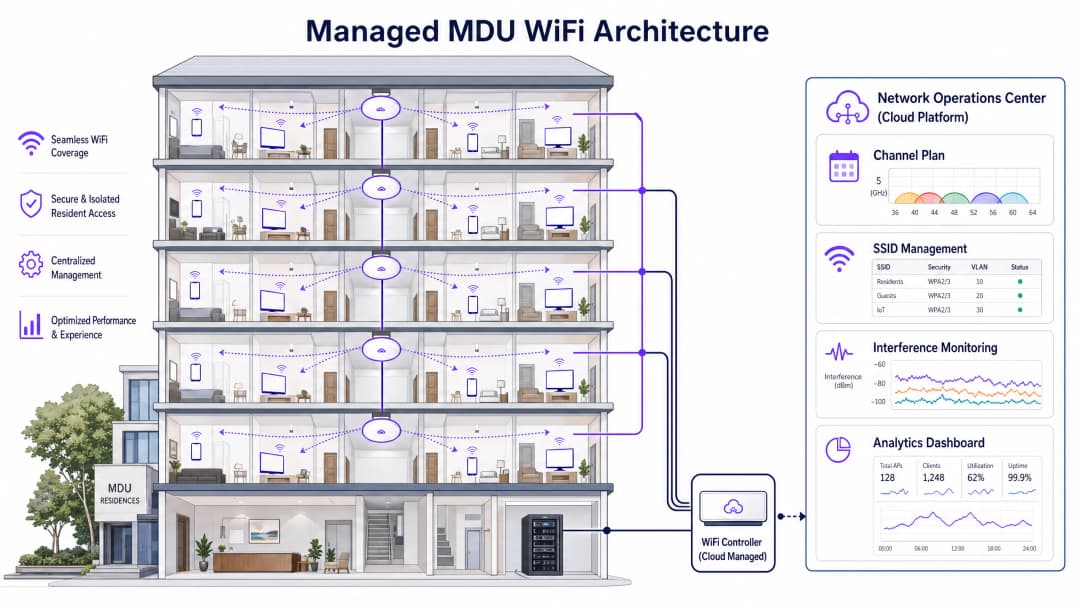
সঠিক পদ্ধতির জন্য একটি ইউনিফাইড, কেন্দ্রীয়ভাবে পরিচালিত WLAN আর্কিটেকচারের পক্ষে পৃথক ভাড়াটিয়া রাউটারগুলিকে বাতিল করা প্রয়োজন। এন্টারপ্রাইজ-গ্রেড AP স্থাপন করা — সাধারণত দেয়ালের অ্যাটেন্যুয়েশনের উপর নির্ভর করে প্রতি ইউনিটে একটি বা প্রতি দ্বিতীয় ইউনিটে একটি — একটি সেন্ট্রাল কন্ট্রোলারকে সম্পূর্ণ RF পরিবেশ পরিচালনা করার অনুমতি দেয়।
একটি পরিচালিত MDU ডিপ্লয়মেন্টের মূল আর্কিটেকচারাল উপাদানগুলির মধ্যে নিম্নলিখিতগুলি অন্তর্ভুক্ত রয়েছে।
| উপাদান | কাজ | প্রভাব |
|---|---|---|
| ডায়নামিক রেডিও ম্যানেজমেন্ট (DRM) | ক্রমাগত RF মনিটর করে এবং চ্যানেল অ্যাসাইনমেন্ট ও ট্রান্সমিট পাওয়ার অ্যাডজাস্ট করে | সংলগ্ন AP-গুলি যেন কখনও চ্যানেল শেয়ার না করে তা নিশ্চিত করে CCI দূর করে |
| ব্যান্ড স্টিয়ারিং | ডুয়াল-ব্যান্ড ক্লায়েন্টদের 5GHz/6GHz-এ পুশ করে | স্যাচুরেটেড 2.4GHz ব্যান্ডে কনজেশন কমায় |
| 2.4GHz চেকারবোর্ড প্রুনিং | অল্টারনেটিং AP-গুলিতে 2.4GHz রেডিও নিষ্ক্রিয় করে | IoT ডিভাইসের কভারেজ বজায় রেখে 2.4GHz CCI প্রতিরোধ করে |
| প্রাইভেট প্রি-শেয়ার্ড কিস (PPSK) | প্রতিটি ভাড়াটিয়ার জন্য ইউনিক পাসফ্রেজ অ্যাসাইন করে, যা আইসোলেটেড VLAN-এ ম্যাপ করা থাকে | শেয়ার্ড ইনফ্রাস্ট্রাকচারে সুরক্ষিত "হোম নেটওয়ার্ক" অভিজ্ঞতা প্রদান করে |
| মিনিমাম বেসিক রেট টিউনিং | ন্যূনতম কানেকশন ডেটা রেট বাড়ায় (যেমন, 12 বা 24 Mbps-এ) | স্টিকি ক্লায়েন্টদের কাছাকাছি AP-তে রোম করতে বাধ্য করে, এয়ারটাইম ফ্রি করে |
5GHz এবং 6GHz: সামনের পথ
5GHz ব্যান্ড উল্লেখযোগ্যভাবে বেশি নন-ওভারল্যাপিং চ্যানেল অফার করে — UNII-1, UNII-2 এবং UNII-3 ব্যান্ডে 25টি পর্যন্ত। WiFi 6E এবং WiFi 7 এটিকে 6GHz ব্যান্ডে আরও প্রসারিত করে, যা ক্লিন, মূলত ইন্টারফারেন্স-মুক্ত স্পেকট্রামের 59টি পর্যন্ত অতিরিক্ত 20MHz চ্যানেল প্রদান করে। তবে, উচ্চতর ফ্রিকোয়েন্সিগুলি দেয়াল এবং মেঝের মধ্য দিয়ে দ্রুত অ্যাটেন্যুয়েট (ক্ষীণ) হয়, যে কারণে ডিপ্লয়মেন্টের আগে MDU-এর নির্দিষ্ট নির্মাণ সামগ্রীর মডেলিং করে একটি প্রেডিক্টিভ সাইট সার্ভে করা অপরিহার্য।
আপনার নির্দিষ্ট সেটআপ নিয়ে কোনো প্রশ্ন আছে?
আমাদের টিম ৮০,০০০ ভেন্যুতে ভেন্যু অপারেটর, IT ম্যানেজার এবং নেটওয়ার্ক ইঞ্জিনিয়ারদের সাথে কাজ করে। একটি ২০ মিনিটের কল বুক করুন এবং আপনার মতো অন্যরা কীভাবে এর সমাধান করেছেন তা আমরা আপনাকে দেখাব।
ইমপ্লিমেন্টেশন গাইড
ধাপ ১: RF অডিট এবং প্রেডিক্টিভ ডিজাইন
একটি AP মাউন্ট করার আগে, স্পেকট্রাম অ্যানালাইজার ব্যবহার করে বিদ্যমান এয়ারস্পেসের একটি সম্পূর্ণ RF অডিট পরিচালনা করুন। প্রতিটি SSID, চ্যানেল এবং সিগন্যাল স্ট্রেন্থ ডকুমেন্ট করুন। তারপর ভবনের নির্মাণের জন্য নির্দিষ্ট দেয়াল অ্যাটেন্যুয়েশন মানগুলি বিবেচনা করে AP প্লেসমেন্ট মডেল করতে প্রেডিক্টিভ সাইট সার্ভে টুল (Ekahau, Hamina) ব্যবহার করুন। শুধুমাত্র কভারেজের জন্য নয়, ক্যাপাসিটি-র জন্য ডিজাইন করুন।
ধাপ ২: PPSK-এর সাথে টেন্যান্ট মাইক্রো-সেগমেন্টেশন
ভাড়াটিয়ারা আশা করে যে তাদের ডিভাইসগুলি — স্মার্ট টিভি, ওয়্যারলেস স্পিকার, IoT গ্যাজেট — স্থানীয়ভাবে যোগাযোগ করবে, ঠিক যেমনটি তারা একটি হোম রাউটারে করে। PPSK বা মাল্টিপল PSK (MPSK) বাস্তবায়ন করা অত্যন্ত গুরুত্বপূর্ণ। প্রতিটি ভাড়াটিয়া একটি ইউনিক পাসফ্রেজ পায়; কন্ট্রোলার এটি ব্যবহার করে তাদের সমস্ত ডিভাইসকে ডায়নামিকভাবে একটি আইসোলেটেড VLAN-এ অ্যাসাইন করে। এটি শত শত পৃথক SSID সম্প্রচার না করেই শেয়ার্ড ইনফ্রাস্ট্রাকচারে হোম নেটওয়ার্কের অভিজ্ঞতা প্রদান করে, যা অন্যথায় উল্লেখযোগ্য ম্যানেজমেন্ট ওভারহেড তৈরি করত। এই পদ্ধতিটি ২০২৬ সালে IT সিকিউরিটির জন্য অডিট ট্রেইল কী তা ব্যাখ্যা করুন-এ আলোচিত কমপ্লায়েন্স বিবেচনাগুলিকেও সমর্থন করে।
ধাপ ৩: AP প্লেসমেন্ট এবং রেডিও কনফিগারেশন
কংক্রিটের দেয়ালযুক্ত ভবনের জন্য, হলওয়ের পরিবর্তে ইউনিটের ভিতরে AP স্থাপন করুন। ক্লায়েন্টরা যেখানে থাকে সেখানে AP স্থাপন করলে অ্যাটেন্যুয়েটিং উপকরণের মধ্য দিয়ে সিগন্যাল পাথ ন্যূনতম হয়। নিম্নলিখিতগুলি কনফিগার করুন।
- চ্যানেল উইডথ: 2.4GHz-এ 20MHz; স্ট্যান্ডার্ড ডেনসিটিতে 5GHz-এ 40MHz; নন-ওভারল্যাপিং চ্যানেলের সংখ্যা সর্বাধিক করতে এক্সট্রিম ডেনসিটিতে 5GHz-এ 20MHz।
- ট্রান্সমিট পাওয়ার: অটো বা মিডিয়ামে সেট করুন। হাই পাওয়ার ইন্টারফারেন্স রেঞ্জ বাড়ায়; লোয়ার পাওয়ার সঠিক ক্লায়েন্ট রোমিংকে উৎসাহিত করে।
- 802.11k/v/r: কানেকশন ড্রপ না করে ক্লায়েন্টরা যাতে AP-গুলির মধ্যে মসৃণভাবে ট্রানজিশন করতে পারে তা নিশ্চিত করতে এই রোমিং অ্যাসিস্ট্যান্স প্রোটোকলগুলি সক্ষম করুন।
ধাপ ৪: চলমান মনিটরিং এবং অপ্টিমাইজেশন
কন্ট্রোলারের বিল্ট-ইন টুল বা একটি ডেডিকেটেড প্ল্যাটফর্মের মাধ্যমে অবিচ্ছিন্ন RF মনিটরিং স্থাপন করুন। ট্র্যাক করার জন্য মূল মেট্রিকগুলির মধ্যে রয়েছে প্রতি চ্যানেলে এয়ারটাইম ইউটিলাইজেশন (অ্যালার্ট থ্রেশহোল্ড: >70%), ক্লায়েন্ট SNR ডিস্ট্রিবিউশন এবং রোগ (rogue) AP কাউন্ট। WiFi অ্যানালিটিক্স অফার করা প্ল্যাটফর্মগুলি গেস্ট বিহেভিয়ার ডেটার পাশাপাশি এই ইনসাইটগুলি তুলে ধরতে পারে, যা একটি ইউনিফাইড অপারেশনাল ভিউ প্রদান করে।
বেস্ট প্র্যাকটিস
ফিউচার-প্রুফিংয়ের জন্য 6GHz কাজে লাগান। যেখানে বাজেট অনুমতি দেয়, সেখানে WiFi 6E বা WiFi 7 AP স্থাপন করুন। 6GHz ব্যান্ড বর্তমানে লিগ্যাসি ডিভাইসের ইন্টারফারেন্স থেকে মুক্ত, যা এটিকে হাই-ব্যান্ডউইথ, ল্যাটেন্সি-সেনসিটিভ অ্যাপ্লিকেশনের জন্য আদর্শ করে তোলে।
ব্যবহারের আগে DFS চ্যানেল অডিট করুন। 5GHz ব্যান্ডে ডায়নামিক ফ্রিকোয়েন্সি সিলেকশন (DFS) চ্যানেলগুলি অতিরিক্ত ক্যাপাসিটি প্রদান করে তবে রাডার অ্যাক্টিভিটি শনাক্ত হলে AP-গুলিকে অবিলম্বে চ্যানেলটি খালি করতে হয়। বিমানবন্দর বা আবহাওয়া স্টেশনগুলির কাছাকাছি শহুরে পরিবেশে, DFS হিট ঘনখণ্ড ক্লায়েন্ট ডিসকানেক্টের কারণ হতে পারে। প্রোডাকশনে DFS চ্যানেলগুলি সক্ষম করার আগে সর্বদা রাডারের জন্য মনিটর করুন।
অ্যাক্সেপ্টেবল ইউজ পলিসি প্রয়োগ করুন। এমনকি একটি পরিচালিত নেটওয়ার্ক থাকা সত্ত্বেও, ভাড়াটিয়ারা তাদের নিজস্ব রাউটার প্লাগ ইন করার চেষ্টা করতে পারে। রোগ (rogue) AP-গুলি শনাক্ত এবং শ্রেণীবদ্ধ করতে ওয়্যারলেস ইনট্রুশন প্রিভেনশন সিস্টেম (WIPS) সক্ষমতা ব্যবহার করুন। যদিও ভাড়াটিয়া ডিভাইসগুলির সক্রিয় ডি-অথেনটিকেশন আইনি বিবেচনার জন্ম দেয়, তবে ডেটা পলিসি প্রয়োগের জন্য ভিত্তি প্রদান করে।
কমপ্লায়েন্স স্ট্যান্ডার্ডের সাথে সামঞ্জস্য রাখুন। পাবলিক সেক্টরের MDU বা শেয়ার্ড গেস্ট অ্যাক্সেস অফার করে এমনগুলির জন্য, নিশ্চিত করুন যে নেটওয়ার্ক আর্কিটেকচার যুক্তরাজ্যে পাবলিক WiFi নেটওয়ার্কের জন্য IWF কমপ্লায়েন্স এবং প্রাসঙ্গিক GDPR ডেটা হ্যান্ডলিং বাধ্যবাধকতার সাথে সামঞ্জস্যপূর্ণ। স্প্যানিশ-ভাষার বাজারের জন্য, Cumplimiento IWF para redes WiFi públicas en el Reino Unido দেখুন।
ট্রাবলশুটিং এবং রিস্ক মিটিগেশন
স্টিকি ক্লায়েন্ট সমস্যা। যদি ক্লায়েন্টরা কাছাকাছি AP-তে রোম না করে, তবে এর প্রাথমিক কারণ সাধারণত ট্রান্সমিট পাওয়ার খুব বেশি সেট করা থাকে। একটি ক্লায়েন্ট যতক্ষণ পর্যন্ত এটি শুনতে পায়, এমনকি কম ডেটা রেটেও, একটি দূরবর্তী AP-এর সাথে যুক্ত থাকবে। AP ট্রান্সমিট পাওয়ার কমান এবং 802.11v BSS ট্রানজিশন ম্যানেজমেন্ট সক্ষম করা আছে কিনা তা যাচাই করুন।
অল্প ক্লায়েন্টের সাথে হাই এয়ারটাইম ইউটিলাইজেশন। যদি একটি চ্যানেল মাত্র কয়েকজন কানেক্টেড ক্লায়েন্টের সাথে 80%+ ইউটিলাইজেশন দেখায়, তবে এর কারণ প্রায় নিশ্চিতভাবেই রোগ (rogue) AP বা প্রতিবেশী পরিচালিত নেটওয়ার্কগুলি থেকে আসা CCI। ইন্টারফারেন্সের উৎস শনাক্ত করতে একটি স্পেকট্রাম অ্যানালাইজার ব্যবহার করুন এবং সেই অনুযায়ী চ্যানেল অ্যাসাইনমেন্ট অ্যাডজাস্ট করুন।
IoT ডিভাইস কানেক্টিভিটি ফেইলিওর। অনেক স্মার্ট হোম ডিভাইস শুধুমাত্র 2.4GHz সমর্থন করে এবং WPA3 সমর্থন করে না। WPA2 কম্প্যাটিবিলিটি মোড সক্ষম করে একটি ডেডিকেটেড 2.4GHz SSID বজায় রাখুন, তবে নিশ্চিত করুন যে এই SSID শুধুমাত্র প্রুনড চেকারবোর্ড AP-গুলি থেকে সম্প্রচারিত হয় যাতে এর ইন্টারফারেন্স ফুটপ্রিন্ট সীমিত থাকে। বৃহত্তর নেটওয়ার্ক সিকিউরিটি আর্কিটেকচার বিবেচনার জন্য, অফিস WiFi: আপনার আধুনিক অফিস WiFi নেটওয়ার্ক অপ্টিমাইজ করুন-এ বর্ণিত নীতিগুলি MDU পরিবেশের ক্ষেত্রেও সমানভাবে প্রযোজ্য।
ROI এবং বিজনেস ইমপ্যাক্ট
একটি পরিচালিত MDU WiFi সলিউশনে রূপান্তর কানেক্টিভিটিকে একটি কস্ট সেন্টার থেকে একটি রেভিনিউ-জেনারেটিং ইউটিলিটিতে পরিণত করে। এর আর্থিক ভিত্তি তিনটি স্তম্ভের উপর নির্মিত।
| ভ্যালু ড্রাইভার | মেট্রিক | সাধারণ ফলাফল |
|---|---|---|
| হ্রাসকৃত সাপোর্ট OpEx | মাসিক কানেক্টিভিটি অভিযোগ | ডিপ্লয়মেন্টের পর 80-94% হ্রাস |
| টেন্যান্ট রিটেনশন | লিজ রিনিউয়াল রেট | আবাসিক জরিপে WiFi-এর মান শীর্ষ-৩ রিটেনশন ফ্যাক্টরের একটি |
| রেভিনিউ জেনারেশন | টিয়ারড ব্যান্ডউইথ প্যাকেজ | £5-£15/মাস প্রিমিয়াম টিয়ার অ্যাডপশন রেট 20-35% |
| প্রপার্টি ভ্যালু | স্মার্ট বিল্ডিং সার্টিফিকেশন | পরিচালিত কানেক্টিভিটি BREEAM এবং WELL বিল্ডিং স্ট্যান্ডার্ড ক্রেডিট সমর্থন করে |
হাসপাতালের ওয়ার্ড বা ট্রানজিট হাবের মতো MDU-স্টাইলের পরিবেশ পরিচালনাকারী Healthcare এবং Transport অপারেটরদের জন্য, কমপ্লায়েন্স এবং অপারেশনাল সুবিধাগুলি সমানভাবে বাধ্যতামূলক। একটি পরিচালিত নেটওয়ার্ক রেগুলেটরি কমপ্লায়েন্সের জন্য প্রয়োজনীয় অডিট ট্রেইল এবং অ্যাক্সেস কন্ট্রোল প্রদান করে, যেখানে Guest WiFi প্ল্যাটফর্মগুলি ডেটা ক্যাপচার এবং এনগেজমেন্ট সক্ষমতার স্তর যুক্ত করে যা পরিমাপযোগ্য বাণিজ্যিক রিটার্ন নিয়ে আসে।
মূল সংজ্ঞাসমূহ
Co-Channel Interference (CCI)
যখন একাধিক অ্যাক্সেস পয়েন্ট এবং ক্লায়েন্ট ঠিক একই ফ্রিকোয়েন্সি চ্যানেলে কাজ করে, তখন সৃষ্ট ইন্টারফারেন্স, যা তাদের CSMA/CA-এর মাধ্যমে এয়ারটাইমের জন্য প্রতিযোগিতা করতে বাধ্য করে।
আনম্যানেজড MDU-তে ধীরগতির WiFi-এর প্রাথমিক কারণ যেখানে ডজন ডজন রাউটার ডিফল্টভাবে চ্যানেল ৬-এ থাকে। কম কানেক্টেড ক্লায়েন্ট থাকা সত্ত্বেও উচ্চ এয়ারটাইম ইউটিলাইজেশন দ্বারা উচ্চ CCI চিহ্নিত করা হয়।
Adjacent-Channel Interference (ACI)
ফ্রিকোয়েন্সিতে সম্পূর্ণরূপে পৃথক নয় এমন চ্যানেলগুলোর ওভারল্যাপিং সিগন্যাল দ্বারা সৃষ্ট ইন্টারফারেন্স (যেমন, 2.4GHz-এ একই সাথে চ্যানেল ৪ এবং চ্যানেল ৬ ব্যবহার করা)।
প্রায়শই ভাড়াটেদের ম্যানুয়ালি এমন চ্যানেল নির্বাচন করার কারণে ঘটে যা তারা মনে করে 'ভিড়মুক্ত' কিন্তু আসলে স্ট্যান্ডার্ড নন-ওভারল্যাপিং চ্যানেলগুলোর সাথে আংশিকভাবে ওভারল্যাপ করে।
Private Pre-Shared Key (PPSK)
একটি সিকিউরিটি মেকানিজম যেখানে একটি একক SSID-তে একাধিক ইউনিক পাসফ্রেজ কনফিগার করা হয়। ব্যবহারকারীর দেওয়া নির্দিষ্ট পাসফ্রেজটি ব্যবহার করে কন্ট্রোলার ডায়নামিকভাবে তাদের ডিভাইসগুলোকে একটি পূর্ব-নির্ধারিত VLAN-এ অ্যাসাইন করে।
শত শত পৃথক SSID সম্প্রচার না করেই শেয়ার্ড ইনফ্রাস্ট্রাকচারে নিরাপদ, আইসোলেটেড প্রতি-ভাড়াটে নেটওয়ার্ক প্রদানের জন্য MDU ডিপ্লয়মেন্টের জন্য অপরিহার্য।
CSMA/CA (Carrier Sense Multiple Access with Collision Avoidance)
802.11 WiFi-এর মৌলিক মিডিয়াম অ্যাক্সেস প্রোটোকল। একটি ডিভাইস চ্যানেলটি শোনে; যদি এটি অন্য কোনো ট্রান্সমিশন শুনতে পায়, তবে এটি ট্রান্সমিট করার চেষ্টা করার আগে একটি র্যান্ডম ব্যাকঅফ পিরিয়ড পর্যন্ত অপেক্ষা করে।
শেয়ার্ড চ্যানেলে উচ্চ AP ঘনত্ব কেন ধীরগতির কারণ হয় তা ব্যাখ্যা করে: ডিভাইসগুলো আসলে ডেটা ট্রান্সমিট করার চেয়ে ক্লিয়ার এয়ারটাইমের জন্য অপেক্ষা করতে বেশি সময় ব্যয় করে।
Band Steering
একটি কন্ট্রোলার বা AP ফিচার যা ডুয়াল-ব্যান্ড সক্ষম ক্লায়েন্টদের প্রোব রেসপন্স বিলম্বিত বা আটকে রেখে 2.4GHz ব্যান্ডের সাথে কানেক্ট হতে নিরুৎসাহিত করে, যাতে তারা কম কনজেস্টেড 5GHz বা 6GHz রেডিওর সাথে যুক্ত হতে উৎসাহিত হয়।
MDU-তে 2.4GHz কনজেশন কমানোর একটি অন্যতম হাতিয়ার। শুধুমাত্র 2.4GHz সমর্থনকারী IoT ডিভাইসগুলোর কানেক্টিভিটি ব্যাহত হওয়া এড়াতে এটি সাবধানে ইমপ্লিমেন্ট করতে হবে।
Dynamic Frequency Selection (DFS)
নির্দিষ্ট 5GHz চ্যানেলে (UNII-2 এবং UNII-2 Extended) მოქმედ 802.11 ডিভাইসগুলোর জন্য একটি রেগুলেটরি বাধ্যবাধকতা যাতে রাডার সিগন্যাল শনাক্ত করা যায় এবং ১০ সেকেন্ডের মধ্যে চ্যানেলটি খালি করে একটি বিকল্প চ্যানেলে চলে যাওয়া যায়।
ক্যাপাসিটির জন্য অতিরিক্ত 5GHz চ্যানেলে অ্যাক্সেস প্রদান করে, তবে বিমানবন্দর, সামরিক স্থাপনা বা আবহাওয়া রাডার স্টেশনের কাছাকাছি ডিপ্লয় করা হলে ক্লায়েন্ট ডিসকানেক্টের কারণ হতে পারে।
Minimum Basic Rate
সর্বনিম্ন ডেটা রেট যেটিতে একটি AP ক্লায়েন্ট অ্যাসোসিয়েশন গ্রহণ করবে বা ম্যানেজমেন্ট ফ্রেম ট্রান্সমিট করবে। এই মানটি বৃদ্ধি করলে (যেমন, ১ Mbps থেকে ১২ বা ২৪ Mbps-এ) কম ডেটা রেটে চলা ক্লায়েন্টদের ডিসকানেক্ট হতে এবং কাছাকাছি কোনো AP-তে রোম করতে বাধ্য করে।
উচ্চ-ঘনত্বের ডিপ্লয়মেন্টের জন্য একটি অত্যন্ত গুরুত্বপূর্ণ টিউনিং প্যারামিটার। কম-রেটের ক্লায়েন্টরা অসম অনুপাতে এয়ারটাইম ব্যবহার করে, যা ওই চ্যানেলের অন্য সমস্ত ব্যবহারকারীর পারফরম্যান্স কমিয়ে দেয়।
Airtime Utilisation
একটি নির্দিষ্ট WiFi চ্যানেল ট্রান্সমিশন (ডেটা, ম্যানেজমেন্ট ফ্রেম বা ইন্টারফারেন্স) দ্বারা কত শতাংশ সময় দখল থাকে তার হার। প্রতিটি AP-এর প্রতি রেডিওতে পরিমাপ করা হয়।
MDU ইন্টারফারেন্স নির্ণয়ের জন্য সবচেয়ে গুরুত্বপূর্ণ মেট্রিক। যেকোনো চ্যানেলে ৭০%-এর বেশি ইউটিলাইজেশন মারাত্মক কনজেশন নির্দেশ করে। ৯০%-এর বেশি ইউটিলাইজেশন চ্যানেলটিকে কার্যত ব্যবহারের অনুপযোগী করে তোলে।
Dynamic Radio Management (DRM)
একটি কন্ট্রোলার ফিচার যা রিয়েল-টাইম RF পরিবেশ মনিটরিংয়ের ওপর ভিত্তি করে ম্যানেজড AP-গুলোর চ্যানেল অ্যাসাইনমেন্ট এবং ট্রান্সমিট পাওয়ার লেভেল স্বয়ংক্রিয়ভাবে এবং ক্রমাগত অ্যাডজাস্ট করে।
একটি ম্যানেজড MDU ডিপ্লয়মেন্টের ইঞ্জিন। DRM ম্যানুয়াল চ্যানেল প্ল্যানিংয়ের প্রয়োজনীয়তা দূর করে এবং RF পরিবেশের পরিবর্তনের সাথে (যেমন, নতুন রোগ AP-এর উপস্থিতি) খাপ খাইয়ে নেয়।
Wireless Intrusion Prevention System (WIPS)
একটি সিস্টেম যা অননুমোদিত বা রোগ (rogue) অ্যাক্সেস পয়েন্ট এবং ক্লায়েন্টদের জন্য ওয়্যারলেস এয়ারস্পেস মনিটর করে, সেগুলোকে শ্রেণীবদ্ধ করে এবং নেটওয়ার্ক অ্যাডমিনিস্ট্রেটরদের জন্য অ্যালার্ট তৈরি করে।
MDU পরিবেশে ভাড়াটেদের দ্বারা স্থাপিত রোগ (rogue) রাউটারগুলো শনাক্ত করতে ব্যবহৃত হয় যা ম্যানেজড চ্যানেল প্ল্যানকে ব্যাহত করে এবং ইন্টারফারেন্স তৈরি করে।
সমাধানকৃত উদাহরণসমূহ
একটি ৩০০-ইউনিটের লাক্সারি অ্যাপার্টমেন্ট বিল্ডিংয়ে সন্ধ্যার পিক আওয়ারে (সন্ধ্যা ৬টা - রাত ১০টা) মারাত্মক কানেক্টিভিটি সমস্যা দেখা দিচ্ছে। ভাড়াটেরা ISP-প্রদত্ত রাউটার ব্যবহার করছেন, যার বেশিরভাগই ডিফল্টভাবে 2.4GHz-এ সেট করা। একটি RF অডিটে দেখা গেছে যে শুধুমাত্র চ্যানেল ৬-এই ৪৭টি ইউনিক SSID রয়েছে। প্রপার্টি ম্যানেজার ভাড়াটেদের ডিভাইস পরিবর্তন না করেই একটি ম্যানেজড সলিউশন স্থাপন করতে চান।
ধাপ ১ - RF ডিজাইন: Ekahau ব্যবহার করে একটি প্রেডিক্টিভ সাইট সার্ভে করুন, যা বিল্ডিংয়ের নির্দিষ্ট দেয়াল অ্যাটেন্যুয়েশন (ড্রাইওয়াল বনাম কংক্রিট) মডেল করবে। প্রতি ইউনিটে একটি করে AP-এর জন্য ডিজাইন করুন, যা ইউনিটের ভেতরে মূল লিভিং এরিয়ার কাছাকাছি স্থাপন করা হবে। ধাপ ২ - হার্ডওয়্যার ডিপ্লয়মেন্ট: ডুয়াল-ব্যান্ড WiFi ৬ AP ডিপ্লয় করুন। সমস্ত AP একটি সেন্ট্রাল ক্লাউড-ম্যানেজড কন্ট্রোলারের সাথে কানেক্ট করুন। ধাপ ৩ - রেডিও কনফিগারেশন: একটি অল্টারনেটিং চেকারবোর্ড প্যাটার্নে ৫০% AP-তে 2.4GHz রেডিও নিষ্ক্রিয় করুন। 5GHz চ্যানেলের উইডথ ৪০MHz-এ সেট করুন। কন্ট্রোলারের ডায়নামিক রেডিও ম্যানেজমেন্টকে অটো-অ্যাসাইন চ্যানেল এবং পাওয়ার লেভেলে কনফিগার করুন। ধাপ ৪ - টেন্যান্ট সেগমেন্টেশন: PPSK ইমপ্লিমেন্ট করুন। প্রতিটি ভাড়াটেকে একটি ইউনিক পাসফ্রেজ দিন। সমস্ত ভাড়াটের ডিভাইস একটি একক SSID-তে অথেন্টিকেট হবে কিন্তু ডায়নামিকভাবে আইসোলেটেড VLAN-এ অ্যাসাইন হবে। ধাপ ৫ - ট্রানজিশন: ভাড়াটেদের জানান যে বিল্ডিংয়ের WiFi এখন সার্ভিস চার্জের অন্তর্ভুক্ত। তাদের ডিভাইস কানেক্ট করার জন্য একটি সহজ গাইড প্রদান করুন। ধাপ ৬ - মনিটরিং: যেকোনো চ্যানেলে এয়ারটাইম ইউটিলাইজেশন ৭০% অতিক্রম করলে অ্যালার্ট সেট করুন। প্রথম মাসের জন্য প্রতি সপ্তাহে রোগ (rogue) AP রিপোর্টগুলি পর্যালোচনা করুন।
একটি ৪৫০-বেডের স্টুডেন্ট অ্যাকোমোডেশন প্রোভাইডার অভিযোগ পাচ্ছে যে দিনের বেলা WiFi স্পিড ঠিকঠাক থাকলেও রাত ৯টার পর তা ব্যবহারের অনুপযোগী হয়ে পড়ে। বিদ্যমান ইনফ্রাস্ট্রাকচারে হলওয়েতে মাউন্ট করা AP এবং একটি ফ্ল্যাট-রেট চ্যানেল প্ল্যান ব্যবহার করা হচ্ছে। বিল্ডিংয়ের রুমগুলোর মাঝে কংক্রিটের দেয়াল রয়েছে।
হলওয়েতে AP স্থাপন করাই হলো প্রধান আর্কিটেকচারাল ত্রুটি। কংক্রিটের দেয়াল AP এবং শিক্ষার্থীর ডিভাইসের মধ্যকার সিগন্যালকে দুর্বল (attenuate) করে দিচ্ছে, যার ফলে কম ডেটা রেটে কানেক্ট হতে বাধ্য হচ্ছে। কম ডেটা রেটের কানেকশনগুলো অতিরিক্ত এয়ারটাইম ব্যবহার করে, যা ওই চ্যানেলের সমস্ত ব্যবহারকারীর পারফরম্যান্স কমিয়ে দেয়। সুপারিশকৃত সমাধান: ১. AP-গুলো রুমের ভেতরে স্থানান্তর করুন (রুমের আকারের ওপর ভিত্তি করে প্রতি রুমে একটি বা প্রতি দুটি রুমে একটি)। ২. ক্লায়েন্টদের উচ্চতর ডেটা রেটে বাধ্য করতে মিনিমাম বেসিক রেট ২৪ Mbps-এ বৃদ্ধি করুন। ৩. কনজেস্টেড 2.4GHz ব্যান্ড থেকে 5GHz-সক্ষম ডিভাইসগুলোকে সরিয়ে নিতে ব্যান্ড স্টিয়ারিং ইমপ্লিমেন্ট করুন। ৪. ইন-রুম AP-গুলোর মধ্যে রোমিংয়ে সহায়তা করতে 802.11k/v সক্ষম করুন। ৫. রুমের ডিভাইসগুলোর মধ্যে পারস্পরিক আবিষ্কার (discovery) রোধ করতে একটি PPSK-ভিত্তিক প্রতি-রুম VLAN স্ট্রাকচার চালু করুন।
অনুশীলনী প্রশ্নসমূহ
Q1. আপনি রুমগুলোর মাঝে পুরু কংক্রিটের দেয়াল বিশিষ্ট একটি ১০-তলা স্টুডেন্ট অ্যাকোমোডেশন ব্লকে WiFi ডিপ্লয় করছেন। আপনার প্রাথমিক ডিজাইনে করিডোরে প্রতি ফ্লোরে একটি করে AP রাখা হয়েছে। বাসিন্দারা তাদের রুমের ভেতরে ধীরগতির অভিযোগ করছেন। এর মূল কারণ কী এবং সঠিক প্রতিকার কী?
ইঙ্গিত: সিগন্যাল স্ট্রেন্থ এবং ডেটা রেটের ওপর কংক্রিটের দেয়ালের অ্যাটেন্যুয়েশনের প্রভাব এবং কীভাবে কম ডেটা রেট শেয়ার্ড এয়ারটাইমকে প্রভাবিত করে তা বিবেচনা করুন।
মডেল উত্তর দেখুন
মূল কারণ হলো কংক্রিটের দেয়াল করিডোরের AP এবং শিক্ষার্থীর ডিভাইসের মধ্যকার সিগন্যালকে মারাত্মকভাবে দুর্বল (attenuate) করে দিচ্ছে। রুমের ভেতরের ডিভাইসগুলো খুব কম ডেটা রেটে (যেমন, ৬ Mbps বা তার কম) কানেক্ট হচ্ছে। যেহেতু WiFi একটি শেয়ার্ড মিডিয়াম, তাই ৬ Mbps-এ ট্রান্সমিট করা একটি ডিভাইস ৩০০ Mbps-এর ডিভাইসের চেয়ে অনেক বেশি এয়ারটাইম ব্যবহার করে, যা ওই AP-র সমস্ত ব্যবহারকারীর পারফরম্যান্স কমিয়ে দেয়। সঠিক প্রতিকার হলো AP-গুলো রুমের ভেতরে স্থানান্তর করা (ইন-রুম ডিপ্লয়মেন্ট), ক্লায়েন্টরা যেখানে আছে সেখানে AP স্থাপন করা এবং প্রাথমিক সিগন্যাল পাথ থেকে কংক্রিটের দেয়ালের বাধা দূর করা। অতিরিক্তভাবে, কম-রেটের অ্যাসোসিয়েশন প্রতিরোধ করতে মিনিমাম বেসিক রেট ২৪ Mbps-এ উন্নীত করুন এবং 5GHz-সক্ষম ডিভাইসগুলোকে 2.4GHz ব্যান্ড থেকে সরিয়ে নিতে ব্যান্ড স্টিয়ারিং সক্ষম করুন।
Q2. একজন প্রপার্টি ম্যানেজার এমন একটি 'হোম নেটওয়ার্ক' অভিজ্ঞতা দিতে চান যেখানে একজন ভাড়াটে তাদের ফোন থেকে Apple TV-তে কাস্ট করতে পারবেন এবং তাদের স্মার্ট প্লাগ নিয়ন্ত্রণ করতে পারবেন, কিন্তু ভাড়াটে A যেন ভাড়াটে B-এর ডিভাইসগুলো দেখতে বা অ্যাক্সেস করতে না পারেন। প্রপার্টিতে একটি একক ম্যানেজড SSID রয়েছে। কোন প্রযুক্তিটি ইমপ্লিমেন্ট করতে হবে এবং এটি কীভাবে কাজ করে?
ইঙ্গিত: শত শত পৃথক SSID তৈরি না করে কীভাবে একটি একক শেয়ার্ড ওয়্যারলেস ইনফ্রাস্ট্রাকচারে ব্যবহারকারীদের সেগমেন্ট করা যায় তা চিন্তা করুন।
মডেল উত্তর দেখুন
Private Pre-Shared Keys (PPSK) বা Multiple PSK (MPSK) ইমপ্লিমেন্ট করুন। প্রপার্টিটি একটি একক SSID সম্প্রচার করে। প্রতিটি ভাড়াটেকে একটি ইউনিক পাসফ্রেজ দেওয়া হয়। যখন কোনো ভাড়াটের ডিভাইস কানেক্ট হয় এবং তাদের পাসফ্রেজটি প্রবেশ করায়, তখন কন্ট্রোলার এটি যাচাই করে এবং ওই পাসফ্রেজ ব্যবহারকারী সমস্ত ডিভাইসকে ডায়নামিকভাবে একটি ডেডিকেটেড, আইসোলেটেড VLAN-এ অ্যাসাইন করে। একই VLAN-এর ভেতরের ডিভাইসগুলো স্থানীয়ভাবে যোগাযোগ করতে পারে (কাস্টিং এবং স্মার্ট হোম কন্ট্রোল সক্ষম করে), অন্যদিকে বিভিন্ন VLAN-এর ডিভাইসগুলো লেয়ার ২-এ একে অপরের থেকে আইসোলেটেড থাকে। এটি শত শত পৃথক SSID-এর ম্যানেজমেন্ট ওভারহেড ছাড়াই এবং একটি একক শেয়ার্ড পাসফ্রেজের সিকিউরিটি রিস্ক ছাড়াই হোম নেটওয়ার্কের অভিজ্ঞতা প্রদান করে।
Q3. আপনার কন্ট্রোলার ড্যাশবোর্ড একটি ২০০-ইউনিটের অ্যাপার্টমেন্ট বিল্ডিংয়ের পূর্ব উইংয়ে চ্যানেল6-এ ৮৭% এয়ারটাইম ইউটিলাইজেশন দেখাচ্ছে, যদিও ওই চ্যানেলে আপনার ম্যানেজড AP-গুলোর সাথে মাত্র ৮টি ক্লায়েন্ট সক্রিয়ভাবে কানেক্টেড রয়েছে। এর সম্ভাব্য কারণ কী এবং আপনার পরবর্তী দুটি ডায়াগনস্টিক ধাপ কী কী?
ইঙ্গিত: এয়ারটাইম ইউটিলাইজেশন চ্যানেলের সমস্ত 802.11 অ্যাক্টিভিটি প্রতিফলিত করে, কেবল আপনার ম্যানেজড ক্লায়েন্টদের ট্রাফিক নয়।
মডেল উত্তর দেখুন
সবচেয়ে সম্ভাব্য কারণ হলো পূর্ব উইংয়ে চ্যানেল ৬-এ সক্রিয় থাকা রোগ (rogue) AP - অর্থাৎ ভাড়াটেদের নিজস্ব রাউটার - থেকে আসা মারাত্মক Co-Channel Interference (CCI)। আপনার ম্যানেজড AP-গুলো এই অননুমোদিত ট্রান্সমিশনগুলো শুনতে পাচ্ছে এবং CSMA/CA-এর মাধ্যমে নিজেদের ট্রান্সমিশন বিলম্বিত করছে, যার ফলে অল্প কয়েকজন সক্রিয় ম্যানেজড ক্লায়েন্ট থাকা সত্ত্বেও ইউটিলাইজেশন বৃদ্ধি পাচ্ছে। ডায়াগনস্টিক ধাপ ১: পূর্ব উইংয়ে চ্যানেল ৬-এ সক্রিয় রোগ AP-গুলো শনাক্ত ও গণনা করতে কন্ট্রোলারের WIPS বা একটি স্পেকট্রাম অ্যানালাইজার ব্যবহার করুন। ডায়াগনস্টিক ধাপ ২: ইন্টারফারেন্স এড়াতে পূর্ব উইংয়ে আপনার ম্যানেজড AP-গুলোকে চ্যানেল ১ বা চ্যানেল ১১-এ রিঅ্যাসাইন করতে কন্ট্রোলারের ডায়নামিক রেডিও ম্যানেজমেন্টকে নির্দেশ দিন। উন্নতি নিশ্চিত করতে চ্যানেল পরিবর্তনের পর এয়ারটাইম ইউটিলাইজেশন মনিটর করুন।
Q4. আপনি একজন প্রপার্টি ম্যানেজারকে একটি আঞ্চলিক বিমানবন্দর থেকে ২ কিমি দূরে অবস্থিত ১৮০-ইউনিটের অ্যাপার্টমেন্ট কমপ্লেক্সে ক্যাপাসিটি বাড়ানোর জন্য 5GHz ব্যান্ডে DFS চ্যানেল সক্ষম করা উচিত কিনা সে বিষয়ে পরামর্শ দিচ্ছেন। আপনার সুপারিশ কী এবং কেন?
ইঙ্গিত: DFS-এর রেগুলেটরি প্রয়োজনীয়তা এবং রাডার-ট্রিগার্ড চ্যানেল পরিবর্তনের অপারেশনাল প্রভাব বিবেচনা করুন।
মডেল উত্তর দেখুন
প্রথমে এয়ারস্পেসের একটি ৪৮-৭২ ঘণ্টার প্যাসিভ রাডার মনিটরিং স্ক্যান না করে DFS চ্যানেল সক্ষম না করার সুপারিশ করুন। DFS চ্যানেলগুলোর (UNII-2 এবং UNII-2 Extended) ক্ষেত্রে রাডার অ্যাক্টিভিটি শনাক্ত হওয়ার ১০ সেকেন্ডের মধ্যে AP-গুলোকে চ্যানেল খালি করতে হয়। ২ কিমি দূরের একটি আঞ্চলিক বিমানবন্দর থেকে রাডার রিটার্ন তৈরি হওয়ার উচ্চ সম্ভাবনা রয়েছে যা DFS ইভেন্টগুলোকে ট্রিগার করবে। প্রতিটি DFS হিট ওই চ্যানেলের সমস্ত ক্লায়েন্টকে ডিসকানেক্ট হতে এবং একটি নতুন চ্যানেলে পুনরায় কানেক্ট হতে বাধ্য করে, যা ব্যবহারকারীর অভিজ্ঞতাকে খারাপ করে তোলে। সুপারিশ হলো প্রথমে নন-DFS 5GHz চ্যানেলগুলোর (UNII-1: চ্যানেল ৩৬, ৪০, ৪৪, ৪৮) ব্যবহার সর্বাধিক করা এবং WiFi 6E AP ডিপ্লয় করা থাকলে 6GHz ব্যান্ডের ব্যবহার বাড়ানো। রাডার মনিটরিং যদি নিশ্চিত করে যে এয়ারস্পেসটি ক্লিন, শুধুমাত্র তখনই DFS চ্যানেল সক্ষম করুন।
এই সিরিজে পড়া চালিয়ে যান
Multi-Tenant অফিস বিল্ডিংয়ের জন্য WiFi নেটওয়ার্ক ডিজাইন করা
এই নির্দেশিকাটি IT ম্যানেজার, নেটওয়ার্ক আর্কিটেক্ট এবং CTO-দের মাল্টি-টেন্যান্ট অফিস বিল্ডিং জুড়ে স্কেলযোগ্য, নিরাপদ এবং বিচ্ছিন্ন WiFi নেটওয়ার্ক ডিজাইন করার জন্য একটি ভেন্ডর-নিরপেক্ষ ব্লুপ্রিন্ট প্রদান করে। এতে IEEE 802.1Q-এর অধীনে VLAN সেগমেন্টেশন, 802.1X এবং RADIUS-এর মাধ্যমে ডাইনামিক VLAN অ্যাসাইনমেন্ট, উচ্চ-ঘনত্বের পরিবেশের জন্য RF প্ল্যানিং এবং GDPR ও PCI-DSS-এর অধীনে কমপ্লায়েন্স সংক্রান্ত বিষয়গুলো কভার করা হয়েছে। ভেন্যু অপারেটর এবং বিল্ডিং ম্যানেজাররা এখানে কার্যকর আর্কিটেকচারাল নির্দেশিকা, বাস্তব-জগতের কেস স্টাডি এবং ডেপ্লয়মেন্টের আগে এড়ানোর মতো কনফিগারেশন ত্রুটিগুলো খুঁজে পাবেন।
Mean time to innocence: কীভাবে প্রমাণ করবেন যে এটি WiFi এর সমস্যা নয়
Mean time to innocence (MTTI) হলো একটি গুরুত্বপূর্ণ মেট্রিক যা নির্ধারণ করে যে IT টিমগুলো একটি নেটওয়ার্ক সমস্যা তাদের কারণে ঘটেনি তা প্রমাণ করতে কতটা সময় ব্যয় করে। এই নির্দেশিকাটি মাল্টি-টেন্যান্ট পরিবেশে দোষারোপের খেলা বন্ধ করতে এবং পারস্পরিক প্রমাণের মাধ্যমে সমাধান করার গড় সময় (MTTR) কমিয়ে আনতে একটি পাঁচ ধাপের অবজারভেবিলিটি পদ্ধতি বিস্তারিতভাবে আলোচনা করে।
ভাগ করা WiFi পরিকাঠামোর আইনি এবং সম্মতি সংক্রান্ত প্রয়োজনীয়তা
এই নির্ভরযোগ্য প্রযুক্তিগত রেফারেন্স গাইডটি ভাগ করা WiFi পরিকাঠামো স্থাপন এবং পরিচালনার জন্য অত্যন্ত গুরুত্বপূর্ণ আইনি, নিয়ন্ত্রণমূলক এবং আর্কিটেকচারাল প্রয়োজনীয়তার রূপরেখা প্রদান করে। এটি IT ম্যানেজার, নেটওয়ার্ক আর্কিটেক্ট এবং ভেন্যু অপারেটরদের এন্টারপ্রাইজ মানদণ্ড ব্যবহার করে শক্তিশালী ডেটা সুরক্ষা, কঠোর পেমেন্ট নিরাপত্তা সম্মতি এবং উচ্চ-ক্ষমতাসম্পন্ন টেন্যান্ট আইসোলেশন নিশ্চিত করার জন্য কার্যকর ফ্রেমওয়ার্ক সরবরাহ করে।
আপনার নির্দিষ্ট সেটআপ নিয়ে কোনো প্রশ্ন আছে?
আমাদের টিম ৮০,০০০ ভেন্যুতে ভেন্যু অপারেটর, IT ম্যানেজার এবং নেটওয়ার্ক ইঞ্জিনিয়ারদের সাথে কাজ করে। একটি ২০ মিনিটের কল বুক করুন এবং আপনার মতো অন্যরা কীভাবে এর সমাধান করেছেন তা আমরা আপনাকে দেখাব।