

WPA2 Enterprise: संपूर्ण मार्गदर्शक
हे मार्गदर्शक WPA2-Enterprise साठी एक सर्वसमावेशक तांत्रिक संदर्भ प्रदान करते, ज्यामध्ये 802.1X आर्किटेक्चर, EAP पद्धत निवड आणि एंटरप्राइझ वातावरणासाठी टप्प्याटप्प्याने अंमलबजावणी धोरणे समाविष्ट आहेत. हे IT व्यवस्थापक, नेटवर्क आर्किटेक्ट आणि ठिकाण संचालन संचालकांसाठी डिझाइन केले आहे ज्यांना सामायिक-की WiFi च्या पलीकडे जाऊन स्केलेबल, ऑडिट करण्यायोग्य आणि अनुपालन-तयार प्रमाणीकरण मॉडेलकडे जाण्याची आवश्यकता आहे. Purple चे प्लॅटफॉर्म मोठ्या प्रमाणावर सुरक्षित अतिथी आणि कर्मचारी WiFi तैनात करणाऱ्या ठिकाणांसाठी एक व्यावहारिक ओळख व्यवस्थापन स्तर म्हणून स्थित आहे.
🎧 हे मार्गदर्शक ऐका
ट्रान्सक्रिप्ट पहा
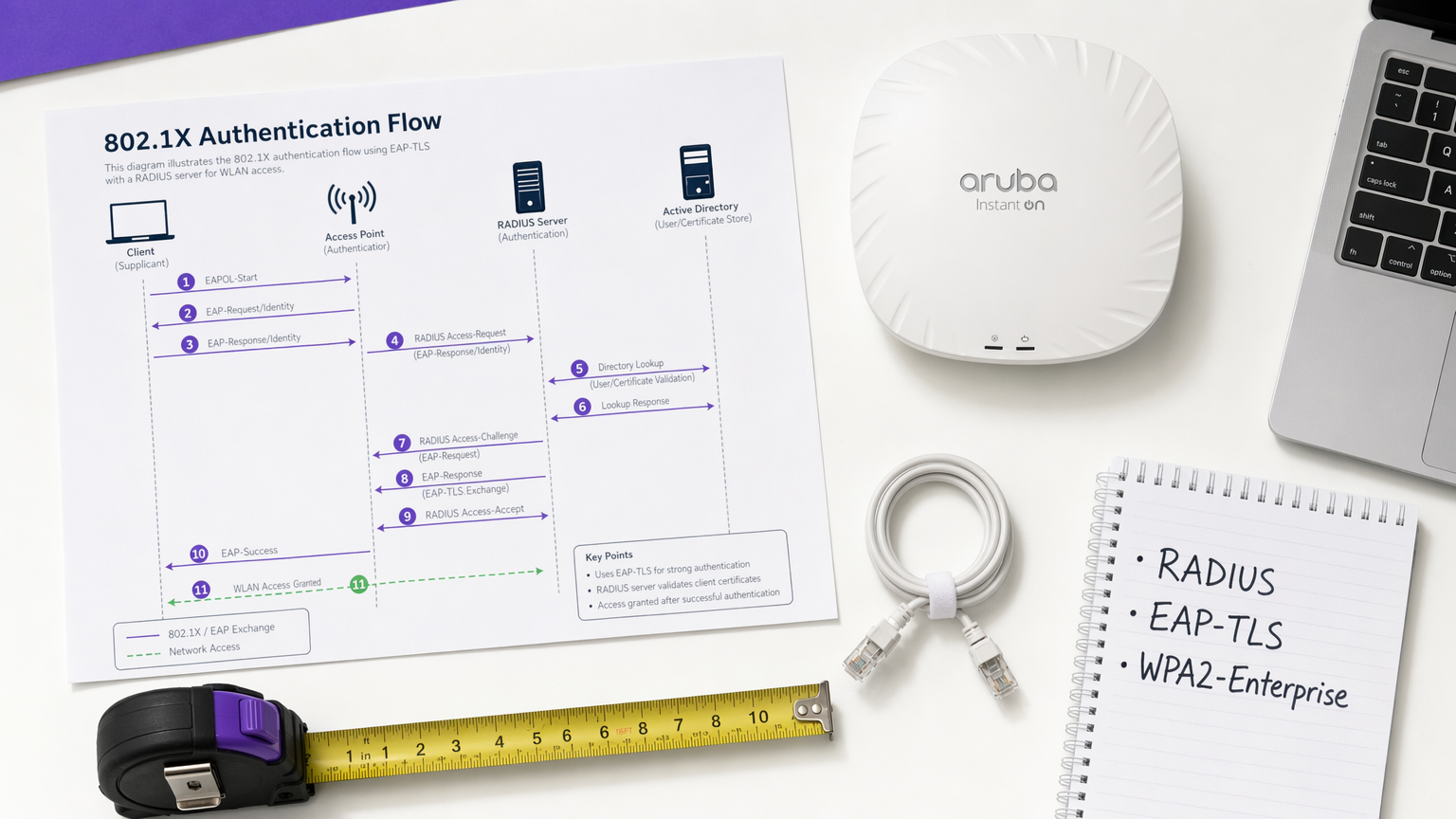
कार्यकारी सारांश
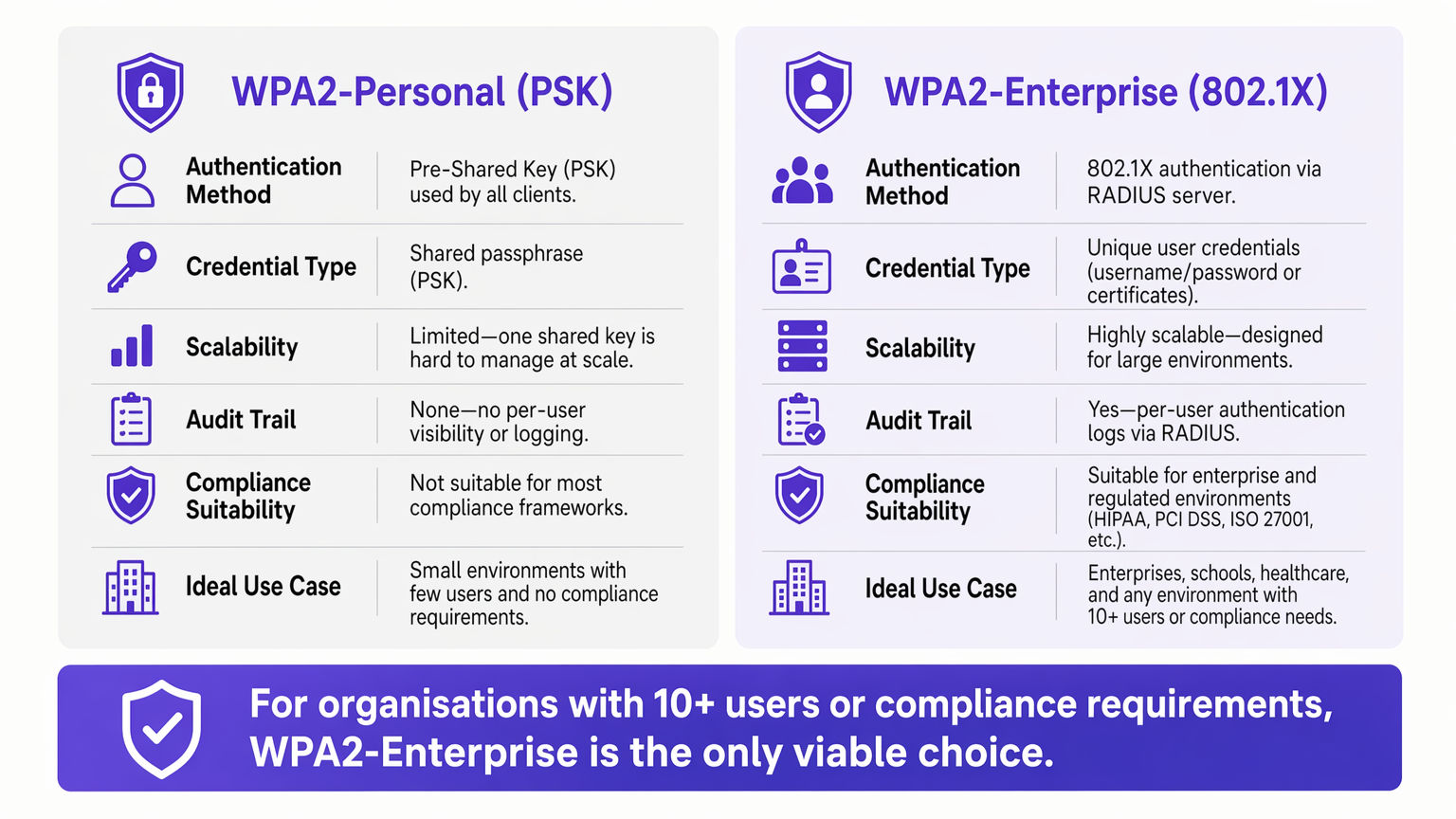
एंटरप्राइझ वातावरणासाठी, WPA2-Personal (प्री-शेअर्ड की) वर अवलंबून राहणे अस्वीकार्य सुरक्षा आणि कार्यात्मक धोका निर्माण करते. नेटवर्क अनेक साइट्सवर विस्तारत असताना, सामायिक पासवर्ड व्यवस्थापित करणे प्रशासकीय ओझे बनते, तर वैयक्तिक जबाबदारीचा अभाव PCI DSS आणि ISO 27001 सारख्या अनुपालन फ्रेमवर्कचे थेट उल्लंघन करतो.
IEEE 802.1X मानकावर आधारित WPA2-Enterprise, RADIUS सर्व्हरद्वारे वापरकर्त्यांना किंवा उपकरणांना वैयक्तिकरित्या प्रमाणीकृत करून सुरक्षा प्रतिमान मूलभूतपणे बदलते. हे मार्गदर्शक IT व्यवस्थापक, नेटवर्क आर्किटेक्ट आणि ठिकाण संचालन संचालकांना WPA2-Enterprise समजून घेण्यासाठी, तैनात करण्यासाठी आणि व्यवस्थापित करण्यासाठी एक व्यावहारिक आराखडा प्रदान करते. आम्ही तांत्रिक आर्किटेक्चर शोधतो, PEAP आणि EAP-TLS सारख्या प्रमाणीकरण प्रोटोकॉलची तुलना करतो आणि Purple सारखे आधुनिक प्लॅटफॉर्म Retail , Hospitality आणि सार्वजनिक क्षेत्रातील वातावरणात सुरक्षित, अनुपालन Guest WiFi उपयोजनांसाठी अखंड ओळख व्यवस्थापन कसे प्रदान करतात हे सविस्तरपणे सांगतो.
तांत्रिक सखोल अभ्यास: 802.1X आर्किटेक्चर समजून घेणे
WPA2-Enterprise चा मुख्य फरक म्हणजे प्रमाणीकरणापासून एन्क्रिप्शनचे विघटन. PSK वातावरणात, पासवर्ड प्रमाणीकरण क्रेडेंशियल आणि एन्क्रिप्शन सीड दोन्ही म्हणून काम करतो. एंटरप्राइझ वातावरणात, नेटवर्क 802.1X फ्रेमवर्कवर अवलंबून असते, जे तीन प्राथमिक घटकांचा समावेश असलेला एक समर्पित प्रमाणीकरण स्तर सादर करते.
सप्लिकंट हे क्लायंट उपकरण आहे — लॅपटॉप, स्मार्टफोन किंवा IoT सेन्सर — जे नेटवर्क ॲक्सेसची विनंती करते. ऑथेंटिकेटर हे नेटवर्क ॲक्सेस उपकरण आहे, सामान्यतः वायरलेस ॲक्सेस पॉइंट किंवा व्यवस्थापित स्विच, जे प्रमाणीकरण यशस्वीरित्या पूर्ण होईपर्यंत सर्व ट्रॅफिक ब्लॉक करते. प्रमाणीकरण सर्व्हर हा RADIUS (रिमोट ऑथेंटिकेशन डायल-इन यूजर सर्व्हिस) सर्व्हर आहे, जो Active Directory, LDAP किंवा क्लाउड डिरेक्टरी सर्व्हिस सारख्या ओळख स्टोअरविरुद्ध क्रेडेंशियल्स प्रमाणित करतो.
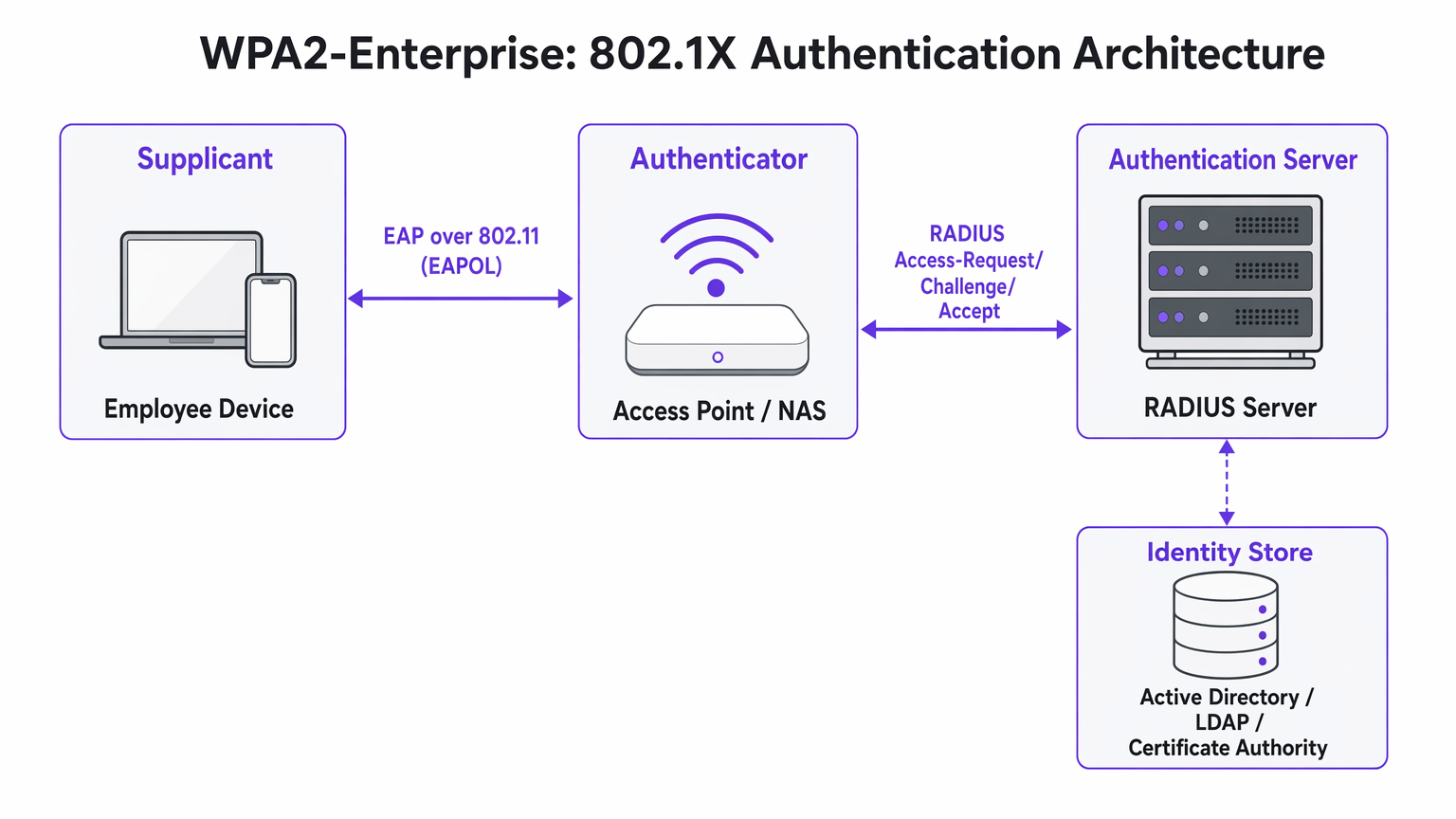
महत्त्वाची आर्किटेक्चरल अंतर्दृष्टी अशी आहे की ॲक्सेस पॉइंट कधीही थेट क्रेडेंशियल्स प्रमाणित करत नाही. ते एक रिले म्हणून कार्य करते, सप्लिकंट आणि RADIUS सर्व्हर दरम्यान एन्क्रिप्टेड प्रमाणीकरण देवाणघेवाण फॉरवर्ड करते. चिंतांचे हे पृथक्करण आर्किटेक्चरला स्केलेबल आणि ऑडिट करण्यायोग्य बनवते.
EAP पद्धती: योग्य प्रोटोकॉल निवडणे
एक्स्टेंसिबल ऑथेंटिकेशन प्रोटोकॉल (EAP) 802.1X फ्रेमवर्कमध्ये प्रमाणीकरण डेटा वाहून नेतो. EAP पद्धतीची निवड संपूर्ण प्रणालीची सुरक्षा स्थिती आणि उपयोजन जटिलता दोन्ही परिभाषित करते.
PEAP-MSCHAPv2 (प्रोटेक्टेड EAP) ही एंटरप्राइझ वातावरणात सर्वात जास्त वापरली जाणारी पद्धत आहे. RADIUS सर्व्हर सुरक्षित TLS टनेल स्थापित करण्यासाठी डिजिटल प्रमाणपत्र सादर करतो. त्या टनेलमध्ये, वापरकर्ता मानक वापरकर्तानाव आणि पासवर्डसह प्रमाणीकृत करतो — सामान्यतः त्यांचे Active Directory क्रेडेंशियल्स. PEAP लोकप्रिय आहे कारण त्याला क्लायंट-साइड प्रमाणपत्र पायाभूत सुविधांची आवश्यकता नाही आणि ते विद्यमान ओळख प्रदात्यांशी थेट समाकलित होते. तथापि, Evil Twin हल्ल्यादरम्यान वापरकर्ते फसवे सर्व्हर प्रमाणपत्रे स्वीकारल्यास ते क्रेडेंशियल चोरीसाठी असुरक्षित राहते.
EAP-TLS (ट्रान्सपोर्ट लेयर सिक्युरिटी) हे उच्च-सुरक्षा उपयोजनांसाठी सुवर्ण मानक आहे. यासाठी परस्पर प्रमाणपत्र प्रमाणीकरण आवश्यक आहे: सर्व्हर आणि क्लायंट उपकरण दोन्हीने वैध प्रमाणपत्रे सादर करणे आवश्यक आहे. कोणतेही पासवर्ड प्रसारित केले जात नसल्यामुळे, फिशिंग हल्ले पूर्णपणे निष्प्रभ होतात. याचा तोटा म्हणजे उपयोजन जटिलता — मोठ्या प्रमाणावर क्लायंट प्रमाणपत्रे वितरित करण्यासाठी एक मजबूत पब्लिक की इन्फ्रास्ट्रक्चर (PKI) आणि मोबाईल डिव्हाइस मॅनेजमेंट (MDM) प्लॅटफॉर्म आवश्यक आहे.
| निकष | PEAP-MSCHAPv2 | EAP-TLS |
|---|---|---|
| क्लायंट प्रमाणपत्र आवश्यक | नाही | होय |
| पासवर्ड उघड होण्याचा धोका | मध्यम (प्रमाणपत्र प्रमाणीकरण बायपास केल्यास) | काहीही नाही |
| उपयोजन जटिलता | कमी ते मध्यम | उच्च |
| MDM आवश्यकता | ऐच्छिक | प्रबळपणे शिफारस केलेले |
| BYOD साठी योग्य | होय | ऑनबोर्डिंग पोर्टलसह |
| अनुपालन उपयुक्तता | चांगले | उत्कृष्ट |
अंमलबजावणी मार्गदर्शक: WPA2-Enterprise मध्ये संक्रमण
WPA2-Enterprise तैनात करण्यासाठी वापरकर्त्यांच्या व्यत्ययापासून वाचण्यासाठी काळजीपूर्वक नियोजन आवश्यक आहे. कोणत्याही स्तरावरील एंटरप्राइझ उपयोजनांसाठी खालील टप्प्याटप्प्याने दृष्टिकोन शिफारसीय आहे.
टप्पा 1: पायाभूत सुविधांची तयारी
802.1X सक्षम करण्यापूर्वी, तुमची RADIUS पायाभूत सुविधा लवचिक असल्याची खात्री करा. तुमचा RADIUS सर्व्हर आता एक गंभीर मार्ग अवलंबित्व आहे — जर तो अनुपलब्ध झाला, तर वापरकर्ते प्रमाणीकृत करू शकणार नाहीत. मोठ्या Retail साखळ्या किंवा Healthcare सुविधांसारख्या वितरित वातावरणासाठी, क्लाउड-होस्टेड RADIUS सेवा प्रत्येक ठिकाणी ऑन-प्रिमाइसेस सर्व्हर व्यवस्थापित करण्याच्या अतिरिक्त खर्चाशिवाय अंगभूत रिडंडंसी प्रदान करतात. RADIUS सर्व्हरला तुमच्या केंद्रीय ओळख प्रदात्याशी समाकलित करा आणि सर्व ॲक्सेस पॉइंट्स आणि RADIUS सर्व्हर दरम्यान पोर्ट 1812 (प्रमाणीकरण) आणि 1813 (अकाउंटिंग) वर UDP ट्रॅफिकला फायरवॉल नियम परवानगी देतात याची पडताळणी करा.
टप्पा 2: प्रमाणपत्र व्यवस्थापन
EAP-TLS उपयोजनांसाठी, प्रमाणपत्र तरतूद पूर्णपणे स्वयंचलित करा. वापरकर्त्यांनी मॅन्युअली प्रमाणपत्रे स्थापित करण्यावर अवलंबून राहिल्यास उच्च सपोर्ट डेस्क व्हॉल्यूम आणि विसंगत सुरक्षा स्थिती येते. तुमचे MDM प्लॅटफॉर्म — Microsoft Intune, Jamf किंवा समतुल्य — वापरून कॉर्पोरेट-मालकीच्या उपकरणांवर प्रमाणपत्रे शांतपणे पुश करा. BYOD परिस्थितींसाठी, ऑनबोर्डिंग पोर्टलचा विचार कराSecureW2 किंवा Foxpass सारखे, जे वैयक्तिक उपकरणांसाठी कॉन्फिगरेशन प्रोफाइल इन्स्टॉलेशन स्वयंचलित करतात, ज्यामुळे हेल्पडेस्कचा भार लक्षणीयरीत्या कमी होतो.
PEAP डिप्लॉयमेंटसाठी, RADIUS सर्व्हरचे प्रमाणपत्र सार्वजनिक सर्टिफिकेट अथॉरिटीने जारी केले आहे याची खात्री करा, जे सर्व क्लायंट ऑपरेटिंग सिस्टमच्या विश्वसनीय रूट स्टोअरमध्ये आधीपासूनच उपस्थित आहे. उत्पादनामध्ये सेल्फ-साईन केलेले प्रमाणपत्रे वापरणे टाळा, कारण ते विश्वास चेतावणी निर्माण करतात जे वापरकर्त्यांना प्रमाणपत्र त्रुटी स्वीकारण्यास शिकवतात — हा एक महत्त्वपूर्ण सुरक्षा धोका आहे.
टप्पा 3: पायलट आणि टप्प्याटप्प्याने अंमलबजावणी
कधीही फ्लॅश कटओव्हर करू नका. पायलट गटाने — सामान्यतः IT विभाग — समर्पित SSID किंवा VLAN वर सुरुवात करा. RADIUS लॉगमध्ये प्रमाणीकरण टाइमआउट्स (जे नेटवर्क राउटिंग समस्या दर्शवतात) किंवा प्रमाणपत्र विश्वास त्रुटी (जे PKI डिप्लॉयमेंटमधील त्रुटी दर्शवतात) यासाठी बारकाईने निरीक्षण करा. एकदा पायलट स्थिर झाल्यावर, एकाच साइट किंवा मजल्यावर विस्तार करा, त्यानंतर साइटनुसार पुढे जा. स्थलांतरादरम्यान जुने PSK नेटवर्क समांतर ठेवा आणि सर्व उपकरणे यशस्वीरित्या स्थलांतरित झाल्यावरच ते बंद करा.
ठिकाण चालकांसाठी सर्वोत्तम पद्धती
स्टेडियम, कॉन्फरन्स सेंटर्स आणि हॉस्पिटॅलिटी ठिकाणांसारख्या सार्वजनिक वातावरणासाठी, WPA2-Enterprise केवळ कर्मचाऱ्यांच्या नेटवर्कसाठीच नव्हे, तर व्यवस्थापित अतिथी प्रवेशासाठीही अधिकाधिक उपयुक्त ठरत आहे.
डायनॅमिक VLAN असाइनमेंट हे 802.1X च्या सर्वात शक्तिशाली आणि कमी वापरल्या जाणाऱ्या वैशिष्ट्यांपैकी एक आहे. वेगवेगळ्या वापरकर्ता गटांसाठी अनेक SSIDs प्रसारित करण्याऐवजी — ज्यामुळे प्रत्येक वेळी RF ओव्हरहेड वाढतो — तुम्ही एकच WPA2-Enterprise SSID प्रसारित करता. जेव्हा एखादा वापरकर्ता प्रमाणीकरण करतो, तेव्हा RADIUS सर्व्हर Access Point ला VLAN असाइनमेंट ॲट्रिब्यूट्स परत करतो, ज्यामुळे वापरकर्त्याच्या गट सदस्यत्वावर आधारित योग्य नेटवर्क सेगमेंटवर सत्र ठेवले जाते. EAP-TLS द्वारे प्रमाणीकरण करणारा पॉइंट ऑफ सेल टर्मिनल PCI-अनुरूप VLAN वर येतो; PEAP द्वारे प्रमाणीकरण करणारा स्टोअर व्यवस्थापक कॉर्पोरेट VLAN वर येतो. हा दृष्टिकोन दाट वातावरणात RF गर्दी लक्षणीयरीत्या कमी करतो.
Purple सह एकत्रीकरण: Purple चे प्लॅटफॉर्म सुरक्षित WiFi प्रवेशासाठी एक अखंड ओळख प्रदाता म्हणून कार्य करते. कनेक्ट परवान्याअंतर्गत, Purple OpenRoaming ला समर्थन देते — हा एक उद्योग मानक आहे जो वापरकर्त्यांना पुन्हा प्रमाणीकरण न करता सहभागी नेटवर्कमध्ये सुरक्षितपणे फिरण्याची परवानगी देतो. हे ट्रान्सपोर्ट हब आणि मल्टी-व्हेन्यू ऑपरेटर्ससाठी विशेषतः मौल्यवान आहे. प्रमाणीकरण डेटा थेट Purple च्या WiFi Analytics डॅशबोर्डमध्ये फीड होतो, ज्यामुळे क्षमता नियोजन आणि अनुपालन अहवालासाठी प्रति-वापरकर्ता दृश्यमानता मिळते.
IoT साठी नेटवर्क सेगमेंटेशन: अनेक जुनी IoT उपकरणे — HVAC कंट्रोलर्स, ॲक्सेस कंट्रोल रीडर्स, जुने प्रिंटर — 802.1X ला समर्थन देत नाहीत. या उपकरणांसाठी, MAC Authentication Bypass (MAB) सह WPA2-PSK वापरून एक वेगळा लपलेला SSID लागू करा, किंवा तुमच्या Access Point विक्रेत्याने समर्थन दिल्यास Multi-PSK (MPSK) चा लाभ घ्या. जुन्या IoT उपकरणांना 802.1X नेटवर्कवर सक्तीने आणण्याचा प्रयत्न करू नका; कार्यात्मक खर्च फायद्यापेक्षा जास्त असतो.
पूरक नेटवर्क आर्किटेक्चर निर्णयांवरील मार्गदर्शनासाठी, आधुनिक व्यवसायांसाठी मुख्य SD WAN फायदे पहा, ज्यात SD-WAN ओव्हरलेज वितरित साइट्सवर RADIUS पोहोचण्यायोग्यता कशी सुधारू शकतात हे समाविष्ट आहे.
समस्यानिवारण आणि जोखीम कमी करणे
WPA2-Enterprise डिप्लॉयमेंटमधील सर्वात सामान्य अपयश प्रमाणपत्र विश्वास, नेटवर्क पोहोचण्यायोग्यता आणि डिव्हाइस सुसंगतता यांच्याशी संबंधित आहेत.
"अविश्वसनीय सर्व्हर" प्रॉम्प्ट: जर क्लायंटना सर्व्हर प्रमाणपत्र सत्यापित केले जाऊ शकत नाही अशी चेतावणी मिळाल्यास, RADIUS सर्व्हर बहुधा सेल्फ-साईन केलेले प्रमाणपत्र किंवा अंतर्गत CA द्वारे जारी केलेले प्रमाणपत्र वापरत आहे ज्याचे रूट सर्व एंडपॉइंट्सवर डिप्लॉय केलेले नाही. निराकरण: ग्रुप पॉलिसी किंवा MDM द्वारे CA रूट प्रमाणपत्र डिप्लॉय करा, किंवा सार्वजनिक CA कडून प्रमाणपत्र वापरा.
RADIUS टाइमआउट्स: क्लायंट अयशस्वी होण्यापूर्वी प्रमाणीकरण स्क्रीनवर थांबतात. याचे कारण जवळजवळ नेहमीच नेटवर्क पाथची समस्या असते — Access Point RADIUS सर्व्हरपर्यंत पोहोचू शकत नाही, किंवा UDP ट्रॅफिक मध्यवर्ती फायरवॉलद्वारे ड्रॉप केले जात आहे. पोर्ट 1812 आणि 1813 साठी फायरवॉल नियम तपासा आणि Access Points आणि RADIUS सर्व्हरमधील राउटिंग सत्यापित करा.
Android कॉन्फिगरेशनची जटिलता: Android ला PEAP साठी RADIUS सर्व्हरचे डोमेन नाव आणि CA प्रमाणपत्राचे स्पष्ट कॉन्फिगरेशन आवश्यक आहे. विंडोजच्या विपरीत, जे ग्रुप पॉलिसीद्वारे या सेटिंग्ज स्वयंचलितपणे शोधू शकते, Android वापरकर्त्यांना त्या मॅन्युअली कॉन्फिगर कराव्या लागतात किंवा ऑनबोर्डिंग पोर्टलद्वारे कॉन्फिगरेशन प्रोफाइल प्राप्त करावे लागते. प्रारंभिक अंमलबजावणीदरम्यान हेल्पडेस्क तिकिटांचा हा एक सामान्य स्रोत आहे.
घड्याळातील त्रुटी आणि प्रमाणपत्राची वैधता: प्रमाणपत्र-आधारित प्रमाणीकरण (EAP-TLS) वेळ सिंक्रोनाइझेशनसाठी संवेदनशील आहे. जर एखाद्या डिव्हाइसचे घड्याळ लक्षणीयरीत्या सिंक्रोनाइझेशनमधून बाहेर असेल, तर प्रमाणपत्र प्रमाणीकरण अयशस्वी होईल. सर्व नेटवर्क डिव्हाइसेस आणि एंडपॉइंट्सवर NTP योग्यरित्या कॉन्फिगर केले आहे याची खात्री करा.
ROI आणि व्यवसायावर परिणाम
WPA2-Enterprise मध्ये संक्रमण केल्याने केवळ जोखीम कमी करण्यापलीकडे मोजता येण्याजोगा व्यावसायिक मूल्य मिळते.
सर्वात तात्काळ ROI पासवर्ड रोटेशनचा कार्यात्मक ओव्हरहेड काढून टाकण्यामुळे मिळतो. 50-ठिकाणांच्या रिटेल चेनमध्ये, सामायिक WiFi पासवर्ड फिरवण्यासाठी प्रत्येक ठिकाणी प्रत्येक डिव्हाइस अपडेट करणे आवश्यक आहे — संभाव्यतः हजारो वैयक्तिक बदल. WPA2-Enterprise सह, कर्मचाऱ्याला डीप्रोव्हिजन करणे ही Active Directory मधील एकच क्रिया आहे, ज्याचा सर्व साइट्सवर त्वरित परिणाम होतो.
अनुपालनाच्या दृष्टिकोनातून, प्रति-वापरकर्ता RADIUS लॉगद्वारे प्रदान केलेला तपशीलवार ऑडिट ट्रेल PCI DSS, HIPAA आणि ISO 27001 मूल्यांकनादरम्यान एक महत्त्वपूर्ण फायदा आहे. ऑडिटर्स नेमके कोणते वापरकर्ता प्रमाणीकृत झाले, कोणत्या डिव्हाइसवरून, कोणत्या वेळी आणि किती काळासाठी हे पाहू शकतात — ही दृश्यमानता सामायिक कीजसह मिळवणे केवळ अशक्य आहे.
शेवटी, प्रति-वापरकर्ता प्रमाणीकरणाद्वारे निर्माण होणारी नेटवर्क बुद्धिमत्ता थेट क्षमता नियोजन आणि विसंगती शोधामध्ये फीड होते. Purple च्या WiFi Analytics सारखे प्लॅटफॉर्म डिव्हाइस वर्तनातील नमुने, उच्च वापराचे कालावधी आणि स्थान-विशिष्ट मागणी दर्शवू शकतात — हा डेटा कार्यात्मक नियोजन आणि रिटेल व हॉस्पिटॅलिटीमध्ये दोन्हीसाठी अमूल्य आहे.संदर्भ, अभ्यागतांच्या वर्तणुकीचे आकलन. तुमच्या अतिथी प्रवेश धोरणाला पूरक असलेल्या स्प्लॅश पेज डिझाइन विचारांसाठी, पहा 10 सर्वोत्तम WiFi स्प्लॅश पेज उदाहरणे (आणि ती कशी कार्य करतात) .
महत्त्वाच्या संज्ञा आणि व्याख्या
802.1X
An IEEE standard for port-based Network Access Control (PNAC) that provides an authentication mechanism for devices attempting to connect to a LAN or WLAN. It defines the roles of Supplicant, Authenticator, and Authentication Server.
This is the underlying framework that makes WPA2-Enterprise possible. When an IT team says they are 'deploying 802.1X', they mean they are implementing this standard on their network infrastructure.
RADIUS
Remote Authentication Dial-In User Service. A networking protocol providing centralised Authentication, Authorisation, and Accounting (AAA) management for users connecting to a network service.
The central server that validates credentials. Access Points do not check passwords; they ask the RADIUS server. RADIUS is the critical infrastructure component that must be made highly available.
Supplicant
The software client on an endpoint device that handles the 802.1X authentication negotiation. Built into modern operating systems including Windows, macOS, iOS, and Android.
When a user selects a WPA2-Enterprise network, the supplicant software on their device initiates the EAP exchange. Configuration of the supplicant — particularly certificate trust settings — is the most common source of end-user issues.
Authenticator
The network device — typically a wireless access point or managed switch — that enforces access control by blocking traffic until the RADIUS server returns an Access-Accept response.
The Access Point acts as a relay between the client and the RADIUS server. It enforces the policy but does not make the authentication decision itself.
EAP-TLS
Extensible Authentication Protocol — Transport Layer Security. An authentication method requiring both a server-side and a client-side digital certificate, providing mutual authentication without transmitting passwords.
The most secure EAP method. Recommended for managed corporate devices, PCI-scoped systems, and any environment where credential phishing is a significant threat vector.
PEAP
Protected Extensible Authentication Protocol. An authentication method that creates a server-authenticated TLS tunnel inside which standard username/password credentials are transmitted securely.
The most common EAP method for enterprise deployments due to its compatibility with existing Active Directory credentials and its relatively straightforward deployment. Vulnerable to Evil Twin attacks if server certificate validation is not enforced.
Dynamic VLAN Assignment
A capability of 802.1X whereby the RADIUS server instructs the Access Point to place an authenticated session onto a specific Virtual LAN based on the user's identity or group membership, using RADIUS tunnel attributes.
Enables network segmentation without multiple SSIDs. Critical for environments that need to separate PCI-scoped devices, corporate users, and IoT devices on a single wireless infrastructure.
Certificate Authority (CA)
A trusted entity that issues and manages digital certificates used to verify the identity of servers and clients in certificate-based authentication systems.
Required for EAP-TLS deployments. Organisations can use a public CA (whose root is pre-trusted by all devices) or an internal CA (whose root must be deployed to all endpoints via Group Policy or MDM).
OpenRoaming
A Wi-Fi Alliance standard that enables seamless, secure, and automatic WiFi connectivity across participating networks using identity federation, eliminating the need for manual re-authentication.
Increasingly relevant for venue operators and transport hubs. Purple supports OpenRoaming under its Connect licence, allowing venues to offer secure automatic connectivity to returning visitors.
केस स्टडीज
A 200-room hotel currently uses a single WPA2-Personal password for all back-of-house staff across housekeeping, maintenance, and management. When staff leave, the password is rarely changed due to the operational difficulty of updating all devices. The IT Director needs to secure the network without disrupting daily operations.
Deploy WPA2-Enterprise using PEAP-MSCHAPv2 integrated with the hotel's existing Azure Active Directory tenant. Staff authenticate using their individual corporate email address and password — credentials they already know. When an employee is terminated, disabling their Azure AD account instantly revokes WiFi access across all properties, with no device updates required. For shared devices such as housekeeping tablets that are not tied to a named user, deploy EAP-TLS with certificates pushed via Microsoft Intune. The certificates are bound to the device, not a user, so there is no password for staff to know or share. Run both the legacy PSK SSID and the new Enterprise SSID in parallel for four weeks during the migration, then decommission the PSK network once all devices are confirmed migrated.
A retail chain with 50 locations needs to ensure that Point of Sale (PoS) terminals are strictly isolated from the staff WiFi network to meet PCI DSS requirements. However, the network team wants to reduce RF overhead by broadcasting fewer SSIDs. Currently they broadcast four separate SSIDs per store.
Implement WPA2-Enterprise with Dynamic VLAN Assignment across all 50 locations. Configure the RADIUS server with two Network Policies: one matching PoS device certificates (issued via an internal CA and pushed via MDM) that returns VLAN 10 attributes, and one matching staff Active Directory group membership that returns VLAN 20 attributes. Broadcast a single corporate WPA2-Enterprise SSID at each location. When a PoS terminal authenticates via EAP-TLS, the RADIUS server instructs the Access Point to place that session on VLAN 10 — the PCI-scoped segment with restricted internet routing. When a store manager authenticates via PEAP, they land on VLAN 20 with standard corporate access. Reduce from four SSIDs to two (one Enterprise, one for legacy IoT devices on a hidden PSK SSID).
परिस्थिती विश्लेषण
Q1. Your organisation is migrating from WPA2-Personal to WPA2-Enterprise using PEAP. The helpdesk is receiving calls from Android users who cannot connect and are being prompted to enter a 'Domain' and to 'Validate CA certificate'. Windows devices are connecting without issue. What is the most likely cause, and how do you resolve it?
💡 संकेत:Consider how Android handles server certificate validation compared to Windows, and what Group Policy can do that Android cannot receive automatically.
शिफारस केलेला दृष्टिकोन दाखवा
Android requires explicit manual configuration of the RADIUS server's domain name and the CA certificate for PEAP, unlike Windows which can receive these settings automatically via Group Policy. The resolution is to deploy an onboarding portal (such as SecureW2 or Foxpass) that generates and pushes a configuration profile to Android devices, automating the PEAP settings. Alternatively, if the RADIUS server uses a certificate from a public CA already trusted by Android, the CA certificate field can be set to 'Use system certificates' and the domain field populated with the RADIUS server's FQDN.
Q2. A stadium venue needs to provide secure WiFi to media and press during events. These are unmanaged personal laptops from dozens of different news organisations. MDM profiles cannot be installed. The IT team needs individual accountability and the ability to revoke access after the event. How should they design the authentication?
💡 संकेत:EAP-TLS requires client certificates, which cannot be pushed to unmanaged devices without an onboarding portal. Consider what credential type is practical for short-term, unmanaged BYOD access.
शिफारस केलेला दृष्टिकोन दाखवा
Deploy WPA2-Enterprise using PEAP-MSCHAPv2. Generate unique, time-limited credentials (username and password) for each media organisation or individual journalist, stored in a temporary Active Directory OU or a cloud RADIUS user directory. Distribute credentials via a secure pre-event communication. Configure the RADIUS server to automatically disable these accounts after the event date. This provides individual accountability and instant revocation without requiring certificate installation on unmanaged devices.
Q3. During a network audit, it is confirmed that WPA2-Enterprise is functioning and users are authenticating successfully. However, the finance team's devices are appearing on the general staff subnet (VLAN 20) rather than the secure finance VLAN (VLAN 30). Where is the configuration error most likely located?
💡 संकेत:Authentication success and authorisation policy enforcement are two separate functions. Which component is responsible for enforcing the VLAN assignment after authentication succeeds?
शिफारस केलेला दृष्टिकोन दाखवा
The error is in the RADIUS server's Network Policy configuration. For Dynamic VLAN Assignment to work, the RADIUS server must be configured to return three specific RADIUS attributes upon successful authentication for the finance group: Tunnel-Type (value: VLAN), Tunnel-Medium-Type (value: 802), and Tunnel-Private-Group-ID (value: 30). Additionally, the Access Point must be configured to accept and apply dynamic VLAN overrides from the RADIUS server — some AP configurations require this to be explicitly enabled. Verify both the RADIUS policy attributes and the AP's 802.1X VLAN override setting.




