

WPA2 Enterprise: O Guia Completo
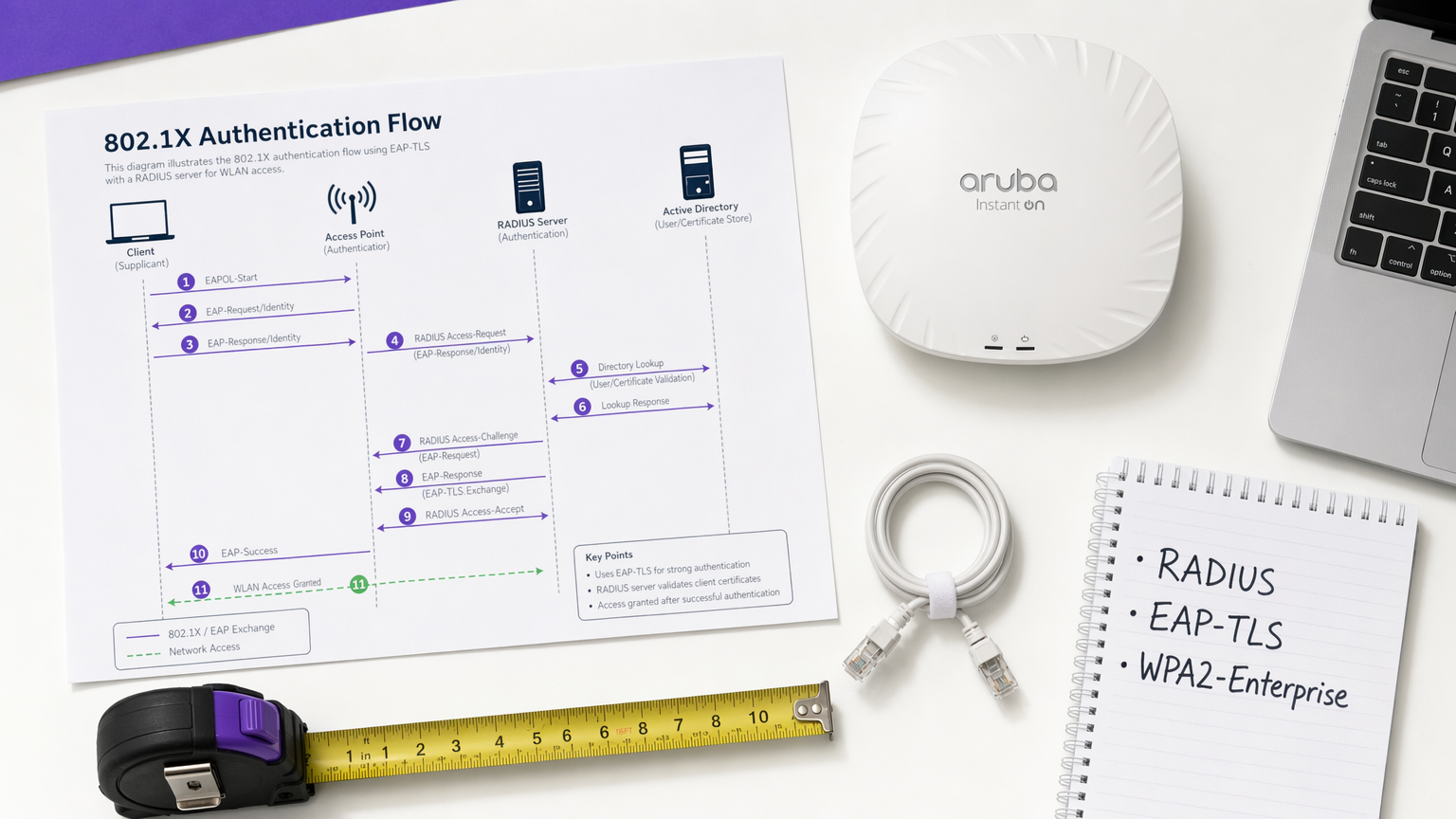
Este guia fornece uma referência técnica abrangente para WPA2-Enterprise, cobrindo a arquitetura 802.1X, a seleção de métodos EAP e estratégias de implementação faseada para ambientes empresariais. Foi concebido para gestores de TI, arquitetos de rede e diretores de operações de espaços que precisam de ir além do WiFi de chave partilhada para um modelo de autenticação escalável, auditável e pronto para conformidade. A plataforma da Purple posiciona-se como uma camada prática de gestão de identidade para espaços que implementam WiFi seguro para convidados e funcionários em larga escala.
🎧 Ouça este Guia
Ver Transcrição
Resumo Executivo
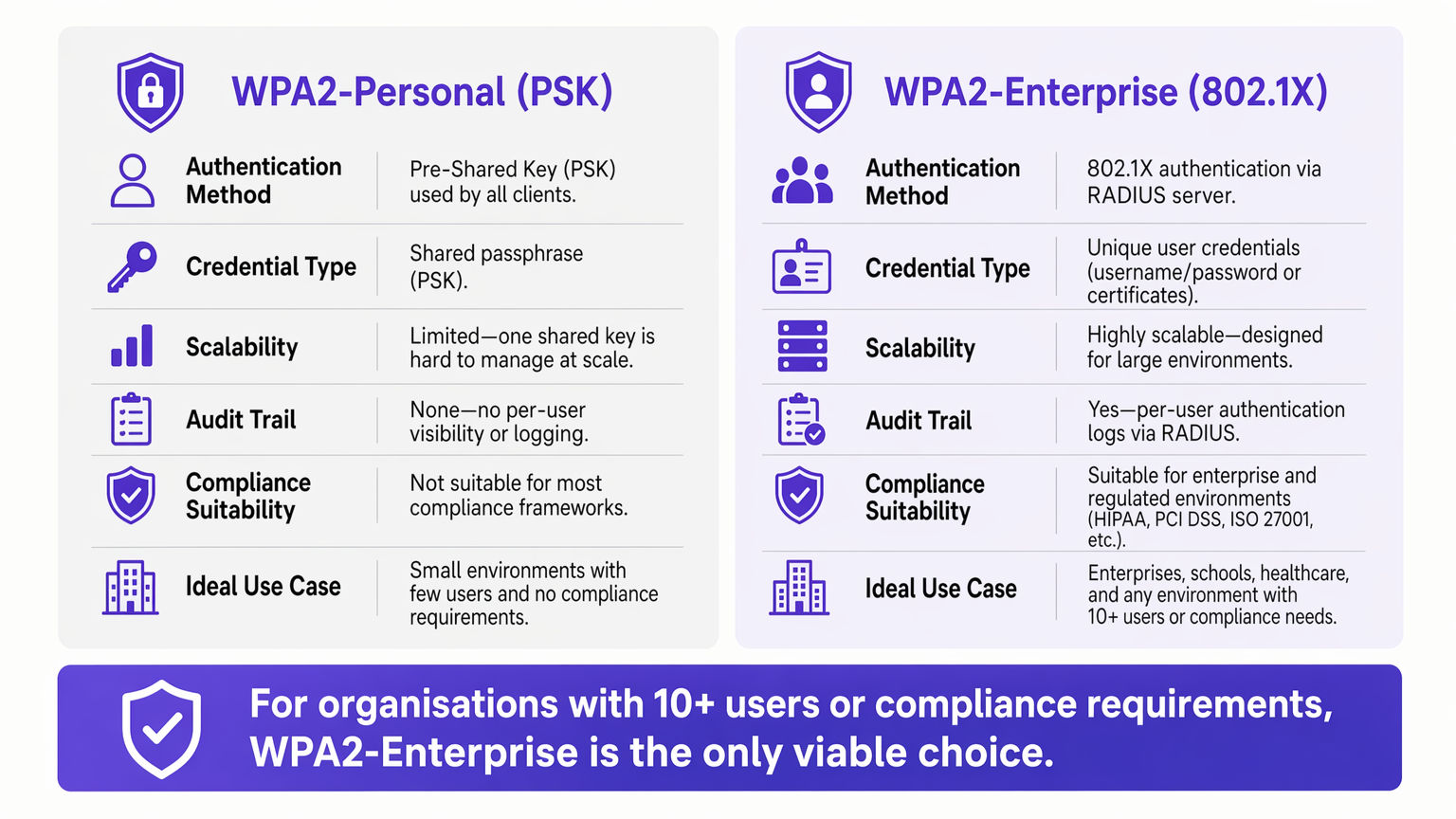
Para ambientes empresariais, a dependência do WPA2-Personal (Chave Pré-Partilhada) apresenta um risco de segurança e operacional inaceitável. À medida que as redes se expandem por vários locais, a gestão de palavras-passe partilhadas torna-se um fardo administrativo, enquanto a falta de responsabilização individual viola diretamente os frameworks de conformidade, como PCI DSS e ISO 27001.
WPA2-Enterprise, construído sobre o padrão IEEE 802.1X, muda fundamentalmente o paradigma de segurança ao autenticar utilizadores ou dispositivos individualmente através de um servidor RADIUS. Este guia fornece a gestores de TI, arquitetos de rede e diretores de operações de espaços um plano prático para compreender, implementar e gerir o WPA2-Enterprise. Exploramos a arquitetura técnica, comparamos protocolos de autenticação como PEAP e EAP-TLS, e detalhamos como plataformas modernas como a Purple fornecem gestão de identidade contínua para implementações seguras e conformes de Guest WiFi em Retalho , Hotelaria e ambientes do setor público.
Análise Técnica Aprofundada: Compreender a Arquitetura 802.1X
O diferenciador central do WPA2-Enterprise é o desacoplamento da encriptação da autenticação. Num ambiente PSK, a palavra-passe serve tanto como credencial de autenticação quanto como semente de encriptação. Num ambiente Enterprise, a rede depende da framework 802.1X, que introduz uma camada de autenticação dedicada, composta por três componentes principais.
O Suplicante é o dispositivo cliente — um portátil, smartphone ou sensor IoT — que solicita acesso à rede. O Autenticador é o dispositivo de acesso à rede, tipicamente um ponto de acesso sem fios ou um switch gerido, que bloqueia todo o tráfego até que a autenticação seja concluída com sucesso. O Servidor de Autenticação é o servidor RADIUS (Remote Authentication Dial-In User Service), que valida as credenciais contra um armazenamento de identidade como Active Directory, LDAP, ou um serviço de diretório na cloud.
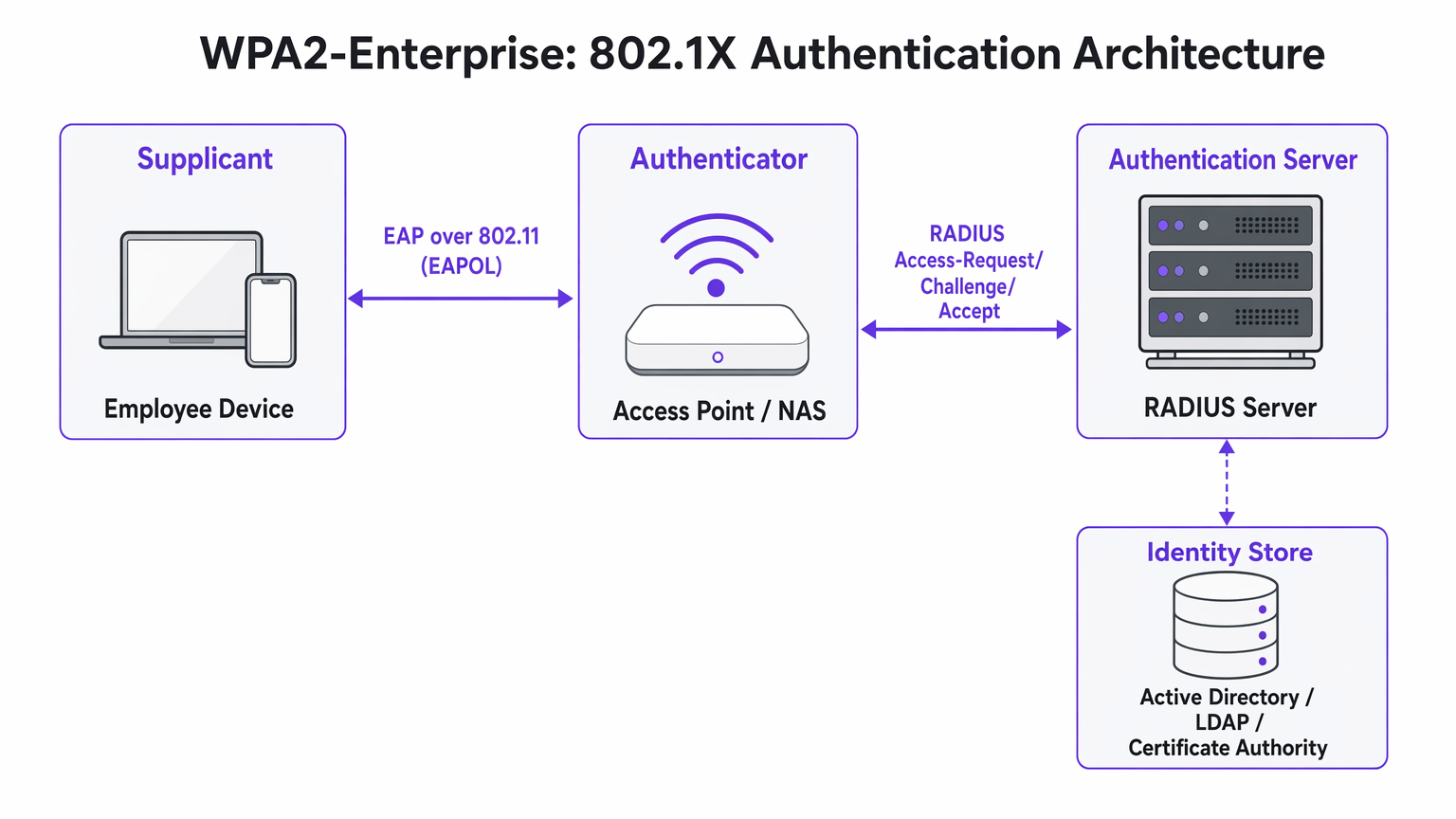
A perspicácia arquitetónica crucial é que o Ponto de Acesso nunca valida diretamente as credenciais. Atua como um relé, encaminhando a troca de autenticação encriptada entre o Suplicante e o servidor RADIUS. Esta separação de preocupações é o que torna a arquitetura escalável e auditável.
Métodos EAP: Selecionar o Protocolo Certo
O Extensible Authentication Protocol (EAP) transporta os dados de autenticação dentro da framework 802.1X. A escolha do método EAP define tanto a postura de segurança quanto a complexidade de implementação de todo o sistema.
PEAP-MSCHAPv2 (Protected EAP) é o método mais amplamente implementado em ambientes empresariais. O servidor RADIUS apresenta um certificado digital para estabelecer um túnel TLS seguro. Dentro desse túnel, o utilizador autentica-se com um nome de utilizador e palavra-passe padrão — tipicamente as suas credenciais do Active Directory. O PEAP é popular porque não requer infraestrutura de certificados do lado do cliente e integra-se diretamente com os fornecedores de identidade existentes. No entanto, permanece vulnerável ao roubo de credenciais se os utilizadores aceitarem certificados de servidor fraudulentos durante um ataque Evil Twin.
EAP-TLS (Transport Layer Security) é o padrão de ouro para implementações de alta segurança. Requer autenticação mútua de certificados: tanto o servidor quanto o dispositivo cliente devem apresentar certificados válidos. Como nenhuma palavra-passe é transmitida, os ataques de phishing são completamente neutralizados. A desvantagem é a complexidade da implementação — uma robusta Infraestrutura de Chave Pública (PKI) e uma plataforma de Gestão de Dispositivos Móveis (MDM) são necessárias para distribuir certificados de cliente em larga escala.
| Criterion | PEAP-MSCHAPv2 | EAP-TLS |
|---|---|---|
| Certificado de cliente necessário | Não | Sim |
| Risco de exposição de palavra-passe | Moderado (se a validação do certificado for ignorada) | Nenhum |
| Complexidade de implementação | Baixa a Média | Alta |
| Requisito de MDM | Opcional | Fortemente recomendado |
| Adequado para BYOD | Sim | Com portal de onboarding |
| Adequação à conformidade | Boa | Excelente |
Guia de Implementação: Transição para WPA2-Enterprise
A implementação do WPA2-Enterprise requer um planeamento cuidadoso para evitar interrupções para o utilizador. A seguinte abordagem faseada é recomendada para implementações empresariais de qualquer escala.
Fase 1: Preparação da Infraestrutura
Antes de ativar o 802.1X, certifique-se de que a sua infraestrutura RADIUS é resiliente. O seu servidor RADIUS é agora uma dependência de caminho crítico — se ficar indisponível, os utilizadores não conseguirão autenticar-se. Para ambientes distribuídos, como grandes cadeias de Retalho ou instalações de Saúde , os serviços RADIUS alojados na cloud oferecem redundância integrada sem o custo de gerir servidores no local em cada localização. Integre o servidor RADIUS com o seu fornecedor de identidade central e verifique se as regras da firewall permitem tráfego UDP nas portas 1812 (autenticação) e 1813 (contabilidade) entre todos os Pontos de Acesso e o servidor RADIUS.
Fase 2: Gestão de Certificados
Para implementações EAP-TLS, automatize completamente o aprovisionamento de certificados. Confiar nos utilizadores para instalar certificados manualmente resulta num elevado volume de chamadas para o suporte técnico e numa postura de segurança inconsistente. Utilize a sua plataforma MDM — Microsoft Intune, Jamf, ou equivalente — para enviar certificados silenciosamente para dispositivos propriedade da empresa. Para cenários BYOD, considere o portal de onboardings como SecureW2 ou Foxpass que automatizam a instalação de perfis de configuração para dispositivos pessoais, reduzindo drasticamente a carga de trabalho do helpdesk.
Para implementações PEAP, certifique-se de que o certificado do servidor RADIUS é emitido por uma Autoridade de Certificação pública já presente no armazenamento de raiz fidedigno de todos os sistemas operativos cliente. Evite certificados autoassinados em produção, pois geram avisos de confiança que ensinam os utilizadores a aceitar erros de certificado — um risco de segurança significativo.
Fase 3: Piloto e Implementação Faseada
Nunca execute uma transição abrupta. Comece com um grupo piloto — tipicamente o departamento de TI — num SSID ou VLAN dedicado. Monitorize os registos RADIUS de perto para timeouts de autenticação, que indicam problemas de encaminhamento de rede, ou erros de confiança de certificado, que indicam falhas na implementação de PKI. Assim que o piloto estiver estável, expanda para um único local ou piso, e depois prossiga local a local. Mantenha a rede PSK legada em paralelo durante toda a migração e desative-a apenas quando todos os dispositivos tiverem sido migrados com sucesso.
Melhores Práticas para Operadores de Espaços
Para ambientes abertos ao público, como estádios, centros de conferências e espaços de Hospitalidade , o WPA2-Enterprise é cada vez mais relevante não só para redes de funcionários, mas também para acesso de convidados gerido.
Atribuição Dinâmica de VLAN é uma das funcionalidades mais poderosas e subutilizadas do 802.1X. Em vez de difundir múltiplos SSIDs para diferentes grupos de utilizadores — cada um adicionando sobrecarga de RF — difunde um único SSID WPA2-Enterprise. Quando um utilizador se autentica, o servidor RADIUS devolve atributos de atribuição de VLAN ao Access Point, colocando a sessão no segmento de rede apropriado com base na adesão do utilizador ao grupo. Um terminal de Ponto de Venda que se autentica via EAP-TLS aterra na VLAN compatível com PCI; um gerente de loja que se autentica via PEAP aterra na VLAN corporativa. Esta abordagem reduz significativamente o congestionamento de RF em ambientes densos.
Integração com Purple: A plataforma da Purple atua como um provedor de identidade contínuo para acesso WiFi seguro. Sob a licença Connect, a Purple suporta OpenRoaming — um padrão da indústria que permite aos utilizadores fazer roaming seguro entre redes participantes sem reautenticação. Isto é particularmente valioso para centros de Transporte e operadores de múltiplos espaços. Os dados de autenticação alimentam diretamente o dashboard de WiFi Analytics da Purple, fornecendo visibilidade por utilizador para planeamento de capacidade e relatórios de conformidade.
Segmentação de Rede para IoT: Muitos dispositivos IoT legados — controladores HVAC, leitores de controlo de acesso, impressoras legadas — não suportam 802.1X. Para estes dispositivos, implemente um SSID oculto separado usando WPA2-PSK com MAC Authentication Bypass (MAB), ou utilize Multi-PSK (MPSK) se suportado pelo seu fornecedor de Access Point. Não tente forçar dispositivos IoT legados para uma rede 802.1X; o custo operacional supera o benefício.
Para orientação sobre decisões complementares de arquitetura de rede, consulte Os Principais Benefícios do SD WAN para Empresas Modernas , que aborda como as sobreposições SD-WAN podem melhorar a acessibilidade RADIUS em locais distribuídos.
Resolução de Problemas e Mitigação de Riscos
Os modos de falha mais comuns em implementações WPA2-Enterprise estão relacionados com a confiança de certificados, acessibilidade da rede e compatibilidade de dispositivos.
O Aviso de "Servidor Não Fidedigno": Se os clientes receberem um aviso de que o certificado do servidor não pode ser verificado, o servidor RADIUS está provavelmente a usar um certificado autoassinado ou um emitido por uma CA interna cuja raiz não foi implementada em todos os endpoints. Resolução: implemente o certificado de raiz da CA via Política de Grupo ou MDM, ou mude para um certificado de uma CA pública.
Timeouts RADIUS: Os clientes ficam presos no ecrã de autenticação antes de falharem. A causa é quase sempre um problema de caminho de rede — o Access Point não consegue alcançar o servidor RADIUS, ou o tráfego UDP está a ser descartado por uma firewall intermédia. Verifique as regras da firewall para as portas 1812 e 1813, e verifique o encaminhamento entre os Access Points e o servidor RADIUS.
Complexidade de Configuração Android: O Android requer configuração explícita do nome de domínio do servidor RADIUS e do certificado CA para PEAP. Ao contrário do Windows, que pode detetar automaticamente estas configurações via Política de Grupo, os utilizadores Android devem configurá-las manualmente ou receber um perfil de configuração via um portal de onboarding. Esta é uma fonte comum de tickets de helpdesk durante a implementação inicial.
Desvio de Relógio e Validade do Certificado: A autenticação baseada em certificado (EAP-TLS) é sensível à sincronização de tempo. Se o relógio de um dispositivo estiver significativamente dessincronizado, a validação do certificado falhará. Certifique-se de que o NTP está corretamente configurado em todos os dispositivos de rede e endpoints.
ROI e Impacto no Negócio
A transição para WPA2-Enterprise oferece valor de negócio mensurável para além da pura mitigação de riscos.
O ROI mais imediato advém da eliminação da sobrecarga operacional da rotação de palavras-passe. Numa cadeia de retalho com 50 locais, rodar uma palavra-passe WiFi partilhada exige a atualização de cada dispositivo em cada local — potencialmente milhares de alterações individuais. Com o WPA2-Enterprise, desativar um funcionário é uma única ação no Active Directory, com efeito imediato em todos os locais.
Do ponto de vista da conformidade, o rasto de auditoria granular fornecido pelos registos RADIUS por utilizador é uma vantagem significativa durante as avaliações PCI DSS, HIPAA e ISO 27001. Os auditores podem ver exatamente qual utilizador se autenticou, de que dispositivo, a que horas e por quanto tempo — um nível de visibilidade que é simplesmente impossível com chaves partilhadas.
Finalmente, a inteligência de rede gerada pela autenticação por utilizador alimenta diretamente o planeamento de capacidade e a deteção de anomalias. Plataformas como o WiFi Analytics da Purple podem revelar padrões no comportamento dos dispositivos, períodos de pico de utilização e procura específica por localização — dados que são inestimáveis tanto para o planeamento operacional como, no retalho e hospitalidade contextos, compreendendo o comportamento dos visitantes. Para considerações de design de página de splash que complementam a sua estratégia de acesso de convidados, consulte Os 10 Melhores Exemplos de Páginas de Splash WiFi (e o que os faz funcionar) .
Termos-Chave e Definições
802.1X
An IEEE standard for port-based Network Access Control (PNAC) that provides an authentication mechanism for devices attempting to connect to a LAN or WLAN. It defines the roles of Supplicant, Authenticator, and Authentication Server.
This is the underlying framework that makes WPA2-Enterprise possible. When an IT team says they are 'deploying 802.1X', they mean they are implementing this standard on their network infrastructure.
RADIUS
Remote Authentication Dial-In User Service. A networking protocol providing centralised Authentication, Authorisation, and Accounting (AAA) management for users connecting to a network service.
The central server that validates credentials. Access Points do not check passwords; they ask the RADIUS server. RADIUS is the critical infrastructure component that must be made highly available.
Supplicant
The software client on an endpoint device that handles the 802.1X authentication negotiation. Built into modern operating systems including Windows, macOS, iOS, and Android.
When a user selects a WPA2-Enterprise network, the supplicant software on their device initiates the EAP exchange. Configuration of the supplicant — particularly certificate trust settings — is the most common source of end-user issues.
Authenticator
The network device — typically a wireless access point or managed switch — that enforces access control by blocking traffic until the RADIUS server returns an Access-Accept response.
The Access Point acts as a relay between the client and the RADIUS server. It enforces the policy but does not make the authentication decision itself.
EAP-TLS
Extensible Authentication Protocol — Transport Layer Security. An authentication method requiring both a server-side and a client-side digital certificate, providing mutual authentication without transmitting passwords.
The most secure EAP method. Recommended for managed corporate devices, PCI-scoped systems, and any environment where credential phishing is a significant threat vector.
PEAP
Protected Extensible Authentication Protocol. An authentication method that creates a server-authenticated TLS tunnel inside which standard username/password credentials are transmitted securely.
The most common EAP method for enterprise deployments due to its compatibility with existing Active Directory credentials and its relatively straightforward deployment. Vulnerable to Evil Twin attacks if server certificate validation is not enforced.
Dynamic VLAN Assignment
A capability of 802.1X whereby the RADIUS server instructs the Access Point to place an authenticated session onto a specific Virtual LAN based on the user's identity or group membership, using RADIUS tunnel attributes.
Enables network segmentation without multiple SSIDs. Critical for environments that need to separate PCI-scoped devices, corporate users, and IoT devices on a single wireless infrastructure.
Certificate Authority (CA)
A trusted entity that issues and manages digital certificates used to verify the identity of servers and clients in certificate-based authentication systems.
Required for EAP-TLS deployments. Organisations can use a public CA (whose root is pre-trusted by all devices) or an internal CA (whose root must be deployed to all endpoints via Group Policy or MDM).
OpenRoaming
A Wi-Fi Alliance standard that enables seamless, secure, and automatic WiFi connectivity across participating networks using identity federation, eliminating the need for manual re-authentication.
Increasingly relevant for venue operators and transport hubs. Purple supports OpenRoaming under its Connect licence, allowing venues to offer secure automatic connectivity to returning visitors.
Estudos de Caso
A 200-room hotel currently uses a single WPA2-Personal password for all back-of-house staff across housekeeping, maintenance, and management. When staff leave, the password is rarely changed due to the operational difficulty of updating all devices. The IT Director needs to secure the network without disrupting daily operations.
Deploy WPA2-Enterprise using PEAP-MSCHAPv2 integrated with the hotel's existing Azure Active Directory tenant. Staff authenticate using their individual corporate email address and password — credentials they already know. When an employee is terminated, disabling their Azure AD account instantly revokes WiFi access across all properties, with no device updates required. For shared devices such as housekeeping tablets that are not tied to a named user, deploy EAP-TLS with certificates pushed via Microsoft Intune. The certificates are bound to the device, not a user, so there is no password for staff to know or share. Run both the legacy PSK SSID and the new Enterprise SSID in parallel for four weeks during the migration, then decommission the PSK network once all devices are confirmed migrated.
A retail chain with 50 locations needs to ensure that Point of Sale (PoS) terminals are strictly isolated from the staff WiFi network to meet PCI DSS requirements. However, the network team wants to reduce RF overhead by broadcasting fewer SSIDs. Currently they broadcast four separate SSIDs per store.
Implement WPA2-Enterprise with Dynamic VLAN Assignment across all 50 locations. Configure the RADIUS server with two Network Policies: one matching PoS device certificates (issued via an internal CA and pushed via MDM) that returns VLAN 10 attributes, and one matching staff Active Directory group membership that returns VLAN 20 attributes. Broadcast a single corporate WPA2-Enterprise SSID at each location. When a PoS terminal authenticates via EAP-TLS, the RADIUS server instructs the Access Point to place that session on VLAN 10 — the PCI-scoped segment with restricted internet routing. When a store manager authenticates via PEAP, they land on VLAN 20 with standard corporate access. Reduce from four SSIDs to two (one Enterprise, one for legacy IoT devices on a hidden PSK SSID).
Análise de Cenários
Q1. Your organisation is migrating from WPA2-Personal to WPA2-Enterprise using PEAP. The helpdesk is receiving calls from Android users who cannot connect and are being prompted to enter a 'Domain' and to 'Validate CA certificate'. Windows devices are connecting without issue. What is the most likely cause, and how do you resolve it?
💡 Dica:Consider how Android handles server certificate validation compared to Windows, and what Group Policy can do that Android cannot receive automatically.
Mostrar Abordagem Recomendada
Android requires explicit manual configuration of the RADIUS server's domain name and the CA certificate for PEAP, unlike Windows which can receive these settings automatically via Group Policy. The resolution is to deploy an onboarding portal (such as SecureW2 or Foxpass) that generates and pushes a configuration profile to Android devices, automating the PEAP settings. Alternatively, if the RADIUS server uses a certificate from a public CA already trusted by Android, the CA certificate field can be set to 'Use system certificates' and the domain field populated with the RADIUS server's FQDN.
Q2. A stadium venue needs to provide secure WiFi to media and press during events. These are unmanaged personal laptops from dozens of different news organisations. MDM profiles cannot be installed. The IT team needs individual accountability and the ability to revoke access after the event. How should they design the authentication?
💡 Dica:EAP-TLS requires client certificates, which cannot be pushed to unmanaged devices without an onboarding portal. Consider what credential type is practical for short-term, unmanaged BYOD access.
Mostrar Abordagem Recomendada
Deploy WPA2-Enterprise using PEAP-MSCHAPv2. Generate unique, time-limited credentials (username and password) for each media organisation or individual journalist, stored in a temporary Active Directory OU or a cloud RADIUS user directory. Distribute credentials via a secure pre-event communication. Configure the RADIUS server to automatically disable these accounts after the event date. This provides individual accountability and instant revocation without requiring certificate installation on unmanaged devices.
Q3. During a network audit, it is confirmed that WPA2-Enterprise is functioning and users are authenticating successfully. However, the finance team's devices are appearing on the general staff subnet (VLAN 20) rather than the secure finance VLAN (VLAN 30). Where is the configuration error most likely located?
💡 Dica:Authentication success and authorisation policy enforcement are two separate functions. Which component is responsible for enforcing the VLAN assignment after authentication succeeds?
Mostrar Abordagem Recomendada
The error is in the RADIUS server's Network Policy configuration. For Dynamic VLAN Assignment to work, the RADIUS server must be configured to return three specific RADIUS attributes upon successful authentication for the finance group: Tunnel-Type (value: VLAN), Tunnel-Medium-Type (value: 802), and Tunnel-Private-Group-ID (value: 30). Additionally, the Access Point must be configured to accept and apply dynamic VLAN overrides from the RADIUS server — some AP configurations require this to be explicitly enabled. Verify both the RADIUS policy attributes and the AP's 802.1X VLAN override setting.




