

WPA2 Enterprise: La Guía Completa
Esta guía proporciona una referencia técnica completa para WPA2-Enterprise, cubriendo la arquitectura 802.1X, la selección de métodos EAP y las estrategias de implementación por fases para entornos empresariales. Está diseñada para gerentes de TI, arquitectos de redes y directores de operaciones de recintos que necesitan ir más allá del WiFi de clave compartida hacia un modelo de autenticación escalable, auditable y listo para el cumplimiento. La plataforma de Purple se posiciona como una capa práctica de gestión de identidad para recintos que implementan WiFi seguro para invitados y personal a escala.
🎧 Escucha esta guía
Ver transcripción
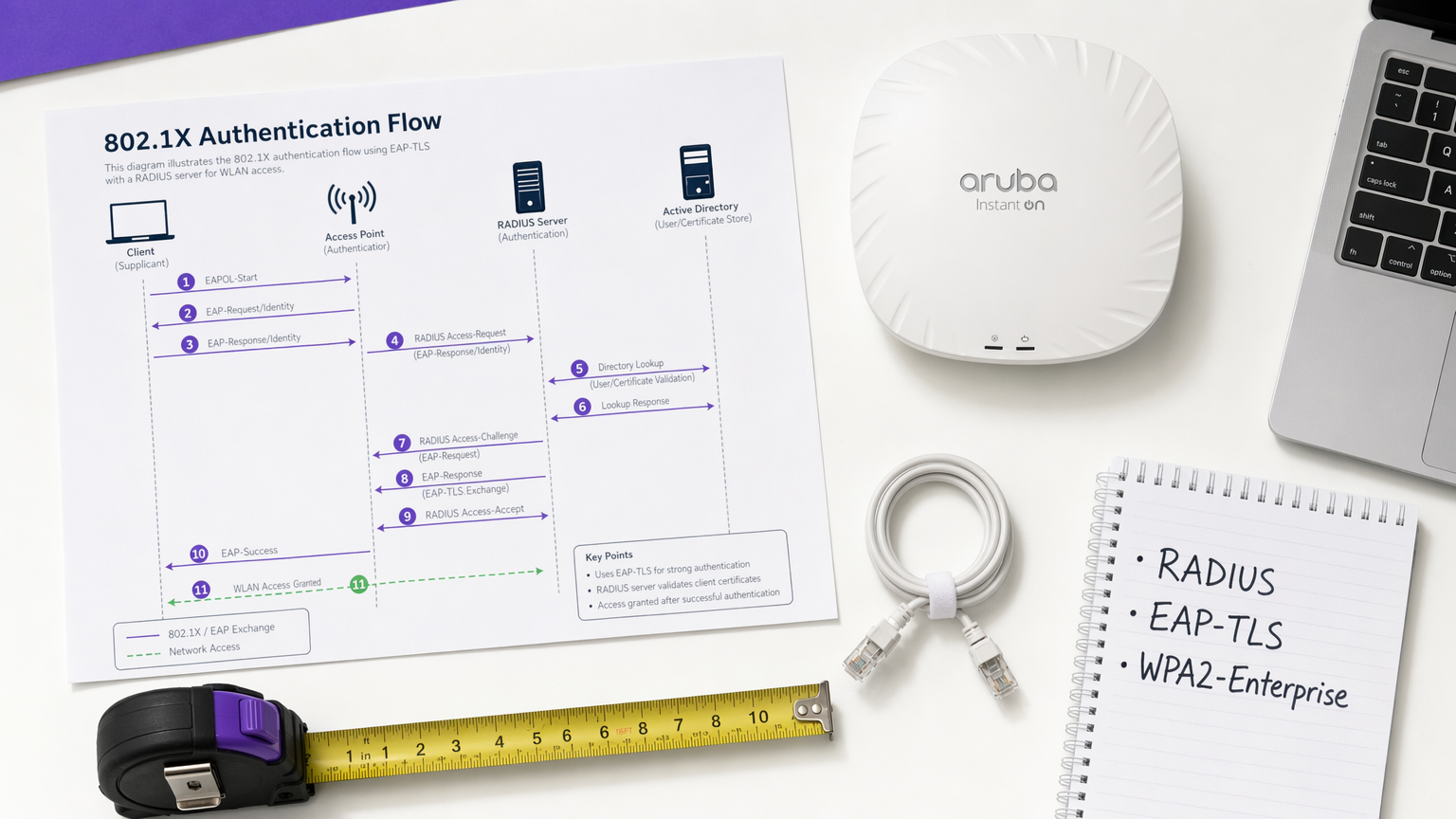
Resumen Ejecutivo
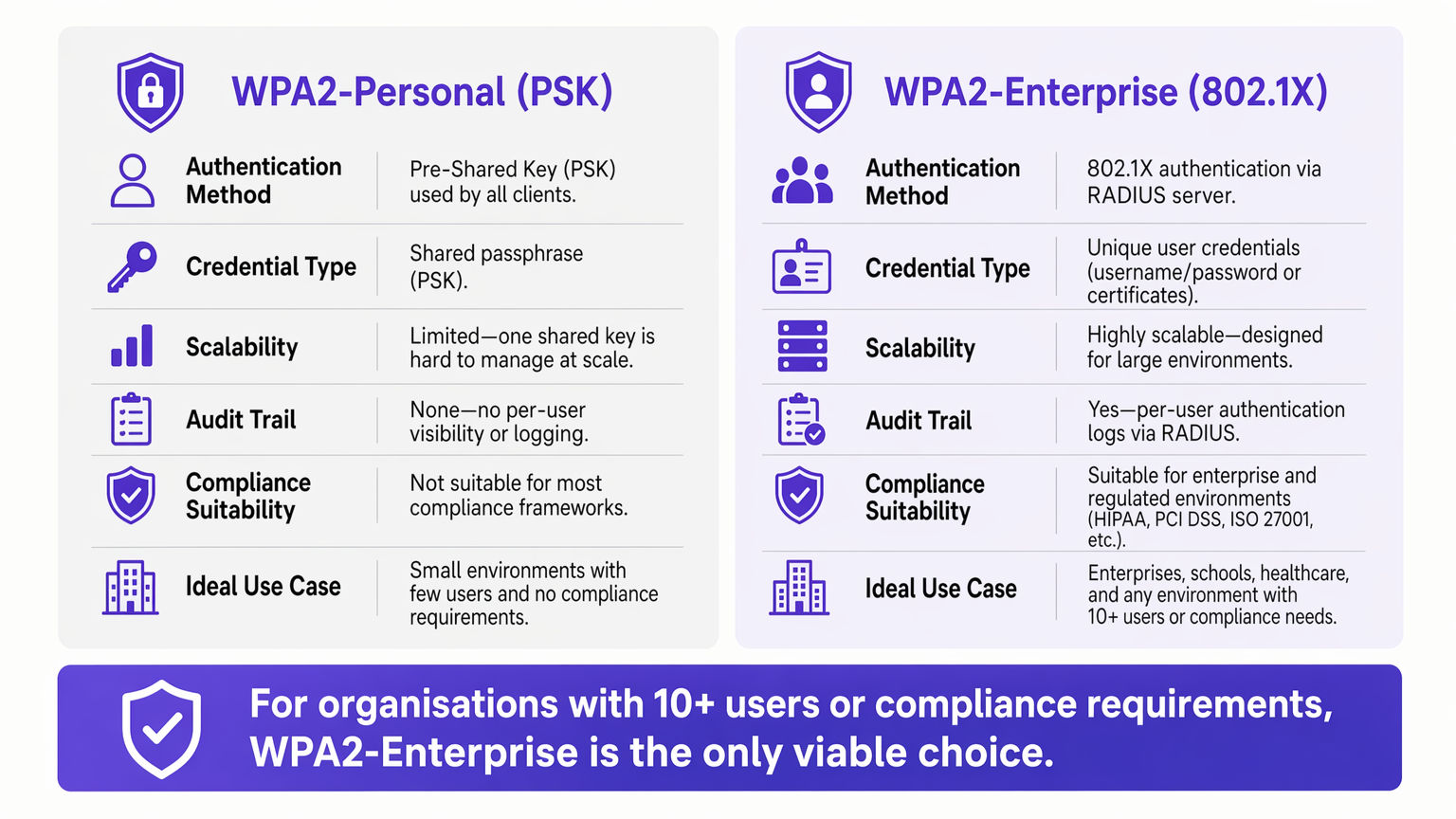
Para entornos empresariales, la dependencia de WPA2-Personal (clave precompartida) presenta un riesgo de seguridad y operativo inaceptable. A medida que las redes escalan a través de múltiples sitios, la gestión de contraseñas compartidas se convierte en una carga administrativa, mientras que la falta de responsabilidad individual viola directamente los marcos de cumplimiento como PCI DSS e ISO 27001.
WPA2-Enterprise, construido sobre el estándar IEEE 802.1X, cambia fundamentalmente el paradigma de seguridad al autenticar usuarios o dispositivos individualmente a través de un servidor RADIUS. Esta guía proporciona a los gerentes de TI, arquitectos de redes y directores de operaciones de recintos un plan práctico para comprender, implementar y gestionar WPA2-Enterprise. Exploramos la arquitectura técnica, comparamos protocolos de autenticación como PEAP y EAP-TLS, y detallamos cómo las plataformas modernas como Purple proporcionan una gestión de identidad fluida para implementaciones de Guest WiFi seguras y conformes en entornos de Retail , Hospitality y del sector público.
Análisis Técnico Detallado: Comprendiendo la Arquitectura 802.1X
El diferenciador principal de WPA2-Enterprise es el desacoplamiento de la encriptación de la autenticación. En un entorno PSK, la contraseña sirve tanto como credencial de autenticación como semilla de encriptación. En un entorno Enterprise, la red se basa en el marco 802.1X, que introduce una capa de autenticación dedicada que consta de tres componentes principales.
El Solicitante es el dispositivo cliente —una laptop, smartphone o sensor IoT— que solicita acceso a la red. El Autenticador es el dispositivo de acceso a la red, típicamente un punto de acceso inalámbrico o un switch gestionado, que bloquea todo el tráfico hasta que la autenticación se completa con éxito. El Servidor de Autenticación es el servidor RADIUS (Remote Authentication Dial-In User Service), que valida las credenciales contra un almacén de identidades como Active Directory, LDAP o un servicio de directorio en la nube.
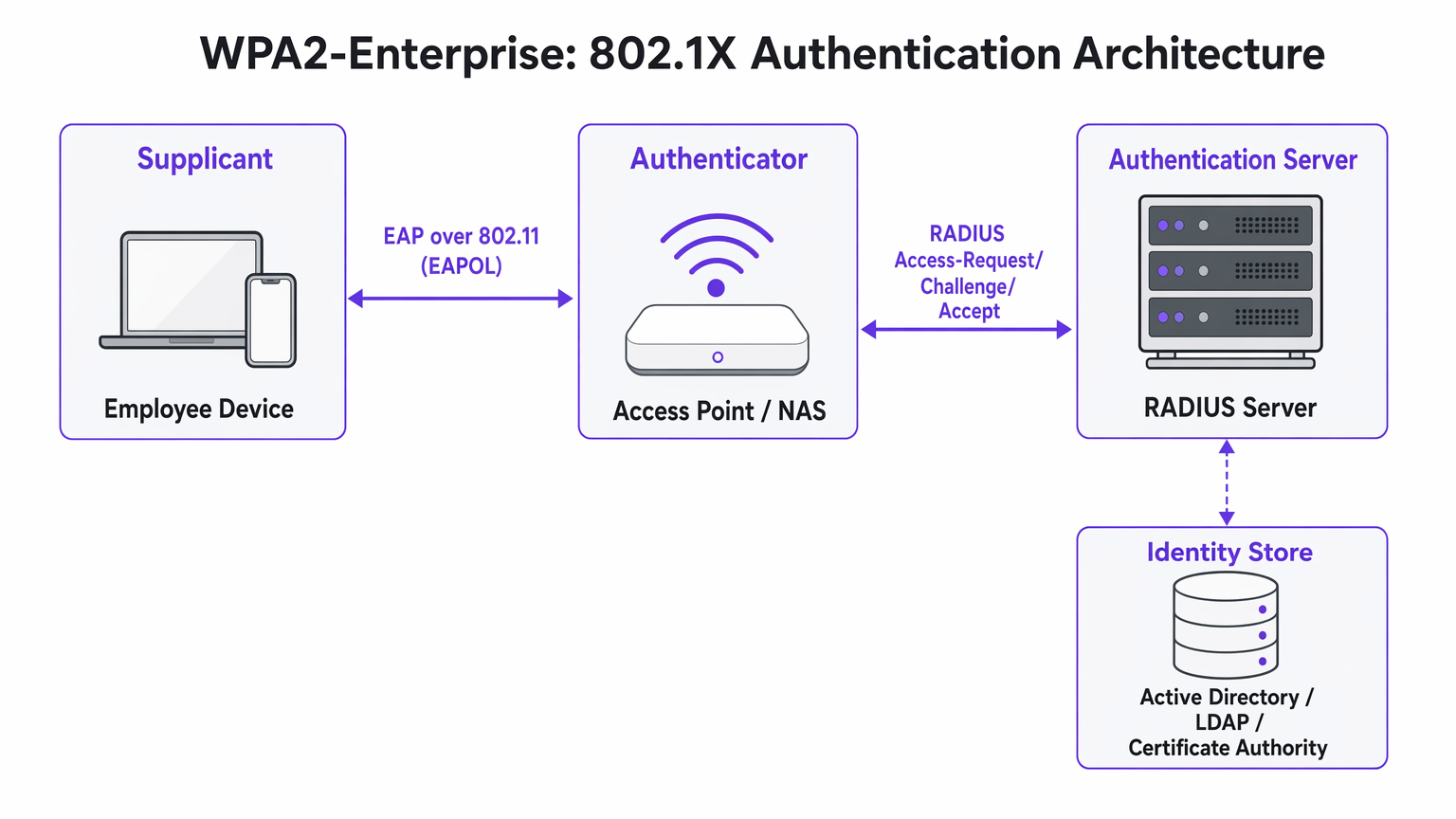
La visión arquitectónica crítica es que el Punto de Acceso nunca valida directamente las credenciales. Actúa como un relé, reenviando el intercambio de autenticación cifrado entre el Solicitante y el servidor RADIUS. Esta separación de preocupaciones es lo que hace que la arquitectura sea escalable y auditable.
Métodos EAP: Seleccionando el Protocolo Correcto
El Protocolo de Autenticación Extensible (EAP) transporta los datos de autenticación dentro del marco 802.1X. La elección del método EAP define tanto la postura de seguridad como la complejidad de implementación de todo el sistema.
PEAP-MSCHAPv2 (EAP Protegido) es el método más ampliamente implementado en entornos empresariales. El servidor RADIUS presenta un certificado digital para establecer un túnel TLS seguro. Dentro de ese túnel, el usuario se autentica con un nombre de usuario y contraseña estándar —típicamente sus credenciales de Active Directory. PEAP es popular porque no requiere infraestructura de certificados del lado del cliente y se integra directamente con los proveedores de identidad existentes. Sin embargo, sigue siendo vulnerable al robo de credenciales si los usuarios aceptan certificados de servidor fraudulentos durante un ataque Evil Twin.
EAP-TLS (Seguridad de la Capa de Transporte) es el estándar de oro para implementaciones de alta seguridad. Requiere autenticación mutua de certificados: tanto el servidor como el dispositivo cliente deben presentar certificados válidos. Debido a que no se transmiten contraseñas, los ataques de phishing se neutralizan por completo. La desventaja es la complejidad de la implementación —se requiere una Infraestructura de Clave Pública (PKI) robusta y una plataforma de Gestión de Dispositivos Móviles (MDM) para distribuir certificados de cliente a escala.
| Criterio | PEAP-MSCHAPv2 | EAP-TLS |
|---|---|---|
| Certificado de cliente requerido | No | Sí |
| Riesgo de exposición de contraseña | Moderado (si se omite la validación del certificado) | Ninguno |
| Complejidad de implementación | Baja a Media | Alta |
| Requisito de MDM | Opcional | Altamente recomendado |
| Adecuado para BYOD | Sí | Con portal de incorporación |
| Idoneidad para el cumplimiento | Buena | Excelente |
Guía de Implementación: Transición a WPA2-Enterprise
La implementación de WPA2-Enterprise requiere una planificación cuidadosa para evitar interrupciones al usuario. Se recomienda el siguiente enfoque por fases para implementaciones empresariales de cualquier escala.
Fase 1: Preparación de la Infraestructura
Antes de habilitar 802.1X, asegúrese de que su infraestructura RADIUS sea resiliente. Su servidor RADIUS es ahora una dependencia de ruta crítica —si deja de estar disponible, los usuarios no podrán autenticarse. Para entornos distribuidos como grandes cadenas de Retail o instalaciones de Healthcare , los servicios RADIUS alojados en la nube ofrecen redundancia incorporada sin la sobrecarga de gestionar servidores locales en cada ubicación. Integre el servidor RADIUS con su proveedor de identidad central y verifique que las reglas del firewall permitan el tráfico UDP en los puertos 1812 (autenticación) y 1813 (contabilidad) entre todos los Puntos de Acceso y el servidor RADIUS.
Fase 2: Gestión de Certificados
Para implementaciones EAP-TLS, automatice completamente el aprovisionamiento de certificados. Depender de que los usuarios instalen certificados manualmente resulta en un alto volumen de solicitudes al soporte técnico y una postura de seguridad inconsistente. Utilice su plataforma MDM —Microsoft Intune, Jamf o equivalente— para enviar certificados de forma silenciosa a los dispositivos propiedad de la empresa. Para escenarios BYOD, considere un portal de incorporacións como SecureW2 o Foxpass que automatizan la instalación del perfil de configuración para dispositivos personales, reduciendo drásticamente la carga del servicio de asistencia.
Para implementaciones de PEAP, asegúrese de que el certificado del servidor RADIUS sea emitido por una Autoridad de Certificación pública ya presente en el almacén raíz de confianza de todos los sistemas operativos cliente. Evite los certificados autofirmados en producción, ya que generan advertencias de confianza que acostumbran a los usuarios a aceptar errores de certificado, lo que representa un riesgo de seguridad significativo.
Fase 3: Piloto y Despliegue por Fases
Nunca realice una transición abrupta. Comience con un grupo piloto —típicamente el departamento de TI— en un SSID o VLAN dedicado. Monitoree de cerca los registros RADIUS en busca de tiempos de espera de autenticación, que indican problemas de enrutamiento de red, o errores de confianza de certificado, que indican deficiencias en la implementación de PKI. Una vez que el piloto sea estable, expanda a un solo sitio o piso, luego proceda sitio por sitio. Mantenga la red PSK heredada en paralelo durante toda la migración y desactívela solo una vez que todos los dispositivos hayan sido migrados con éxito.
Mejores Prácticas para Operadores de Recintos
Para entornos de cara al público como estadios, centros de conferencias y recintos de Hospitalidad , WPA2-Enterprise es cada vez más relevante no solo para las redes del personal, sino también para el acceso gestionado de invitados.
Asignación Dinámica de VLAN es una de las características más potentes y subutilizadas de 802.1X. En lugar de transmitir múltiples SSIDs para diferentes grupos de usuarios —cada uno añadiendo sobrecarga de RF—, se transmite un único SSID WPA2-Enterprise. Cuando un usuario se autentica, el servidor RADIUS devuelve atributos de asignación de VLAN al Punto de Acceso, colocando la sesión en el segmento de red apropiado según la membresía del grupo del usuario. Un terminal de Punto de Venta que se autentica a través de EAP-TLS aterriza en la VLAN compatible con PCI; un gerente de tienda que se autentica a través de PEAP aterriza en la VLAN corporativa. Este enfoque reduce significativamente la congestión de RF en entornos densos.
Integración con Purple: La plataforma de Purple actúa como un proveedor de identidad sin interrupciones para un acceso seguro a WiFi. Bajo la licencia Connect, Purple es compatible con OpenRoaming —un estándar de la industria que permite a los usuarios moverse de forma segura entre redes participantes sin volver a autenticarse. Esto es particularmente valioso para centros de Transporte y operadores de múltiples recintos. Los datos de autenticación se alimentan directamente al panel de control de WiFi Analytics de Purple, proporcionando visibilidad por usuario para la planificación de capacidad y la elaboración de informes de cumplimiento.
Segmentación de Red para IoT: Muchos dispositivos IoT heredados —controladores HVAC, lectores de control de acceso, impresoras heredadas— no son compatibles con 802.1X. Para estos dispositivos, implemente un SSID oculto separado utilizando WPA2-PSK con MAC Authentication Bypass (MAB), o aproveche Multi-PSK (MPSK) si es compatible con su proveedor de Access Point. No intente forzar dispositivos IoT heredados a una red 802.1X; el costo operativo supera el beneficio.
Para obtener orientación sobre decisiones complementarias de arquitectura de red, consulte Los Beneficios Clave de SD WAN para Empresas Modernas , que cubre cómo las superposiciones de SD-WAN pueden mejorar la accesibilidad de RADIUS en sitios distribuidos.
Solución de Problemas y Mitigación de Riesgos
Los modos de fallo más comunes en las implementaciones de WPA2-Enterprise se relacionan con la confianza del certificado, la accesibilidad de la red y la compatibilidad del dispositivo.
El Mensaje de "Servidor No Confiable": Si los clientes reciben una advertencia de que el certificado del servidor no puede ser verificado, es probable que el servidor RADIUS esté utilizando un certificado autofirmado o uno emitido por una CA interna cuya raíz no ha sido desplegada en todos los puntos finales. Resolución: despliegue el certificado raíz de la CA a través de la Política de Grupo o MDM, o cambie a un certificado de una CA pública.
Tiempos de Espera de RADIUS: Los clientes se quedan colgados en la pantalla de autenticación antes de fallar. La causa es casi siempre un problema de ruta de red —el Access Point no puede alcanzar el servidor RADIUS, o el tráfico UDP está siendo descartado por un firewall intermedio. Verifique las reglas del firewall para los puertos 1812 y 1813, y compruebe el enrutamiento entre los Access Points y el servidor RADIUS.
Complejidad de Configuración de Android: Android requiere una configuración explícita del nombre de dominio del servidor RADIUS y del certificado de CA para PEAP. A diferencia de Windows, que puede detectar automáticamente estas configuraciones a través de la Política de Grupo, los usuarios de Android deben configurarlas manualmente o recibir un perfil de configuración a través de un portal de incorporación. Esta es una fuente común de tickets de soporte durante el despliegue inicial.
Desviación del Reloj y Validez del Certificado: La autenticación basada en certificados (EAP-TLS) es sensible a la sincronización horaria. Si el reloj de un dispositivo está significativamente desincronizado, la validación del certificado fallará. Asegúrese de que NTP esté configurado correctamente en todos los dispositivos de red y puntos finales.
ROI e Impacto Empresarial
La transición a WPA2-Enterprise ofrece un valor empresarial medible más allá de la mera mitigación de riesgos.
El ROI más inmediato proviene de la eliminación de la sobrecarga operativa de la rotación de contraseñas. En una cadena minorista de 50 ubicaciones, rotar una contraseña de WiFi compartida requiere actualizar cada dispositivo en cada ubicación —potencialmente miles de cambios individuales. Con WPA2-Enterprise, la desaprovisionamiento de un empleado es una única acción en Active Directory, con efecto inmediato en todos los sitios.
Desde una perspectiva de cumplimiento, la pista de auditoría granular proporcionada por los registros RADIUS por usuario es una ventaja significativa durante las evaluaciones de PCI DSS, HIPAA e ISO 27001. Los auditores pueden ver exactamente qué usuario se autenticó, desde qué dispositivo, a qué hora y durante cuánto tiempo —un nivel de visibilidad que es simplemente imposible con claves compartidas.
Finalmente, la inteligencia de red generada por la autenticación por usuario se alimenta directamente a la planificación de capacidad y la detección de anomalías. Plataformas como WiFi Analytics de Purple pueden revelar patrones en el comportamiento de los dispositivos, períodos de uso pico y demanda específica de ubicación —datos invaluables tanto para la planificación operativa como, en el comercio minorista y la hospitalidad contextos, comprendiendo el comportamiento del visitante. Para consideraciones de diseño de páginas de bienvenida que complementen su estrategia de acceso para invitados, consulte Los 10 mejores ejemplos de páginas de bienvenida WiFi (y qué los hace funcionar) .
Términos clave y definiciones
802.1X
An IEEE standard for port-based Network Access Control (PNAC) that provides an authentication mechanism for devices attempting to connect to a LAN or WLAN. It defines the roles of Supplicant, Authenticator, and Authentication Server.
This is the underlying framework that makes WPA2-Enterprise possible. When an IT team says they are 'deploying 802.1X', they mean they are implementing this standard on their network infrastructure.
RADIUS
Remote Authentication Dial-In User Service. A networking protocol providing centralised Authentication, Authorisation, and Accounting (AAA) management for users connecting to a network service.
The central server that validates credentials. Access Points do not check passwords; they ask the RADIUS server. RADIUS is the critical infrastructure component that must be made highly available.
Supplicant
The software client on an endpoint device that handles the 802.1X authentication negotiation. Built into modern operating systems including Windows, macOS, iOS, and Android.
When a user selects a WPA2-Enterprise network, the supplicant software on their device initiates the EAP exchange. Configuration of the supplicant — particularly certificate trust settings — is the most common source of end-user issues.
Authenticator
The network device — typically a wireless access point or managed switch — that enforces access control by blocking traffic until the RADIUS server returns an Access-Accept response.
The Access Point acts as a relay between the client and the RADIUS server. It enforces the policy but does not make the authentication decision itself.
EAP-TLS
Extensible Authentication Protocol — Transport Layer Security. An authentication method requiring both a server-side and a client-side digital certificate, providing mutual authentication without transmitting passwords.
The most secure EAP method. Recommended for managed corporate devices, PCI-scoped systems, and any environment where credential phishing is a significant threat vector.
PEAP
Protected Extensible Authentication Protocol. An authentication method that creates a server-authenticated TLS tunnel inside which standard username/password credentials are transmitted securely.
The most common EAP method for enterprise deployments due to its compatibility with existing Active Directory credentials and its relatively straightforward deployment. Vulnerable to Evil Twin attacks if server certificate validation is not enforced.
Dynamic VLAN Assignment
A capability of 802.1X whereby the RADIUS server instructs the Access Point to place an authenticated session onto a specific Virtual LAN based on the user's identity or group membership, using RADIUS tunnel attributes.
Enables network segmentation without multiple SSIDs. Critical for environments that need to separate PCI-scoped devices, corporate users, and IoT devices on a single wireless infrastructure.
Certificate Authority (CA)
A trusted entity that issues and manages digital certificates used to verify the identity of servers and clients in certificate-based authentication systems.
Required for EAP-TLS deployments. Organisations can use a public CA (whose root is pre-trusted by all devices) or an internal CA (whose root must be deployed to all endpoints via Group Policy or MDM).
OpenRoaming
A Wi-Fi Alliance standard that enables seamless, secure, and automatic WiFi connectivity across participating networks using identity federation, eliminating the need for manual re-authentication.
Increasingly relevant for venue operators and transport hubs. Purple supports OpenRoaming under its Connect licence, allowing venues to offer secure automatic connectivity to returning visitors.
Casos de éxito
A 200-room hotel currently uses a single WPA2-Personal password for all back-of-house staff across housekeeping, maintenance, and management. When staff leave, the password is rarely changed due to the operational difficulty of updating all devices. The IT Director needs to secure the network without disrupting daily operations.
Deploy WPA2-Enterprise using PEAP-MSCHAPv2 integrated with the hotel's existing Azure Active Directory tenant. Staff authenticate using their individual corporate email address and password — credentials they already know. When an employee is terminated, disabling their Azure AD account instantly revokes WiFi access across all properties, with no device updates required. For shared devices such as housekeeping tablets that are not tied to a named user, deploy EAP-TLS with certificates pushed via Microsoft Intune. The certificates are bound to the device, not a user, so there is no password for staff to know or share. Run both the legacy PSK SSID and the new Enterprise SSID in parallel for four weeks during the migration, then decommission the PSK network once all devices are confirmed migrated.
A retail chain with 50 locations needs to ensure that Point of Sale (PoS) terminals are strictly isolated from the staff WiFi network to meet PCI DSS requirements. However, the network team wants to reduce RF overhead by broadcasting fewer SSIDs. Currently they broadcast four separate SSIDs per store.
Implement WPA2-Enterprise with Dynamic VLAN Assignment across all 50 locations. Configure the RADIUS server with two Network Policies: one matching PoS device certificates (issued via an internal CA and pushed via MDM) that returns VLAN 10 attributes, and one matching staff Active Directory group membership that returns VLAN 20 attributes. Broadcast a single corporate WPA2-Enterprise SSID at each location. When a PoS terminal authenticates via EAP-TLS, the RADIUS server instructs the Access Point to place that session on VLAN 10 — the PCI-scoped segment with restricted internet routing. When a store manager authenticates via PEAP, they land on VLAN 20 with standard corporate access. Reduce from four SSIDs to two (one Enterprise, one for legacy IoT devices on a hidden PSK SSID).
Análisis de escenarios
Q1. Your organisation is migrating from WPA2-Personal to WPA2-Enterprise using PEAP. The helpdesk is receiving calls from Android users who cannot connect and are being prompted to enter a 'Domain' and to 'Validate CA certificate'. Windows devices are connecting without issue. What is the most likely cause, and how do you resolve it?
💡 Sugerencia:Consider how Android handles server certificate validation compared to Windows, and what Group Policy can do that Android cannot receive automatically.
Mostrar enfoque recomendado
Android requires explicit manual configuration of the RADIUS server's domain name and the CA certificate for PEAP, unlike Windows which can receive these settings automatically via Group Policy. The resolution is to deploy an onboarding portal (such as SecureW2 or Foxpass) that generates and pushes a configuration profile to Android devices, automating the PEAP settings. Alternatively, if the RADIUS server uses a certificate from a public CA already trusted by Android, the CA certificate field can be set to 'Use system certificates' and the domain field populated with the RADIUS server's FQDN.
Q2. A stadium venue needs to provide secure WiFi to media and press during events. These are unmanaged personal laptops from dozens of different news organisations. MDM profiles cannot be installed. The IT team needs individual accountability and the ability to revoke access after the event. How should they design the authentication?
💡 Sugerencia:EAP-TLS requires client certificates, which cannot be pushed to unmanaged devices without an onboarding portal. Consider what credential type is practical for short-term, unmanaged BYOD access.
Mostrar enfoque recomendado
Deploy WPA2-Enterprise using PEAP-MSCHAPv2. Generate unique, time-limited credentials (username and password) for each media organisation or individual journalist, stored in a temporary Active Directory OU or a cloud RADIUS user directory. Distribute credentials via a secure pre-event communication. Configure the RADIUS server to automatically disable these accounts after the event date. This provides individual accountability and instant revocation without requiring certificate installation on unmanaged devices.
Q3. During a network audit, it is confirmed that WPA2-Enterprise is functioning and users are authenticating successfully. However, the finance team's devices are appearing on the general staff subnet (VLAN 20) rather than the secure finance VLAN (VLAN 30). Where is the configuration error most likely located?
💡 Sugerencia:Authentication success and authorisation policy enforcement are two separate functions. Which component is responsible for enforcing the VLAN assignment after authentication succeeds?
Mostrar enfoque recomendado
The error is in the RADIUS server's Network Policy configuration. For Dynamic VLAN Assignment to work, the RADIUS server must be configured to return three specific RADIUS attributes upon successful authentication for the finance group: Tunnel-Type (value: VLAN), Tunnel-Medium-Type (value: 802), and Tunnel-Private-Group-ID (value: 30). Additionally, the Access Point must be configured to accept and apply dynamic VLAN overrides from the RADIUS server — some AP configurations require this to be explicitly enabled. Verify both the RADIUS policy attributes and the AP's 802.1X VLAN override setting.




