

WPA2 Enterprise: La Guida Completa
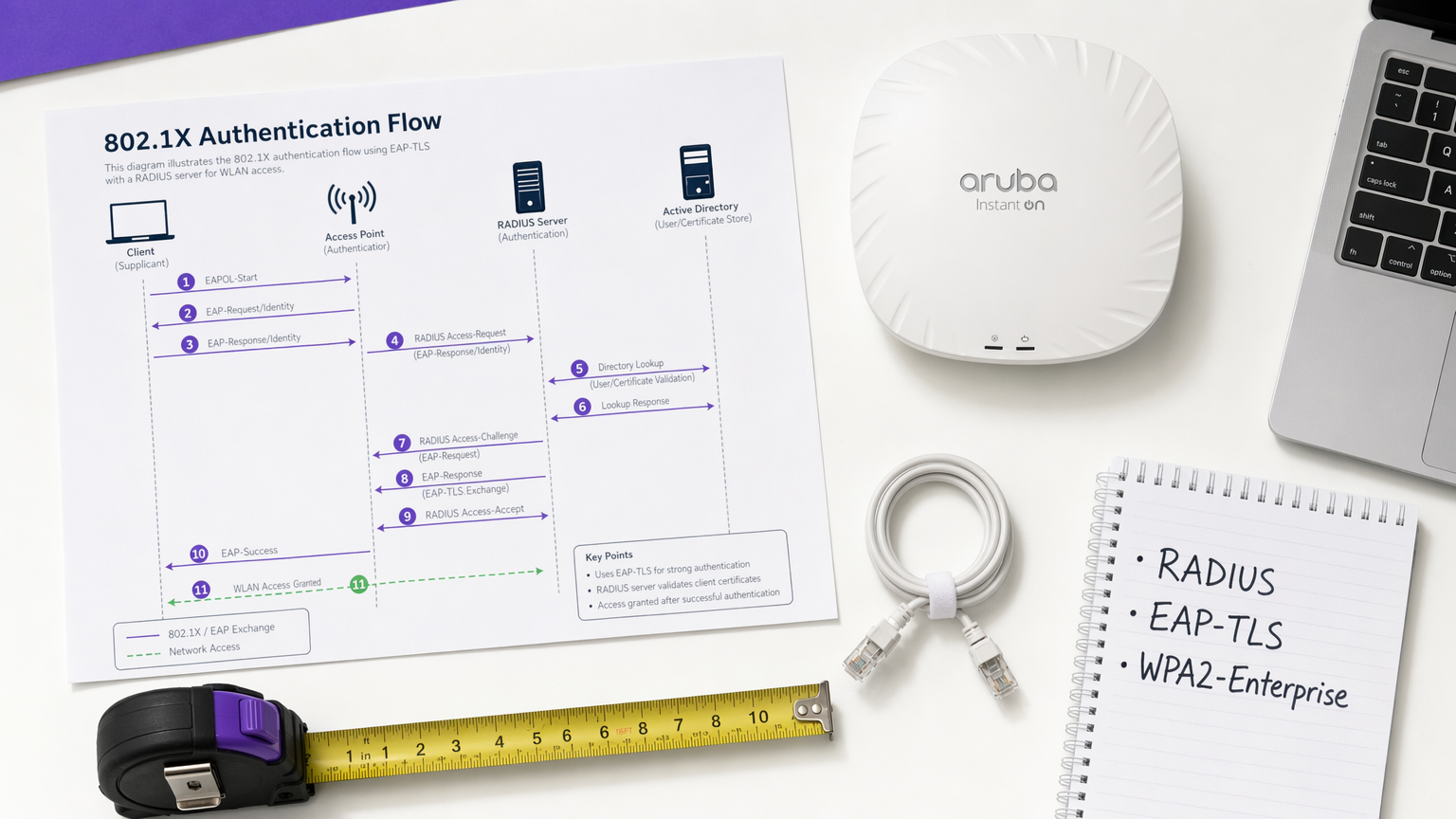
Questa guida fornisce un riferimento tecnico completo per WPA2-Enterprise, coprendo l'architettura 802.1X, la selezione del metodo EAP e le strategie di implementazione a fasi per gli ambienti aziendali. È progettata per responsabili IT, architetti di rete e direttori delle operazioni di sede che necessitano di superare il WiFi a chiave condivisa per adottare un modello di autenticazione scalabile, verificabile e conforme. La piattaforma Purple si posiziona come uno strato pratico di gestione delle identità per le sedi che implementano WiFi sicuro per ospiti e personale su larga scala.
🎧 Ascolta questa guida
Visualizza trascrizione
Riepilogo Esecutivo
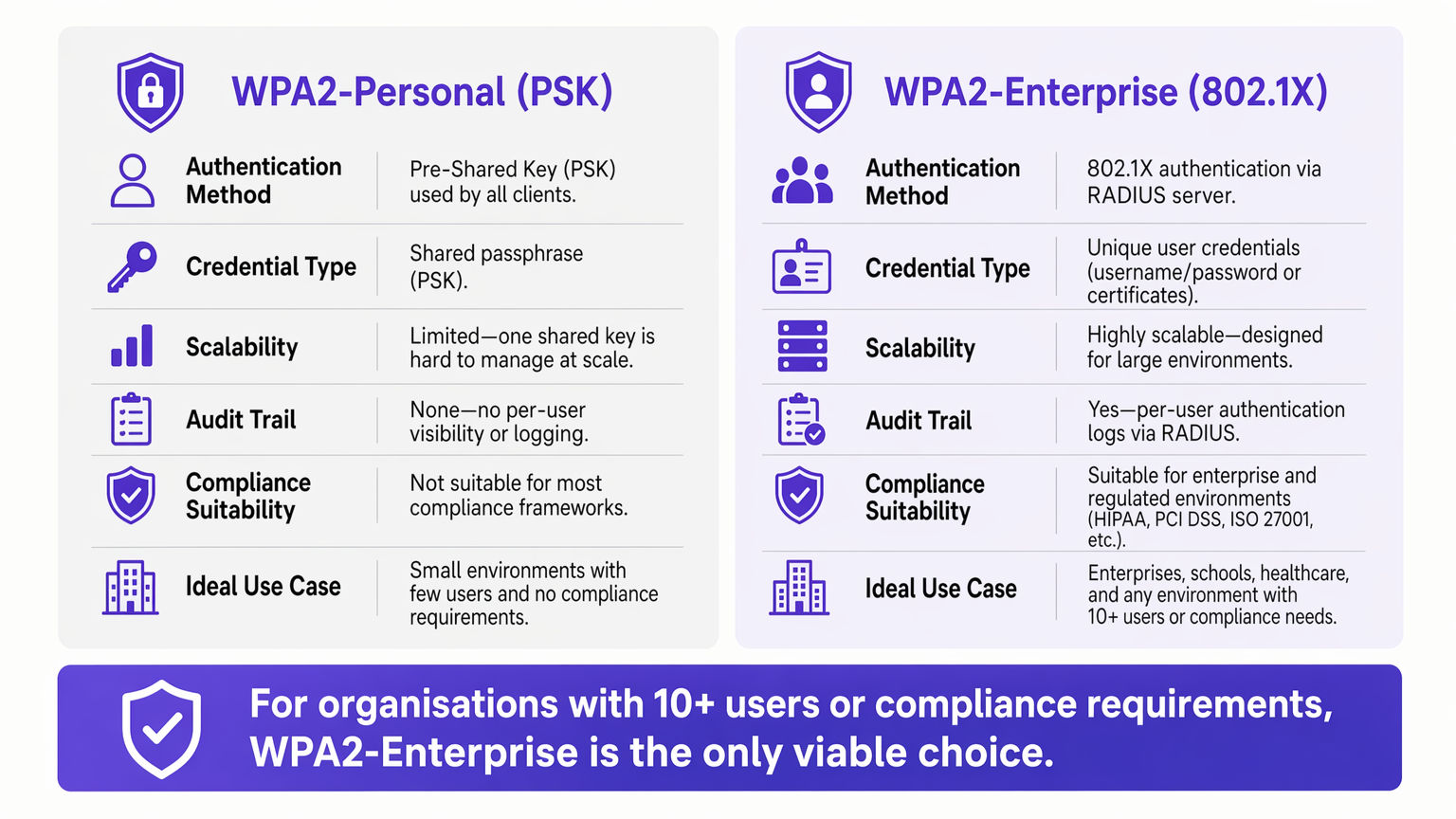
Per gli ambienti aziendali, l'affidamento su WPA2-Personal (chiave pre-condivisa) presenta un rischio di sicurezza e operativo inaccettabile. Man mano che le reti si espandono su più siti, la gestione delle password condivise diventa un onere amministrativo, mentre la mancanza di responsabilità individuale viola direttamente i framework di conformità come PCI DSS e ISO 27001.
WPA2-Enterprise, basato sullo standard IEEE 802.1X, cambia radicalmente il paradigma di sicurezza autenticando utenti o dispositivi individualmente tramite un server RADIUS. Questa guida fornisce a responsabili IT, architetti di rete e direttori delle operazioni di sede un modello pratico per comprendere, implementare e gestire WPA2-Enterprise. Esploriamo l'architettura tecnica, confrontiamo i protocolli di autenticazione come PEAP ed EAP-TLS e dettagliamo come le piattaforme moderne come Purple forniscano una gestione delle identità senza interruzioni per implementazioni Guest WiFi sicure e conformi in ambienti Retail , Hospitality e del settore pubblico.
Approfondimento Tecnico: Comprendere l'Architettura 802.1X
Il principale elemento distintivo di WPA2-Enterprise è il disaccoppiamento della crittografia dall'autenticazione. In un ambiente PSK, la password funge sia da credenziale di autenticazione che da seme di crittografia. In un ambiente Enterprise, la rete si basa sul framework 802.1X, che introduce un livello di autenticazione dedicato composto da tre componenti principali.
Il Supplicant è il dispositivo client — un laptop, uno smartphone o un sensore IoT — che richiede l'accesso alla rete. L'Authenticator è il dispositivo di accesso alla rete, tipicamente un access point wireless o uno switch gestito, che blocca tutto il traffico fino al completamento dell'autenticazione. L'Authentication Server è il server RADIUS (Remote Authentication Dial-In User Service), che convalida le credenziali rispetto a un archivio di identità come Active Directory, LDAP o un servizio di directory cloud.
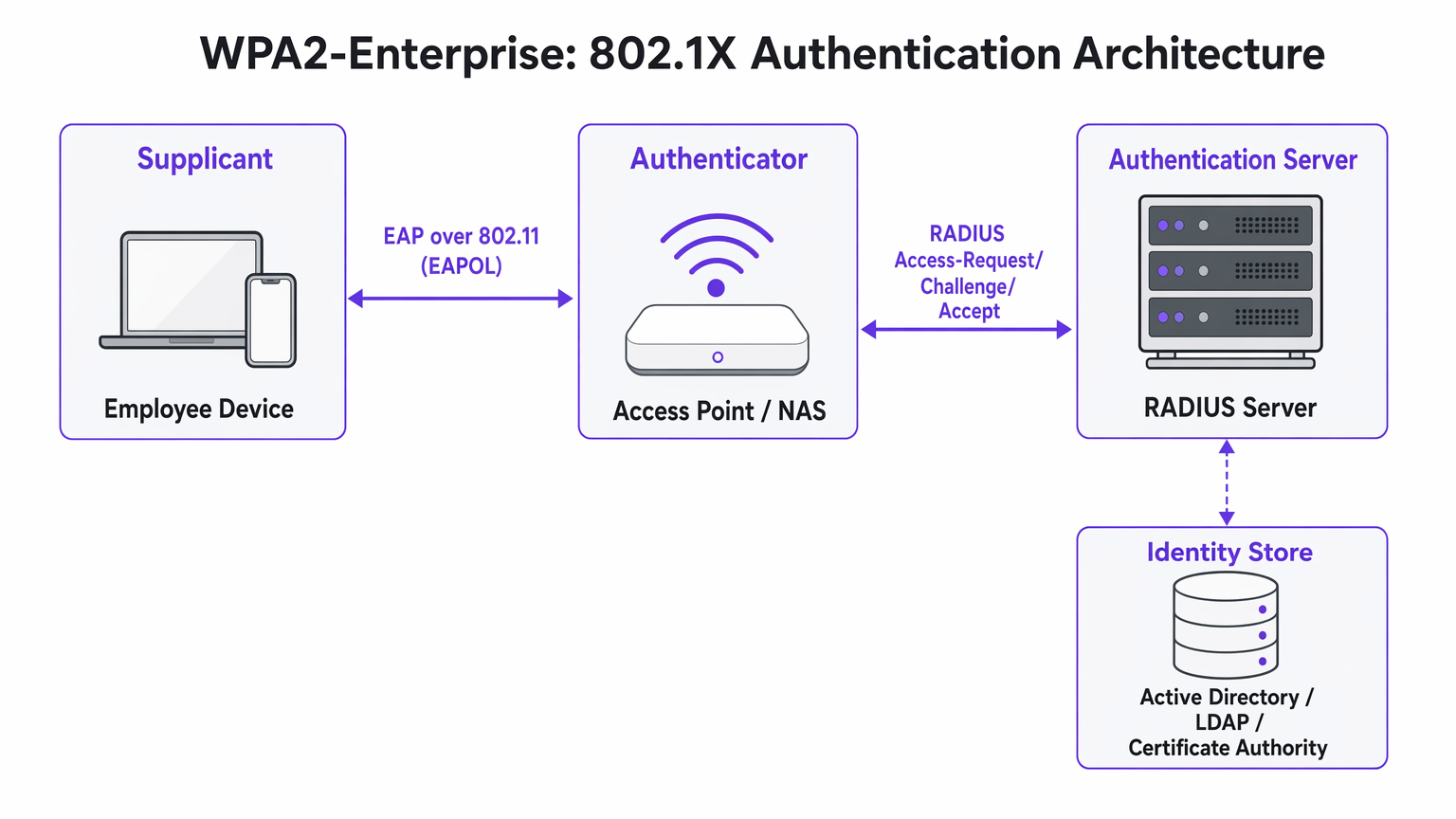
L'intuizione architettonica fondamentale è che l'Access Point non convalida mai direttamente le credenziali. Agisce come un relè, inoltrando lo scambio di autenticazione crittografato tra il Supplicant e il server RADIUS. Questa separazione delle responsabilità è ciò che rende l'architettura scalabile e verificabile.
Metodi EAP: Selezione del Protocollo Corretto
L'Extensible Authentication Protocol (EAP) veicola i dati di autenticazione all'interno del framework 802.1X. La scelta del metodo EAP definisce sia la postura di sicurezza che la complessità di implementazione dell'intero sistema.
PEAP-MSCHAPv2 (Protected EAP) è il metodo più ampiamente utilizzato negli ambienti aziendali. Il server RADIUS presenta un certificato digitale per stabilire un tunnel TLS sicuro. All'interno di quel tunnel, l'utente si autentica con un nome utente e una password standard — tipicamente le proprie credenziali di Active Directory. PEAP è popolare perché non richiede un'infrastruttura di certificati lato client e si integra direttamente con i provider di identità esistenti. Tuttavia, rimane vulnerabile al furto di credenziali se gli utenti accettano certificati server fraudolenti durante un attacco Evil Twin.
EAP-TLS (Transport Layer Security) è lo standard di riferimento per le implementazioni ad alta sicurezza. Richiede l'autenticazione reciproca dei certificati: sia il server che il dispositivo client devono presentare certificati validi. Poiché non vengono trasmesse password, gli attacchi di phishing sono completamente neutralizzati. Il compromesso è la complessità di implementazione — sono necessarie un'infrastruttura a chiave pubblica (PKI) robusta e una piattaforma di gestione dei dispositivi mobili (MDM) per distribuire i certificati client su larga scala.
| Criterio | PEAP-MSCHAPv2 | EAP-TLS |
|---|---|---|
| Certificato client richiesto | No | Sì |
| Rischio di esposizione password | Moderato (se la convalida del certificato viene ignorata) | Nessuno |
| Complessità di implementazione | Bassa a Media | Alta |
| Requisito MDM | Opzionale | Fortemente raccomandato |
| Adatto per BYOD | Sì | Con portale di onboarding |
| Idoneità alla conformità | Buona | Eccellente |
Guida all'Implementazione: Transizione a WPA2-Enterprise
L'implementazione di WPA2-Enterprise richiede un'attenta pianificazione per evitare interruzioni per gli utenti. Il seguente approccio a fasi è raccomandato per implementazioni aziendali di qualsiasi dimensione.
Fase 1: Preparazione dell'Infrastruttura
Prima di abilitare 802.1X, assicurati che la tua infrastruttura RADIUS sia resiliente. Il tuo server RADIUS è ora una dipendenza critica — se diventa non disponibile, gli utenti non possono autenticarsi. Per ambienti distribuiti come grandi catene Retail o strutture Healthcare , i servizi RADIUS ospitati nel cloud offrono ridondanza integrata senza il sovraccarico di gestire server on-premise in ogni località. Integra il server RADIUS con il tuo provider di identità centrale e verifica che le regole del firewall consentano il traffico UDP sulle porte 1812 (autenticazione) e 1813 (accounting) tra tutti gli Access Point e il server RADIUS.
Fase 2: Gestione dei Certificati
Per le implementazioni EAP-TLS, automatizza completamente il provisioning dei certificati. Affidarsi agli utenti per l'installazione manuale dei certificati comporta un elevato volume di richieste al supporto tecnico e una postura di sicurezza incoerente. Utilizza la tua piattaforma MDM — Microsoft Intune, Jamf o equivalente — per inviare i certificati in modo silenzioso ai dispositivi aziendali. Per gli scenari BYOD, considera il portale di onboardingcome SecureW2 o Foxpass che automatizzano l'installazione del profilo di configurazione per i dispositivi personali, riducendo drasticamente il carico di lavoro dell'helpdesk.
Per le implementazioni PEAP, assicurarsi che il certificato del server RADIUS sia rilasciato da un'Autorità di Certificazione pubblica già presente nell'archivio radice attendibile di tutti i sistemi operativi client. Evitare i certificati autofirmati in produzione, poiché generano avvisi di fiducia che abituano gli utenti ad accettare errori di certificato, un rischio significativo per la sicurezza.
Fase 3: Pilot e Rollout a Fasi
Non eseguire mai un cutover immediato. Iniziare con un gruppo pilota — tipicamente il reparto IT — su un SSID o VLAN dedicato. Monitorare attentamente i log RADIUS per rilevare timeout di autenticazione, che indicano problemi di routing di rete, o errori di fiducia del certificato, che indicano lacune nell'implementazione PKI. Una volta che il pilot è stabile, espandere a un singolo sito o piano, quindi procedere sito per sito. Mantenere la rete PSK legacy in parallelo durante tutta la migrazione e dismetterla solo una volta che tutti i dispositivi sono stati migrati con successo.
Best Practice per gli Operatori di Strutture
Per ambienti aperti al pubblico come stadi, centri congressi e strutture Hospitality , WPA2-Enterprise è sempre più rilevante non solo per le reti del personale ma anche per l'accesso gestito degli ospiti.
Assegnazione Dinamica VLAN è una delle funzionalità più potenti e sottoutilizzate di 802.1X. Invece di trasmettere più SSID per diversi gruppi di utenti — ognuno aggiungendo overhead RF — si trasmette un singolo SSID WPA2-Enterprise. Quando un utente si autentica, il server RADIUS restituisce gli attributi di assegnazione VLAN all'Access Point, posizionando la sessione sul segmento di rete appropriato in base all'appartenenza al gruppo dell'utente. Un terminale Point of Sale che si autentica tramite EAP-TLS atterra sulla VLAN conforme a PCI; un responsabile di negozio che si autentica tramite PEAP atterra sulla VLAN aziendale. Questo approccio riduce significativamente la congestione RF in ambienti densi.
Integrazione con Purple: la piattaforma di Purple agisce come un provider di identità senza soluzione di continuità per l'accesso WiFi sicuro. Con la licenza Connect, Purple supporta OpenRoaming — uno standard di settore che consente agli utenti di spostarsi in modo sicuro tra le reti partecipanti senza doversi riautenticare. Questo è particolarmente prezioso per gli hub di Transport e gli operatori multi-struttura. I dati di autenticazione vengono immessi direttamente nella dashboard WiFi Analytics di Purple, fornendo visibilità per utente per la pianificazione della capacità e la rendicontazione della conformità.
Segmentazione della Rete per IoT: Molti dispositivi IoT legacy — controller HVAC, lettori di controllo accessi, stampanti legacy — non supportano 802.1X. Per questi dispositivi, implementare un SSID nascosto separato utilizzando WPA2-PSK con MAC Authentication Bypass (MAB), o sfruttare Multi-PSK (MPSK) se supportato dal fornitore del proprio Access Point. Non tentare di forzare i dispositivi IoT legacy su una rete 802.1X; il costo operativo supera il beneficio.
Per indicazioni sulle decisioni relative all'architettura di rete complementare, consultare I Vantaggi Chiave dell'SD WAN per le Aziende Moderne , che illustra come gli overlay SD-WAN possano migliorare la raggiungibilità RADIUS tra siti distribuiti.
Risoluzione dei Problemi e Mitigazione del Rischio
Le modalità di errore più comuni nelle implementazioni WPA2-Enterprise riguardano la fiducia dei certificati, la raggiungibilità della rete e la compatibilità dei dispositivi.
Il Prompt "Server non attendibile": Se i client ricevono un avviso che il certificato del server non può essere verificato, il server RADIUS sta probabilmente utilizzando un certificato autofirmato o uno rilasciato da una CA interna la cui radice non è stata distribuita a tutti gli endpoint. Risoluzione: distribuire il certificato radice della CA tramite Criteri di gruppo o MDM, oppure passare a un certificato di una CA pubblica.
Timeout RADIUS: I client si bloccano sulla schermata di autenticazione prima di fallire. La causa è quasi sempre un problema di percorso di rete — l'Access Point non riesce a raggiungere il server RADIUS, o il traffico UDP viene bloccato da un firewall intermedio. Controllare le regole del firewall per le porte 1812 e 1813 e verificare il routing tra gli Access Point e il server RADIUS.
Complessità della Configurazione Android: Android richiede la configurazione esplicita del nome di dominio del server RADIUS e del certificato CA per PEAP. A differenza di Windows, che può rilevare automaticamente queste impostazioni tramite Criteri di gruppo, gli utenti Android devono configurarle manualmente o ricevere un profilo di configurazione tramite un portale di onboarding. Questa è una fonte comune di ticket per l'helpdesk durante il rollout iniziale.
Disallineamento dell'Orologio e Validità del Certificato: L'autenticazione basata su certificato (EAP-TLS) è sensibile alla sincronizzazione dell'ora. Se l'orologio di un dispositivo è significativamente fuori sincronia, la convalida del certificato fallirà. Assicurarsi che NTP sia configurato correttamente su tutti i dispositivi di rete e gli endpoint.
ROI e Impatto sul Business
La transizione a WPA2-Enterprise offre un valore aziendale misurabile che va oltre la pura mitigazione del rischio.
Il ROI più immediato deriva dall'eliminazione del sovraccarico operativo della rotazione delle password. In una catena di vendita al dettaglio con 50 sedi, la rotazione di una password WiFi condivisa richiede l'aggiornamento di ogni dispositivo in ogni sede — potenzialmente migliaia di modifiche individuali. Con WPA2-Enterprise, la disattivazione di un dipendente è una singola azione in Active Directory, con effetto immediato su tutti i siti.
Da una prospettiva di conformità, la traccia di audit granulare fornita dai log RADIUS per utente è un vantaggio significativo durante le valutazioni PCI DSS, HIPAA e ISO 27001. Gli auditor possono vedere esattamente quale utente si è autenticato, da quale dispositivo, a che ora e per quanto tempo — un livello di visibilità semplicemente impossibile con chiavi condivise.
Infine, l'intelligence di rete generata dall'autenticazione per utente alimenta direttamente la pianificazione della capacità e il rilevamento delle anomalie. Piattaforme come WiFi Analytics di Purple possono far emergere modelli nel comportamento dei dispositivi, periodi di picco di utilizzo e domanda specifica per località — dati inestimabili sia per la pianificazione operativa che, nel settore della vendita al dettaglio e dell'ospitalità contesti, comprendendo il comportamento dei visitatori. Per considerazioni sul design della splash page che completano la tua strategia di accesso ospite, consulta I 10 migliori esempi di splash page WiFi (e cosa li rende efficaci) .
Termini chiave e definizioni
802.1X
An IEEE standard for port-based Network Access Control (PNAC) that provides an authentication mechanism for devices attempting to connect to a LAN or WLAN. It defines the roles of Supplicant, Authenticator, and Authentication Server.
This is the underlying framework that makes WPA2-Enterprise possible. When an IT team says they are 'deploying 802.1X', they mean they are implementing this standard on their network infrastructure.
RADIUS
Remote Authentication Dial-In User Service. A networking protocol providing centralised Authentication, Authorisation, and Accounting (AAA) management for users connecting to a network service.
The central server that validates credentials. Access Points do not check passwords; they ask the RADIUS server. RADIUS is the critical infrastructure component that must be made highly available.
Supplicant
The software client on an endpoint device that handles the 802.1X authentication negotiation. Built into modern operating systems including Windows, macOS, iOS, and Android.
When a user selects a WPA2-Enterprise network, the supplicant software on their device initiates the EAP exchange. Configuration of the supplicant — particularly certificate trust settings — is the most common source of end-user issues.
Authenticator
The network device — typically a wireless access point or managed switch — that enforces access control by blocking traffic until the RADIUS server returns an Access-Accept response.
The Access Point acts as a relay between the client and the RADIUS server. It enforces the policy but does not make the authentication decision itself.
EAP-TLS
Extensible Authentication Protocol — Transport Layer Security. An authentication method requiring both a server-side and a client-side digital certificate, providing mutual authentication without transmitting passwords.
The most secure EAP method. Recommended for managed corporate devices, PCI-scoped systems, and any environment where credential phishing is a significant threat vector.
PEAP
Protected Extensible Authentication Protocol. An authentication method that creates a server-authenticated TLS tunnel inside which standard username/password credentials are transmitted securely.
The most common EAP method for enterprise deployments due to its compatibility with existing Active Directory credentials and its relatively straightforward deployment. Vulnerable to Evil Twin attacks if server certificate validation is not enforced.
Dynamic VLAN Assignment
A capability of 802.1X whereby the RADIUS server instructs the Access Point to place an authenticated session onto a specific Virtual LAN based on the user's identity or group membership, using RADIUS tunnel attributes.
Enables network segmentation without multiple SSIDs. Critical for environments that need to separate PCI-scoped devices, corporate users, and IoT devices on a single wireless infrastructure.
Certificate Authority (CA)
A trusted entity that issues and manages digital certificates used to verify the identity of servers and clients in certificate-based authentication systems.
Required for EAP-TLS deployments. Organisations can use a public CA (whose root is pre-trusted by all devices) or an internal CA (whose root must be deployed to all endpoints via Group Policy or MDM).
OpenRoaming
A Wi-Fi Alliance standard that enables seamless, secure, and automatic WiFi connectivity across participating networks using identity federation, eliminating the need for manual re-authentication.
Increasingly relevant for venue operators and transport hubs. Purple supports OpenRoaming under its Connect licence, allowing venues to offer secure automatic connectivity to returning visitors.
Casi di studio
A 200-room hotel currently uses a single WPA2-Personal password for all back-of-house staff across housekeeping, maintenance, and management. When staff leave, the password is rarely changed due to the operational difficulty of updating all devices. The IT Director needs to secure the network without disrupting daily operations.
Deploy WPA2-Enterprise using PEAP-MSCHAPv2 integrated with the hotel's existing Azure Active Directory tenant. Staff authenticate using their individual corporate email address and password — credentials they already know. When an employee is terminated, disabling their Azure AD account instantly revokes WiFi access across all properties, with no device updates required. For shared devices such as housekeeping tablets that are not tied to a named user, deploy EAP-TLS with certificates pushed via Microsoft Intune. The certificates are bound to the device, not a user, so there is no password for staff to know or share. Run both the legacy PSK SSID and the new Enterprise SSID in parallel for four weeks during the migration, then decommission the PSK network once all devices are confirmed migrated.
A retail chain with 50 locations needs to ensure that Point of Sale (PoS) terminals are strictly isolated from the staff WiFi network to meet PCI DSS requirements. However, the network team wants to reduce RF overhead by broadcasting fewer SSIDs. Currently they broadcast four separate SSIDs per store.
Implement WPA2-Enterprise with Dynamic VLAN Assignment across all 50 locations. Configure the RADIUS server with two Network Policies: one matching PoS device certificates (issued via an internal CA and pushed via MDM) that returns VLAN 10 attributes, and one matching staff Active Directory group membership that returns VLAN 20 attributes. Broadcast a single corporate WPA2-Enterprise SSID at each location. When a PoS terminal authenticates via EAP-TLS, the RADIUS server instructs the Access Point to place that session on VLAN 10 — the PCI-scoped segment with restricted internet routing. When a store manager authenticates via PEAP, they land on VLAN 20 with standard corporate access. Reduce from four SSIDs to two (one Enterprise, one for legacy IoT devices on a hidden PSK SSID).
Analisi degli scenari
Q1. Your organisation is migrating from WPA2-Personal to WPA2-Enterprise using PEAP. The helpdesk is receiving calls from Android users who cannot connect and are being prompted to enter a 'Domain' and to 'Validate CA certificate'. Windows devices are connecting without issue. What is the most likely cause, and how do you resolve it?
💡 Suggerimento:Consider how Android handles server certificate validation compared to Windows, and what Group Policy can do that Android cannot receive automatically.
Mostra l'approccio consigliato
Android requires explicit manual configuration of the RADIUS server's domain name and the CA certificate for PEAP, unlike Windows which can receive these settings automatically via Group Policy. The resolution is to deploy an onboarding portal (such as SecureW2 or Foxpass) that generates and pushes a configuration profile to Android devices, automating the PEAP settings. Alternatively, if the RADIUS server uses a certificate from a public CA already trusted by Android, the CA certificate field can be set to 'Use system certificates' and the domain field populated with the RADIUS server's FQDN.
Q2. A stadium venue needs to provide secure WiFi to media and press during events. These are unmanaged personal laptops from dozens of different news organisations. MDM profiles cannot be installed. The IT team needs individual accountability and the ability to revoke access after the event. How should they design the authentication?
💡 Suggerimento:EAP-TLS requires client certificates, which cannot be pushed to unmanaged devices without an onboarding portal. Consider what credential type is practical for short-term, unmanaged BYOD access.
Mostra l'approccio consigliato
Deploy WPA2-Enterprise using PEAP-MSCHAPv2. Generate unique, time-limited credentials (username and password) for each media organisation or individual journalist, stored in a temporary Active Directory OU or a cloud RADIUS user directory. Distribute credentials via a secure pre-event communication. Configure the RADIUS server to automatically disable these accounts after the event date. This provides individual accountability and instant revocation without requiring certificate installation on unmanaged devices.
Q3. During a network audit, it is confirmed that WPA2-Enterprise is functioning and users are authenticating successfully. However, the finance team's devices are appearing on the general staff subnet (VLAN 20) rather than the secure finance VLAN (VLAN 30). Where is the configuration error most likely located?
💡 Suggerimento:Authentication success and authorisation policy enforcement are two separate functions. Which component is responsible for enforcing the VLAN assignment after authentication succeeds?
Mostra l'approccio consigliato
The error is in the RADIUS server's Network Policy configuration. For Dynamic VLAN Assignment to work, the RADIUS server must be configured to return three specific RADIUS attributes upon successful authentication for the finance group: Tunnel-Type (value: VLAN), Tunnel-Medium-Type (value: 802), and Tunnel-Private-Group-ID (value: 30). Additionally, the Access Point must be configured to accept and apply dynamic VLAN overrides from the RADIUS server — some AP configurations require this to be explicitly enabled. Verify both the RADIUS policy attributes and the AP's 802.1X VLAN override setting.




