

WPA2 Enterprise: The Complete Guide
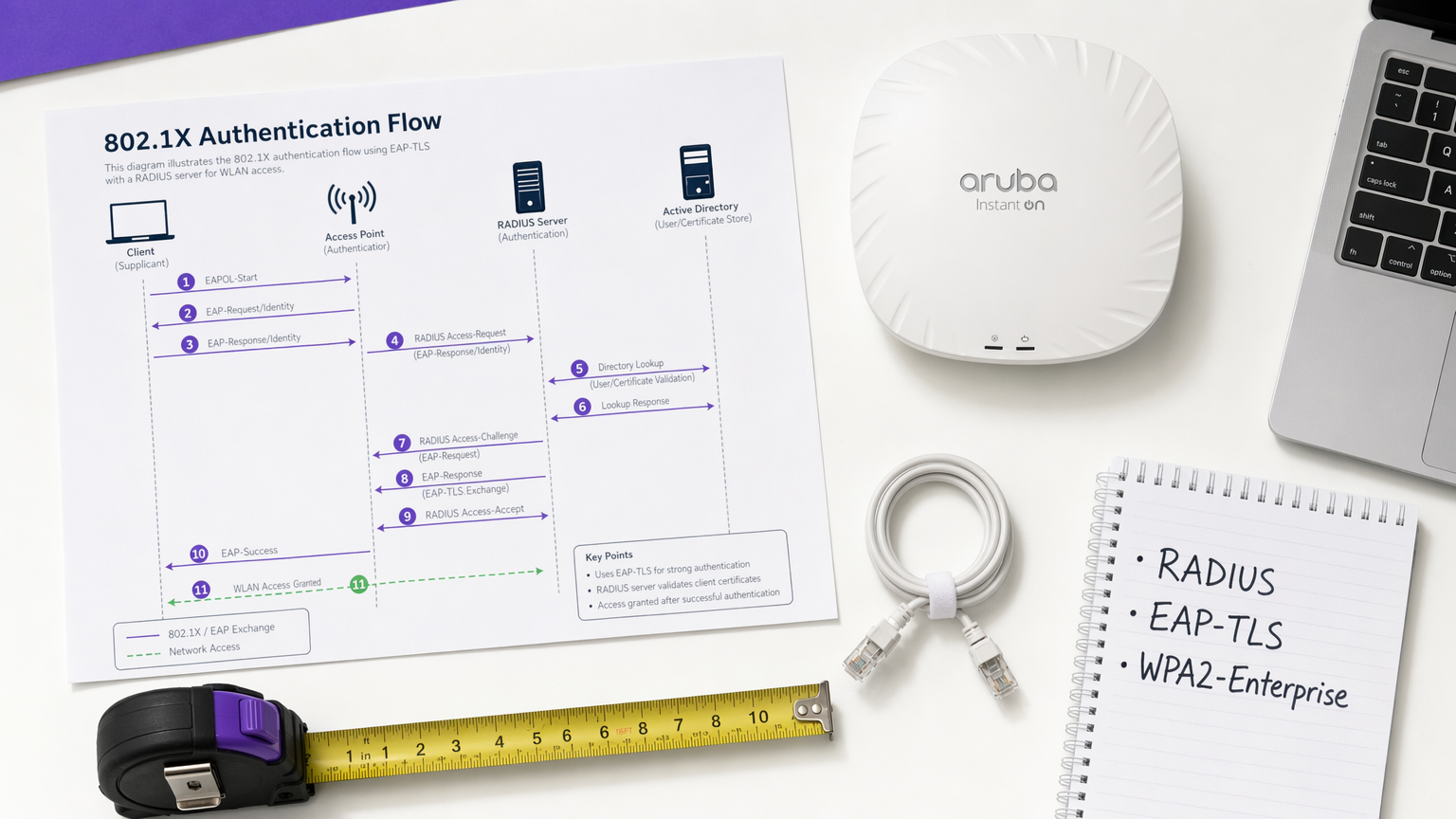
This guide provides a comprehensive technical reference for WPA2-Enterprise, covering 802.1X architecture, EAP method selection, and phased deployment strategies for enterprise environments. It is designed for IT managers, network architects, and venue operations directors who need to move beyond shared-key WiFi to a scalable, auditable, and compliance-ready authentication model. Purple's platform is positioned as a practical identity management layer for venues deploying secure guest and staff WiFi at scale.
🎧 Listen to this Guide
View Transcript
Executive Summary
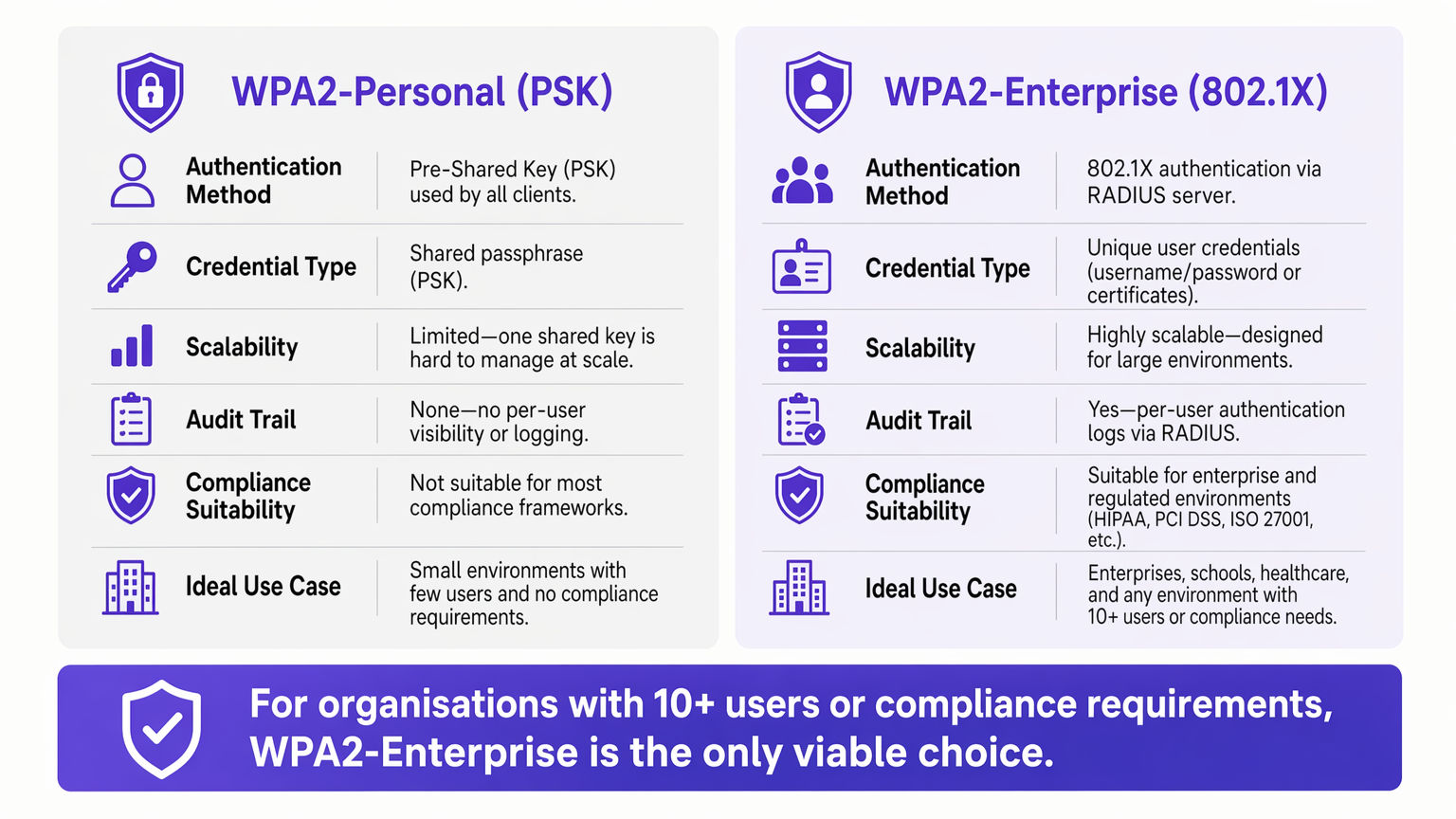
For enterprise environments, reliance on WPA2-Personal (Pre-Shared Key) presents an unacceptable security and operational risk. As networks scale across multiple sites, managing shared passwords becomes an administrative burden, while the lack of individual accountability directly violates compliance frameworks such as PCI DSS and ISO 27001.
WPA2-Enterprise, built on the IEEE 802.1X standard, fundamentally changes the security paradigm by authenticating users or devices individually via a RADIUS server. This guide provides IT managers, network architects, and venue operations directors with a practical blueprint for understanding, deploying, and managing WPA2-Enterprise. We explore the technical architecture, compare authentication protocols such as PEAP and EAP-TLS, and detail how modern platforms like Purple provide seamless identity management for secure, compliant Guest WiFi deployments across Retail , Hospitality , and public-sector environments.
Technical Deep-Dive: Understanding 802.1X Architecture
The core differentiator of WPA2-Enterprise is the decoupling of encryption from authentication. In a PSK environment, the password serves as both the authentication credential and the encryption seed. In an Enterprise environment, the network relies on the 802.1X framework, which introduces a dedicated authentication layer consisting of three primary components.
The Supplicant is the client device — a laptop, smartphone, or IoT sensor — requesting network access. The Authenticator is the network access device, typically a wireless access point or managed switch, which blocks all traffic until authentication is successfully completed. The Authentication Server is the RADIUS (Remote Authentication Dial-In User Service) server, which validates credentials against an identity store such as Active Directory, LDAP, or a cloud directory service.
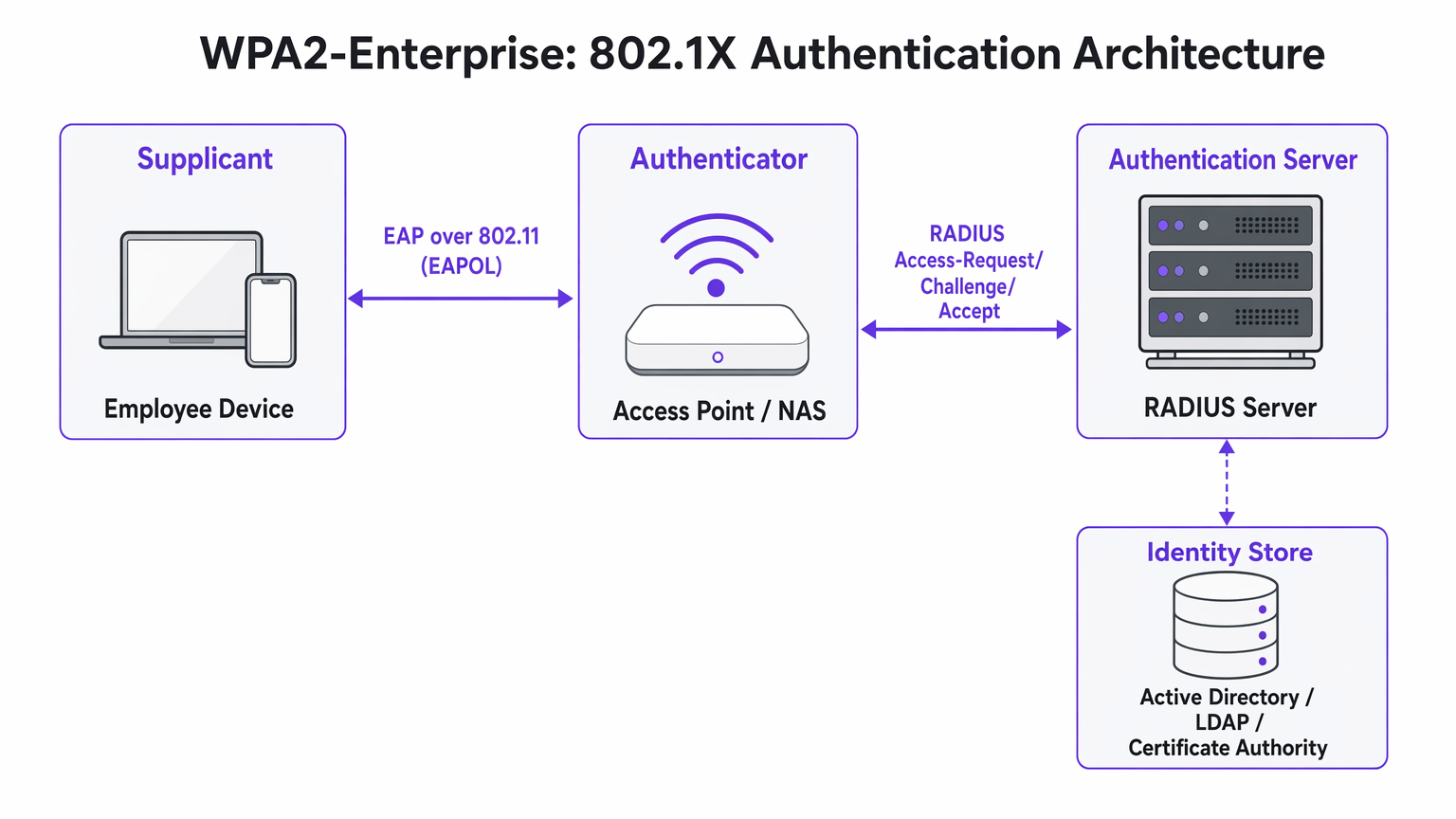
The critical architectural insight is that the Access Point never directly validates credentials. It acts as a relay, forwarding the encrypted authentication exchange between the Supplicant and the RADIUS server. This separation of concerns is what makes the architecture both scalable and auditable.
EAP Methods: Selecting the Right Protocol
The Extensible Authentication Protocol (EAP) carries the authentication data within the 802.1X framework. The choice of EAP method defines both the security posture and the deployment complexity of the entire system.
PEAP-MSCHAPv2 (Protected EAP) is the most widely deployed method in enterprise environments. The RADIUS server presents a digital certificate to establish a secure TLS tunnel. Inside that tunnel, the user authenticates with a standard username and password — typically their Active Directory credentials. PEAP is popular because it requires no client-side certificate infrastructure and integrates directly with existing identity providers. However, it remains vulnerable to credential theft if users accept fraudulent server certificates during an Evil Twin attack.
EAP-TLS (Transport Layer Security) is the gold standard for high-security deployments. It requires mutual certificate authentication: both the server and the client device must present valid certificates. Because no passwords are transmitted, phishing attacks are completely neutralised. The trade-off is deployment complexity — a robust Public Key Infrastructure (PKI) and a Mobile Device Management (MDM) platform are required to distribute client certificates at scale.
| Criterion | PEAP-MSCHAPv2 | EAP-TLS |
|---|---|---|
| Client certificate required | No | Yes |
| Password exposure risk | Moderate (if cert validation bypassed) | None |
| Deployment complexity | Low to Medium | High |
| MDM requirement | Optional | Strongly recommended |
| Suitable for BYOD | Yes | With onboarding portal |
| Compliance suitability | Good | Excellent |
Implementation Guide: Transitioning to WPA2-Enterprise
Deploying WPA2-Enterprise requires careful planning to avoid user disruption. The following phased approach is recommended for enterprise deployments of any scale.
Phase 1: Infrastructure Readiness
Before enabling 802.1X, ensure your RADIUS infrastructure is resilient. Your RADIUS server is now a critical path dependency — if it becomes unavailable, users cannot authenticate. For distributed environments such as large Retail chains or Healthcare facilities, cloud-hosted RADIUS services offer built-in redundancy without the overhead of managing on-premise servers at each location. Integrate the RADIUS server with your central identity provider and verify that firewall rules permit UDP traffic on ports 1812 (authentication) and 1813 (accounting) between all Access Points and the RADIUS server.
Phase 2: Certificate Management
For EAP-TLS deployments, automate certificate provisioning entirely. Relying on users to manually install certificates results in high support desk volume and inconsistent security posture. Use your MDM platform — Microsoft Intune, Jamf, or equivalent — to push certificates silently to corporate-owned devices. For BYOD scenarios, consider onboarding portals such as SecureW2 or Foxpass that automate the configuration profile installation for personal devices, dramatically reducing helpdesk burden.
For PEAP deployments, ensure the RADIUS server's certificate is issued by a public Certificate Authority already present in the trusted root store of all client operating systems. Avoid self-signed certificates in production, as they generate trust warnings that train users to accept certificate errors — a significant security risk.
Phase 3: Pilot and Phased Rollout
Never execute a flash cutover. Begin with a pilot group — typically the IT department — on a dedicated SSID or VLAN. Monitor RADIUS logs closely for authentication timeouts, which indicate network routing issues, or certificate trust errors, which indicate PKI deployment gaps. Once the pilot is stable, expand to a single site or floor, then proceed site by site. Maintain the legacy PSK network in parallel throughout the migration and decommission it only once all devices have been successfully migrated.
Best Practices for Venue Operators
For public-facing environments such as stadiums, conference centres, and Hospitality venues, WPA2-Enterprise is increasingly relevant not just for staff networks but for managed guest access.
Dynamic VLAN Assignment is one of the most powerful and underutilised features of 802.1X. Instead of broadcasting multiple SSIDs for different user groups — each adding RF overhead — you broadcast a single WPA2-Enterprise SSID. When a user authenticates, the RADIUS server returns VLAN assignment attributes to the Access Point, placing the session on the appropriate network segment based on the user's group membership. A Point of Sale terminal authenticating via EAP-TLS lands on the PCI-compliant VLAN; a store manager authenticating via PEAP lands on the corporate VLAN. This approach significantly reduces RF congestion in dense environments.
Integration with Purple: Purple's platform acts as a seamless identity provider for secure WiFi access. Under the Connect licence, Purple supports OpenRoaming — an industry standard that allows users to securely roam between participating networks without re-authenticating. This is particularly valuable for Transport hubs and multi-venue operators. The authentication data feeds directly into Purple's WiFi Analytics dashboard, providing per-user visibility for capacity planning and compliance reporting.
Network Segmentation for IoT: Many legacy IoT devices — HVAC controllers, access control readers, legacy printers — do not support 802.1X. For these devices, implement a separate hidden SSID using WPA2-PSK with MAC Authentication Bypass (MAB), or leverage Multi-PSK (MPSK) if supported by your Access Point vendor. Do not attempt to force legacy IoT devices onto an 802.1X network; the operational cost outweighs the benefit.
For guidance on complementary network architecture decisions, see The Core SD WAN Benefits for Modern Businesses , which covers how SD-WAN overlays can improve RADIUS reachability across distributed sites.
Troubleshooting & Risk Mitigation
The most common failure modes in WPA2-Enterprise deployments relate to certificate trust, network reachability, and device compatibility.
The "Untrusted Server" Prompt: If clients receive a warning that the server certificate cannot be verified, the RADIUS server is likely using a self-signed certificate or one issued by an internal CA whose root has not been deployed to all endpoints. Resolution: deploy the CA root certificate via Group Policy or MDM, or switch to a certificate from a public CA.
RADIUS Timeouts: Clients hang at the authentication screen before failing. The cause is almost always a network path issue — the Access Point cannot reach the RADIUS server, or UDP traffic is being dropped by an intermediate firewall. Check firewall rules for ports 1812 and 1813, and verify routing between Access Points and the RADIUS server.
Android Configuration Complexity: Android requires explicit configuration of the RADIUS server's domain name and CA certificate for PEAP. Unlike Windows, which can auto-detect these settings via Group Policy, Android users must configure them manually or receive a configuration profile via an onboarding portal. This is a common source of helpdesk tickets during initial rollout.
Clock Skew and Certificate Validity: Certificate-based authentication (EAP-TLS) is sensitive to time synchronisation. If a device's clock is significantly out of sync, certificate validation will fail. Ensure NTP is correctly configured on all network devices and endpoints.
ROI & Business Impact
Transitioning to WPA2-Enterprise delivers measurable business value beyond pure risk mitigation.
The most immediate ROI comes from eliminating the operational overhead of password rotation. In a 50-location retail chain, rotating a shared WiFi password requires updating every device at every location — potentially thousands of individual changes. With WPA2-Enterprise, deprovisioning an employee is a single action in Active Directory, with immediate effect across all sites.
From a compliance perspective, the granular audit trail provided by per-user RADIUS logs is a significant advantage during PCI DSS, HIPAA, and ISO 27001 assessments. Auditors can see exactly which user authenticated, from which device, at which time, and for how long — a level of visibility that is simply impossible with shared keys.
Finally, the network intelligence generated by per-user authentication feeds directly into capacity planning and anomaly detection. Platforms like Purple's WiFi Analytics can surface patterns in device behaviour, peak usage periods, and location-specific demand — data that is invaluable for both operational planning and, in retail and hospitality contexts, understanding visitor behaviour. For splash page design considerations that complement your guest access strategy, see The 10 Best WiFi Splash Page Examples (And What Makes Them Work) .
Key Terms & Definitions
802.1X
An IEEE standard for port-based Network Access Control (PNAC) that provides an authentication mechanism for devices attempting to connect to a LAN or WLAN. It defines the roles of Supplicant, Authenticator, and Authentication Server.
This is the underlying framework that makes WPA2-Enterprise possible. When an IT team says they are 'deploying 802.1X', they mean they are implementing this standard on their network infrastructure.
RADIUS
Remote Authentication Dial-In User Service. A networking protocol providing centralised Authentication, Authorisation, and Accounting (AAA) management for users connecting to a network service.
The central server that validates credentials. Access Points do not check passwords; they ask the RADIUS server. RADIUS is the critical infrastructure component that must be made highly available.
Supplicant
The software client on an endpoint device that handles the 802.1X authentication negotiation. Built into modern operating systems including Windows, macOS, iOS, and Android.
When a user selects a WPA2-Enterprise network, the supplicant software on their device initiates the EAP exchange. Configuration of the supplicant — particularly certificate trust settings — is the most common source of end-user issues.
Authenticator
The network device — typically a wireless access point or managed switch — that enforces access control by blocking traffic until the RADIUS server returns an Access-Accept response.
The Access Point acts as a relay between the client and the RADIUS server. It enforces the policy but does not make the authentication decision itself.
EAP-TLS
Extensible Authentication Protocol — Transport Layer Security. An authentication method requiring both a server-side and a client-side digital certificate, providing mutual authentication without transmitting passwords.
The most secure EAP method. Recommended for managed corporate devices, PCI-scoped systems, and any environment where credential phishing is a significant threat vector.
PEAP
Protected Extensible Authentication Protocol. An authentication method that creates a server-authenticated TLS tunnel inside which standard username/password credentials are transmitted securely.
The most common EAP method for enterprise deployments due to its compatibility with existing Active Directory credentials and its relatively straightforward deployment. Vulnerable to Evil Twin attacks if server certificate validation is not enforced.
Dynamic VLAN Assignment
A capability of 802.1X whereby the RADIUS server instructs the Access Point to place an authenticated session onto a specific Virtual LAN based on the user's identity or group membership, using RADIUS tunnel attributes.
Enables network segmentation without multiple SSIDs. Critical for environments that need to separate PCI-scoped devices, corporate users, and IoT devices on a single wireless infrastructure.
Certificate Authority (CA)
A trusted entity that issues and manages digital certificates used to verify the identity of servers and clients in certificate-based authentication systems.
Required for EAP-TLS deployments. Organisations can use a public CA (whose root is pre-trusted by all devices) or an internal CA (whose root must be deployed to all endpoints via Group Policy or MDM).
OpenRoaming
A Wi-Fi Alliance standard that enables seamless, secure, and automatic WiFi connectivity across participating networks using identity federation, eliminating the need for manual re-authentication.
Increasingly relevant for venue operators and transport hubs. Purple supports OpenRoaming under its Connect licence, allowing venues to offer secure automatic connectivity to returning visitors.
Case Studies
A 200-room hotel currently uses a single WPA2-Personal password for all back-of-house staff across housekeeping, maintenance, and management. When staff leave, the password is rarely changed due to the operational difficulty of updating all devices. The IT Director needs to secure the network without disrupting daily operations.
Deploy WPA2-Enterprise using PEAP-MSCHAPv2 integrated with the hotel's existing Azure Active Directory tenant. Staff authenticate using their individual corporate email address and password — credentials they already know. When an employee is terminated, disabling their Azure AD account instantly revokes WiFi access across all properties, with no device updates required. For shared devices such as housekeeping tablets that are not tied to a named user, deploy EAP-TLS with certificates pushed via Microsoft Intune. The certificates are bound to the device, not a user, so there is no password for staff to know or share. Run both the legacy PSK SSID and the new Enterprise SSID in parallel for four weeks during the migration, then decommission the PSK network once all devices are confirmed migrated.
A retail chain with 50 locations needs to ensure that Point of Sale (PoS) terminals are strictly isolated from the staff WiFi network to meet PCI DSS requirements. However, the network team wants to reduce RF overhead by broadcasting fewer SSIDs. Currently they broadcast four separate SSIDs per store.
Implement WPA2-Enterprise with Dynamic VLAN Assignment across all 50 locations. Configure the RADIUS server with two Network Policies: one matching PoS device certificates (issued via an internal CA and pushed via MDM) that returns VLAN 10 attributes, and one matching staff Active Directory group membership that returns VLAN 20 attributes. Broadcast a single corporate WPA2-Enterprise SSID at each location. When a PoS terminal authenticates via EAP-TLS, the RADIUS server instructs the Access Point to place that session on VLAN 10 — the PCI-scoped segment with restricted internet routing. When a store manager authenticates via PEAP, they land on VLAN 20 with standard corporate access. Reduce from four SSIDs to two (one Enterprise, one for legacy IoT devices on a hidden PSK SSID).
Scenario Analysis
Q1. Your organisation is migrating from WPA2-Personal to WPA2-Enterprise using PEAP. The helpdesk is receiving calls from Android users who cannot connect and are being prompted to enter a 'Domain' and to 'Validate CA certificate'. Windows devices are connecting without issue. What is the most likely cause, and how do you resolve it?
💡 Hint:Consider how Android handles server certificate validation compared to Windows, and what Group Policy can do that Android cannot receive automatically.
Show Recommended Approach
Android requires explicit manual configuration of the RADIUS server's domain name and the CA certificate for PEAP, unlike Windows which can receive these settings automatically via Group Policy. The resolution is to deploy an onboarding portal (such as SecureW2 or Foxpass) that generates and pushes a configuration profile to Android devices, automating the PEAP settings. Alternatively, if the RADIUS server uses a certificate from a public CA already trusted by Android, the CA certificate field can be set to 'Use system certificates' and the domain field populated with the RADIUS server's FQDN.
Q2. A stadium venue needs to provide secure WiFi to media and press during events. These are unmanaged personal laptops from dozens of different news organisations. MDM profiles cannot be installed. The IT team needs individual accountability and the ability to revoke access after the event. How should they design the authentication?
💡 Hint:EAP-TLS requires client certificates, which cannot be pushed to unmanaged devices without an onboarding portal. Consider what credential type is practical for short-term, unmanaged BYOD access.
Show Recommended Approach
Deploy WPA2-Enterprise using PEAP-MSCHAPv2. Generate unique, time-limited credentials (username and password) for each media organisation or individual journalist, stored in a temporary Active Directory OU or a cloud RADIUS user directory. Distribute credentials via a secure pre-event communication. Configure the RADIUS server to automatically disable these accounts after the event date. This provides individual accountability and instant revocation without requiring certificate installation on unmanaged devices.
Q3. During a network audit, it is confirmed that WPA2-Enterprise is functioning and users are authenticating successfully. However, the finance team's devices are appearing on the general staff subnet (VLAN 20) rather than the secure finance VLAN (VLAN 30). Where is the configuration error most likely located?
💡 Hint:Authentication success and authorisation policy enforcement are two separate functions. Which component is responsible for enforcing the VLAN assignment after authentication succeeds?
Show Recommended Approach
The error is in the RADIUS server's Network Policy configuration. For Dynamic VLAN Assignment to work, the RADIUS server must be configured to return three specific RADIUS attributes upon successful authentication for the finance group: Tunnel-Type (value: VLAN), Tunnel-Medium-Type (value: 802), and Tunnel-Private-Group-ID (value: 30). Additionally, the Access Point must be configured to accept and apply dynamic VLAN overrides from the RADIUS server — some AP configurations require this to be explicitly enabled. Verify both the RADIUS policy attributes and the AP's 802.1X VLAN override setting.




