

WPA2 Enterprise : Le Guide Complet
Ce guide fournit une référence technique complète pour WPA2-Enterprise, couvrant l'architecture 802.1X, la sélection des méthodes EAP et les stratégies de déploiement par phases pour les environnements d'entreprise. Il est conçu pour les responsables informatiques, les architectes réseau et les directeurs des opérations de sites qui doivent dépasser le WiFi à clé partagée pour adopter un modèle d'authentification évolutif, auditable et conforme. La plateforme de Purple est positionnée comme une couche pratique de gestion des identités pour les sites déployant un WiFi sécurisé pour les invités et le personnel à grande échelle.
🎧 Écouter ce guide
Voir la transcription
Résumé Exécutif
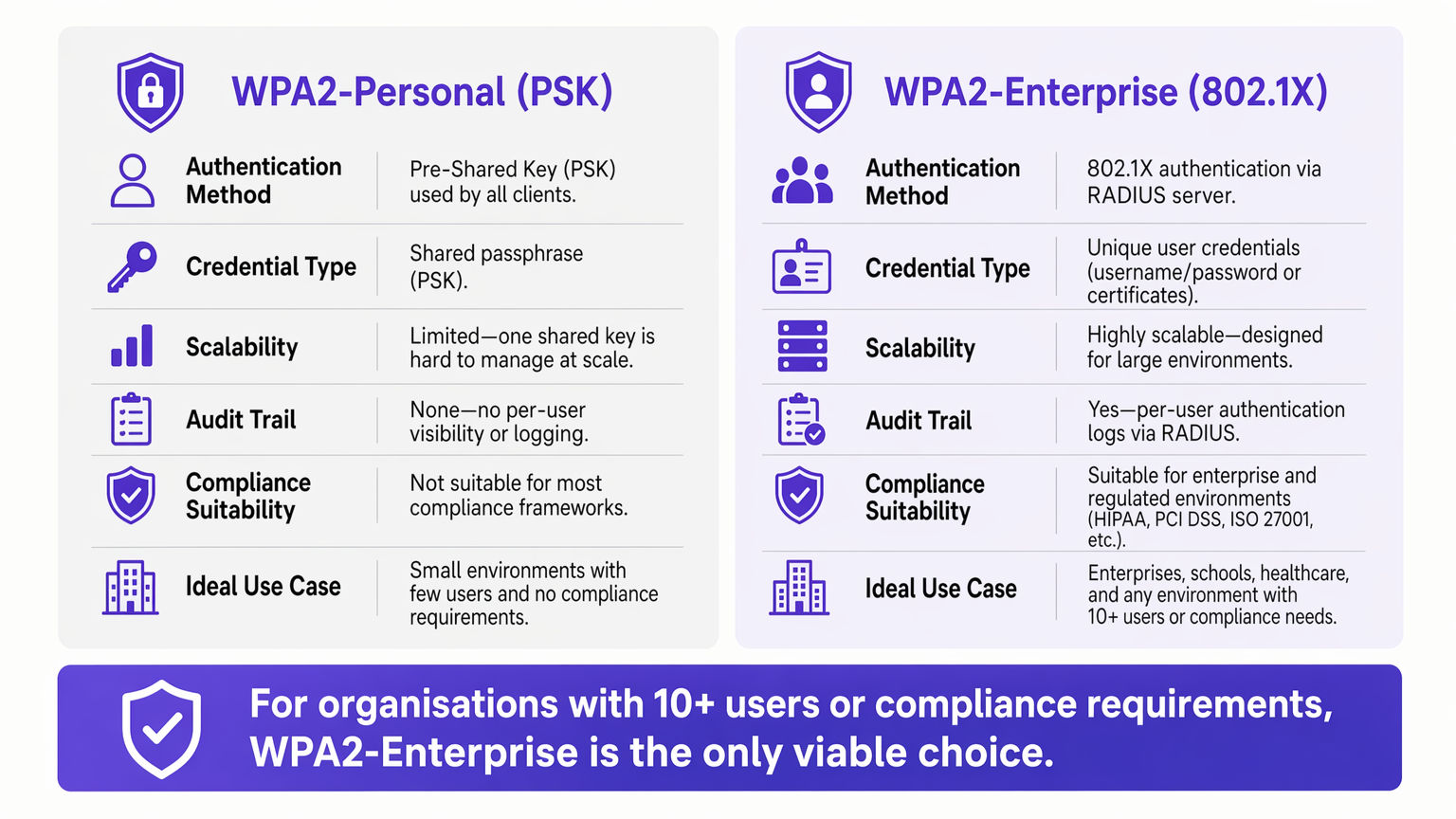
Pour les environnements d'entreprise, la dépendance au WPA2-Personal (clé pré-partagée) présente un risque de sécurité et opérationnel inacceptable. À mesure que les réseaux s'étendent sur plusieurs sites, la gestion des mots de passe partagés devient une charge administrative, tandis que le manque de responsabilité individuelle viole directement les cadres de conformité tels que PCI DSS et ISO 27001.
WPA2-Enterprise, basé sur la norme IEEE 802.1X, modifie fondamentalement le paradigme de sécurité en authentifiant les utilisateurs ou les appareils individuellement via un serveur RADIUS. Ce guide fournit aux responsables informatiques, aux architectes réseau et aux directeurs des opérations de sites un plan pratique pour comprendre, déployer et gérer WPA2-Enterprise. Nous explorons l'architecture technique, comparons les protocoles d'authentification tels que PEAP et EAP-TLS, et détaillons comment les plateformes modernes comme Purple offrent une gestion transparente des identités pour des déploiements de Guest WiFi sécurisés et conformes dans les environnements de Retail , d' Hospitality et du secteur public.
Plongée Technique : Comprendre l'Architecture 802.1X
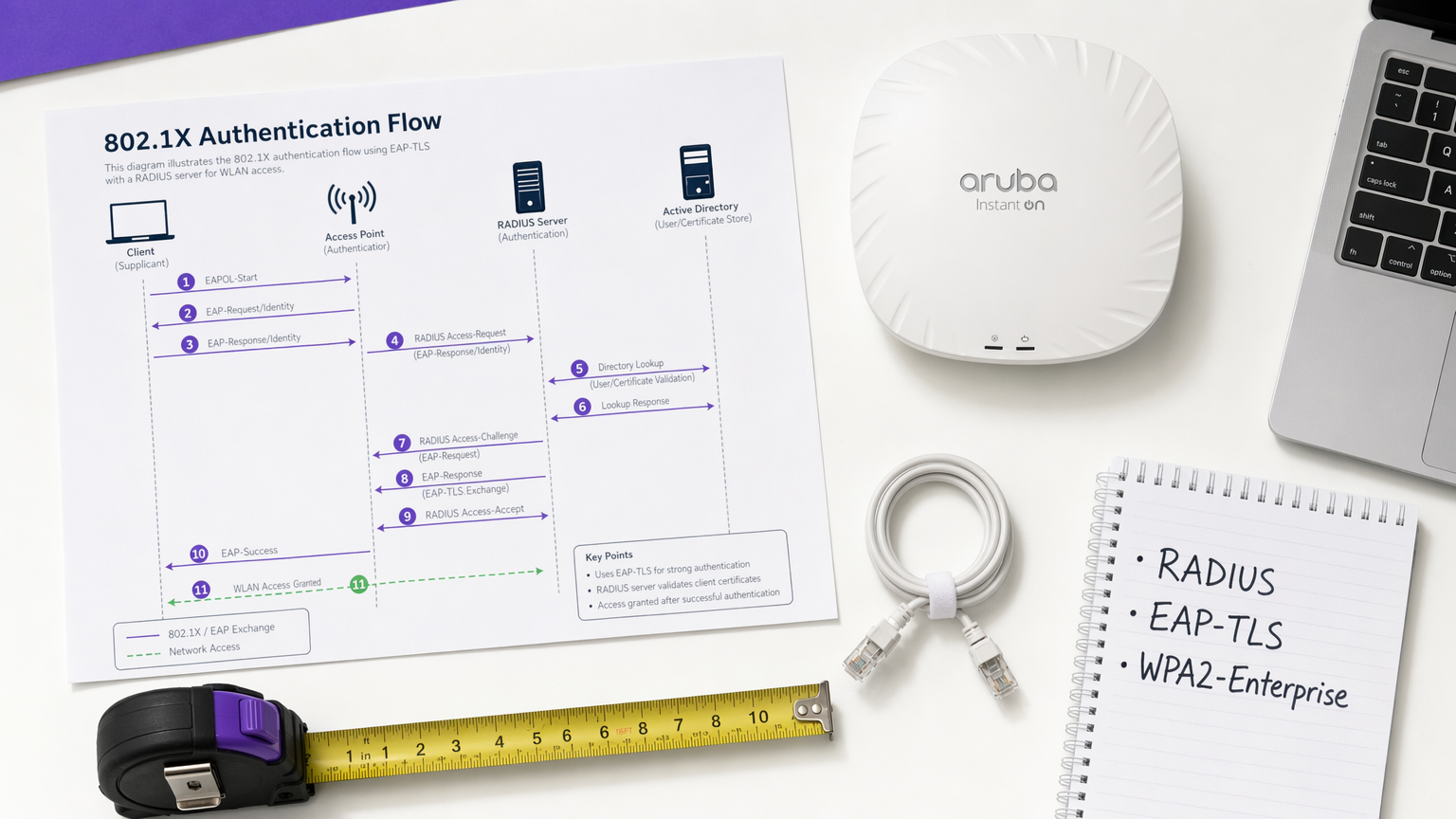
Le principal différenciateur de WPA2-Enterprise est le découplage du chiffrement de l'authentification. Dans un environnement PSK, le mot de passe sert à la fois de credential d'authentification et de graine de chiffrement. Dans un environnement d'entreprise, le réseau s'appuie sur le cadre 802.1X, qui introduit une couche d'authentification dédiée composée de trois composants principaux.
Le Supplicant est le périphérique client — un ordinateur portable, un smartphone ou un capteur IoT — demandant l'accès au réseau. L'Authentificateur est le périphérique d'accès réseau, généralement un point d'accès sans fil ou un commutateur géré, qui bloque tout le trafic jusqu'à ce que l'authentification soit terminée avec succès. Le Serveur d'Authentification est le serveur RADIUS (Remote Authentication Dial-In User Service), qui valide les credentials par rapport à un magasin d'identités tel qu'Active Directory, LDAP ou un service d'annuaire cloud.
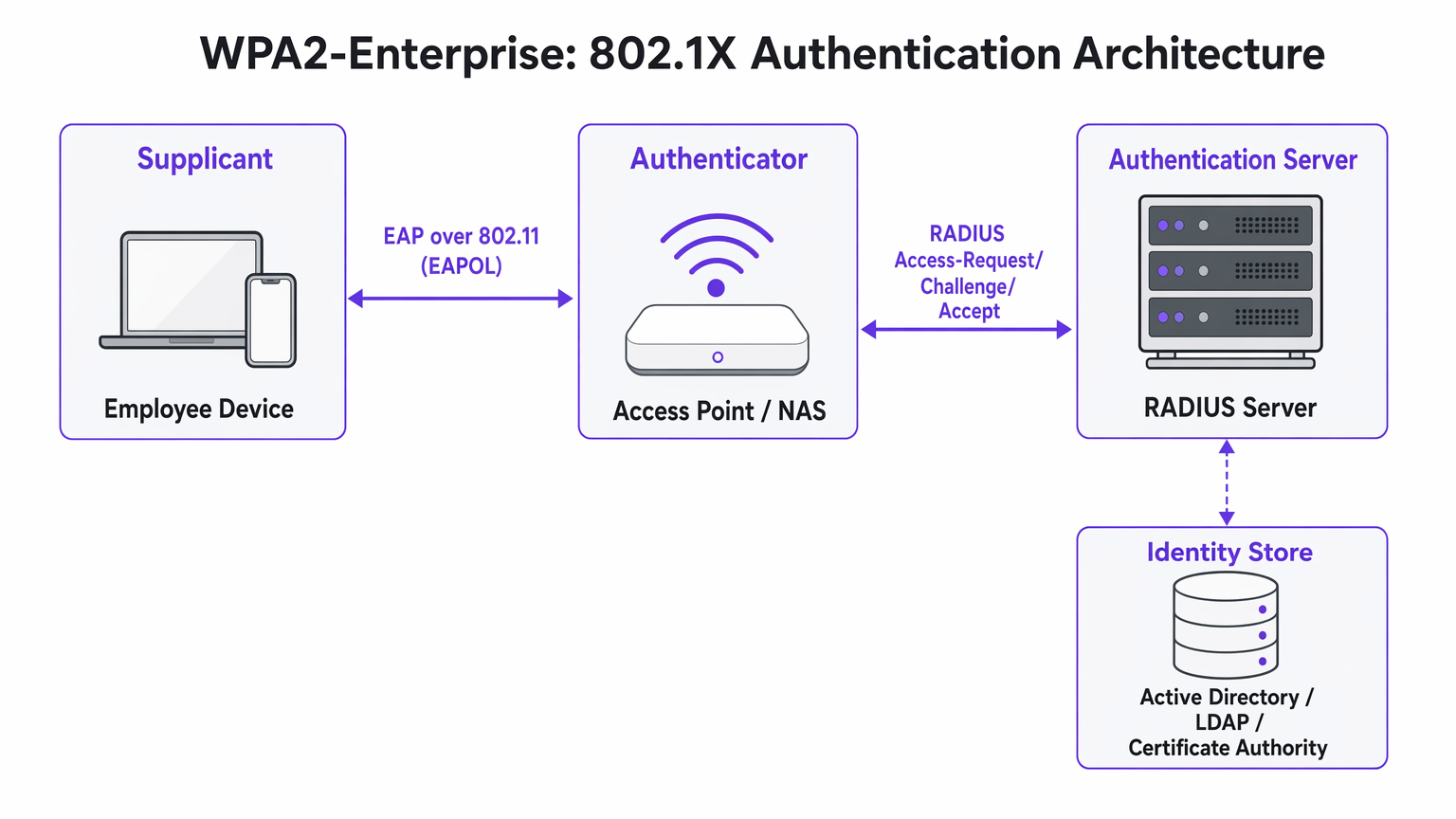
L'idée architecturale essentielle est que le point d'accès ne valide jamais directement les credentials. Il agit comme un relais, transmettant l'échange d'authentification chiffré entre le Supplicant et le serveur RADIUS. Cette séparation des préoccupations est ce qui rend l'architecture à la fois évolutive et auditable.
Méthodes EAP : Choisir le Bon Protocole
Le Protocole d'Authentification Extensible (EAP) transporte les données d'authentification au sein du cadre 802.1X. Le choix de la méthode EAP définit à la fois la posture de sécurité et la complexité de déploiement de l'ensemble du système.
PEAP-MSCHAPv2 (Protected EAP) est la méthode la plus largement déployée dans les environnements d'entreprise. Le serveur RADIUS présente un certificat numérique pour établir un tunnel TLS sécurisé. À l'intérieur de ce tunnel, l'utilisateur s'authentifie avec un nom d'utilisateur et un mot de passe standard — généralement ses credentials Active Directory. PEAP est populaire car il ne nécessite aucune infrastructure de certificat côté client et s'intègre directement aux fournisseurs d'identité existants. Cependant, il reste vulnérable au vol de credentials si les utilisateurs acceptent des certificats de serveur frauduleux lors d'une attaque Evil Twin.
EAP-TLS (Transport Layer Security) est la référence absolue pour les déploiements à haute sécurité. Il nécessite une authentification mutuelle par certificat : le serveur et le périphérique client doivent tous deux présenter des certificats valides. Comme aucun mot de passe n'est transmis, les attaques de phishing sont complètement neutralisées. L'inconvénient est la complexité du déploiement — une infrastructure à clé publique (PKI) robuste et une plateforme de gestion des appareils mobiles (MDM) sont nécessaires pour distribuer les certificats clients à grande échelle.
| Critère | PEAP-MSCHAPv2 | EAP-TLS |
|---|---|---|
| Certificat client requis | Non | Oui |
| Risque d'exposition du mot de passe | Modéré (si la validation du certificat est contournée) | Aucun |
| Complexité du déploiement | Faible à Moyen | Élevée |
| Exigence MDM | Optionnel | Fortement recommandé |
| Adapté au BYOD | Oui | Avec portail d'intégration |
| Adéquation à la conformité | Bonne | Excellente |
Guide d'Implémentation : Transition vers WPA2-Enterprise
Le déploiement de WPA2-Enterprise nécessite une planification minutieuse pour éviter toute perturbation pour les utilisateurs. L'approche par phases suivante est recommandée pour les déploiements d'entreprise de toute envergure.
Phase 1 : Préparation de l'Infrastructure
Avant d'activer le 802.1X, assurez-vous que votre infrastructure RADIUS est résiliente. Votre serveur RADIUS est désormais une dépendance critique — s'il devient indisponible, les utilisateurs ne pourront pas s'authentifier. Pour les environnements distribués tels que les grandes chaînes de Retail ou les établissements de Healthcare , les services RADIUS hébergés dans le cloud offrent une redondance intégrée sans la charge de gestion des serveurs sur site à chaque emplacement. Intégrez le serveur RADIUS à votre fournisseur d'identité central et vérifiez que les règles de pare-feu autorisent le trafic UDP sur les ports 1812 (authentification) et 1813 (comptabilité) entre tous les points d'accès et le serveur RADIUS.
Phase 2 : Gestion des Certificats
Pour les déploiements EAP-TLS, automatisez entièrement le provisionnement des certificats. Compter sur les utilisateurs pour installer manuellement les certificats entraîne un volume élevé de demandes au support technique et une posture de sécurité incohérente. Utilisez votre plateforme MDM — Microsoft Intune, Jamf ou équivalent — pour pousser les certificats silencieusement vers les appareils appartenant à l'entreprise. Pour les scénarios BYOD, envisagez un portail d'intégrationtels que SecureW2 ou Foxpass qui automatisent l'installation des profils de configuration pour les appareils personnels, réduisant considérablement la charge du support technique.
Pour les déploiements PEAP, assurez-vous que le certificat du serveur RADIUS est émis par une autorité de certification publique déjà présente dans le magasin de racines de confiance de tous les systèmes d'exploitation clients. Évitez les certificats auto-signés en production, car ils génèrent des avertissements de confiance qui incitent les utilisateurs à accepter les erreurs de certificat — un risque de sécurité important.
Phase 3 : Pilote et déploiement progressif
N'effectuez jamais de basculement instantané. Commencez par un groupe pilote — généralement le service informatique — sur un SSID ou un VLAN dédié. Surveillez attentivement les journaux RADIUS pour détecter les délais d'authentification, qui indiquent des problèmes de routage réseau, ou les erreurs de confiance des certificats, qui indiquent des lacunes dans le déploiement PKI. Une fois le pilote stable, étendez-le à un seul site ou étage, puis procédez site par site. Maintenez le réseau PSK existant en parallèle tout au long de la migration et ne le décommissionnez qu'une fois que tous les appareils ont été migrés avec succès.
Bonnes pratiques pour les opérateurs de sites
Pour les environnements ouverts au public tels que les stades, les centres de conférence et les sites d' Hospitality , WPA2-Enterprise est de plus en plus pertinent non seulement pour les réseaux du personnel, mais aussi pour l'accès invité géré.
Attribution dynamique de VLAN est l'une des fonctionnalités les plus puissantes et sous-utilisées de 802.1X. Au lieu de diffuser plusieurs SSIDs pour différents groupes d'utilisateurs — chacun ajoutant une surcharge RF — vous diffusez un seul SSID WPA2-Enterprise. Lorsqu'un utilisateur s'authentifie, le serveur RADIUS renvoie les attributs d'attribution de VLAN au point d'accès, plaçant la session sur le segment réseau approprié en fonction de l'appartenance au groupe de l'utilisateur. Un terminal de point de vente s'authentifiant via EAP-TLS atterrit sur le VLAN conforme PCI ; un gérant de magasin s'authentifiant via PEAP atterrit sur le VLAN d'entreprise. Cette approche réduit considérablement la congestion RF dans les environnements denses.
Intégration avec Purple : La plateforme de Purple agit comme un fournisseur d'identité transparent pour un accès WiFi sécurisé. Sous la licence Connect, Purple prend en charge OpenRoaming — une norme industrielle qui permet aux utilisateurs de se déplacer en toute sécurité entre les réseaux participants sans se réauthentifier. Ceci est particulièrement précieux pour les pôles de Transport et les opérateurs multi-sites. Les données d'authentification sont directement intégrées au tableau de bord WiFi Analytics de Purple, offrant une visibilité par utilisateur pour la planification de la capacité et les rapports de conformité.
Segmentation réseau pour l'IoT : De nombreux appareils IoT hérités — contrôleurs CVC, lecteurs de contrôle d'accès, imprimantes anciennes — ne prennent pas en charge 802.1X. Pour ces appareils, implémentez un SSID caché séparé utilisant WPA2-PSK avec contournement d'authentification MAC (MAB), ou utilisez le Multi-PSK (MPSK) si pris en charge par votre fournisseur de points d'accès. N'essayez pas de forcer les appareils IoT hérités sur un réseau 802.1X ; le coût opérationnel l'emporte sur le bénéfice.
Pour des conseils sur les décisions d'architecture réseau complémentaires, consultez Les avantages clés du SD WAN pour les entreprises modernes , qui explique comment les superpositions SD-WAN peuvent améliorer l'accessibilité RADIUS sur les sites distribués.
Dépannage et atténuation des risques
Les modes de défaillance les plus courants dans les déploiements WPA2-Enterprise sont liés à la confiance des certificats, à l'accessibilité du réseau et à la compatibilité des appareils.
L'invite "Serveur non fiable" : Si les clients reçoivent un avertissement indiquant que le certificat du serveur ne peut pas être vérifié, le serveur RADIUS utilise probablement un certificat auto-signé ou un certificat émis par une CA interne dont la racine n'a pas été déployée sur tous les points d'extrémité. Résolution : déployez le certificat racine de la CA via une stratégie de groupe ou un MDM, ou passez à un certificat d'une CA publique.
Délais d'attente RADIUS : Les clients restent bloqués sur l'écran d'authentification avant d'échouer. La cause est presque toujours un problème de chemin réseau — le point d'accès ne peut pas atteindre le serveur RADIUS, ou le trafic UDP est abandonné par un pare-feu intermédiaire. Vérifiez les règles de pare-feu pour les ports 1812 et 1813, et vérifiez le routage entre les points d'accès et le serveur RADIUS.
Complexité de la configuration Android : Android nécessite une configuration explicite du nom de domaine du serveur RADIUS et du certificat CA pour PEAP. Contrairement à Windows, qui peut détecter automatiquement ces paramètres via une stratégie de groupe, les utilisateurs Android doivent les configurer manuellement ou recevoir un profil de configuration via un portail d'intégration. C'est une source fréquente de tickets de support technique lors du déploiement initial.
Décalage d'horloge et validité des certificats : L'authentification basée sur les certificats (EAP-TLS) est sensible à la synchronisation horaire. Si l'horloge d'un appareil est significativement désynchronisée, la validation du certificat échouera. Assurez-vous que le NTP est correctement configuré sur tous les appareils réseau et points d'extrémité.
ROI et impact commercial
La transition vers WPA2-Enterprise offre une valeur commerciale mesurable au-delà de la simple atténuation des risques.
Le ROI le plus immédiat provient de l'élimination de la surcharge opérationnelle liée à la rotation des mots de passe. Dans une chaîne de magasins de 50 emplacements, la rotation d'un mot de passe WiFi partagé nécessite la mise à jour de chaque appareil à chaque emplacement — potentiellement des milliers de changements individuels. Avec WPA2-Enterprise, la désactivation d'un employé est une action unique dans Active Directory, avec un effet immédiat sur tous les sites.
Du point de vue de la conformité, la piste d'audit granulaire fournie par les journaux RADIUS par utilisateur est un avantage significatif lors des évaluations PCI DSS, HIPAA et ISO 27001. Les auditeurs peuvent voir exactement quel utilisateur s'est authentifié, depuis quel appareil, à quelle heure et pendant combien de temps — un niveau de visibilité qui est tout simplement impossible avec des clés partagées.
Enfin, l'intelligence réseau générée par l'authentification par utilisateur alimente directement la planification de la capacité et la détection des anomalies. Des plateformes comme WiFi Analytics de Purple peuvent révéler des modèles de comportement des appareils, des périodes de pointe d'utilisation et une demande spécifique à l'emplacement — des données inestimables pour la planification opérationnelle et, dans le commerce de détail et l'hôtellerie contextes, comprendre le comportement des visiteurs. Pour les considérations de conception de page d'accueil qui complètent votre stratégie d'accès invité, consultez Les 10 meilleurs exemples de pages d'accueil WiFi (et ce qui les rend efficaces) .
Termes clés et définitions
802.1X
An IEEE standard for port-based Network Access Control (PNAC) that provides an authentication mechanism for devices attempting to connect to a LAN or WLAN. It defines the roles of Supplicant, Authenticator, and Authentication Server.
This is the underlying framework that makes WPA2-Enterprise possible. When an IT team says they are 'deploying 802.1X', they mean they are implementing this standard on their network infrastructure.
RADIUS
Remote Authentication Dial-In User Service. A networking protocol providing centralised Authentication, Authorisation, and Accounting (AAA) management for users connecting to a network service.
The central server that validates credentials. Access Points do not check passwords; they ask the RADIUS server. RADIUS is the critical infrastructure component that must be made highly available.
Supplicant
The software client on an endpoint device that handles the 802.1X authentication negotiation. Built into modern operating systems including Windows, macOS, iOS, and Android.
When a user selects a WPA2-Enterprise network, the supplicant software on their device initiates the EAP exchange. Configuration of the supplicant — particularly certificate trust settings — is the most common source of end-user issues.
Authenticator
The network device — typically a wireless access point or managed switch — that enforces access control by blocking traffic until the RADIUS server returns an Access-Accept response.
The Access Point acts as a relay between the client and the RADIUS server. It enforces the policy but does not make the authentication decision itself.
EAP-TLS
Extensible Authentication Protocol — Transport Layer Security. An authentication method requiring both a server-side and a client-side digital certificate, providing mutual authentication without transmitting passwords.
The most secure EAP method. Recommended for managed corporate devices, PCI-scoped systems, and any environment where credential phishing is a significant threat vector.
PEAP
Protected Extensible Authentication Protocol. An authentication method that creates a server-authenticated TLS tunnel inside which standard username/password credentials are transmitted securely.
The most common EAP method for enterprise deployments due to its compatibility with existing Active Directory credentials and its relatively straightforward deployment. Vulnerable to Evil Twin attacks if server certificate validation is not enforced.
Dynamic VLAN Assignment
A capability of 802.1X whereby the RADIUS server instructs the Access Point to place an authenticated session onto a specific Virtual LAN based on the user's identity or group membership, using RADIUS tunnel attributes.
Enables network segmentation without multiple SSIDs. Critical for environments that need to separate PCI-scoped devices, corporate users, and IoT devices on a single wireless infrastructure.
Certificate Authority (CA)
A trusted entity that issues and manages digital certificates used to verify the identity of servers and clients in certificate-based authentication systems.
Required for EAP-TLS deployments. Organisations can use a public CA (whose root is pre-trusted by all devices) or an internal CA (whose root must be deployed to all endpoints via Group Policy or MDM).
OpenRoaming
A Wi-Fi Alliance standard that enables seamless, secure, and automatic WiFi connectivity across participating networks using identity federation, eliminating the need for manual re-authentication.
Increasingly relevant for venue operators and transport hubs. Purple supports OpenRoaming under its Connect licence, allowing venues to offer secure automatic connectivity to returning visitors.
Études de cas
A 200-room hotel currently uses a single WPA2-Personal password for all back-of-house staff across housekeeping, maintenance, and management. When staff leave, the password is rarely changed due to the operational difficulty of updating all devices. The IT Director needs to secure the network without disrupting daily operations.
Deploy WPA2-Enterprise using PEAP-MSCHAPv2 integrated with the hotel's existing Azure Active Directory tenant. Staff authenticate using their individual corporate email address and password — credentials they already know. When an employee is terminated, disabling their Azure AD account instantly revokes WiFi access across all properties, with no device updates required. For shared devices such as housekeeping tablets that are not tied to a named user, deploy EAP-TLS with certificates pushed via Microsoft Intune. The certificates are bound to the device, not a user, so there is no password for staff to know or share. Run both the legacy PSK SSID and the new Enterprise SSID in parallel for four weeks during the migration, then decommission the PSK network once all devices are confirmed migrated.
A retail chain with 50 locations needs to ensure that Point of Sale (PoS) terminals are strictly isolated from the staff WiFi network to meet PCI DSS requirements. However, the network team wants to reduce RF overhead by broadcasting fewer SSIDs. Currently they broadcast four separate SSIDs per store.
Implement WPA2-Enterprise with Dynamic VLAN Assignment across all 50 locations. Configure the RADIUS server with two Network Policies: one matching PoS device certificates (issued via an internal CA and pushed via MDM) that returns VLAN 10 attributes, and one matching staff Active Directory group membership that returns VLAN 20 attributes. Broadcast a single corporate WPA2-Enterprise SSID at each location. When a PoS terminal authenticates via EAP-TLS, the RADIUS server instructs the Access Point to place that session on VLAN 10 — the PCI-scoped segment with restricted internet routing. When a store manager authenticates via PEAP, they land on VLAN 20 with standard corporate access. Reduce from four SSIDs to two (one Enterprise, one for legacy IoT devices on a hidden PSK SSID).
Analyse de scénario
Q1. Your organisation is migrating from WPA2-Personal to WPA2-Enterprise using PEAP. The helpdesk is receiving calls from Android users who cannot connect and are being prompted to enter a 'Domain' and to 'Validate CA certificate'. Windows devices are connecting without issue. What is the most likely cause, and how do you resolve it?
💡 Astuce :Consider how Android handles server certificate validation compared to Windows, and what Group Policy can do that Android cannot receive automatically.
Afficher l'approche recommandée
Android requires explicit manual configuration of the RADIUS server's domain name and the CA certificate for PEAP, unlike Windows which can receive these settings automatically via Group Policy. The resolution is to deploy an onboarding portal (such as SecureW2 or Foxpass) that generates and pushes a configuration profile to Android devices, automating the PEAP settings. Alternatively, if the RADIUS server uses a certificate from a public CA already trusted by Android, the CA certificate field can be set to 'Use system certificates' and the domain field populated with the RADIUS server's FQDN.
Q2. A stadium venue needs to provide secure WiFi to media and press during events. These are unmanaged personal laptops from dozens of different news organisations. MDM profiles cannot be installed. The IT team needs individual accountability and the ability to revoke access after the event. How should they design the authentication?
💡 Astuce :EAP-TLS requires client certificates, which cannot be pushed to unmanaged devices without an onboarding portal. Consider what credential type is practical for short-term, unmanaged BYOD access.
Afficher l'approche recommandée
Deploy WPA2-Enterprise using PEAP-MSCHAPv2. Generate unique, time-limited credentials (username and password) for each media organisation or individual journalist, stored in a temporary Active Directory OU or a cloud RADIUS user directory. Distribute credentials via a secure pre-event communication. Configure the RADIUS server to automatically disable these accounts after the event date. This provides individual accountability and instant revocation without requiring certificate installation on unmanaged devices.
Q3. During a network audit, it is confirmed that WPA2-Enterprise is functioning and users are authenticating successfully. However, the finance team's devices are appearing on the general staff subnet (VLAN 20) rather than the secure finance VLAN (VLAN 30). Where is the configuration error most likely located?
💡 Astuce :Authentication success and authorisation policy enforcement are two separate functions. Which component is responsible for enforcing the VLAN assignment after authentication succeeds?
Afficher l'approche recommandée
The error is in the RADIUS server's Network Policy configuration. For Dynamic VLAN Assignment to work, the RADIUS server must be configured to return three specific RADIUS attributes upon successful authentication for the finance group: Tunnel-Type (value: VLAN), Tunnel-Medium-Type (value: 802), and Tunnel-Private-Group-ID (value: 30). Additionally, the Access Point must be configured to accept and apply dynamic VLAN overrides from the RADIUS server — some AP configurations require this to be explicitly enabled. Verify both the RADIUS policy attributes and the AP's 802.1X VLAN override setting.




