

Aruba Central and Purple WiFi: ক্লাউড-পরিচালিত ইন্টিগ্রেশন
Aruba Central-কে Purple-এর ক্লাউড-হোস্টেড গেস্ট WiFi ইন্টেলিজেন্স প্ল্যাটফর্মের সাথে একত্রিত করার জন্য একটি বিস্তারিত প্রযুক্তিগত রেফারেন্স গাইড। এই গাইডে আর্কিটেকচার, এক্সটার্নাল Captive Portal এবং RADIUS-এর ধাপে ধাপে কনফিগারেশন এবং এন্টারপ্রাইজ IT টিমের জন্য মাল্টি-সাইট রোলআউট কৌশলগুলি কভার করা হয়েছে।
🎧 এই গাইডটি শুনুন
ট্রান্সক্রিপ্ট দেখুন
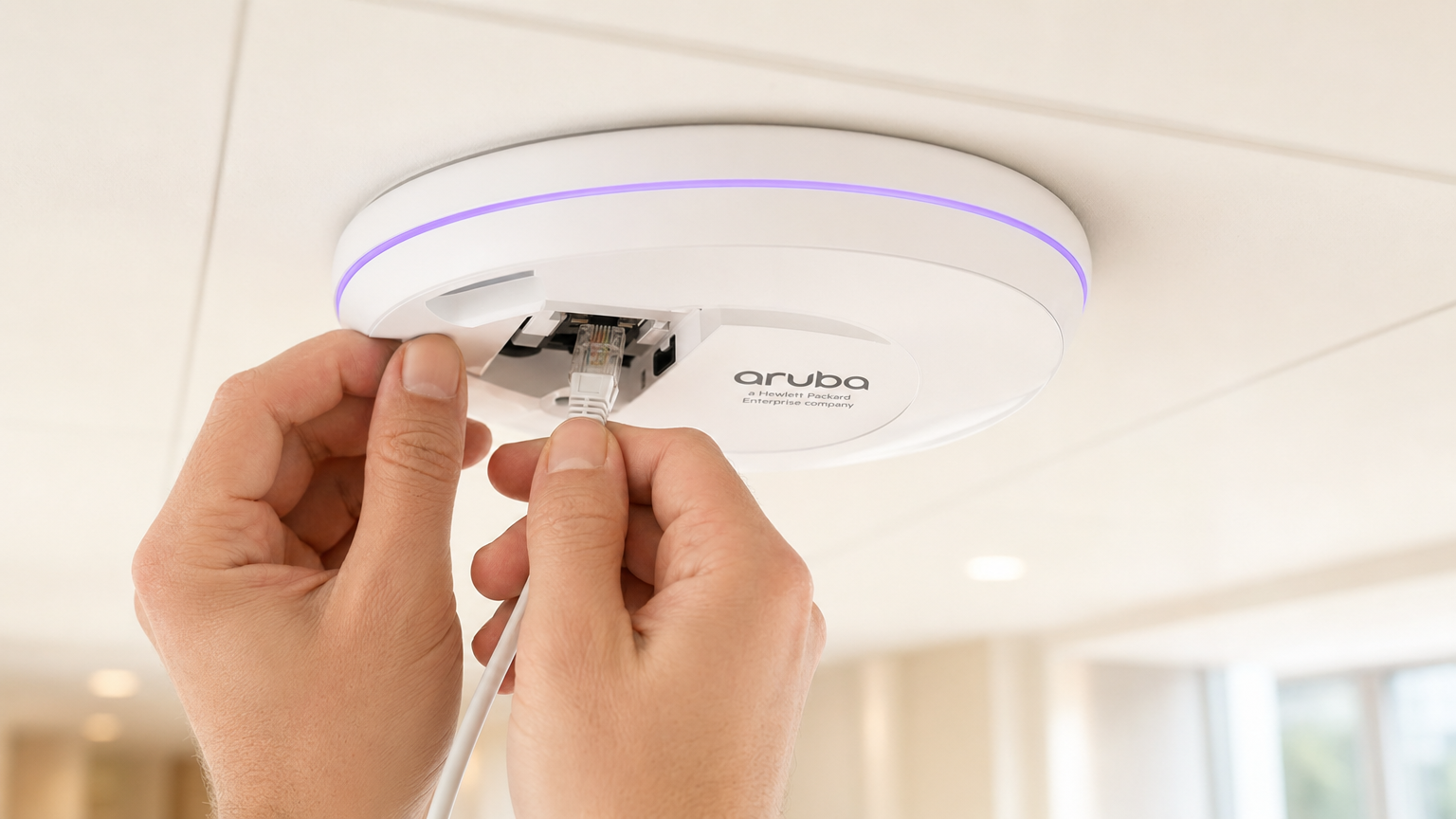
এক্সিকিউটিভ সারাংশ
ডিস্ট্রিবিউটেড ওয়্যারলেস নেটওয়ার্ক পরিচালনা করা এন্টারপ্রাইজ IT টিমগুলির জন্য, অন-প্রিমিজ কন্ট্রোলার থেকে Aruba Central-এর মতো ক্লাউড-পরিচালিত প্ল্যাটফর্মে স্থানান্তরিত হওয়া ডিপ্লয়মেন্ট মডেলকে মৌলিকভাবে পরিবর্তন করে। যদিও Captive Portal এবং RADIUS অথেন্টিকেশনের মূল মেকানিক্স একই থাকে, কনফিগারেশন প্যারাডাইম ডিভাইস-কেন্দ্রিক থেকে গ্রুপ-ভিত্তিক নীতি ব্যবস্থাপনায় স্থানান্তরিত হয়।
এই গাইডটি Aruba Central-কে Purple-এর ক্লাউড-হোস্টেড গেস্ট WiFi ইন্টেলিজেন্স প্ল্যাটফর্মের সাথে একত্রিত করার জন্য একটি বিস্তারিত প্রযুক্তিগত রেফারেন্স সরবরাহ করে। আমরা অন-প্রিমিজ এবং ক্লাউড-পরিচালিত ডিপ্লয়মেন্টগুলির মধ্যে স্থাপত্যগত পার্থক্য, এক্সটার্নাল Captive Portal এবং RADIUS-as-a-Service-এর জন্য ধাপে ধাপে কনফিগারেশন এবং Aruba Central API ব্যবহার করে মাল্টি-সাইট রোলআউট স্বয়ংক্রিয় করার কৌশলগুলি কভার করি। আপনি এক ডজন আঞ্চলিক অফিস জুড়ে Guest WiFi স্থাপন করুন বা খুচরা স্টোরগুলির একটি বিশ্বব্যাপী পদচিহ্ন স্থাপন করুন না কেন, এই রেফারেন্সটি একটি সুরক্ষিত, স্কেলযোগ্য এবং অনুগত ইন্টিগ্রেশন নিশ্চিত করার জন্য প্রয়োজনীয় কার্যকর নির্দেশিকা সরবরাহ করে।
প্রযুক্তিগত গভীর-পর্যালোচনা
স্থাপত্যগত পরিবর্তন: কন্ট্রোলার থেকে ক্লাউডে
একটি ঐতিহ্যবাহী Aruba ডিপ্লয়মেন্টে, Mobility Controllers নীতি প্রয়োগের পয়েন্ট হিসাবে কাজ করে। Captive Portal প্রোফাইল, ওয়াল্ড গার্ডেন নিয়ম এবং RADIUS সার্ভার সংজ্ঞা সরাসরি কন্ট্রোলারে কনফিগার করা হয়। যখন একজন অতিথি একটি AP-এর সাথে যুক্ত হন, তখন তাদের ট্র্যাফিক কন্ট্রোলারে টানেল করা হয়, যা Captive Portal-এ HTTP রিডাইরেক্ট পরিচালনা করে এবং ব্যাকএন্ড সার্ভারে RADIUS অথেন্টিকেশন প্রক্সি করে।
Aruba Central একটি ডিস্ট্রিবিউটেড এনফোর্সমেন্ট মডেলে কাজ করে। নীতি প্রয়োগ Instant Access Point (IAP) প্রান্তে ঘটে, যখন কনফিগারেশন ক্লাউড থেকে নিচে ঠেলে দেওয়া হয়। ইন্টিগ্রেশন টাচপয়েন্টগুলি স্থানীয় ডিভাইস কনফিগারেশন থেকে গ্রুপ টেমপ্লেট, SSID প্রোফাইল এবং Central-এর কনফিগারেশন হায়ারার্কির মধ্যে এক্সটার্নাল Captive Portal অবজেক্টগুলিতে স্থানান্তরিত হয়।
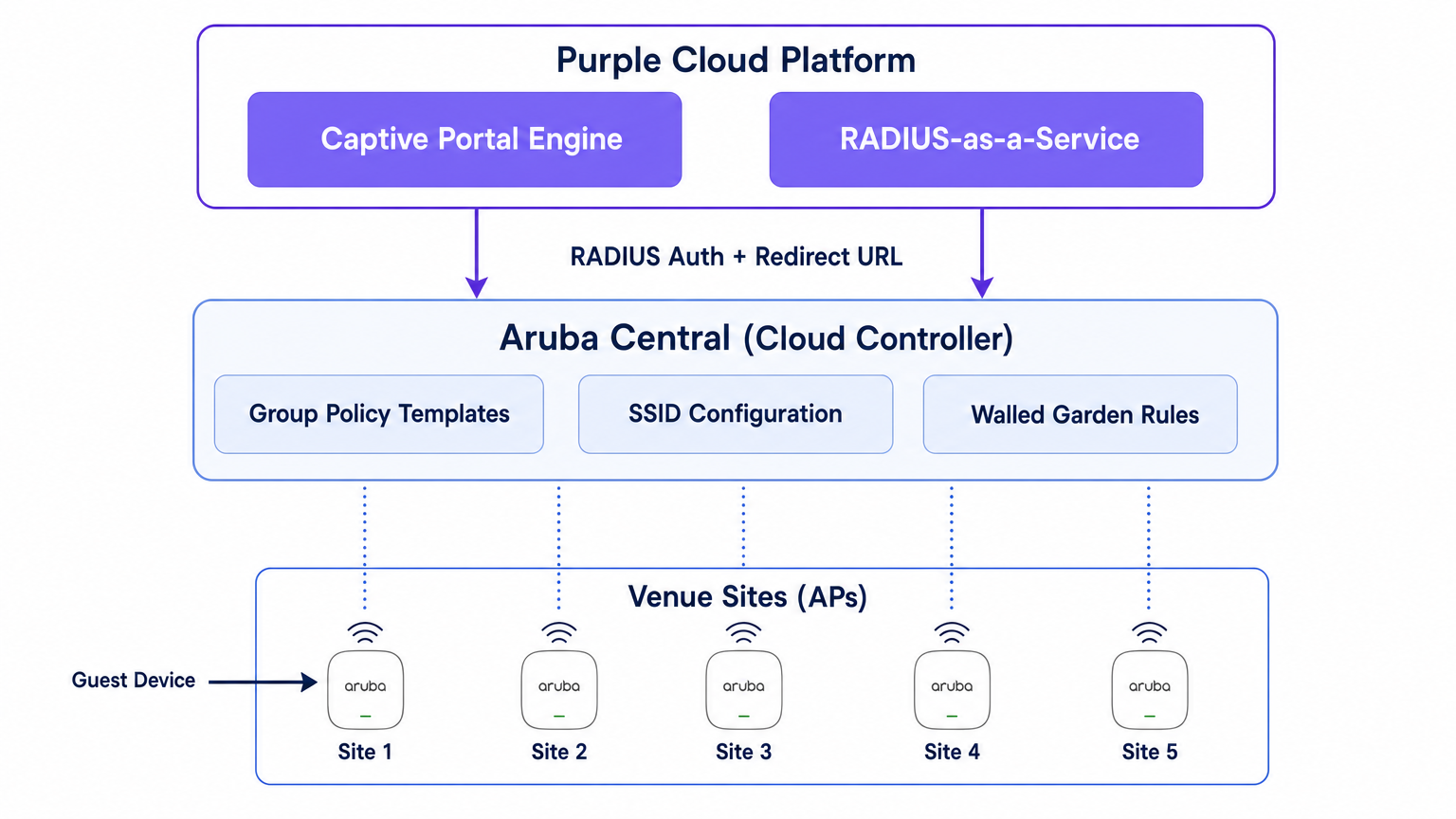
Purple এই নেটওয়ার্ক স্তরের উপরে একটি ক্লাউড-হোস্টেড ইন্টেলিজেন্স প্ল্যাটফর্ম হিসাবে কাজ করে। এটি Captive Portal ইঞ্জিন সরবরাহ করে, অথেন্টিকেশন লজিক পরিচালনা করে (সামাজিক লগইন, SMS এবং ফর্ম-ভিত্তিক অথেন্টিকেশন সহ), ফার্স্ট-পার্টি ডেটা ক্যাপচার করে এবং WiFi Analytics ড্যাশবোর্ডের মাধ্যমে আপনার মার্কেটিং এবং অপারেশনস টিমগুলিতে অ্যানালিটিক্স ফিড করে। Purple RADIUS-as-a-Service-ও সরবরাহ করে, যা গেস্ট অথেন্টিকেশনের জন্য FreeRADIUS বা Cisco ISE-এর মতো অন-প্রিমিজ RADIUS অবকাঠামোর প্রয়োজনীয়তা দূর করে।
অথেন্টিকেশন ফ্লো
- অ্যাসোসিয়েশন: একটি গেস্ট ডিভাইস একটি Aruba IAP দ্বারা সম্প্রচারিত গেস্ট SSID-এর সাথে যুক্ত হয়।
- প্রি-অথেন্টিকেশন রোল: IAP গেস্টকে একটি প্রি-অথেন্টিকেশন রোল অ্যাসাইন করে। এই রোলটি শুধুমাত্র DNS, DHCP এবং ওয়াল্ড গার্ডেনে স্পষ্টভাবে অনুমোদিত ডোমেনগুলির জন্য নির্ধারিত ট্র্যাফিককে অনুমতি দেয়।
- HTTP ইন্টারসেপ্ট: যখন গেস্ট একটি ব্রাউজার খোলে এবং একটি HTTP সাইট অ্যাক্সেস করার চেষ্টা করে, তখন IAP অনুরোধটি ইন্টারসেপ্ট করে।
- রিডাইরেক্ট: IAP তার এক্সটার্নাল Captive Portal প্রোফাইল রেফারেন্স করে এবং গেস্টের ব্রাউজারকে Purple-এর স্প্ল্যাশ পেজ URL-এ রিডাইরেক্ট করে, AP MAC অ্যাড্রেস এবং ক্লায়েন্ট MAC অ্যাড্রেসের মতো প্যারামিটার যুক্ত করে।
- অথেন্টিকেশন: গেস্ট Purple স্প্ল্যাশ পেজের মাধ্যমে অথেন্টিকেট করে।
- RADIUS অ্যাক্সেস-রিকোয়েস্ট: Purple-এর ব্যাকএন্ড গেস্টের পক্ষে IAP (বা ভার্চুয়াল কন্ট্রোলার)-এ একটি RADIUS অ্যাক্সেস-রিকোয়েস্ট পাঠায়।
- RADIUS অ্যাক্সেস-অ্যাকসেপ্ট: সফল অথেন্টিকেশনের পর, Purple IAP-তে একটি RADIUS অ্যাক্সেস-অ্যাকসেপ্ট মেসেজ ফেরত পাঠায়।
- অথেন্টিকেটেড রোল: IAP গেস্টকে প্রি-অথেন্টিকেশন রোল থেকে অথেন্টিকেটেড গেস্ট রোলে স্থানান্তরিত করে, সম্পূর্ণ ইন্টারনেট অ্যাক্সেস প্রদান করে।
- অ্যাকাউন্টিং: IAP সেশন জুড়ে Purple-এ RADIUS অ্যাকাউন্টিং-স্টার্ট এবং অন্তর্বর্তী আপডেট প্যাকেট পাঠায়, যা সেশনের সময়কাল এবং ডেটা ব্যবহারের দৃশ্যমানতা প্রদান করে।
বাস্তবায়ন নির্দেশিকা
এই বিভাগটি Aruba Central-এর মধ্যে একটি একক সাইট একত্রিত করার জন্য প্রয়োজনীয় ধাপে ধাপে কনফিগারেশন বর্ণনা করে। মাল্টি-সাইট ডিপ্লয়মেন্টের জন্য, এই কনফিগারেশনটি একটি গ্রুপ টেমপ্লেটে তৈরি করা উচিত।
ধাপ 1: গেস্ট SSID তৈরি করুন
- Aruba Central WebUI-তে, টার্গেট গ্রুপ কনটেক্সটে নেভিগেট করুন।
- Manage-এর অধীনে, Devices > Access Points ক্লিক করুন, তারপর Config আইকনে ক্লিক করুন।
- WLANs ট্যাবটি নির্বাচন করুন এবং + Add SSID ক্লিক করুন।
- SSID-এর জন্য একটি নাম লিখুন (যেমন,
Venue-Guest)। - Security ট্যাবের অধীনে, সিকিউরিটি লেভেল Visitors সেট করুন।
ধাপ 2: এক্সটার্নাল Captive Portal প্রোফাইল কনফিগার করুন
- SSID সিকিউরিটি সেটিংসে, স্প্ল্যাশ পেজ টাইপ External Captive Portal হিসাবে নির্বাচন করুন।
- একটি নতুন Captive Portal প্রোফাইল তৈরি করতে + আইকনে ক্লিক করুন।
- নাম: একটি বর্ণনামূলক নাম লিখুন (যেমন,
Purple-Portal)। - অথেন্টিকেশন টাইপ: Radius Authentication নির্বাচন করুন।
- IP বা হোস্টনেম: আপনার Purple পোর্টাল সেটিংসে প্রদত্ত Purple Captive Portal সার্ভার হোস্টনেম লিখুন।
- URL: Purple দ্বারা প্রদত্ত রিডাইরেক্ট URL লিখুন।
- HTTPS ব্যবহার করুন: সুরক্ষিত যোগাযোগ প্রয়োগ করতে এই অপশনটি সক্ষম করুন।
- Captive Portal ব্যর্থতা: Deny Internet নির্বাচন করুন যাতে পোর্টালটি পৌঁছানো না গেলে গেস্টরা অথেন্টিকেশন বাইপাস করতে না পারে।
ধাপ 3: RADIUS-as-a-Service কনফিগার করুন
- এখনও SSID সিকিউরিটি সেটিংসে, এক্সটার্নাল Captive Portal কনফিগারেশনের অধীনে Primary Server ফিল্ডটি খুঁজুন।
- একটি নতুন এক্সটার্নাল অথেন্টিকেশন সার্ভার যোগ করতে + আইকনে ক্লিক করুন।
- IP অ্যাড্রেস: Purple-এর RADIUS সার্ভারের IP অ্যাড্রেস বা হোস্টনেম লিখুন।
- শেয়ার্ড কী: আপনার Purple পোর্টালে তৈরি RADIUS শেয়ার্ড সিক্রেট লিখুন। গুরুত্বপূর্ণ: এটি হুবহু মিলতে হবে।
- অথ পোর্ট:
1812 - অ্যাকাউন্টিং পোর্ট:
1813 - নিশ্চিত করুন যে Accounting সক্ষম করা আছে এবং Purple ড্যাশবোর্ডে সঠিক সেশন ট্র্যাকিং নিশ্চিত করতে একটি যুক্তিসঙ্গত ব্যবধানে (যেমন, 5 মিনিট) সেট করা আছে।
ধাপ ৪: ওয়াল্ড গার্ডেন সংজ্ঞায়িত করুন
ওয়াল্ড গার্ডেন হল সবচেয়ে গুরুত্বপূর্ণ কনফিগারেশন উপাদান। এটি সংজ্ঞায়িত করে যে একজন অতিথি প্রমাণীকরণ করার আগে কোন ডোমেনগুলি অ্যাক্সেস করতে পারবে। যদি ওয়াল্ড গার্ডেন অসম্পূর্ণ হয়, তাহলে স্প্ল্যাশ পৃষ্ঠা লোড হতে ব্যর্থ হবে, অথবা সামাজিক প্রমাণীকরণ ভেঙে যাবে।
- SSID সেটিংসে, অ্যাক্সেস নিয়মগুলিতে নেভিগেট করুন।
- Purple এর Captive Portal ডোমেন এবং CDN এন্ডপয়েন্টগুলিতে ট্র্যাফিক অনুমোদনের জন্য নিয়ম যোগ করুন।
- যদি আপনি সামাজিক লগইন ব্যবহার করেন (যেমন, Facebook, Google, X), তাহলে আপনাকে সেই পরিচয় প্রদানকারীদের জন্য সংশ্লিষ্ট ডোমেনগুলি যোগ করতে হবে। Purple তাদের সমর্থন ডকুমেন্টেশনে প্রয়োজনীয় ওয়াল্ড গার্ডেন ডোমেনগুলির একটি আপডেট তালিকা বজায় রাখে।
ধাপ ৫: VLAN এবং DHCP কনফিগারেশন
নিশ্চিত করুন যে অতিথি SSID একটি ডেডিকেটেড VLAN-এর সাথে ম্যাপ করা আছে, যা আপনার কর্পোরেট নেটওয়ার্ক থেকে বিচ্ছিন্ন।
- SSID কনফিগারেশনের VLANs ট্যাবের অধীনে, External DHCP server assigned (যদি আপনার নিজস্ব DHCP অবকাঠামো ব্যবহার করেন) অথবা Instant AP assigned (যদি ভার্চুয়াল কন্ট্রোলার অতিথিদের জন্য DHCP এবং NAT পরিচালনা করে) নির্বাচন করুন।
- অতিথি নেটওয়ার্কের জন্য সঠিক VLAN ID নির্দিষ্ট করুন।
মাল্টি-সাইট রোলআউটের জন্য সেরা অনুশীলন
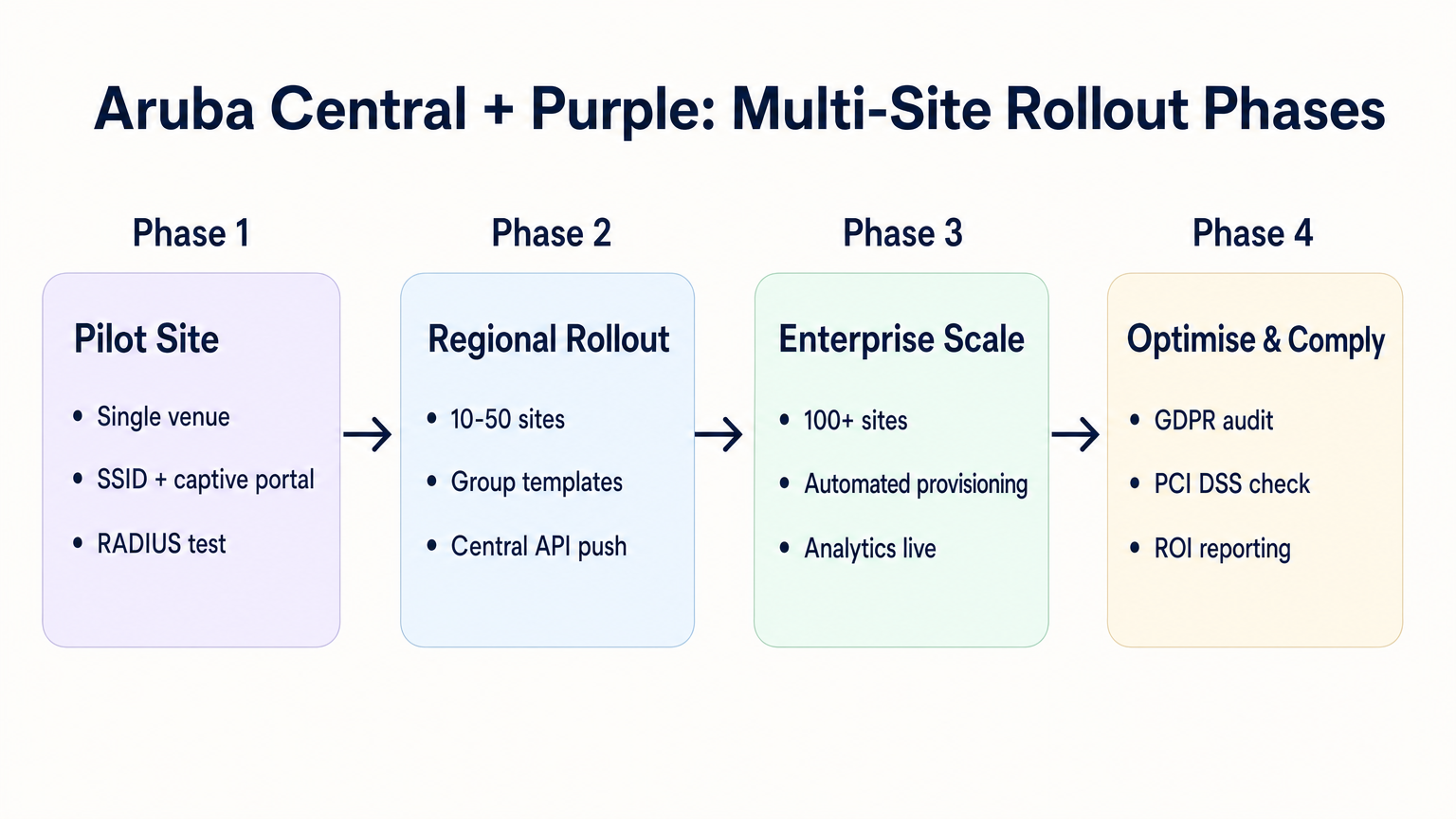
যখন কয়েক ডজন বা শত শত স্থানে স্থাপন করা হয়—তা Retail , Hospitality , অথবা Healthcare ক্ষেত্রেই হোক না কেন—ম্যানুয়াল কনফিগারেশন ত্রুটির প্রবণতাযুক্ত। একটি সুশৃঙ্খল, স্বয়ংক্রিয় পদ্ধতি প্রয়োজন।
১. গ্রুপ কাঠামো এবং অনুক্রম
আপনার Aruba Central গ্রুপ কাঠামোকে আপনার ভেন্যু অনুক্রমের সাথে সারিবদ্ধ করুন। একটি সাধারণ প্যাটার্ন হল ভেন্যুর ধরন বা ব্র্যান্ডের উপর ভিত্তি করে গ্রুপ তৈরি করা (যেমন, "ফ্ল্যাগশিপ স্টোর" বনাম "পপ-আপ লোকেশন")। External Captive Portal প্রোফাইল গ্রুপ স্তরে প্রয়োগ করা হয়, যার অর্থ সেই গ্রুপের সমস্ত AP একই Purple ইন্টিগ্রেশন সেটিংস উত্তরাধিকার সূত্রে পায়।
২. প্যারামিটারাইজড রিডাইরেক্ট
যদি বিভিন্ন সাইটের জন্য বিভিন্ন স্প্ল্যাশ পৃষ্ঠার থিম প্রয়োজন হয়, তাহলে প্রতিটি সাইটের জন্য আলাদা Captive Portal প্রোফাইল প্রয়োজন নেই। Purple আপনাকে একটি একক রিডাইরেক্ট URL ব্যবহার করার অনুমতি দেয় যা AP MAC ঠিকানা বা Aruba AP দ্বারা URL-এর সাথে যুক্ত একটি কাস্টম প্যারামিটারের উপর ভিত্তি করে গতিশীলভাবে সঠিক থিম পরিবেশন করে।
৩. API-চালিত প্রভিশনিং
সাইট অনবোর্ডিং স্বয়ংক্রিয় করতে Aruba Central REST API ব্যবহার করুন। Central API আপনাকে প্রোগ্রাম্যাটিকভাবে SSID তৈরি করতে, Captive Portal প্রোফাইল বরাদ্দ করতে এবং ওয়াল্ড গার্ডেন তালিকা আপডেট করতে দেয়। Purple API এর সাথে একত্রিত হলে, আপনি একটি জিরো-টাচ প্রভিশনিং ওয়ার্কফ্লো তৈরি করতে পারেন:
- স্ক্রিপ্ট ট্রিগার: আপনার CMDB-তে একটি নতুন ভেন্যু যোগ করা হয়েছে।
- Purple API: Purple-এ ভেন্যু রেকর্ড তৈরি করে এবং RADIUS গোপনীয়তা তৈরি করে।
- Central API: Aruba Central-এ সাইট তৈরি করে, APs বরাদ্দ করে, গ্রুপ টেমপ্লেট প্রয়োগ করে এবং Purple RADIUS গোপনীয়তা ইনজেক্ট করে।
৪. SSID একত্রীকরণ
বিভিন্ন ব্যবহারকারীর প্রকারের জন্য একাধিক অতিথি SSID সম্প্রচার করার প্রলোভন এড়িয়ে চলুন (যেমন, "অতিথি", "ঠিকাদার", "বিক্রেতা")। Indoor Positioning System: UWB, BLE, & WiFi Guide সম্পর্কিত আমাদের নির্দেশিকায় বিস্তারিতভাবে বলা হয়েছে, অতিরিক্ত SSID গুলি বীকন ফ্রেমের সাথে মূল্যবান এয়ারটাইম খরচ করে RF কর্মক্ষমতা হ্রাস করে। একটি একক SSID সম্প্রচার করুন এবং ব্যবহারকারীর পরিচয়ের উপর ভিত্তি করে বিভিন্ন ভূমিকা বা ব্যান্ডউইথ সীমা বরাদ্দ করতে Purple এর প্রমাণীকরণ যুক্তি ব্যবহার করুন।
সমস্যা সমাধান এবং ঝুঁকি প্রশমন
সাধারণ ব্যর্থতার ধরণ
- স্প্ল্যাশ পৃষ্ঠা লোড হতে ব্যর্থ: এটি প্রায় সবসময়ই একটি ওয়াল্ড গার্ডেন সমস্যা। অতিথি ডিভাইস এমন একটি ডোমেন থেকে একটি রিসোর্স (যেমন, একটি ফন্ট, একটি ছবি, বা একটি CSS ফাইল) লোড করার চেষ্টা করছে যা প্রাক-প্রমাণীকরণের আগে অনুমোদিত নয়। ব্লক করা অনুরোধগুলি সনাক্ত করতে একটি পরীক্ষা ডিভাইসে ব্রাউজারের ডেভেলপার টুলস ব্যবহার করুন।
- নীরব প্রমাণীকরণ ব্যর্থতা: যদি স্প্ল্যাশ পৃষ্ঠা লোড হয়, ব্যবহারকারী প্রমাণীকরণ করে, কিন্তু তাদের ইন্টারনেট অ্যাক্সেস দেওয়া না হয়, তাহলে সমস্যাটি সাধারণত একটি RADIUS শেয়ার্ড সিক্রেট অমিল অথবা AP এবং Purple এর RADIUS সার্ভারগুলির মধ্যে UDP পোর্ট 1812/1813 ব্লক করা একটি ফায়ারওয়াল।
- রিডাইরেক্টে সার্টিফিকেট ত্রুটি: আধুনিক অপারেটিং সিস্টেমগুলি কঠোর HTTPS বৈধতা প্রয়োগ করে। যদি আপনার ওয়াল্ড গার্ডেন ক্লায়েন্ট ডিভাইস দ্বারা Purple এর TLS সার্টিফিকেট যাচাই করার জন্য ব্যবহৃত Certificate Revocation List (CRL) বা Online Certificate Status Protocol (OCSP) এন্ডপয়েন্টগুলিতে অ্যাক্সেস ব্লক করে, তাহলে ব্রাউজার একটি নিরাপত্তা সতর্কতা দেখাবে। নিশ্চিত করুন যে এই এন্ডপয়েন্টগুলি হোয়াইটলিস্ট করা আছে।
ঝুঁকি প্রশমন: সম্মতি এবং গোপনীয়তা
অতিথি WiFi স্থাপন করার সময়, আপনি ব্যক্তিগত ডেটা প্রক্রিয়া করছেন। ইন্টিগ্রেশনটি গোপনীয়তা বিধিমালা মাথায় রেখে ডিজাইন করা উচিত।
- GDPR এবং CCPA: নিশ্চিত করুন যে আপনার Purple স্প্ল্যাশ পৃষ্ঠা ডেটা ক্যাপচারের জন্য স্পষ্ট শর্তাবলী এবং সুস্পষ্ট সম্মতি প্রক্রিয়া উপস্থাপন করে। নিয়ন্ত্রক প্রভাব সম্পর্কে আরও তথ্যের জন্য, EU AI Act and Guest WiFi: What Marketers Need to Know সম্পর্কিত আমাদের ব্রিফিং দেখুন।
- PCI DSS: অতিথি ট্র্যাফিককে পেমেন্ট প্রসেসিং নেটওয়ার্ক থেকে যৌক্তিকভাবে আলাদা করতে হবে। যাচাই করুন যে Aruba Central-এ অতিথি SSID-কে বরাদ্দ করা VLAN আপনার পয়েন্ট-অফ-সেল (POS) অবকাঠামোতে রুট করতে পারে না।
ROI এবং ব্যবসায়িক প্রভাব
Aruba Central এবং Purple এর মধ্যে একটি ক্লাউড-ম্যানেজড ইন্টিগ্রেশনে রূপান্তর পরিমাপযোগ্য ব্যবসায়িক মূল্য প্রদান করে:
- কম TCO: অন-প্রিমিজ কন্ট্রোলার এবং স্থানীয় RADIUS সার্ভার বাদ দিলে হার্ডওয়্যার খরচ এবং রক্ষণাবেক্ষণের ওভারহেড কমে যায়।
- অপারেশনাল অ্যাজিলিটি: গ্রুপ-ভিত্তিক নীতি ব্যবস্থাপনা এবং API-চালিত প্রভিশনিং IT দলগুলিকে কয়েক দিনের পরিবর্তে কয়েক মিনিটের মধ্যে নতুন সাইট স্থাপন করতে দেয়।
- কার্যকরী বুদ্ধিমত্তা: নেটওয়ার্ক এজকে Purple এর অ্যানালিটিক্স প্ল্যাটফর্মের সাথে নির্বিঘ্নে সংযুক্ত করার মাধ্যমে, ভেন্যুগুলি ফুটফল, থাকার সময় এবং গ্রাহকের জনসংখ্যার তাৎক্ষণিক দৃশ্যমানতা লাভ করে, যা একটি ব্যয় কেন্দ্র (অতিথি WiFi) কে একটি রাজস্ব-উৎপাদনকারী সম্পদে রূপান্তরিত করে।
আরও তথ্যের জন্য আমাদের গভীর-পর্যালোচনা পডকাস্ট শুনুন:
মূল শব্দ ও সংজ্ঞা
External Captive Portal Profile
A configuration object in Aruba Central that defines the redirect URL and authentication server details for a third-party guest WiFi platform like Purple.
This is the primary integration point where IT teams link their Aruba network to Purple's cloud services.
Walled Garden
A set of access rules that permit traffic to specific IP addresses or domains before a user has authenticated.
Essential for allowing guest devices to load the Purple splash page, access social login providers, and validate TLS certificates prior to gaining full internet access.
RADIUS-as-a-Service
A cloud-hosted RADIUS server provided by Purple that handles authentication and accounting for guest WiFi sessions.
Eliminates the need for enterprise IT teams to deploy and maintain on-premises RADIUS infrastructure for guest access.
Pre-Authentication Role
The initial state assigned to a guest device upon association with the SSID, restricting access to only DNS, DHCP, and walled garden destinations.
Ensures security by preventing unauthenticated devices from accessing the internet or the corporate network.
Group Template
A hierarchical configuration structure in Aruba Central that allows policies and SSID settings to be applied uniformly across multiple access points.
The foundational mechanism for achieving scalable, consistent multi-site deployments.
RADIUS Accounting
The process by which the access point sends session data (start time, duration, data transferred) to the RADIUS server.
Critical for Purple to provide accurate analytics on dwell time and bandwidth consumption in the WiFi Analytics dashboard.
OCSP/CRL Endpoints
Online Certificate Status Protocol and Certificate Revocation List endpoints used by browsers to verify the validity of an SSL/TLS certificate.
If these endpoints are blocked by the walled garden, modern devices will display security warnings instead of the Purple splash page.
OAuth 2.0
The industry-standard protocol for authorization, used to secure access to the Aruba Central REST API.
IT teams must generate OAuth credentials to script and automate the provisioning of new sites and captive portal profiles.
কেস স্টাডিজ
A 200-room hotel is migrating from on-premises Aruba Mobility Controllers to Aruba Central. They need to replicate their existing Purple WiFi integration, which uses a custom splash page and social login, across 45 access points. How should the IT team approach the configuration?
The IT team should first create a dedicated Group in Aruba Central for the hotel. Within this group, they configure a new guest SSID with the security level set to 'Visitors'. They must then create an External Captive Portal profile pointing to Purple's redirect URL and configure Purple's RADIUS-as-a-Service endpoint as the primary authentication server. Crucially, because they use social login, the team must configure the SSID's access rules (the walled garden) to explicitly allow traffic to Purple's domains, CDN endpoints, and the specific domains required by the social identity providers (e.g., Facebook, Google) before authentication. Finally, the APs are assigned to the group, automatically inheriting the configuration.
A retail chain is rolling out Purple WiFi across 150 stores managed by Aruba Central. They want a different splash page theme for their flagship stores versus their standard outlets, but want to minimize configuration overhead. How can they achieve this?
Instead of creating separate Aruba Central Groups and separate External Captive Portal profiles for each store type, the chain can use a single Group Template and a single redirect URL. Purple's platform allows the redirect URL to dynamically serve different splash page themes based on parameters appended by the Aruba AP, such as the AP MAC address or the Site ID. The IT team configures one External Captive Portal profile in Central, and manages the theme mapping entirely within the Purple platform.
দৃশ্যপট বিশ্লেষণ
Q1. You have configured an External Captive Portal profile in Aruba Central pointing to Purple. Guests connect to the SSID, but their browsers display a generic 'Cannot reach the server' error instead of the splash page. What is the most likely cause?
💡 ইঙ্গিত:Consider what traffic is permitted before a guest successfully authenticates.
প্রস্তাবিত পদ্ধতি দেখুন
The most likely cause is an incomplete or missing walled garden configuration. Before authentication, the AP drops all traffic except DNS, DHCP, and traffic destined for domains explicitly allowed in the access rules. You must ensure Purple's captive portal domains and CDN endpoints are whitelisted.
Q2. Your organisation is deploying Purple WiFi across 50 regional offices. You want to ensure that if the Purple RADIUS server becomes temporarily unreachable, guests are not granted unauthenticated access to the internet. Which setting must you configure in the External Captive Portal profile?
💡 ইঙ্গিত:Look for the configuration parameter that dictates behaviour when the external server fails.
প্রস্তাবিত পদ্ধতি দেখুন
You must set the 'Captive Portal Failure' behaviour to 'Deny Internet'. This fail-closed approach ensures security and compliance by preventing unauthenticated access if the RADIUS server cannot be reached.
Q3. After a successful deployment, the marketing team reports that Purple's analytics dashboard shows guest logins, but all sessions show a duration of 0 minutes and 0 bytes of data used. What network configuration step was missed?
💡 ইঙ্গিত:Think about how session duration and data usage are communicated from the AP to the authentication server.
প্রস্তাবিত পদ্ধতি দেখুন
RADIUS Accounting was likely not enabled, or the accounting port (1813) is blocked by a firewall. The AP uses RADIUS Accounting-Start, Interim-Update, and Stop packets to report session metrics to Purple. Without these, Purple knows a login occurred but has no visibility into the session details.




