

Aruba Central y Purple WiFi: Integración Gestionada en la Nube
Una guía de referencia técnica completa para integrar Aruba Central con la plataforma de inteligencia de WiFi para invitados alojada en la nube de Purple. Esta guía cubre la arquitectura, la configuración paso a paso de portales cautivos externos y RADIUS, y estrategias de implementación multisitio para equipos de TI empresariales.
🎧 Escucha esta guía
Ver transcripción
Resumen Ejecutivo
Para los equipos de TI empresariales que gestionan redes inalámbricas distribuidas, la migración de controladores locales a plataformas gestionadas en la nube como Aruba Central cambia fundamentalmente el modelo de implementación. Si bien la mecánica central de los Captive Portal y la autenticación RADIUS sigue siendo la misma, el paradigma de configuración cambia de una gestión de políticas centrada en el dispositivo a una basada en grupos.
Esta guía proporciona una referencia técnica completa para integrar Aruba Central con la plataforma de inteligencia de WiFi para invitados alojada en la nube de Purple. Cubrimos las diferencias arquitectónicas entre implementaciones locales y gestionadas en la nube, la configuración paso a paso para Captive Portal externos y RADIUS-as-a-Service, y estrategias para automatizar implementaciones multisitio utilizando la API de Aruba Central. Ya sea que esté implementando Guest WiFi en una docena de oficinas regionales o en una huella global de tiendas minoristas, esta referencia proporciona la guía práctica necesaria para garantizar una integración segura, escalable y conforme.
Análisis Técnico Detallado
Cambio Arquitectónico: Del Controlador a la Nube
En una implementación tradicional de Aruba, los Controladores de Movilidad actúan como puntos de aplicación de políticas. Los perfiles de Captive Portal, las reglas de walled garden y las definiciones de servidor RADIUS se configuran directamente en el controlador. Cuando un invitado se asocia con un AP, su tráfico se tuneliza de vuelta al controlador, que maneja la redirección HTTP al Captive Portal y actúa como proxy para la autenticación RADIUS al servidor backend.
Aruba Central opera con un modelo de aplicación distribuida. La aplicación de políticas ocurre en el borde del Instant Access Point (IAP), mientras que la configuración se descarga desde la nube. Los puntos de contacto de integración cambian de la configuración local del dispositivo a plantillas de grupo, perfiles de SSID y objetos de Captive Portal externos dentro de la jerarquía de configuración de Central.
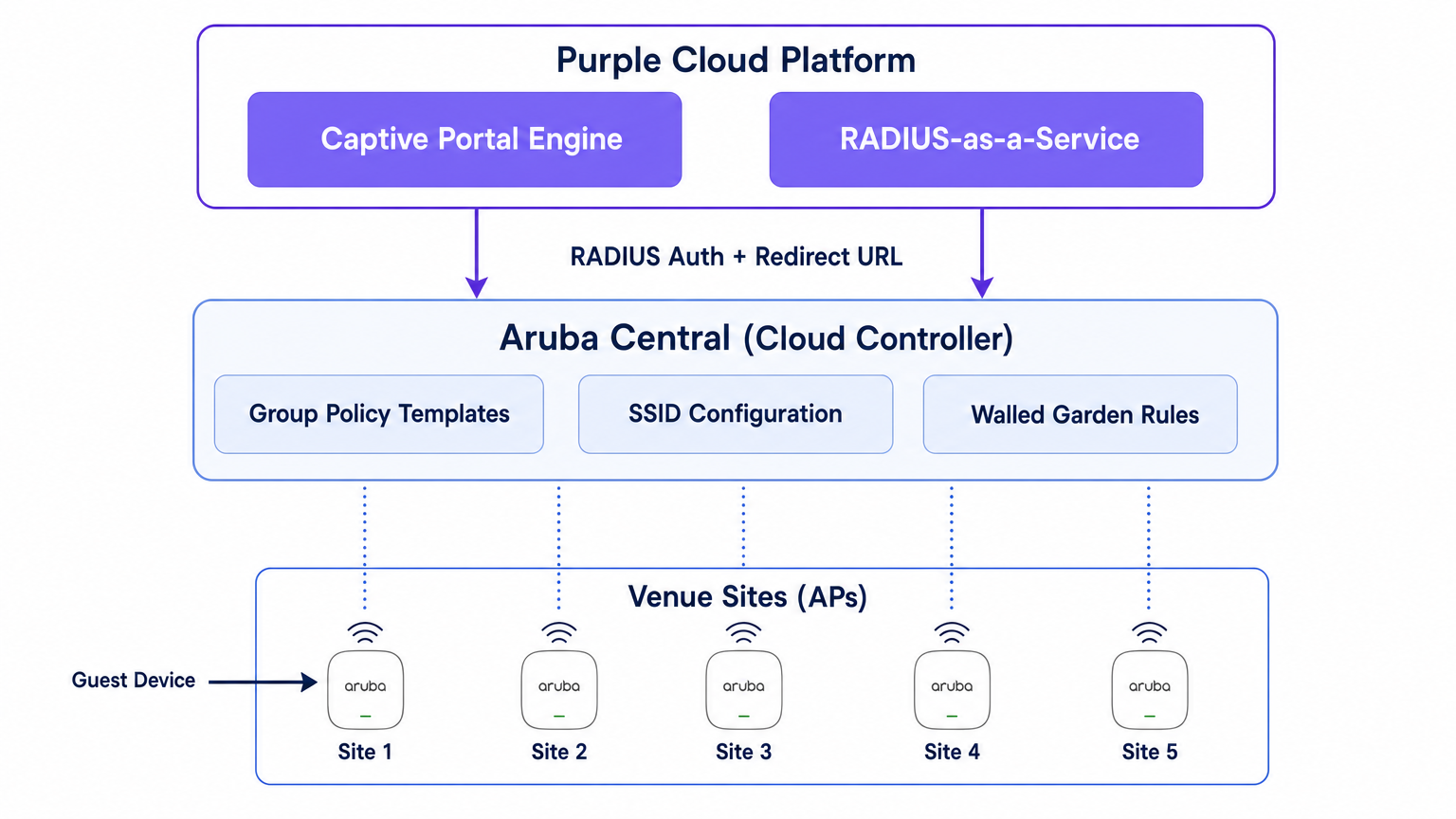
Purple se sitúa por encima de esta capa de red como una plataforma de inteligencia alojada en la nube. Proporciona el motor del Captive Portal, maneja la lógica de autenticación (incluyendo inicio de sesión social, SMS y autenticación basada en formularios), captura datos de primera parte y envía análisis a sus equipos de marketing y operaciones a través del panel de WiFi Analytics . Purple también proporciona RADIUS-as-a-Service, eliminando la necesidad de infraestructura RADIUS local como FreeRADIUS o Cisco ISE para la autenticación de invitados.
El Flujo de Autenticación
- Asociación: Un dispositivo de invitado se asocia con el SSID de invitado transmitido por un IAP de Aruba.
- Rol de Pre-Autenticación: El IAP asigna al invitado un rol de pre-autenticación. Este rol permite solo DNS, DHCP y tráfico destinado a dominios explícitamente permitidos en el walled garden.
- Intercepción HTTP: Cuando el invitado abre un navegador e intenta acceder a un sitio HTTP, el IAP intercepta la solicitud.
- Redirección: El IAP hace referencia a su perfil de Captive Portal Externo y redirige el navegador del invitado a la URL de la página de bienvenida de Purple, añadiendo parámetros como la dirección MAC del AP y la dirección MAC del cliente.
- Autenticación: El invitado se autentica a través de la página de bienvenida de Purple.
- Solicitud de Acceso RADIUS: El backend de Purple envía una Solicitud de Acceso RADIUS al IAP (o Controlador Virtual) en nombre del invitado.
- Aceptación de Acceso RADIUS: Tras una autenticación exitosa, Purple envía un mensaje de Aceptación de Acceso RADIUS de vuelta al IAP.
- Rol Autenticado: El IAP mueve al invitado del rol de pre-autenticación al rol de invitado autenticado, otorgando acceso completo a internet.
- Contabilidad: El IAP envía paquetes RADIUS Accounting-Start y de actualización provisional a Purple durante toda la sesión, proporcionando visibilidad sobre la duración de la sesión y el uso de datos.
Guía de Implementación
Esta sección describe la configuración paso a paso necesaria para integrar un solo sitio dentro de Aruba Central. Para implementaciones multisitio, esta configuración debe integrarse en una Plantilla de Grupo.
Paso 1: Crear el SSID de Invitado
- En la interfaz de usuario web de Aruba Central, navegue al contexto del grupo objetivo.
- En Administrar, haga clic en Dispositivos > Puntos de Acceso, luego haga clic en el icono Configuración.
- Seleccione la pestaña WLANs y haga clic en + Añadir SSID.
- Ingrese un nombre para el SSID (por ejemplo,
Venue-Guest). - En la pestaña Seguridad, establezca el Nivel de Seguridad en Visitantes.
Paso 2: Configurar el Perfil del Captive Portal Externo
- En la configuración de Seguridad del SSID, seleccione el tipo de Página de Bienvenida como Captive Portal Externo.
- Haga clic en el icono + para crear un nuevo Perfil de Captive Portal.
- Nombre: Ingrese un nombre descriptivo (por ejemplo,
Purple-Portal). - Tipo de Autenticación: Seleccione Autenticación Radius.
- IP o Nombre de Host: Ingrese el nombre de host del servidor del Captive Portal de Purple proporcionado en la configuración de su portal Purple.
- URL: Ingrese la URL de redirección proporcionada por Purple.
- Usar HTTPS: Habilite esta opción para forzar la comunicación segura.
- Fallo del Captive Portal: Seleccione Denegar Internet para asegurar que los invitados no puedan omitir la autenticación si el portal no es accesible.
Paso 3: Configurar RADIUS-as-a-Service
- Aún dentro de la configuración de Seguridad del SSID, localice el campo Servidor Principal bajo la configuración del Captive Portal Externo.
- Haga clic en el icono + para añadir un nuevo servidor de autenticación externo.
- Dirección IP: Ingrese la dirección IP o el nombre de host del servidor RADIUS de Purple.
- Clave Compartida: Ingrese la clave secreta compartida RADIUS generada en su portal Purple. Crucial: Debe coincidir exactamente.
- Puerto de Autenticación:
1812 - Puerto de Contabilidad:
1813 - Asegúrese de que la Contabilidad esté habilitada y configurada con un intervalo razonable (por ejemplo, 5 minutos) para garantizar un seguimiento preciso de la sesión en el panel de Purple.
Paso 4: Definir el Walled Garden
El walled garden es el elemento de configuración más crítico. Define los dominios a los que un invitado puede acceder antes de autenticarse. Si el walled garden está incompleto, la página de bienvenida no se cargará o la autenticación social fallará.
- En la configuración del SSID, navegue a las reglas de Acceso.
- Agregue reglas para permitir el tráfico a los dominios del Captive Portal de Purple y a los puntos finales de CDN.
- Si utiliza el inicio de sesión social (por ejemplo, Facebook, Google, X), debe agregar los dominios respectivos para esos proveedores de identidad. Purple mantiene una lista actualizada de los dominios de walled garden requeridos en su documentación de soporte.
Paso 5: Configuración de VLAN y DHCP
Asegúrese de que el SSID de invitado esté asignado a una VLAN dedicada, aislada de su red corporativa.
- En la pestaña VLANs de la configuración del SSID, seleccione Servidor DHCP externo asignado (si utiliza su propia infraestructura DHCP) o AP instantáneo asignado (si el Controlador Virtual está manejando DHCP y NAT para invitados).
- Especifique el ID de VLAN correcto para la red de invitados.
Mejores Prácticas para Implementaciones Multi-Sitio
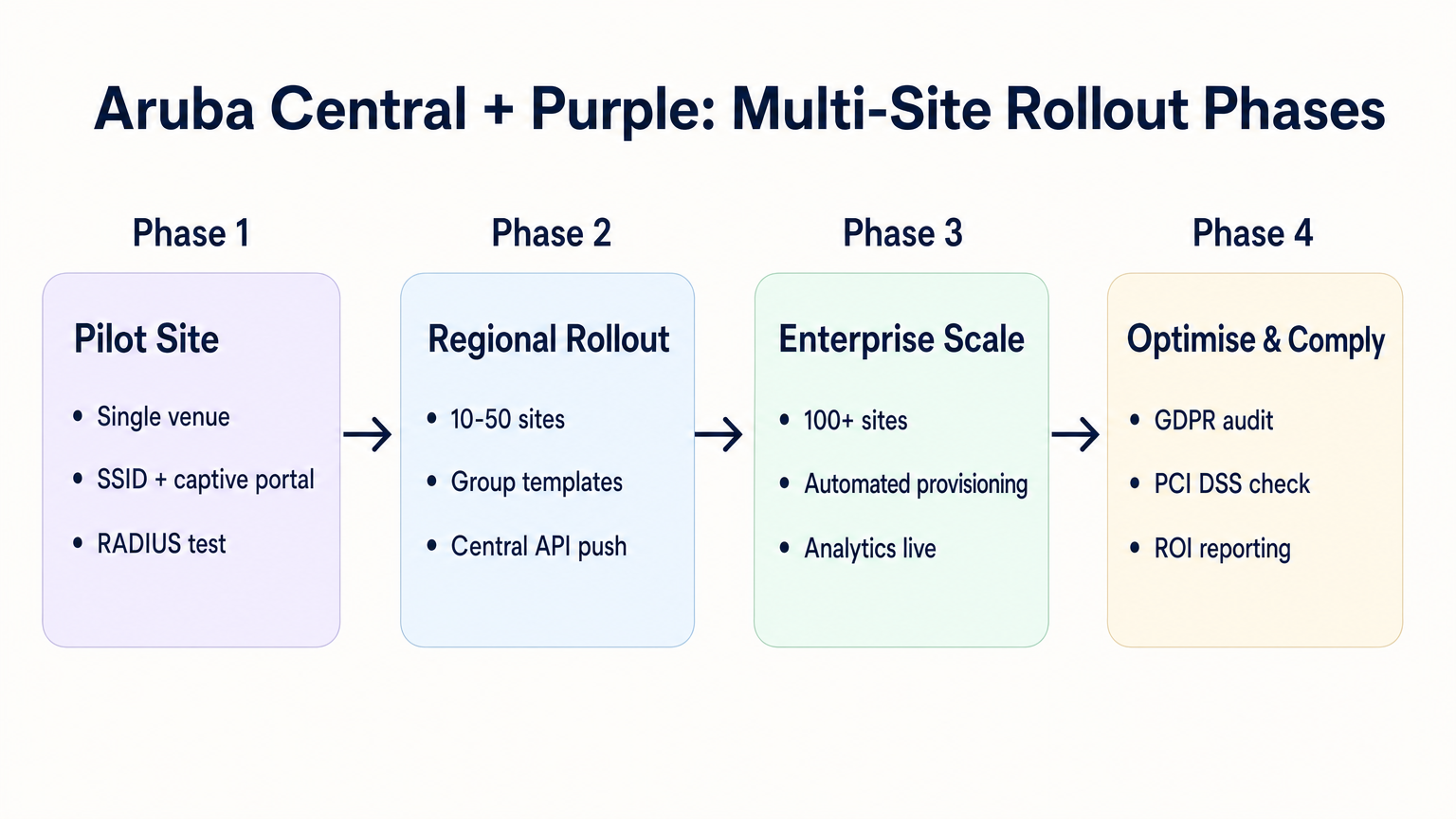
Al implementar en docenas o cientos de ubicaciones —ya sea en Retail , Hospitality o Healthcare — la configuración manual es propensa a errores. Se requiere un enfoque disciplinado y automatizado.
1. Estructura y Jerarquía de Grupos
Alinee la estructura de grupos de Aruba Central con la jerarquía de sus ubicaciones. Un patrón común es crear grupos basados en el tipo de ubicación o marca (por ejemplo, "Tiendas Insignia" vs. "Ubicaciones Pop-up"). El perfil de External Captive Portal se aplica a nivel de grupo, lo que significa que todos los AP de ese grupo heredan la misma configuración de integración de Purple.
2. Redirecciones Parametrizadas
Si diferentes sitios requieren distintos temas de página de bienvenida, no necesita perfiles de Captive Portal separados para cada sitio. Purple le permite usar una única URL de redirección que sirve dinámicamente el tema correcto basándose en la dirección MAC del AP o en un parámetro personalizado añadido a la URL por el AP de Aruba.
3. Aprovisionamiento Impulsado por API
Aproveche la API REST de Aruba Central para automatizar la incorporación de sitios. La API Central le permite crear SSIDs programáticamente, asignar perfiles de Captive Portal y actualizar listas de walled garden. Cuando se combina con la API de Purple, puede construir un flujo de trabajo de aprovisionamiento sin contacto:
- Activadores de script: Se añade una nueva ubicación a su CMDB.
- API de Purple: Crea el registro de la ubicación en Purple y genera el secreto RADIUS.
- API Central: Crea el sitio en Aruba Central, asigna los APs, aplica la plantilla de grupo e inyecta el secreto RADIUS de Purple.
4. Consolidación de SSID
Evite la tentación de transmitir múltiples SSIDs de invitado para diferentes tipos de usuario (por ejemplo, "Invitado", "Contratista", "Proveedor"). Como se detalla en nuestra guía sobre Sistema de Posicionamiento Interior: Guía UWB, BLE y WiFi , los SSIDs excesivos degradan el rendimiento de RF al consumir tiempo de aire valioso con tramas de baliza. Transmita un único SSID y utilice la lógica de autenticación de Purple para asignar diferentes roles o límites de ancho de banda basados en la identidad del usuario.
Solución de Problemas y Mitigación de Riesgos
Modos de Falla Comunes
- La Página de Bienvenida no se Carga: Esto es casi siempre un problema de walled garden. El dispositivo invitado está intentando cargar un recurso (por ejemplo, una fuente, una imagen o un archivo CSS) desde un dominio que no está permitido antes de la autenticación. Utilice las herramientas de desarrollador de un navegador en un dispositivo de prueba para identificar las solicitudes bloqueadas.
- Fallos de Autenticación Silenciosos: Si la página de bienvenida se carga, el usuario se autentica, pero no se le concede acceso a internet, el problema suele ser una falta de coincidencia del secreto compartido de RADIUS o un firewall que bloquea los puertos UDP 1812/1813 entre el AP y los servidores RADIUS de Purple.
- Errores de Certificado en la Redirección: Los sistemas operativos modernos aplican una validación HTTPS estricta. Si su walled garden bloquea el acceso a la Lista de Revocación de Certificados (CRL) o a los puntos finales del Protocolo de Estado de Certificado en Línea (OCSP) utilizados por el dispositivo cliente para validar el certificado TLS de Purple, el navegador mostrará una advertencia de seguridad. Asegúrese de que estos puntos finales estén en la lista blanca.
Mitigación de Riesgos: Cumplimiento y Privacidad
Al implementar WiFi para invitados, usted está procesando datos personales. La integración debe diseñarse teniendo en cuenta las regulaciones de privacidad.
- GDPR y CCPA: Asegúrese de que su página de bienvenida de Purple presente términos y condiciones claros y mecanismos de consentimiento explícito para la captura de datos. Para más contexto sobre los impactos regulatorios, consulte nuestro informe sobre la Ley de IA de la UE y WiFi para Invitados: Lo que los Marketers Necesitan Saber .
- PCI DSS: El tráfico de invitados debe estar lógicamente separado de las redes de procesamiento de pagos. Verifique que la VLAN asignada al SSID de invitado en Aruba Central no pueda enrutar a su infraestructura de punto de venta (POS).
ROI e Impacto Empresarial
La transición a una integración gestionada en la nube entre Aruba Central y Purple ofrece un valor empresarial medible:
- TCO Reducido: La eliminación de controladores locales y servidores RADIUS locales reduce los costos de hardware y los gastos generales de mantenimiento.
- Agilidad Operacional: La gestión de políticas basada en grupos y el aprovisionamiento impulsado por API permiten a los equipos de TI implementar nuevos sitios en minutos en lugar de días.
- Inteligencia Accionable: Al conectar sin problemas el borde de la red a la plataforma de análisis de Purple, las ubicaciones obtienen visibilidad inmediata del tráfico peatonal, los tiempos de permanencia y la demografía de los clientes, transformando un centro de costos (WiFi para invitados) en un activo generador de ingresos.
Escuche nuestro podcast de análisis profundo para obtener más información:
Términos clave y definiciones
External Captive Portal Profile
A configuration object in Aruba Central that defines the redirect URL and authentication server details for a third-party guest WiFi platform like Purple.
This is the primary integration point where IT teams link their Aruba network to Purple's cloud services.
Walled Garden
A set of access rules that permit traffic to specific IP addresses or domains before a user has authenticated.
Essential for allowing guest devices to load the Purple splash page, access social login providers, and validate TLS certificates prior to gaining full internet access.
RADIUS-as-a-Service
A cloud-hosted RADIUS server provided by Purple that handles authentication and accounting for guest WiFi sessions.
Eliminates the need for enterprise IT teams to deploy and maintain on-premises RADIUS infrastructure for guest access.
Pre-Authentication Role
The initial state assigned to a guest device upon association with the SSID, restricting access to only DNS, DHCP, and walled garden destinations.
Ensures security by preventing unauthenticated devices from accessing the internet or the corporate network.
Group Template
A hierarchical configuration structure in Aruba Central that allows policies and SSID settings to be applied uniformly across multiple access points.
The foundational mechanism for achieving scalable, consistent multi-site deployments.
RADIUS Accounting
The process by which the access point sends session data (start time, duration, data transferred) to the RADIUS server.
Critical for Purple to provide accurate analytics on dwell time and bandwidth consumption in the WiFi Analytics dashboard.
OCSP/CRL Endpoints
Online Certificate Status Protocol and Certificate Revocation List endpoints used by browsers to verify the validity of an SSL/TLS certificate.
If these endpoints are blocked by the walled garden, modern devices will display security warnings instead of the Purple splash page.
OAuth 2.0
The industry-standard protocol for authorization, used to secure access to the Aruba Central REST API.
IT teams must generate OAuth credentials to script and automate the provisioning of new sites and captive portal profiles.
Casos de éxito
A 200-room hotel is migrating from on-premises Aruba Mobility Controllers to Aruba Central. They need to replicate their existing Purple WiFi integration, which uses a custom splash page and social login, across 45 access points. How should the IT team approach the configuration?
The IT team should first create a dedicated Group in Aruba Central for the hotel. Within this group, they configure a new guest SSID with the security level set to 'Visitors'. They must then create an External Captive Portal profile pointing to Purple's redirect URL and configure Purple's RADIUS-as-a-Service endpoint as the primary authentication server. Crucially, because they use social login, the team must configure the SSID's access rules (the walled garden) to explicitly allow traffic to Purple's domains, CDN endpoints, and the specific domains required by the social identity providers (e.g., Facebook, Google) before authentication. Finally, the APs are assigned to the group, automatically inheriting the configuration.
A retail chain is rolling out Purple WiFi across 150 stores managed by Aruba Central. They want a different splash page theme for their flagship stores versus their standard outlets, but want to minimize configuration overhead. How can they achieve this?
Instead of creating separate Aruba Central Groups and separate External Captive Portal profiles for each store type, the chain can use a single Group Template and a single redirect URL. Purple's platform allows the redirect URL to dynamically serve different splash page themes based on parameters appended by the Aruba AP, such as the AP MAC address or the Site ID. The IT team configures one External Captive Portal profile in Central, and manages the theme mapping entirely within the Purple platform.
Análisis de escenarios
Q1. You have configured an External Captive Portal profile in Aruba Central pointing to Purple. Guests connect to the SSID, but their browsers display a generic 'Cannot reach the server' error instead of the splash page. What is the most likely cause?
💡 Sugerencia:Consider what traffic is permitted before a guest successfully authenticates.
Mostrar enfoque recomendado
The most likely cause is an incomplete or missing walled garden configuration. Before authentication, the AP drops all traffic except DNS, DHCP, and traffic destined for domains explicitly allowed in the access rules. You must ensure Purple's captive portal domains and CDN endpoints are whitelisted.
Q2. Your organisation is deploying Purple WiFi across 50 regional offices. You want to ensure that if the Purple RADIUS server becomes temporarily unreachable, guests are not granted unauthenticated access to the internet. Which setting must you configure in the External Captive Portal profile?
💡 Sugerencia:Look for the configuration parameter that dictates behaviour when the external server fails.
Mostrar enfoque recomendado
You must set the 'Captive Portal Failure' behaviour to 'Deny Internet'. This fail-closed approach ensures security and compliance by preventing unauthenticated access if the RADIUS server cannot be reached.
Q3. After a successful deployment, the marketing team reports that Purple's analytics dashboard shows guest logins, but all sessions show a duration of 0 minutes and 0 bytes of data used. What network configuration step was missed?
💡 Sugerencia:Think about how session duration and data usage are communicated from the AP to the authentication server.
Mostrar enfoque recomendado
RADIUS Accounting was likely not enabled, or the accounting port (1813) is blocked by a firewall. The AP uses RADIUS Accounting-Start, Interim-Update, and Stop packets to report session metrics to Purple. Without these, Purple knows a login occurred but has no visibility into the session details.




