

Aruba Central und Purple WiFi: Cloud-verwaltete Integration
Ein umfassender technischer Leitfaden zur Integration von Aruba Central mit der Cloud-basierten Gast-WiFi-Intelligenzplattform von Purple. Dieser Leitfaden behandelt die Architektur, die Schritt-für-Schritt-Konfiguration externer Captive Portals und RADIUS sowie Strategien für die Einführung an mehreren Standorten für IT-Teams von Unternehmen.
🎧 Diesen Leitfaden anhören
Transkript anzeigen
Kurzzusammenfassung
Für IT-Teams von Unternehmen, die verteilte drahtlose Netzwerke verwalten, ändert die Migration von lokalen Controllern zu Cloud-verwalteten Plattformen wie Aruba Central das Bereitstellungsmodell grundlegend. Während die Kernmechanismen von Captive Portals und der RADIUS-Authentifizierung gleich bleiben, verlagert sich das Konfigurationsparadigma von der gerätezentrierten zur gruppenbasierten Richtlinienverwaltung.
Dieser Leitfaden bietet eine umfassende technische Referenz für die Integration von Aruba Central mit der Cloud-basierten Gast-WiFi-Intelligenzplattform von Purple. Wir behandeln die architektonischen Unterschiede zwischen lokalen und Cloud-verwalteten Bereitstellungen, die Schritt-für-Schritt-Konfiguration für externe Captive Portals und RADIUS-as-a-Service sowie Strategien zur Automatisierung von Multi-Site-Rollouts mithilfe der Aruba Central API. Ob Sie Guest WiFi in einem Dutzend regionaler Büros oder in einer globalen Präsenz von Einzelhandelsgeschäften bereitstellen, diese Referenz bietet die umsetzbaren Anleitungen, die für eine sichere, skalierbare und konforme Integration erforderlich sind.
Technischer Einblick
Architektonischer Wandel: Vom Controller zur Cloud
In einer traditionellen Aruba-Bereitstellung fungieren Mobility Controller als Richtliniendurchsetzungspunkte. Captive Portal-Profile, Walled Garden-Regeln und RADIUS-Serverdefinitionen werden direkt auf dem Controller konfiguriert. Wenn sich ein Gast mit einem AP verbindet, wird sein Datenverkehr zurück zum Controller getunnelt, der die HTTP-Weiterleitung zum Captive Portal und die RADIUS-Authentifizierung an den Backend-Server übernimmt.
Aruba Central arbeitet mit einem verteilten Durchsetzungsmodell. Die Richtliniendurchsetzung erfolgt am Instant Access Point (IAP) Edge, während die Konfiguration aus der Cloud heruntergeladen wird. Die Integrationspunkte verschieben sich von der lokalen Gerätekonfiguration zu Gruppenvorlagen, SSID-Profilen und externen Captive Portal-Objekten innerhalb der Konfigurationshierarchie von Central.
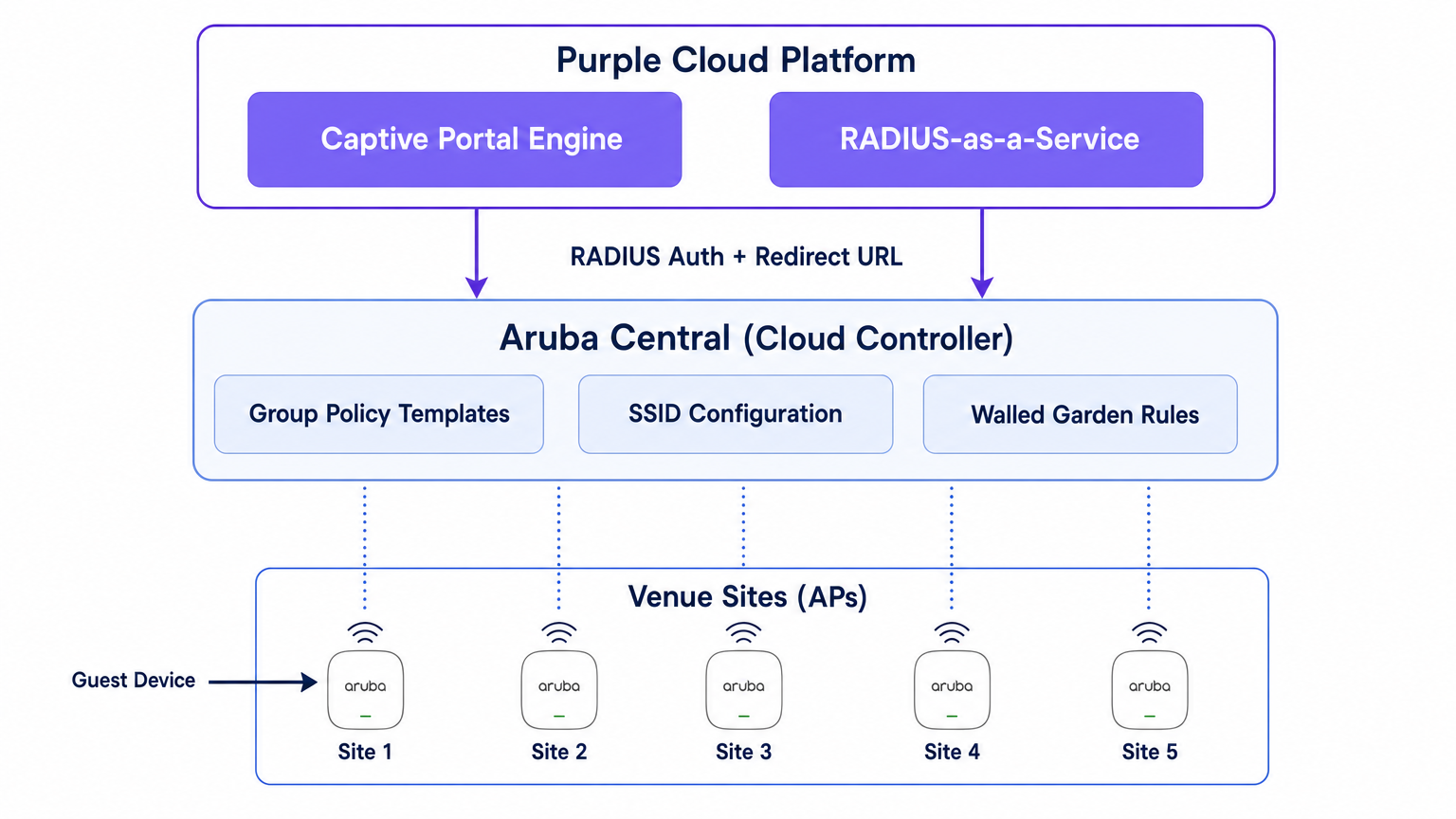
Purple agiert über dieser Netzwerkschicht als Cloud-basierte Intelligenzplattform. Es stellt die Captive Portal-Engine bereit, verarbeitet die Authentifizierungslogik (einschließlich Social Login, SMS und formularbasierter Authentifizierung), erfasst Erstanbieterdaten und speist Analysen über das WiFi Analytics -Dashboard an Ihre Marketing- und Betriebsteams zurück. Purple bietet auch RADIUS-as-a-Service an, wodurch die Notwendigkeit einer lokalen RADIUS-Infrastruktur wie FreeRADIUS oder Cisco ISE für die Gastauthentifizierung entfällt.
Der Authentifizierungsablauf
- Verbindung: Ein Gastgerät verbindet sich mit der vom Aruba IAP ausgestrahlten Gast-SSID.
- Pre-Authentifizierungsrolle: Der IAP weist dem Gast eine Pre-Authentifizierungsrolle zu. Diese Rolle erlaubt nur DNS, DHCP und Datenverkehr, der für explizit im Walled Garden zugelassene Domains bestimmt ist.
- HTTP-Abfangen: Wenn der Gast einen Browser öffnet und versucht, auf eine HTTP-Seite zuzugreifen, fängt der IAP die Anfrage ab.
- Weiterleitung: Der IAP referenziert sein externes Captive Portal-Profil und leitet den Browser des Gastes zur Splash-Page-URL von Purple weiter, wobei Parameter wie die AP-MAC-Adresse und die Client-MAC-Adresse angehängt werden.
- Authentifizierung: Der Gast authentifiziert sich über die Purple Splash-Page.
- RADIUS Access-Request: Das Backend von Purple sendet im Namen des Gastes einen RADIUS Access-Request an den IAP (oder Virtual Controller).
- RADIUS Access-Accept: Nach erfolgreicher Authentifizierung sendet Purple eine RADIUS Access-Accept-Nachricht zurück an den IAP.
- Authentifizierte Rolle: Der IAP verschiebt den Gast von der Pre-Authentifizierungsrolle in die authentifizierte Gastrolle und gewährt vollen Internetzugang.
- Accounting: Der IAP sendet während der gesamten Sitzung RADIUS Accounting-Start- und Zwischenaktualisierungspakete an Purple, um Einblick in die Sitzungsdauer und Datennutzung zu geben.
Implementierungsleitfaden
Dieser Abschnitt beschreibt die Schritt-für-Schritt-Konfiguration, die für die Integration eines einzelnen Standorts in Aruba Central erforderlich ist. Für Multi-Site-Bereitstellungen sollte diese Konfiguration in eine Gruppen-Vorlage integriert werden.
Schritt 1: Gast-SSID erstellen
- Navigieren Sie in der Aruba Central WebUI zum Kontext der Zielgruppe.
- Klicken Sie unter Verwalten auf Geräte > Access Points und dann auf das Konfigurationssymbol.
- Wählen Sie die Registerkarte WLANs und klicken Sie auf + SSID hinzufügen.
- Geben Sie einen Namen für die SSID ein (z. B.
Venue-Guest). - Wählen Sie auf der Registerkarte Sicherheit die Sicherheitsstufe Besucher.
Schritt 2: Externes Captive Portal-Profil konfigurieren
- Wählen Sie in den SSID-Sicherheitseinstellungen den Splash Page-Typ als Externes Captive Portal aus.
- Klicken Sie auf das +-Symbol, um ein neues Captive Portal-Profil zu erstellen.
- Name: Geben Sie einen aussagekräftigen Namen ein (z. B.
Purple-Portal). - Authentifizierungstyp: Wählen Sie Radius-Authentifizierung.
- IP oder Hostname: Geben Sie den Purple Captive Portal Server-Hostnamen ein, der in Ihren Purple Portal-Einstellungen angegeben ist.
- URL: Geben Sie die von Purple bereitgestellte Weiterleitungs-URL ein.
- HTTPS verwenden: Aktivieren Sie diese Option, um eine sichere Kommunikation zu erzwingen.
- Captive Portal-Fehler: Wählen Sie Internetzugang verweigern, um sicherzustellen, dass Gäste die Authentifizierung nicht umgehen können, wenn das Portal nicht erreichbar ist.
Schritt 3: RADIUS-as-a-Service konfigurieren
- Suchen Sie in den SSID-Sicherheitseinstellungen das Feld Primärer Server unter der Konfiguration des externen Captive Portals.
- Klicken Sie auf das +-Symbol, um einen neuen externen Authentifizierungsserver hinzuzufügen.
- IP-Adresse: Geben Sie die IP-Adresse oder den Hostnamen des RADIUS-Servers von Purple ein.
- Shared Key: Geben Sie den in Ihrem Purple Portal generierten RADIUS Shared Secret ein. Wichtig: Dies muss exakt übereinstimmen.
- Auth Port:
1812 - Accounting Port:
1813 - Stellen Sie sicher, dass Accounting aktiviert und auf ein angemessenes Intervall (z. B. 5 Minuten) eingestellt ist, um eine genaue Sitzungsverfolgung im Purple Dashboard zu gewährleisten.
Schritt 4: Den Walled Garden definieren
Der Walled Garden ist das kritischste Konfigurationselement. Er definiert die Domains, auf die ein Gast zugreifen kann, bevor er sich authentifiziert hat. Ist der Walled Garden unvollständig, kann die Splash Page nicht geladen werden oder die soziale Authentifizierung funktioniert nicht.
- Navigieren Sie in den SSID-Einstellungen zu den Zugriffsregeln.
- Fügen Sie Regeln hinzu, um den Datenverkehr zu den Captive Portal-Domains und CDN-Endpunkten von Purple zuzulassen.
- Wenn Sie Social Login verwenden (z. B. Facebook, Google, X), müssen Sie die entsprechenden Domains für diese Identitätsanbieter hinzufügen. Purple pflegt eine aktualisierte Liste der erforderlichen Walled Garden-Domains in ihrer Support-Dokumentation.
Schritt 5: VLAN- und DHCP-Konfiguration
Stellen Sie sicher, dass die Gast-SSID einem dedizierten VLAN zugeordnet ist, das von Ihrem Unternehmensnetzwerk isoliert ist.
- Wählen Sie unter der Registerkarte VLANs in der SSID-Konfiguration Externer DHCP-Server zugewiesen (wenn Sie Ihre eigene DHCP-Infrastruktur verwenden) oder Instant AP zugewiesen (wenn der Virtual Controller DHCP und NAT für Gäste verwaltet).
- Geben Sie die korrekte VLAN-ID für das Gastnetzwerk an.
Best Practices für Multi-Site-Rollouts
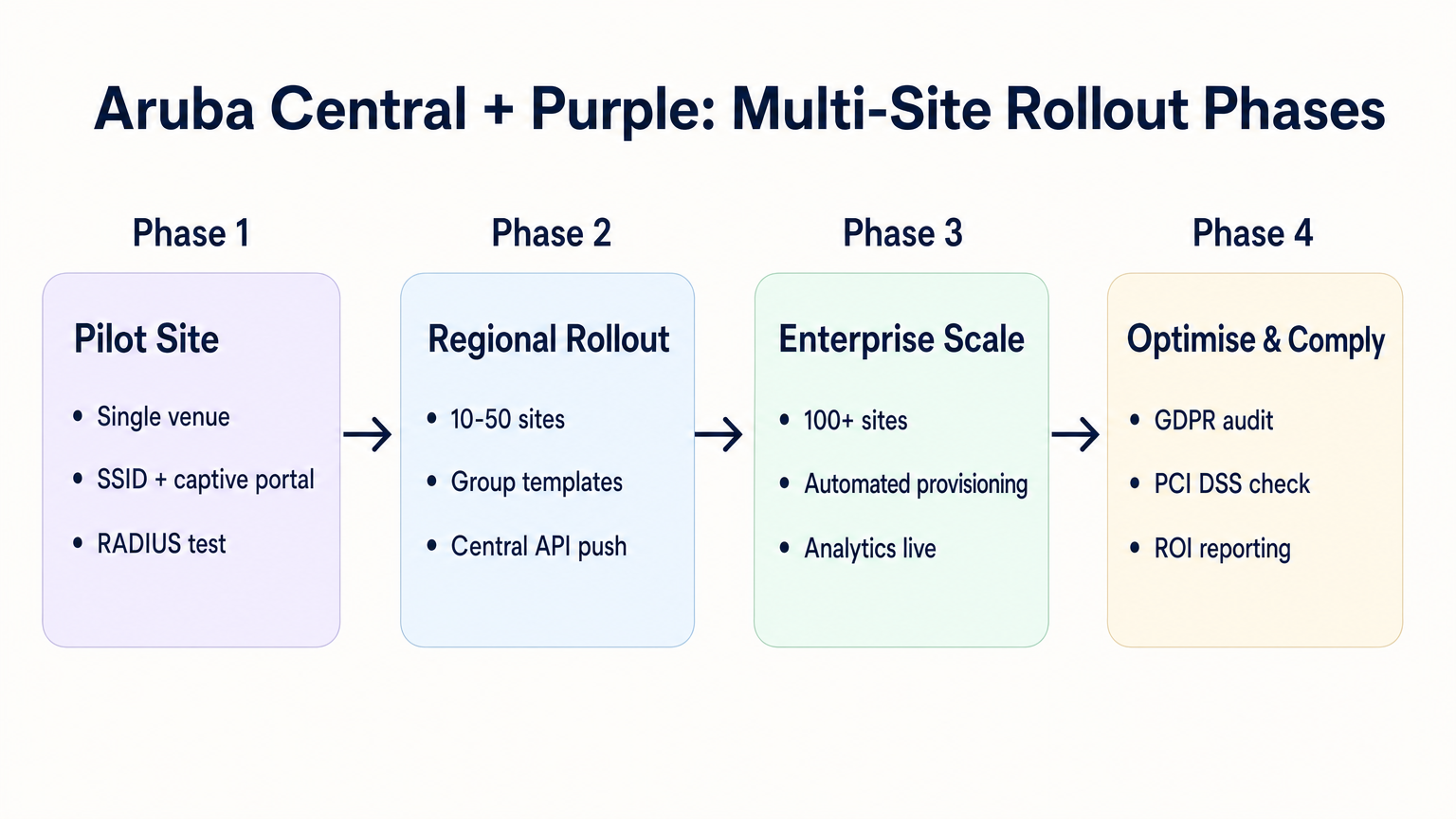
Beim Rollout über Dutzende oder Hunderte von Standorten – sei es im Einzelhandel , im Gastgewerbe oder im Gesundheitswesen – ist die manuelle Konfiguration fehleranfällig. Ein disziplinierter, automatisierter Ansatz ist erforderlich.
1. Gruppenstruktur und Hierarchie
Richten Sie Ihre Aruba Central Gruppenstruktur an Ihrer Standort-Hierarchie aus. Ein gängiges Muster ist die Erstellung von Gruppen basierend auf dem Standorttyp oder der Marke (z. B. „Flagship Stores“ vs. „Pop-up Locations“). Das externe Captive Portal-Profil wird auf Gruppenebene angewendet, was bedeutet, dass alle APs in dieser Gruppe dieselben Purple-Integrations-Einstellungen erben.
2. Parametrisierte Weiterleitungen
Wenn verschiedene Standorte unterschiedliche Splash Page-Designs erfordern, benötigen Sie keine separaten Captive Portal-Profile für jeden Standort. Purple ermöglicht die Verwendung einer einzigen Weiterleitungs-URL, die das korrekte Design dynamisch basierend auf der AP-MAC-Adresse oder einem benutzerdefinierten Parameter bereitstellt, der von der Aruba AP an die URL angehängt wird.
3. API-gesteuerte Bereitstellung
Nutzen Sie die Aruba Central REST API, um die Standort-Einrichtung zu automatisieren. Die Central API ermöglicht es Ihnen, SSIDs programmatisch zu erstellen, Captive Portal-Profile zuzuweisen und Walled Garden-Listen zu aktualisieren. In Kombination mit der Purple API können Sie einen Zero-Touch-Provisioning-Workflow aufbauen:
- Skript-Trigger: Ein neuer Standort wird zu Ihrer CMDB hinzugefügt.
- Purple API: Erstellt den Standortdatensatz in Purple und generiert das RADIUS-Geheimnis.
- Central API: Erstellt den Standort in Aruba Central, weist die APs zu, wendet die Gruppen-Vorlage an und injiziert das Purple RADIUS-Geheimnis.
4. SSID-Konsolidierung
Vermeiden Sie die Versuchung, mehrere Gast-SSIDs für verschiedene Benutzertypen (z. B. „Gast“, „Auftragnehmer“, „Anbieter“) auszustrahlen. Wie in unserem Leitfaden zu Indoor Positioning System: UWB, BLE, & WiFi Guide beschrieben, beeinträchtigen übermäßige SSIDs die HF-Leistung, indem sie wertvolle Sendezeit mit Beacon-Frames verbrauchen. Senden Sie eine einzige SSID und verwenden Sie die Authentifizierungslogik von Purple, um verschiedene Rollen oder Bandbreitenbeschränkungen basierend auf der Identität des Benutzers zuzuweisen.
Fehlerbehebung & Risikominderung
Häufige Fehlerursachen
- Splash Page lädt nicht: Dies ist fast immer ein Walled Garden-Problem. Das Gastgerät versucht, eine Ressource (z. B. eine Schriftart, ein Bild oder eine CSS-Datei) von einer Domain zu laden, die vor der Authentifizierung nicht zugelassen ist. Verwenden Sie die Entwicklertools eines Browsers auf einem Testgerät, um blockierte Anfragen zu identifizieren.
- Stille Authentifizierungsfehler: Wenn die Splash Page lädt, der Benutzer sich authentifiziert, aber keinen Internetzugang erhält, liegt das Problem typischerweise an einer Nichtübereinstimmung des RADIUS Shared Secret oder einer Firewall, die UDP-Ports 1812/1813 zwischen dem AP und den RADIUS-Servern von Purple blockiert.
- Zertifikatsfehler bei Weiterleitung: Moderne Betriebssysteme erzwingen eine strenge HTTPS-Validierung. Wenn Ihr Walled Garden den Zugriff auf die Certificate Revocation List (CRL) oder Online Certificate Status Protocol (OCSP)-Endpunkte blockiert, die vom Client-Gerät zur Validierung des TLS-Zertifikats von Purple verwendet werden, gibt der Browser eine Sicherheitswarnung aus. Stellen Sie sicher, dass diese Endpunkte auf der Whitelist stehen.
Risikominderung: Compliance und Datenschutz
Beim Einsatz von Gast-WiFi verarbeiten Sie personenbezogene Daten. Die Integration muss unter Berücksichtigung der Datenschutzbestimmungen konzipiert werden.
- GDPR und CCPA: Stellen Sie sicher, dass Ihre Purple Splash Page klare Geschäftsbedingungen und explizite Zustimmungsmechanismen für die Datenerfassung präsentiert. Für weitere Informationen zu regulatorischen Auswirkungen verweisen wir auf unser Briefing zum EU AI Act and Guest WiFi: What Marketers Need to Know .
- PCI DSS: Der Gastdatenverkehr muss logisch von Zahlungsverarbeitungsnetzwerken getrennt sein. Überprüfen Sie, ob das der Gast-SSID in Aruba Central zugewiesene VLAN nicht zu Ihrer Point-of-Sale (POS)-Infrastruktur routen kann.
ROI & Geschäftlicher Nutzen
Der Übergang zu einer Cloud-verwalteten Integration zwischen Aruba Central und Purple liefert messbaren Geschäftswert:
- Reduzierte TCO: Die Eliminierung von lokalen Controllern und lokalen RADIUS-Servern reduziert Hardwarekosten und Wartungsaufwand.
- Operative Agilität: Gruppenbasiertes Richtlinienmanagement und API-gesteuerte Bereitstellung ermöglichen es IT-Teams, neue Standorte in Minuten statt in Tagen bereitzustellen.
- Verwertbare Erkenntnisse: Durch die nahtlose Verbindung des Netzwerk-Rands mit der Analyseplattform von Purple erhalten Standorte sofortige Einblicke in Besucherfrequenz, Verweildauer und Kundendemografie, wodurch ein Kostenfaktor (Gast-WiFi) in einen umsatzgenerierenden Vermögenswert verwandelt wird.
Hören Sie unseren Deep-Dive-Podcast für weitere Einblicke: <audio controls src=" https://tfstmpunsngbqczbybwb.supabase.co/storage/v1/object/public/guide-assets/guides/aruba-central-purple-wifi-integration/aruba_central_and_purple_wifi_cloud_managed_integration_podcast.mp3"preload="none">
Schlüsselbegriffe & Definitionen
External Captive Portal Profile
A configuration object in Aruba Central that defines the redirect URL and authentication server details for a third-party guest WiFi platform like Purple.
This is the primary integration point where IT teams link their Aruba network to Purple's cloud services.
Walled Garden
A set of access rules that permit traffic to specific IP addresses or domains before a user has authenticated.
Essential for allowing guest devices to load the Purple splash page, access social login providers, and validate TLS certificates prior to gaining full internet access.
RADIUS-as-a-Service
A cloud-hosted RADIUS server provided by Purple that handles authentication and accounting for guest WiFi sessions.
Eliminates the need for enterprise IT teams to deploy and maintain on-premises RADIUS infrastructure for guest access.
Pre-Authentication Role
The initial state assigned to a guest device upon association with the SSID, restricting access to only DNS, DHCP, and walled garden destinations.
Ensures security by preventing unauthenticated devices from accessing the internet or the corporate network.
Group Template
A hierarchical configuration structure in Aruba Central that allows policies and SSID settings to be applied uniformly across multiple access points.
The foundational mechanism for achieving scalable, consistent multi-site deployments.
RADIUS Accounting
The process by which the access point sends session data (start time, duration, data transferred) to the RADIUS server.
Critical for Purple to provide accurate analytics on dwell time and bandwidth consumption in the WiFi Analytics dashboard.
OCSP/CRL Endpoints
Online Certificate Status Protocol and Certificate Revocation List endpoints used by browsers to verify the validity of an SSL/TLS certificate.
If these endpoints are blocked by the walled garden, modern devices will display security warnings instead of the Purple splash page.
OAuth 2.0
The industry-standard protocol for authorization, used to secure access to the Aruba Central REST API.
IT teams must generate OAuth credentials to script and automate the provisioning of new sites and captive portal profiles.
Fallstudien
A 200-room hotel is migrating from on-premises Aruba Mobility Controllers to Aruba Central. They need to replicate their existing Purple WiFi integration, which uses a custom splash page and social login, across 45 access points. How should the IT team approach the configuration?
The IT team should first create a dedicated Group in Aruba Central for the hotel. Within this group, they configure a new guest SSID with the security level set to 'Visitors'. They must then create an External Captive Portal profile pointing to Purple's redirect URL and configure Purple's RADIUS-as-a-Service endpoint as the primary authentication server. Crucially, because they use social login, the team must configure the SSID's access rules (the walled garden) to explicitly allow traffic to Purple's domains, CDN endpoints, and the specific domains required by the social identity providers (e.g., Facebook, Google) before authentication. Finally, the APs are assigned to the group, automatically inheriting the configuration.
A retail chain is rolling out Purple WiFi across 150 stores managed by Aruba Central. They want a different splash page theme for their flagship stores versus their standard outlets, but want to minimize configuration overhead. How can they achieve this?
Instead of creating separate Aruba Central Groups and separate External Captive Portal profiles for each store type, the chain can use a single Group Template and a single redirect URL. Purple's platform allows the redirect URL to dynamically serve different splash page themes based on parameters appended by the Aruba AP, such as the AP MAC address or the Site ID. The IT team configures one External Captive Portal profile in Central, and manages the theme mapping entirely within the Purple platform.
Szenarioanalyse
Q1. You have configured an External Captive Portal profile in Aruba Central pointing to Purple. Guests connect to the SSID, but their browsers display a generic 'Cannot reach the server' error instead of the splash page. What is the most likely cause?
💡 Hinweis:Consider what traffic is permitted before a guest successfully authenticates.
Empfohlenen Ansatz anzeigen
The most likely cause is an incomplete or missing walled garden configuration. Before authentication, the AP drops all traffic except DNS, DHCP, and traffic destined for domains explicitly allowed in the access rules. You must ensure Purple's captive portal domains and CDN endpoints are whitelisted.
Q2. Your organisation is deploying Purple WiFi across 50 regional offices. You want to ensure that if the Purple RADIUS server becomes temporarily unreachable, guests are not granted unauthenticated access to the internet. Which setting must you configure in the External Captive Portal profile?
💡 Hinweis:Look for the configuration parameter that dictates behaviour when the external server fails.
Empfohlenen Ansatz anzeigen
You must set the 'Captive Portal Failure' behaviour to 'Deny Internet'. This fail-closed approach ensures security and compliance by preventing unauthenticated access if the RADIUS server cannot be reached.
Q3. After a successful deployment, the marketing team reports that Purple's analytics dashboard shows guest logins, but all sessions show a duration of 0 minutes and 0 bytes of data used. What network configuration step was missed?
💡 Hinweis:Think about how session duration and data usage are communicated from the AP to the authentication server.
Empfohlenen Ansatz anzeigen
RADIUS Accounting was likely not enabled, or the accounting port (1813) is blocked by a firewall. The AP uses RADIUS Accounting-Start, Interim-Update, and Stop packets to report session metrics to Purple. Without these, Purple knows a login occurred but has no visibility into the session details.




