

Aruba Central and Purple WiFi: Cloud-Managed Integration
A comprehensive technical reference guide for integrating Aruba Central with Purple's cloud-hosted guest WiFi intelligence platform. This guide covers architecture, step-by-step configuration of external captive portals and RADIUS, and multi-site rollout strategies for enterprise IT teams.
🎧 Listen to this Guide
View Transcript
Executive Summary
For enterprise IT teams managing distributed wireless networks, migrating from on-premises controllers to cloud-managed platforms like Aruba Central fundamentally changes the deployment model. While the core mechanics of captive portals and RADIUS authentication remain the same, the configuration paradigm shifts from device-centric to group-based policy management.
This guide provides a comprehensive technical reference for integrating Aruba Central with Purple's cloud-hosted guest WiFi intelligence platform. We cover the architectural differences between on-premises and cloud-managed deployments, step-by-step configuration for external captive portals and RADIUS-as-a-Service, and strategies for automating multi-site rollouts using the Aruba Central API. Whether you are deploying Guest WiFi across a dozen regional offices or a global footprint of retail stores, this reference provides the actionable guidance needed to ensure a secure, scalable, and compliant integration.
Technical Deep-Dive
Architectural Shift: Controller to Cloud
In a traditional Aruba deployment, Mobility Controllers act as the policy enforcement points. Captive portal profiles, walled garden rules, and RADIUS server definitions are configured directly on the controller. When a guest associates with an AP, their traffic is tunnelled back to the controller, which handles the HTTP redirect to the captive portal and proxies the RADIUS authentication to the backend server.
Aruba Central operates on a distributed enforcement model. The policy enforcement happens at the Instant Access Point (IAP) edge, while the configuration is pushed down from the cloud. The integration touchpoints shift from local device configuration to group templates, SSID profiles, and external captive portal objects within Central's configuration hierarchy.
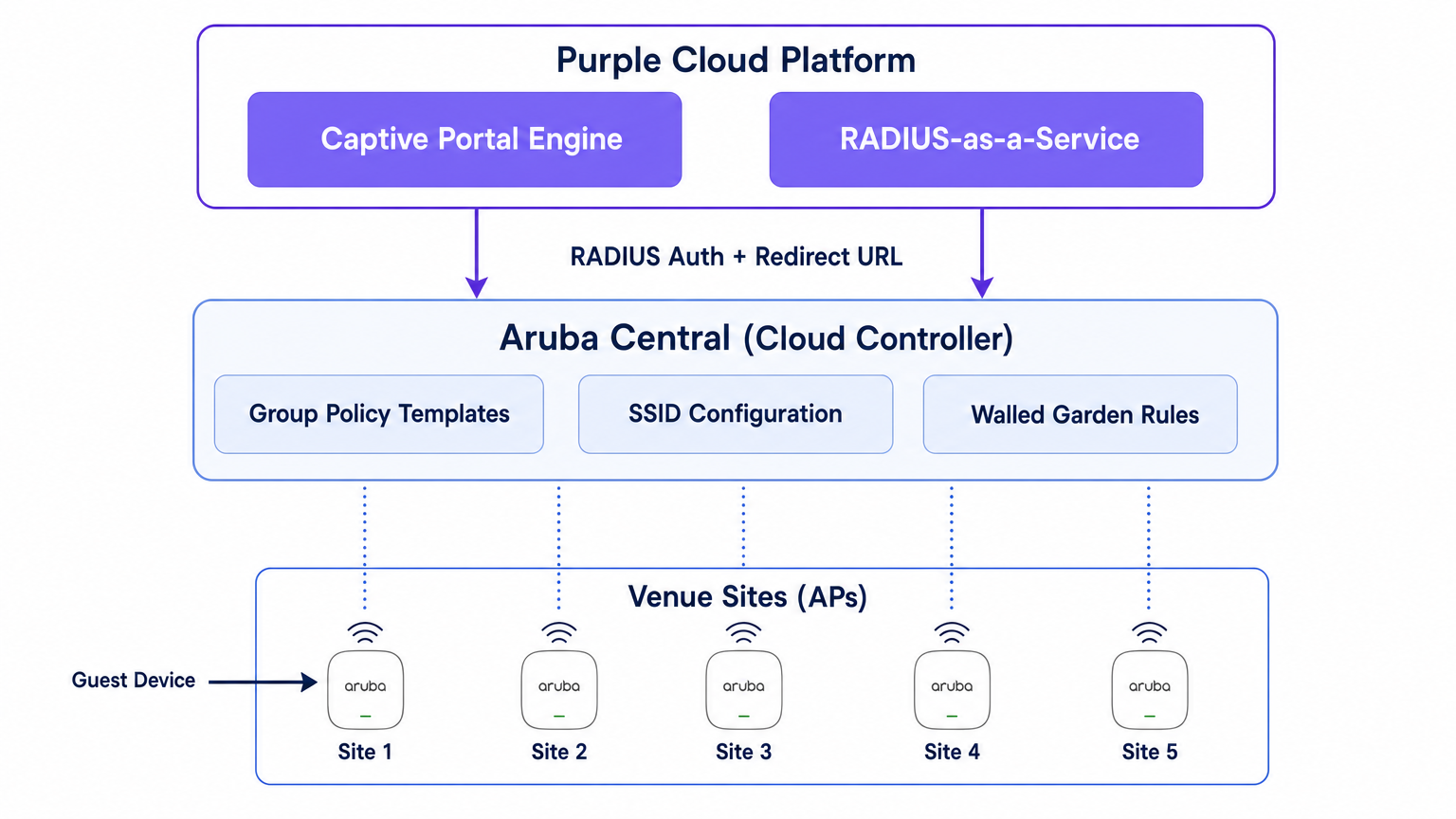
Purple sits above this network layer as a cloud-hosted intelligence platform. It provides the captive portal engine, handles the authentication logic (including social login, SMS, and form-based auth), captures first-party data, and feeds analytics back to your marketing and operations teams via the WiFi Analytics dashboard. Purple also provides RADIUS-as-a-Service, eliminating the need for on-premises RADIUS infrastructure like FreeRADIUS or Cisco ISE for guest authentication.
The Authentication Flow
- Association: A guest device associates with the guest SSID broadcast by an Aruba IAP.
- Pre-Authentication Role: The IAP assigns the guest a pre-authentication role. This role permits only DNS, DHCP, and traffic destined for domains explicitly allowed in the walled garden.
- HTTP Intercept: When the guest opens a browser and attempts to access an HTTP site, the IAP intercepts the request.
- Redirect: The IAP references its External Captive Portal profile and redirects the guest's browser to Purple's splash page URL, appending parameters like the AP MAC address and client MAC address.
- Authentication: The guest authenticates via the Purple splash page.
- RADIUS Access-Request: Purple's backend sends a RADIUS Access-Request to the IAP (or Virtual Controller) on behalf of the guest.
- RADIUS Access-Accept: Upon successful authentication, Purple sends a RADIUS Access-Accept message back to the IAP.
- Authenticated Role: The IAP moves the guest from the pre-authentication role to the authenticated guest role, granting full internet access.
- Accounting: The IAP sends RADIUS Accounting-Start and interim update packets to Purple throughout the session, providing visibility into session duration and data usage.
Implementation Guide
This section outlines the step-by-step configuration required to integrate a single site within Aruba Central. For multi-site deployments, this configuration should be built into a Group Template.
Step 1: Create the Guest SSID
- In the Aruba Central WebUI, navigate to the target group context.
- Under Manage, click Devices > Access Points, then click the Config icon.
- Select the WLANs tab and click + Add SSID.
- Enter a name for the SSID (e.g.,
Venue-Guest). - Under the Security tab, set the Security Level to Visitors.
Step 2: Configure the External Captive Portal Profile
- In the SSID Security settings, select the Splash Page type as External Captive Portal.
- Click the + icon to create a new Captive Portal Profile.
- Name: Enter a descriptive name (e.g.,
Purple-Portal). - Authentication Type: Select Radius Authentication.
- IP or Hostname: Enter the Purple captive portal server hostname provided in your Purple portal settings.
- URL: Enter the redirect URL provided by Purple.
- Use HTTPS: Enable this option to enforce secure communication.
- Captive Portal Failure: Select Deny Internet to ensure guests cannot bypass authentication if the portal is unreachable.
Step 3: Configure RADIUS-as-a-Service
- Still within the SSID Security settings, locate the Primary Server field under the External Captive Portal configuration.
- Click the + icon to add a new external authentication server.
- IP Address: Enter the IP address or hostname of Purple's RADIUS server.
- Shared Key: Enter the RADIUS shared secret generated in your Purple portal. Crucial: This must match exactly.
- Auth Port:
1812 - Accounting Port:
1813 - Ensure Accounting is enabled and set to a reasonable interval (e.g., 5 minutes) to ensure accurate session tracking in the Purple dashboard.
Step 4: Define the Walled Garden
The walled garden is the most critical configuration element. It defines the domains a guest can access before they have authenticated. If the walled garden is incomplete, the splash page will fail to load, or social authentication will break.
- In the SSID settings, navigate to the Access rules.
- Add rules to allow traffic to Purple's captive portal domains and CDN endpoints.
- If you are using social login (e.g., Facebook, Google, X), you must add the respective domains for those identity providers. Purple maintains an updated list of required walled garden domains in their support documentation.
Step 5: VLAN and DHCP Configuration
Ensure the guest SSID is mapped to a dedicated VLAN, isolated from your corporate network.
- Under the VLANs tab in the SSID configuration, select External DHCP server assigned (if using your own DHCP infrastructure) or Instant AP assigned (if the Virtual Controller is handling DHCP and NAT for guests).
- Specify the correct VLAN ID for the guest network.
Best Practices for Multi-Site Rollouts
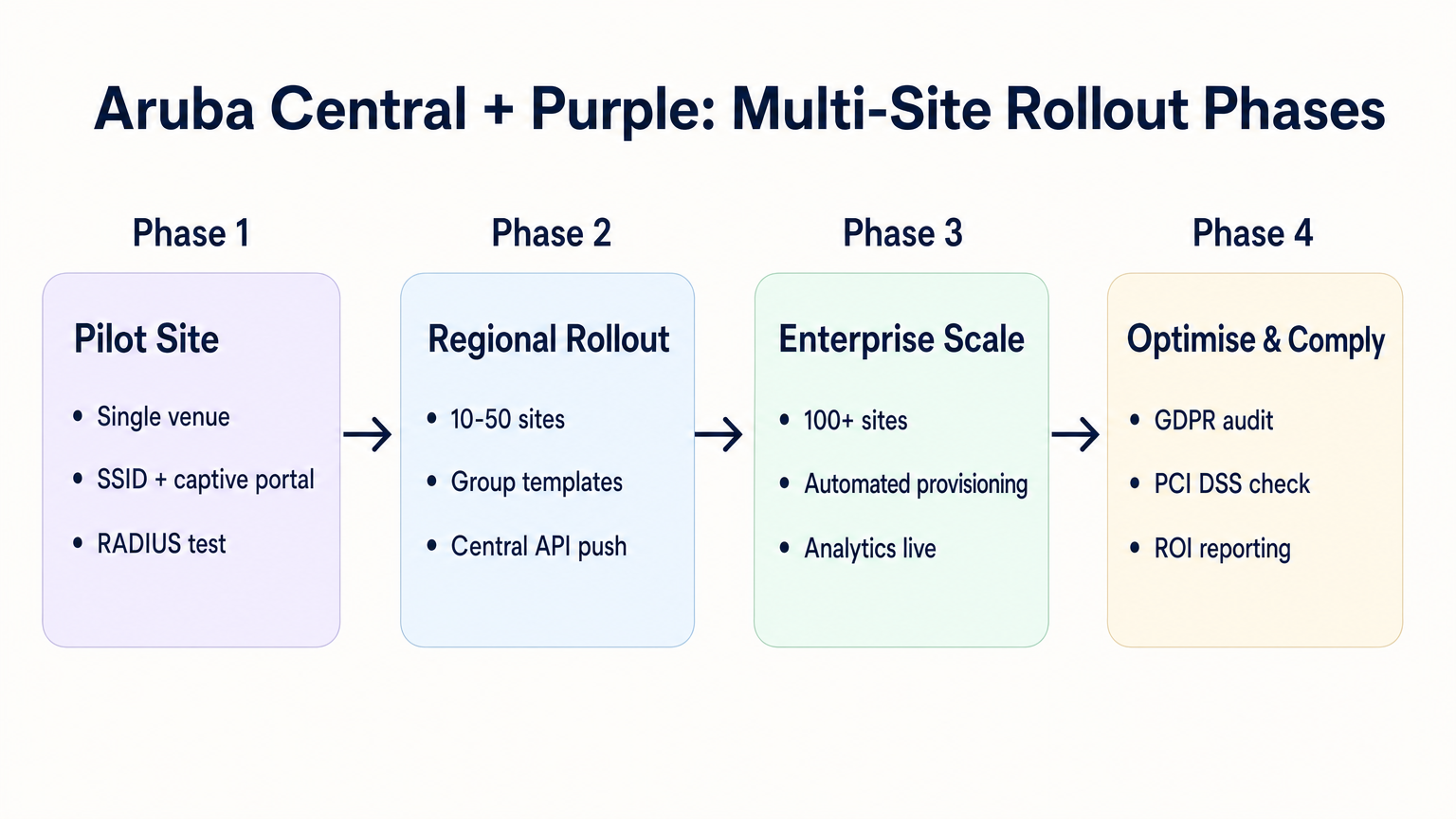
When deploying across dozens or hundreds of venues—whether in Retail , Hospitality , or Healthcare —manual configuration is prone to error. A disciplined, automated approach is required.
1. Group Structure and Hierarchy
Align your Aruba Central group structure with your venue hierarchy. A common pattern is to create groups based on venue type or brand (e.g., "Flagship Stores" vs. "Pop-up Locations"). The External Captive Portal profile is applied at the group level, meaning all APs in that group inherit the same Purple integration settings.
2. Parameterised Redirects
If different sites require different splash page themes, you do not need separate captive portal profiles for each site. Purple allows you to use a single redirect URL that dynamically serves the correct theme based on the AP MAC address or a custom parameter appended to the URL by the Aruba AP.
3. API-Driven Provisioning
Leverage the Aruba Central REST API to automate site onboarding. The Central API allows you to programmatically create SSIDs, assign captive portal profiles, and update walled garden lists. When combined with the Purple API, you can build a zero-touch provisioning workflow:
- Script triggers: A new venue is added to your CMDB.
- Purple API: Creates the venue record in Purple and generates the RADIUS secret.
- Central API: Creates the site in Aruba Central, assigns the APs, applies the group template, and injects the Purple RADIUS secret.
4. SSID Consolidation
Avoid the temptation to broadcast multiple guest SSIDs for different user types (e.g., "Guest", "Contractor", "Vendor"). As detailed in our guide on Indoor Positioning System: UWB, BLE, & WiFi Guide , excessive SSIDs degrade RF performance by consuming valuable airtime with beacon frames. Broadcast a single SSID and use Purple's authentication logic to assign different roles or bandwidth limits based on the user's identity.
Troubleshooting & Risk Mitigation
Common Failure Modes
- Splash Page Fails to Load: This is almost always a walled garden issue. The guest device is attempting to load a resource (e.g., a font, an image, or a CSS file) from a domain that is not permitted pre-authentication. Use a browser's developer tools on a test device to identify blocked requests.
- Silent Authentication Failures: If the splash page loads, the user authenticates, but they are not granted internet access, the issue is typically a RADIUS shared secret mismatch or a firewall blocking UDP ports 1812/1813 between the AP and Purple's RADIUS servers.
- Certificate Errors on Redirect: Modern operating systems enforce strict HTTPS validation. If your walled garden blocks access to the Certificate Revocation List (CRL) or Online Certificate Status Protocol (OCSP) endpoints used by the client device to validate Purple's TLS certificate, the browser will throw a security warning. Ensure these endpoints are whitelisted.
Risk Mitigation: Compliance and Privacy
When deploying guest WiFi, you are processing personal data. The integration must be designed with privacy regulations in mind.
- GDPR and CCPA: Ensure your Purple splash page presents clear terms and conditions and explicit consent mechanisms for data capture. For more context on regulatory impacts, refer to our briefing on the EU AI Act and Guest WiFi: What Marketers Need to Know .
- PCI DSS: Guest traffic must be logically separated from payment processing networks. Verify that the VLAN assigned to the guest SSID in Aruba Central cannot route to your point-of-sale (POS) infrastructure.
ROI & Business Impact
The transition to a cloud-managed integration between Aruba Central and Purple delivers measurable business value:
- Reduced TCO: Eliminating on-premises controllers and local RADIUS servers reduces hardware costs and maintenance overhead.
- Operational Agility: Group-based policy management and API-driven provisioning allow IT teams to deploy new sites in minutes rather than days.
- Actionable Intelligence: By seamlessly connecting the network edge to Purple's analytics platform, venues gain immediate visibility into footfall, dwell times, and customer demographics, transforming a cost centre (guest WiFi) into a revenue-generating asset.
Listen to our deep-dive podcast for more insights:
Key Terms & Definitions
External Captive Portal Profile
A configuration object in Aruba Central that defines the redirect URL and authentication server details for a third-party guest WiFi platform like Purple.
This is the primary integration point where IT teams link their Aruba network to Purple's cloud services.
Walled Garden
A set of access rules that permit traffic to specific IP addresses or domains before a user has authenticated.
Essential for allowing guest devices to load the Purple splash page, access social login providers, and validate TLS certificates prior to gaining full internet access.
RADIUS-as-a-Service
A cloud-hosted RADIUS server provided by Purple that handles authentication and accounting for guest WiFi sessions.
Eliminates the need for enterprise IT teams to deploy and maintain on-premises RADIUS infrastructure for guest access.
Pre-Authentication Role
The initial state assigned to a guest device upon association with the SSID, restricting access to only DNS, DHCP, and walled garden destinations.
Ensures security by preventing unauthenticated devices from accessing the internet or the corporate network.
Group Template
A hierarchical configuration structure in Aruba Central that allows policies and SSID settings to be applied uniformly across multiple access points.
The foundational mechanism for achieving scalable, consistent multi-site deployments.
RADIUS Accounting
The process by which the access point sends session data (start time, duration, data transferred) to the RADIUS server.
Critical for Purple to provide accurate analytics on dwell time and bandwidth consumption in the WiFi Analytics dashboard.
OCSP/CRL Endpoints
Online Certificate Status Protocol and Certificate Revocation List endpoints used by browsers to verify the validity of an SSL/TLS certificate.
If these endpoints are blocked by the walled garden, modern devices will display security warnings instead of the Purple splash page.
OAuth 2.0
The industry-standard protocol for authorization, used to secure access to the Aruba Central REST API.
IT teams must generate OAuth credentials to script and automate the provisioning of new sites and captive portal profiles.
Case Studies
A 200-room hotel is migrating from on-premises Aruba Mobility Controllers to Aruba Central. They need to replicate their existing Purple WiFi integration, which uses a custom splash page and social login, across 45 access points. How should the IT team approach the configuration?
The IT team should first create a dedicated Group in Aruba Central for the hotel. Within this group, they configure a new guest SSID with the security level set to 'Visitors'. They must then create an External Captive Portal profile pointing to Purple's redirect URL and configure Purple's RADIUS-as-a-Service endpoint as the primary authentication server. Crucially, because they use social login, the team must configure the SSID's access rules (the walled garden) to explicitly allow traffic to Purple's domains, CDN endpoints, and the specific domains required by the social identity providers (e.g., Facebook, Google) before authentication. Finally, the APs are assigned to the group, automatically inheriting the configuration.
A retail chain is rolling out Purple WiFi across 150 stores managed by Aruba Central. They want a different splash page theme for their flagship stores versus their standard outlets, but want to minimize configuration overhead. How can they achieve this?
Instead of creating separate Aruba Central Groups and separate External Captive Portal profiles for each store type, the chain can use a single Group Template and a single redirect URL. Purple's platform allows the redirect URL to dynamically serve different splash page themes based on parameters appended by the Aruba AP, such as the AP MAC address or the Site ID. The IT team configures one External Captive Portal profile in Central, and manages the theme mapping entirely within the Purple platform.
Scenario Analysis
Q1. You have configured an External Captive Portal profile in Aruba Central pointing to Purple. Guests connect to the SSID, but their browsers display a generic 'Cannot reach the server' error instead of the splash page. What is the most likely cause?
💡 Hint:Consider what traffic is permitted before a guest successfully authenticates.
Show Recommended Approach
The most likely cause is an incomplete or missing walled garden configuration. Before authentication, the AP drops all traffic except DNS, DHCP, and traffic destined for domains explicitly allowed in the access rules. You must ensure Purple's captive portal domains and CDN endpoints are whitelisted.
Q2. Your organisation is deploying Purple WiFi across 50 regional offices. You want to ensure that if the Purple RADIUS server becomes temporarily unreachable, guests are not granted unauthenticated access to the internet. Which setting must you configure in the External Captive Portal profile?
💡 Hint:Look for the configuration parameter that dictates behaviour when the external server fails.
Show Recommended Approach
You must set the 'Captive Portal Failure' behaviour to 'Deny Internet'. This fail-closed approach ensures security and compliance by preventing unauthenticated access if the RADIUS server cannot be reached.
Q3. After a successful deployment, the marketing team reports that Purple's analytics dashboard shows guest logins, but all sessions show a duration of 0 minutes and 0 bytes of data used. What network configuration step was missed?
💡 Hint:Think about how session duration and data usage are communicated from the AP to the authentication server.
Show Recommended Approach
RADIUS Accounting was likely not enabled, or the accounting port (1813) is blocked by a firewall. The AP uses RADIUS Accounting-Start, Interim-Update, and Stop packets to report session metrics to Purple. Without these, Purple knows a login occurred but has no visibility into the session details.




