

Aruba Central and Purple WiFi: Integração Gerida na Nuvem
Um guia de referência técnica abrangente para integrar o Aruba Central com a plataforma de inteligência de WiFi para convidados alojada na nuvem da Purple. Este guia abrange a arquitetura, a configuração passo a passo de captive portals externos e RADIUS, e estratégias de implementação em vários locais para equipas de TI empresariais.
🎧 Ouça este Guia
Ver Transcrição
Resumo Executivo
Para equipas de TI empresariais que gerem redes sem fios distribuídas, a migração de controladores no local para plataformas geridas na nuvem como o Aruba Central altera fundamentalmente o modelo de implementação. Embora a mecânica central dos Captive Portals e da autenticação RADIUS permaneça a mesma, o paradigma de configuração muda de uma gestão de políticas centrada no dispositivo para uma gestão baseada em grupos.
Este guia fornece uma referência técnica abrangente para integrar o Aruba Central com a plataforma de inteligência de WiFi para convidados alojada na nuvem da Purple. Abordamos as diferenças arquitetónicas entre implementações no local e geridas na nuvem, a configuração passo a passo para Captive Portals externos e RADIUS-as-a-Service, e estratégias para automatizar implementações em vários locais utilizando a API do Aruba Central. Quer esteja a implementar Guest WiFi em uma dúzia de escritórios regionais ou numa pegada global de lojas de retalho, esta referência fornece a orientação acionável necessária para garantir uma integração segura, escalável e em conformidade.
Análise Técnica Detalhada
Mudança Arquitetónica: Do Controlador para a Nuvem
Numa implementação tradicional da Aruba, os Mobility Controllers atuam como pontos de aplicação de políticas. Os perfis de Captive Portal, as regras de walled garden e as definições de servidor RADIUS são configurados diretamente no controlador. Quando um convidado se associa a um AP, o seu tráfego é tunelizado de volta para o controlador, que lida com o redirecionamento HTTP para o Captive Portal e atua como proxy para a autenticação RADIUS para o servidor de backend.
O Aruba Central opera num modelo de aplicação distribuída. A aplicação da política ocorre na extremidade do Instant Access Point (IAP), enquanto a configuração é enviada da nuvem. Os pontos de contacto de integração mudam da configuração de dispositivos locais para modelos de grupo, perfis de SSID e objetos de Captive Portal externos dentro da hierarquia de configuração do Central.
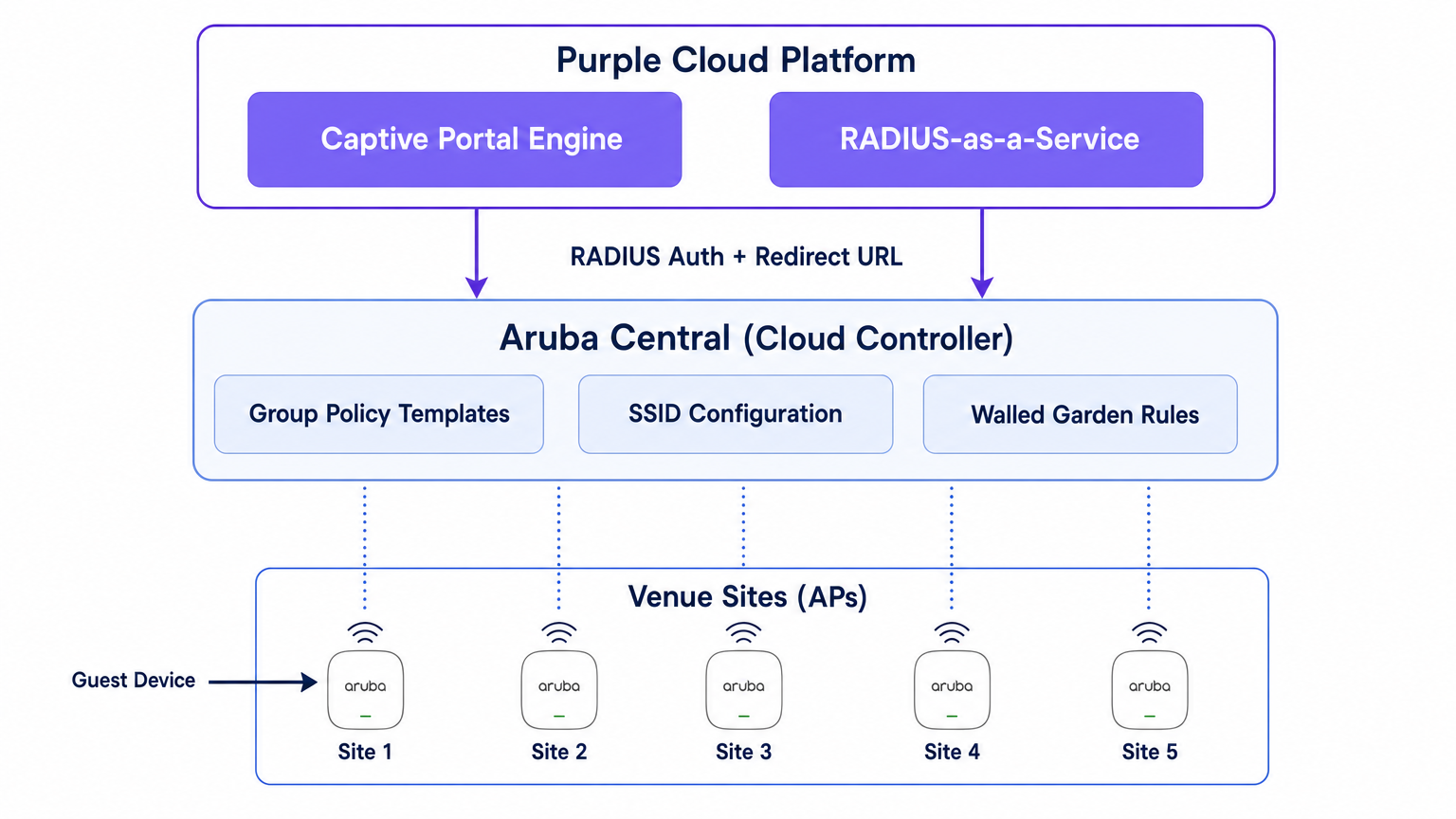
A Purple posiciona-se acima desta camada de rede como uma plataforma de inteligência alojada na nuvem. Fornece o motor do Captive Portal, gere a lógica de autenticação (incluindo login social, SMS e autenticação baseada em formulário), captura dados primários e alimenta análises de volta para as suas equipas de marketing e operações através do painel de controlo WiFi Analytics . A Purple também fornece RADIUS-as-a-Service, eliminando a necessidade de infraestrutura RADIUS no local, como FreeRADIUS ou Cisco ISE, para autenticação de convidados.
O Fluxo de Autenticação
- Associação: Um dispositivo convidado associa-se ao SSID de convidado transmitido por um Aruba IAP.
- Função de Pré-Autenticação: O IAP atribui ao convidado uma função de pré-autenticação. Esta função permite apenas DNS, DHCP e tráfego destinado a domínios explicitamente permitidos no walled garden.
- Interceção HTTP: Quando o convidado abre um navegador e tenta aceder a um site HTTP, o IAP interceta o pedido.
- Redirecionamento: O IAP referencia o seu perfil de Captive Portal Externo e redireciona o navegador do convidado para o URL da página de splash da Purple, anexando parâmetros como o endereço MAC do AP e o endereço MAC do cliente.
- Autenticação: O convidado autentica-se através da página de splash da Purple.
- Pedido de Acesso RADIUS: O backend da Purple envia um Pedido de Acesso RADIUS para o IAP (ou Controlador Virtual) em nome do convidado.
- Aceitação de Acesso RADIUS: Após autenticação bem-sucedida, a Purple envia uma mensagem de Aceitação de Acesso RADIUS de volta para o IAP.
- Função Autenticada: O IAP move o convidado da função de pré-autenticação para a função de convidado autenticado, concedendo acesso total à internet.
- Contabilidade: O IAP envia pacotes RADIUS Accounting-Start e de atualização interina para a Purple durante toda a sessão, fornecendo visibilidade sobre a duração da sessão e o uso de dados.
Guia de Implementação
Esta secção descreve a configuração passo a passo necessária para integrar um único local no Aruba Central. Para implementações em vários locais, esta configuração deve ser incorporada num Modelo de Grupo.
Passo 1: Criar o SSID de Convidado
- Na WebUI do Aruba Central, navegue até ao contexto do grupo de destino.
- Em Gerir, clique em Dispositivos > Pontos de Acesso, e depois clique no ícone Config.
- Selecione o separador WLANs e clique em + Adicionar SSID.
- Introduza um nome para o SSID (por exemplo,
Venue-Guest). - No separador Segurança, defina o Nível de Segurança para Visitantes.
Passo 2: Configurar o Perfil do Captive Portal Externo
- Nas definições de Segurança do SSID, selecione o tipo de Página de Splash como Captive Portal Externo.
- Clique no ícone + para criar um novo Perfil de Captive Portal.
- Nome: Introduza um nome descritivo (por exemplo,
Purple-Portal). - Tipo de Autenticação: Selecione Autenticação Radius.
- IP ou Nome de Host: Introduza o nome de host do servidor de Captive Portal da Purple fornecido nas suas definições do portal Purple.
- URL: Introduza o URL de redirecionamento fornecido pela Purple.
- Usar HTTPS: Ative esta opção para impor comunicação segura.
- Falha do Captive Portal: Selecione Negar Internet para garantir que os convidados não podem ignorar a autenticação se o portal estiver inacessível.
Passo 3: Configurar RADIUS-as-a-Service
- Ainda nas definições de Segurança do SSID, localize o campo Servidor Primário sob a configuração do Captive Portal Externo.
- Clique no ícone + para adicionar um novo servidor de autenticação externo.
- Endereço IP: Introduza o endereço IP ou nome de host do servidor RADIUS da Purple.
- Chave Partilhada: Introduza a chave secreta partilhada RADIUS gerada no seu portal Purple. Crucial: Isto deve corresponder exatamente.
- Porta de Autenticação:
1812 - Porta de Contabilidade:
1813 - Certifique-se de que a Contabilidade está ativada e definida para um intervalo razoável (por exemplo, 5 minutos) para garantir o rastreamento preciso da sessão no painel de controlo da Purple.
Passo 4: Definir o Walled Garden
O walled garden é o elemento de configuração mais crítico. Define os domínios que um convidado pode aceder antes de se autenticar. Se o walled garden estiver incompleto, a página de apresentação (splash page) não carregará ou a autenticação social falhará.
- Nas definições do SSID, navegue até às regras de Acesso.
- Adicione regras para permitir o tráfego para os domínios do Captive Portal da Purple e os endpoints CDN.
- Se estiver a usar o login social (por exemplo, Facebook, Google, X), deve adicionar os respetivos domínios para esses fornecedores de identidade. A Purple mantém uma lista atualizada dos domínios de walled garden necessários na sua documentação de suporte.
Passo 5: Configuração de VLAN e DHCP
Certifique-se de que o SSID de convidado está mapeado para uma VLAN dedicada, isolada da sua rede corporativa.
- No separador VLANs na configuração do SSID, selecione Servidor DHCP externo atribuído (se estiver a usar a sua própria infraestrutura DHCP) ou AP Instantâneo atribuído (se o Virtual Controller estiver a gerir DHCP e NAT para convidados).
- Especifique o ID de VLAN correto para a rede de convidados.
Melhores Práticas para Implementações Multi-Site
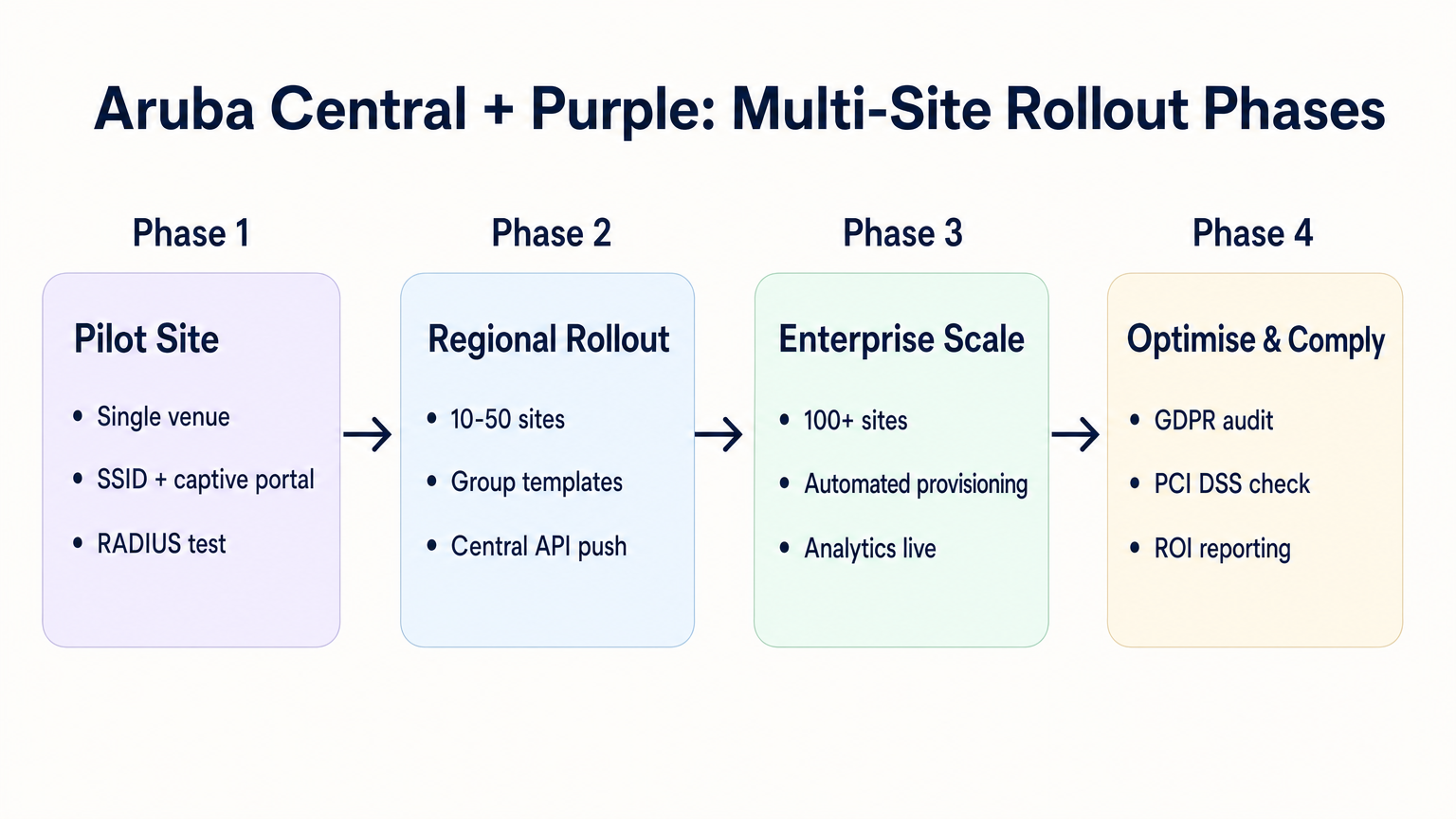
Ao implementar em dezenas ou centenas de locais — seja em Retalho , Hotelaria ou Saúde — a configuração manual é propensa a erros. É necessária uma abordagem disciplinada e automatizada.
1. Estrutura e Hierarquia de Grupos
Alinhe a sua estrutura de grupo do Aruba Central com a hierarquia dos seus locais. Um padrão comum é criar grupos com base no tipo de local ou marca (por exemplo, "Lojas Principais" vs. "Locais Pop-up"). O perfil do Captive Portal Externo é aplicado ao nível do grupo, o que significa que todos os APs nesse grupo herdam as mesmas definições de integração da Purple.
2. Redirecionamentos Parametrizados
Se diferentes sites exigirem diferentes temas de splash page, não precisa de perfis de captive portal separados para cada site. A Purple permite-lhe usar um único URL de redirecionamento que serve dinamicamente o tema correto com base no endereço MAC do AP ou num parâmetro personalizado anexado ao URL pelo AP Aruba.
3. Provisionamento Orientado por API
Aproveite a REST API do Aruba Central para automatizar o onboarding de sites. A Central API permite-lhe criar programaticamente SSIDs, atribuir perfis de captive portal e atualizar listas de walled garden. Quando combinada com a Purple API, pode construir um fluxo de trabalho de provisionamento zero-touch:
- Gatilhos de script: Um novo local é adicionado à sua CMDB.
- Purple API: Cria o registo do local na Purple e gera o segredo RADIUS.
- Central API: Cria o site no Aruba Central, atribui os APs, aplica o modelo de grupo e injeta o segredo RADIUS da Purple.
4. Consolidação de SSID
Evite a tentação de transmitir múltiplos SSIDs de convidado para diferentes tipos de utilizadores (por exemplo, "Convidado", "Empreiteiro", "Fornecedor"). Conforme detalhado no nosso guia sobre Sistema de Posicionamento Interior: Guia UWB, BLE e WiFi , SSIDs excessivos degradam o desempenho de RF ao consumir tempo de antena valioso com frames de beacon. Transmita um único SSID e use a lógica de autenticação da Purple para atribuir diferentes funções ou limites de largura de banda com base na identidade do utilizador.
Resolução de Problemas e Mitigação de Riscos
Modos de Falha Comuns
- A Splash Page não Carrega: Isto é quase sempre um problema de walled garden. O dispositivo do convidado está a tentar carregar um recurso (por exemplo, uma fonte, uma imagem ou um ficheiro CSS) de um domínio que não é permitido antes da autenticação. Use as ferramentas de desenvolvimento de um navegador num dispositivo de teste para identificar pedidos bloqueados.
- Falhas de Autenticação Silenciosas: Se a splash page carregar, o utilizador autentica-se, mas não lhe é concedido acesso à internet, o problema é tipicamente uma incompatibilidade de segredo partilhado RADIUS ou uma firewall a bloquear as portas UDP 1812/1813 entre o AP e os servidores RADIUS da Purple.
- Erros de Certificado no Redirecionamento: Os sistemas operativos modernos impõem uma validação HTTPS rigorosa. Se o seu walled garden bloquear o acesso à Lista de Revogação de Certificados (CRL) ou aos endpoints do Online Certificate Status Protocol (OCSP) usados pelo dispositivo cliente para validar o certificado TLS da Purple, o navegador emitirá um aviso de segurança. Certifique-se de que estes endpoints estão na lista de permissões (whitelisted).
Mitigação de Riscos: Conformidade e Privacidade
Ao implementar WiFi para convidados, está a processar dados pessoais. A integração deve ser projetada tendo em mente os regulamentos de privacidade.
- GDPR e CCPA: Certifique-se de que a sua splash page da Purple apresenta termos e condições claros e mecanismos de consentimento explícito para a recolha de dados. Para mais contexto sobre os impactos regulatórios, consulte o nosso briefing sobre a Lei da IA da UE e WiFi para Convidados: O que os Marketers Precisam de Saber .
- PCI DSS: O tráfego de convidados deve ser logicamente separado das redes de processamento de pagamentos. Verifique se a VLAN atribuída ao SSID de convidado no Aruba Central não pode encaminhar para a sua infraestrutura de ponto de venda (POS).
ROI e Impacto no Negócio
A transição para uma integração gerida na cloud entre o Aruba Central e a Purple oferece valor de negócio mensurável:
- TCO Reduzido: A eliminação de controladores no local e servidores RADIUS locais reduz os custos de hardware e a sobrecarga de manutenção.
- Agilidade Operacional: A gestão de políticas baseada em grupos e o provisionamento orientado por API permitem que as equipas de TI implementem novos sites em minutos, em vez de dias.
- Inteligência Acionável: Ao conectar perfeitamente a extremidade da rede à plataforma de análise da Purple, os locais obtêm visibilidade imediata sobre o fluxo de pessoas, tempos de permanência e dados demográficos dos clientes, transformando um centro de custos (WiFi para convidados) num ativo gerador de receita.
Ouça o nosso podcast aprofundado para mais informações:
Termos-Chave e Definições
External Captive Portal Profile
A configuration object in Aruba Central that defines the redirect URL and authentication server details for a third-party guest WiFi platform like Purple.
This is the primary integration point where IT teams link their Aruba network to Purple's cloud services.
Walled Garden
A set of access rules that permit traffic to specific IP addresses or domains before a user has authenticated.
Essential for allowing guest devices to load the Purple splash page, access social login providers, and validate TLS certificates prior to gaining full internet access.
RADIUS-as-a-Service
A cloud-hosted RADIUS server provided by Purple that handles authentication and accounting for guest WiFi sessions.
Eliminates the need for enterprise IT teams to deploy and maintain on-premises RADIUS infrastructure for guest access.
Pre-Authentication Role
The initial state assigned to a guest device upon association with the SSID, restricting access to only DNS, DHCP, and walled garden destinations.
Ensures security by preventing unauthenticated devices from accessing the internet or the corporate network.
Group Template
A hierarchical configuration structure in Aruba Central that allows policies and SSID settings to be applied uniformly across multiple access points.
The foundational mechanism for achieving scalable, consistent multi-site deployments.
RADIUS Accounting
The process by which the access point sends session data (start time, duration, data transferred) to the RADIUS server.
Critical for Purple to provide accurate analytics on dwell time and bandwidth consumption in the WiFi Analytics dashboard.
OCSP/CRL Endpoints
Online Certificate Status Protocol and Certificate Revocation List endpoints used by browsers to verify the validity of an SSL/TLS certificate.
If these endpoints are blocked by the walled garden, modern devices will display security warnings instead of the Purple splash page.
OAuth 2.0
The industry-standard protocol for authorization, used to secure access to the Aruba Central REST API.
IT teams must generate OAuth credentials to script and automate the provisioning of new sites and captive portal profiles.
Estudos de Caso
A 200-room hotel is migrating from on-premises Aruba Mobility Controllers to Aruba Central. They need to replicate their existing Purple WiFi integration, which uses a custom splash page and social login, across 45 access points. How should the IT team approach the configuration?
The IT team should first create a dedicated Group in Aruba Central for the hotel. Within this group, they configure a new guest SSID with the security level set to 'Visitors'. They must then create an External Captive Portal profile pointing to Purple's redirect URL and configure Purple's RADIUS-as-a-Service endpoint as the primary authentication server. Crucially, because they use social login, the team must configure the SSID's access rules (the walled garden) to explicitly allow traffic to Purple's domains, CDN endpoints, and the specific domains required by the social identity providers (e.g., Facebook, Google) before authentication. Finally, the APs are assigned to the group, automatically inheriting the configuration.
A retail chain is rolling out Purple WiFi across 150 stores managed by Aruba Central. They want a different splash page theme for their flagship stores versus their standard outlets, but want to minimize configuration overhead. How can they achieve this?
Instead of creating separate Aruba Central Groups and separate External Captive Portal profiles for each store type, the chain can use a single Group Template and a single redirect URL. Purple's platform allows the redirect URL to dynamically serve different splash page themes based on parameters appended by the Aruba AP, such as the AP MAC address or the Site ID. The IT team configures one External Captive Portal profile in Central, and manages the theme mapping entirely within the Purple platform.
Análise de Cenários
Q1. You have configured an External Captive Portal profile in Aruba Central pointing to Purple. Guests connect to the SSID, but their browsers display a generic 'Cannot reach the server' error instead of the splash page. What is the most likely cause?
💡 Dica:Consider what traffic is permitted before a guest successfully authenticates.
Mostrar Abordagem Recomendada
The most likely cause is an incomplete or missing walled garden configuration. Before authentication, the AP drops all traffic except DNS, DHCP, and traffic destined for domains explicitly allowed in the access rules. You must ensure Purple's captive portal domains and CDN endpoints are whitelisted.
Q2. Your organisation is deploying Purple WiFi across 50 regional offices. You want to ensure that if the Purple RADIUS server becomes temporarily unreachable, guests are not granted unauthenticated access to the internet. Which setting must you configure in the External Captive Portal profile?
💡 Dica:Look for the configuration parameter that dictates behaviour when the external server fails.
Mostrar Abordagem Recomendada
You must set the 'Captive Portal Failure' behaviour to 'Deny Internet'. This fail-closed approach ensures security and compliance by preventing unauthenticated access if the RADIUS server cannot be reached.
Q3. After a successful deployment, the marketing team reports that Purple's analytics dashboard shows guest logins, but all sessions show a duration of 0 minutes and 0 bytes of data used. What network configuration step was missed?
💡 Dica:Think about how session duration and data usage are communicated from the AP to the authentication server.
Mostrar Abordagem Recomendada
RADIUS Accounting was likely not enabled, or the accounting port (1813) is blocked by a firewall. The AP uses RADIUS Accounting-Start, Interim-Update, and Stop packets to report session metrics to Purple. Without these, Purple knows a login occurred but has no visibility into the session details.




