

Aruba Central e Purple WiFi: Integrazione Gestita in Cloud
Una guida di riferimento tecnico completa per l'integrazione di Aruba Central con la piattaforma di intelligence WiFi per ospiti ospitata nel cloud di Purple. Questa guida copre l'architettura, la configurazione passo-passo di Captive Portal esterni e RADIUS, e le strategie di implementazione multi-sito per i team IT aziendali.
🎧 Ascolta questa guida
Visualizza trascrizione
Riepilogo Esecutivo
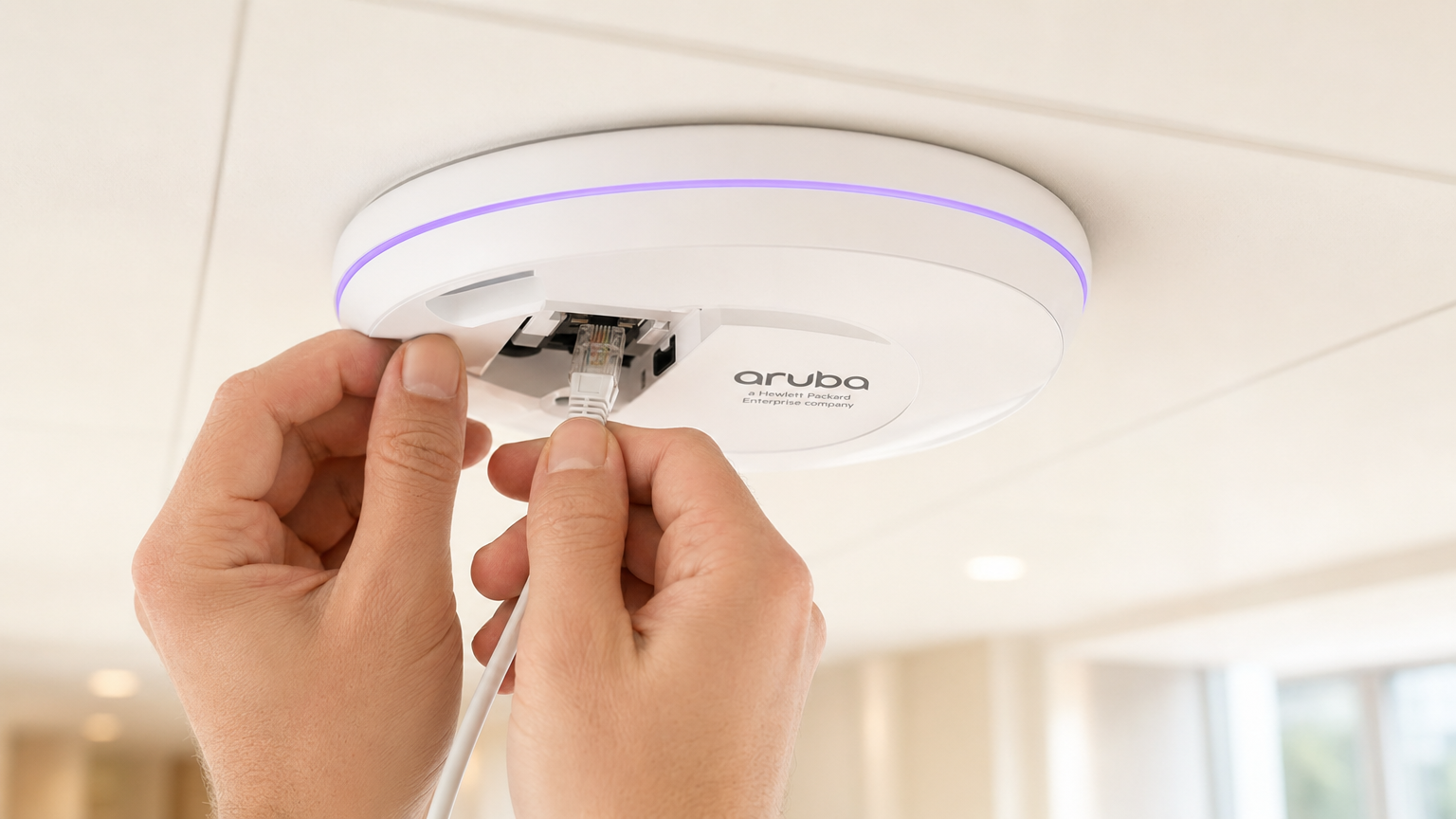
Per i team IT aziendali che gestiscono reti wireless distribuite, la migrazione da controller on-premises a piattaforme gestite in cloud come Aruba Central cambia radicalmente il modello di implementazione. Mentre i meccanismi fondamentali dei Captive Portal e dell'autenticazione RADIUS rimangono gli stessi, il paradigma di configurazione si sposta dalla gestione delle policy basata sul dispositivo a quella basata sui gruppi.
Questa guida fornisce un riferimento tecnico completo per l'integrazione di Aruba Central con la piattaforma di intelligence WiFi per ospiti ospitata nel cloud di Purple. Copriamo le differenze architetturali tra le implementazioni on-premises e quelle gestite in cloud, la configurazione passo-passo per i Captive Portal esterni e RADIUS-as-a-Service, e le strategie per automatizzare le implementazioni multi-sito utilizzando l'API di Aruba Central. Sia che stiate implementando Guest WiFi in una dozzina di uffici regionali o in un'impronta globale di negozi al dettaglio, questo riferimento fornisce la guida pratica necessaria per garantire un'integrazione sicura, scalabile e conforme.
Approfondimento Tecnico
Cambiamento Architetturale: da Controller a Cloud
In una tradizionale implementazione Aruba, i Mobility Controller agiscono come punti di applicazione delle policy. I profili dei Captive Portal, le regole del walled garden e le definizioni dei server RADIUS sono configurati direttamente sul controller. Quando un ospite si associa a un AP, il suo traffico viene incanalato nuovamente al controller, che gestisce il reindirizzamento HTTP al Captive Portal ed esegue il proxy dell'autenticazione RADIUS al server backend.
Aruba Central opera su un modello di applicazione distribuita. L'applicazione delle policy avviene al bordo dell'Instant Access Point (IAP), mentre la configurazione viene inviata dal cloud. I punti di contatto per l'integrazione si spostano dalla configurazione del dispositivo locale a modelli di gruppo, profili SSID e oggetti Captive Portal esterni all'interno della gerarchia di configurazione di Central.
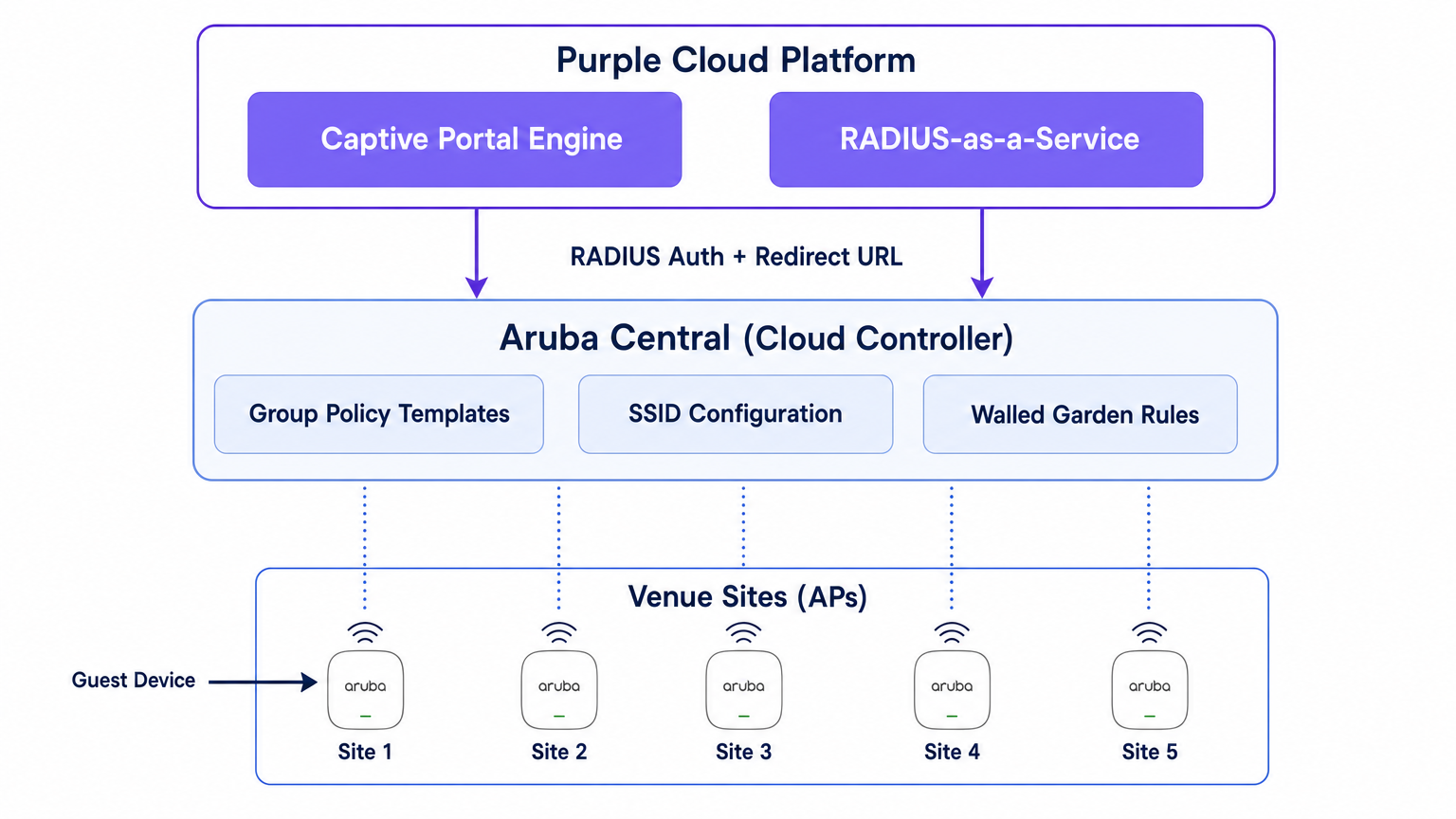
Purple si posiziona al di sopra di questo livello di rete come piattaforma di intelligence ospitata nel cloud. Fornisce il motore del Captive Portal, gestisce la logica di autenticazione (inclusi social login, SMS e autenticazione basata su modulo), acquisisce dati di prima parte e fornisce analisi ai team di marketing e operazioni tramite la dashboard WiFi Analytics . Purple fornisce anche RADIUS-as-a-Service, eliminando la necessità di infrastrutture RADIUS on-premises come FreeRADIUS o Cisco ISE per l'autenticazione degli ospiti.
Il Flusso di Autenticazione
- Associazione: Un dispositivo ospite si associa all'SSID ospite trasmesso da un IAP Aruba.
- Ruolo di Pre-Autenticazione: L'IAP assegna all'ospite un ruolo di pre-autenticazione. Questo ruolo consente solo DNS, DHCP e traffico destinato a domini esplicitamente consentiti nel walled garden.
- Intercettazione HTTP: Quando l'ospite apre un browser e tenta di accedere a un sito HTTP, l'IAP intercetta la richiesta.
- Reindirizzamento: L'IAP fa riferimento al suo profilo External Captive Portal e reindirizza il browser dell'ospite all'URL della splash page di Purple, aggiungendo parametri come l'indirizzo MAC dell'AP e l'indirizzo MAC del client.
- Autenticazione: L'ospite si autentica tramite la splash page di Purple.
- Richiesta di Accesso RADIUS: Il backend di Purple invia una richiesta di accesso RADIUS all'IAP (o Virtual Controller) per conto dell'ospite.
- Accettazione di Accesso RADIUS: Dopo l'autenticazione riuscita, Purple invia un messaggio di accettazione di accesso RADIUS all'IAP.
- Ruolo Autenticato: L'IAP sposta l'ospite dal ruolo di pre-autenticazione al ruolo di ospite autenticato, concedendo l'accesso completo a Internet.
- Accounting: L'IAP invia pacchetti RADIUS Accounting-Start e di aggiornamento intermedio a Purple durante tutta la sessione, fornendo visibilità sulla durata della sessione e sull'utilizzo dei dati.
Guida all'Implementazione
Questa sezione illustra la configurazione passo-passo necessaria per integrare un singolo sito all'interno di Aruba Central. Per le implementazioni multi-sito, questa configurazione dovrebbe essere integrata in un Modello di Gruppo.
Passo 1: Creare l'SSID Ospite
- Nell'interfaccia utente web di Aruba Central, navigare al contesto del gruppo di destinazione.
- Sotto Manage, cliccare su Devices > Access Points, quindi cliccare sull'icona Config.
- Selezionare la scheda WLANs e cliccare su + Add SSID.
- Inserire un nome per l'SSID (es.
Venue-Guest). - Sotto la scheda Security, impostare il Livello di Sicurezza su Visitors.
Passo 2: Configurare il Profilo External Captive Portal
- Nelle impostazioni di Sicurezza SSID, selezionare il tipo di Splash Page come External Captive Portal.
- Cliccare sull'icona + per creare un nuovo Profilo Captive Portal.
- Nome: Inserire un nome descrittivo (es.
Purple-Portal). - Tipo di Autenticazione: Selezionare Radius Authentication.
- IP o Hostname: Inserire l'hostname del server Captive Portal Purple fornito nelle impostazioni del vostro portale Purple.
- URL: Inserire l'URL di reindirizzamento fornito da Purple.
- Usa HTTPS: Abilitare questa opzione per imporre una comunicazione sicura.
- Guasto del Captive Portal: Selezionare Deny Internet per assicurarsi che gli ospiti non possano bypassare l'autenticazione se il portale non è raggiungibile.
Passo 3: Configurare RADIUS-as-a-Service
- Ancora all'interno delle impostazioni di Sicurezza SSID, individuare il campo Primary Server sotto la configurazione dell'External Captive Portal.
- Cliccare sull'icona + per aggiungere un nuovo server di autenticazione esterno.
- Indirizzo IP: Inserire l'indirizzo IP o l'hostname del server RADIUS di Purple.
- Chiave Condivisa: Inserire la chiave segreta condivisa RADIUS generata nel vostro portale Purple. Cruciale: Deve corrispondere esattamente.
- Porta di Autenticazione:
1812 - Porta di Accounting:
1813 - Assicurarsi che Accounting sia abilitato e impostato su un intervallo ragionevole (es. 5 minuti) per garantire un tracciamento accurato della sessione nella dashboard di Purple.
Passaggio 4: Definire il Walled Garden
Il walled garden è l'elemento di configurazione più critico. Definisce i domini a cui un ospite può accedere prima di aver effettuato l'autenticazione. Se il walled garden è incompleto, la splash page non si caricherà o l'autenticazione social non funzionerà.
- Nelle impostazioni dell'SSID, navigare alle regole di Accesso.
- Aggiungere regole per consentire il traffico ai domini del Captive Portal di Purple e agli endpoint CDN.
- Se si utilizza il login social (es. Facebook, Google, X), è necessario aggiungere i rispettivi domini per tali provider di identità. Purple mantiene un elenco aggiornato dei domini walled garden richiesti nella propria documentazione di supporto.
Passaggio 5: Configurazione VLAN e DHCP
Assicurarsi che l'SSID ospite sia mappato a una VLAN dedicata, isolata dalla rete aziendale.
- Sotto la scheda VLAN nella configurazione dell'SSID, selezionare Server DHCP esterno assegnato (se si utilizza la propria infrastruttura DHCP) o AP istantaneo assegnato (se il Virtual Controller gestisce DHCP e NAT per gli ospiti).
- Specificare l'ID VLAN corretto per la rete ospite.
Best Practice per Implementazioni Multi-Sito
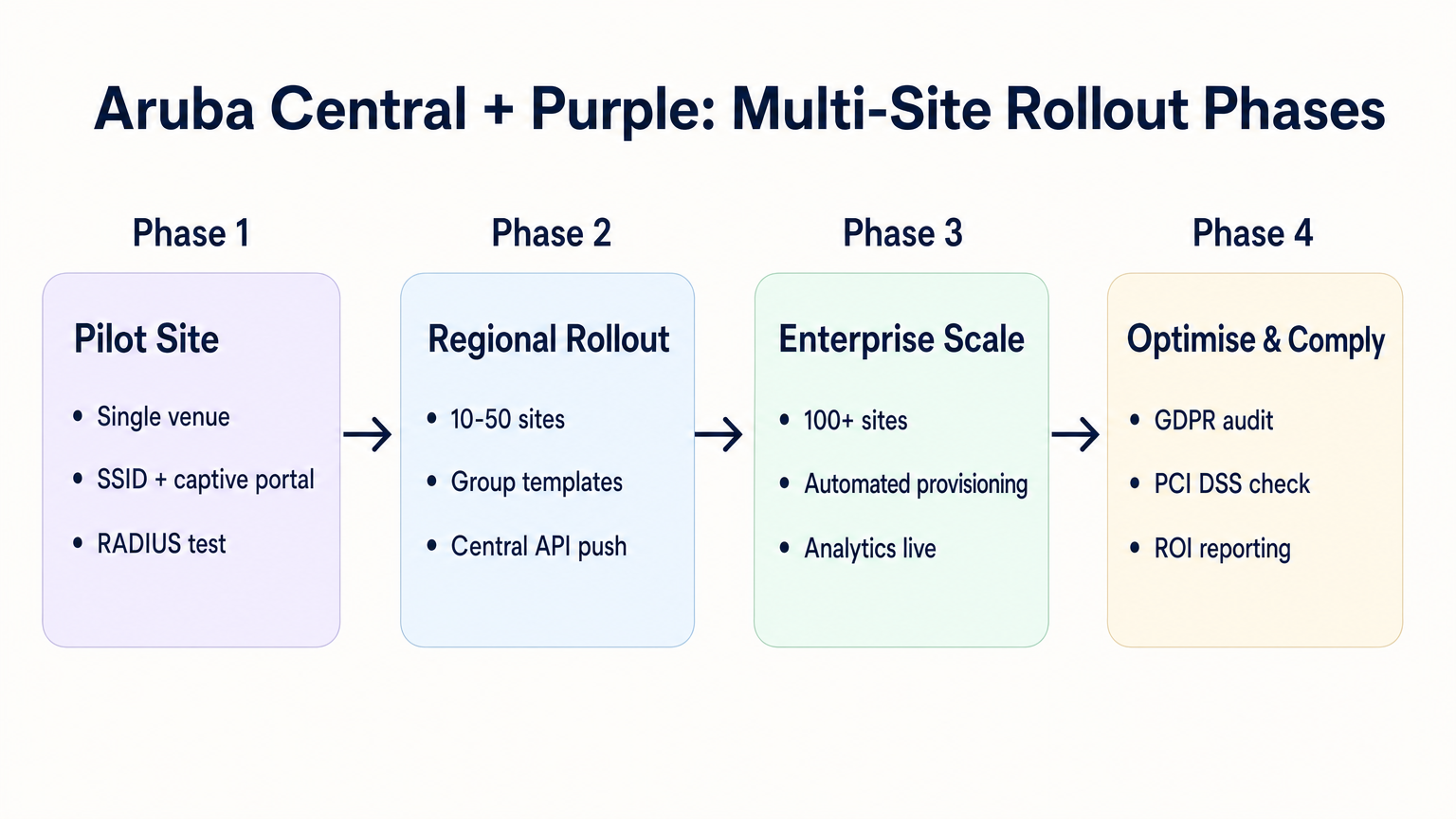
Quando si implementa in decine o centinaia di sedi — sia nel Retail , nell' Hospitality o nell' Healthcare — la configurazione manuale è soggetta a errori. È richiesto un approccio disciplinato e automatizzato.
1. Struttura e Gerarchia dei Gruppi
Allineare la struttura dei gruppi di Aruba Central con la gerarchia delle sedi. Un modello comune è creare gruppi basati sul tipo di sede o sul marchio (es. "Negozi Flagship" vs. "Punti Vendita Temporanei"). Il profilo del Captive Portal esterno viene applicato a livello di gruppo, il che significa che tutti gli AP in quel gruppo ereditano le stesse impostazioni di integrazione Purple.
2. Reindirizzamenti Parametrizzati
Se siti diversi richiedono temi di splash page diversi, non sono necessari profili di Captive Portal separati per ogni sito. Purple consente di utilizzare un singolo URL di reindirizzamento che serve dinamicamente il tema corretto in base all'indirizzo MAC dell'AP o a un parametro personalizzato aggiunto all'URL dall'AP Aruba.
3. Provisioning basato su API
Sfruttare la REST API di Aruba Central per automatizzare l'onboarding dei siti. La Central API consente di creare programmaticamente SSID, assegnare profili di Captive Portal e aggiornare gli elenchi di walled garden. Se combinata con la Purple API, è possibile costruire un flusso di lavoro di provisioning zero-touch:
- Trigger di script: Una nuova sede viene aggiunta al tuo CMDB.
- Purple API: Crea il record della sede in Purple e genera il segreto RADIUS.
- Central API: Crea il sito in Aruba Central, assegna gli AP, applica il template del gruppo e inietta il segreto RADIUS di Purple.
4. Consolidamento SSID
Evitare la tentazione di trasmettere più SSID guest per diversi tipi di utente (es. "Ospite", "Appaltatore", "Fornitore"). Come dettagliato nella nostra guida su Indoor Positioning System: UWB, BLE, & WiFi Guide , SSID eccessivi degradano le prestazioni RF consumando prezioso tempo di trasmissione con i frame beacon. Trasmettere un singolo SSID e utilizzare la logica di autenticazione di Purple per assegnare ruoli o limiti di larghezza di banda diversi in base all'identità dell'utente.
Risoluzione dei Problemi e Mitigazione dei Rischi
Modalità di Guasto Comuni
- La Splash Page non si Carica: Questo è quasi sempre un problema di walled garden. Il dispositivo ospite sta tentando di caricare una risorsa (es. un font, un'immagine o un file CSS) da un dominio non consentito prima dell'autenticazione. Utilizzare gli strumenti per sviluppatori di un browser su un dispositivo di test per identificare le richieste bloccate.
- Errori di Autenticazione Silenziosi: Se la splash page si carica, l'utente si autentica, ma non gli viene concesso l'accesso a Internet, il problema è tipicamente una mancata corrispondenza del segreto condiviso RADIUS o un firewall che blocca le porte UDP 1812/1813 tra l'AP e i server RADIUS di Purple.
- Errori di Certificato sul Reindirizzamento: I sistemi operativi moderni applicano una rigorosa validazione HTTPS. Se il tuo walled garden blocca l'accesso agli endpoint della Certificate Revocation List (CRL) o Online Certificate Status Protocol (OCSP) utilizzati dal dispositivo client per convalidare il certificato TLS di Purple, il browser genererà un avviso di sicurezza. Assicurarsi che questi endpoint siano nella whitelist.
Mitigazione del Rischio: Conformità e Privacy
Quando si implementa il WiFi per gli ospiti, si elaborano dati personali. L'integrazione deve essere progettata tenendo conto delle normative sulla privacy.
- GDPR e CCPA: Assicurarsi che la splash page di Purple presenti termini e condizioni chiari e meccanismi di consenso espliciti per l'acquisizione dei dati. Per maggiori informazioni sugli impatti normativi, fare riferimento al nostro briefing su EU AI Act and Guest WiFi: What Marketers Need to Know .
- PCI DSS: Il traffico degli ospiti deve essere logicamente separato dalle reti di elaborazione dei pagamenti. Verificare che la VLAN assegnata all'SSID ospite in Aruba Central non possa instradare all'infrastruttura del punto vendita (POS).
ROI e Impatto sul Business
La transizione a un'integrazione gestita in cloud tra Aruba Central e Purple offre un valore aziendale misurabile:
- TCO Ridotto: L'eliminazione di controller on-premise e server RADIUS locali riduce i costi hardware e le spese di manutenzione.
- Agilità Operativa: La gestione delle policy basata su gruppi e il provisioning basato su API consentono ai team IT di implementare nuovi siti in minuti anziché giorni.
- Intelligenza Azionabile: Connettendo senza soluzione di continuità il bordo della rete alla piattaforma di analisi di Purple, le sedi ottengono visibilità immediata su affluenza, tempi di permanenza e dati demografici dei clienti, trasformando un centro di costo (WiFi per gli ospiti) in una risorsa generatrice di entrate.
Ascolta il nostro podcast di approfondimento per maggiori informazioni:
Termini chiave e definizioni
External Captive Portal Profile
A configuration object in Aruba Central that defines the redirect URL and authentication server details for a third-party guest WiFi platform like Purple.
This is the primary integration point where IT teams link their Aruba network to Purple's cloud services.
Walled Garden
A set of access rules that permit traffic to specific IP addresses or domains before a user has authenticated.
Essential for allowing guest devices to load the Purple splash page, access social login providers, and validate TLS certificates prior to gaining full internet access.
RADIUS-as-a-Service
A cloud-hosted RADIUS server provided by Purple that handles authentication and accounting for guest WiFi sessions.
Eliminates the need for enterprise IT teams to deploy and maintain on-premises RADIUS infrastructure for guest access.
Pre-Authentication Role
The initial state assigned to a guest device upon association with the SSID, restricting access to only DNS, DHCP, and walled garden destinations.
Ensures security by preventing unauthenticated devices from accessing the internet or the corporate network.
Group Template
A hierarchical configuration structure in Aruba Central that allows policies and SSID settings to be applied uniformly across multiple access points.
The foundational mechanism for achieving scalable, consistent multi-site deployments.
RADIUS Accounting
The process by which the access point sends session data (start time, duration, data transferred) to the RADIUS server.
Critical for Purple to provide accurate analytics on dwell time and bandwidth consumption in the WiFi Analytics dashboard.
OCSP/CRL Endpoints
Online Certificate Status Protocol and Certificate Revocation List endpoints used by browsers to verify the validity of an SSL/TLS certificate.
If these endpoints are blocked by the walled garden, modern devices will display security warnings instead of the Purple splash page.
OAuth 2.0
The industry-standard protocol for authorization, used to secure access to the Aruba Central REST API.
IT teams must generate OAuth credentials to script and automate the provisioning of new sites and captive portal profiles.
Casi di studio
A 200-room hotel is migrating from on-premises Aruba Mobility Controllers to Aruba Central. They need to replicate their existing Purple WiFi integration, which uses a custom splash page and social login, across 45 access points. How should the IT team approach the configuration?
The IT team should first create a dedicated Group in Aruba Central for the hotel. Within this group, they configure a new guest SSID with the security level set to 'Visitors'. They must then create an External Captive Portal profile pointing to Purple's redirect URL and configure Purple's RADIUS-as-a-Service endpoint as the primary authentication server. Crucially, because they use social login, the team must configure the SSID's access rules (the walled garden) to explicitly allow traffic to Purple's domains, CDN endpoints, and the specific domains required by the social identity providers (e.g., Facebook, Google) before authentication. Finally, the APs are assigned to the group, automatically inheriting the configuration.
A retail chain is rolling out Purple WiFi across 150 stores managed by Aruba Central. They want a different splash page theme for their flagship stores versus their standard outlets, but want to minimize configuration overhead. How can they achieve this?
Instead of creating separate Aruba Central Groups and separate External Captive Portal profiles for each store type, the chain can use a single Group Template and a single redirect URL. Purple's platform allows the redirect URL to dynamically serve different splash page themes based on parameters appended by the Aruba AP, such as the AP MAC address or the Site ID. The IT team configures one External Captive Portal profile in Central, and manages the theme mapping entirely within the Purple platform.
Analisi degli scenari
Q1. You have configured an External Captive Portal profile in Aruba Central pointing to Purple. Guests connect to the SSID, but their browsers display a generic 'Cannot reach the server' error instead of the splash page. What is the most likely cause?
💡 Suggerimento:Consider what traffic is permitted before a guest successfully authenticates.
Mostra l'approccio consigliato
The most likely cause is an incomplete or missing walled garden configuration. Before authentication, the AP drops all traffic except DNS, DHCP, and traffic destined for domains explicitly allowed in the access rules. You must ensure Purple's captive portal domains and CDN endpoints are whitelisted.
Q2. Your organisation is deploying Purple WiFi across 50 regional offices. You want to ensure that if the Purple RADIUS server becomes temporarily unreachable, guests are not granted unauthenticated access to the internet. Which setting must you configure in the External Captive Portal profile?
💡 Suggerimento:Look for the configuration parameter that dictates behaviour when the external server fails.
Mostra l'approccio consigliato
You must set the 'Captive Portal Failure' behaviour to 'Deny Internet'. This fail-closed approach ensures security and compliance by preventing unauthenticated access if the RADIUS server cannot be reached.
Q3. After a successful deployment, the marketing team reports that Purple's analytics dashboard shows guest logins, but all sessions show a duration of 0 minutes and 0 bytes of data used. What network configuration step was missed?
💡 Suggerimento:Think about how session duration and data usage are communicated from the AP to the authentication server.
Mostra l'approccio consigliato
RADIUS Accounting was likely not enabled, or the accounting port (1813) is blocked by a firewall. The AP uses RADIUS Accounting-Start, Interim-Update, and Stop packets to report session metrics to Purple. Without these, Purple knows a login occurred but has no visibility into the session details.




