

Fortinet FortiAP এবং Purple WiFi ইন্টিগ্রেশন গাইড
Fortinet FortiAP এবং FortiGate অবকাঠামোকে Purple WiFi-এর সাথে একত্রিত করার জন্য একটি সুনির্দিষ্ট প্রযুক্তিগত রেফারেন্স। এই গাইডটি বাহ্যিক Captive Portal কনফিগারেশন, FortiAuthenticator-এর সাথে RADIUS প্রমাণীকরণের সহাবস্থান, এবং আতিথেয়তা, খুচরা এবং পাবলিক-সেক্টর পরিবেশ জুড়ে এন্টারপ্রাইজ স্থাপনার জন্য নিরাপত্তা নীতি নকশা কভার করে।
🎧 এই গাইডটি শুনুন
ট্রান্সক্রিপ্ট দেখুন
Executive Summary
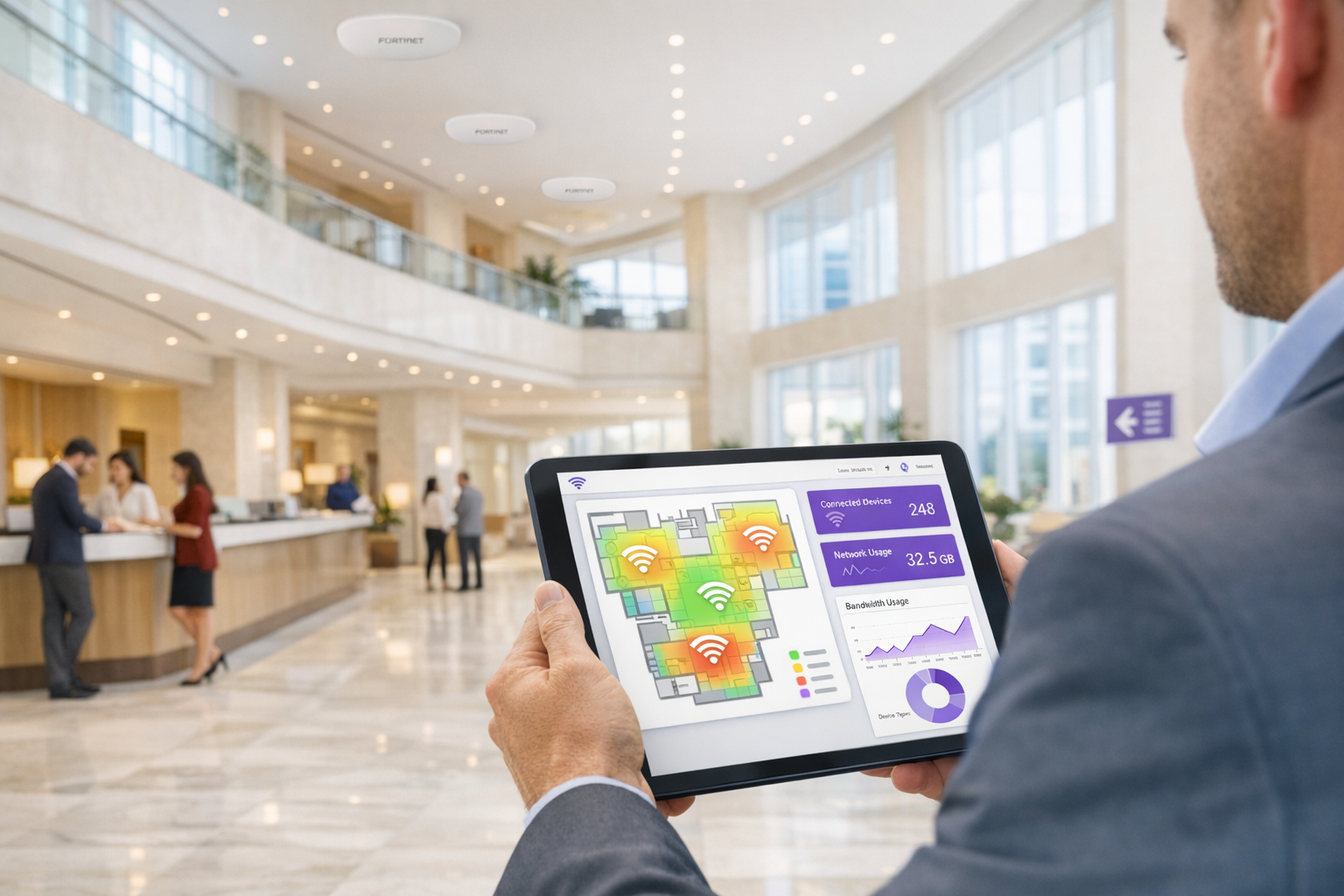
Fortinet অবকাঠামো ব্যবহারকারী এন্টারপ্রাইজ আইটি দলগুলির জন্য, কঠোর নিরাপত্তা বজায় রেখে অতিথি অ্যাক্সেসের জন্য বাহ্যিক Captive Portal একত্রিত করা একটি সাধারণ প্রয়োজন। Fortinet FortiAP অ্যাক্সেস পয়েন্ট, FortiGate Unified Threat Management (UTM) অ্যাপ্লায়েন্স এবং Purple WiFi প্ল্যাটফর্মের মধ্যে ইন্টিগ্রেশন সংস্থাগুলিকে মূল নেটওয়ার্ক নিরাপত্তা থেকে অতিথি প্রমাণীকরণকে বিচ্ছিন্ন করতে দেয়। এই গাইডটি প্রযুক্তিগত স্থপতি এবং আইটি ম্যানেজারদের Fortinet পরিবেশে Purple কে একটি বাহ্যিক Captive Portal হিসাবে স্থাপন করার জন্য একটি সুনির্দিষ্ট ব্লুপ্রিন্ট সরবরাহ করে। Purple-এর ক্লাউড RADIUS-এ অতিথি পরিচয় ব্যবস্থাপনা অফলোড করার মাধ্যমে, নেটওয়ার্ক দলগুলি ট্র্যাফিক পরিদর্শনের জন্য Fortinet-এর শক্তিশালী লেয়ার 7 নিরাপত্তা নীতিগুলি ব্যবহার করতে পারে এবং একই সাথে ব্যবসায়িক মূল্য বাড়ানোর জন্য ফার্স্ট-পার্টি জনসংখ্যাগত ডেটা সংগ্রহ করতে পারে। একটি বিতরণকৃত খুচরা এস্টেট বা একটি উচ্চ-ঘনত্বের স্টেডিয়াম জুড়ে স্থাপন করা হোক না কেন, এই আর্কিটেকচারটি PCI DSS এবং GDPR এর সাথে সম্মতি নিশ্চিত করে এবং একটি নির্বিঘ্ন Guest WiFi অভিজ্ঞতা প্রদান করে।
Technical Deep-Dive
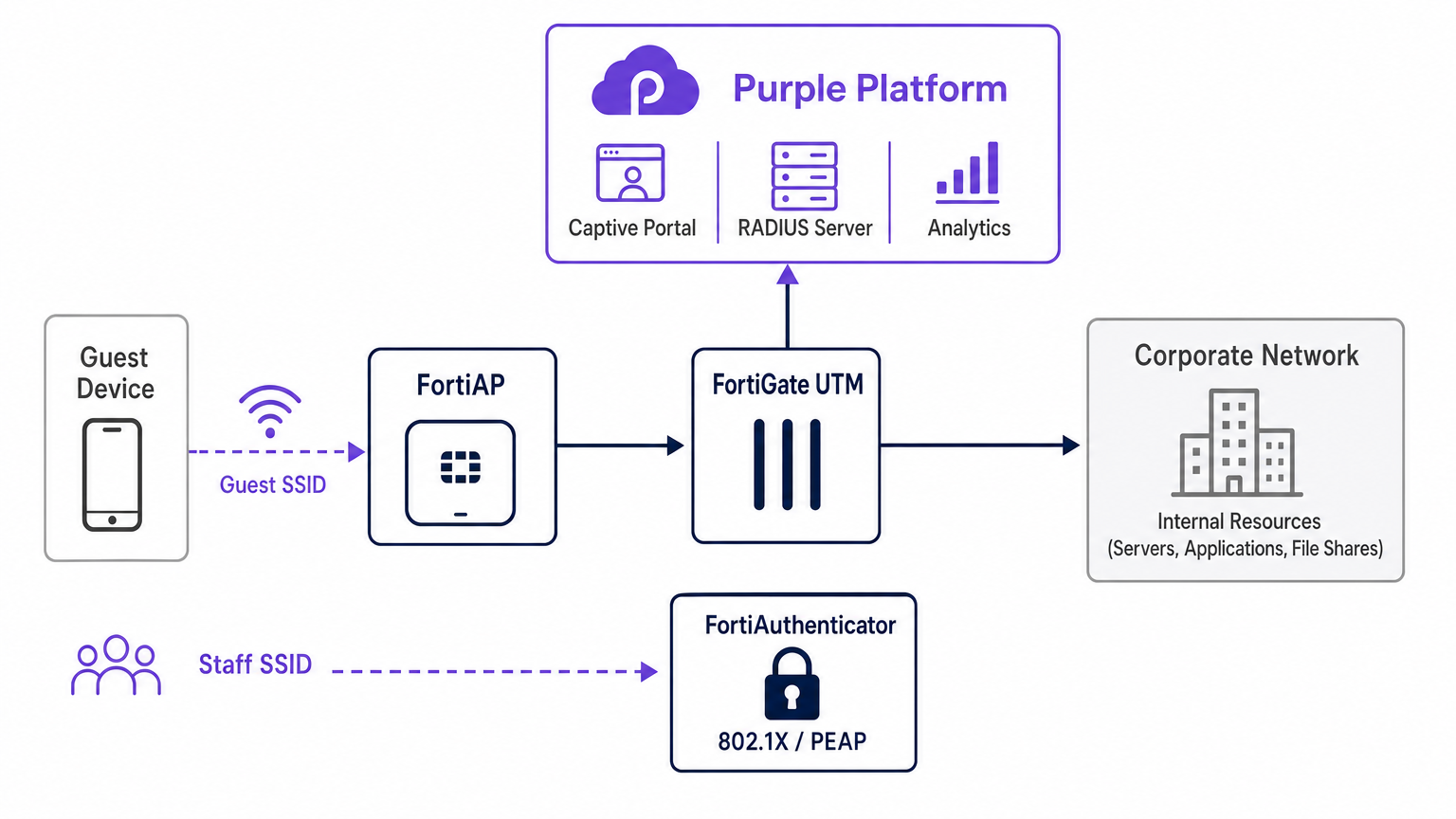
Fortinet এবং Purple-এর মধ্যে স্থাপত্যগত ইন্টিগ্রেশন স্ট্যান্ডার্ড RADIUS প্রোটোকল এবং HTTP রিডাইরেকশন মেকানিজমের উপর নির্ভর করে। যখন একটি অতিথি ডিভাইস FortiAP দ্বারা সম্প্রচারিত নির্ধারিত ওপেন SSID-এর সাথে যুক্ত হয়, তখন FortiGate প্রাথমিক HTTP/HTTPS অনুরোধটি আটকায়। একটি স্থানীয় Captive Portal পরিবেশন করার পরিবর্তে, FortiGate ক্লায়েন্টকে Purple-এর ক্লাউড-হোস্টেড স্প্ল্যাশ পৃষ্ঠায় পুনঃনির্দেশিত করার জন্য কনফিগার করা হয়।
এই প্রাক-প্রমাণীকরণ পর্যায়ে, FortiGate একটি ওয়াল্ড গার্ডেন প্রয়োগ করে — IP ঠিকানা এবং ডোমেনগুলির একটি কঠোর অনুমতি তালিকা যা ক্লায়েন্ট ডিভাইসকে Captive Portal সম্পদ লোড করতে, সামাজিক লগইন করতে এবং প্রয়োজনীয় পরিষেবাগুলি (যেমন DNS) অ্যাক্সেস করতে দেয় সম্পূর্ণ ইন্টারনেট অ্যাক্সেস না দিয়ে। একবার ব্যবহারকারী Purple পোর্টালে প্রমাণীকরণ করলে, Purple প্ল্যাটফর্ম RADIUS Access-Accept বার্তার মাধ্যমে FortiGate-এর সাথে যোগাযোগ করে। FortiGate তখন ক্লায়েন্টের সেশন স্টেটকে অপ্রমাণিত থেকে প্রমাণীকৃত অবস্থায় স্থানান্তরিত করে, উপযুক্ত পোস্ট-প্রমাণীকরণ ফায়ারওয়াল নীতিগুলি প্রয়োগ করে।
RADIUS Coexistence: Purple এবং FortiAuthenticator
Fortinet পরিবেশে একটি সাধারণ স্থাপত্যগত চ্যালেঞ্জ হল কর্পোরেট পরিচয়ের জন্য যখন একটি FortiAuthenticator (FAC) ইতিমধ্যেই স্থাপন করা থাকে তখন স্টাফ প্রমাণীকরণের পাশাপাশি অতিথি অ্যাক্সেস পরিচালনা করা। প্রস্তাবিত পদ্ধতি হল সম্পূর্ণ SSID বিভাজন। স্টাফ ডিভাইসগুলি IEEE 802.1X — সাধারণত PEAP বা EAP-TLS — ব্যবহার করে একটি সুরক্ষিত SSID-এর সাথে সংযুক্ত হয়, যা সরাসরি FortiAuthenticator-এর বিরুদ্ধে প্রমাণীকৃত হয়। বিপরীতভাবে, অতিথি ডিভাইসগুলি বাহ্যিক Captive Portal পুনঃনির্দেশের জন্য কনফিগার করা একটি ওপেন SSID-এর সাথে সংযুক্ত হয়, যা Purple-এর ক্লাউড RADIUS অবকাঠামোর বিরুদ্ধে প্রমাণীকৃত হয়।
এই বিভাজন নিশ্চিত করে যে অতিথি পরিচয় ডেটা — WiFi Analytics -এর জন্য অত্যন্ত গুরুত্বপূর্ণ — সম্পূর্ণরূপে Purple প্ল্যাটফর্মের মধ্যে পরিচালিত হয়, যখন কর্পোরেট Active Directory শংসাপত্রগুলি FortiAuthenticator অন-প্রিমিজ দ্বারা নিরাপদে প্রক্রিয়া করা হয়। FortiGate উভয় ট্র্যাফিক স্ট্রিমের জন্য স্বাধীনভাবে রাউটিং এবং নীতি প্রয়োগ পরিচালনা করে, অতিথি VLAN এবং কর্পোরেট VLAN-এর মধ্যে শূন্য ক্রসওভার নিশ্চিত করে। এই আর্কিটেকচারটি নেটওয়ার্ক বিভাজনের জন্য PCI DSS প্রয়োজনীয়তাগুলিও পূরণ করে, কারণ অতিথি ট্র্যাফিক যেকোনো পেমেন্ট-প্রসেসিং অবকাঠামো থেকে শারীরিকভাবে এবং যৌক্তিকভাবে বিচ্ছিন্ন থাকে।
Implementation Guide
FortiAP Purple ইন্টিগ্রেশন স্থাপন করার জন্য Purple পোর্টাল এবং Fortinet অবকাঠামো উভয় ক্ষেত্রেই সমন্বিত কনফিগারেশন প্রয়োজন। নিম্নলিখিত পদক্ষেপগুলি FortiCloud AP ব্যবস্থাপনা ব্যবহার করে একটি সফল স্থাপনার জন্য গুরুত্বপূর্ণ পথটি তুলে ধরে।
Step 1: Network এবং RADIUS Configuration
FortiCloud ড্যাশবোর্ডের মধ্যে নেটওয়ার্ক সংজ্ঞায়িত করে শুরু করুন। Configure > My RADIUS Server-এ নেভিগেট করুন এবং Purple পোর্টালে প্রদত্ত শংসাপত্রগুলি ব্যবহার করে প্রমাণীকরণ সার্ভার (পোর্ট 1812) এবং অ্যাকাউন্টিং সার্ভার (পোর্ট 1813) উভয়ই সংজ্ঞায়িত করুন। উভয় সার্ভার কনফিগার করা আবশ্যক — অ্যাকাউন্টিং ঐচ্ছিক নয়। Purple সেশন সময়কাল, ব্যান্ডউইথ ব্যবহার এবং ভিজিটর ফ্রিকোয়েন্সি মেট্রিক্স সহ WiFi Analytics ড্যাশবোর্ড পূরণ করতে RADIUS অ্যাকাউন্টিং ডেটার উপর নির্ভর করে। রিয়েল-টাইম দৃশ্যমানতার জন্য অ্যাকাউন্টিং অন্তর্বর্তী ব্যবধান 120 সেকেন্ডে সেট করুন।
Step 2: SSID এবং Captive Portal Definition
অতিথি অ্যাক্সেসের জন্য একটি নতুন SSID তৈরি করুন। প্রমাণীকরণ পদ্ধতিকে Open-এ সেট করুন এবং Captive Portal বৈশিষ্ট্যটি সক্ষম করুন, বাহ্যিক বা কাস্টম পোর্টাল বিকল্পটি নির্বাচন করুন। আপনাকে Purple পোর্টাল কনফিগারেশন স্ক্রিন দ্বারা প্রদত্ত অনন্য অ্যাক্সেস URL এবং রিডাইরেক্ট URL ইনপুট করতে হবে।
ওয়াল্ড গার্ডেন কনফিগারেশন পুরো স্থাপনার সবচেয়ে সংবেদনশীল পদক্ষেপ। সামাজিক লগইন প্রদানকারী (Facebook, Google, X) এবং প্রয়োজনীয় পোর্টাল সম্পদগুলি প্রমাণীকরণের আগে সঠিকভাবে লোড হয় তা নিশ্চিত করতে আপনাকে Purple-এর প্রয়োজনীয় ডোমেনগুলির ব্যাপক তালিকা ইনপুট করতে হবে। ওয়াল্ড গার্ডেন সঠিকভাবে কনফিগার করতে ব্যর্থ হলে একটি ভাঙা প্রমাণীকরণ প্রবাহের সৃষ্টি হবে, কারণ ক্লায়েন্ট ডিভাইস প্রয়োজনীয় বাহ্যিক সংস্থানগুলিতে পৌঁছাতে পারবে না। এছাড়াও নিশ্চিত করুন যে DNS ট্র্যাফিক (UDP পোর্ট 53) প্রাক-প্রমাণীকরণ নীতিতে স্পষ্টভাবে অনুমোদিত।
Step 3: IP Assignment — NAT vs Bridge Mode
SSID সংজ্ঞায়িত করার সময়, আপনাকে IP অ্যাসাইনমেন্টের জন্য NAT মোড এবং Bridge মোডের মধ্যে একটি বেছে নিতে হবে।
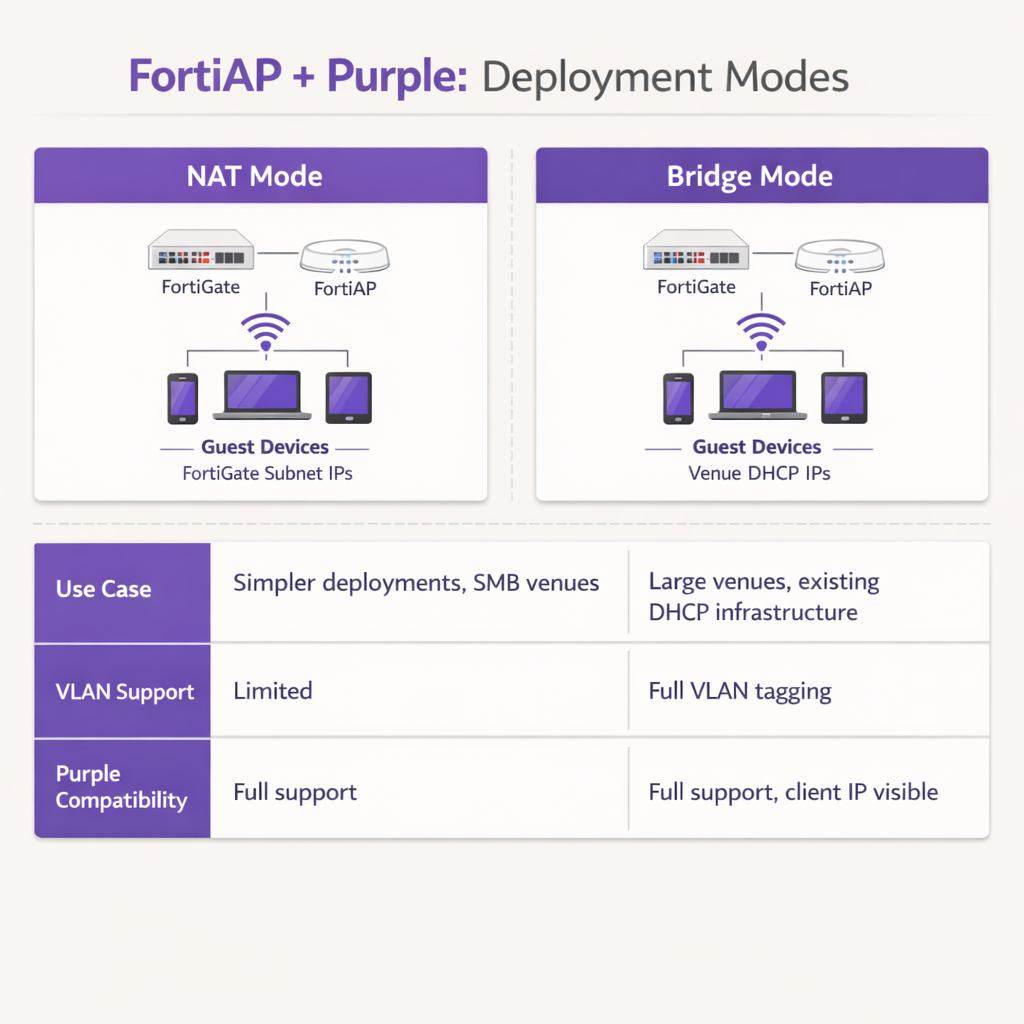
NAT মোডে, FortiGate একটি ডেডিকেটেড অভ্যন্তরীণ সাবনেট থেকে অতিথি ডিভাইসগুলিতে DHCP ঠিকানা সরবরাহ করে, ফায়ারওয়াল থেকে ট্র্যাফিক বের হওয়ার সাথে সাথে সেই ঠিকানাগুলি অনুবাদ করে। এটি সহজ স্থাপনা বা ছোট Retail শাখা পরিবেশে যেখানে FortiGate সম্পূর্ণ গেস্ট সাবনেট পরিচালনা করে।
Bridge মোডে, FortiAP গেস্ট ট্র্যাফিক সরাসরি একটি নির্দিষ্ট VLAN-এ ব্রিজ করে, যা একটি বাহ্যিক DHCP সার্ভারকে IP ঠিকানা বরাদ্দ করতে দেয়। Bridge মোড Hospitality প্রপার্টি বা Transport হাবের মতো উচ্চ-ঘনত্বের পরিবেশের জন্য দৃঢ়ভাবে সুপারিশ করা হয়, কারণ এটি IP ঠিকানা ব্যবস্থাপনার জন্য অধিক নমনীয়তা প্রদান করে, FortiGate-এ DHCP বাধা প্রতিরোধ করে এবং Purple প্ল্যাটফর্মকে আরও বিস্তারিত অ্যানালিটিক্স এবং সমস্যা সমাধানের জন্য প্রকৃত ক্লায়েন্ট IP ঠিকানা দেখতে দেয়।
ধাপ 4: পোস্ট-অথেন্টিকেশন ফায়ারওয়াল নীতি
একবার অথেন্টিকেশন সম্পূর্ণ হলে, FortiGate-কে গেস্ট VLAN-এ একটি ডেডিকেটেড পোস্ট-অথেন্টিকেশন ফায়ারওয়াল নীতি প্রয়োগ করতে হবে। এই নীতিতে FortiGuard Web Filtering এবং Application Control প্রোফাইল উল্লেখ করা উচিত যাতে বিষয়বস্তুর সীমাবদ্ধতা প্রয়োগ করা যায় এবং পিয়ার-টু-পিয়ার ট্র্যাফিক ব্লক করা যায়। ব্যান্ডউইথের সীমা প্রয়োগ করতে একটি Traffic Shaper প্রোফাইল প্রয়োগ করুন, যাতে কোনো একক গেস্ট ভেন্যুর আপলিঙ্ককে স্যাচুরেট করতে না পারে। নিশ্চিত করুন যে নীতিটি স্পষ্টভাবে সমস্ত RFC 1918 প্রাইভেট IP স্পেস গন্তব্যগুলিকে ব্লক করে যাতে গেস্টরা অভ্যন্তরীণ নেটওয়ার্ক রিসোর্সগুলি প্রোব করতে না পারে।
সর্বোত্তম অনুশীলন
এই ইন্টিগ্রেশন ডিজাইন করার সময়, স্থিতিশীলতা, নিরাপত্তা এবং সম্মতি নিশ্চিত করতে নিম্নলিখিত শিল্প-মানের সুপারিশগুলি মেনে চলুন।
VLAN বিভাজন বাধ্যতামূলক: কর্পোরেট সম্পদ বা পয়েন্ট-অফ-সেল সিস্টেমের একই VLAN-এ গেস্ট WiFi স্থাপন করবেন না। PCI DSS সম্মতি বজায় রাখতে সুইচ পোর্ট স্তরে কঠোর VLAN ট্যাগিং প্রয়োগ করতে হবে। FortiGate-কে গেস্ট VLAN-এ আক্রমণাত্মক ফায়ারওয়াল নীতি প্রয়োগ করা উচিত, সমস্ত RFC 1918 প্রাইভেট IP স্পেস গন্তব্যগুলিকে ব্লক করে পার্শ্বীয় চলাচল প্রতিরোধ করতে।
সেশন টাইমার অপ্টিমাইজ করুন: DHCP লিজ টাইম এবং RADIUS অ্যাকাউন্টিং অন্তর্বর্তী ব্যবধানগুলি যথাযথভাবে কনফিগার করুন। 3600 সেকেন্ডের একটি DHCP লিজ টাইম এবং 120 সেকেন্ডের একটি অ্যাকাউন্টিং অন্তর্বর্তী ব্যবধান IP ঠিকানা সংরক্ষণ এবং Purple ড্যাশবোর্ডের মধ্যে সঠিক রিয়েল-টাইম অ্যানালিটিক্স রিপোর্টিংয়ের মধ্যে একটি সর্বোত্তম ভারসাম্য প্রদান করে।
অথেন্টিকেশনের পরে Fortinet UTM বৈশিষ্ট্যগুলি ব্যবহার করুন: এই ইন্টিগ্রেশনের প্রাথমিক সুবিধা হল অথেন্টিকেশনের পরে গেস্ট ট্র্যাফিকের উপর Fortinet-এর উন্নত নিরাপত্তা বৈশিষ্ট্যগুলি প্রয়োগ করার ক্ষমতা। FortiGuard Web Filtering এবং Application Control ব্যবহার করার জন্য পোস্ট-অথেন্টিকেশন ফায়ারওয়াল নীতি কনফিগার করুন। এটি গেস্টদের ভেন্যুর ব্যান্ডউইথকে দূষিত কার্যকলাপ, টরেন্টিং বা অনুপযুক্ত বিষয়বস্তু অ্যাক্সেস করার জন্য ব্যবহার করার ঝুঁকি হ্রাস করে, যার ফলে ভেন্যুর পাবলিক IP খ্যাতি এবং ইন্টারনেট পরিষেবা চুক্তি সুরক্ষিত থাকে।
পাবলিক সার্টিফিকেট ব্যবহার করুন: নিশ্চিত করুন যে FortiGate রিডাইরেকশন ইন্টারফেসে একটি বৈধ, সর্বজনীনভাবে বিশ্বস্ত SSL/TLS সার্টিফিকেট উপস্থাপন করে। স্ব-স্বাক্ষরিত সার্টিফিকেট আধুনিক iOS এবং Android ডিভাইসে নিরাপত্তা সতর্কতা ট্রিগার করে, যা পোর্টালে গেস্টদের পরিত্যাগ করার হার উল্লেখযোগ্যভাবে বৃদ্ধি করে।
সমস্যা সমাধান ও ঝুঁকি প্রশমন
এমনকি সূক্ষ্ম কনফিগারেশন সহও, স্থাপনগুলিতে সমস্যা দেখা দিতে পারে। সাধারণ ব্যর্থতার মোডগুলি বোঝা সমাধানকে উল্লেখযোগ্যভাবে ত্বরান্বিত করে।
Captive Portal লোড হতে ব্যর্থ: যদি একজন গেস্ট সংযোগ করে কিন্তু স্প্ল্যাশ পেজটি না আসে, তবে সবচেয়ে সাধারণ কারণ হল একটি অসম্পূর্ণ ওয়াল্ড গার্ডেন। যাচাই করুন যে Purple এবং যেকোনো কনফিগার করা সোশ্যাল লগইন প্রদানকারীদের জন্য প্রয়োজনীয় সমস্ত ডোমেন প্রি-অথেন্টিকেশন নীতিতে স্পষ্টভাবে অনুমোদিত। নিশ্চিত করুন যে অনঅথেন্টিকেটেড ক্লায়েন্টদের জন্য DNS রেজোলিউশন সঠিকভাবে কাজ করছে; যদি ক্লায়েন্ট Purple পোর্টাল URL সমাধান করতে না পারে, তবে রিডাইরেক্ট সম্পূর্ণরূপে ব্যর্থ হবে।
RADIUS টাইমআউট: যদি পোর্টাল লোড হয় কিন্তু অথেন্টিকেশন ধারাবাহিকভাবে ব্যর্থ হয়, তবে RADIUS যোগাযোগ পথটি তদন্ত করুন। যাচাই করুন যে FortiGate-এর বাহ্যিক IP ঠিকানা Purple পোর্টালের রাউটার কনফিগারেশনের মধ্যে সঠিকভাবে নিবন্ধিত আছে। নিশ্চিত করুন যে শেয়ার্ড সিক্রেটগুলি হুবহু মিলে যায় — একটি একক অক্ষরের অমিল নীরব অথেন্টিকেশন ব্যর্থতার কারণ হবে — এবং Fortinet অবকাঠামো এবং Purple-এর ক্লাউড RADIUS সার্ভারগুলির মধ্যে কোনো মধ্যবর্তী ফায়ারওয়াল UDP পোর্ট 1812 এবং 1813 ব্লক করছে না।
সার্টিফিকেট ত্রুটি: আধুনিক মোবাইল অপারেটিং সিস্টেমগুলি Captive Portal ইন্টারসেপশনের সময় SSL/TLS সার্টিফিকেট অস্বাভাবিকতার প্রতি অত্যন্ত সংবেদনশীল। নিশ্চিত করুন যে FortiGate রিডাইরেকশন ইন্টারফেসের জন্য একটি বৈধ, সর্বজনীনভাবে বিশ্বস্ত সার্টিফিকেট উপস্থাপন করছে, একটি স্ব-স্বাক্ষরিত ডিফল্ট সার্টিফিকেটের পরিবর্তে। এটি উদ্বেগজনক নিরাপত্তা সতর্কতা প্রতিরোধ করে যা গেস্টদের অথেন্টিকেশন ফ্লো সম্পূর্ণ করা থেকে বিরত রাখে।
সেশন অ্যাকাউন্টিং গ্যাপস: যদি Purple অ্যানালিটিক্স ড্যাশবোর্ডে অসম্পূর্ণ সেশন ডেটা বা অনুপস্থিত ব্যান্ডউইথ মেট্রিক্স দেখা যায়, তবে যাচাই করুন যে RADIUS অ্যাকাউন্টিং সার্ভার (পোর্ট 1813) সঠিকভাবে কনফিগার করা হয়েছে এবং অ্যাকাউন্টিং অন্তর্বর্তী ব্যবধান সেট করা হয়েছে। অ্যাকাউন্টিং ডেটা অথেন্টিকেশন থেকে আলাদাভাবে পাঠানো হয় এবং এর নিজস্ব সার্ভার সংজ্ঞা প্রয়োজন।
ROI এবং ব্যবসায়িক প্রভাব
Fortinet এবং Purple-এর ইন্টিগ্রেশন একটি স্ট্যান্ডার্ড কস্ট-সেন্টার — গেস্ট WiFi — কে একটি পরিমাপযোগ্য ব্যবসায়িক সম্পদে রূপান্তরিত করে। Purple-এর Captive Portal ব্যবহার করে, ভেন্যুগুলি যাচাইকৃত জনসংখ্যাগত ডেটা এবং যোগাযোগের তথ্য সংগ্রহ করে, যা লক্ষ্যযুক্ত বিপণন প্রচারাভিযান, লয়্যালটি প্রোগ্রামের বৃদ্ধি এবং ভিজিট-পরবর্তী পুনঃ-এনগেজমেন্ট সক্ষম করে। Retail বা Hospitality সেক্টর জুড়ে পরিচালিত ভেন্যুগুলির জন্য, এই ফার্স্ট-পার্টি ডেটা ক্রমবর্ধমান মূল্যবান, কারণ থার্ড-পার্টি কুকি অবচয় ঐতিহ্যবাহী ডিজিটাল বিপণন চ্যানেলগুলিকে সীমিত করে।
IT অপারেশনের জন্য, গেস্ট অথেন্টিকেশনকে Purple-এর ক্লাউড RADIUS-এ অফলোড করা স্থানীয় ব্যবহারকারী ডেটাবেস পরিচালনা, ফিজিক্যাল ভাউচার প্রিন্ট করা বা অন-প্রিমিজ RADIUS অবকাঠামো রক্ষণাবেক্ষণের সাথে সম্পর্কিত প্রশাসনিক ওভারহেড উল্লেখযোগ্যভাবে হ্রাস করে। Purple-এর নির্বিঘ্ন অনবোর্ডিং এবং Fortinet-এর শক্তিশালী ট্র্যাফিক পরিদর্শনের সমন্বয় নিশ্চিত করে যে ভেন্যু একটি উচ্চ-পারফরম্যান্স, সুরক্ষিত ইন্টারনেট অভিজ্ঞতা প্রদান করে এবং একই সাথে WiFi Analytics এর মাধ্যমে কার্যকর ব্যবসায়িক বুদ্ধিমত্তা তৈরি করে। এই আর্কিটেকচারটি অত্যন্ত স্কেলযোগ্য, একটি একক বুটিক হোটেল থেকে শুরু করে সবকিছু সমর্থন করে একটি বিতরণকৃত এন্টারপ্রাইজ ক্যাম্পাসে, বিপণন সক্ষমতা এবং অপারেশনাল দক্ষতা উভয় মাধ্যমেই ধারাবাহিক ROI প্রদান করে।
মূল শব্দ ও সংজ্ঞা
External Captive Portal
A configuration where the network hardware (FortiGate/FortiAP) redirects unauthenticated user traffic to a splash page hosted on a third-party cloud server (Purple), rather than serving a page stored locally on the appliance.
IT teams use this to offload portal design, social login API maintenance, and GDPR consent capture to a specialized platform, reducing operational overhead on the network team.
Walled Garden
An explicit allowlist of IP addresses, domains, and subnets that a client device is permitted to access prior to successfully authenticating on the network.
Crucial for allowing devices to load captive portal graphics, process social media logins, and resolve DNS queries before they have full internet access. The most common source of captive portal failures when misconfigured.
RADIUS Accounting
The protocol mechanism utilizing UDP Port 1813 that tracks a user's session duration, bandwidth consumption, and data transfer volumes, reporting this data back to the RADIUS server.
Purple relies on accurate accounting data from the Fortinet hardware to populate analytics dashboards and enforce time or data limits on guest sessions. Must be configured separately from authentication.
FortiAuthenticator (FAC)
Fortinet's dedicated identity and access management appliance, used for internal staff 802.1X network authentication, single sign-on, and certificate management.
IT managers frequently need to ensure that deploying Purple for guests does not disrupt existing FAC infrastructure used by corporate employees. The answer is always SSID segregation.
Bridge Mode SSID
A wireless configuration where the access point acts as a transparent layer 2 bridge, passing client traffic directly onto a specific VLAN on the wired network rather than performing NAT.
Preferred in enterprise deployments as it allows existing core DHCP servers to manage IP addresses, prevents FortiGate DHCP bottlenecks, and exposes true client IPs to the Purple analytics platform.
Post-Authentication Policy
The firewall rules and Unified Threat Management (UTM) profiles applied to a user's traffic only after they have successfully authenticated via the captive portal.
This is where network architects apply web filtering, application control, and bandwidth shaping to protect the venue's network from malicious guest activity. Purple handles identity; FortiGate handles enforcement.
IEEE 802.1X
An IEEE Standard for port-based Network Access Control, providing a framework for authenticating devices wishing to attach to a LAN or WLAN using EAP methods such as PEAP or EAP-TLS.
Used for secure staff access via FortiAuthenticator, distinct from the open, portal-based authentication used for guests via Purple. The two authentication methods coexist on separate SSIDs.
RADIUS-as-a-Service
A cloud-hosted RADIUS infrastructure provided by Purple, eliminating the need for venues to deploy and maintain local RADIUS servers such as FreeRADIUS or Windows NPS.
Reduces infrastructure overhead for IT teams while ensuring high availability and seamless integration with the captive portal platform. Particularly valuable for distributed retail or hospitality deployments.
FortiGuard
Fortinet's cloud-based threat intelligence and content filtering subscription service, providing real-time web filtering, application control, and intrusion prevention signatures to FortiGate appliances.
Applied via post-authentication firewall policies to inspect and control guest internet traffic after Purple has authenticated the user, protecting the venue's network and IP reputation.
কেস স্টাডিজ
A 200-room hotel currently uses a FortiGate 100F and FortiAPs. They use FortiAuthenticator for staff 802.1X authentication. They want to implement Purple WiFi for guests to capture marketing data, but the IT Director is concerned about the guest portal interfering with the existing staff authentication flow.
Deploy absolute SSID segregation. Maintain the existing Staff_WiFi SSID configured for WPA2-Enterprise, pointing to the FortiAuthenticator RADIUS server on Port 1812. Create a new, separate Guest_WiFi SSID configured as an Open network with External Captive Portal enabled. Configure the captive portal URL to point to Purple's splash page, and configure the RADIUS settings for this specific SSID to point to Purple's cloud RADIUS servers (Port 1812 for auth, Port 1813 for accounting). Map the Guest SSID to an isolated VLAN with a dedicated firewall policy. The FortiGate routes authentication requests based on the originating SSID, ensuring zero interference between the two authentication systems.
A retail chain is deploying FortiCloud APs across 50 locations. They want to use Purple WiFi for guest analytics. During testing at the first site, the guest connects to the WiFi, but their device displays a blank page or a connection timed out error instead of the Purple splash page.
The IT team must audit and update the Walled Garden configuration on the FortiCloud AP SSID settings. The FortiAP is currently blocking the client's HTTP/HTTPS requests to the Purple portal assets before authentication. The team must input the complete list of Purple's required domains — including CDN endpoints and social login provider domains — into the Walled Garden allowlist. They must also verify that the pre-authentication policy explicitly permits DNS traffic on UDP port 53, so the client device can resolve the portal hostname. Once corrected at the first site, this configuration should be templated and applied consistently across all 50 locations.
দৃশ্যপট বিশ্লেষণ
Q1. Your deployment requires guests to authenticate via a Purple splash page. You have configured the SSID, the RADIUS servers, and the redirect URL. However, when connecting, guest devices immediately report No Internet Connection and the portal fails to pop up automatically. What is the most likely configuration omission?
💡 ইঙ্গিত:Consider what network access a device requires before it has fully authenticated on the network.
প্রস্তাবিত পদ্ধতি দেখুন
The Walled Garden (pre-authentication allowlist) is likely incomplete or missing entirely. The device needs explicit permission to reach Purple's portal domains, social login APIs (Facebook, Google), and perform DNS resolution before the FortiGate grants full access. Without this, the device's Captive Portal Assistant cannot reach the target URL to trigger the pop-up. Additionally, verify that DNS traffic on UDP port 53 is permitted in the pre-authentication policy.
Q2. A stadium deployment anticipates 15,000 concurrent guest connections during events. The current design proposes using the FortiGate in NAT mode to provide DHCP to the guest SSID from a single /20 subnet. Why might this architectural decision create operational problems, and what is the recommended alternative?
💡 ইঙ্গিত:Consider the processing overhead on the FortiGate firewall and the implications of DHCP lease churn at high scale.
প্রস্তাবিত পদ্ধতি দেখুন
Using NAT mode places the entire DHCP processing burden on the FortiGate, which may struggle with the rapid lease churn of 15,000 transient devices connecting and disconnecting throughout an event. A single /20 subnet provides only 4,094 usable addresses, which may be insufficient for peak concurrent connections. Furthermore, NAT mode obscures the true client IP from the Purple platform, limiting analytical depth. The recommended approach is Bridge mode, dropping guest traffic onto a dedicated VLAN managed by a robust external enterprise DHCP infrastructure with appropriately sized address pools.
Q3. The CISO mandates that guest WiFi traffic must not consume more than 20% of the venue's total internet bandwidth, and guests must be prevented from accessing peer-to-peer file sharing networks. Where in the Fortinet-Purple architecture is this policy enforced, and what specific Fortinet features are required?
💡 ইঙ্গিত:Determine which component handles traffic inspection and policy enforcement after the user's identity has been verified by Purple.
প্রস্তাবিত পদ্ধতি দেখুন
This policy is enforced on the FortiGate UTM appliance via the Post-Authentication Firewall Policy applied to the guest VLAN. While Purple handles authentication and identity capture, the FortiGate remains responsible for Layer 7 traffic inspection and enforcement. The network team must configure a FortiGuard Application Control profile to block P2P categories (BitTorrent, eDonkey, etc.) and apply a Traffic Shaper profile to the guest policy to enforce the 20% bandwidth cap. Both profiles must be referenced in the post-authentication firewall policy, not the pre-authentication walled garden policy.




