

Fortinet FortiAP और Purple WiFi इंटीग्रेशन गाइड
Fortinet FortiAP और FortiGate इन्फ्रास्ट्रक्चर को Purple WiFi के साथ एकीकृत करने के लिए एक निश्चित तकनीकी संदर्भ। यह गाइड बाहरी Captive Portal कॉन्फ़िगरेशन, FortiAuthenticator के साथ RADIUS प्रमाणीकरण सह-अस्तित्व, और आतिथ्य, खुदरा और सार्वजनिक क्षेत्र के वातावरण में एंटरप्राइज़ डिप्लॉयमेंट के लिए सुरक्षा नीति डिज़ाइन को कवर करती है।
🎧 इस गाइड को सुनें
ट्रांसक्रिप्ट देखें

कार्यकारी सारांश
Fortinet इन्फ्रास्ट्रक्चर चलाने वाली एंटरप्राइज़ IT टीमों के लिए, कठोर सुरक्षा बनाए रखते हुए अतिथि पहुँच के लिए बाहरी Captive Portal को एकीकृत करना एक सामान्य आवश्यकता है। Fortinet FortiAP एक्सेस पॉइंट, FortiGate यूनिफाइड थ्रेट मैनेजमेंट (UTM) अप्लायंसेज और Purple WiFi प्लेटफॉर्म के बीच एकीकरण संगठनों को अतिथि प्रमाणीकरण को मुख्य नेटवर्क सुरक्षा से अलग करने की अनुमति देता है। यह गाइड तकनीकी आर्किटेक्ट्स और IT प्रबंधकों को Fortinet वातावरण के भीतर Purple को एक बाहरी Captive Portal के रूप में तैनात करने के लिए निश्चित ब्लूप्रिंट प्रदान करती है। Purple के क्लाउड RADIUS पर अतिथि पहचान प्रबंधन को ऑफलोड करके, नेटवर्क टीमें ट्रैफ़िक निरीक्षण के लिए Fortinet की मजबूत लेयर 7 सुरक्षा नीतियों का लाभ उठा सकती हैं, जबकि साथ ही व्यावसायिक मूल्य बढ़ाने के लिए फर्स्ट-पार्टी जनसांख्यिकीय डेटा कैप्चर कर सकती हैं। चाहे एक वितरित खुदरा संपत्ति या उच्च-घनत्व वाले स्टेडियम में तैनात किया गया हो, यह आर्किटेक्चर PCI DSS और GDPR के अनुपालन को सुनिश्चित करता है, जबकि एक सहज अतिथि WiFi अनुभव प्रदान करता है।
तकनीकी गहन-विश्लेषण
Fortinet और Purple के बीच वास्तुशिल्प एकीकरण मानक RADIUS प्रोटोकॉल और HTTP पुनर्निर्देशन तंत्र पर निर्भर करता है। जब कोई अतिथि डिवाइस FortiAP द्वारा प्रसारित निर्दिष्ट खुले SSID से जुड़ता है, तो FortiGate प्रारंभिक HTTP/HTTPS अनुरोध को इंटरसेप्ट करता है। स्थानीय Captive Portal प्रदान करने के बजाय, FortiGate को क्लाइंट को Purple के क्लाउड-होस्टेड स्प्लैश पेज पर रीडायरेक्ट करने के लिए कॉन्फ़िगर किया गया है।
इस पूर्व-प्रमाणीकरण चरण के दौरान, FortiGate एक वॉल्ड गार्डन लागू करता है — IP पतों और डोमेन की एक सख्त अनुमति सूची जो क्लाइंट डिवाइस को Captive Portal एसेट लोड करने, सोशल लॉगिन करने और आवश्यक सेवाओं (जैसे DNS) तक पूर्ण इंटरनेट एक्सेस दिए बिना पहुँचने की अनुमति देती है। एक बार जब उपयोगकर्ता Purple पोर्टल पर प्रमाणित हो जाता है, तो Purple प्लेटफ़ॉर्म RADIUS एक्सेस-एक्सेप्ट संदेशों के माध्यम से FortiGate को वापस संचार करता है। FortiGate तब क्लाइंट के सत्र की स्थिति को अप्रमाणित से प्रमाणित में बदल देता है, उचित पोस्ट-प्रमाणीकरण फ़ायरवॉल नीतियों को लागू करता है।
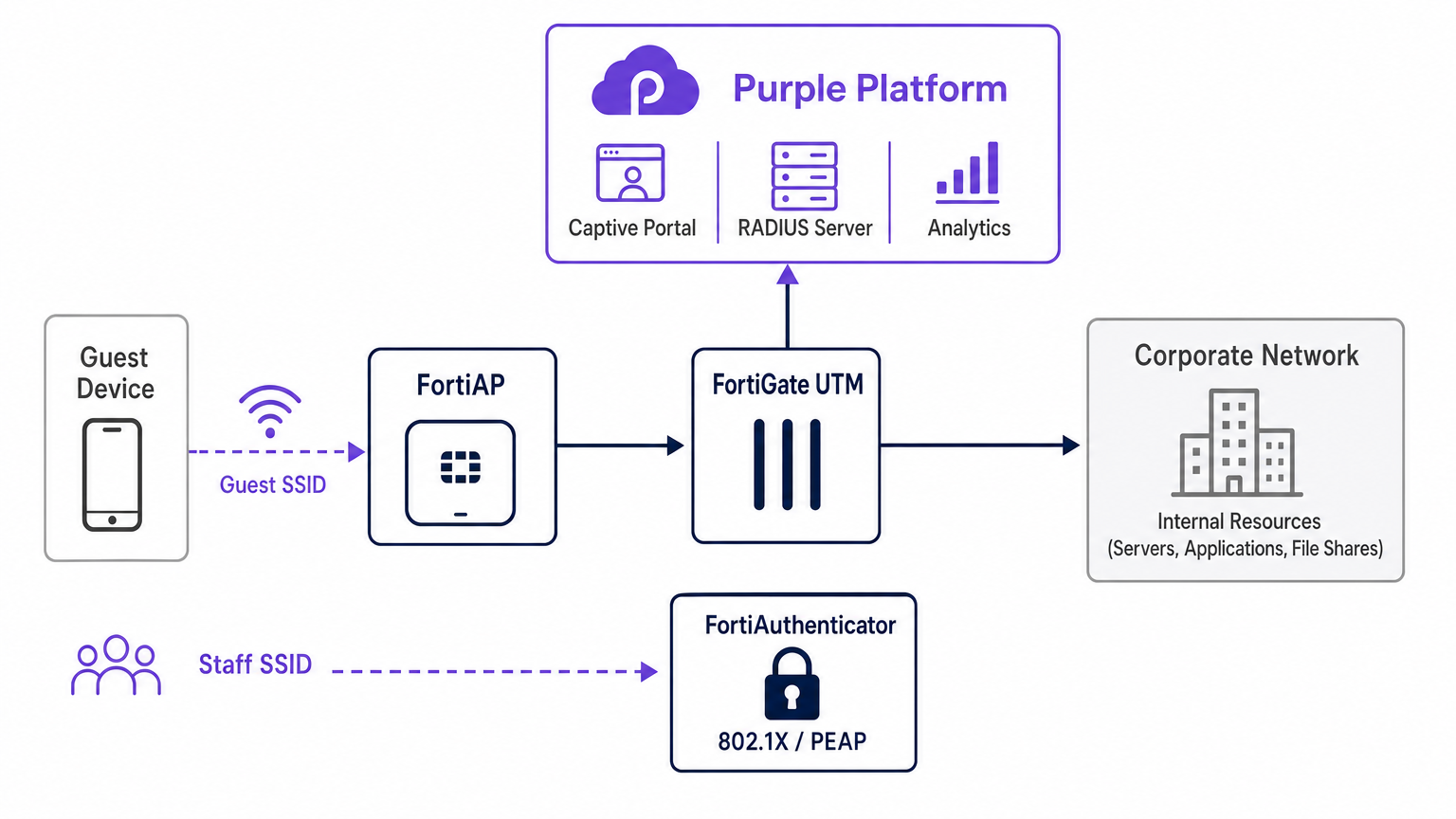
RADIUS सह-अस्तित्व: Purple और FortiAuthenticator
Fortinet दुकानों में एक लगातार वास्तुशिल्प चुनौती यह है कि जब कॉर्पोरेट पहचान के लिए FortiAuthenticator (FAC) पहले से ही तैनात हो, तो स्टाफ प्रमाणीकरण के साथ अतिथि पहुँच का प्रबंधन करना। अनुशंसित दृष्टिकोण पूर्ण SSID अलगाव है। स्टाफ डिवाइस IEEE 802.1X — आमतौर पर PEAP या EAP-TLS — का उपयोग करके एक सुरक्षित SSID से जुड़ते हैं, जो सीधे FortiAuthenticator के विरुद्ध प्रमाणित होते हैं। इसके विपरीत, अतिथि डिवाइस बाहरी Captive Portal पुनर्निर्देशन के लिए कॉन्फ़िगर किए गए एक खुले SSID से जुड़ते हैं, जो Purple के क्लाउड RADIUS इन्फ्रास्ट्रक्चर के विरुद्ध प्रमाणित होते हैं।
यह अलगाव सुनिश्चित करता है कि अतिथि पहचान डेटा — WiFi Analytics के लिए महत्वपूर्ण — पूरी तरह से Purple प्लेटफ़ॉर्म के भीतर प्रबंधित किया जाता है, जबकि कॉर्पोरेट एक्टिव डायरेक्टरी क्रेडेंशियल FortiAuthenticator द्वारा ऑन-प्रिमाइसेस पर सुरक्षित रूप से संसाधित किए जाते हैं। FortiGate अतिथि VLAN और कॉर्पोरेट VLAN के बीच शून्य क्रॉसओवर सुनिश्चित करते हुए, दोनों ट्रैफ़िक स्ट्रीम के लिए रूटिंग और नीति प्रवर्तन को स्वतंत्र रूप से संभालता है। यह आर्किटेक्चर नेटवर्क सेगमेंटेशन के लिए PCI DSS आवश्यकताओं को भी पूरा करता है, क्योंकि अतिथि ट्रैफ़िक किसी भी भुगतान-प्रसंस्करण इन्फ्रास्ट्रक्चर से भौतिक और तार्किक रूप से अलग होता है।
कार्यान्वयन गाइड
FortiAP Purple एकीकरण को तैनात करने के लिए Purple पोर्टल और Fortinet इन्फ्रास्ट्रक्चर दोनों में समन्वित कॉन्फ़िगरेशन की आवश्यकता होती है। निम्नलिखित चरण FortiCloud AP प्रबंधन का उपयोग करके एक सफल डिप्लॉयमेंट के लिए महत्वपूर्ण मार्ग की रूपरेखा तैयार करते हैं।
चरण 1: नेटवर्क और RADIUS कॉन्फ़िगरेशन
FortiCloud डैशबोर्ड के भीतर नेटवर्क को परिभाषित करके प्रारंभ करें। कॉन्फ़िगर करें > मेरा RADIUS सर्वर पर नेविगेट करें और Purple पोर्टल में प्रदान किए गए क्रेडेंशियल का उपयोग करके प्रमाणीकरण सर्वर (पोर्ट 1812) और अकाउंटिंग सर्वर (पोर्ट 1813) दोनों को परिभाषित करें। दोनों सर्वर कॉन्फ़िगर किए जाने चाहिए — अकाउंटिंग वैकल्पिक नहीं है। Purple सत्र अवधि, बैंडविड्थ खपत और विज़िटर फ़्रीक्वेंसी मेट्रिक्स के साथ WiFi Analytics डैशबोर्ड को पॉप्युलेट करने के लिए RADIUS अकाउंटिंग डेटा पर निर्भर करता है। वास्तविक समय की दृश्यता के लिए अकाउंटिंग अंतरिम अंतराल को 120 सेकंड पर सेट करें।
चरण 2: SSID और Captive Portal परिभाषा
अतिथि पहुँच के लिए समर्पित एक नया SSID बनाएँ। प्रमाणीकरण विधि को ओपन पर सेट करें और Captive Portal सुविधा को सक्षम करें, बाहरी या कस्टम पोर्टल विकल्प का चयन करें। आपको Purple पोर्टल कॉन्फ़िगरेशन स्क्रीन द्वारा प्रदान किए गए अद्वितीय एक्सेस URL और रीडायरेक्ट URL को इनपुट करना होगा।
वॉल्ड गार्डन कॉन्फ़िगरेशन पूरे डिप्लॉयमेंट में सबसे संवेदनशील कदम है। आपको Purple के आवश्यक डोमेन की व्यापक सूची इनपुट करनी होगी ताकि यह सुनिश्चित हो सके कि सोशल लॉगिन प्रदाता (Facebook, Google, X) और आवश्यक पोर्टल एसेट प्रमाणीकरण से पहले सही ढंग से लोड हों। वॉल्ड गार्डन को सटीक रूप से कॉन्फ़िगर करने में विफलता के परिणामस्वरूप एक टूटा हुआ प्रमाणीकरण प्रवाह होगा, क्योंकि क्लाइंट डिवाइस आवश्यक बाहरी संसाधनों तक पहुंचने में असमर्थ होगा। यह भी सुनिश्चित करें कि DNS ट्रैफ़िक (UDP पोर्ट 53) को पूर्व-प्रमाणीकरण नीति में स्पष्ट रूप से अनुमति दी गई है।
चरण 3: IP असाइनमेंट — NAT बनाम ब्रिज मोड
SSID को परिभाषित करते समय, आपको IP असाइनमेंट के लिए NAT मोड और ब्रिज मोड के बीच चयन करना होगा।
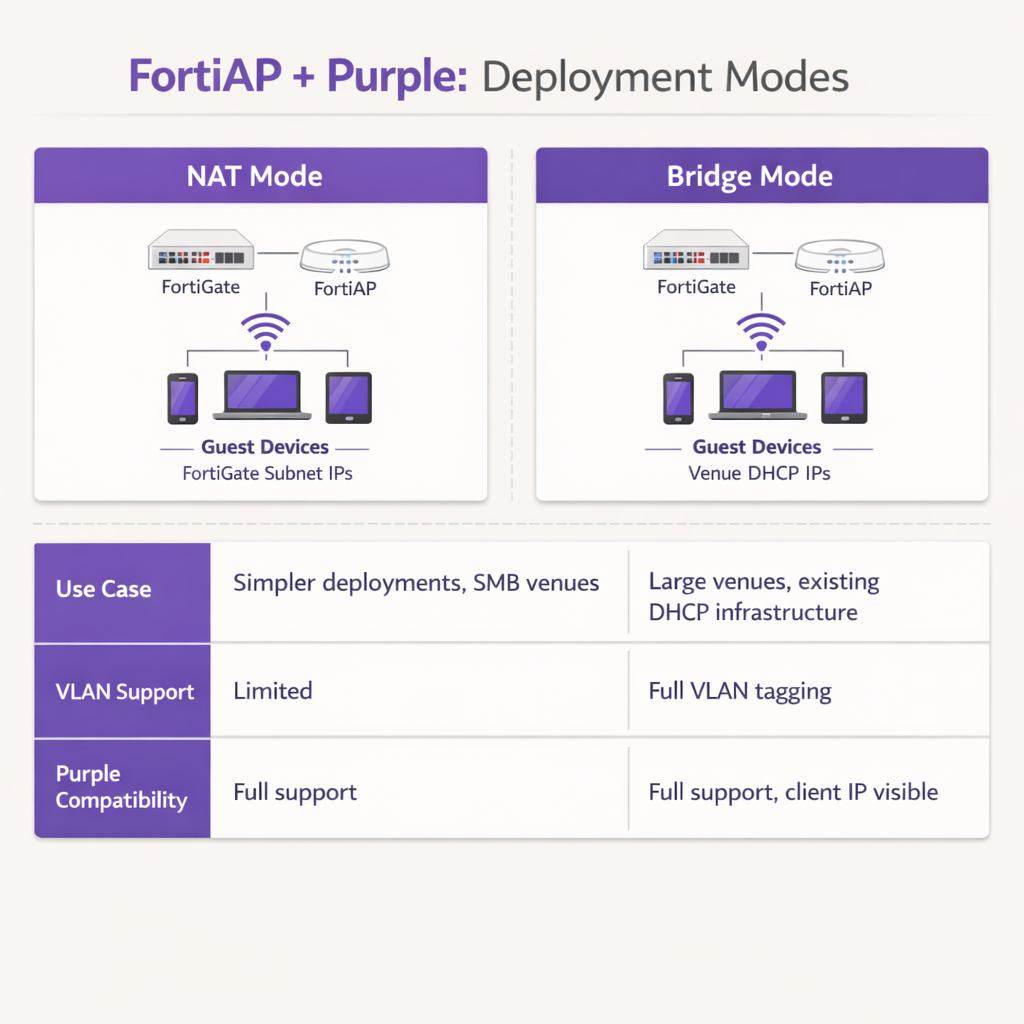
NAT मोड में, FortiGate अतिथि डिवाइसों को एक समर्पित आंतरिक सबनेट से DHCP पते प्रदान करता है, फ़ायरवॉल से ट्रैफ़िक बाहर निकलने पर उन पतों का अनुवाद करता है। यह सरल डिप्लॉयमेंट या छोटे खुदरा ) ब्रांच वातावरण जहाँ FortiGate पूरे गेस्ट सबनेट का प्रबंधन करता है।
Bridge mode में, FortiAP गेस्ट ट्रैफ़िक को सीधे एक विशिष्ट VLAN पर ब्रिज करता है, जिससे एक बाहरी DHCP सर्वर को IP address असाइन करने की अनुमति मिलती है। Bridge mode को Hospitality प्रॉपर्टीज़ या Transport हब जैसे उच्च-घनत्व वाले वातावरण के लिए दृढ़ता से अनुशंसित किया जाता है, क्योंकि यह IP address प्रबंधन के लिए अधिक लचीलापन प्रदान करता है, FortiGate पर DHCP बॉटलनेक को रोकता है, और Purple प्लेटफ़ॉर्म को अधिक विस्तृत analytics और troubleshooting के लिए वास्तविक client IP address देखने की अनुमति देता है।
चरण 4: Post-Authentication Firewall Policy
एक बार authentication पूरा हो जाने पर, FortiGate को गेस्ट VLAN पर एक समर्पित post-authentication firewall policy लागू करनी होगी। इस policy को सामग्री प्रतिबंधों को लागू करने और पीयर-टू-पीयर ट्रैफ़िक को ब्लॉक करने के लिए FortiGuard Web Filtering और Application Control प्रोफाइल का संदर्भ देना चाहिए। बैंडविड्थ सीमाओं को लागू करने के लिए एक Traffic Shaper प्रोफाइल लागू करें, जिससे किसी भी एक गेस्ट को वेन्यू के अपलिंक को संतृप्त करने से रोका जा सके। सुनिश्चित करें कि policy स्पष्ट रूप से सभी RFC 1918 private IP space गंतव्यों को ब्लॉक करती है ताकि गेस्ट को आंतरिक नेटवर्क संसाधनों की जांच करने से रोका जा सके।
सर्वोत्तम अभ्यास
इस एकीकरण की वास्तुकला तैयार करते समय, स्थिरता, सुरक्षा और अनुपालन सुनिश्चित करने के लिए निम्नलिखित उद्योग-मानक सिफारिशों का पालन करें।
VLAN Segregation अनिवार्य है: गेस्ट WiFi को कभी भी कॉर्पोरेट संपत्तियों या पॉइंट-ऑफ-सेल सिस्टम के समान VLAN पर तैनात न करें। PCI DSS अनुपालन बनाए रखने के लिए स्विच पोर्ट स्तर पर सख्त VLAN tagging लागू किया जाना चाहिए। FortiGate को गेस्ट VLAN पर आक्रामक firewall policies लागू करनी चाहिए, जो पार्श्व गति को रोकने के लिए सभी RFC 1918 private IP space गंतव्यों को ब्लॉक करती है।
Session Timers को अनुकूलित करें: DHCP lease time और RADIUS accounting interim intervals को उचित रूप से कॉन्फ़िगर करें। 3600 सेकंड का DHCP lease time, 120 सेकंड के accounting interim interval के साथ मिलकर, IP address संरक्षण और Purple dashboard के भीतर सटीक वास्तविक समय analytics रिपोर्टिंग के बीच एक इष्टतम संतुलन प्रदान करता है।
Post-Authentication के बाद Fortinet UTM Features का लाभ उठाएं: इस एकीकरण का प्राथमिक लाभ authentication के बाद गेस्ट ट्रैफ़िक पर Fortinet की उन्नत सुरक्षा सुविधाओं को लागू करने की क्षमता है। FortiGuard Web Filtering और Application Control का उपयोग करने के लिए post-authentication firewall policy को कॉन्फ़िगर करें। यह गेस्ट द्वारा दुर्भावनापूर्ण गतिविधियों, torrenting, या अनुचित सामग्री तक पहुँचने के जोखिम को कम करता है, जिससे वेन्यू की public IP reputation और इंटरनेट सेवा समझौते की रक्षा होती है।
सार्वजनिक प्रमाणपत्रों का उपयोग करें: सुनिश्चित करें कि FortiGate रीडायरेक्शन इंटरफ़ेस पर एक वैध, सार्वजनिक रूप से विश्वसनीय SSL/TLS certificate प्रस्तुत करता है। Self-signed certificates आधुनिक iOS और Android डिवाइसों पर सुरक्षा चेतावनी ट्रिगर करते हैं, जिससे portal पर गेस्ट के छोड़ने की दर में काफी वृद्धि होती है।
Troubleshooting और जोखिम न्यूनीकरण
यहां तक कि सावधानीपूर्वक कॉन्फ़िगरेशन के साथ भी, परिनियोजन में घर्षण का सामना करना पड़ सकता है। सामान्य विफलता मोड को समझना समाधान को काफी तेज करता है।
Captive Portal लोड होने में विफल रहता है: यदि कोई गेस्ट कनेक्ट होता है लेकिन स्प्लैश पेज दिखाई नहीं देता है, तो सबसे आम अपराधी एक अधूरा walled garden है। सत्यापित करें कि Purple और किसी भी कॉन्फ़िगर किए गए सोशल लॉगिन प्रदाताओं के लिए सभी आवश्यक डोमेन pre-authentication policy में स्पष्ट रूप से अनुमत हैं। सुनिश्चित करें कि DNS रिज़ॉल्यूशन अप्रमाणित क्लाइंट के लिए सही ढंग से काम कर रहा है; यदि क्लाइंट Purple portal URL को हल नहीं कर सकता है, तो रीडायरेक्ट पूरी तरह से विफल हो जाएगा।
RADIUS Timeouts: यदि portal लोड होता है लेकिन authentication लगातार विफल रहता है, तो RADIUS संचार पथ की जांच करें। सत्यापित करें कि FortiGate का बाहरी IP address Purple portal के राउटर कॉन्फ़िगरेशन के भीतर सही ढंग से पंजीकृत है। सुनिश्चित करें कि साझा रहस्य बिल्कुल मेल खाते हैं — एक भी वर्ण बेमेल होने से मौन authentication विफलताएं होंगी — और Fortinet इन्फ्रास्ट्रक्चर और Purple के cloud RADIUS servers के बीच कोई मध्यवर्ती फ़ायरवॉल UDP ports 1812 और 1813 को ब्लॉक नहीं कर रहा है।
Certificate Errors: आधुनिक मोबाइल ऑपरेटिंग सिस्टम captive portal इंटरसेप्शन के दौरान SSL/TLS certificate विसंगतियों के प्रति अत्यधिक संवेदनशील होते हैं। सुनिश्चित करें कि FortiGate रीडायरेक्शन इंटरफ़ेस के लिए एक वैध, सार्वजनिक रूप से विश्वसनीय certificate प्रस्तुत कर रहा है, न कि एक self-signed डिफ़ॉल्ट certificate। यह खतरनाक सुरक्षा चेतावनियों को रोकता है जो गेस्ट को authentication प्रवाह पूरा करने से रोकते हैं।
Session Accounting Gaps: यदि Purple analytics dashboard अधूरा सेशन डेटा या गुम बैंडविड्थ मेट्रिक्स दिखाता है, तो सत्यापित करें कि RADIUS accounting server (Port 1813) सही ढंग से कॉन्फ़िगर किया गया है और accounting interim interval सेट है। Accounting डेटा authentication से अलग भेजा जाता है और इसके लिए अपनी स्वयं की सर्वर परिभाषा की आवश्यकता होती है।
ROI और व्यावसायिक प्रभाव
Fortinet और Purple का एकीकरण एक मानक लागत-केंद्र — गेस्ट WiFi — को एक मापने योग्य व्यावसायिक संपत्ति में बदल देता है। Purple के captive portal का उपयोग करके, वेन्यू सत्यापित जनसांख्यिकीय डेटा और संपर्क जानकारी कैप्चर करते हैं, जिससे लक्षित मार्केटिंग अभियान, लॉयल्टी कार्यक्रम वृद्धि और पोस्ट-विज़िट री-एंगेजमेंट सक्षम होता है। Retail या Hospitality क्षेत्रों में काम करने वाले वेन्यू के लिए, यह फर्स्ट-पार्टी डेटा तेजी से मूल्यवान है क्योंकि थर्ड-पार्टी कुकी डिप्रिकेशन पारंपरिक डिजिटल मार्केटिंग चैनलों को सीमित करता है।
IT संचालन के लिए, गेस्ट authentication को Purple के cloud RADIUS पर ऑफलोड करने से स्थानीय उपयोगकर्ता डेटाबेस के प्रबंधन, भौतिक वाउचर प्रिंट करने, या ऑन-प्रिमाइसेस RADIUS इन्फ्रास्ट्रक्चर को बनाए रखने से जुड़े प्रशासनिक ओवरहेड में काफी कमी आती है। Purple के सहज ऑनबोर्डिंग और Fortinet के मजबूत ट्रैफ़िक निरीक्षण का संयोजन यह सुनिश्चित करता है कि वेन्यू एक उच्च-प्रदर्शन, सुरक्षित इंटरनेट अनुभव प्रदान करता है, जबकि साथ ही WiFi Analytics के माध्यम से कार्रवाई योग्य व्यावसायिक बुद्धिमत्ता उत्पन्न करता है। यह आर्किटेक्चर अत्यधिक स्केलेबल है, जो एक एकल बुटीक होटल से लेकर हर चीज़ का समर्थन करता है।एक वितरित एंटरप्राइज़ कैंपस तक, जो विपणन सक्षमता और परिचालन दक्षता दोनों के माध्यम से लगातार ROI प्रदान करता है।
मुख्य शब्द और परिभाषाएं
External Captive Portal
A configuration where the network hardware (FortiGate/FortiAP) redirects unauthenticated user traffic to a splash page hosted on a third-party cloud server (Purple), rather than serving a page stored locally on the appliance.
IT teams use this to offload portal design, social login API maintenance, and GDPR consent capture to a specialized platform, reducing operational overhead on the network team.
Walled Garden
An explicit allowlist of IP addresses, domains, and subnets that a client device is permitted to access prior to successfully authenticating on the network.
Crucial for allowing devices to load captive portal graphics, process social media logins, and resolve DNS queries before they have full internet access. The most common source of captive portal failures when misconfigured.
RADIUS Accounting
The protocol mechanism utilizing UDP Port 1813 that tracks a user's session duration, bandwidth consumption, and data transfer volumes, reporting this data back to the RADIUS server.
Purple relies on accurate accounting data from the Fortinet hardware to populate analytics dashboards and enforce time or data limits on guest sessions. Must be configured separately from authentication.
FortiAuthenticator (FAC)
Fortinet's dedicated identity and access management appliance, used for internal staff 802.1X network authentication, single sign-on, and certificate management.
IT managers frequently need to ensure that deploying Purple for guests does not disrupt existing FAC infrastructure used by corporate employees. The answer is always SSID segregation.
Bridge Mode SSID
A wireless configuration where the access point acts as a transparent layer 2 bridge, passing client traffic directly onto a specific VLAN on the wired network rather than performing NAT.
Preferred in enterprise deployments as it allows existing core DHCP servers to manage IP addresses, prevents FortiGate DHCP bottlenecks, and exposes true client IPs to the Purple analytics platform.
Post-Authentication Policy
The firewall rules and Unified Threat Management (UTM) profiles applied to a user's traffic only after they have successfully authenticated via the captive portal.
This is where network architects apply web filtering, application control, and bandwidth shaping to protect the venue's network from malicious guest activity. Purple handles identity; FortiGate handles enforcement.
IEEE 802.1X
An IEEE Standard for port-based Network Access Control, providing a framework for authenticating devices wishing to attach to a LAN or WLAN using EAP methods such as PEAP or EAP-TLS.
Used for secure staff access via FortiAuthenticator, distinct from the open, portal-based authentication used for guests via Purple. The two authentication methods coexist on separate SSIDs.
RADIUS-as-a-Service
A cloud-hosted RADIUS infrastructure provided by Purple, eliminating the need for venues to deploy and maintain local RADIUS servers such as FreeRADIUS or Windows NPS.
Reduces infrastructure overhead for IT teams while ensuring high availability and seamless integration with the captive portal platform. Particularly valuable for distributed retail or hospitality deployments.
FortiGuard
Fortinet's cloud-based threat intelligence and content filtering subscription service, providing real-time web filtering, application control, and intrusion prevention signatures to FortiGate appliances.
Applied via post-authentication firewall policies to inspect and control guest internet traffic after Purple has authenticated the user, protecting the venue's network and IP reputation.
केस स्टडीज
A 200-room hotel currently uses a FortiGate 100F and FortiAPs. They use FortiAuthenticator for staff 802.1X authentication. They want to implement Purple WiFi for guests to capture marketing data, but the IT Director is concerned about the guest portal interfering with the existing staff authentication flow.
Deploy absolute SSID segregation. Maintain the existing Staff_WiFi SSID configured for WPA2-Enterprise, pointing to the FortiAuthenticator RADIUS server on Port 1812. Create a new, separate Guest_WiFi SSID configured as an Open network with External Captive Portal enabled. Configure the captive portal URL to point to Purple's splash page, and configure the RADIUS settings for this specific SSID to point to Purple's cloud RADIUS servers (Port 1812 for auth, Port 1813 for accounting). Map the Guest SSID to an isolated VLAN with a dedicated firewall policy. The FortiGate routes authentication requests based on the originating SSID, ensuring zero interference between the two authentication systems.
A retail chain is deploying FortiCloud APs across 50 locations. They want to use Purple WiFi for guest analytics. During testing at the first site, the guest connects to the WiFi, but their device displays a blank page or a connection timed out error instead of the Purple splash page.
The IT team must audit and update the Walled Garden configuration on the FortiCloud AP SSID settings. The FortiAP is currently blocking the client's HTTP/HTTPS requests to the Purple portal assets before authentication. The team must input the complete list of Purple's required domains — including CDN endpoints and social login provider domains — into the Walled Garden allowlist. They must also verify that the pre-authentication policy explicitly permits DNS traffic on UDP port 53, so the client device can resolve the portal hostname. Once corrected at the first site, this configuration should be templated and applied consistently across all 50 locations.
परिदृश्य विश्लेषण
Q1. Your deployment requires guests to authenticate via a Purple splash page. You have configured the SSID, the RADIUS servers, and the redirect URL. However, when connecting, guest devices immediately report No Internet Connection and the portal fails to pop up automatically. What is the most likely configuration omission?
💡 संकेत:Consider what network access a device requires before it has fully authenticated on the network.
अनुशंसित दृष्टिकोण दिखाएं
The Walled Garden (pre-authentication allowlist) is likely incomplete or missing entirely. The device needs explicit permission to reach Purple's portal domains, social login APIs (Facebook, Google), and perform DNS resolution before the FortiGate grants full access. Without this, the device's Captive Portal Assistant cannot reach the target URL to trigger the pop-up. Additionally, verify that DNS traffic on UDP port 53 is permitted in the pre-authentication policy.
Q2. A stadium deployment anticipates 15,000 concurrent guest connections during events. The current design proposes using the FortiGate in NAT mode to provide DHCP to the guest SSID from a single /20 subnet. Why might this architectural decision create operational problems, and what is the recommended alternative?
💡 संकेत:Consider the processing overhead on the FortiGate firewall and the implications of DHCP lease churn at high scale.
अनुशंसित दृष्टिकोण दिखाएं
Using NAT mode places the entire DHCP processing burden on the FortiGate, which may struggle with the rapid lease churn of 15,000 transient devices connecting and disconnecting throughout an event. A single /20 subnet provides only 4,094 usable addresses, which may be insufficient for peak concurrent connections. Furthermore, NAT mode obscures the true client IP from the Purple platform, limiting analytical depth. The recommended approach is Bridge mode, dropping guest traffic onto a dedicated VLAN managed by a robust external enterprise DHCP infrastructure with appropriately sized address pools.
Q3. The CISO mandates that guest WiFi traffic must not consume more than 20% of the venue's total internet bandwidth, and guests must be prevented from accessing peer-to-peer file sharing networks. Where in the Fortinet-Purple architecture is this policy enforced, and what specific Fortinet features are required?
💡 संकेत:Determine which component handles traffic inspection and policy enforcement after the user's identity has been verified by Purple.
अनुशंसित दृष्टिकोण दिखाएं
This policy is enforced on the FortiGate UTM appliance via the Post-Authentication Firewall Policy applied to the guest VLAN. While Purple handles authentication and identity capture, the FortiGate remains responsible for Layer 7 traffic inspection and enforcement. The network team must configure a FortiGuard Application Control profile to block P2P categories (BitTorrent, eDonkey, etc.) and apply a Traffic Shaper profile to the guest policy to enforce the 20% bandwidth cap. Both profiles must be referenced in the post-authentication firewall policy, not the pre-authentication walled garden policy.




