

Fortinet FortiAP and Purple WiFi Integration Guide
A definitive technical reference for integrating Fortinet FortiAP and FortiGate infrastructure with Purple WiFi. This guide covers external captive portal configuration, RADIUS authentication coexistence with FortiAuthenticator, and security policy design for enterprise deployments across hospitality, retail, and public-sector environments.
🎧 Listen to this Guide
View Transcript

Executive Summary
For enterprise IT teams running Fortinet infrastructure, integrating external captive portals for guest access while maintaining stringent security postures is a common requirement. The integration between Fortinet FortiAP access points, FortiGate Unified Threat Management (UTM) appliances, and the Purple WiFi platform allows organisations to decouple guest authentication from core network security. This guide provides technical architects and IT managers with the definitive blueprint for deploying Purple as an external captive portal within a Fortinet environment. By offloading guest identity management to Purple's cloud RADIUS, network teams can leverage Fortinet's robust Layer 7 security policies for traffic inspection while simultaneously capturing first-party demographic data to drive business value. Whether deploying across a distributed retail estate or a high-density stadium, this architecture ensures compliance with PCI DSS and GDPR while delivering a seamless Guest WiFi experience.
Technical Deep-Dive
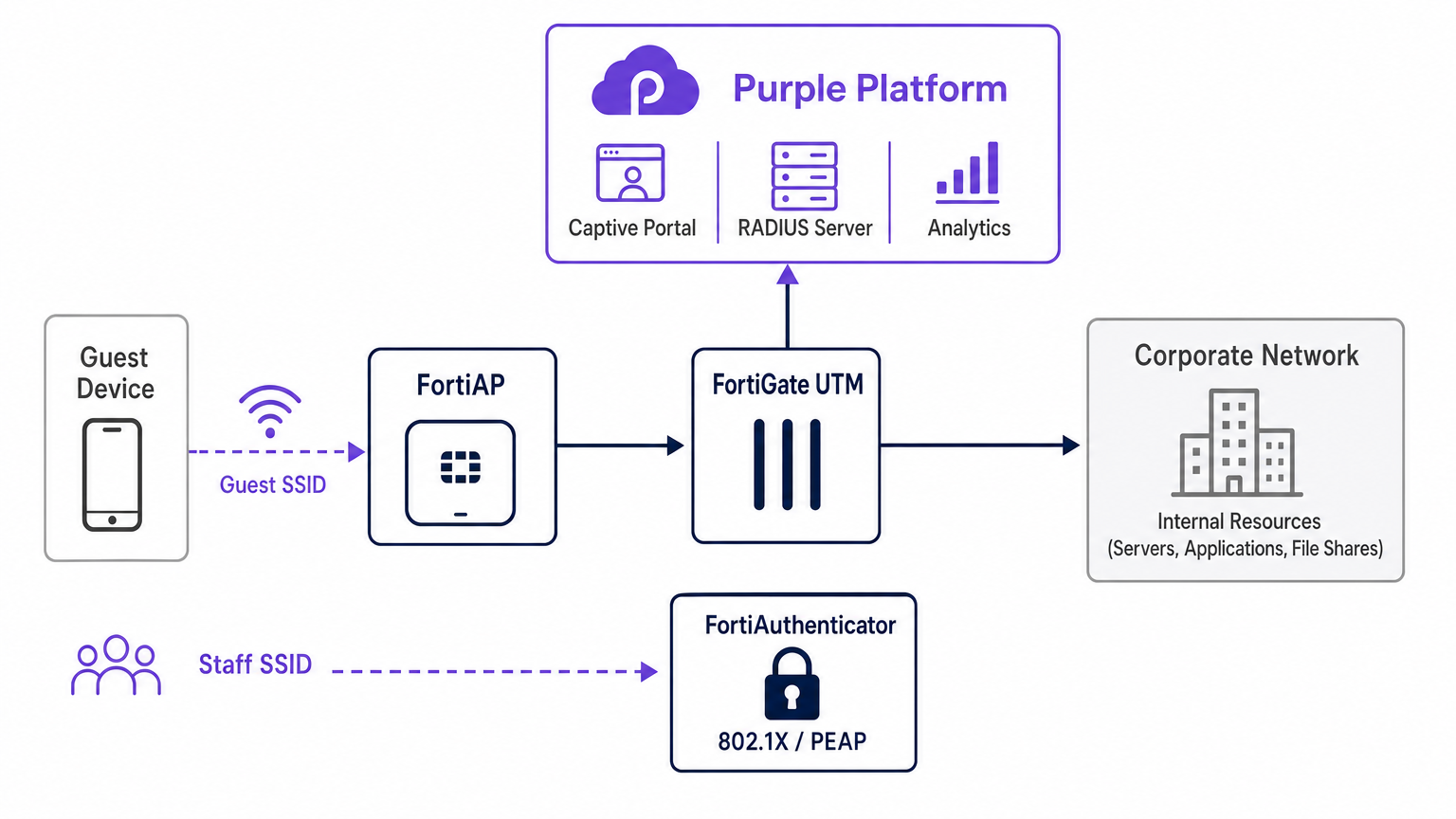
The architectural integration between Fortinet and Purple relies on standard RADIUS protocols and HTTP redirection mechanisms. When a guest device associates with the designated open SSID broadcasted by a FortiAP, the FortiGate intercepts the initial HTTP/HTTPS request. Instead of serving a local captive portal, the FortiGate is configured to redirect the client to Purple's cloud-hosted splash page.
During this pre-authentication phase, the FortiGate enforces a walled garden — a strict allowlist of IP addresses and domains that permits the client device to load the captive portal assets, perform social logins, and access essential services (such as DNS) without granting full internet access. Once the user authenticates on the Purple portal, the Purple platform communicates back to the FortiGate via RADIUS Access-Accept messages. The FortiGate then transitions the client's session state from unauthenticated to authenticated, applying the appropriate post-authentication firewall policies.
RADIUS Coexistence: Purple and FortiAuthenticator
A frequent architectural challenge in Fortinet shops is managing guest access alongside staff authentication when a FortiAuthenticator (FAC) is already deployed for corporate identity. The recommended approach is absolute SSID segregation. Staff devices connect to a secure SSID utilizing IEEE 802.1X — typically PEAP or EAP-TLS — authenticated directly against the FortiAuthenticator. Conversely, guest devices connect to an open SSID configured for external captive portal redirection, authenticating against Purple's cloud RADIUS infrastructure.
This separation ensures that guest identity data — crucial for WiFi Analytics — is managed entirely within the Purple platform, while corporate Active Directory credentials remain securely processed by the FortiAuthenticator on-premise. The FortiGate handles routing and policy enforcement for both traffic streams independently, ensuring zero crossover between the guest VLAN and the corporate VLAN. This architecture also satisfies PCI DSS requirements for network segmentation, as guest traffic is physically and logically isolated from any payment-processing infrastructure.
Implementation Guide
Deploying the FortiAP Purple integration requires coordinated configuration across both the Purple portal and the Fortinet infrastructure. The following steps outline the critical path for a successful deployment using FortiCloud AP management.
Step 1: Network and RADIUS Configuration
Begin by defining the network within the FortiCloud Dashboard. Navigate to Configure > My RADIUS Server and define both the authentication server (Port 1812) and the accounting server (Port 1813) using the credentials provided in the Purple portal. Both servers must be configured — accounting is not optional. Purple relies on RADIUS accounting data to populate the WiFi Analytics dashboard with session duration, bandwidth consumption, and visitor frequency metrics. Set the accounting interim interval to 120 seconds for real-time visibility.
Step 2: SSID and Captive Portal Definition
Create a new SSID dedicated to guest access. Set the authentication method to Open and enable the Captive Portal feature, selecting the external or custom portal option. You must input the unique Access URL and Redirect URL provided by the Purple portal configuration screen.
The Walled Garden configuration is the most sensitive step in the entire deployment. You must input Purple's comprehensive list of required domains to ensure that social login providers (Facebook, Google, X) and essential portal assets load correctly before authentication. Failure to configure the walled garden accurately will result in a broken authentication flow, as the client device will be unable to reach the necessary external resources. Also ensure that DNS traffic (UDP port 53) is explicitly permitted in the pre-authentication policy.
Step 3: IP Assignment — NAT vs Bridge Mode
When defining the SSID, you must choose between NAT mode and Bridge mode for IP assignment.
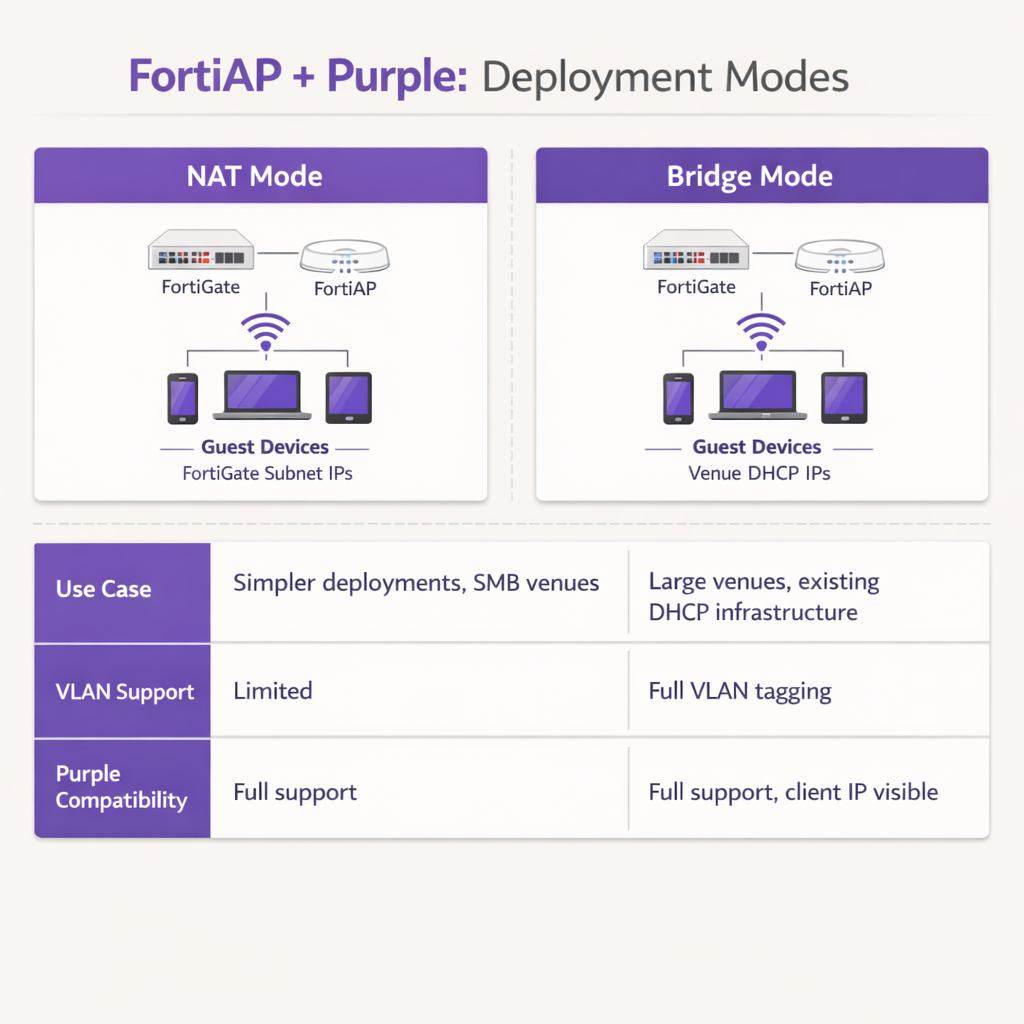
In NAT mode, the FortiGate provides DHCP addresses to guest devices from a dedicated internal subnet, translating those addresses as traffic exits the firewall. This is suitable for simpler deployments or smaller Retail branch environments where the FortiGate manages the entire guest subnet.
In Bridge mode, the FortiAP bridges guest traffic directly onto a specific VLAN, allowing an external DHCP server to assign IP addresses. Bridge mode is strongly recommended for high-density environments such as Hospitality properties or Transport hubs, as it provides greater flexibility for IP address management, prevents DHCP bottlenecks on the FortiGate, and allows the Purple platform to see the true client IP address for more granular analytics and troubleshooting.
Step 4: Post-Authentication Firewall Policy
Once authentication is complete, the FortiGate must apply a dedicated post-authentication firewall policy to the guest VLAN. This policy should reference FortiGuard Web Filtering and Application Control profiles to enforce content restrictions and block peer-to-peer traffic. Apply a Traffic Shaper profile to enforce bandwidth limits, preventing any single guest from saturating the venue's uplink. Ensure the policy explicitly blocks all RFC 1918 private IP space destinations to prevent guests from probing internal network resources.
Best Practices
When architecting this integration, adhere to the following industry-standard recommendations to ensure stability, security, and compliance.
VLAN Segregation is Mandatory: Never deploy guest WiFi on the same VLAN as corporate assets or point-of-sale systems. Strict VLAN tagging must be enforced at the switch port level to maintain PCI DSS compliance. The FortiGate should apply aggressive firewall policies to the guest VLAN, blocking all RFC 1918 private IP space destinations to prevent lateral movement.
Optimize Session Timers: Configure the DHCP lease time and RADIUS accounting interim intervals appropriately. A DHCP lease time of 3600 seconds combined with an accounting interim interval of 120 seconds provides an optimal balance between IP address conservation and accurate real-time analytics reporting within the Purple dashboard.
Leverage Fortinet UTM Features Post-Authentication: The primary advantage of this integration is the ability to apply Fortinet's advanced security features to guest traffic after authentication. Configure the post-authentication firewall policy to utilize FortiGuard Web Filtering and Application Control. This mitigates the risk of guests utilizing the venue's bandwidth for malicious activities, torrenting, or accessing inappropriate content, thereby protecting the venue's public IP reputation and internet service agreement.
Use Public Certificates: Ensure the FortiGate presents a valid, publicly trusted SSL/TLS certificate on the redirection interface. Self-signed certificates trigger security warnings on modern iOS and Android devices, significantly increasing guest abandonment rates at the portal.
Troubleshooting & Risk Mitigation
Even with meticulous configuration, deployments can encounter friction. Understanding common failure modes accelerates resolution significantly.
Captive Portal Fails to Load: If a guest connects but the splash page does not appear, the most common culprit is an incomplete walled garden. Verify that all required domains for Purple and any configured social login providers are explicitly allowed in the pre-authentication policy. Ensure DNS resolution is functioning correctly for unauthenticated clients; if the client cannot resolve the Purple portal URL, the redirect will fail entirely.
RADIUS Timeouts: If the portal loads but authentication fails consistently, investigate the RADIUS communication path. Verify that the FortiGate's external IP address is correctly registered within the Purple portal's router configuration. Ensure that the shared secrets match exactly — a single character mismatch will cause silent authentication failures — and that no intermediate firewalls are blocking UDP ports 1812 and 1813 between the Fortinet infrastructure and Purple's cloud RADIUS servers.
Certificate Errors: Modern mobile operating systems are highly sensitive to SSL/TLS certificate anomalies during captive portal interception. Ensure that the FortiGate is presenting a valid, publicly trusted certificate for the redirection interface, rather than a self-signed default certificate. This prevents alarming security warnings that deter guests from completing the authentication flow.
Session Accounting Gaps: If the Purple analytics dashboard shows incomplete session data or missing bandwidth metrics, verify that the RADIUS accounting server (Port 1813) is correctly configured and that the accounting interim interval is set. Accounting data is sent separately from authentication and requires its own server definition.
ROI & Business Impact
The integration of Fortinet and Purple transforms a standard cost-centre — guest WiFi — into a measurable business asset. By utilizing Purple's captive portal, venues capture verified demographic data and contact information, enabling targeted marketing campaigns, loyalty program growth, and post-visit re-engagement. For venues operating across Retail or Hospitality sectors, this first-party data is increasingly valuable as third-party cookie deprecation limits traditional digital marketing channels.
For IT operations, offloading guest authentication to Purple's cloud RADIUS significantly reduces the administrative overhead associated with managing local user databases, printing physical vouchers, or maintaining on-premise RADIUS infrastructure. The combination of Purple's seamless onboarding and Fortinet's robust traffic inspection ensures that the venue delivers a high-performance, secure internet experience while simultaneously generating actionable business intelligence through WiFi Analytics . This architecture is highly scalable, supporting everything from a single boutique hotel to a distributed enterprise campus, delivering consistent ROI through both marketing enablement and operational efficiency.
Key Terms & Definitions
External Captive Portal
A configuration where the network hardware (FortiGate/FortiAP) redirects unauthenticated user traffic to a splash page hosted on a third-party cloud server (Purple), rather than serving a page stored locally on the appliance.
IT teams use this to offload portal design, social login API maintenance, and GDPR consent capture to a specialized platform, reducing operational overhead on the network team.
Walled Garden
An explicit allowlist of IP addresses, domains, and subnets that a client device is permitted to access prior to successfully authenticating on the network.
Crucial for allowing devices to load captive portal graphics, process social media logins, and resolve DNS queries before they have full internet access. The most common source of captive portal failures when misconfigured.
RADIUS Accounting
The protocol mechanism utilizing UDP Port 1813 that tracks a user's session duration, bandwidth consumption, and data transfer volumes, reporting this data back to the RADIUS server.
Purple relies on accurate accounting data from the Fortinet hardware to populate analytics dashboards and enforce time or data limits on guest sessions. Must be configured separately from authentication.
FortiAuthenticator (FAC)
Fortinet's dedicated identity and access management appliance, used for internal staff 802.1X network authentication, single sign-on, and certificate management.
IT managers frequently need to ensure that deploying Purple for guests does not disrupt existing FAC infrastructure used by corporate employees. The answer is always SSID segregation.
Bridge Mode SSID
A wireless configuration where the access point acts as a transparent layer 2 bridge, passing client traffic directly onto a specific VLAN on the wired network rather than performing NAT.
Preferred in enterprise deployments as it allows existing core DHCP servers to manage IP addresses, prevents FortiGate DHCP bottlenecks, and exposes true client IPs to the Purple analytics platform.
Post-Authentication Policy
The firewall rules and Unified Threat Management (UTM) profiles applied to a user's traffic only after they have successfully authenticated via the captive portal.
This is where network architects apply web filtering, application control, and bandwidth shaping to protect the venue's network from malicious guest activity. Purple handles identity; FortiGate handles enforcement.
IEEE 802.1X
An IEEE Standard for port-based Network Access Control, providing a framework for authenticating devices wishing to attach to a LAN or WLAN using EAP methods such as PEAP or EAP-TLS.
Used for secure staff access via FortiAuthenticator, distinct from the open, portal-based authentication used for guests via Purple. The two authentication methods coexist on separate SSIDs.
RADIUS-as-a-Service
A cloud-hosted RADIUS infrastructure provided by Purple, eliminating the need for venues to deploy and maintain local RADIUS servers such as FreeRADIUS or Windows NPS.
Reduces infrastructure overhead for IT teams while ensuring high availability and seamless integration with the captive portal platform. Particularly valuable for distributed retail or hospitality deployments.
FortiGuard
Fortinet's cloud-based threat intelligence and content filtering subscription service, providing real-time web filtering, application control, and intrusion prevention signatures to FortiGate appliances.
Applied via post-authentication firewall policies to inspect and control guest internet traffic after Purple has authenticated the user, protecting the venue's network and IP reputation.
Case Studies
A 200-room hotel currently uses a FortiGate 100F and FortiAPs. They use FortiAuthenticator for staff 802.1X authentication. They want to implement Purple WiFi for guests to capture marketing data, but the IT Director is concerned about the guest portal interfering with the existing staff authentication flow.
Deploy absolute SSID segregation. Maintain the existing Staff_WiFi SSID configured for WPA2-Enterprise, pointing to the FortiAuthenticator RADIUS server on Port 1812. Create a new, separate Guest_WiFi SSID configured as an Open network with External Captive Portal enabled. Configure the captive portal URL to point to Purple's splash page, and configure the RADIUS settings for this specific SSID to point to Purple's cloud RADIUS servers (Port 1812 for auth, Port 1813 for accounting). Map the Guest SSID to an isolated VLAN with a dedicated firewall policy. The FortiGate routes authentication requests based on the originating SSID, ensuring zero interference between the two authentication systems.
A retail chain is deploying FortiCloud APs across 50 locations. They want to use Purple WiFi for guest analytics. During testing at the first site, the guest connects to the WiFi, but their device displays a blank page or a connection timed out error instead of the Purple splash page.
The IT team must audit and update the Walled Garden configuration on the FortiCloud AP SSID settings. The FortiAP is currently blocking the client's HTTP/HTTPS requests to the Purple portal assets before authentication. The team must input the complete list of Purple's required domains — including CDN endpoints and social login provider domains — into the Walled Garden allowlist. They must also verify that the pre-authentication policy explicitly permits DNS traffic on UDP port 53, so the client device can resolve the portal hostname. Once corrected at the first site, this configuration should be templated and applied consistently across all 50 locations.
Scenario Analysis
Q1. Your deployment requires guests to authenticate via a Purple splash page. You have configured the SSID, the RADIUS servers, and the redirect URL. However, when connecting, guest devices immediately report No Internet Connection and the portal fails to pop up automatically. What is the most likely configuration omission?
💡 Hint:Consider what network access a device requires before it has fully authenticated on the network.
Show Recommended Approach
The Walled Garden (pre-authentication allowlist) is likely incomplete or missing entirely. The device needs explicit permission to reach Purple's portal domains, social login APIs (Facebook, Google), and perform DNS resolution before the FortiGate grants full access. Without this, the device's Captive Portal Assistant cannot reach the target URL to trigger the pop-up. Additionally, verify that DNS traffic on UDP port 53 is permitted in the pre-authentication policy.
Q2. A stadium deployment anticipates 15,000 concurrent guest connections during events. The current design proposes using the FortiGate in NAT mode to provide DHCP to the guest SSID from a single /20 subnet. Why might this architectural decision create operational problems, and what is the recommended alternative?
💡 Hint:Consider the processing overhead on the FortiGate firewall and the implications of DHCP lease churn at high scale.
Show Recommended Approach
Using NAT mode places the entire DHCP processing burden on the FortiGate, which may struggle with the rapid lease churn of 15,000 transient devices connecting and disconnecting throughout an event. A single /20 subnet provides only 4,094 usable addresses, which may be insufficient for peak concurrent connections. Furthermore, NAT mode obscures the true client IP from the Purple platform, limiting analytical depth. The recommended approach is Bridge mode, dropping guest traffic onto a dedicated VLAN managed by a robust external enterprise DHCP infrastructure with appropriately sized address pools.
Q3. The CISO mandates that guest WiFi traffic must not consume more than 20% of the venue's total internet bandwidth, and guests must be prevented from accessing peer-to-peer file sharing networks. Where in the Fortinet-Purple architecture is this policy enforced, and what specific Fortinet features are required?
💡 Hint:Determine which component handles traffic inspection and policy enforcement after the user's identity has been verified by Purple.
Show Recommended Approach
This policy is enforced on the FortiGate UTM appliance via the Post-Authentication Firewall Policy applied to the guest VLAN. While Purple handles authentication and identity capture, the FortiGate remains responsible for Layer 7 traffic inspection and enforcement. The network team must configure a FortiGuard Application Control profile to block P2P categories (BitTorrent, eDonkey, etc.) and apply a Traffic Shaper profile to the guest policy to enforce the 20% bandwidth cap. Both profiles must be referenced in the post-authentication firewall policy, not the pre-authentication walled garden policy.




