

Guida all'integrazione di Fortinet FortiAP e Purple WiFi
Un riferimento tecnico definitivo per l'integrazione dell'infrastruttura Fortinet FortiAP e FortiGate con Purple WiFi. Questa guida copre la configurazione del Captive Portal esterno, la coesistenza dell'autenticazione RADIUS con FortiAuthenticator e la progettazione di policy di sicurezza per implementazioni aziendali in ambienti di ospitalità, vendita al dettaglio e settore pubblico.
🎧 Ascolta questa guida
Visualizza trascrizione
Riepilogo Esecutivo
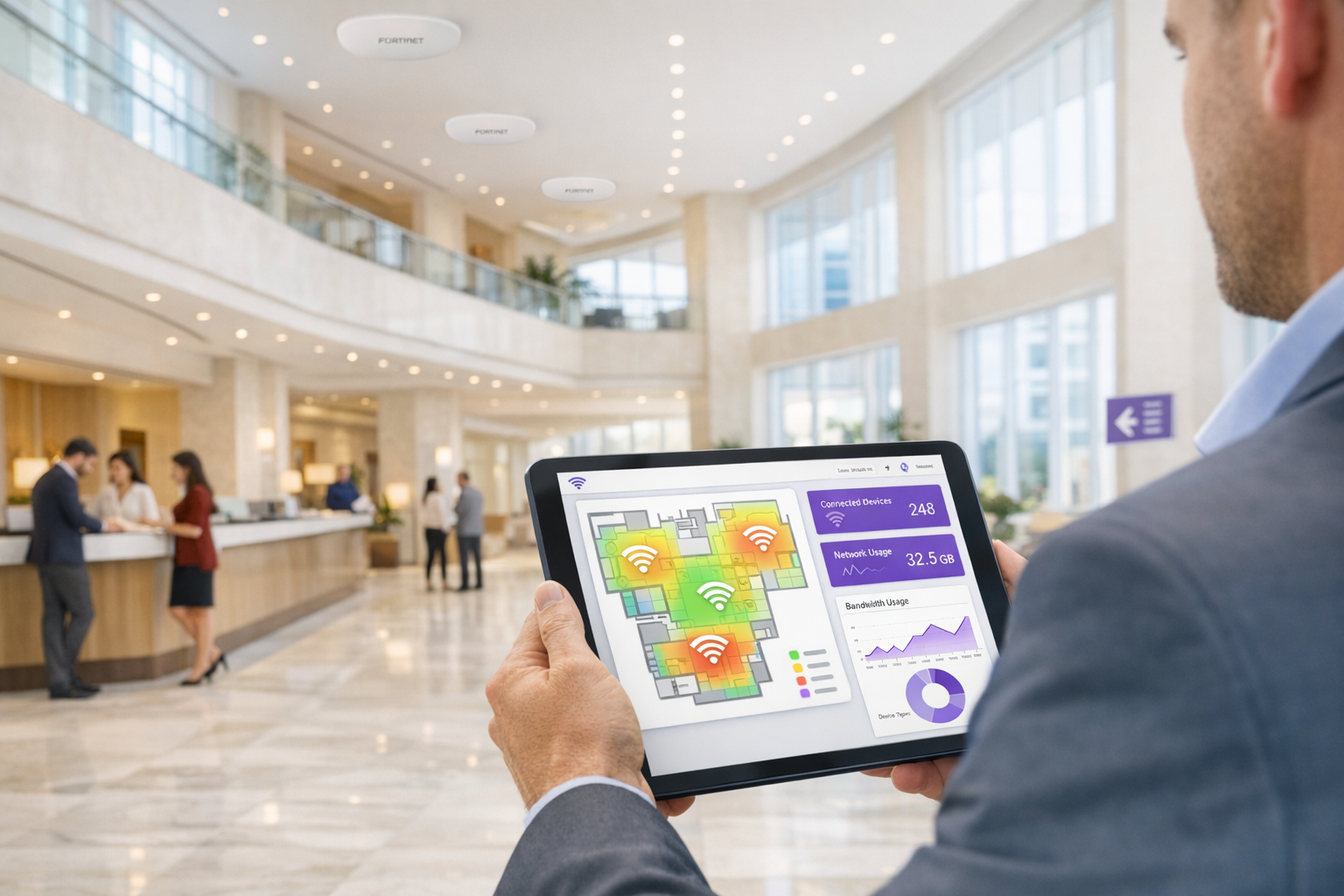
Per i team IT aziendali che utilizzano l'infrastruttura Fortinet, l'integrazione di Captive Portal esterni per l'accesso degli ospiti, mantenendo al contempo rigorose posture di sicurezza, è un requisito comune. L'integrazione tra gli access point Fortinet FortiAP, gli appliance FortiGate Unified Threat Management (UTM) e la piattaforma Purple WiFi consente alle organizzazioni di disaccoppiare l'autenticazione degli ospiti dalla sicurezza della rete principale. Questa guida fornisce ad architetti tecnici e responsabili IT il progetto definitivo per l'implementazione di Purple come Captive Portal esterno all'interno di un ambiente Fortinet. Delegando la gestione dell'identità degli ospiti al RADIUS cloud di Purple, i team di rete possono sfruttare le robuste policy di sicurezza Layer 7 di Fortinet per l'ispezione del traffico, acquisendo contemporaneamente dati demografici di prima parte per generare valore aziendale. Sia che si tratti di un'implementazione in una rete di punti vendita distribuiti o in uno stadio ad alta densità, questa architettura garantisce la conformità con PCI DSS e GDPR, offrendo al contempo un'esperienza Guest WiFi senza interruzioni.
Approfondimento Tecnico
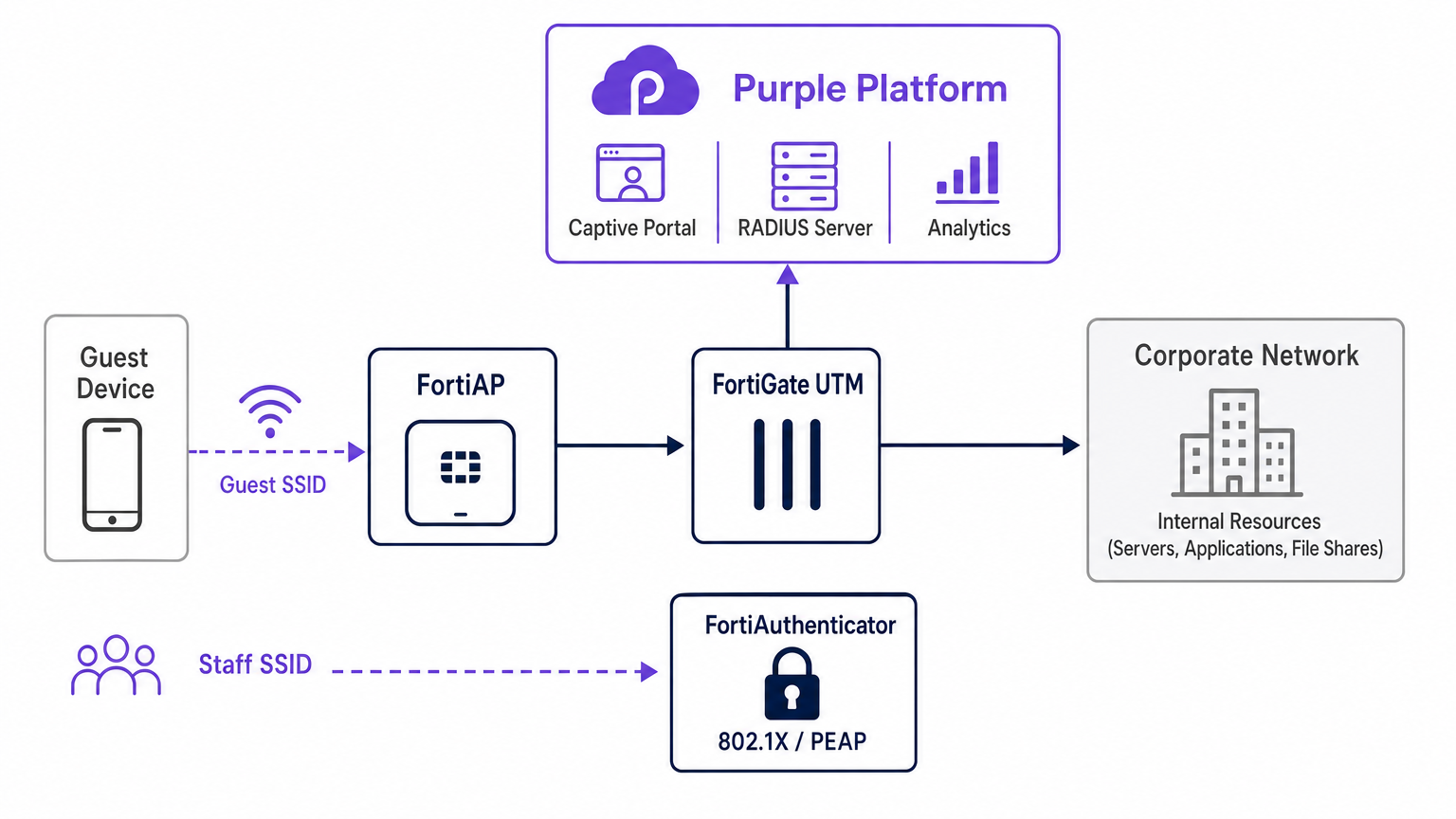
L'integrazione architetturale tra Fortinet e Purple si basa su protocolli RADIUS standard e meccanismi di reindirizzamento HTTP. Quando un dispositivo ospite si associa all'SSID aperto designato trasmesso da un FortiAP, il FortiGate intercetta la richiesta HTTP/HTTPS iniziale. Invece di servire un Captive Portal locale, il FortiGate è configurato per reindirizzare il client alla splash page ospitata nel cloud di Purple.
Durante questa fase di pre-autenticazione, il FortiGate applica un "walled garden" — una rigorosa lista bianca di indirizzi IP e domini che consente al dispositivo client di caricare le risorse del Captive Portal, eseguire accessi social e accedere a servizi essenziali (come DNS) senza concedere l'accesso completo a Internet. Una volta che l'utente si autentica sul portale Purple, la piattaforma Purple comunica con il FortiGate tramite messaggi RADIUS Access-Accept. Il FortiGate quindi transita lo stato della sessione del client da non autenticato ad autenticato, applicando le appropriate policy firewall post-autenticazione.
Coesistenza RADIUS: Purple e FortiAuthenticator
Una frequente sfida architetturale negli ambienti Fortinet è la gestione dell'accesso degli ospiti insieme all'autenticazione del personale quando un FortiAuthenticator (FAC) è già implementato per l'identità aziendale. L'approccio raccomandato è la segregazione assoluta degli SSID. I dispositivi del personale si connettono a un SSID sicuro utilizzando IEEE 802.1X — tipicamente PEAP o EAP-TLS — autenticati direttamente contro il FortiAuthenticator. Al contrario, i dispositivi ospiti si connettono a un SSID aperto configurato per il reindirizzamento a un Captive Portal esterno, autenticandosi contro l'infrastruttura RADIUS cloud di Purple.
Questa separazione garantisce che i dati di identità degli ospiti — cruciali per WiFi Analytics — siano gestiti interamente all'interno della piattaforma Purple, mentre le credenziali di Active Directory aziendali rimangono elaborate in modo sicuro dal FortiAuthenticator on-premise. Il FortiGate gestisce il routing e l'applicazione delle policy per entrambi i flussi di traffico in modo indipendente, garantendo l'assenza di sovrapposizioni tra la VLAN degli ospiti e la VLAN aziendale. Questa architettura soddisfa anche i requisiti PCI DSS per la segmentazione della rete, poiché il traffico degli ospiti è fisicamente e logicamente isolato da qualsiasi infrastruttura di elaborazione dei pagamenti.
Guida all'Implementazione
L'implementazione dell'integrazione FortiAP Purple richiede una configurazione coordinata sia sul portale Purple che sull'infrastruttura Fortinet. I seguenti passaggi delineano il percorso critico per un'implementazione di successo utilizzando la gestione AP di FortiCloud.
Passaggio 1: Configurazione di Rete e RADIUS
Iniziare definendo la rete all'interno della Dashboard di FortiCloud. Navigare su Configura > Il mio Server RADIUS e definire sia il server di autenticazione (Porta 1812) che il server di accounting (Porta 1813) utilizzando le credenziali fornite nel portale Purple. Entrambi i server devono essere configurati — l'accounting non è opzionale. Purple si basa sui dati di accounting RADIUS per popolare la dashboard WiFi Analytics con metriche di durata della sessione, consumo di banda e frequenza dei visitatori. Impostare l'intervallo intermedio di accounting a 120 secondi per una visibilità in tempo reale.
Passaggio 2: Definizione di SSID e Captive Portal
Creare un nuovo SSID dedicato all'accesso degli ospiti. Impostare il metodo di autenticazione su Aperto e abilitare la funzione Captive Portal, selezionando l'opzione di portale esterno o personalizzato. È necessario inserire l'URL di accesso e l'URL di reindirizzamento unici forniti dalla schermata di configurazione del portale Purple.
La configurazione del Walled Garden è il passaggio più delicato dell'intera implementazione. È necessario inserire l'elenco completo di domini richiesti da Purple per garantire che i provider di accesso social (Facebook, Google, X) e le risorse essenziali del portale si carichino correttamente prima dell'autenticazione. La mancata configurazione accurata del walled garden comporterà un flusso di autenticazione interrotto, poiché il dispositivo client non sarà in grado di raggiungere le risorse esterne necessarie. Assicurarsi inoltre che il traffico DNS (porta UDP 53) sia esplicitamente consentito nella policy di pre-autenticazione.
Passaggio 3: Assegnazione IP — Modalità NAT vs Bridge
Quando si definisce l'SSID, è necessario scegliere tra la modalità NAT e la modalità Bridge per l'assegnazione degli IP.
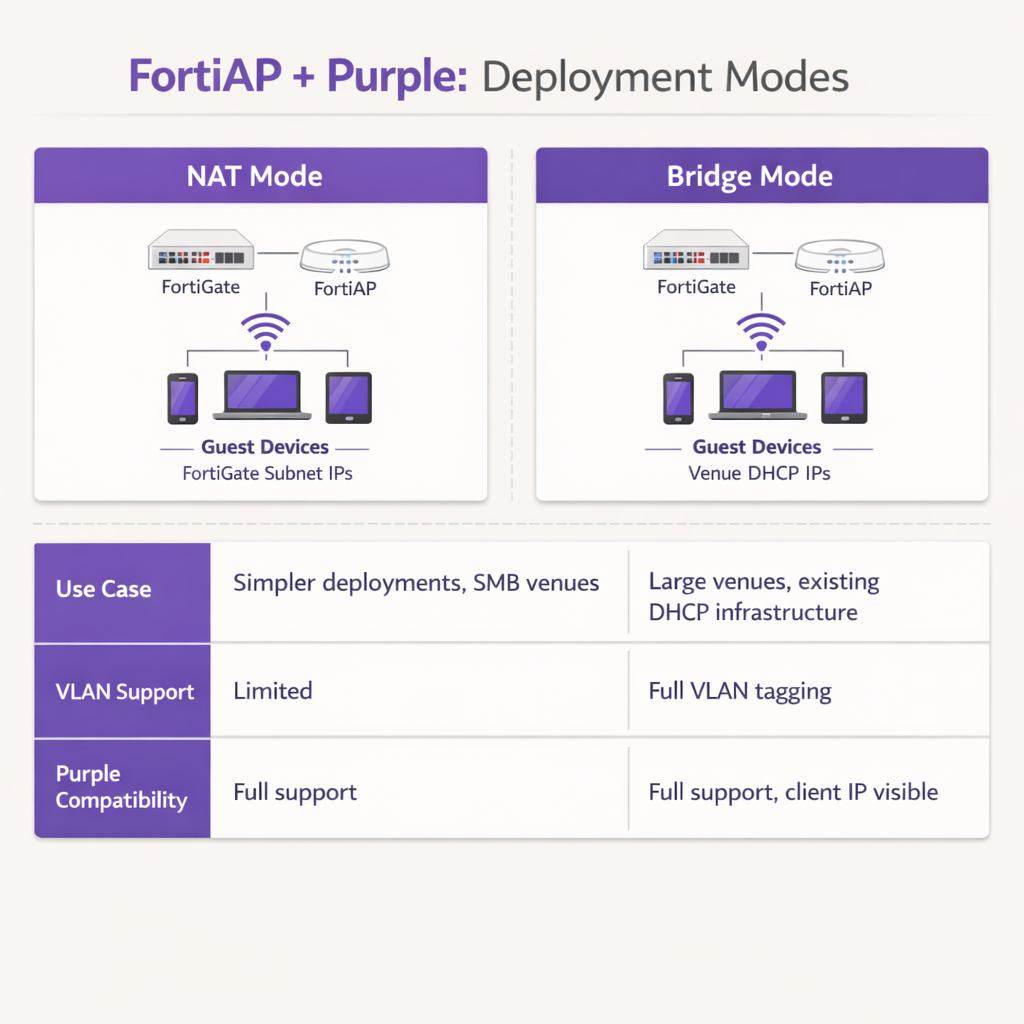
In modalità NAT, il FortiGate fornisce indirizzi DHCP ai dispositivi ospiti da una sottorete interna dedicata, traducendo tali indirizzi quando il traffico esce dal firewall. Questo è adatto per implementazioni più semplici o per Retail ambienti di filiale in cui il FortiGate gestisce l'intera sottorete guest.
In modalità Bridge, il FortiAP instrada il traffico guest direttamente su una VLAN specifica, consentendo a un server DHCP esterno di assegnare gli indirizzi IP. La modalità Bridge è fortemente raccomandata per ambienti ad alta densità come le proprietà Hospitality o gli hub di Transport , in quanto offre maggiore flessibilità per la gestione degli indirizzi IP, previene i colli di bottiglia DHCP sul FortiGate e consente alla piattaforma Purple di visualizzare il vero indirizzo IP del client per analisi e risoluzione dei problemi più granulari.
Fase 4: Criteri Firewall Post-Autenticazione
Una volta completata l'autenticazione, il FortiGate deve applicare un criterio firewall post-autenticazione dedicato alla VLAN guest. Questo criterio dovrebbe fare riferimento ai profili FortiGuard Web Filtering e Application Control per imporre restrizioni sui contenuti e bloccare il traffico peer-to-peer. Applicare un profilo Traffic Shaper per imporre limiti di larghezza di banda, impedendo a un singolo ospite di saturare l'uplink della sede. Assicurarsi che il criterio blocchi esplicitamente tutte le destinazioni dello spazio IP privato RFC 1918 per impedire agli ospiti di sondare le risorse di rete interne.
Migliori Pratiche
Quando si progetta questa integrazione, attenersi alle seguenti raccomandazioni standard del settore per garantire stabilità, sicurezza e conformità.
La Segregazione VLAN è Obbligatoria: Non distribuire mai il WiFi guest sulla stessa VLAN degli asset aziendali o dei sistemi POS. Il tagging VLAN rigoroso deve essere applicato a livello di porta dello switch per mantenere la conformità PCI DSS. Il FortiGate dovrebbe applicare criteri firewall aggressivi alla VLAN guest, bloccando tutte le destinazioni dello spazio IP privato RFC 1918 per prevenire movimenti laterali.
Ottimizzare i Timer di Sessione: Configurare in modo appropriato il tempo di lease DHCP e gli intervalli intermedi di accounting RADIUS. Un tempo di lease DHCP di 3600 secondi combinato con un intervallo intermedio di accounting di 120 secondi fornisce un equilibrio ottimale tra la conservazione degli indirizzi IP e la reportistica analitica accurata in tempo reale all'interno della dashboard Purple.
Sfruttare le Funzionalità UTM di Fortinet Post-Autenticazione: Il vantaggio principale di questa integrazione è la capacità di applicare le funzionalità di sicurezza avanzate di Fortinet al traffico guest dopo l'autenticazione. Configurare il criterio firewall post-autenticazione per utilizzare FortiGuard Web Filtering e Application Control. Ciò mitiga il rischio che gli ospiti utilizzino la larghezza di banda della sede per attività dannose, torrenting o accesso a contenuti inappropriati, proteggendo così la reputazione IP pubblica della sede e l'accordo di servizio internet.
Utilizzare Certificati Pubblici: Assicurarsi che il FortiGate presenti un certificato SSL/TLS valido e pubblicamente attendibile sull'interfaccia di reindirizzamento. I certificati autofirmati attivano avvisi di sicurezza sui moderni dispositivi iOS e Android, aumentando significativamente i tassi di abbandono degli ospiti al Captive Portal.
Risoluzione dei Problemi e Mitigazione del Rischio
Anche con una configurazione meticolosa, le implementazioni possono incontrare attriti. Comprendere le modalità di errore comuni accelera significativamente la risoluzione.
Il Captive Portal non si Carica: Se un ospite si connette ma la splash page non appare, il colpevole più comune è un walled garden incompleto. Verificare che tutti i domini richiesti per Purple e per qualsiasi provider di social login configurato siano esplicitamente consentiti nel criterio di pre-autenticazione. Assicurarsi che la risoluzione DNS funzioni correttamente per i client non autenticati; se il client non riesce a risolvere l'URL del Captive Portal Purple, il reindirizzamento fallirà completamente.
Timeout RADIUS: Se il Captive Portal si carica ma l'autenticazione fallisce costantemente, indagare il percorso di comunicazione RADIUS. Verificare che l'indirizzo IP esterno del FortiGate sia correttamente registrato nella configurazione del router del Captive Portal Purple. Assicurarsi che i segreti condivisi corrispondano esattamente — una singola discrepanza di caratteri causerà errori di autenticazione silenziosi — e che nessun firewall intermedio stia bloccando le porte UDP 1812 e 1813 tra l'infrastruttura Fortinet e i server RADIUS cloud di Purple.
Errori di Certificato: I moderni sistemi operativi mobili sono estremamente sensibili alle anomalie dei certificati SSL/TLS durante l'intercettazione del Captive Portal. Assicurarsi che il FortiGate presenti un certificato valido e pubblicamente attendibile per l'interfaccia di reindirizzamento, piuttosto che un certificato autofirmato predefinito. Ciò previene allarmanti avvisi di sicurezza che scoraggiano gli ospiti dal completare il flusso di autenticazione.
Lacune nell'Accounting delle Sessioni: Se la dashboard di analisi Purple mostra dati di sessione incompleti o metriche di larghezza di banda mancanti, verificare che il server di accounting RADIUS (Porta 1813) sia configurato correttamente e che l'intervallo intermedio di accounting sia impostato. I dati di accounting vengono inviati separatamente dall'autenticazione e richiedono una propria definizione del server.
ROI e Impatto sul Business
L'integrazione di Fortinet e Purple trasforma un centro di costo standard — il WiFi guest — in una risorsa aziendale misurabile. Utilizzando il Captive Portal di Purple, le sedi acquisiscono dati demografici verificati e informazioni di contatto, consentendo campagne di marketing mirate, la crescita dei programmi fedeltà e il re-engagement post-visita. Per le sedi che operano nei settori Retail o Hospitality , questi dati di prima parte sono sempre più preziosi poiché la deprecazione dei cookie di terze parti limita i canali di marketing digitale tradizionali.
Per le operazioni IT, il trasferimento dell'autenticazione degli ospiti al RADIUS cloud di Purple riduce significativamente il sovraccarico amministrativo associato alla gestione di database utente locali, alla stampa di voucher fisici o al mantenimento di infrastrutture RADIUS on-premise. La combinazione dell'onboarding senza interruzioni di Purple e della robusta ispezione del traffico di Fortinet garantisce che la sede offra un'esperienza internet sicura e ad alte prestazioni, generando al contempo business intelligence azionabile tramite WiFi Analytics . Questa architettura è altamente scalabile, supportando tutto, da un singolo boutique hotel a un campus aziendale distribuito, offrendo un ROI costante sia attraverso l'abilitazione del marketing che l'efficienza operativa.
Termini chiave e definizioni
External Captive Portal
A configuration where the network hardware (FortiGate/FortiAP) redirects unauthenticated user traffic to a splash page hosted on a third-party cloud server (Purple), rather than serving a page stored locally on the appliance.
IT teams use this to offload portal design, social login API maintenance, and GDPR consent capture to a specialized platform, reducing operational overhead on the network team.
Walled Garden
An explicit allowlist of IP addresses, domains, and subnets that a client device is permitted to access prior to successfully authenticating on the network.
Crucial for allowing devices to load captive portal graphics, process social media logins, and resolve DNS queries before they have full internet access. The most common source of captive portal failures when misconfigured.
RADIUS Accounting
The protocol mechanism utilizing UDP Port 1813 that tracks a user's session duration, bandwidth consumption, and data transfer volumes, reporting this data back to the RADIUS server.
Purple relies on accurate accounting data from the Fortinet hardware to populate analytics dashboards and enforce time or data limits on guest sessions. Must be configured separately from authentication.
FortiAuthenticator (FAC)
Fortinet's dedicated identity and access management appliance, used for internal staff 802.1X network authentication, single sign-on, and certificate management.
IT managers frequently need to ensure that deploying Purple for guests does not disrupt existing FAC infrastructure used by corporate employees. The answer is always SSID segregation.
Bridge Mode SSID
A wireless configuration where the access point acts as a transparent layer 2 bridge, passing client traffic directly onto a specific VLAN on the wired network rather than performing NAT.
Preferred in enterprise deployments as it allows existing core DHCP servers to manage IP addresses, prevents FortiGate DHCP bottlenecks, and exposes true client IPs to the Purple analytics platform.
Post-Authentication Policy
The firewall rules and Unified Threat Management (UTM) profiles applied to a user's traffic only after they have successfully authenticated via the captive portal.
This is where network architects apply web filtering, application control, and bandwidth shaping to protect the venue's network from malicious guest activity. Purple handles identity; FortiGate handles enforcement.
IEEE 802.1X
An IEEE Standard for port-based Network Access Control, providing a framework for authenticating devices wishing to attach to a LAN or WLAN using EAP methods such as PEAP or EAP-TLS.
Used for secure staff access via FortiAuthenticator, distinct from the open, portal-based authentication used for guests via Purple. The two authentication methods coexist on separate SSIDs.
RADIUS-as-a-Service
A cloud-hosted RADIUS infrastructure provided by Purple, eliminating the need for venues to deploy and maintain local RADIUS servers such as FreeRADIUS or Windows NPS.
Reduces infrastructure overhead for IT teams while ensuring high availability and seamless integration with the captive portal platform. Particularly valuable for distributed retail or hospitality deployments.
FortiGuard
Fortinet's cloud-based threat intelligence and content filtering subscription service, providing real-time web filtering, application control, and intrusion prevention signatures to FortiGate appliances.
Applied via post-authentication firewall policies to inspect and control guest internet traffic after Purple has authenticated the user, protecting the venue's network and IP reputation.
Casi di studio
A 200-room hotel currently uses a FortiGate 100F and FortiAPs. They use FortiAuthenticator for staff 802.1X authentication. They want to implement Purple WiFi for guests to capture marketing data, but the IT Director is concerned about the guest portal interfering with the existing staff authentication flow.
Deploy absolute SSID segregation. Maintain the existing Staff_WiFi SSID configured for WPA2-Enterprise, pointing to the FortiAuthenticator RADIUS server on Port 1812. Create a new, separate Guest_WiFi SSID configured as an Open network with External Captive Portal enabled. Configure the captive portal URL to point to Purple's splash page, and configure the RADIUS settings for this specific SSID to point to Purple's cloud RADIUS servers (Port 1812 for auth, Port 1813 for accounting). Map the Guest SSID to an isolated VLAN with a dedicated firewall policy. The FortiGate routes authentication requests based on the originating SSID, ensuring zero interference between the two authentication systems.
A retail chain is deploying FortiCloud APs across 50 locations. They want to use Purple WiFi for guest analytics. During testing at the first site, the guest connects to the WiFi, but their device displays a blank page or a connection timed out error instead of the Purple splash page.
The IT team must audit and update the Walled Garden configuration on the FortiCloud AP SSID settings. The FortiAP is currently blocking the client's HTTP/HTTPS requests to the Purple portal assets before authentication. The team must input the complete list of Purple's required domains — including CDN endpoints and social login provider domains — into the Walled Garden allowlist. They must also verify that the pre-authentication policy explicitly permits DNS traffic on UDP port 53, so the client device can resolve the portal hostname. Once corrected at the first site, this configuration should be templated and applied consistently across all 50 locations.
Analisi degli scenari
Q1. Your deployment requires guests to authenticate via a Purple splash page. You have configured the SSID, the RADIUS servers, and the redirect URL. However, when connecting, guest devices immediately report No Internet Connection and the portal fails to pop up automatically. What is the most likely configuration omission?
💡 Suggerimento:Consider what network access a device requires before it has fully authenticated on the network.
Mostra l'approccio consigliato
The Walled Garden (pre-authentication allowlist) is likely incomplete or missing entirely. The device needs explicit permission to reach Purple's portal domains, social login APIs (Facebook, Google), and perform DNS resolution before the FortiGate grants full access. Without this, the device's Captive Portal Assistant cannot reach the target URL to trigger the pop-up. Additionally, verify that DNS traffic on UDP port 53 is permitted in the pre-authentication policy.
Q2. A stadium deployment anticipates 15,000 concurrent guest connections during events. The current design proposes using the FortiGate in NAT mode to provide DHCP to the guest SSID from a single /20 subnet. Why might this architectural decision create operational problems, and what is the recommended alternative?
💡 Suggerimento:Consider the processing overhead on the FortiGate firewall and the implications of DHCP lease churn at high scale.
Mostra l'approccio consigliato
Using NAT mode places the entire DHCP processing burden on the FortiGate, which may struggle with the rapid lease churn of 15,000 transient devices connecting and disconnecting throughout an event. A single /20 subnet provides only 4,094 usable addresses, which may be insufficient for peak concurrent connections. Furthermore, NAT mode obscures the true client IP from the Purple platform, limiting analytical depth. The recommended approach is Bridge mode, dropping guest traffic onto a dedicated VLAN managed by a robust external enterprise DHCP infrastructure with appropriately sized address pools.
Q3. The CISO mandates that guest WiFi traffic must not consume more than 20% of the venue's total internet bandwidth, and guests must be prevented from accessing peer-to-peer file sharing networks. Where in the Fortinet-Purple architecture is this policy enforced, and what specific Fortinet features are required?
💡 Suggerimento:Determine which component handles traffic inspection and policy enforcement after the user's identity has been verified by Purple.
Mostra l'approccio consigliato
This policy is enforced on the FortiGate UTM appliance via the Post-Authentication Firewall Policy applied to the guest VLAN. While Purple handles authentication and identity capture, the FortiGate remains responsible for Layer 7 traffic inspection and enforcement. The network team must configure a FortiGuard Application Control profile to block P2P categories (BitTorrent, eDonkey, etc.) and apply a Traffic Shaper profile to the guest policy to enforce the 20% bandwidth cap. Both profiles must be referenced in the post-authentication firewall policy, not the pre-authentication walled garden policy.




