

সুপারমার্কেট WiFi কি নিরাপদ? ক্রেতাদের জন্য একটি নির্দেশিকা
এই প্রামাণিক নির্দেশিকা সুপারমার্কেট WiFi সুরক্ষার প্রযুক্তিগত বাস্তবতা পরীক্ষা করে, খুচরা খাতের IT নেতাদের জন্য কার্যকর স্থাপত্য এবং নিরাপত্তা কৌশল প্রদান করে। এটি Evil Twin APs থেকে Man-in-the-Middle আক্রমণ পর্যন্ত হুমকির পরিস্থিতি বিস্তারিতভাবে তুলে ধরে — এবং ভোক্তা ও এন্টারপ্রাইজ কার্যক্রম সুরক্ষার জন্য প্রয়োজনীয় প্রশমন স্ট্যাকও বর্ণনা করে। খুচরা বিক্রেতা এবং ভেন্যু অপারেটররা VLAN segmentation, client isolation, WPA3, PCI DSS compliance, এবং Purple-এর মতো প্ল্যাটফর্মের মাধ্যমে GDPR-সম্মত গেস্ট অনবোর্ডিং কভার করে এমন সুনির্দিষ্ট বাস্তবায়ন নির্দেশিকা পাবেন।
🎧 এই গাইডটি শুনুন
ট্রান্সক্রিপ্ট দেখুন
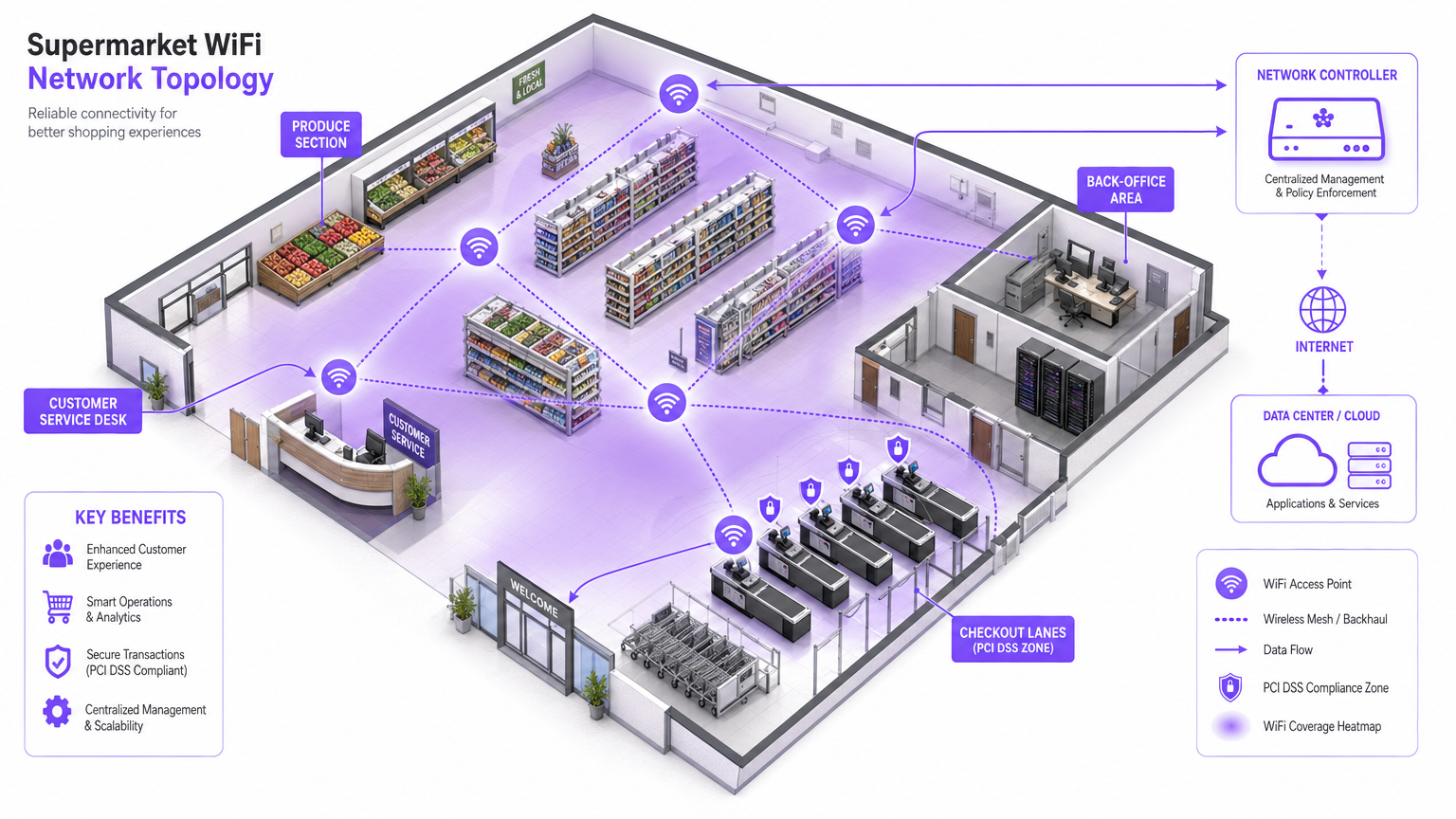
কার্যনির্বাহী সারসংক্ষেপ
IT ম্যানেজার, নেটওয়ার্ক আর্কিটেক্ট এবং ভেন্যু অপারেশনস ডিরেক্টরদের জন্য, সুপারমার্কেট WiFi নিরাপদ কিনা তা কেবল একটি ভোক্তা উদ্বেগ নয় — এটি একটি গুরুত্বপূর্ণ এন্টারপ্রাইজ ঝুঁকি ব্যবস্থাপনার বিষয়। যেহেতু খুচরা পরিবেশ গ্রাহক আকর্ষণ এবং অপারেশনাল দক্ষতা উভয়ের জন্যই ক্রমবর্ধমানভাবে ডিজিটাল সংযোগের উপর নির্ভর করে, তাই অন্তর্নিহিত নেটওয়ার্ক অবকাঠামো অবশ্যই শক্তিশালী, সুরক্ষিত এবং PCI DSS ও GDPR-এর সাথে সঙ্গতিপূর্ণ হতে হবে।
এই নির্দেশিকা সুরক্ষিত ইন-স্টোর WiFi সরবরাহের জন্য প্রয়োজনীয় স্থাপত্যের একটি প্রযুক্তিগত গভীর বিশ্লেষণ প্রদান করে। নির্দিষ্ট হুমকির পরিস্থিতিতে Evil Twin APs, Man-in-the-Middle আক্রমণ এবং রোগ DHCP সার্ভার অন্তর্ভুক্ত। প্রয়োজনীয় প্রশমন স্ট্যাক কঠোর VLAN segmentation, client isolation, WPA3 encryption এবং 802.1X authentication জুড়ে বিস্তৃত। Purple's Guest WiFi -এর মতো প্ল্যাটফর্ম ব্যবহার করে সুরক্ষিত অনবোর্ডিং এবং সম্মতি-গ্রেড সম্মতি সংগ্রহের জন্য, খুচরা বিক্রেতারা তাদের মূল নেটওয়ার্কের অখণ্ডতার সাথে আপস না করে বা পেমেন্ট কার্ড সুরক্ষা মান লঙ্ঘন না করে একটি নির্বিঘ্ন কেনাকাটার অভিজ্ঞতা প্রদান করতে পারে। লক্ষ্য হল মৌলিক সংযোগের বাইরে গিয়ে একটি স্থিতিস্থাপক, বুদ্ধিমান এজ নেটওয়ার্ক তৈরি করা যা পরিমাপযোগ্য ব্যবসায়িক মূল্য তৈরি করে।
প্রযুক্তিগত গভীর বিশ্লেষণ
খুচরা WiFi পরিবেশ উচ্চ ক্লায়েন্ট ঘনত্ব, ক্ষণস্থায়ী ব্যবহারকারীর আচরণ এবং অবিশ্বাসযোগ্য গেস্ট ডিভাইস দ্বারা দখলকৃত একই ভৌত স্থান থেকে পয়েন্ট-অফ-সেল (POS) সিস্টেমগুলিকে রক্ষা করার গুরুত্বপূর্ণ প্রয়োজনের কারণে অনন্যভাবে চ্যালেঞ্জিং। মৌলিক প্রযুক্তিগত চ্যালেঞ্জ হল কর্পোরেট সম্পদ থেকে সম্পূর্ণ যৌক্তিক বিচ্ছিন্নতা বজায় রেখে ঘর্ষণহীন অ্যাক্সেস প্রদান করা।
হুমকির পরিস্থিতি
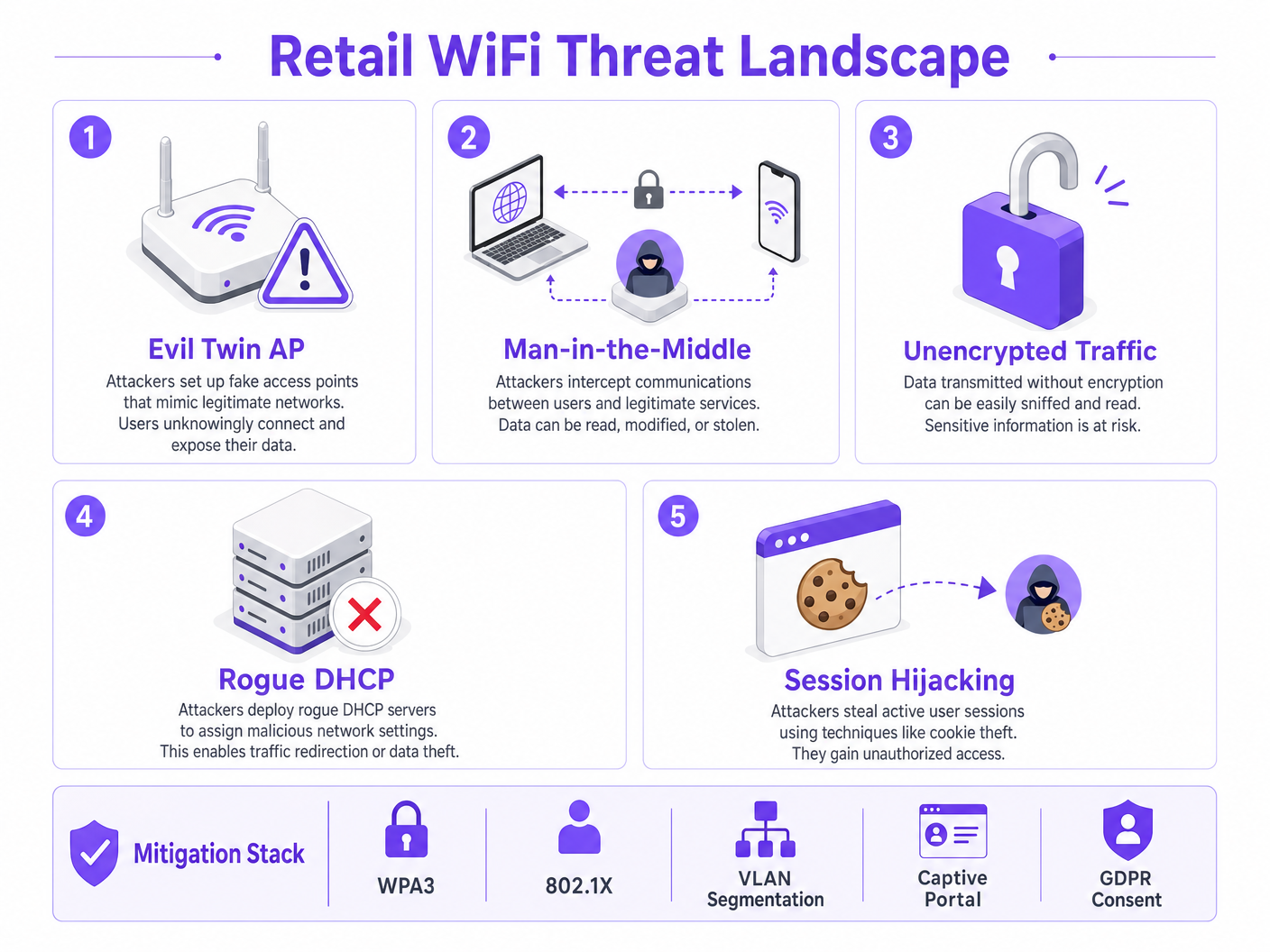
খুচরা নেটওয়ার্কগুলি আক্রমণের বেশ কয়েকটি নির্দিষ্ট ভেক্টরের মুখোমুখি হয় যা তাদের অন্যান্য এন্টারপ্রাইজ পরিবেশ থেকে আলাদা করে।
Evil Twin Access Points সবচেয়ে প্রচলিত এবং বিপজ্জনক হুমকি। আক্রমণকারীরা বৈধ স্টোর SSID — উদাহরণস্বরূপ, Supermarket_Free_WiFi — সম্প্রচার করে এমন রোগ অ্যাক্সেস পয়েন্ট স্থাপন করে, যা বৈধ অবকাঠামোর চেয়ে শক্তিশালী সংকেত সহ। সংরক্ষিত নেটওয়ার্ক প্রোফাইল সহ ক্লায়েন্ট ডিভাইসগুলি স্বয়ংক্রিয়ভাবে সংযুক্ত হয়, যা আক্রমণকারীকে সমস্ত ট্র্যাফিক আটকাতে সক্ষম করে। সুপারমার্কেটের মতো উচ্চ-ফুটফল পরিবেশে, একটি একক রোগ AP মিনিটের মধ্যে শত শত ডিভাইসকে প্রভাবিত করতে পারে।
Man-in-the-Middle (MitM) Attacks Evil Twin স্থাপনা থেকে স্বাভাবিকভাবেই আসে। এনক্রিপ্টবিহীন ওপেন নেটওয়ার্কগুলিতে, আক্রমণকারীরা বৈধ গেস্ট VLAN-এ ARP spoofing ব্যবহার করে ক্লায়েন্ট এবং গেটওয়ের মধ্যে নিজেদের অবস্থান করতে পারে, সেশন কুকিজ এবং শংসাপত্র সহ এনক্রিপ্টবিহীন পেলোডগুলি ক্যাপচার করে।
Rogue DHCP Servers অ্যাক্সেস সুইচগুলিতে ভুলভাবে কনফিগার করা পোর্ট সুরক্ষার সুযোগ নেয়। গেস্ট VLAN-এ প্রবর্তিত একটি দূষিত ডিভাইস বৈধ সার্ভারের চেয়ে দ্রুত DHCP অনুরোধের প্রতিক্রিয়া জানাতে পারে, দূষিত DNS সেটিংস বরাদ্দ করে যা আক্রমণকারী-নিয়ন্ত্রিত অবকাঠামোর মাধ্যমে সমস্ত ওয়েব ট্র্যাফিককে নীরবে পুনঃনির্দেশিত করে।
Session Hijacking এমন পরিষেবাগুলিকে লক্ষ্য করে যা পুরো সেশন জীবনচক্র জুড়ে HTTPS প্রয়োগ করে না। আক্রমণকারীরা প্লেইন টেক্সটে প্রেরিত সেশন কুকিজ ক্যাপচার করে, যা তাদের তৃতীয় পক্ষের পরিষেবাগুলিতে ব্যবহারকারীদের ছদ্মবেশ ধারণ করতে দেয়।
স্থাপত্য এবং মান
এই হুমকিগুলি প্রশমিত করতে, নেটওয়ার্ক স্থাপত্যকে ওয়্যারলেস এজে জিরো-ট্রাস্ট নীতির উপর ভিত্তি করে তৈরি করতে হবে। নিম্নলিখিত মান এবং প্রযুক্তিগুলি একটি দায়িত্বশীল খুচরা WiFi স্থাপনার মূল গঠন করে।
| Standard / Technology | Role in Retail WiFi | Compliance Relevance |
|---|---|---|
| WPA3 (SAE) | ওয়্যারলেস লিঙ্ক এনক্রিপ্ট করে; ফরোয়ার্ড সিক্রেসি প্রদান করে | PCI DSS Req. 4 |
| 802.1X (PNAC) | পোর্ট স্তরে কর্মী এবং POS ডিভাইসগুলিকে প্রমাণীকরণ করে | PCI DSS Req. 8 |
| VLAN Segmentation | Layer 2/3 এ গেস্ট, POS এবং IoT ট্র্যাফিককে বিচ্ছিন্ন করে | PCI DSS Req. 1 |
| Client Isolation | গেস্ট VLAN-এ পিয়ার-টু-পিয়ার আক্রমণ প্রতিরোধ করে | ঝুঁকি প্রশমন |
| Captive Portal (GDPR) | ToS প্রয়োগ করে; ডেটা প্রক্রিয়াকরণের জন্য বৈধ সম্মতি সংগ্রহ করে | GDPR Art. 6, 7 |
| OpenRoaming / Passpoint | এনক্রিপ্ট করা, ঘর্ষণহীন গেস্ট অনবোর্ডিং | গোপনীয়তার সেরা অনুশীলন |
| WIPS | রোগ APs এবং Evil Twins সনাক্ত ও ধারণ করে | PCI DSS Req. 11.2 |
WPA3 Simultaneous Authentication of Equals (SAE) প্রবর্তন করে, যা WPA2-এ ব্যবহৃত Pre-Shared Key (PSK) বিনিময়কে প্রতিস্থাপন করে। এটি ফরোয়ার্ড সিক্রেসি প্রদান করে এবং অফলাইন ডিকশনারি আক্রমণ থেকে রক্ষা করে, যা এমন যেকোনো নেটওয়ার্কের জন্য গুরুত্বপূর্ণ যেখানে পাসফ্রেজ প্রকাশ্যে প্রদর্শিত হতে পারে।
802.1X পোর্ট-ভিত্তিক Network Access Control (PNAC) প্রদান করে। এটি নিশ্চিত করে যে শুধুমাত্র বৈধ শংসাপত্র বা সার্টিফিকেট সহ অনুমোদিত ডিভাইসগুলি সুরক্ষিত কর্পোরেট VLANs অ্যাক্সেস করতে পারে। গেস্ট ডিভাইসগুলির জন্য, যেখানে 802.1X এনরোলমেন্ট অবাস্তব, সেখানে Passpoint (Hotspot 2.0) এবং OpenRoaming একটি সুরক্ষিত, সার্টিফিকেট-ভিত্তিক বিকল্প প্রদান করে। Purple Connect লাইসেন্সের অধীনে OpenRoaming-এর জন্য একটি বিনামূল্যে পরিচয় প্রদানকারী হিসাবে কাজ করে, যা Captive Portal ইন্টারঅ্যাকশন ছাড়াই এনক্রিপ্ট করা, নির্বিঘ্ন অনবোর্ডিং সক্ষম করে।
বাস্তবায়ন নির্দেশিকা
খুচরা দোকানে সুরক্ষিত WiFi স্থাপন করার জন্য কনফিগারেশন এবং নীতি প্রয়োগের জন্য একটি পদ্ধতিগত পদ্ধতির প্রয়োজন। নিম্নলিখিত পদক্ষেপগুলি একটি সঙ্গতিপূর্ণ, সুরক্ষিত স্থাপনার জন্য ন্যূনতম কার্যকর স্থাপত্যকে উপস্থাপন করে।
ধাপ 1: VLAN স্থাপত্য ডিজাইন করুন
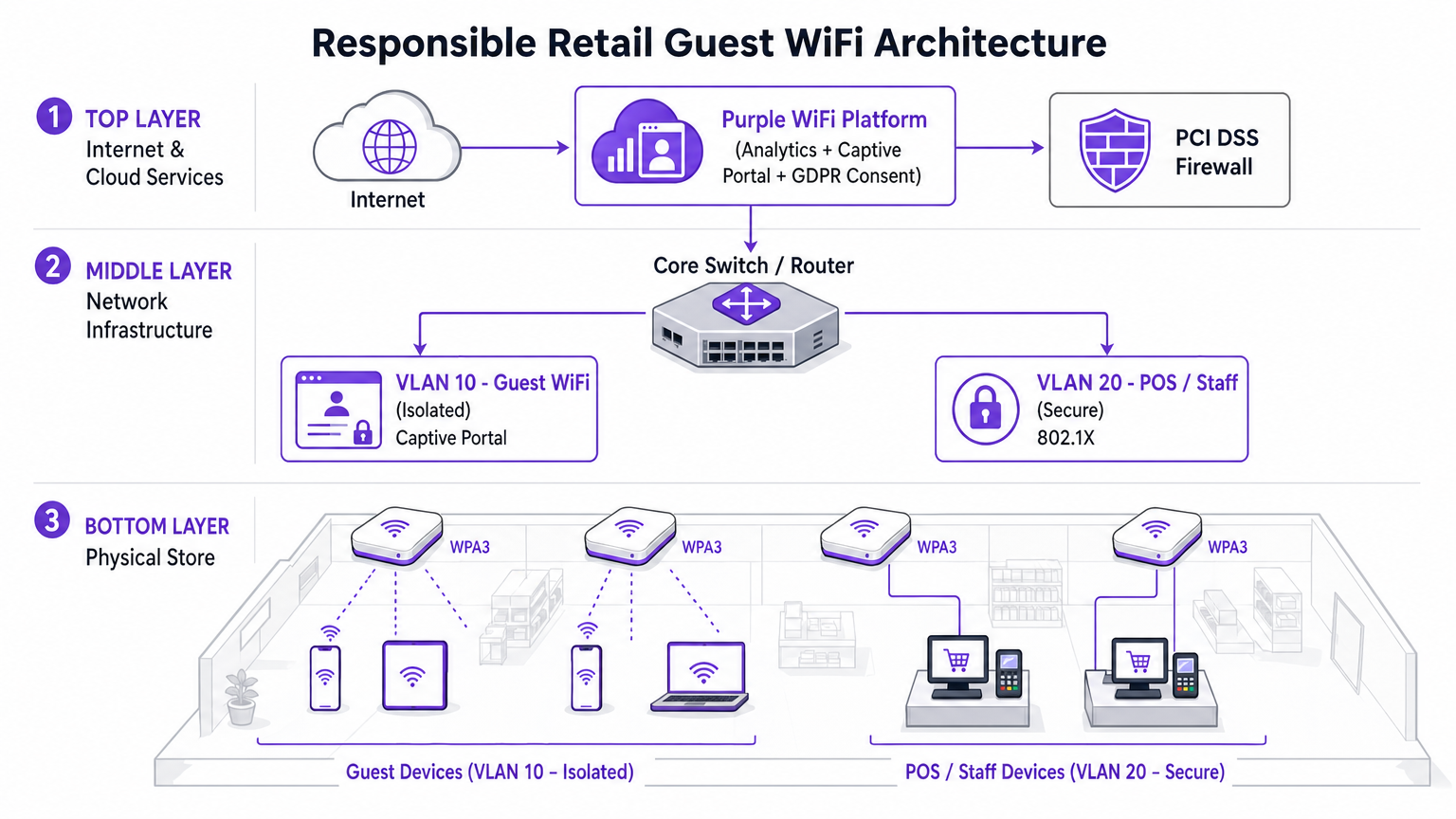
সবচেয়ে গুরুত্বপূর্ণ বাস্তবায়ন সিদ্ধান্ত হল ট্র্যাফিকের ভৌত এবং যৌক্তিক পৃথকীকরণ। একটি আধুনিক সুপারমার্কেটের জন্য তিনটি VLAN হল ন্যূনতম কার্যকর কনফিগারেশন।
- VLAN 10 (Guest WiFi): কঠোরভাবে বিচ্ছিন্ন। শুধুমাত্র ইন্টারনেট গেটওয়েতে ডিফল্ট রুট। কোনো RFC 1918 ব্যক্তিগত ঠিকানা স্পেসে কোনো রুট নেই। AP স্তরে ক্লায়েন্ট আইসোলেশন সক্ষম করা হয়েছে।
- VLAN 20 (POS / Staff): সংবেদনশীল লেনদেন ডেটা পরিচালনা করে। 802.1X প্রমাণীকরণ প্রয়োজন। কঠোর ইনগ্রেস/ইগ্রেস ACLs শুধুমাত্র প্রয়োজনীয় ট্র্যাফিককে পেমেন্ট gaগেটওয়ে। এই VLAN PCI DSS কার্ডহোল্ডার ডেটা এনভায়রনমেন্ট (CDE) এর পরিধি নির্ধারণ করে।
- VLAN 30 (IoT / অপারেশনস): ডিজিটাল সাইনেজ, ইলেকট্রনিক শেল্ফ লেবেল (ESLs), তাপমাত্রা সেন্সর। অতিথি এবং POS VLAN উভয় থেকে বিচ্ছিন্ন।
ধাপ 2: অতিথি SSID-এ ক্লায়েন্ট আইসোলেশন সক্ষম করুন
ক্লায়েন্ট আইসোলেশন — যা AP আইসোলেশন বা স্টেশন আইসোলেশন নামেও পরিচিত — একই AP বা VLAN-এর সাথে সংযুক্ত ডিভাইসগুলিকে একে অপরের সাথে সরাসরি যোগাযোগ করা থেকে বিরত রাখে। এন্টারপ্রাইজ ওয়্যারলেস কন্ট্রোলারের প্রতিটি ক্ষেত্রে উপলব্ধ এই একক কনফিগারেশন পরিবর্তন, বেশিরভাগ পিয়ার-টু-পিয়ার আক্রমণ, ARP স্পুফিং প্রচেষ্টা এবং অতিথি নেটওয়ার্কে পার্শ্বীয় গতিবিধিকে নিষ্ক্রিয় করে। একটি খুচরা পরিবেশে অতিথি ক্লায়েন্টদের একে অপরের সাথে যোগাযোগ করার জন্য কোনো বৈধ ব্যবহারিক ক্ষেত্র নেই। এটি অবশ্যই সক্ষম করতে হবে।
ধাপ 3: একটি অনুগত Captive Portal স্থাপন করুন
Captive Portal হল নীতি এবং সম্মতির প্রয়োগের স্থান। এটি কেবল একটি স্প্ল্যাশ পেজ নয়। Purple WiFi Analytics প্ল্যাটফর্মের সাথে একত্রিত হয়ে, নেটওয়ার্ক অ্যাক্সেস দেওয়ার আগে পোর্টালটি GDPR-সম্মত সম্মতি গ্রহণ এবং পরিষেবার শর্তাবলী প্রয়োগ করে। এই স্তরটি নেটওয়ার্কে ব্যবহারকারীর আচরণের সাথে সম্পর্কিত দায় থেকে ভেন্যু অপারেটরকে রক্ষা করে। প্ল্যাটফর্মটি ব্যান্ডউইথ থ্রটলিং এবং সেশন টাইম লিমিটও সক্ষম করে, যা কোনো একক ব্যবহারকারীকে অন্যদের অভিজ্ঞতা নষ্ট করা থেকে বিরত রাখে।
ধাপ 4: রোগ AP সনাক্তকরণ কনফিগার করুন
আপনার এন্টারপ্রাইজ ওয়্যারলেস কন্ট্রোলারের ওয়্যারলেস ইন্ট্রুশন প্রিভেনশন সিস্টেম (WIPS) ক্ষমতাগুলি সক্ষম করুন। স্পুফড SSID-গুলির স্বয়ংক্রিয় নিয়ন্ত্রণ কনফিগার করুন। একটি ইভিল টুইন AP সনাক্ত করার পর, বৈধ অবকাঠামো রোগ AP-এর MAC ঠিকানা স্পুফ করে ডি-অথেন্টিকেশন ফ্রেম প্রেরণ করে, যা ক্লায়েন্ট ডিভাইসগুলিকে সংযোগ বিচ্ছিন্ন করতে বাধ্য করে। এটি স্বয়ংক্রিয়ভাবে হুমকিকে নিষ্ক্রিয় করে যখন নিরাপত্তা কর্মীরা শারীরিক ডিভাইসটি সনাক্ত করে।
ধাপ 5: অতিথি VLAN-এ DNS ফিল্টারিং প্রয়োগ করুন
VLAN 10-এ DNS-স্তর নিরাপত্তা প্রয়োগ করুন যাতে পরিচিত দূষিত ডোমেন, ম্যালওয়্যার কমান্ড-এন্ড-কন্ট্রোল সার্ভার এবং গ্রহণযোগ্য ব্যবহার নীতি লঙ্ঘনকারী বিষয়বস্তু বিভাগগুলিতে অ্যাক্সেস ব্লক করা যায়। এটি ব্যবহারকারীদের দূষিত পুনঃনির্দেশ থেকে রক্ষা করে এবং এর নেটওয়ার্কে অ্যাক্সেস করা বিষয়বস্তুর জন্য ভেন্যুর দায়বদ্ধতা হ্রাস করে।
সর্বোত্তম অনুশীলন
নিম্নলিখিত শিল্প-মান সুপারিশগুলি এন্টারপ্রাইজ স্কেলে স্টোর WiFi-এর যেকোনো স্থাপনার ক্ষেত্রে প্রযোজ্য।
কোর-এ কঠোর ইন্টার-VLAN ACL প্রয়োগ করুন। শুধুমাত্র VLAN বিভাজনের উপর নির্ভর করবেন না। রাউটিং স্তরে অতিথি সাবনেট থেকে সমস্ত ব্যক্তিগত ঠিকানা রেঞ্জে সমস্ত ট্র্যাফিক স্পষ্টভাবে অস্বীকার করুন। একটি ভুল কনফিগার করা রুট নীরবে VLAN গুলিকে সংযুক্ত করতে পারে।
একটি সুশৃঙ্খল ফার্মওয়্যার প্যাচিং সময়সূচী বজায় রাখুন। অ্যাক্সেস পয়েন্টগুলি হল পাবলিক এয়ারস্পেসের সংস্পর্শে থাকা প্রান্তিক ডিভাইস। KRACK (Key Reinstallation Attack) দুর্বলতা দেখিয়েছে যে ফার্মওয়্যার-স্তরের দুর্বলতার মাধ্যমে WPA2-ও আপস করা যেতে পারে। একটি গুরুত্বপূর্ণ CVE প্রকাশের 30 দিনের মধ্যে প্যাচ করুন।
দায়িত্বশীলভাবে অ্যানালিটিক্স ব্যবহার করুন। WiFi Analytics প্ল্যাটফর্মটি থাকার সময়, ফুটফল প্যাটার্ন এবং গ্রাহক যাত্রার ম্যাপিং সম্পর্কে শক্তিশালী অন্তর্দৃষ্টি প্রদান করে। নিশ্চিত করুন যে অ্যানালিটিক্স পাইপলাইন GDPR এবং ব্যক্তিগত ডেটা হিসাবে ডিভাইস শনাক্তকারী সম্পর্কিত ICO-এর নির্দেশিকা মেনে MAC ঠিকানাগুলিকে বেনামী করে।
অতিথি নেটওয়ার্ককে অবিশ্বস্ত বাহ্যিক ট্র্যাফিক হিসাবে বিবেচনা করুন। মানসিক মডেলটি হওয়া উচিত: অতিথি VLAN হল ইন্টারনেট। এখান থেকে উদ্ভূত যেকোনো ট্র্যাফিককে একটি অজানা বাহ্যিক IP ঠিকানা থেকে আগত ট্র্যাফিকের মতোই সন্দেহের সাথে বিবেচনা করা উচিত।
সংলগ্ন সেক্টরগুলিতে এই নীতিগুলি কীভাবে প্রযোজ্য হয় সে সম্পর্কে জানতে, হাসপাতালগুলিতে WiFi: নিরাপদ ক্লিনিকাল নেটওয়ার্কগুলির জন্য একটি নির্দেশিকা সম্পর্কিত আমাদের নির্দেশিকা দেখুন, যা উচ্চ-ঝুঁকির পরিবেশে অনুরূপ বিভাজন চ্যালেঞ্জগুলি মোকাবেলা করে।
সমস্যা সমাধান ও ঝুঁকি প্রশমন
ইন-স্টোর WiFi স্থাপন বা নিরীক্ষণের সময়, বেশ কয়েকটি সাধারণ ব্যর্থতার মোড নিরাপত্তা বা কর্মক্ষমতাকে আপস করতে পারে।
ব্যর্থতার মোড: অতিথি VLAN-এ অ্যাসিমেট্রিক রাউটিং। যদি কোর সুইচে অতিথি VLAN সঠিকভাবে বিচ্ছিন্ন না হয়, তাহলে ট্র্যাফিক অনিচ্ছাকৃতভাবে কর্পোরেট ফায়ারওয়ালের মাধ্যমে রুট হতে পারে, যার ফলে স্টেটফুল ইন্সপেকশন ব্যর্থতা ঘটে এবং অভ্যন্তরীণ রুটগুলি অতিথি ডিভাইসগুলির কাছে উন্মুক্ত হয়। প্রশমন: এজ ফায়ারওয়ালে অতিথি ট্র্যাফিকের জন্য একটি ডেডিকেটেড ফিজিক্যাল বা লজিক্যাল ইন্টারফেস প্রয়োগ করুন, অথবা সম্পূর্ণ রাউটিং টেবিল বিভাজন বজায় রাখতে VRF (ভার্চুয়াল রাউটিং এবং ফরওয়ার্ডিং) ব্যবহার করুন।
ব্যর্থতার মোড: DNS টানেলিংয়ের মাধ্যমে Captive Portal বাইপাস। উন্নত ব্যবহারকারীরা তাদের নিয়ন্ত্রিত একটি বাহ্যিক রিজলভারে DNS কোয়েরির মধ্যে HTTP ট্র্যাফিক এনকোড করে Captive Portal বাইপাস করতে পারে। প্রশমন: কঠোর ওয়াল্ড গার্ডেন কনফিগারেশন প্রয়োগ করুন। প্রমাণীকরণের আগে শুধুমাত্র অনুমোদিত বাহ্যিক রিজলভারগুলিতে DNS ট্র্যাফিক অনুমতি দিন। টানেল করা ট্র্যাফিক সনাক্ত করতে এবং বাদ দিতে ডিপ প্যাকেট ইন্সপেকশন (DPI) প্রয়োগ করুন।
ব্যর্থতার মোড: MAC ঠিকানা স্পুফিং। আক্রমণকারীরা Captive Portal বাইপাস করতে একটি প্রমাণীকৃত ডিভাইসের MAC ঠিকানা ক্লোন করতে পারে। প্রশমন: MAC ঠিকানা এবং IP ঠিকানা উভয় ক্ষেত্রেই সেশন বাইন্ডিং প্রয়োগ করুন। ঠিকানা দ্বন্দ্ব সনাক্ত করতে DHCP স্নুপিং সক্ষম করুন। শোষণের উইন্ডো সীমিত করতে সংক্ষিপ্ত সেশন টাইমআউট সেট করুন।
ব্যর্থতার মোড: ডাবল ট্যাগিংয়ের মাধ্যমে VLAN হপিং। ভুল কনফিগার করা ট্রাঙ্ক পোর্টগুলিতে, একজন আক্রমণকারী একটি ভিন্ন VLAN-এ ট্র্যাফিক ইনজেক্ট করার জন্য ডাবল-ট্যাগ করা 802.1Q ফ্রেম তৈরি করতে পারে। প্রশমন: নিশ্চিত করুন যে সমস্ত অ্যাক্সেস পোর্ট স্পষ্টভাবে একটি নন-নেটিভ VLAN-এ বরাদ্দ করা হয়েছে। সমস্ত অ্যাক্সেস-ফেসিং সুইচ পোর্টে DTP (ডাইনামিক ট্রাঙ্কিং প্রোটোকল) অক্ষম করুন।
ROI এবং ব্যবসায়িক প্রভাব
নিরাপদ, এন্টারপ্রাইজ-গ্রেড WiFi আর্কিটেকচারে বিনিয়োগ পরিমাপযোগ্য ব্যবসায়িক মূল্য প্রদান করে যা ঝুঁকি প্রশমনের বাইরেও প্রসারিত।
PCI DSS সম্মতি খরচ হ্রাস। সঠিক VLAN বিভাজন PCI DSS কার্ডহোল্ডার ডেটা এনভায়রনমেন্টের পরিধি হ্রাস করে। একটি ছোট CDE পরিধির অর্থ হল নিরীক্ষণের জন্য কম সিস্টেম, প্রমাণ করার জন্য কম নিয়ন্ত্রণ এবং উল্লেখযোগ্যভাবে হ্রাসকৃত QSA (Qualified Security Assessor) ফি। 200-অবস্থানের খুচরা চেইন এর জন্যএতে, বার্ষিক অডিট চক্রে দশ হাজার পাউন্ড সাশ্রয় হতে পারে।
ফার্স্ট-পার্টি ডেটা সংগ্রহ। একটি সুরক্ষিত, ব্র্যান্ডেড Captive Portal মার্কেটিং ডেটাবেসের জন্য উচ্চ অপ্ট-ইন হার বাড়ায়। যেসব ক্রেতা একটি সুপরিকল্পিত, নির্ভরযোগ্য গেস্ট WiFi অভিজ্ঞতার সাথে সংযুক্ত হন, তারা মার্কেটিং যোগাযোগে সম্মতি দিতে উল্লেখযোগ্যভাবে বেশি আগ্রহী হন। এই ফার্স্ট-পার্টি ডেটা ক্রমশ মূল্যবান হয়ে উঠছে কারণ থার্ড-পার্টি কুকি অবলুপ্তি ডিজিটাল বিজ্ঞাপনের কার্যকারিতা হ্রাস করে। অবস্থানগত বুদ্ধিমত্তার মূল্য সম্পর্কে আরও জানতে, আমাদের ইনডোর পজিশনিং সিস্টেম: UWB, BLE, ও WiFi গাইড দেখুন।
ব্র্যান্ড সুরক্ষা। গেস্ট নেটওয়ার্ক থেকে উদ্ভূত একটি উচ্চ-প্রোফাইল ডেটা লঙ্ঘনের সুনামগত খরচ সুরক্ষিত অবকাঠামোতে বিনিয়োগের চেয়ে অনেক বেশি। একটি একক ঘটনা GDPR (বৈশ্বিক বার্ষিক টার্নওভারের ৪% পর্যন্ত) এর অধীনে ICO জরিমানা, ক্লাস অ্যাকশন মামলা, এবং ভোক্তা আস্থার দীর্ঘস্থায়ী ক্ষতির কারণ হতে পারে।
অপারেশনাল ইন্টেলিজেন্স। গেস্ট নেটওয়ার্ক থেকে প্রাপ্ত WiFi অ্যানালিটিক্স ডেটা ফুটফল প্যাটার্ন, স্টোর জোন অনুসারে থাকার সময় এবং পিক ট্র্যাফিক পিরিয়ড সম্পর্কে কার্যকর অন্তর্দৃষ্টি প্রদান করে। এই ডেটা সরাসরি কর্মী নিয়োগের সিদ্ধান্ত, স্টোর লেআউট অপ্টিমাইজেশন এবং প্রচারমূলক সময় নির্ধারণে সহায়তা করে — একই অবকাঠামো বিনিয়োগ থেকে পরিমাপযোগ্য ROI প্রদান করে।
শুনুন: রিটেইল WiFi সুরক্ষায় এক্সিকিউটিভ ব্রিফিং
সম্পর্কিত পঠন: বিশ্ববিদ্যালয়ের WiFi কি নিরাপদ? শিক্ষার্থীদের জন্য একটি গাইড | হাসপাতালগুলিতে WiFi: সুরক্ষিত ক্লিনিক্যাল নেটওয়ার্কের জন্য একটি গাইড | এন্টারপ্রাইজ ইন-কার Wi-Fi সমাধানের জন্য আপনার গাইড
তথ্যসূত্র
[১] IEEE 802.11-2020 — IEEE স্ট্যান্ডার্ড ফর ইনফরমেশন টেকনোলজি — ওয়্যারলেস ল্যান মিডিয়াম অ্যাক্সেস কন্ট্রোল অ্যান্ড ফিজিক্যাল লেয়ার স্পেসিফিকেশন। [২] PCI সিকিউরিটি স্ট্যান্ডার্ডস কাউন্সিল — PCI DSS v4.0, রিকোয়ারমেন্টস ১, ৪, ৮, এবং ১১। [৩] ইউকে ইনফরমেশন কমিশনারস অফিস — ইউকে GDPR এর অধীনে ব্যক্তিগত ডেটা হিসাবে ডিভাইস আইডেন্টিফায়ার ব্যবহারের নির্দেশিকা। [৪] Wi-Fi অ্যালায়েন্স — WPA3 স্পেসিফিকেশন v3.0।
মূল শব্দ ও সংজ্ঞা
Client Isolation
A wireless network feature that prevents devices connected to the same Access Point or VLAN from communicating directly with each other. All traffic must traverse the AP and be routed through the upstream gateway.
The single most impactful security control for guest networks. Prevents peer-to-peer attacks, ARP spoofing, lateral movement, and malware propagation between shopper devices. Must be enabled on all guest SSIDs.
VLAN Segmentation
The practice of dividing a physical network into multiple logical networks (Virtual LANs) at Layer 2, with routing between them controlled by ACLs at Layer 3.
Essential for separating untrusted guest traffic from sensitive POS and corporate data. The primary mechanism for reducing PCI DSS audit scope in retail environments.
Evil Twin AP
A rogue wireless access point that broadcasts the same SSID as a legitimate network, typically with a stronger signal, to trick client devices into automatically associating with it.
The primary wireless threat in high-footfall retail environments. Mitigated by deploying WIPS capabilities to detect and contain spoofed SSIDs automatically.
Captive Portal
A web page that intercepts all HTTP/HTTPS traffic from a newly connected device and requires the user to complete an action — accepting Terms of Service, authenticating, or providing consent — before granting full network access.
The enforcement point for GDPR compliance, acceptable use policy, and first-party data capture in guest WiFi deployments. Not a security boundary — a policy and compliance layer.
802.1X (PNAC)
An IEEE standard for port-based Network Access Control that provides an authentication mechanism for devices attempting to connect to a LAN or WLAN, using an authentication server (typically RADIUS) to validate credentials or certificates.
The standard for securing staff and POS device access in retail. Ensures only authorized, enrolled devices can access the secure corporate VLANs, regardless of physical port.
OpenRoaming
A Wi-Fi Alliance roaming federation service that allows user devices to automatically and securely authenticate to participating Wi-Fi networks using device certificates, without captive portals or manual password entry.
The emerging standard for frictionless, encrypted guest onboarding. Purple acts as a free identity provider for OpenRoaming under the Connect license, enabling retailers to offer seamless connectivity without sacrificing security.
WPA3 (SAE)
The third generation of Wi-Fi Protected Access, introducing Simultaneous Authentication of Equals (SAE) to replace the Pre-Shared Key (PSK) handshake. Provides forward secrecy and resistance to offline dictionary attacks.
Mandatory for new retail WiFi deployments. Particularly important in environments where the network passphrase may be publicly displayed, as SAE prevents retroactive decryption of captured traffic.
PCI DSS
Payment Card Industry Data Security Standard — a set of security requirements for all organisations that accept, process, store, or transmit payment card data. Defines the Cardholder Data Environment (CDE) and mandates strict network segmentation.
The primary regulatory driver for strict VLAN segmentation in retail. Mixing guest and POS traffic on the same network segment is a direct violation of PCI DSS Requirement 1 and can result in significant fines and loss of card processing privileges.
Dynamic ARP Inspection (DAI)
A security feature on managed switches that validates ARP packets against a DHCP snooping binding database, dropping any ARP reply that does not match the legitimate IP-to-MAC binding.
The Layer 2 control that prevents ARP spoofing attacks on the guest VLAN. Works in conjunction with DHCP Snooping to maintain an accurate binding table.
কেস স্টাডিজ
A national retail chain with 200 locations is upgrading its network infrastructure. They currently operate a single flat network for POS terminals, staff devices, and a WPA2 password-protected guest SSID. The password is printed on customer receipts. They need to achieve PCI DSS v4.0 compliance within the next two quarters while improving the guest experience. How should the architecture be redesigned?
The network must be redesigned around strict VLAN segmentation and a compliant guest onboarding flow.
VLAN Architecture: Create VLAN 10 for Guest Access (isolated, internet-only route), VLAN 20 for POS and payment terminals (802.1X authenticated, strict ACLs to payment gateway IPs only), and VLAN 30 for staff and back-office devices.
Guest SSID: Migrate from WPA2-PSK to an open SSID with a captive portal. Enable client isolation at the AP level immediately. This removes the false security of a publicly displayed password and eliminates peer-to-peer attack vectors.
Captive Portal: Deploy the Purple platform as the captive portal layer. Configure GDPR-compliant consent capture, Terms of Service enforcement, and bandwidth throttling (e.g., 5 Mbps per device, 60-minute session timeout).
POS Segmentation: Migrate all POS terminals to VLAN 20. Implement 802.1X with device certificates. Apply ACLs at the core switch denying all traffic from VLAN 10 to VLAN 20 and VLAN 30.
Monitoring: Enable WIPS on all wireless controllers. Configure automatic containment of spoofed SSIDs. Integrate controller logs with the central SIEM for real-time alerting.
A large supermarket's NOC receives alerts showing a high volume of ARP broadcast traffic and anomalous DNS requests originating from several MAC addresses on the guest VLAN. Guest WiFi performance is degraded. A packet capture shows ARP replies claiming the gateway IP belongs to a device that is not the legitimate gateway. What is the likely attack and the immediate remediation steps?
The symptoms are consistent with an ARP spoofing / Man-in-the-Middle attack on the guest VLAN. The attacker has introduced a device onto the guest network and is broadcasting gratuitous ARP replies claiming ownership of the gateway IP, redirecting guest traffic through their device.
Immediate Remediation:
- Verify that Client Isolation is enabled on the guest SSID. If disabled, enable it immediately — this is the most effective single control.
- Enable Dynamic ARP Inspection (DAI) on the access switches for the guest VLAN. DAI validates ARP packets against the DHCP snooping binding database, dropping any ARP reply that does not match the legitimate IP-to-MAC binding.
- Enable DHCP Snooping on the guest VLAN to build the binding database that DAI relies on.
- Identify and blacklist the attacker's MAC address at the wireless controller level to terminate their connection.
- Force a DHCP lease renewal for all guest clients to flush any poisoned ARP caches.
- Review WIPS logs to determine whether the attacker connected via the legitimate SSID or an Evil Twin.
দৃশ্যপট বিশ্লেষণ
Q1. You are auditing a newly deployed supermarket network. The configuration shows the guest SSID is on VLAN 50 and POS terminals are on VLAN 60. However, a ping from a device on VLAN 50 successfully reaches a POS terminal on VLAN 60. The network team insists the VLANs are correctly configured. What is the most likely architectural failure and how do you remediate it?
💡 ইঙ্গিত:VLANs separate traffic at Layer 2. Think about where routing between subnets happens and what controls should exist there.
প্রস্তাবিত পদ্ধতি দেখুন
The VLANs are correctly configured at Layer 2, but inter-VLAN routing is enabled at the core switch or firewall without restrictive ACLs. Traffic is being routed between the subnets because no ACL explicitly denies it. Remediation: Apply an outbound ACL on the VLAN 50 (guest) interface at the routing layer, explicitly denying all traffic destined for any RFC 1918 private address range (10.0.0.0/8, 172.16.0.0/12, 192.168.0.0/16), with a permit statement for the default route to the internet only. Verify with a packet capture that no inter-VLAN traffic traverses the firewall after the ACL is applied.
Q2. A retail client's CTO wants to remove the captive portal entirely to reduce friction for shoppers, proposing a completely open network with no authentication or Terms of Service. What are the three most significant risks you must communicate, and what is the recommended alternative that preserves the frictionless experience?
💡 ইঙ্গিত:Consider technical security, legal liability under UK GDPR, and the commercial value being lost.
প্রস্তাবিত পদ্ধতি দেখুন
- Legal Liability: Without a Terms of Service, the venue assumes liability for illegal activities (e.g., copyright infringement, accessing prohibited content) performed on their network. The captive portal is the legal instrument that transfers responsibility to the user. 2. GDPR Compliance: Removing the portal eliminates the consent capture mechanism. Any analytics or marketing data derived from network usage without a lawful basis under GDPR Article 6 exposes the organisation to ICO enforcement. 3. Commercial Value: The captive portal is the primary mechanism for first-party data acquisition — email addresses, demographic data, and marketing opt-ins. Removing it destroys this revenue-generating capability. Recommended Alternative: Deploy OpenRoaming via the Purple Connect license. This provides completely frictionless, encrypted onboarding for users with compatible devices, while maintaining a lightweight captive portal for non-OpenRoaming devices that still captures consent.
Q3. Your WIPS alerts you to a rogue AP broadcasting the store's exact SSID with a signal strength 15 dBm stronger than your legitimate APs near the main entrance. Staff report that several customers are complaining their phones 'won't load anything' after connecting to the WiFi. What is happening and what is the correct automated response you should have pre-configured?
💡 ইঙ্গিত:Consider both the attack mechanism and the over-the-air countermeasure available to enterprise wireless controllers.
প্রস্তাবিত পদ্ধতি দেখুন
An Evil Twin AP has been deployed near the entrance with a boosted signal to force client devices to prefer it over the legitimate infrastructure. The customers experiencing connectivity failures are connected to the rogue AP, which is either not providing internet access (a passive credential harvesting setup) or is actively intercepting and failing to forward traffic. The correct automated response is WIPS-based containment: the legitimate wireless controllers should be configured to automatically transmit de-authentication (deauth) frames spoofing the MAC address of the rogue AP. This forces any device attempting to associate with the Evil Twin to immediately disconnect, effectively neutralising the attack over the air. Simultaneously, the NOC alert should trigger a physical security response to locate and remove the rogue device. Note: automated deauth containment should be carefully scoped to avoid accidentally deauthenticating clients from legitimate neighbouring networks.




