

Il WiFi del Supermercato è Sicuro? Una Guida per gli Acquirenti
Questa guida autorevole esamina le realtà tecniche della sicurezza del WiFi nei supermercati, fornendo architetture e strategie di sicurezza attuabili per i leader IT nel settore della vendita al dettaglio. Dettaglia il panorama delle minacce — dagli Evil Twin APs agli attacchi Man-in-the-Middle — insieme allo stack di mitigazione richiesto per proteggere i consumatori e le operazioni aziendali. I rivenditori e gli operatori di locali troveranno indicazioni concrete sull'implementazione che coprono la segmentazione VLAN, l'isolamento dei client, WPA3, la conformità PCI DSS e l'onboarding degli ospiti conforme al GDPR tramite piattaforme come Purple.
🎧 Ascolta questa guida
Visualizza trascrizione
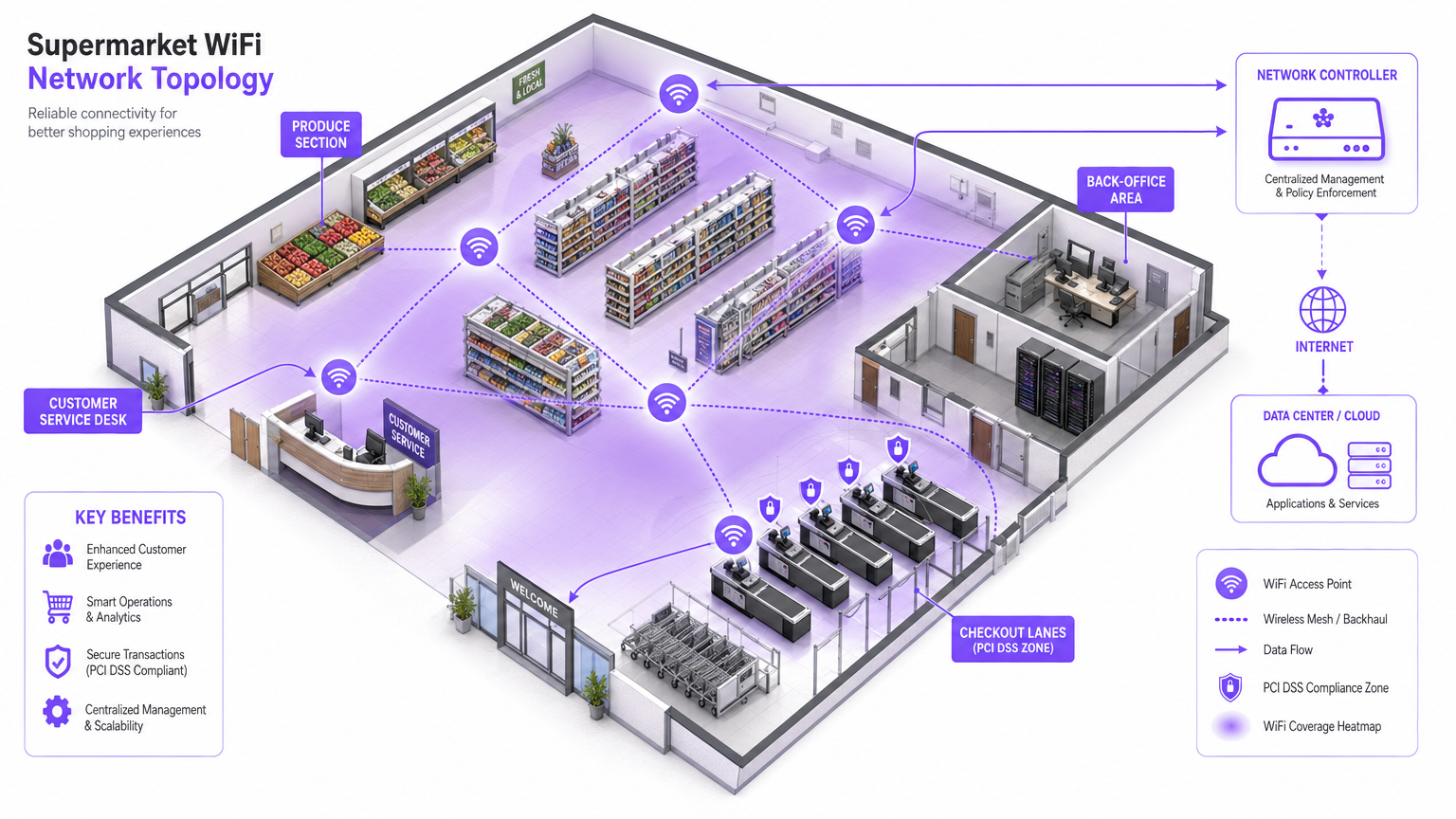
Riepilogo Esecutivo
Per i responsabili IT, gli architetti di rete e i direttori delle operazioni dei locali, la questione se il WiFi del supermercato sia sicuro non è solo una preoccupazione del consumatore — è una questione critica di gestione del rischio aziendale. Poiché gli ambienti di vendita al dettaglio si affidano sempre più alla connettività digitale sia per il coinvolgimento dei clienti che per l'efficienza operativa, l'infrastruttura di rete sottostante deve essere robusta, sicura e conforme a PCI DSS e GDPR.
Questa guida fornisce un'analisi tecnica approfondita dell'architettura necessaria per fornire un WiFi sicuro all'interno del negozio. Il panorama specifico delle minacce include Evil Twin APs, attacchi Man-in-the-Middle e server DHCP non autorizzati. Lo stack di mitigazione necessario comprende una rigorosa segmentazione VLAN, l'isolamento dei client, la crittografia WPA3 e l'autenticazione 802.1X. Sfruttando piattaforme come il Guest WiFi di Purple per un onboarding sicuro e l'acquisizione del consenso conforme, i rivenditori possono offrire un'esperienza di acquisto senza interruzioni senza compromettere l'integrità delle loro reti principali o violare gli standard di sicurezza delle carte di pagamento. L'obiettivo è andare oltre la connettività di base e progettare una rete edge resiliente e intelligente che generi un valore aziendale misurabile.
Approfondimento Tecnico
L'ambiente WiFi della vendita al dettaglio è particolarmente impegnativo a causa dell'elevata densità di client, del comportamento transitorio degli utenti e della necessità critica di proteggere i sistemi POS (point-of-sale) dallo stesso spazio fisico occupato da dispositivi guest non attendibili. La sfida tecnica fondamentale è fornire un accesso senza attriti mantenendo un isolamento logico assoluto dagli asset aziendali.
Il Panorama delle Minacce
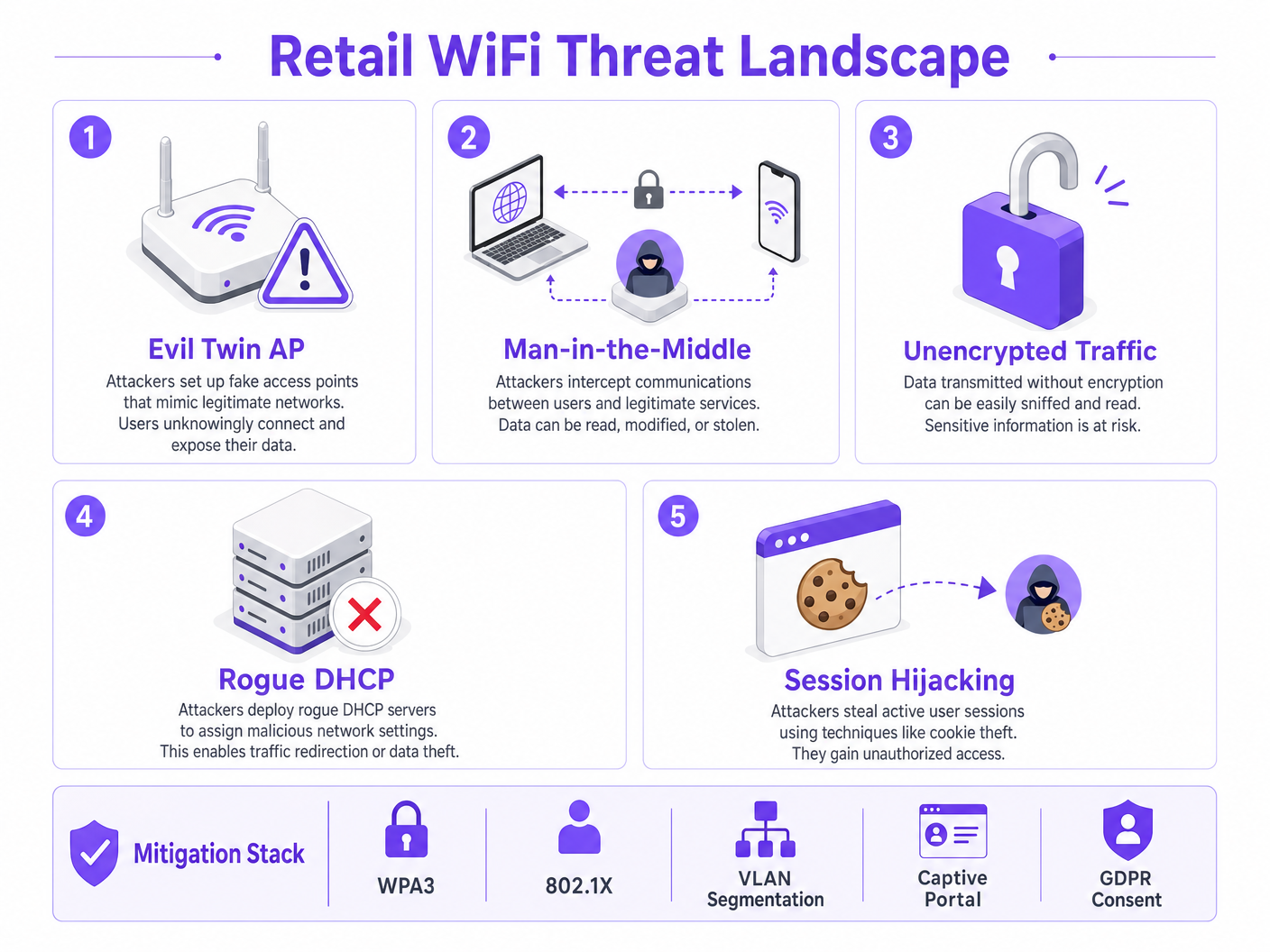
Le reti di vendita al dettaglio affrontano diversi vettori di attacco specifici che le distinguono da altri ambienti aziendali.
Gli Evil Twin Access Points rappresentano la minaccia più diffusa e pericolosa. Gli attaccanti distribuiscono access point non autorizzati che trasmettono l'SSID legittimo del negozio — ad esempio, Supermarket_Free_WiFi — con un segnale più forte rispetto all'infrastruttura legittima. I dispositivi client con profili di rete salvati si associano automaticamente, consentendo all'attaccante di intercettare tutto il traffico. In un ambiente ad alto traffico come un supermercato, un singolo AP non autorizzato può influenzare centinaia di dispositivi in pochi minuti.
Gli attacchi Man-in-the-Middle (MitM) derivano naturalmente dalle implementazioni Evil Twin. Su reti aperte non crittografate, gli attaccanti possono anche utilizzare lo spoofing ARP sulla VLAN guest legittima per posizionarsi tra il client e il gateway, catturando payload non crittografati inclusi cookie di sessione e credenziali.
I server DHCP non autorizzati sfruttano la sicurezza delle porte mal configurata sugli switch di accesso. Un dispositivo dannoso introdotto sulla VLAN guest può rispondere alle richieste DHCP più velocemente del server legittimo, assegnando impostazioni DNS dannose che reindirizzano silenziosamente tutto il traffico web attraverso l'infrastruttura controllata dall'attaccante.
Il dirottamento di sessione (Session Hijacking) prende di mira i servizi che non impongono HTTPS per l'intero ciclo di vita della sessione. Gli attaccanti catturano i cookie di sessione trasmessi in chiaro, consentendo loro di impersonare gli utenti su servizi di terze parti.
Architettura e Standard
Per mitigare queste minacce, l'architettura di rete deve essere costruita su una base di principi zero-trust all'edge wireless. I seguenti standard e tecnologie costituiscono il nucleo di una distribuzione WiFi responsabile nel settore della vendita al dettaglio.
| Standard / Tecnologia | Ruolo nel WiFi al Dettaglio | Rilevanza per la Conformità |
|---|---|---|
| WPA3 (SAE) | Crittografa il collegamento wireless; fornisce forward secrecy | PCI DSS Req. 4 |
| 802.1X (PNAC) | Autentica il personale e i dispositivi POS a livello di porta | PCI DSS Req. 8 |
| Segmentazione VLAN | Isola il traffico guest, POS e IoT a Livello 2/3 | PCI DSS Req. 1 |
| Isolamento Client | Previene attacchi peer-to-peer sulla VLAN guest | Mitigazione del Rischio |
| Captive Portal (GDPR) | Applica i ToS; acquisisce il consenso legale per il trattamento dei dati | GDPR Art. 6, 7 |
| OpenRoaming / Passpoint | Onboarding guest crittografato e senza attriti | Best Practice sulla Privacy |
| WIPS | Rileva e contiene AP non autorizzati ed Evil Twins | PCI DSS Req. 11.2 |
WPA3 introduce la Simultaneous Authentication of Equals (SAE), sostituendo lo scambio di Pre-Shared Key (PSK) utilizzato in WPA2. Questo fornisce forward secrecy e protegge dagli attacchi a dizionario offline, il che è fondamentale per qualsiasi rete in cui la passphrase potrebbe essere visualizzata pubblicamente.
802.1X fornisce il Network Access Control (PNAC) basato su porta. Assicura che solo i dispositivi autorizzati con credenziali o certificati validi possano accedere alle VLAN aziendali sicure. Per i dispositivi guest, dove l'iscrizione 802.1X è impraticabile, Passpoint (Hotspot 2.0) e OpenRoaming forniscono un'alternativa sicura basata su certificati. Purple agisce come fornitore di identità gratuito per OpenRoaming con la licenza Connect, consentendo un onboarding crittografato e senza interruzioni senza interazione con un Captive Portal.
Guida all'Implementazione
La distribuzione di WiFi sicuro nei negozi al dettaglio richiede un approccio sistematico alla configurazione e all'applicazione delle policy. I seguenti passaggi rappresentano l'architettura minima praticabile per una distribuzione conforme e sicura.
Passaggio 1: Progettare l'Architettura VLAN
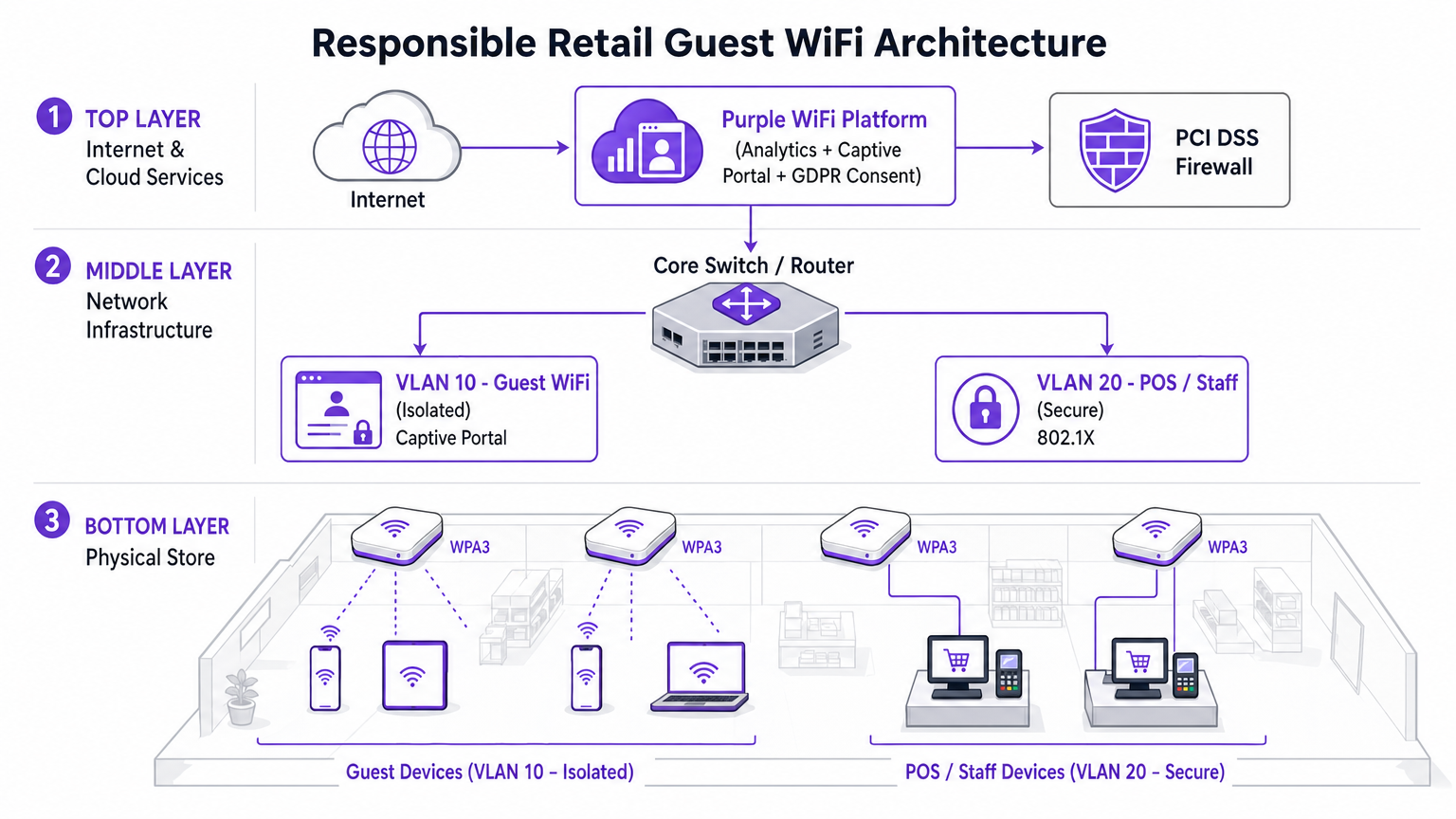
La decisione di implementazione più critica è la separazione fisica e logica del traffico. Tre VLAN sono la configurazione minima praticabile per un supermercato moderno.
- VLAN 10 (Guest WiFi): Strettamente isolata. Route predefinita solo verso il gateway internet. Nessuna route verso qualsiasi spazio di indirizzi privati RFC 1918. Isolamento client abilitato a livello di AP.
- VLAN 20 (POS / Personale): Gestisce dati transazionali sensibili. Richiede autenticazione 802.1X. ACL di ingresso/uscita rigorose che consentono solo il traffico necessario al pagamento gagateway. Questa VLAN definisce l'ambito dell'ambiente di dati del titolare della carta (CDE) PCI DSS.
- VLAN 30 (IoT / Operazioni): Segnaletica digitale, etichette elettroniche per scaffali (ESL), sensori di temperatura. Isolato sia dalle VLAN ospiti che da quelle POS.
Fase 2: Abilitare l'isolamento client sull'SSID ospite
L'isolamento client — anche chiamato isolamento AP o isolamento stazione — impedisce ai dispositivi connessi allo stesso AP o VLAN di comunicare direttamente tra loro. Questa singola modifica di configurazione, disponibile in ogni controller wireless aziendale, neutralizza la maggior parte degli attacchi peer-to-peer, i tentativi di spoofing ARP e il movimento laterale sulla rete ospite. Non esiste un caso d'uso legittimo per i client ospiti che comunicano tra loro in un ambiente di vendita al dettaglio. Deve essere abilitato.
Fase 3: Implementare un Captive Portal conforme
Il Captive Portal è il punto di applicazione per la politica e la conformità. Non è semplicemente una pagina di benvenuto. Integrandosi con la piattaforma Purple WiFi Analytics , il portale gestisce l'acquisizione del consenso conforme al GDPR e l'applicazione dei Termini di Servizio prima che venga concesso l'accesso alla rete. Questo livello protegge l'operatore della sede da responsabilità associate al comportamento degli utenti sulla rete. La piattaforma consente anche la limitazione della larghezza di banda e i limiti di tempo di sessione, impedendo a un singolo utente di degradare l'esperienza per gli altri.
Fase 4: Configurare il rilevamento di AP non autorizzati
Abilitare le funzionalità WIPS (Wireless Intrusion Prevention System) del controller wireless aziendale. Configurare il contenimento automatico degli SSID contraffatti. Al rilevamento di un AP Evil Twin, l'infrastruttura legittima trasmette frame di de-autenticazione che falsificano l'indirizzo MAC dell'AP non autorizzato, costringendo i dispositivi client a disconnettersi. Ciò neutralizza automaticamente la minaccia mentre il personale di sicurezza individua il dispositivo fisico.
Fase 5: Implementare il filtraggio DNS sulla VLAN ospite
Applicare la sicurezza a livello DNS sulla VLAN 10 per bloccare l'accesso a domini dannosi noti, server di comando e controllo di malware e categorie di contenuti che violano la politica di utilizzo accettabile. Ciò protegge gli utenti da reindirizzamenti dannosi e riduce la responsabilità della sede per i contenuti accessibili sulla sua rete.
Migliori Pratiche
Le seguenti raccomandazioni standard del settore si applicano a qualsiasi implementazione di WiFi in negozio su scala aziendale.
Applicare ACL inter-VLAN rigorose al core. Non fare affidamento esclusivamente sulla separazione delle VLAN. Negare esplicitamente tutto il traffico dalla sottorete ospite a tutti gli intervalli di indirizzi privati a livello di routing. Una rotta mal configurata può silenziosamente collegare le VLAN.
Mantenere un programma disciplinato di patching del firmware. Gli access point sono dispositivi edge esposti allo spazio aereo pubblico. La vulnerabilità KRACK (Key Reinstallation Attack) ha dimostrato che anche WPA2 potrebbe essere compromesso tramite debolezze a livello di firmware. Applicare le patch entro 30 giorni dalla pubblicazione di un CVE critico.
Utilizzare gli analytics in modo responsabile. La piattaforma WiFi Analytics fornisce potenti intuizioni sul tempo di permanenza, sui modelli di affluenza e sulla mappatura del percorso del cliente. Assicurarsi che la pipeline di analytics anonimizzi gli indirizzi MAC in conformità con il GDPR e le linee guida dell'ICO sugli identificatori di dispositivo come dati personali.
Trattare la rete ospite come traffico esterno non attendibile. Il modello mentale dovrebbe essere: la VLAN ospite è internet. Qualsiasi traffico proveniente da essa dovrebbe essere trattato con lo stesso sospetto del traffico in entrata da un indirizzo IP esterno sconosciuto.
Per un contesto su come questi principi si applicano in settori adiacenti, consultare la nostra guida su WiFi negli ospedali: una guida alle reti cliniche sicure , che affronta sfide di segmentazione simili in ambienti ad alto rischio.
Risoluzione dei problemi e mitigazione del rischio
Durante l'implementazione o l'audit del WiFi in negozio, diverse modalità di errore comuni possono compromettere la sicurezza o le prestazioni.
Modalità di errore: Routing asimmetrico sulla VLAN ospite. Se la VLAN ospite non è adeguatamente isolata sullo switch core, il traffico potrebbe inavvertitamente instradarsi attraverso i firewall aziendali, causando errori di ispezione stateful ed esponendo rotte interne ai dispositivi ospiti. Mitigazione: Implementare un'interfaccia fisica o logica dedicata per il traffico ospite sul firewall perimetrale, o utilizzare VRF (Virtual Routing and Forwarding) per mantenere una completa separazione della tabella di routing.
Modalità di errore: Bypass del Captive Portal tramite tunneling DNS. Gli utenti avanzati possono bypassare il Captive Portal codificando il traffico HTTP all'interno di query DNS verso un resolver esterno che controllano. Mitigazione: Implementare configurazioni di walled garden rigorose. Consentire il traffico DNS solo a resolver esterni approvati prima dell'autenticazione. Applicare l'ispezione approfondita dei pacchetti (DPI) per identificare e scartare il traffico tunnelizzato.
Modalità di errore: Spoofing dell'indirizzo MAC. Gli attaccanti possono clonare l'indirizzo MAC di un dispositivo autenticato per bypassare il Captive Portal. Mitigazione: Implementare il binding della sessione sia all'indirizzo MAC che all'indirizzo IP. Abilitare lo snooping DHCP per rilevare i conflitti di indirizzo. Impostare timeout di sessione brevi per limitare la finestra di sfruttamento.
Modalità di errore: VLAN Hopping tramite Double Tagging. Su porte trunk mal configurate, un attaccante può creare frame 802.1Q con doppio tag per iniettare traffico in una VLAN diversa. Mitigazione: Assicurarsi che tutte le porte di accesso siano esplicitamente assegnate a una VLAN non nativa. Disabilitare DTP (Dynamic Trunking Protocol) su tutte le porte switch rivolte all'accesso.
ROI e impatto aziendale
Investire in un'architettura WiFi sicura e di livello aziendale offre un valore aziendale misurabile che va ben oltre la mitigazione del rischio.
Riduzione dei costi di conformità PCI DSS. Una corretta segmentazione delle VLAN riduce l'ambito dell'ambiente di dati del titolare della carta PCI DSS. Un ambito CDE più piccolo significa meno sistemi da controllare, meno controlli da evidenziare e costi QSA (Qualified Security Assessor) significativamente ridotti. Per una catena di vendita al dettaglio con 200 sediin questo modo, questo può rappresentare un risparmio di decine di migliaia di sterline per ciclo di audit annuale.
Acquisizione di Dati di Prima Parte. Un captive portal sicuro e personalizzato favorisce alti tassi di adesione per i database di marketing. Gli acquirenti che si connettono a un'esperienza WiFi guest ben progettata e affidabile sono significativamente più propensi a dare il consenso alle comunicazioni di marketing. Questi dati di prima parte sono sempre più preziosi poiché la deprecazione dei cookie di terze parti riduce l'efficacia della pubblicità digitale. Per maggiori informazioni sul valore della location intelligence, consulta la nostra guida su Sistema di Posizionamento Indoor: Guida UWB, BLE e WiFi .
Protezione del Brand. Il costo reputazionale di una violazione di dati di alto profilo originata dalla rete guest supera di gran lunga l'investimento in infrastrutture sicure. Un singolo incidente può comportare multe da parte dell'ICO ai sensi del GDPR (fino al 4% del fatturato annuo globale), contenziosi collettivi e danni duraturi alla fiducia dei consumatori.
Intelligence Operativa. I dati di WiFi Analytics della rete guest forniscono informazioni utili sui modelli di affluenza, sul tempo di permanenza per zona del negozio e sui periodi di picco di traffico. Questi dati informano direttamente le decisioni relative al personale, l'ottimizzazione del layout del negozio e la tempistica delle promozioni, offrendo un ROI misurabile dallo stesso investimento infrastrutturale.
Ascolta: Briefing Esecutivo sulla Sicurezza WiFi nel Retail
Letture Correlate: Il WiFi Universitario è Sicuro? Una Guida per gli Studenti | WiFi negli Ospedali: Una Guida alle Reti Cliniche Sicure | La Tua Guida alle Soluzioni Wi-Fi In-Car per Aziende
Riferimenti
[1] IEEE 802.11-2020 — IEEE Standard for Information Technology — Wireless LAN Medium Access Control and Physical Layer Specifications. [2] PCI Security Standards Council — PCI DSS v4.0, Requirements 1, 4, 8, and 11. [3] UK Information Commissioner's Office — Guida sull'uso degli identificatori di dispositivo come dati personali ai sensi del GDPR del Regno Unito. [4] Wi-Fi Alliance — WPA3 Specification v3.0.
Termini chiave e definizioni
Client Isolation
A wireless network feature that prevents devices connected to the same Access Point or VLAN from communicating directly with each other. All traffic must traverse the AP and be routed through the upstream gateway.
The single most impactful security control for guest networks. Prevents peer-to-peer attacks, ARP spoofing, lateral movement, and malware propagation between shopper devices. Must be enabled on all guest SSIDs.
VLAN Segmentation
The practice of dividing a physical network into multiple logical networks (Virtual LANs) at Layer 2, with routing between them controlled by ACLs at Layer 3.
Essential for separating untrusted guest traffic from sensitive POS and corporate data. The primary mechanism for reducing PCI DSS audit scope in retail environments.
Evil Twin AP
A rogue wireless access point that broadcasts the same SSID as a legitimate network, typically with a stronger signal, to trick client devices into automatically associating with it.
The primary wireless threat in high-footfall retail environments. Mitigated by deploying WIPS capabilities to detect and contain spoofed SSIDs automatically.
Captive Portal
A web page that intercepts all HTTP/HTTPS traffic from a newly connected device and requires the user to complete an action — accepting Terms of Service, authenticating, or providing consent — before granting full network access.
The enforcement point for GDPR compliance, acceptable use policy, and first-party data capture in guest WiFi deployments. Not a security boundary — a policy and compliance layer.
802.1X (PNAC)
An IEEE standard for port-based Network Access Control that provides an authentication mechanism for devices attempting to connect to a LAN or WLAN, using an authentication server (typically RADIUS) to validate credentials or certificates.
The standard for securing staff and POS device access in retail. Ensures only authorized, enrolled devices can access the secure corporate VLANs, regardless of physical port.
OpenRoaming
A Wi-Fi Alliance roaming federation service that allows user devices to automatically and securely authenticate to participating Wi-Fi networks using device certificates, without captive portals or manual password entry.
The emerging standard for frictionless, encrypted guest onboarding. Purple acts as a free identity provider for OpenRoaming under the Connect license, enabling retailers to offer seamless connectivity without sacrificing security.
WPA3 (SAE)
The third generation of Wi-Fi Protected Access, introducing Simultaneous Authentication of Equals (SAE) to replace the Pre-Shared Key (PSK) handshake. Provides forward secrecy and resistance to offline dictionary attacks.
Mandatory for new retail WiFi deployments. Particularly important in environments where the network passphrase may be publicly displayed, as SAE prevents retroactive decryption of captured traffic.
PCI DSS
Payment Card Industry Data Security Standard — a set of security requirements for all organisations that accept, process, store, or transmit payment card data. Defines the Cardholder Data Environment (CDE) and mandates strict network segmentation.
The primary regulatory driver for strict VLAN segmentation in retail. Mixing guest and POS traffic on the same network segment is a direct violation of PCI DSS Requirement 1 and can result in significant fines and loss of card processing privileges.
Dynamic ARP Inspection (DAI)
A security feature on managed switches that validates ARP packets against a DHCP snooping binding database, dropping any ARP reply that does not match the legitimate IP-to-MAC binding.
The Layer 2 control that prevents ARP spoofing attacks on the guest VLAN. Works in conjunction with DHCP Snooping to maintain an accurate binding table.
Casi di studio
A national retail chain with 200 locations is upgrading its network infrastructure. They currently operate a single flat network for POS terminals, staff devices, and a WPA2 password-protected guest SSID. The password is printed on customer receipts. They need to achieve PCI DSS v4.0 compliance within the next two quarters while improving the guest experience. How should the architecture be redesigned?
The network must be redesigned around strict VLAN segmentation and a compliant guest onboarding flow.
VLAN Architecture: Create VLAN 10 for Guest Access (isolated, internet-only route), VLAN 20 for POS and payment terminals (802.1X authenticated, strict ACLs to payment gateway IPs only), and VLAN 30 for staff and back-office devices.
Guest SSID: Migrate from WPA2-PSK to an open SSID with a captive portal. Enable client isolation at the AP level immediately. This removes the false security of a publicly displayed password and eliminates peer-to-peer attack vectors.
Captive Portal: Deploy the Purple platform as the captive portal layer. Configure GDPR-compliant consent capture, Terms of Service enforcement, and bandwidth throttling (e.g., 5 Mbps per device, 60-minute session timeout).
POS Segmentation: Migrate all POS terminals to VLAN 20. Implement 802.1X with device certificates. Apply ACLs at the core switch denying all traffic from VLAN 10 to VLAN 20 and VLAN 30.
Monitoring: Enable WIPS on all wireless controllers. Configure automatic containment of spoofed SSIDs. Integrate controller logs with the central SIEM for real-time alerting.
A large supermarket's NOC receives alerts showing a high volume of ARP broadcast traffic and anomalous DNS requests originating from several MAC addresses on the guest VLAN. Guest WiFi performance is degraded. A packet capture shows ARP replies claiming the gateway IP belongs to a device that is not the legitimate gateway. What is the likely attack and the immediate remediation steps?
The symptoms are consistent with an ARP spoofing / Man-in-the-Middle attack on the guest VLAN. The attacker has introduced a device onto the guest network and is broadcasting gratuitous ARP replies claiming ownership of the gateway IP, redirecting guest traffic through their device.
Immediate Remediation:
- Verify that Client Isolation is enabled on the guest SSID. If disabled, enable it immediately — this is the most effective single control.
- Enable Dynamic ARP Inspection (DAI) on the access switches for the guest VLAN. DAI validates ARP packets against the DHCP snooping binding database, dropping any ARP reply that does not match the legitimate IP-to-MAC binding.
- Enable DHCP Snooping on the guest VLAN to build the binding database that DAI relies on.
- Identify and blacklist the attacker's MAC address at the wireless controller level to terminate their connection.
- Force a DHCP lease renewal for all guest clients to flush any poisoned ARP caches.
- Review WIPS logs to determine whether the attacker connected via the legitimate SSID or an Evil Twin.
Analisi degli scenari
Q1. You are auditing a newly deployed supermarket network. The configuration shows the guest SSID is on VLAN 50 and POS terminals are on VLAN 60. However, a ping from a device on VLAN 50 successfully reaches a POS terminal on VLAN 60. The network team insists the VLANs are correctly configured. What is the most likely architectural failure and how do you remediate it?
💡 Suggerimento:VLANs separate traffic at Layer 2. Think about where routing between subnets happens and what controls should exist there.
Mostra l'approccio consigliato
The VLANs are correctly configured at Layer 2, but inter-VLAN routing is enabled at the core switch or firewall without restrictive ACLs. Traffic is being routed between the subnets because no ACL explicitly denies it. Remediation: Apply an outbound ACL on the VLAN 50 (guest) interface at the routing layer, explicitly denying all traffic destined for any RFC 1918 private address range (10.0.0.0/8, 172.16.0.0/12, 192.168.0.0/16), with a permit statement for the default route to the internet only. Verify with a packet capture that no inter-VLAN traffic traverses the firewall after the ACL is applied.
Q2. A retail client's CTO wants to remove the captive portal entirely to reduce friction for shoppers, proposing a completely open network with no authentication or Terms of Service. What are the three most significant risks you must communicate, and what is the recommended alternative that preserves the frictionless experience?
💡 Suggerimento:Consider technical security, legal liability under UK GDPR, and the commercial value being lost.
Mostra l'approccio consigliato
- Legal Liability: Without a Terms of Service, the venue assumes liability for illegal activities (e.g., copyright infringement, accessing prohibited content) performed on their network. The captive portal is the legal instrument that transfers responsibility to the user. 2. GDPR Compliance: Removing the portal eliminates the consent capture mechanism. Any analytics or marketing data derived from network usage without a lawful basis under GDPR Article 6 exposes the organisation to ICO enforcement. 3. Commercial Value: The captive portal is the primary mechanism for first-party data acquisition — email addresses, demographic data, and marketing opt-ins. Removing it destroys this revenue-generating capability. Recommended Alternative: Deploy OpenRoaming via the Purple Connect license. This provides completely frictionless, encrypted onboarding for users with compatible devices, while maintaining a lightweight captive portal for non-OpenRoaming devices that still captures consent.
Q3. Your WIPS alerts you to a rogue AP broadcasting the store's exact SSID with a signal strength 15 dBm stronger than your legitimate APs near the main entrance. Staff report that several customers are complaining their phones 'won't load anything' after connecting to the WiFi. What is happening and what is the correct automated response you should have pre-configured?
💡 Suggerimento:Consider both the attack mechanism and the over-the-air countermeasure available to enterprise wireless controllers.
Mostra l'approccio consigliato
An Evil Twin AP has been deployed near the entrance with a boosted signal to force client devices to prefer it over the legitimate infrastructure. The customers experiencing connectivity failures are connected to the rogue AP, which is either not providing internet access (a passive credential harvesting setup) or is actively intercepting and failing to forward traffic. The correct automated response is WIPS-based containment: the legitimate wireless controllers should be configured to automatically transmit de-authentication (deauth) frames spoofing the MAC address of the rogue AP. This forces any device attempting to associate with the Evil Twin to immediately disconnect, effectively neutralising the attack over the air. Simultaneously, the NOC alert should trigger a physical security response to locate and remove the rogue device. Note: automated deauth containment should be carefully scoped to avoid accidentally deauthenticating clients from legitimate neighbouring networks.




