

O WiFi do Supermercado é Seguro? Um Guia para Compradores
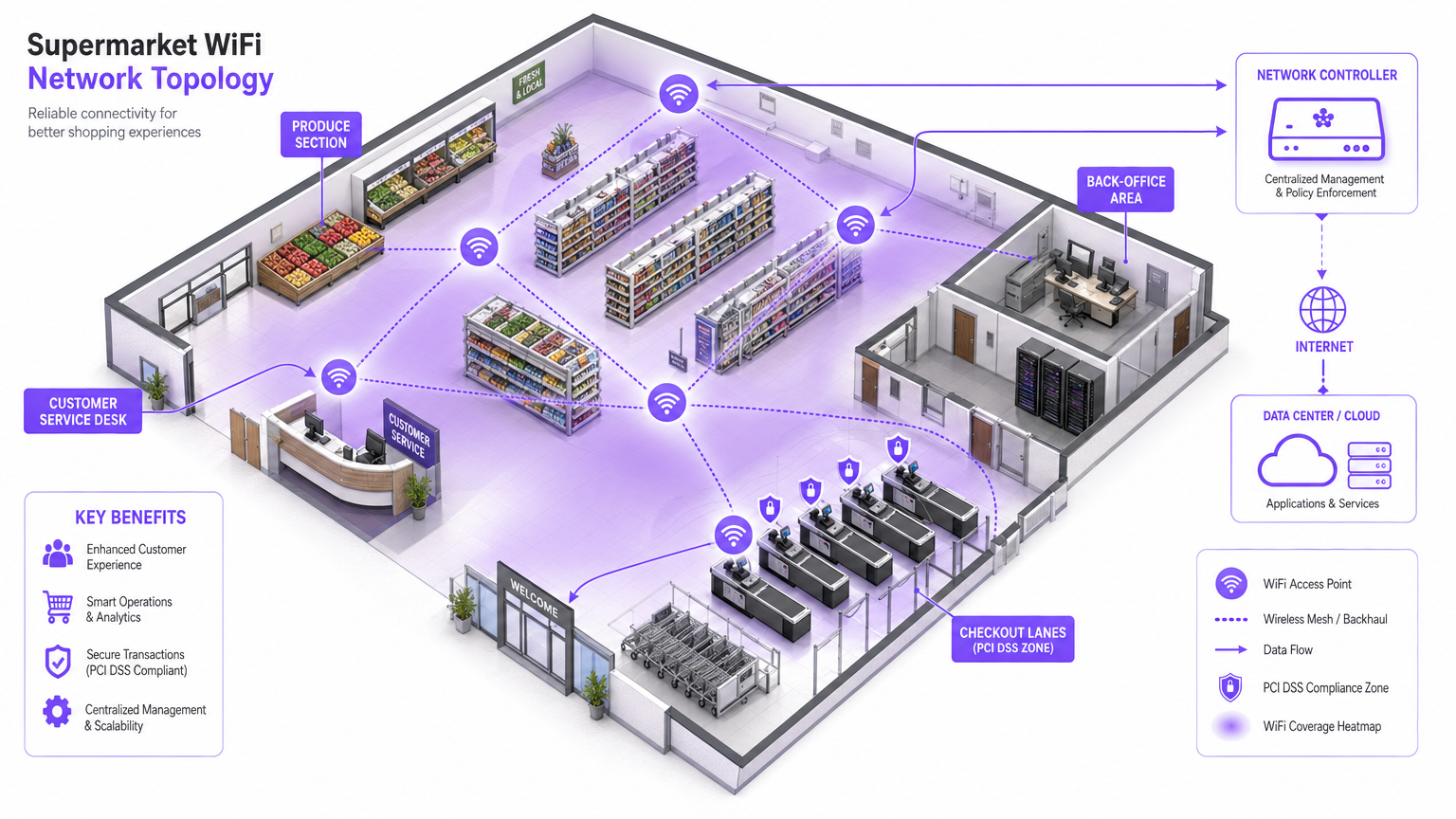
Este guia autorizado examina as realidades técnicas da segurança do WiFi em supermercados, fornecendo arquitetura acionável e estratégias de segurança para líderes de TI no setor de retalho. Detalha o panorama de ameaças — desde Evil Twin APs a ataques Man-in-the-Middle — juntamente com o conjunto de mitigações necessário para proteger os consumidores e as operações empresariais. Retalhistas e operadores de espaços encontrarão orientações de implementação concretas que abrangem segmentação de VLAN, isolamento de clientes, WPA3, conformidade com PCI DSS e onboarding de convidados em conformidade com o GDPR através de plataformas como a Purple.
🎧 Ouça este Guia
Ver Transcrição
Resumo Executivo
Para gestores de TI, arquitetos de rede e diretores de operações de espaços, a questão de saber se o WiFi do supermercado é seguro não é apenas uma preocupação do consumidor — é uma questão crítica de gestão de risco empresarial. À medida que os ambientes de retalho dependem cada vez mais da conectividade digital, tanto para o envolvimento do cliente como para a eficiência operacional, a infraestrutura de rede subjacente deve ser robusta, segura e em conformidade com o PCI DSS e o GDPR.
Este guia oferece uma análise técnica aprofundada da arquitetura necessária para fornecer WiFi seguro em loja. O panorama de ameaças específico inclui Evil Twin APs, ataques Man-in-the-Middle e servidores DHCP maliciosos. O conjunto de mitigações necessário abrange segmentação rigorosa de VLAN, isolamento de clientes, encriptação WPA3 e autenticação 802.1X. Ao aproveitar plataformas como o Guest WiFi da Purple para onboarding seguro e captura de consentimento de nível de conformidade, os retalhistas podem proporcionar uma experiência de compra fluida sem comprometer a integridade das suas redes principais ou violar os padrões de segurança de cartões de pagamento. O objetivo é ir além da conectividade básica e arquitetar uma rede de ponta resiliente e inteligente que gere valor de negócio mensurável.
Análise Técnica Aprofundada
O ambiente de WiFi no retalho é particularmente desafiador devido à alta densidade de clientes, ao comportamento transitório dos utilizadores e à necessidade crítica de proteger os sistemas de ponto de venda (POS) do mesmo espaço físico ocupado por dispositivos de convidados não fidedignos. O desafio técnico fundamental é proporcionar acesso sem atrito, mantendo um isolamento lógico absoluto dos ativos corporativos.
O Panorama de Ameaças
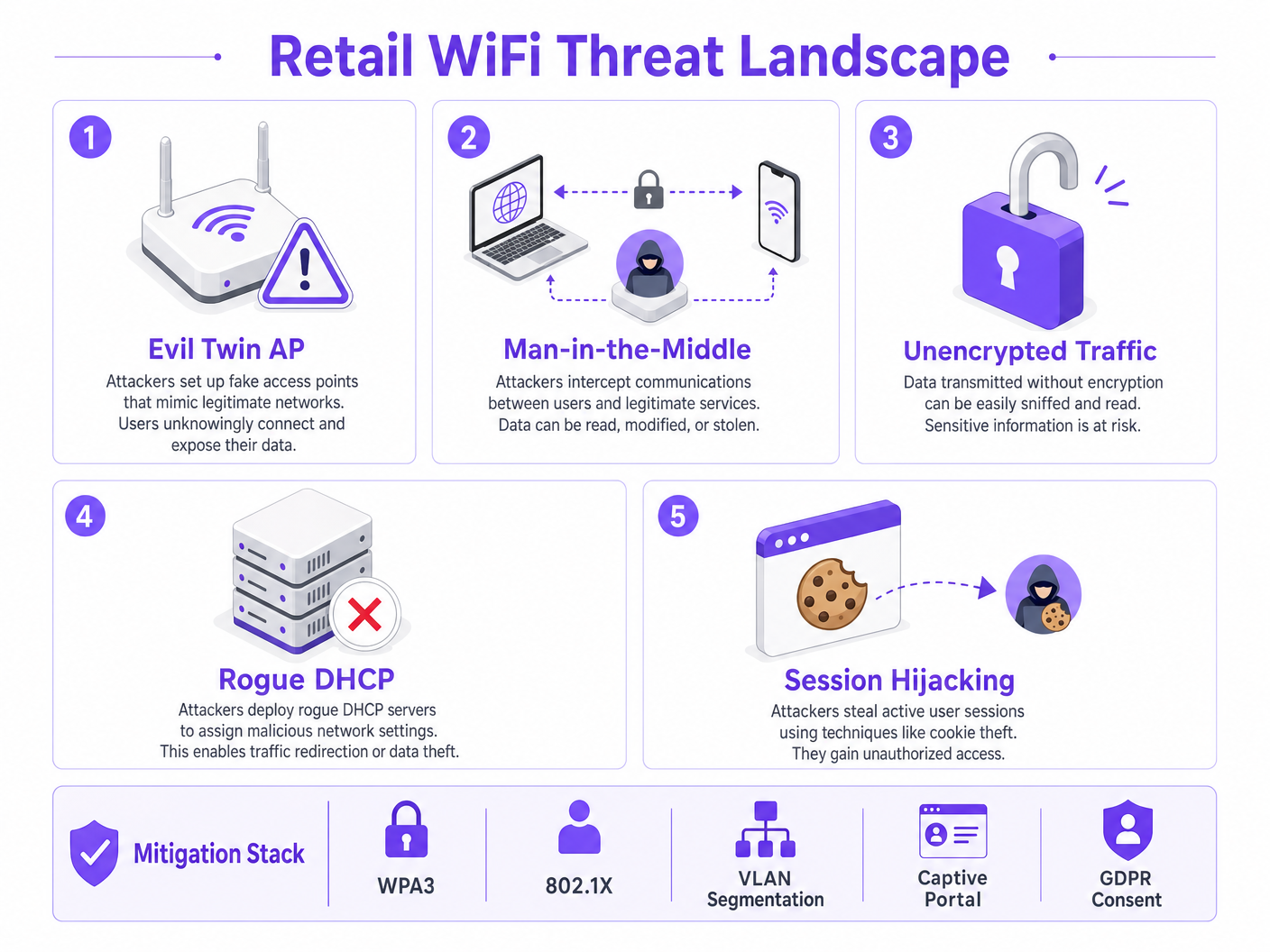
As redes de retalho enfrentam vários vetores de ataque específicos que as distinguem de outros ambientes empresariais.
Os Evil Twin Access Points representam a ameaça mais prevalente e perigosa. Os atacantes implementam pontos de acesso maliciosos que transmitem o SSID legítimo da loja — por exemplo, Supermarket_Free_WiFi — com um sinal mais forte do que a infraestrutura legítima. Os dispositivos clientes com perfis de rede guardados associam-se automaticamente, permitindo que o atacante intercete todo o tráfego. Num ambiente de grande afluência como um supermercado, um único AP malicioso pode afetar centenas de dispositivos em minutos.
Os Ataques Man-in-the-Middle (MitM) decorrem naturalmente das implementações de Evil Twin. Em redes abertas não encriptadas, os atacantes também podem usar spoofing de ARP na VLAN de convidados legítima para se posicionarem entre o cliente e o gateway, capturando payloads não encriptados, incluindo cookies de sessão e credenciais.
Os Servidores DHCP Maliciosos exploram a segurança de porta mal configurada em switches de acesso. Um dispositivo malicioso introduzido na VLAN de convidados pode responder a pedidos DHCP mais rapidamente do que o servidor legítimo, atribuindo configurações DNS maliciosas que redirecionam silenciosamente todo o tráfego web através de infraestrutura controlada pelo atacante.
O Sequestro de Sessão visa serviços que não impõem HTTPS durante todo o ciclo de vida da sessão. Os atacantes capturam cookies de sessão transmitidos em texto simples, permitindo-lhes fazer-se passar por utilizadores em serviços de terceiros.
Arquitetura e Padrões
Para mitigar estas ameaças, a arquitetura de rede deve ser construída sobre uma base de princípios de confiança zero na extremidade sem fios. Os seguintes padrões e tecnologias formam o núcleo de uma implementação de WiFi responsável no retalho.
| Padrão / Tecnologia | Função no WiFi de Retalho | Relevância para a Conformidade |
|---|---|---|
| WPA3 (SAE) | Encripta a ligação sem fios; fornece sigilo de encaminhamento | PCI DSS Req. 4 |
| 802.1X (PNAC) | Autentica funcionários e dispositivos POS ao nível da porta | PCI DSS Req. 8 |
| Segmentação de VLAN | Isola o tráfego de convidados, POS e IoT nas Camadas 2/3 | PCI DSS Req. 1 |
| Isolamento de Clientes | Previne ataques peer-to-peer na VLAN de convidados | Mitigação de Risco |
| Captive Portal (GDPR) | Impõe os Termos de Serviço; captura consentimento legal para processamento de dados | GDPR Art. 6, 7 |
| OpenRoaming / Passpoint | Onboarding de convidados encriptado e sem atrito | Melhor Prática de Privacidade |
| WIPS | Deteta e contém APs maliciosos e Evil Twins | PCI DSS Req. 11.2 |
O WPA3 introduz a Autenticação Simultânea de Iguais (SAE), substituindo a troca de Chave Pré-Partilhada (PSK) utilizada no WPA2. Isto proporciona sigilo de encaminhamento e protege contra ataques de dicionário offline, o que é crítico para qualquer rede onde a palavra-passe possa ser exibida publicamente.
O 802.1X fornece Controlo de Acesso à Rede (PNAC) baseado em porta. Garante que apenas dispositivos autorizados com credenciais ou certificados válidos podem aceder às VLANs corporativas seguras. Para dispositivos de convidados, onde o registo 802.1X é impraticável, o Passpoint (Hotspot 2.0) e o OpenRoaming fornecem uma alternativa segura baseada em certificados. A Purple atua como um fornecedor de identidade gratuito para o OpenRoaming sob a licença Connect, permitindo um onboarding encriptado e contínuo sem interação com um Captive Portal.
Guia de Implementação
A implementação de WiFi seguro em lojas de retalho requer uma abordagem sistemática à configuração e aplicação de políticas. Os passos seguintes representam a arquitetura mínima viável para uma implementação segura e em conformidade.
Passo 1: Desenhar a Arquitetura de VLAN
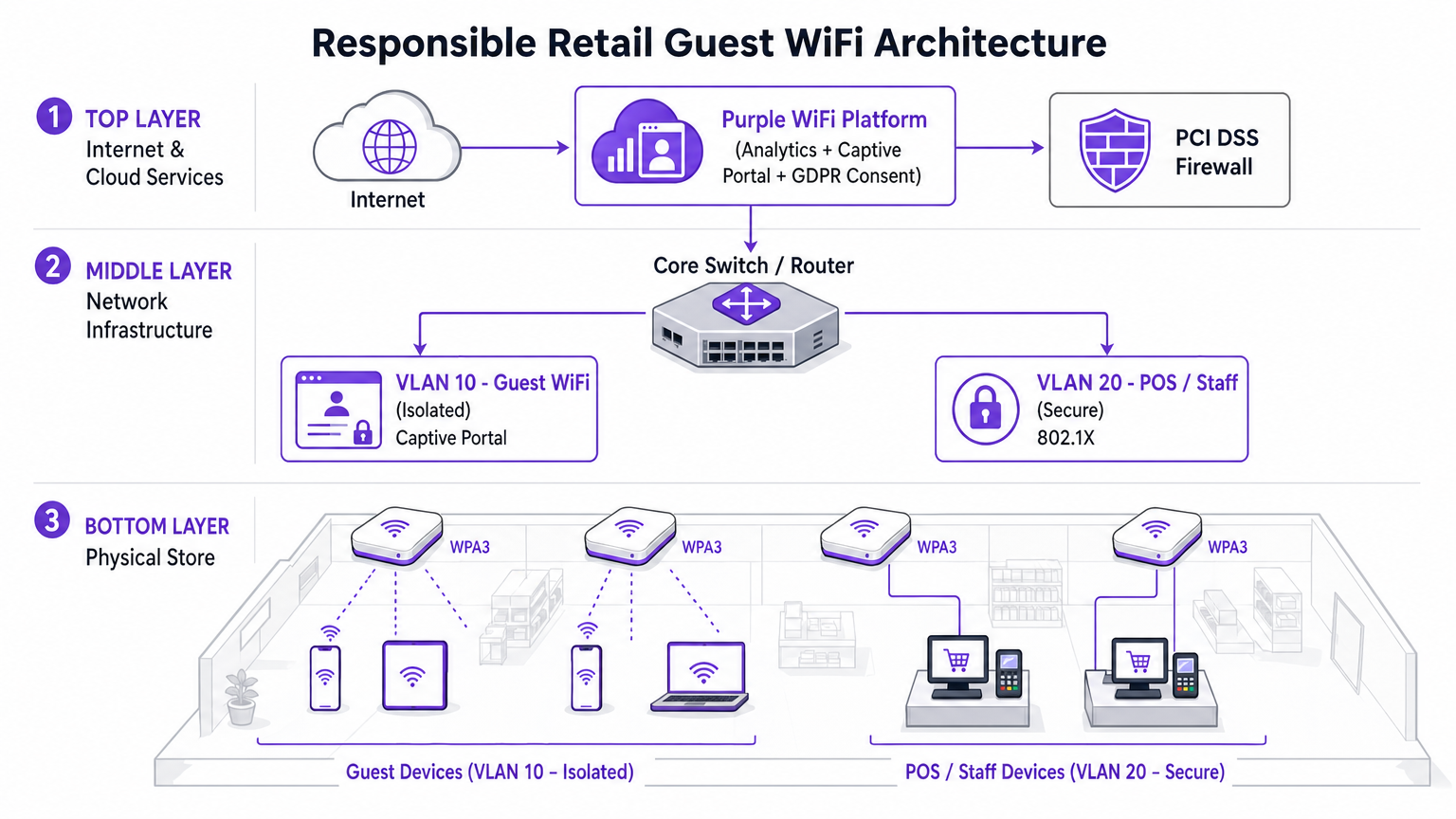
A decisão de implementação mais crítica é a separação física e lógica do tráfego. Três VLANs são a configuração mínima viável para um supermercado moderno.
- VLAN 10 (Guest WiFi): Estritamente isolada. Rota predefinida apenas para o gateway de internet. Sem rotas para qualquer espaço de endereço privado RFC 1918. Isolamento de cliente ativado ao nível do AP.
- VLAN 20 (POS / Staff): Lida com dados transacionais sensíveis. Requer autenticação 802.1X. ACLs de entrada/saída rigorosas que permitem apenas o tráfego necessário para o gateway de pagamentogateways. Esta VLAN define o âmbito do ambiente de dados de titulares de cartões (CDE) PCI DSS.
- VLAN 30 (IoT / Operações): Sinalização digital, etiquetas eletrónicas de prateleira (ESLs), sensores de temperatura. Isolada das VLANs de convidados e de POS.
Passo 2: Ativar o Isolamento de Clientes no SSID de Convidados
O isolamento de clientes — também referido como Isolamento de AP ou Isolamento de Estação — impede que dispositivos ligados ao mesmo AP ou VLAN comuniquem diretamente entre si. Esta única alteração de configuração, disponível em todos os controladores sem fios empresariais, neutraliza a maioria dos ataques peer-to-peer, tentativas de spoofing de ARP e movimento lateral na rede de convidados. Não existe um caso de uso legítimo para que os clientes convidados comuniquem entre si num ambiente de retalho. Deve ser ativado.
Passo 3: Implementar um Captive Portal em Conformidade
O Captive Portal é o ponto de aplicação da política e conformidade. Não é meramente uma página de apresentação. Ao integrar com a plataforma Purple WiFi Analytics , o portal gere a captura de consentimento em conformidade com o GDPR e a aplicação dos Termos de Serviço antes que o acesso à rede seja concedido. Esta camada protege o operador do local de responsabilidade associada ao comportamento do utilizador na rede. A plataforma também permite a limitação de largura de banda e limites de tempo de sessão, impedindo que um único utilizador degrade a experiência para os outros.
Passo 4: Configurar a Deteção de APs Maliciosos
Ative as capacidades do Sistema de Prevenção de Intrusões Sem Fios (WIPS) do seu controlador sem fios empresarial. Configure a contenção automática de SSIDs falsificados. Ao detetar um AP Evil Twin, a infraestrutura legítima transmite frames de desautenticação falsificando o endereço MAC do AP malicioso, forçando os dispositivos clientes a desconectar. Isto neutraliza a ameaça automaticamente enquanto o pessoal de segurança localiza o dispositivo físico.
Passo 5: Implementar Filtragem DNS na VLAN de Convidados
Aplique segurança na camada DNS na VLAN 10 para bloquear o acesso a domínios maliciosos conhecidos, servidores de comando e controlo de malware e categorias de conteúdo que violam a política de uso aceitável. Isto protege os utilizadores de redirecionamentos maliciosos e reduz a responsabilidade do local pelo conteúdo acedido na sua rede.
Boas Práticas
As seguintes recomendações padrão da indústria aplicam-se a qualquer implementação de WiFi em lojas à escala empresarial.
Aplique ACLs inter-VLANs rigorosas no núcleo. Não dependa apenas da separação de VLANs. Negue explicitamente todo o tráfego da sub-rede de convidados para todos os intervalos de endereços privados na camada de encaminhamento. Uma rota mal configurada pode silenciosamente fazer a ponte entre VLANs.
Mantenha um cronograma disciplinado de aplicação de patches de firmware. Os pontos de acesso são dispositivos de ponta expostos ao espaço aéreo público. A vulnerabilidade KRACK (Key Reinstallation Attack) demonstrou que mesmo o WPA2 poderia ser comprometido através de fraquezas ao nível do firmware. Aplique patches no prazo de 30 dias após a publicação de um CVE crítico.
Utilize a análise de forma responsável. A plataforma WiFi Analytics fornece informações poderosas sobre o tempo de permanência, padrões de tráfego e mapeamento da jornada do cliente. Garanta que o pipeline de análise anonimiza os endereços MAC em conformidade com o GDPR e as orientações do ICO sobre identificadores de dispositivos como dados pessoais.
Trate a rede de convidados como tráfego externo não fidedigno. O modelo mental deve ser: a VLAN de convidados é a internet. Qualquer tráfego originado nela deve ser tratado com a mesma suspeita que o tráfego de entrada de um endereço IP externo desconhecido.
Para contexto sobre como estes princípios se aplicam em setores adjacentes, consulte o nosso guia sobre WiFi em Hospitais: Um Guia para Redes Clínicas Seguras , que aborda desafios de segmentação semelhantes em ambientes de alto risco.
Resolução de Problemas e Mitigação de Riscos
Ao implementar ou auditar o WiFi em loja, vários modos de falha comuns podem comprometer a segurança ou o desempenho.
Modo de Falha: Encaminhamento Assimétrico na VLAN de Convidados. Se a VLAN de convidados não estiver devidamente isolada no switch central, o tráfego pode inadvertidamente ser encaminhado através de firewalls corporativos, causando falhas de inspeção de estado e expondo rotas internas a dispositivos de convidados. Mitigação: Implemente uma interface física ou lógica dedicada para o tráfego de convidados na firewall de borda, ou use VRF (Virtual Routing and Forwarding) para manter uma separação completa da tabela de encaminhamento.
Modo de Falha: Bypass do Captive Portal via Tunelamento DNS. Utilizadores avançados podem contornar o Captive Portal codificando o tráfego HTTP dentro de consultas DNS para um resolvedor externo que controlam. Mitigação: Implemente configurações rigorosas de walled garden. Permita apenas o tráfego DNS para resolvedores externos aprovados antes da autenticação. Aplique inspeção profunda de pacotes (DPI) para identificar e descartar tráfego tunelado.
Modo de Falha: Spoofing de Endereço MAC. Atacantes podem clonar o endereço MAC de um dispositivo autenticado para contornar o Captive Portal. Mitigação: Implemente a vinculação de sessão tanto ao endereço MAC quanto ao endereço IP. Ative o DHCP snooping para detetar conflitos de endereço. Defina tempos limite de sessão curtos para limitar a janela de exploração.
Modo de Falha: VLAN Hopping via Double Tagging. Em portas trunk mal configuradas, um atacante pode criar frames 802.1Q com dupla tag para injetar tráfego numa VLAN diferente. Mitigação: Garanta que todas as portas de acesso são explicitamente atribuídas a uma VLAN não nativa. Desative o DTP (Dynamic Trunking Protocol) em todas as portas de switch voltadas para acesso.
ROI e Impacto nos Negócios
Investir numa arquitetura WiFi segura e de nível empresarial oferece um valor de negócio mensurável que se estende muito além da mitigação de riscos.
Redução de Custos de Conformidade PCI DSS. A segmentação adequada de VLANs reduz o âmbito do ambiente de dados de titulares de cartões PCI DSS. Um âmbito CDE menor significa menos sistemas para auditar, menos controlos para evidenciar e taxas de QSA (Qualified Security Assessor) significativamente reduzidas. Para uma cadeia de retalho com 200 localizaçõesisto pode representar poupanças de dezenas de milhares de libras por ciclo de auditoria anual.
Aquisição de Dados Próprios. Um Captive Portal seguro e de marca impulsiona altas taxas de adesão para bases de dados de marketing. Compradores que se conectam a uma experiência de guest WiFi bem projetada e confiável são significativamente mais propensos a consentir com comunicações de marketing. Estes dados próprios são cada vez mais valiosos à medida que a depreciação de cookies de terceiros reduz a eficácia da publicidade digital. Para mais contexto sobre o valor da inteligência de localização, consulte o nosso guia sobre Sistema de Posicionamento Interior: Guia UWB, BLE e WiFi .
Proteção da Marca. O custo reputacional de uma violação de dados de alto perfil originada da rede de convidados supera em muito o investimento em infraestrutura segura. Um único incidente pode resultar em multas do ICO sob o GDPR (até 4% do volume de negócios anual global), litígios de ação coletiva e danos duradouros à confiança do consumidor.
Inteligência Operacional. Os dados de WiFi Analytics da rede de convidados fornecem informações acionáveis sobre padrões de fluxo de pessoas, tempo de permanência por zona da loja e períodos de pico de tráfego. Estes dados informam diretamente as decisões de pessoal, a otimização do layout da loja e o timing promocional — proporcionando um ROI mensurável do mesmo investimento em infraestrutura.
Ouvir: Briefing Executivo sobre Segurança de WiFi no Retalho
Leitura Relacionada: O WiFi da Universidade é Seguro? Um Guia para Estudantes | WiFi em Hospitais: Um Guia para Redes Clínicas Seguras | O Seu Guia para Soluções Wi-Fi Empresariais em Carros
Referências
[1] IEEE 802.11-2020 — Norma IEEE para Tecnologia da Informação — Especificações de Controlo de Acesso ao Meio e Camada Física de LAN Sem Fios. [2] PCI Security Standards Council — PCI DSS v4.0, Requisitos 1, 4, 8 e 11. [3] UK Information Commissioner's Office — Orientação sobre o uso de identificadores de dispositivos como dados pessoais sob o GDPR do Reino Unido. [4] Wi-Fi Alliance — Especificação WPA3 v3.0.
Termos-Chave e Definições
Client Isolation
A wireless network feature that prevents devices connected to the same Access Point or VLAN from communicating directly with each other. All traffic must traverse the AP and be routed through the upstream gateway.
The single most impactful security control for guest networks. Prevents peer-to-peer attacks, ARP spoofing, lateral movement, and malware propagation between shopper devices. Must be enabled on all guest SSIDs.
VLAN Segmentation
The practice of dividing a physical network into multiple logical networks (Virtual LANs) at Layer 2, with routing between them controlled by ACLs at Layer 3.
Essential for separating untrusted guest traffic from sensitive POS and corporate data. The primary mechanism for reducing PCI DSS audit scope in retail environments.
Evil Twin AP
A rogue wireless access point that broadcasts the same SSID as a legitimate network, typically with a stronger signal, to trick client devices into automatically associating with it.
The primary wireless threat in high-footfall retail environments. Mitigated by deploying WIPS capabilities to detect and contain spoofed SSIDs automatically.
Captive Portal
A web page that intercepts all HTTP/HTTPS traffic from a newly connected device and requires the user to complete an action — accepting Terms of Service, authenticating, or providing consent — before granting full network access.
The enforcement point for GDPR compliance, acceptable use policy, and first-party data capture in guest WiFi deployments. Not a security boundary — a policy and compliance layer.
802.1X (PNAC)
An IEEE standard for port-based Network Access Control that provides an authentication mechanism for devices attempting to connect to a LAN or WLAN, using an authentication server (typically RADIUS) to validate credentials or certificates.
The standard for securing staff and POS device access in retail. Ensures only authorized, enrolled devices can access the secure corporate VLANs, regardless of physical port.
OpenRoaming
A Wi-Fi Alliance roaming federation service that allows user devices to automatically and securely authenticate to participating Wi-Fi networks using device certificates, without captive portals or manual password entry.
The emerging standard for frictionless, encrypted guest onboarding. Purple acts as a free identity provider for OpenRoaming under the Connect license, enabling retailers to offer seamless connectivity without sacrificing security.
WPA3 (SAE)
The third generation of Wi-Fi Protected Access, introducing Simultaneous Authentication of Equals (SAE) to replace the Pre-Shared Key (PSK) handshake. Provides forward secrecy and resistance to offline dictionary attacks.
Mandatory for new retail WiFi deployments. Particularly important in environments where the network passphrase may be publicly displayed, as SAE prevents retroactive decryption of captured traffic.
PCI DSS
Payment Card Industry Data Security Standard — a set of security requirements for all organisations that accept, process, store, or transmit payment card data. Defines the Cardholder Data Environment (CDE) and mandates strict network segmentation.
The primary regulatory driver for strict VLAN segmentation in retail. Mixing guest and POS traffic on the same network segment is a direct violation of PCI DSS Requirement 1 and can result in significant fines and loss of card processing privileges.
Dynamic ARP Inspection (DAI)
A security feature on managed switches that validates ARP packets against a DHCP snooping binding database, dropping any ARP reply that does not match the legitimate IP-to-MAC binding.
The Layer 2 control that prevents ARP spoofing attacks on the guest VLAN. Works in conjunction with DHCP Snooping to maintain an accurate binding table.
Estudos de Caso
A national retail chain with 200 locations is upgrading its network infrastructure. They currently operate a single flat network for POS terminals, staff devices, and a WPA2 password-protected guest SSID. The password is printed on customer receipts. They need to achieve PCI DSS v4.0 compliance within the next two quarters while improving the guest experience. How should the architecture be redesigned?
The network must be redesigned around strict VLAN segmentation and a compliant guest onboarding flow.
VLAN Architecture: Create VLAN 10 for Guest Access (isolated, internet-only route), VLAN 20 for POS and payment terminals (802.1X authenticated, strict ACLs to payment gateway IPs only), and VLAN 30 for staff and back-office devices.
Guest SSID: Migrate from WPA2-PSK to an open SSID with a captive portal. Enable client isolation at the AP level immediately. This removes the false security of a publicly displayed password and eliminates peer-to-peer attack vectors.
Captive Portal: Deploy the Purple platform as the captive portal layer. Configure GDPR-compliant consent capture, Terms of Service enforcement, and bandwidth throttling (e.g., 5 Mbps per device, 60-minute session timeout).
POS Segmentation: Migrate all POS terminals to VLAN 20. Implement 802.1X with device certificates. Apply ACLs at the core switch denying all traffic from VLAN 10 to VLAN 20 and VLAN 30.
Monitoring: Enable WIPS on all wireless controllers. Configure automatic containment of spoofed SSIDs. Integrate controller logs with the central SIEM for real-time alerting.
A large supermarket's NOC receives alerts showing a high volume of ARP broadcast traffic and anomalous DNS requests originating from several MAC addresses on the guest VLAN. Guest WiFi performance is degraded. A packet capture shows ARP replies claiming the gateway IP belongs to a device that is not the legitimate gateway. What is the likely attack and the immediate remediation steps?
The symptoms are consistent with an ARP spoofing / Man-in-the-Middle attack on the guest VLAN. The attacker has introduced a device onto the guest network and is broadcasting gratuitous ARP replies claiming ownership of the gateway IP, redirecting guest traffic through their device.
Immediate Remediation:
- Verify that Client Isolation is enabled on the guest SSID. If disabled, enable it immediately — this is the most effective single control.
- Enable Dynamic ARP Inspection (DAI) on the access switches for the guest VLAN. DAI validates ARP packets against the DHCP snooping binding database, dropping any ARP reply that does not match the legitimate IP-to-MAC binding.
- Enable DHCP Snooping on the guest VLAN to build the binding database that DAI relies on.
- Identify and blacklist the attacker's MAC address at the wireless controller level to terminate their connection.
- Force a DHCP lease renewal for all guest clients to flush any poisoned ARP caches.
- Review WIPS logs to determine whether the attacker connected via the legitimate SSID or an Evil Twin.
Análise de Cenários
Q1. You are auditing a newly deployed supermarket network. The configuration shows the guest SSID is on VLAN 50 and POS terminals are on VLAN 60. However, a ping from a device on VLAN 50 successfully reaches a POS terminal on VLAN 60. The network team insists the VLANs are correctly configured. What is the most likely architectural failure and how do you remediate it?
💡 Dica:VLANs separate traffic at Layer 2. Think about where routing between subnets happens and what controls should exist there.
Mostrar Abordagem Recomendada
The VLANs are correctly configured at Layer 2, but inter-VLAN routing is enabled at the core switch or firewall without restrictive ACLs. Traffic is being routed between the subnets because no ACL explicitly denies it. Remediation: Apply an outbound ACL on the VLAN 50 (guest) interface at the routing layer, explicitly denying all traffic destined for any RFC 1918 private address range (10.0.0.0/8, 172.16.0.0/12, 192.168.0.0/16), with a permit statement for the default route to the internet only. Verify with a packet capture that no inter-VLAN traffic traverses the firewall after the ACL is applied.
Q2. A retail client's CTO wants to remove the captive portal entirely to reduce friction for shoppers, proposing a completely open network with no authentication or Terms of Service. What are the three most significant risks you must communicate, and what is the recommended alternative that preserves the frictionless experience?
💡 Dica:Consider technical security, legal liability under UK GDPR, and the commercial value being lost.
Mostrar Abordagem Recomendada
- Legal Liability: Without a Terms of Service, the venue assumes liability for illegal activities (e.g., copyright infringement, accessing prohibited content) performed on their network. The captive portal is the legal instrument that transfers responsibility to the user. 2. GDPR Compliance: Removing the portal eliminates the consent capture mechanism. Any analytics or marketing data derived from network usage without a lawful basis under GDPR Article 6 exposes the organisation to ICO enforcement. 3. Commercial Value: The captive portal is the primary mechanism for first-party data acquisition — email addresses, demographic data, and marketing opt-ins. Removing it destroys this revenue-generating capability. Recommended Alternative: Deploy OpenRoaming via the Purple Connect license. This provides completely frictionless, encrypted onboarding for users with compatible devices, while maintaining a lightweight captive portal for non-OpenRoaming devices that still captures consent.
Q3. Your WIPS alerts you to a rogue AP broadcasting the store's exact SSID with a signal strength 15 dBm stronger than your legitimate APs near the main entrance. Staff report that several customers are complaining their phones 'won't load anything' after connecting to the WiFi. What is happening and what is the correct automated response you should have pre-configured?
💡 Dica:Consider both the attack mechanism and the over-the-air countermeasure available to enterprise wireless controllers.
Mostrar Abordagem Recomendada
An Evil Twin AP has been deployed near the entrance with a boosted signal to force client devices to prefer it over the legitimate infrastructure. The customers experiencing connectivity failures are connected to the rogue AP, which is either not providing internet access (a passive credential harvesting setup) or is actively intercepting and failing to forward traffic. The correct automated response is WIPS-based containment: the legitimate wireless controllers should be configured to automatically transmit de-authentication (deauth) frames spoofing the MAC address of the rogue AP. This forces any device attempting to associate with the Evil Twin to immediately disconnect, effectively neutralising the attack over the air. Simultaneously, the NOC alert should trigger a physical security response to locate and remove the rogue device. Note: automated deauth containment should be carefully scoped to avoid accidentally deauthenticating clients from legitimate neighbouring networks.




