

Is University WiFi Safe? A Guide for Students
A comprehensive technical reference for IT managers and venue operators on the security architecture of university WiFi (eduroam/802.1X). This guide unpacks how enterprise-grade authentication works, its implementation pitfalls, and how these principles apply to hospitality, retail, and public sector deployments.
🎧 Listen to this Guide
View Transcript
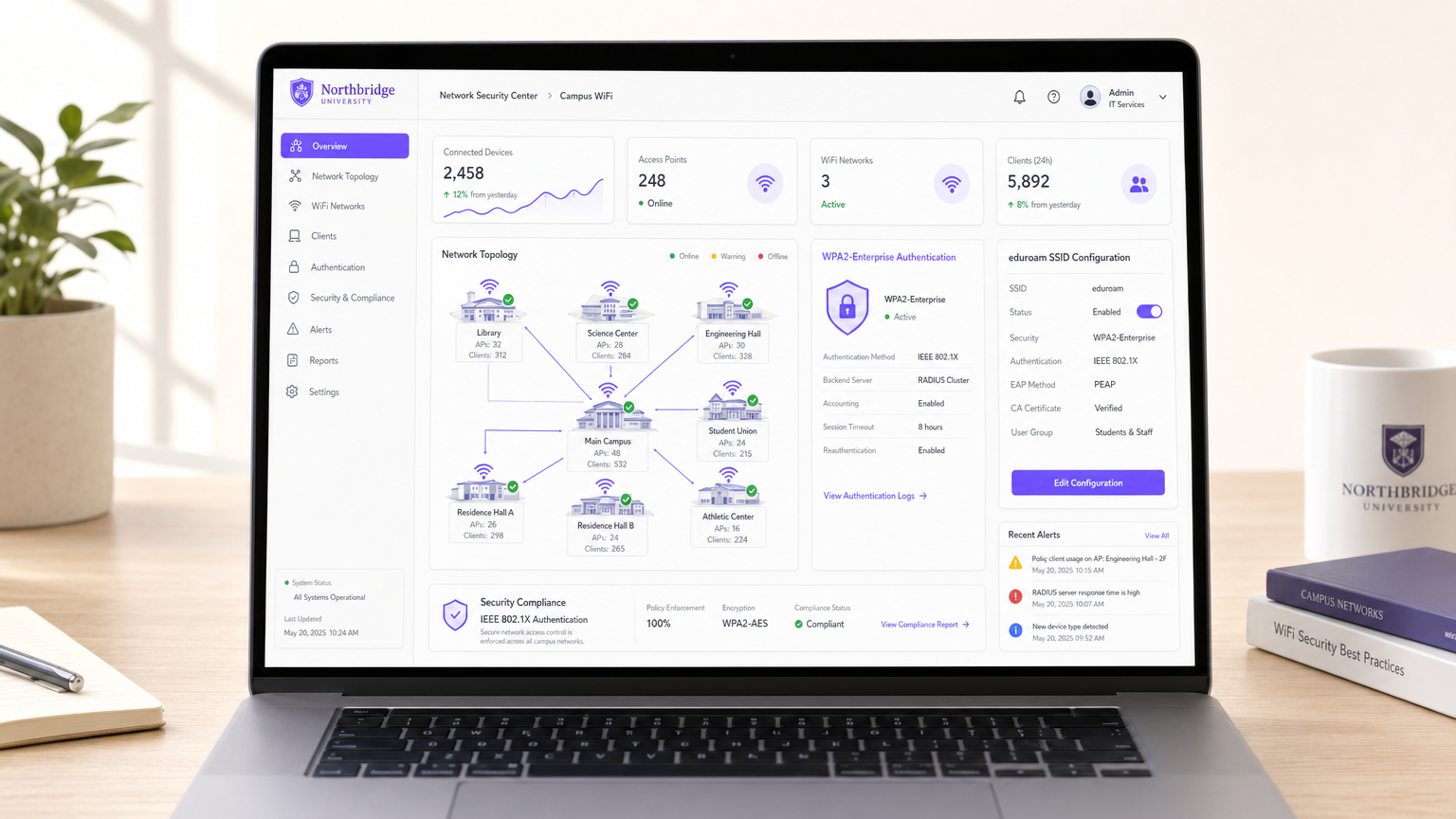
Executive Summary
For IT directors and network architects managing large-scale public or semi-public venues, the question "is university WiFi safe?" serves as a critical case study in enterprise mobility. University campuses represent some of the most hostile, dense, and complex RF environments in the world. They must support tens of thousands of concurrent users, unmanaged BYOD (Bring Your Own Device) endpoints, and strict compliance requirements, all while maintaining seamless roaming.
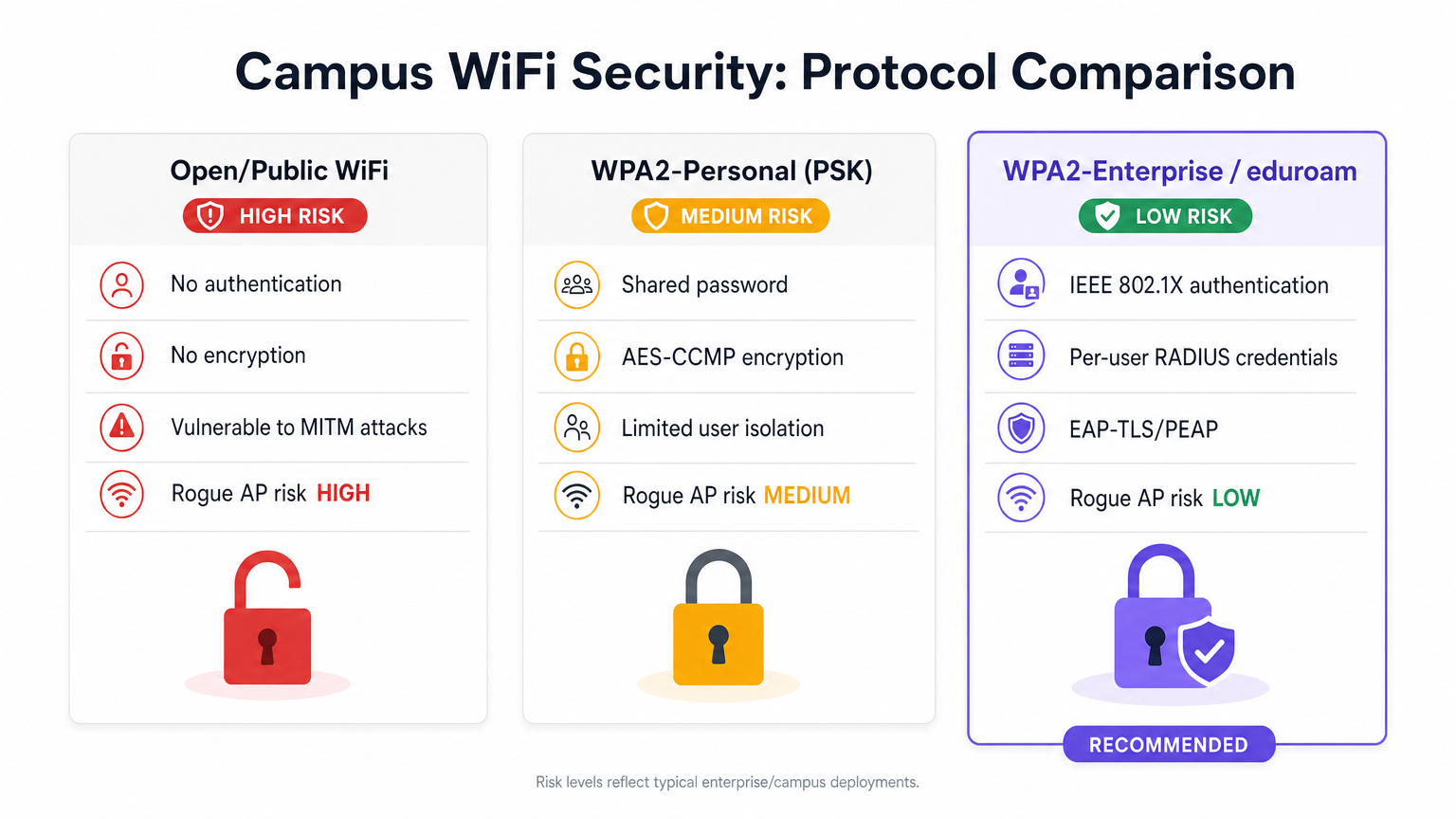
The short answer is yes—when architected around IEEE 802.1X and WPA2/WPA3-Enterprise (commonly via the eduroam federation), university WiFi is exceptionally secure. It shifts the security perimeter from the network edge to the individual user session, providing unique over-the-air encryption that neutralises the passive eavesdropping risks inherent in open public networks or shared Pre-Shared Key (PSK) deployments.
This guide breaks down the technical mechanics of campus WiFi security, common implementation pitfalls, and how CTOs in hospitality, retail, and healthcare can utilise these same architectures—often utilising platforms like Purple's Guest WiFi and WiFi Analytics —to deliver secure, frictionless connectivity at scale.
Technical Deep-Dive: The Architecture of Campus Security
Unlike the local coffee shop's open captive portal or a small business's shared password, university networks rely on enterprise-grade authentication protocols.
IEEE 802.1X and EAP
The foundation of campus WiFi security is IEEE 802.1X port-based network access control, operating in tandem with the Extensible Authentication Protocol (EAP).
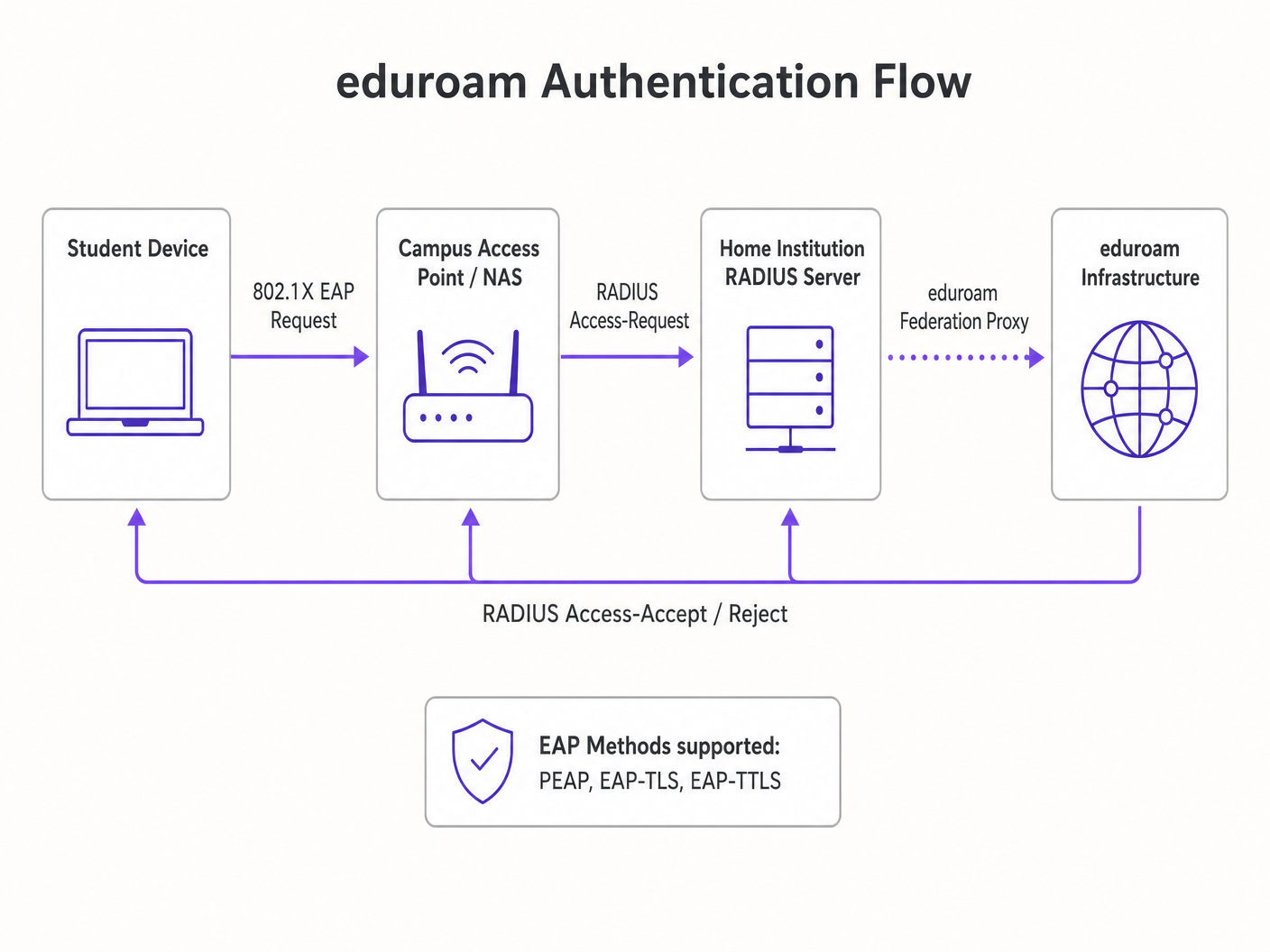
When a client device (the supplicant) attempts to associate with a campus Access Point (the authenticator), the AP blocks all IP traffic. It only permits EAP traffic over the LAN (EAPOL) until the device successfully authenticates against a backend RADIUS server.
The eduroam Federation Model
The most prevalent implementation in higher education is eduroam. This is a federated RADIUS hierarchy that allows students from participating institutions to securely access WiFi at any other participating campus globally.
- Authentication Routing: If a student from Institution A visits Institution B, Institution B's AP forwards the authentication request to its local RADIUS server.
- Realm Routing: The local RADIUS server reads the user's realm (e.g.,
@institutionA.edu) and proxies the request to the national top-level RADIUS server, which routes it to Institution A's home server. - Credential Protection: The authentication happens directly between the student's device and their home institution via an encrypted tunnel (typically PEAP or EAP-TLS). The visited campus never sees the user's password.
Per-User Encryption
Once authenticated, the RADIUS server sends an Access-Accept message containing a Master Session Key (MSK). The AP and the client device use this to derive a unique Pairwise Transient Key (PTK).
This means every user's over-the-air traffic is encrypted with a unique key. Even if an attacker captures the RF traffic, they cannot decrypt the data of other users on the same SSID. This fundamentally solves the security flaws of Open networks and WPA2-Personal.
Implementation Guide: Applying Campus Security to the Enterprise
For venue operators in Retail or Hospitality , migrating from open networks to enterprise-grade security requires careful planning.
1. Certificate Management and Supplicant Configuration
The Achilles' heel of PEAP (the most common EAP method) is client-side certificate validation. If a user's device is not configured to strictly validate the RADIUS server's certificate, they are vulnerable to Evil Twin attacks where a rogue AP spoofs the SSID.
Recommendation: Utilise onboarding platforms (like SecureW2) or MDM profiles to automatically configure user devices.
The profile must specify the exact CA certificate and server name to trust.
2. Handling Headless IoT Devices
802.1X requires a supplicant (software that handles the authentication dialogue). Smart TVs, digital signage, and medical equipment often lack this capability. This is a major consideration when deploying WiFi in Hospitals: A Guide to Secure Clinical Networks .
Recommendation: Implement a parallel SSID utilising Multiple Pre-Shared Keys (MPSK) or Identity PSK (iPSK). This assigns a unique passphrase to each IoT device MAC address, maintaining per-device encryption and dynamic VLAN assignment without requiring 802.1X.
3. Analytics and Threat Visibility
Encryption is only half the battle; visibility is the other. Enterprise networks must monitor for anomalous behaviour, rogue APs, and MAC spoofing.
Recommendation: Integrate your Wireless LAN Controller (WLC) with a robust analytics engine. Purple's platform ingests RADIUS logs, DHCP data, and location telemetry (see our Indoor Positioning System: UWB, BLE, & WiFi Guide ) to provide actionable security intelligence alongside marketing analytics.
Best Practices for Venue Operators
- Implement Client Isolation: Configure the WLC to drop peer-to-peer traffic between clients on the same subnet. A compromised laptop should not be able to scan or attack another device on the guest network.
- Dynamic VLAN Steering: Use RADIUS attributes to assign users to specific VLANs based on their identity group (e.g., Staff vs. Guest vs. IoT), enforcing network segmentation at the edge.
- Transition to OpenRoaming: For public venues, consider joining the WBA OpenRoaming federation. Purple acts as a free identity provider for OpenRoaming, offering the seamless, secure offload experience of eduroam for commercial environments like Transport hubs.
Troubleshooting & Risk Mitigation
| Failure Mode | Symptom | Mitigation Strategy |
|---|---|---|
| RADIUS Timeout | Clients fail to authenticate during peak hours. | Implement RADIUS load balancing and ensure the backend identity provider (e.g., Active Directory) has sufficient IOPS. |
| Evil Twin Attack | Users connect to a spoofed SSID and leak credentials. | Enforce strict certificate validation on client devices; utilise WIPS (Wireless Intrusion Prevention System) to locate and suppress rogue APs. |
| MAC Spoofing | Unauthorized device bypasses captive portal using a cloned MAC. | Implement anomalous travel-time detection (a MAC address appearing in two physically distant APs simultaneously) via analytics platforms. |
ROI & Business Impact
Upgrading to an 802.1X/Enterprise WiFi architecture is not merely a cost centre; it is a strategic enabler.
- Risk Mitigation: Drastically reduces the attack surface for data breaches, protecting brand reputation and avoiding regulatory fines (e.g., GDPR, PCI DSS).
- Operational Efficiency: Eliminates the helpdesk overhead of managing rotating shared passwords or dealing with captive portal compatibility issues.
- Data Quality: By tying network access to verified digital identities rather than ephemeral MAC addresses, the quality of data collected for analytics and attribution improves significantly.
For a deeper dive into specific vertical applications, review our guide: Is Hospital WiFi Safe? What Patients and Visitors Should Know (also available in Hindi: क्या अस्पताल का WiFi सुरक्षित है? मरीजों और आगंतुकों को क्या जानना चाहिए ).
Key Terms & Definitions
IEEE 802.1X
A network authentication protocol that opens ports for network access only after a user's identity has been successfully authorized via a centralized server.
The fundamental standard required to move a venue from shared passwords to enterprise-grade, per-user security.
RADIUS (Remote Authentication Dial-In User Service)
A networking protocol that provides centralized Authentication, Authorization, and Accounting (AAA) management for users who connect and use a network service.
The backend server that validates credentials and tells the Access Point which VLAN to assign the user to.
EAP (Extensible Authentication Protocol)
An authentication framework frequently used in wireless networks and point-to-point connections, allowing for various authentication methods like certificates or secure passwords.
The 'language' spoken between the user's device and the RADIUS server during the login process.
eduroam
An international roaming service for users in research, higher education, and further education, providing secure network access across participating institutions.
The primary case study for how federated 802.1X architecture can scale globally.
Supplicant
The software client on an end-user device (laptop, smartphone) that negotiates the EAP authentication with the network.
A common point of failure; if the OS supplicant is misconfigured, the user cannot connect securely.
Evil Twin Attack
A rogue wireless access point that masquerades as a legitimate Wi-Fi network to eavesdrop on wireless communications or steal credentials.
The primary threat vector that proper EAP certificate validation is designed to prevent.
VLAN Steering (Dynamic VLAN Assignment)
The process where the RADIUS server instructs the Access Point to place a specific user into a specific virtual network segment based on their identity or role.
Crucial for network segmentation, ensuring guest devices cannot route traffic to administrative servers.
OpenRoaming
A federation standard created by the WBA that allows mobile users to automatically and securely roam between Wi-Fi networks and cellular networks without captive portals.
The commercial equivalent of eduroam, allowing retail and hospitality venues to offer secure, frictionless connectivity.
Case Studies
A 400-room enterprise hotel currently uses an open captive portal for guest WiFi. They want to upgrade to a secure, encrypted connection for returning loyalty members without requiring them to manually log in on every visit. How should the network architect design this?
The architect should implement Passpoint (Hotspot 2.0) / OpenRoaming. When a loyalty member downloads the hotel's app, it installs an EAP-TLS certificate or a TTLS profile on the device. The hotel's WLC broadcasts the Passpoint ANQP elements. The device recognizes the network, automatically authenticates via 802.1X using the installed profile against the hotel's RADIUS server, and establishes an AES-encrypted connection. No captive portal is required for returning users.
A university IT team is deploying new wireless digital signage across the campus. These devices only support basic WPA2-Personal and cannot run an 802.1X supplicant. How can they secure these devices without creating a vulnerable campus-wide shared password?
The IT team should deploy an MPSK (Multiple Pre-Shared Key) or iPSK (Identity PSK) architecture. They broadcast a single 'Campus-IoT' SSID. However, instead of one global password, the RADIUS server generates a unique, complex PSK for the specific MAC address of each digital sign. When the sign connects, the WLC queries RADIUS, verifies the MAC-to-PSK mapping, and dynamically assigns the device to an isolated 'Digital Signage' VLAN.
Scenario Analysis
Q1. Your enterprise retail client wants to deploy WPA3-Enterprise across 500 stores. However, they have a fleet of legacy barcode scanners that only support WPA2-Personal. How do you architect the wireless network to maximize security for corporate devices while maintaining connectivity for the scanners?
💡 Hint:Consider how you can broadcast SSIDs and segment traffic at the edge.
Show Recommended Approach
Deploy two separate SSIDs. The primary SSID ('Corp-Secure') should be configured for WPA2/WPA3-Enterprise mixed mode utilizing 802.1X/PEAP, authenticating against the corporate RADIUS server for all laptops and modern devices. Deploy a secondary, hidden SSID ('Retail-IoT') utilizing Identity PSK (iPSK) or MPSK. The RADIUS server will assign a unique PSK to each barcode scanner's MAC address and dynamically steer them into an isolated, internet-only VLAN that cannot route to the corporate subnet.
Q2. During an eduroam deployment, users are complaining that their devices frequently prompt them to 'Trust this certificate' when roaming between buildings, leading to confusion and helpdesk tickets. What is the architectural flaw?
💡 Hint:Think about how the supplicant verifies the identity of the authentication server.
Show Recommended Approach
The client devices (supplicants) have not been properly provisioned with a strict certificate trust profile. They are likely configured to 'prompt user' when encountering a new or updated RADIUS certificate. To fix this, the IT team must deploy an onboarding tool (like SecureW2) or an MDM payload that explicitly configures the supplicant to trust only the specific Root CA that signed the RADIUS server's certificate, and strictly match the server's domain name. This eliminates the prompt and prevents Evil Twin attacks.
Q3. A hospital IT director wants to implement Purple's WiFi Analytics but is concerned that moving from an Open Captive Portal to an 802.1X OpenRoaming architecture will break their ability to collect guest data. Is this true?
💡 Hint:How does identity mapping work in federated roaming environments?
Show Recommended Approach
No, it is not true. While OpenRoaming eliminates the traditional captive portal 'splash page', it actually improves data fidelity. When a user connects via OpenRoaming, the identity provider passes specific, verified attributes (like an anonymized identifier or verified email, depending on the terms of service) to the venue's network. Purple's platform ingests this RADIUS accounting data, allowing the hospital to track dwell time, roaming patterns, and return visits with higher accuracy than MAC-based tracking, which is often broken by MAC randomization.




