

¿Es seguro el WiFi del supermercado? Una guía para compradores
Esta guía autorizada examina las realidades técnicas de la seguridad del WiFi en supermercados, proporcionando estrategias de arquitectura y seguridad accionables para líderes de TI en el sector minorista. Detalla el panorama de amenazas —desde APs Evil Twin hasta ataques Man-in-the-Middle— junto con el conjunto de mitigación necesario para proteger a los consumidores y las operaciones empresariales. Los minoristas y operadores de recintos encontrarán orientación de implementación concreta que cubre la segmentación de VLAN, el aislamiento de clientes, WPA3, el cumplimiento de PCI DSS y el onboarding de invitados compatible con GDPR a través de plataformas como Purple.
🎧 Escucha esta guía
Ver transcripción
Resumen Ejecutivo
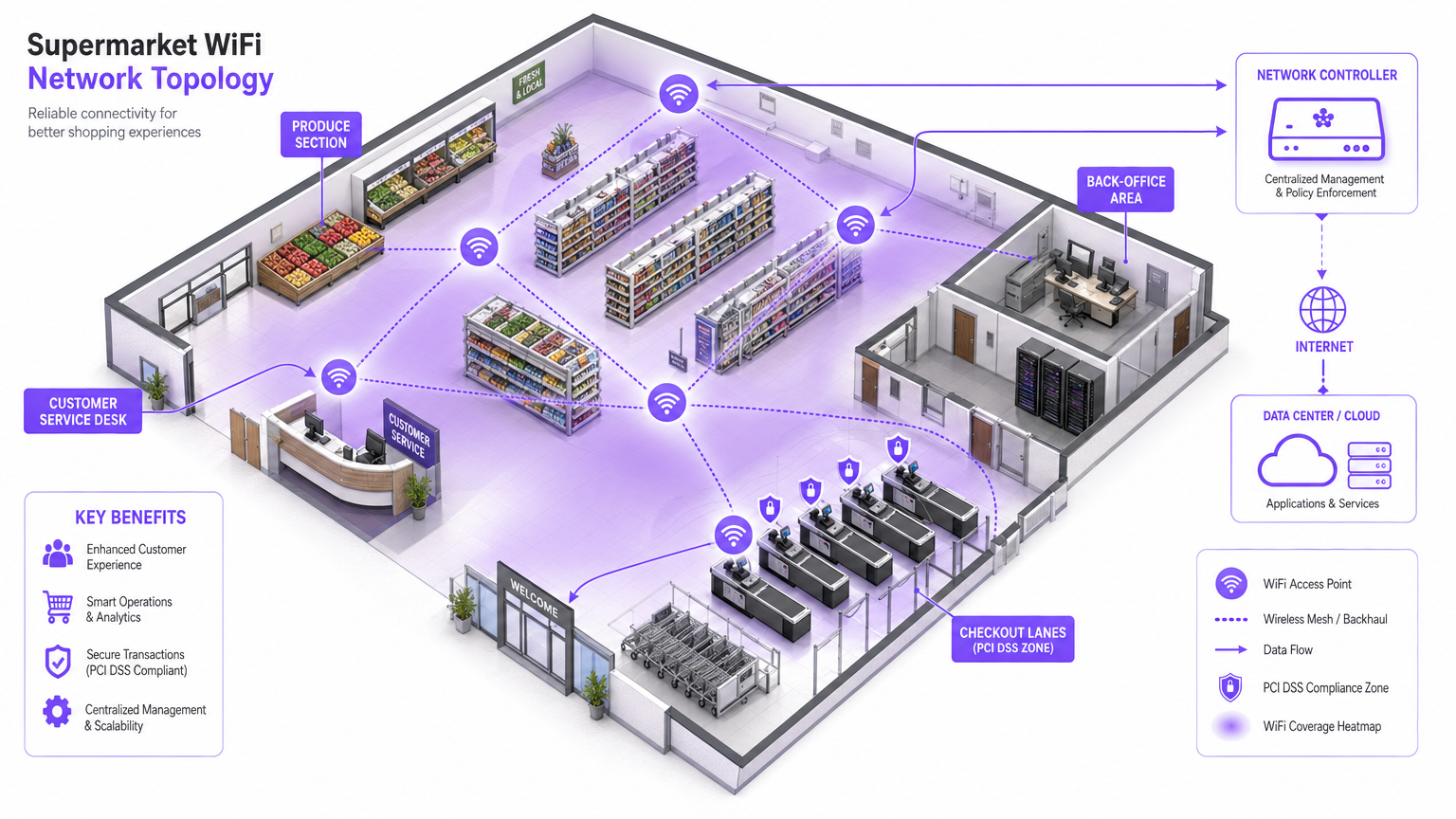
Para los gerentes de TI, arquitectos de red y directores de operaciones de recintos, la pregunta de si el WiFi del supermercado es seguro no es solo una preocupación del consumidor, es un problema crítico de gestión de riesgos empresariales. A medida que los entornos minoristas dependen cada vez más de la conectividad digital tanto para la interacción con el cliente como para la eficiencia operativa, la infraestructura de red subyacente debe ser robusta, segura y compatible con PCI DSS y GDPR.
Esta guía proporciona una inmersión técnica profunda en la arquitectura necesaria para ofrecer WiFi seguro en la tienda. El panorama de amenazas específico incluye APs Evil Twin, ataques Man-in-the-Middle y servidores DHCP no autorizados. El conjunto de mitigación necesario abarca una estricta segmentación de VLAN, aislamiento de clientes, cifrado WPA3 y autenticación 802.1X. Al aprovechar plataformas como el Guest WiFi de Purple para un onboarding seguro y una captura de consentimiento de grado de cumplimiento, los minoristas pueden proporcionar una experiencia de compra fluida sin comprometer la integridad de sus redes centrales ni violar los estándares de seguridad de tarjetas de pago. El objetivo es ir más allá de la conectividad básica y diseñar una red de borde inteligente y resiliente que genere valor comercial medible.
Inmersión Técnica Profunda
El entorno WiFi minorista es excepcionalmente desafiante debido a la alta densidad de clientes, el comportamiento transitorio de los usuarios y la necesidad crítica de proteger los sistemas de punto de venta (POS) del mismo espacio físico ocupado por dispositivos de invitados no confiables. El desafío técnico fundamental es proporcionar acceso sin fricciones manteniendo un aislamiento lógico absoluto de los activos corporativos.
El Panorama de Amenazas
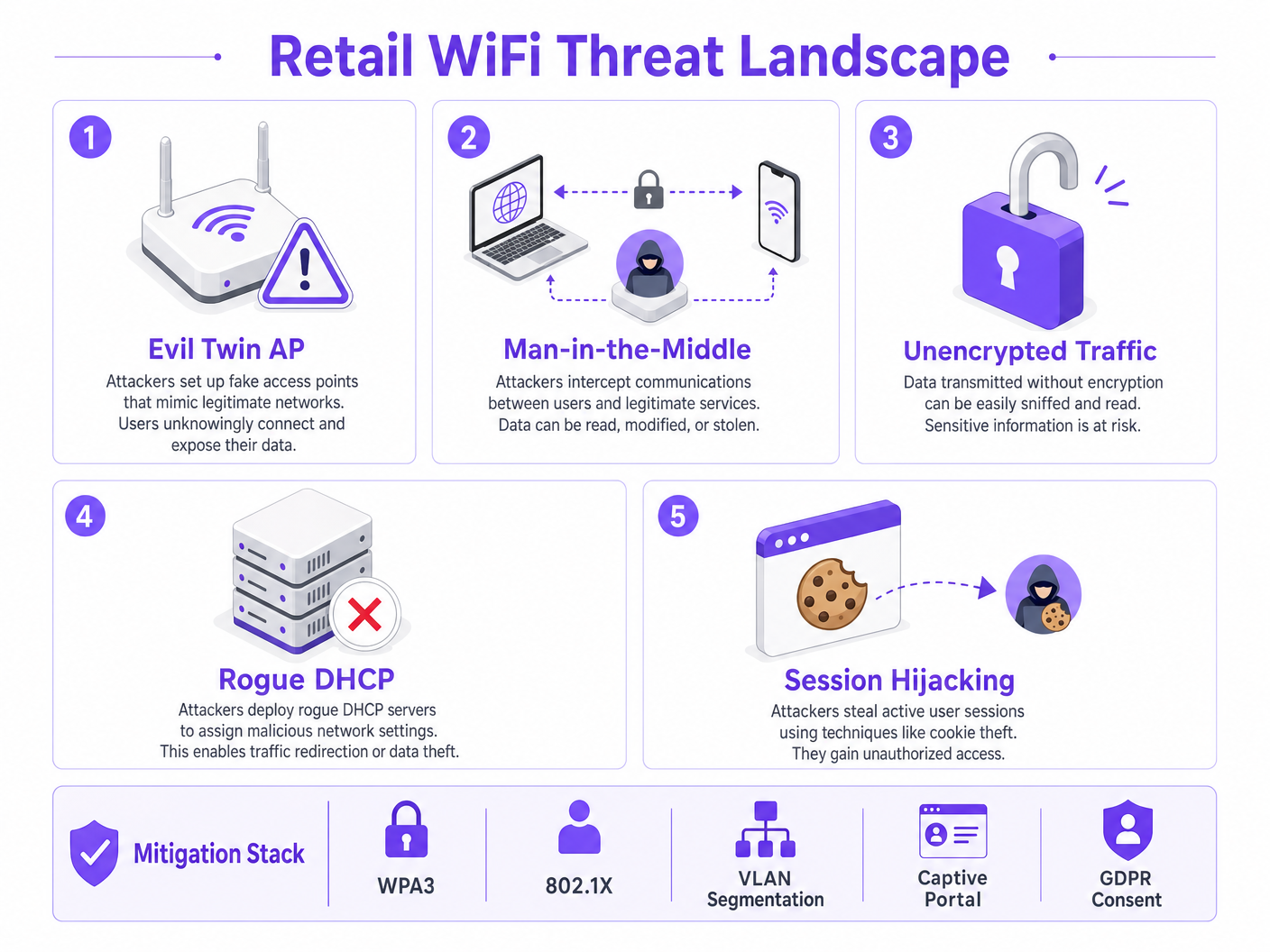
Las redes minoristas enfrentan varios vectores de ataque específicos que las distinguen de otros entornos empresariales.
Evil Twin Access Points representan la amenaza más prevalente y peligrosa. Los atacantes implementan puntos de acceso no autorizados que transmiten el SSID legítimo de la tienda —por ejemplo, Supermarket_Free_WiFi— con una señal más fuerte que la infraestructura legítima. Los dispositivos cliente con perfiles de red guardados se asocian automáticamente, permitiendo al atacante interceptar todo el tráfico. En un entorno de alto tráfico como un supermercado, un solo AP no autorizado puede afectar a cientos de dispositivos en cuestión de minutos.
Ataques Man-in-the-Middle (MitM) se derivan naturalmente de las implementaciones de Evil Twin. En redes abiertas no cifradas, los atacantes también pueden usar el spoofing de ARP en la VLAN de invitados legítima para posicionarse entre el cliente y la puerta de enlace, capturando cargas útiles no cifradas, incluyendo cookies de sesión y credenciales.
Servidores DHCP no autorizados explotan la seguridad de puerto mal configurada en los switches de acceso. Un dispositivo malicioso introducido en la VLAN de invitados puede responder a las solicitudes DHCP más rápido que el servidor legítimo, asignando configuraciones DNS maliciosas que redirigen silenciosamente todo el tráfico web a través de una infraestructura controlada por el atacante.
Secuestro de Sesión se dirige a servicios que no aplican HTTPS durante todo el ciclo de vida de la sesión. Los atacantes capturan las cookies de sesión transmitidas en texto plano, lo que les permite suplantar a los usuarios en servicios de terceros.
Arquitectura y Estándares
Para mitigar estas amenazas, la arquitectura de red debe construirse sobre una base de principios de confianza cero en el borde inalámbrico. Los siguientes estándares y tecnologías forman el núcleo de una implementación WiFi minorista responsable.
| Estándar / Tecnología | Rol en el WiFi Minorista | Relevancia de Cumplimiento |
|---|---|---|
| WPA3 (SAE) | Cifra el enlace inalámbrico; proporciona secreto hacia adelante | Requisito 4 de PCI DSS |
| 802.1X (PNAC) | Autentica al personal y dispositivos POS a nivel de puerto | Requisito 8 de PCI DSS |
| Segmentación de VLAN | Aísla el tráfico de invitados, POS e IoT en Capa 2/3 | Requisito 1 de PCI DSS |
| Aislamiento de Clientes | Previene ataques peer-to-peer en la VLAN de invitados | Mitigación de Riesgos |
| Captive Portal (GDPR) | Aplica los Términos de Servicio; captura el consentimiento legal para el procesamiento de datos | GDPR Art. 6, 7 |
| OpenRoaming / Passpoint | Onboarding de invitados cifrado y sin fricciones | Mejor Práctica de Privacidad |
| WIPS | Detecta y contiene APs no autorizados y Evil Twins | Requisito 11.2 de PCI DSS |
WPA3 introduce la Autenticación Simultánea de Iguales (SAE), reemplazando el intercambio de Clave Precompartida (PSK) utilizado en WPA2. Esto proporciona secreto hacia adelante y protege contra ataques de diccionario fuera de línea, lo cual es crítico para cualquier red donde la frase de contraseña pueda mostrarse públicamente.
802.1X proporciona Control de Acceso a la Red basado en puertos (PNAC). Asegura que solo los dispositivos autorizados con credenciales o certificados válidos puedan acceder a las VLAN corporativas seguras. Para dispositivos de invitados, donde la inscripción 802.1X es poco práctica, Passpoint (Hotspot 2.0) y OpenRoaming proporcionan una alternativa segura basada en certificados. Purple actúa como un proveedor de identidad gratuito para OpenRoaming bajo la licencia Connect, permitiendo un onboarding cifrado y sin interrupciones sin una interacción con el Captive Portal.
Guía de Implementación
La implementación de WiFi seguro en tiendas minoristas requiere un enfoque sistemático para la configuración y la aplicación de políticas. Los siguientes pasos representan la arquitectura mínima viable para una implementación segura y compatible.
Paso 1: Diseñar la Arquitectura de VLAN
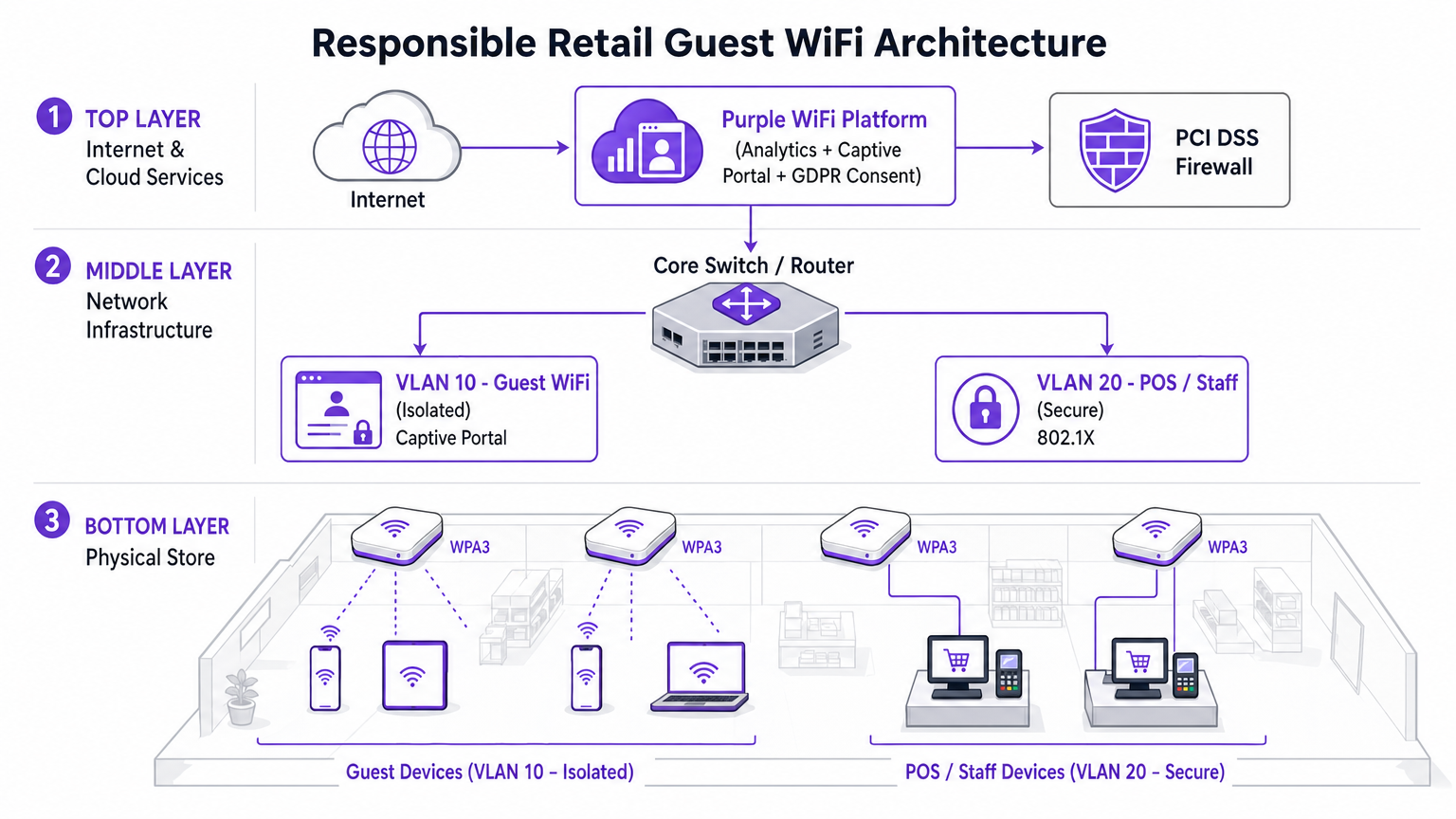
La decisión de implementación más crítica es la separación física y lógica del tráfico. Tres VLANs son la configuración mínima viable para un supermercado moderno.
- VLAN 10 (Guest WiFi): Estrictamente aislada. Ruta predeterminada solo a la puerta de enlace de internet. Sin rutas a ningún espacio de direcciones privadas RFC 1918. Aislamiento de clientes habilitado a nivel de AP.
- VLAN 20 (POS / Personal): Maneja datos transaccionales sensibles. Requiere autenticación 802.1X. ACLs estrictas de entrada/salida que permiten solo el tráfico necesario a la pasarela de pago.teways. Esta VLAN define el alcance del entorno de datos de titulares de tarjetas (CDE) de PCI DSS.
- VLAN 30 (IoT / Operaciones): Señalización digital, etiquetas electrónicas de estante (ESLs), sensores de temperatura. Aislada tanto de las VLAN de invitados como de las de POS.
Paso 2: Habilitar el aislamiento de clientes en el SSID de invitados
El aislamiento de clientes —también conocido como aislamiento de AP o aislamiento de estación— evita que los dispositivos conectados al mismo AP o VLAN se comuniquen directamente entre sí. Este único cambio de configuración, disponible en cada controlador inalámbrico empresarial, neutraliza la mayoría de los ataques peer-to-peer, los intentos de suplantación de ARP y el movimiento lateral en la red de invitados. No existe un caso de uso legítimo para que los clientes invitados se comuniquen entre sí en un entorno minorista. Debe habilitarse.
Paso 3: Implementar un Captive Portal compatible
El captive portal es el punto de aplicación de políticas y cumplimiento. No es simplemente una página de bienvenida. Al integrarse con la plataforma Purple WiFi Analytics , el portal gestiona la captura de consentimiento compatible con GDPR y la aplicación de los Términos de Servicio antes de que se conceda el acceso a la red. Esta capa protege al operador del lugar de la responsabilidad asociada con el comportamiento del usuario en la red. La plataforma también permite la limitación de ancho de banda y los límites de tiempo de sesión, evitando que un solo usuario degrade la experiencia para los demás.
Paso 4: Configurar la detección de AP no autorizados
Habilite las capacidades del Sistema de Prevención de Intrusiones Inalámbricas (WIPS) de su controlador inalámbrico empresarial. Configure la contención automática de SSIDs suplantados. Al detectar un AP Evil Twin, la infraestructura legítima transmite tramas de desautenticación suplantando la dirección MAC del AP no autorizado, forzando a los dispositivos cliente a desconectarse. Esto neutraliza la amenaza automáticamente mientras el personal de seguridad localiza el dispositivo físico.
Paso 5: Implementar filtrado DNS en la VLAN de invitados
Aplique seguridad a nivel de DNS en la VLAN 10 para bloquear el acceso a dominios maliciosos conocidos, servidores de comando y control de malware, y categorías de contenido que violen la política de uso aceptable. Esto protege a los usuarios de redireccionamientos maliciosos y reduce la responsabilidad del lugar por el contenido accedido en su red.
Mejores prácticas
Las siguientes recomendaciones estándar de la industria se aplican a cualquier implementación de WiFi en tiendas a escala empresarial.
Aplicar ACLs inter-VLAN estrictas en el núcleo. No dependa únicamente de la separación de VLAN. Deniegue explícitamente todo el tráfico de la subred de invitados a todos los rangos de direcciones privadas en la capa de enrutamiento. Una ruta mal configurada puede unir VLANs silenciosamente.
Mantener un programa disciplinado de parches de firmware. Los puntos de acceso son dispositivos de borde expuestos al espacio aéreo público. La vulnerabilidad KRACK (Key Reinstallation Attack) demostró que incluso WPA2 podría verse comprometido a través de debilidades a nivel de firmware. Aplique parches dentro de los 30 días posteriores a la publicación de un CVE crítico.
Aprovechar los análisis de forma responsable. La plataforma WiFi Analytics proporciona información valiosa sobre el tiempo de permanencia, los patrones de afluencia y el mapeo del recorrido del cliente. Asegúrese de que el proceso de análisis anonimice las direcciones MAC en cumplimiento con GDPR y la guía de la ICO sobre identificadores de dispositivos como datos personales.
Tratar la red de invitados como tráfico externo no confiable. El modelo mental debe ser: la VLAN de invitados es internet. Cualquier tráfico que se origine en ella debe tratarse con la misma sospecha que el tráfico entrante de una dirección IP externa desconocida.
Para contextualizar cómo se aplican estos principios en sectores adyacentes, consulte nuestra guía sobre WiFi en Hospitales: Una Guía para Redes Clínicas Seguras , que aborda desafíos de segmentación similares en entornos de alto riesgo.
Solución de problemas y mitigación de riesgos
Al implementar o auditar el WiFi en la tienda, varios modos de falla comunes pueden comprometer la seguridad o el rendimiento.
Modo de falla: Enrutamiento asimétrico en la VLAN de invitados. Si la VLAN de invitados no está correctamente aislada en el switch central, el tráfico puede enrutarse inadvertidamente a través de firewalls corporativos, causando fallas en la inspección con estado y exponiendo rutas internas a los dispositivos de invitados. Mitigación: Implemente una interfaz física o lógica dedicada para el tráfico de invitados en el firewall de borde, o use VRF (Virtual Routing and Forwarding) para mantener una separación completa de la tabla de enrutamiento.
Modo de falla: Omisión del Captive Portal mediante tunelización DNS. Los usuarios avanzados pueden omitir el captive portal codificando el tráfico HTTP dentro de las consultas DNS a un resolvedor externo que controlan. Mitigación: Implemente configuraciones estrictas de "walled garden". Solo permita el tráfico DNS a resolvedores externos aprobados antes de la autenticación. Aplique inspección profunda de paquetes (DPI) para identificar y descartar el tráfico tunelizado.
Modo de falla: Suplantación de dirección MAC. Los atacantes pueden clonar la dirección MAC de un dispositivo autenticado para omitir el captive portal. Mitigación: Implemente la vinculación de sesión tanto a la dirección MAC como a la dirección IP. Habilite DHCP snooping para detectar conflictos de direcciones. Establezca tiempos de espera de sesión cortos para limitar la ventana de explotación.
Modo de falla: Salto de VLAN mediante doble etiquetado. En puertos troncales mal configurados, un atacante puede crear tramas 802.1Q con doble etiquetado para inyectar tráfico en una VLAN diferente. Mitigación: Asegúrese de que todos los puertos de acceso estén explícitamente asignados a una VLAN no nativa. Deshabilite DTP (Dynamic Trunking Protocol) en todos los puertos de switch orientados al acceso.
ROI e impacto comercial
Invertir en una arquitectura WiFi segura y de nivel empresarial ofrece un valor comercial medible que se extiende mucho más allá de la mitigación de riesgos.
Reducción de costos de cumplimiento de PCI DSS. La segmentación adecuada de VLAN reduce el alcance del entorno de datos de titulares de tarjetas de PCI DSS. Un alcance de CDE más pequeño significa menos sistemas para auditar, menos controles para evidenciar y tarifas de QSA (Qualified Security Assessor) significativamente reducidas. Para una cadena minorista de 200 ubicacionesesto puede representar ahorros de decenas de miles de libras por ciclo de auditoría anual.
Adquisición de Datos de Primera Parte. Un Captive Portal seguro y de marca impulsa altas tasas de aceptación para bases de datos de marketing. Los compradores que se conectan a una experiencia de WiFi para invitados bien diseñada y confiable son significativamente más propensos a dar su consentimiento para comunicaciones de marketing. Estos datos de primera parte son cada vez más valiosos a medida que la eliminación de las cookies de terceros reduce la eficacia de la publicidad digital. Para más contexto sobre el valor de la inteligencia de ubicación, consulte nuestra guía sobre Sistema de Posicionamiento Interior: Guía UWB, BLE y WiFi .
Protección de Marca. El costo reputacional de una filtración de datos de alto perfil originada en la red de invitados supera con creces la inversión en infraestructura segura. Un solo incidente puede resultar en multas de la ICO bajo GDPR (hasta el 4% de la facturación anual global), litigios por acciones colectivas y daños duraderos a la confianza del consumidor.
Inteligencia Operacional. Los datos de WiFi Analytics de la red de invitados proporcionan información procesable sobre los patrones de afluencia, el tiempo de permanencia por zona de la tienda y los períodos de tráfico pico. Estos datos informan directamente las decisiones de personal, la optimización del diseño de la tienda y la programación de promociones — entregando un ROI medible de la misma inversión en infraestructura.
Escuche: Informe Ejecutivo sobre Seguridad WiFi en el Comercio Minorista
Lectura Relacionada: ¿Es seguro el WiFi universitario? Una guía para estudiantes | WiFi en Hospitales: Una Guía para Redes Clínicas Seguras | Su Guía para Soluciones Wi-Fi Empresariales en Automóviles
Referencias
[1] IEEE 802.11-2020 — Estándar IEEE para Tecnología de la Información — Especificaciones de Control de Acceso al Medio y Capa Física de LAN Inalámbrica. [2] PCI Security Standards Council — PCI DSS v4.0, Requisitos 1, 4, 8 y 11. [3] Oficina del Comisionado de Información del Reino Unido — Guía sobre el uso de identificadores de dispositivos como datos personales bajo el GDPR del Reino Unido. [4] Wi-Fi Alliance — Especificación WPA3 v3.0.
Términos clave y definiciones
Client Isolation
A wireless network feature that prevents devices connected to the same Access Point or VLAN from communicating directly with each other. All traffic must traverse the AP and be routed through the upstream gateway.
The single most impactful security control for guest networks. Prevents peer-to-peer attacks, ARP spoofing, lateral movement, and malware propagation between shopper devices. Must be enabled on all guest SSIDs.
VLAN Segmentation
The practice of dividing a physical network into multiple logical networks (Virtual LANs) at Layer 2, with routing between them controlled by ACLs at Layer 3.
Essential for separating untrusted guest traffic from sensitive POS and corporate data. The primary mechanism for reducing PCI DSS audit scope in retail environments.
Evil Twin AP
A rogue wireless access point that broadcasts the same SSID as a legitimate network, typically with a stronger signal, to trick client devices into automatically associating with it.
The primary wireless threat in high-footfall retail environments. Mitigated by deploying WIPS capabilities to detect and contain spoofed SSIDs automatically.
Captive Portal
A web page that intercepts all HTTP/HTTPS traffic from a newly connected device and requires the user to complete an action — accepting Terms of Service, authenticating, or providing consent — before granting full network access.
The enforcement point for GDPR compliance, acceptable use policy, and first-party data capture in guest WiFi deployments. Not a security boundary — a policy and compliance layer.
802.1X (PNAC)
An IEEE standard for port-based Network Access Control that provides an authentication mechanism for devices attempting to connect to a LAN or WLAN, using an authentication server (typically RADIUS) to validate credentials or certificates.
The standard for securing staff and POS device access in retail. Ensures only authorized, enrolled devices can access the secure corporate VLANs, regardless of physical port.
OpenRoaming
A Wi-Fi Alliance roaming federation service that allows user devices to automatically and securely authenticate to participating Wi-Fi networks using device certificates, without captive portals or manual password entry.
The emerging standard for frictionless, encrypted guest onboarding. Purple acts as a free identity provider for OpenRoaming under the Connect license, enabling retailers to offer seamless connectivity without sacrificing security.
WPA3 (SAE)
The third generation of Wi-Fi Protected Access, introducing Simultaneous Authentication of Equals (SAE) to replace the Pre-Shared Key (PSK) handshake. Provides forward secrecy and resistance to offline dictionary attacks.
Mandatory for new retail WiFi deployments. Particularly important in environments where the network passphrase may be publicly displayed, as SAE prevents retroactive decryption of captured traffic.
PCI DSS
Payment Card Industry Data Security Standard — a set of security requirements for all organisations that accept, process, store, or transmit payment card data. Defines the Cardholder Data Environment (CDE) and mandates strict network segmentation.
The primary regulatory driver for strict VLAN segmentation in retail. Mixing guest and POS traffic on the same network segment is a direct violation of PCI DSS Requirement 1 and can result in significant fines and loss of card processing privileges.
Dynamic ARP Inspection (DAI)
A security feature on managed switches that validates ARP packets against a DHCP snooping binding database, dropping any ARP reply that does not match the legitimate IP-to-MAC binding.
The Layer 2 control that prevents ARP spoofing attacks on the guest VLAN. Works in conjunction with DHCP Snooping to maintain an accurate binding table.
Casos de éxito
A national retail chain with 200 locations is upgrading its network infrastructure. They currently operate a single flat network for POS terminals, staff devices, and a WPA2 password-protected guest SSID. The password is printed on customer receipts. They need to achieve PCI DSS v4.0 compliance within the next two quarters while improving the guest experience. How should the architecture be redesigned?
The network must be redesigned around strict VLAN segmentation and a compliant guest onboarding flow.
VLAN Architecture: Create VLAN 10 for Guest Access (isolated, internet-only route), VLAN 20 for POS and payment terminals (802.1X authenticated, strict ACLs to payment gateway IPs only), and VLAN 30 for staff and back-office devices.
Guest SSID: Migrate from WPA2-PSK to an open SSID with a captive portal. Enable client isolation at the AP level immediately. This removes the false security of a publicly displayed password and eliminates peer-to-peer attack vectors.
Captive Portal: Deploy the Purple platform as the captive portal layer. Configure GDPR-compliant consent capture, Terms of Service enforcement, and bandwidth throttling (e.g., 5 Mbps per device, 60-minute session timeout).
POS Segmentation: Migrate all POS terminals to VLAN 20. Implement 802.1X with device certificates. Apply ACLs at the core switch denying all traffic from VLAN 10 to VLAN 20 and VLAN 30.
Monitoring: Enable WIPS on all wireless controllers. Configure automatic containment of spoofed SSIDs. Integrate controller logs with the central SIEM for real-time alerting.
A large supermarket's NOC receives alerts showing a high volume of ARP broadcast traffic and anomalous DNS requests originating from several MAC addresses on the guest VLAN. Guest WiFi performance is degraded. A packet capture shows ARP replies claiming the gateway IP belongs to a device that is not the legitimate gateway. What is the likely attack and the immediate remediation steps?
The symptoms are consistent with an ARP spoofing / Man-in-the-Middle attack on the guest VLAN. The attacker has introduced a device onto the guest network and is broadcasting gratuitous ARP replies claiming ownership of the gateway IP, redirecting guest traffic through their device.
Immediate Remediation:
- Verify that Client Isolation is enabled on the guest SSID. If disabled, enable it immediately — this is the most effective single control.
- Enable Dynamic ARP Inspection (DAI) on the access switches for the guest VLAN. DAI validates ARP packets against the DHCP snooping binding database, dropping any ARP reply that does not match the legitimate IP-to-MAC binding.
- Enable DHCP Snooping on the guest VLAN to build the binding database that DAI relies on.
- Identify and blacklist the attacker's MAC address at the wireless controller level to terminate their connection.
- Force a DHCP lease renewal for all guest clients to flush any poisoned ARP caches.
- Review WIPS logs to determine whether the attacker connected via the legitimate SSID or an Evil Twin.
Análisis de escenarios
Q1. You are auditing a newly deployed supermarket network. The configuration shows the guest SSID is on VLAN 50 and POS terminals are on VLAN 60. However, a ping from a device on VLAN 50 successfully reaches a POS terminal on VLAN 60. The network team insists the VLANs are correctly configured. What is the most likely architectural failure and how do you remediate it?
💡 Sugerencia:VLANs separate traffic at Layer 2. Think about where routing between subnets happens and what controls should exist there.
Mostrar enfoque recomendado
The VLANs are correctly configured at Layer 2, but inter-VLAN routing is enabled at the core switch or firewall without restrictive ACLs. Traffic is being routed between the subnets because no ACL explicitly denies it. Remediation: Apply an outbound ACL on the VLAN 50 (guest) interface at the routing layer, explicitly denying all traffic destined for any RFC 1918 private address range (10.0.0.0/8, 172.16.0.0/12, 192.168.0.0/16), with a permit statement for the default route to the internet only. Verify with a packet capture that no inter-VLAN traffic traverses the firewall after the ACL is applied.
Q2. A retail client's CTO wants to remove the captive portal entirely to reduce friction for shoppers, proposing a completely open network with no authentication or Terms of Service. What are the three most significant risks you must communicate, and what is the recommended alternative that preserves the frictionless experience?
💡 Sugerencia:Consider technical security, legal liability under UK GDPR, and the commercial value being lost.
Mostrar enfoque recomendado
- Legal Liability: Without a Terms of Service, the venue assumes liability for illegal activities (e.g., copyright infringement, accessing prohibited content) performed on their network. The captive portal is the legal instrument that transfers responsibility to the user. 2. GDPR Compliance: Removing the portal eliminates the consent capture mechanism. Any analytics or marketing data derived from network usage without a lawful basis under GDPR Article 6 exposes the organisation to ICO enforcement. 3. Commercial Value: The captive portal is the primary mechanism for first-party data acquisition — email addresses, demographic data, and marketing opt-ins. Removing it destroys this revenue-generating capability. Recommended Alternative: Deploy OpenRoaming via the Purple Connect license. This provides completely frictionless, encrypted onboarding for users with compatible devices, while maintaining a lightweight captive portal for non-OpenRoaming devices that still captures consent.
Q3. Your WIPS alerts you to a rogue AP broadcasting the store's exact SSID with a signal strength 15 dBm stronger than your legitimate APs near the main entrance. Staff report that several customers are complaining their phones 'won't load anything' after connecting to the WiFi. What is happening and what is the correct automated response you should have pre-configured?
💡 Sugerencia:Consider both the attack mechanism and the over-the-air countermeasure available to enterprise wireless controllers.
Mostrar enfoque recomendado
An Evil Twin AP has been deployed near the entrance with a boosted signal to force client devices to prefer it over the legitimate infrastructure. The customers experiencing connectivity failures are connected to the rogue AP, which is either not providing internet access (a passive credential harvesting setup) or is actively intercepting and failing to forward traffic. The correct automated response is WIPS-based containment: the legitimate wireless controllers should be configured to automatically transmit de-authentication (deauth) frames spoofing the MAC address of the rogue AP. This forces any device attempting to associate with the Evil Twin to immediately disconnect, effectively neutralising the attack over the air. Simultaneously, the NOC alert should trigger a physical security response to locate and remove the rogue device. Note: automated deauth containment should be carefully scoped to avoid accidentally deauthenticating clients from legitimate neighbouring networks.




