

Planificación del Presupuesto PoE para Despliegues WiFi Multi-Sitio
Esta guía proporciona un marco práctico para calcular los presupuestos de Power over Ethernet (PoE) en despliegues WiFi multi-sitio. Cubre la transición a PoE++ para WiFi 6E y 7, estrategias de dimensionamiento de switches y métodos para preparar la infraestructura para el futuro, mitigando los riesgos de sobrecarga de energía.
🎧 Escuchar esta guía
Ver transcripción

Resumen Ejecutivo
Para los CTOs y directores de TI que gestionan ubicaciones multi-sitio —desde cadenas minoristas hasta carteras de hostelería— la transición a la próxima generación inalámbrica ya no es solo un desafío de RF; es un desafío de energía fundamental. La llegada de WiFi 6E y el inminente lanzamiento de WiFi 7 han alterado drásticamente los requisitos de energía de los puntos de acceso empresariales. Si bien los estándares heredados 802.3af y 802.3at eran suficientes para generaciones anteriores, los APs modernos de alta densidad exigen cada vez más 802.3bt (PoE++).
No calcular con precisión los presupuestos PoE en cientos de switches puede llevar a fallos catastróficos en el despliegue, donde los APs negocian silenciosamente estados de menor potencia, deshabilitando radios y paralizando el rendimiento de la red. Esta guía proporciona un marco de acción, independiente del proveedor, para calcular los presupuestos PoE totales, dimensionar los switches de distribución y preparar la infraestructura de switching para el futuro, con el fin de soportar Guest WiFi y WiFi Analytics avanzados sin riesgo de caídas de tensión o reemplazos forzados de hardware a mitad de ciclo de vida.
Análisis Técnico Detallado: La Evolución de los Estándares PoE
El IEEE ha ratificado continuamente nuevos estándares Power over Ethernet para mantenerse al día con las demandas de los dispositivos finales. Comprender la diferencia entre la energía suministrada por el Equipo de Suministro de Energía (PSE) y la energía recibida por el Dispositivo Alimentado (PD) es fundamental debido a la pérdida de cable.
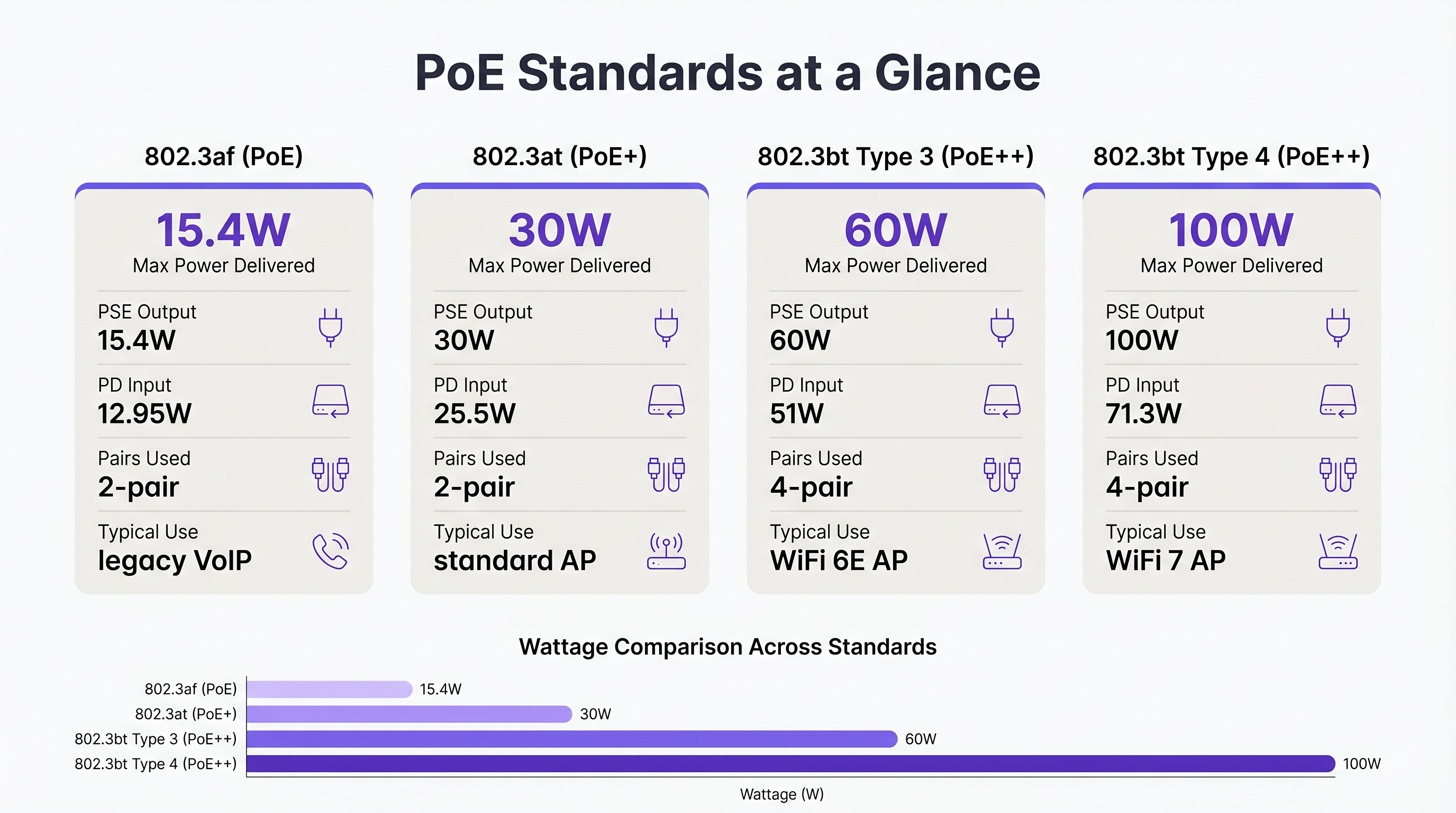
- 802.3af (PoE): Suministra hasta 15,4W en el puerto del switch, proporcionando 12,95W al dispositivo. Históricamente utilizado para teléfonos VoIP heredados y sensores básicos.
- 802.3at (PoE+): Suministra hasta 30W en el puerto, proporcionando 25,5W al dispositivo. Este ha sido el estándar para los puntos de acceso WiFi 5 y WiFi 6 estándar.
- 802.3bt Tipo 3 (PoE++): Suministra hasta 60W en el puerto, proporcionando 51W al dispositivo. Esta es la nueva base para los APs WiFi 6E de alto rendimiento, que cuentan con múltiples radios y arrays de escaneo dedicados para Wayfinding y seguridad.
- 802.3bt Tipo 4 (PoE++): Suministra hasta 100W en el puerto, proporcionando 71,3W al dispositivo. Este estándar es necesario para APs WiFi 7 de ultra alta densidad y agregadores IoT complejos.
Por qué WiFi 6E y 7 Demandan PoE++
Los puntos de acceso modernos son esencialmente dispositivos de computación en el borde. Un AP WiFi 6E típico opera radios en las bandas de 2,4 GHz, 5 GHz y 6 GHz simultáneamente. Además, muchos APs empresariales incluyen una cuarta radio para BLE/Zigbee (utilizada para Sensors y seguimiento de activos) y una quinta radio de escaneo dedicada para WIPS/WIDS (Sistemas de Prevención/Detección de Intrusiones Inalámbricas) continuos. Impulsar estos componentes, junto con interfaces Ethernet multi-gigabit (2.5GbE o 5GbE), eleva el consumo de energía mucho más allá del límite de 25,5W de PoE+.
Si un AP WiFi 6E se conecta a un switch PoE+, normalmente utilizará LLDP (Link Layer Discovery Protocol) para negociar la energía. Si la energía disponible es insuficiente, el AP entrará en un estado degradado, a menudo deshabilitando la radio de 6 GHz o reduciendo la potencia de transmisión de todas las radios. Esto resulta en una red que parece funcional en un panel de control, pero que tiene un rendimiento deficiente para el usuario final.
Guía de Implementación: Cálculo del Presupuesto Multi-Sitio
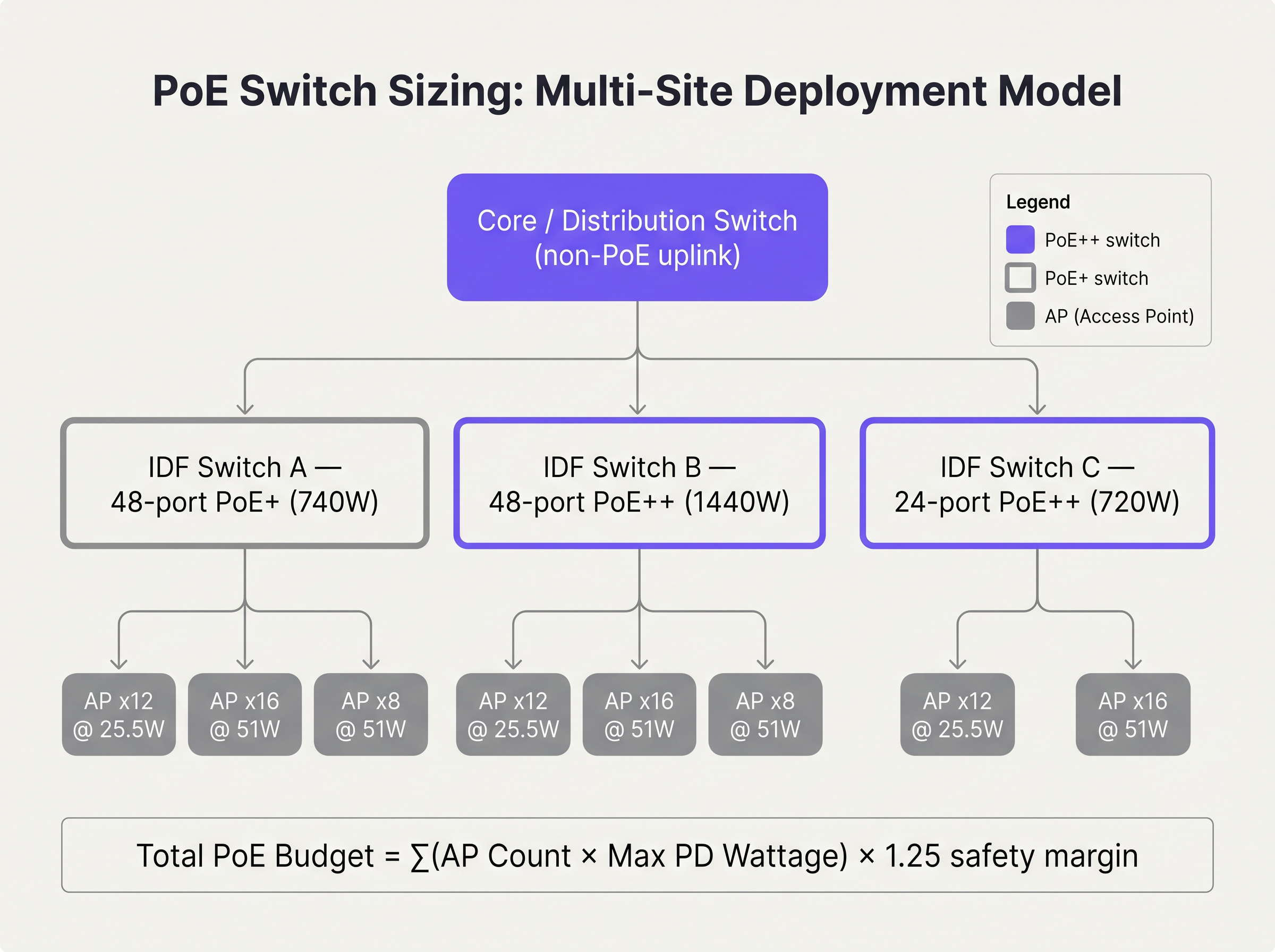
Al planificar un despliegue multi-sitio, como la actualización de una cadena Retail nacional, debe calcular el presupuesto PoE total para cada switch IDF (Intermediate Distribution Frame).
Paso 1: Auditar los Requisitos de Energía de los Dispositivos Finales
Compile una lista completa de todos los PDs que se conectarán al switch. No confíe en el consumo de energía típico; utilice el consumo máximo de energía especificado por el proveedor. Por ejemplo, si se despliegan 24 APs WiFi 6E con un consumo máximo de 45W cada uno, el requisito base es de 1.080W.
Paso 2: Aplicar el Margen de Seguridad
Nunca diseñe un switch para que funcione al 100% de su capacidad PoE. Debe tener en cuenta la degradación del cable, la pérdida térmica y la expansión futura. Una práctica estándar de la industria es aplicar un margen de seguridad del 20% al 25%.
Presupuesto Total = (Suma del Consumo Máximo del PD) × 1,25
En nuestro ejemplo: 1.080W × 1,25 = 1.350W.
Paso 3: Seleccionar la Fuente de Alimentación del Switch
Un switch PoE+ estándar de 48 puertos suele contar con una fuente de alimentación de 740W. Esto es claramente insuficiente para nuestro requisito de 1.350W. El arquitecto debe especificar un switch con una fuente de alimentación de 1440W o superior, o dividir los APs entre dos switches apilados para distribuir la carga.
Mejores Prácticas para Entornos Empresariales
- Actualizaciones de la Infraestructura de Cableado: PoE++ transmite energía a través de los cuatro pares del cable de par trenzado. En entornos como Hospitality donde los cables a menudo están fuertemente agrupados en bandejas de techo, esto genera un calor significativo. El aumento del calor eleva la resistencia del cable, lo que provoca una caída de tensión. Siempre especifique cableado de Categoría 6A (Cat6A) para nuevos despliegues PoE++ para manejar la carga térmica y soportar el rendimiento multi-gigabit.
- Configuración de LLDP: Asegúrese de que LLDP-MED esté habilitado globalmente y en todas las interfaces orientadas a los APs. Esto permite que el switch y el AP negocien dinámicamente los requisitos de energía con precisión granular, en lugar de depender de asignaciones estáticas basadas en clases que a menudo desperdician presupuesto.
- Configuración de Prioridad de Puerto: En caso de un fallo de la fuente de alimentación en una configuración apilada, el switch comenzará a desprender carga PoE. Configure las prioridades de puerto (Crítica, Alta, Baja) para que la infraestructura esencial (por ejemplo, APs que cubren el vestíbulo o terminales de pago) permanezca alimentada mientras los dispositivos secundarios (por ejemplo., señalización digital) se caen.
Resolución de problemas y mitigación de riesgos
La trampa de la sobresuscripción
La sobresuscripción ocurre cuando el consumo potencial total de todos los dispositivos conectados excede la fuente de alimentación del switch, incluso si el consumo actual está dentro de los límites. Por ejemplo, un switch con un presupuesto de 740W podría alimentar con éxito 30 APs que consumen 20W cada uno (600W en total). Sin embargo, durante una actualización de firmware o un ciclo de arranque, esos APs podrían aumentar temporalmente su consumo máximo a 30W (900W en total). Este pico hará que el switch active su protección de energía, lo que resultará en un reinicio en cascada de todo el segmento de red.
Mitigación: Calcule siempre basándose en el consumo máximo, no en el consumo típico. Implemente un control de cambios estricto para evitar que los técnicos conecten dispositivos PoE no autorizados a los switches de borde.
ROI e impacto empresarial
Preparar su infraestructura de switching para el futuro requiere un CapEx inicial más alto. Un switch PoE++ multigigabit de 48 puertos es significativamente más caro que un switch PoE+ gigabit estándar. Sin embargo, el ROI se materializa al evitar un ciclo de 'retirar y reemplazar'.
Considere un proveedor de Atención sanitaria que implementa WiFi 6 hoy. Si implementan switches PoE+, ahorran dinero inicialmente. Pero cuando inevitablemente actualicen a WiFi 7 en cuatro años para soportar telemetría médica de alta densidad, esos switches quedarán obsoletos. Al invertir hoy en infraestructura PoE++, el próximo ciclo de actualización inalámbrica solo requerirá el cambio de los APs de borde, reduciendo drásticamente los costes de hardware y el tiempo de inactividad de la implementación.
Además, una alimentación adecuada garantiza que funciones avanzadas como Tiempos de espera de sesión de WiFi para invitados: equilibrio entre UX y seguridad y el escaneo de seguridad continuo funcionen correctamente, protegiendo a la empresa de incumplimientos de conformidad y malas experiencias de usuario.
Informe de audio
Escuche a nuestro arquitecto de soluciones sénior hablar sobre las realidades de la planificación de PoE en este informe de 10 minutos:
Términos clave y definiciones
Power Sourcing Equipment (PSE)
The device that provides power onto the Ethernet cable, typically a PoE switch or midspan injector.
When sizing switches, you are evaluating the total power capacity of the PSE.
Powered Device (PD)
The endpoint device receiving power from the Ethernet cable, such as an access point or IP camera.
The PD determines the power demand. Its maximum draw dictates the budget requirements.
802.3at (PoE+)
The IEEE standard delivering up to 30W at the switch port.
The legacy standard that is increasingly insufficient for modern WiFi 6E and WiFi 7 deployments.
802.3bt (PoE++)
The IEEE standard delivering up to 60W (Type 3) or 100W (Type 4) at the switch port.
The necessary standard for powering multi-radio, high-density access points.
LLDP-MED
Link Layer Discovery Protocol - Media Endpoint Discovery. An extension of LLDP that allows PSE and PD to negotiate exact power requirements.
Crucial for optimising the power budget dynamically rather than relying on static class allocations.
Oversubscription
A state where the potential maximum power draw of all connected devices exceeds the switch's power supply capacity.
A dangerous design flaw that leads to unpredictable network outages during load spikes.
Port Priority
A switch configuration that determines which ports lose power first if the total budget is exceeded.
Essential for ensuring critical infrastructure remains online during a partial power failure.
Voltage Drop
The loss of electrical potential along the length of a cable due to resistance.
The reason why a switch delivering 60W at the port only guarantees 51W at the device.
Casos de éxito
A 200-room hotel is upgrading its wireless infrastructure. The design calls for 80 WiFi 6E APs (Max draw: 41W) and 20 IP Security Cameras (Max draw: 12W). The IT director plans to use three 48-port switches, each with a 740W power supply. Will this design succeed?
No, this design will fail due to power oversubscription.
Total AP power: 80 APs × 41W = 3,280W. Total Camera power: 20 Cameras × 12W = 240W. Total required power (without margin): 3,520W.
Total available power: 3 switches × 740W = 2,220W.
The design is short by at least 1,300W. The switches will shed load, causing APs to drop offline or negotiate down to disabled radios.
A stadium concourse deployment features long cable runs (up to 90 metres) from the IDF to the APs. The APs require 802.3bt Type 3 (60W). What physical layer considerations must be addressed?
The deployment must utilise Cat6A cabling, and cable bundles must be kept small. PoE++ over long distances generates significant heat, especially in the centre of large cable bundles. Heat increases resistance, which leads to voltage drop. If voltage drops too low over the 90m run, the AP will not receive the required 51W.
Análisis de escenarios
Q1. You are deploying 15 WiFi 6E APs (Max draw: 45W) in a new retail branch. You have an existing 24-port switch with a 370W power supply. What is your recommendation?
💡 Sugerencia:Calculate the total maximum draw and compare it to the existing supply.
Mostrar enfoque recomendado
The total maximum draw is 675W (15 × 45W). The existing 370W switch is entirely insufficient and will fail. Recommendation: Replace the switch with a 24-port PoE++ switch featuring at least a 1000W power supply to accommodate the load and a safety margin.
Q2. During a network audit, you notice that several WiFi 6E APs are operating with their 6 GHz radios disabled, despite being configured correctly in the controller. What is the most likely physical layer cause?
💡 Sugerencia:Consider what happens when an AP does not receive enough power via LLDP negotiation.
Mostrar enfoque recomendado
The APs are likely connected to an older 802.3at (PoE+) switch. Because they are not receiving the required 802.3bt (PoE++) power, they have negotiated down to a lower power state, which typically involves disabling advanced radios like 6 GHz to remain operational.
Q3. You are designing a high-density stadium deployment. To save costs, the procurement team suggests using existing Cat5e cabling for the new 802.3bt Type 4 (100W) APs. How do you respond?
💡 Sugerencia:Consider the thermal implications of pushing 100W over four pairs in large cable bundles.
Mostrar enfoque recomendado
Reject the suggestion. Pushing 100W over Cat5e, especially in bundled cable trays common in stadiums, generates excessive heat. This increases resistance, causing severe voltage drop and potential fire hazards. Cat6A must be specified to handle the thermal load and ensure full power delivery to the APs.




