

Pianificazione del Budget PoE per Implementazioni WiFi Multi-Sito
Questa guida fornisce un framework pratico per il calcolo dei budget Power over Ethernet (PoE) nelle implementazioni WiFi multi-sito. Copre la transizione a PoE++ per WiFi 6E e 7, le strategie di dimensionamento degli switch e i metodi per rendere l'infrastruttura a prova di futuro, mitigando i rischi di sovraccarico di potenza.
🎧 Ascolta questa guida
Visualizza trascrizione

Riepilogo Esecutivo
Per i CTO e i direttori IT che gestiscono sedi multi-sito, dalle catene di vendita al dettaglio ai portfolio di ospitalità, la transizione al wireless di nuova generazione non è più solo una sfida RF; è una sfida fondamentale di alimentazione. L'avvento di WiFi 6E e l'imminente lancio di WiFi 7 hanno alterato drasticamente i requisiti di alimentazione degli access point aziendali. Mentre gli standard legacy 802.3af e 802.3at erano sufficienti per le generazioni precedenti, gli AP moderni ad alta densità richiedono sempre più 802.3bt (PoE++).
La mancata accuratezza nel calcolo dei budget PoE su centinaia di switch può portare a guasti catastrofici nell'implementazione, dove gli AP negoziano silenziosamente stati di alimentazione inferiori, disabilitando le radio e compromettendo la velocità effettiva della rete. Questa guida fornisce un framework agnostico rispetto al fornitore e attuabile per il calcolo dei budget PoE totali, il dimensionamento degli switch di distribuzione e la preparazione dell'infrastruttura di switching per supportare Guest WiFi e WiFi Analytics avanzati senza rischiare cali di tensione o sostituzioni forzate dell'hardware a metà ciclo di vita.
Approfondimento Tecnico: L'Evoluzione degli Standard PoE
L'IEEE ha continuamente ratificato nuovi standard Power over Ethernet per tenere il passo con le richieste degli endpoint. Comprendere la differenza tra la potenza erogata dall'apparecchiatura di alimentazione (PSE) e la potenza ricevuta dal dispositivo alimentato (PD) è fondamentale a causa della perdita del cavo.
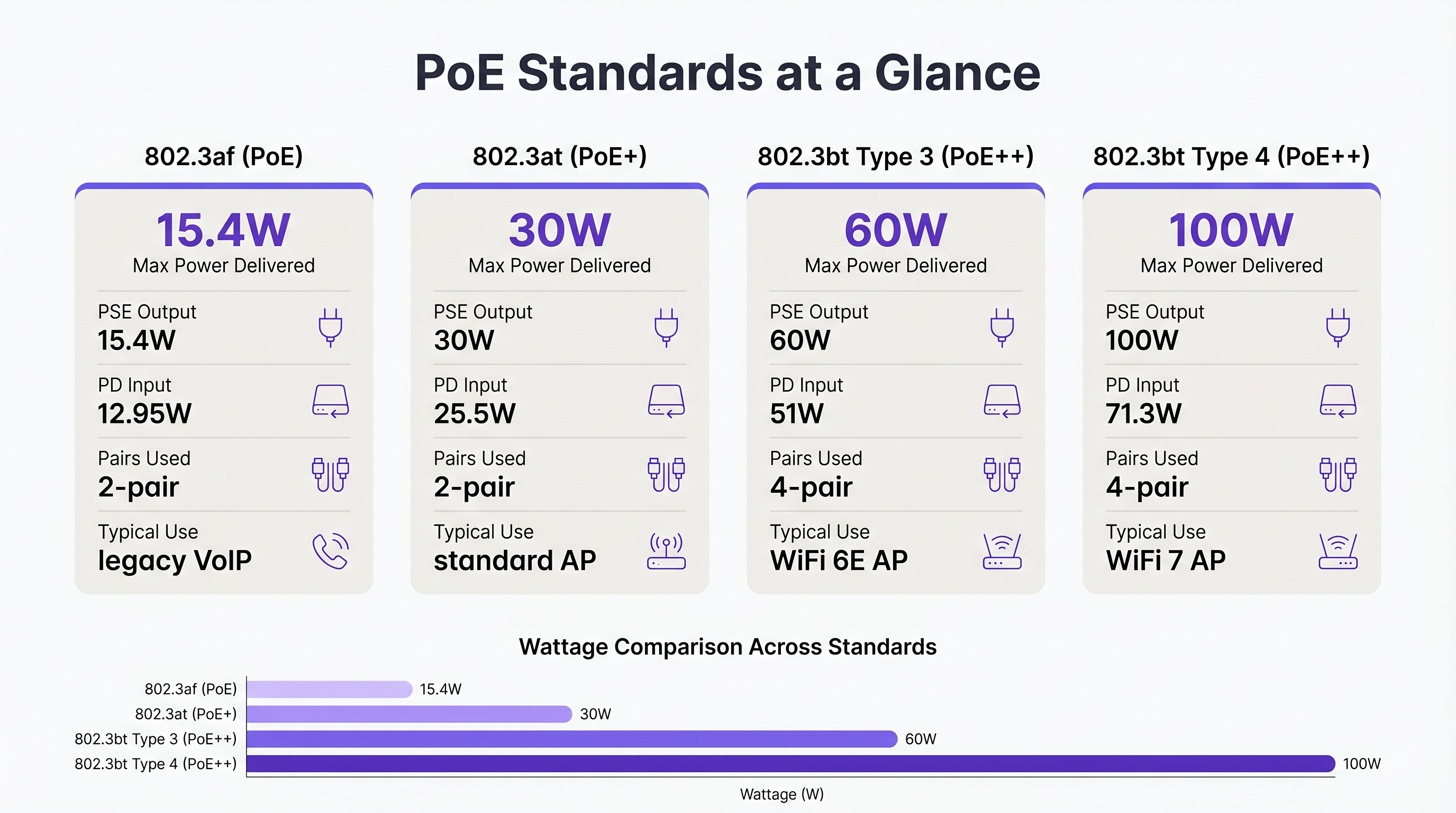
- 802.3af (PoE): Fornisce fino a 15,4W sulla porta dello switch, erogando 12,95W al dispositivo. Storicamente utilizzato per telefoni VoIP legacy e sensori di base.
- 802.3at (PoE+): Fornisce fino a 30W sulla porta, erogando 25,5W al dispositivo. Questo è stato lo standard per gli access point WiFi 5 e WiFi 6 standard.
- 802.3bt Tipo 3 (PoE++): Fornisce fino a 60W sulla porta, erogando 51W al dispositivo. Questa è la nuova base per gli AP WiFi 6E ad alte prestazioni, che dispongono di più radio e array di scansione dedicati per Wayfinding e sicurezza.
- 802.3bt Tipo 4 (PoE++): Fornisce fino a 100W sulla porta, erogando 71,3W al dispositivo. Questo standard è necessario per gli AP WiFi 7 ad altissima densità e gli aggregatori IoT complessi.
Perché WiFi 6E e 7 Richiedono PoE++
Gli access point moderni sono essenzialmente dispositivi di edge computing. Un tipico AP WiFi 6E opera simultaneamente radio sulle bande 2.4 GHz, 5 GHz e 6 GHz. Inoltre, molti AP aziendali includono una quarta radio per BLE/Zigbee (utilizzata per Sensors e il tracciamento degli asset) e una quinta radio di scansione dedicata per WIPS/WIDS (Wireless Intrusion Prevention/Detection Systems) continui. L'alimentazione di questi componenti, insieme alle interfacce Ethernet multi-gigabit (2.5GbE o 5GbE), spinge il consumo di energia ben oltre il limite di 25,5W di PoE+.
Se un AP WiFi 6E è collegato a uno switch PoE+, tipicamente utilizzerà LLDP (Link Layer Discovery Protocol) per negoziare l'alimentazione. Se la potenza disponibile è insufficiente, l'AP entrerà in uno stato degradato, spesso disabilitando la radio a 6 GHz o riducendo la potenza di trasmissione di tutte le radio. Ciò si traduce in una rete che appare funzionale su una dashboard ma che offre prestazioni scarse per l'utente finale.
Guida all'Implementazione: Calcolo del Budget Multi-Sito
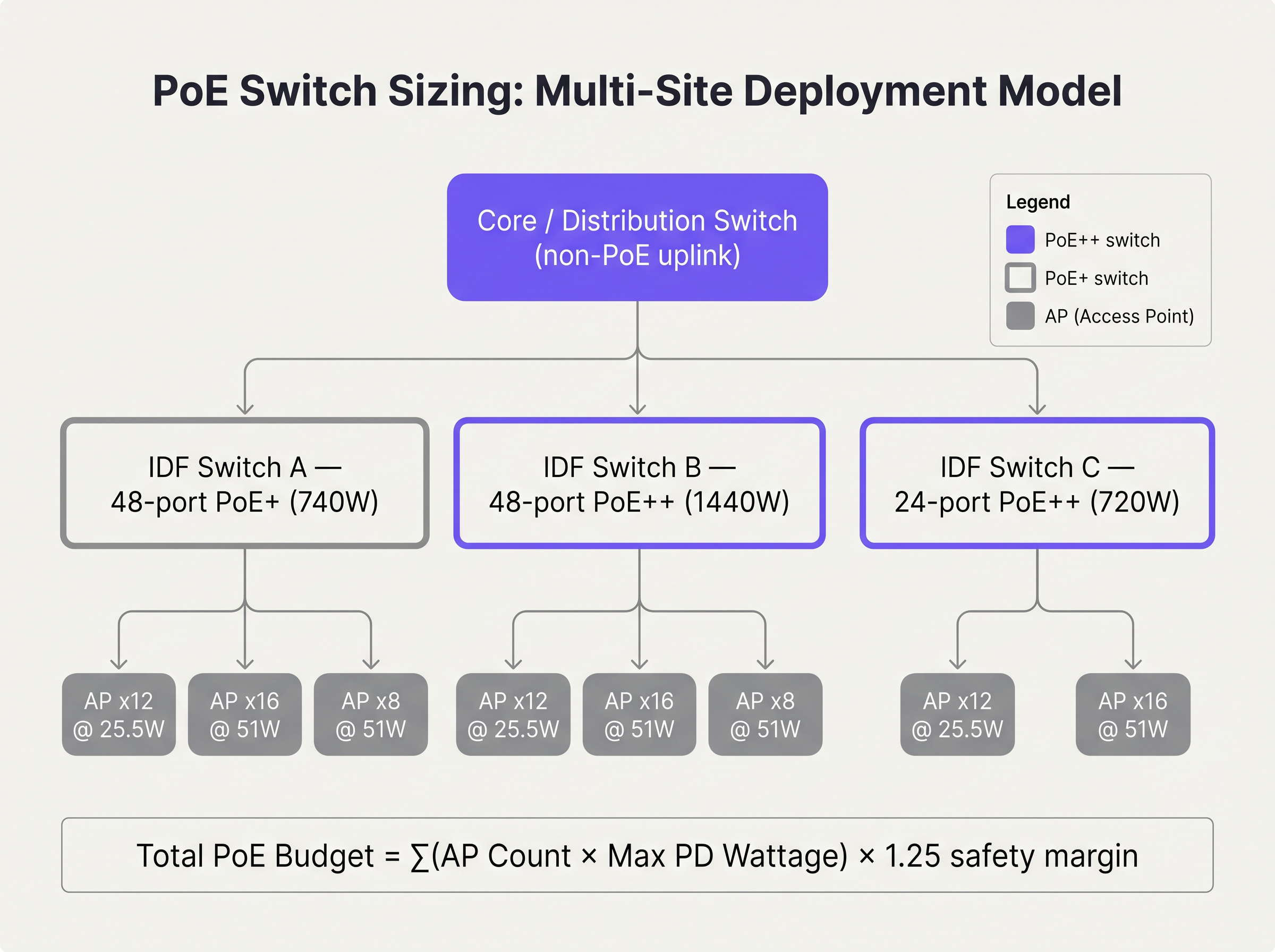
Quando si pianifica un'implementazione multi-sito, come l'aggiornamento di una catena nazionale di Retail , è necessario calcolare il budget PoE totale per ogni switch IDF (Intermediate Distribution Frame).
Fase 1: Verifica dei Requisiti di Alimentazione degli Endpoint
Compilare un elenco completo di tutti i PD che si collegheranno allo switch. Non fare affidamento sul consumo energetico tipico; utilizzare il consumo massimo di potenza specificato dal fornitore. Ad esempio, se si implementano 24 AP WiFi 6E con un consumo massimo di 45W ciascuno, il requisito di base è di 1.080W.
Fase 2: Applicare il Margine di Sicurezza
Non progettare mai uno switch per funzionare al 100% della sua capacità PoE. È necessario tenere conto del degrado dei cavi, della perdita termica e dell'espansione futura. Una pratica standard del settore è applicare un margine di sicurezza del 20% al 25%.
Budget Totale = (Somma del Consumo Max PD) × 1.25
Nel nostro esempio: 1.080W × 1.25 = 1.350W.
Fase 3: Selezione dell'Alimentatore dello Switch
Uno switch PoE+ standard a 48 porte tipicamente dispone di un alimentatore da 740W. Questo è ampiamente insufficiente per il nostro requisito di 1.350W. L'architetto deve specificare uno switch con un alimentatore da 1440W o superiore, oppure suddividere gli AP su due switch impilati per distribuire il carico.
Best Practice per Ambienti Enterprise
- Aggiornamenti dell'Infrastruttura di Cablaggio: PoE++ trasmette potenza su tutte e quattro le coppie del cavo a doppino intrecciato. In ambienti come Hospitality dove i cavi sono spesso strettamente raggruppati in canaline a soffitto, questo genera un calore significativo. L'aumento del calore aumenta la resistenza del cavo, portando a una caduta di tensione. Specificare sempre il cablaggio di Categoria 6A (Cat6A) per le nuove implementazioni PoE++ per gestire il carico termico e supportare la velocità effettiva multi-gigabit.
- Configurazione LLDP: Assicurarsi che LLDP-MED sia abilitato globalmente e su tutte le interfacce rivolte agli AP. Ciò consente allo switch e all'AP di negoziare dinamicamente i requisiti di alimentazione con precisione granulare, anziché fare affidamento su allocazioni statiche basate su classi che spesso sprecano budget.
- Configurazione della Priorità delle Porte: In caso di guasto dell'alimentatore in una configurazione impilata, lo switch inizierà a disattivare il carico PoE. Configurare le priorità delle porte (Critica, Alta, Bassa) in modo che l'infrastruttura essenziale (ad es.., segnaletica digitale) vengono eliminati.
Risoluzione dei problemi e mitigazione dei rischi
La trappola dell'oversubscription
L'oversubscription si verifica quando l'assorbimento potenziale totale di tutti i dispositivi connessi supera l'alimentazione dello switch, anche se l'assorbimento di corrente rientra nei limiti. Ad esempio, uno switch con un budget di 740W potrebbe alimentare con successo 30 AP che assorbono 20W ciascuno (600W totali). Tuttavia, durante un aggiornamento del firmware o un ciclo di avvio, questi AP potrebbero temporaneamente raggiungere il loro assorbimento massimo di 30W (900W totali). Questo picco farà scattare la protezione di alimentazione dello switch, causando un riavvio a cascata dell'intero segmento di rete.
Mitigazione: Calcolare sempre in base all'assorbimento massimo, non a quello tipico. Implementare un rigoroso controllo delle modifiche per impedire ai tecnici di collegare dispositivi PoE non autorizzati agli switch di bordo.
ROI e impatto sul business
Rendere la vostra infrastruttura di switching a prova di futuro richiede un CapEx iniziale più elevato. Uno switch PoE++ multi-gigabit a 48 porte è significativamente più costoso di uno switch PoE+ gigabit standard. Tuttavia, il ROI si realizza evitando un ciclo di 'smontaggio e sostituzione'.
Si consideri un fornitore Sanitario che implementa oggi il WiFi 6. Se implementano switch PoE+, risparmiano denaro inizialmente. Ma quando inevitabilmente passeranno al WiFi 7 tra quattro anni per supportare la telemetria medica ad alta densità, quegli switch saranno obsoleti. Investendo oggi nell'infrastruttura PoE++, il prossimo ciclo di aggiornamento wireless richiederà solo la sostituzione degli AP di bordo, riducendo drasticamente i costi hardware e i tempi di inattività dell'implementazione.
Inoltre, una potenza adeguata garantisce che funzionalità avanzate come Timeout sessione WiFi ospite: bilanciare UX e sicurezza e la scansione di sicurezza continua funzionino correttamente, proteggendo l'azienda da violazioni della conformità e scarse esperienze utente.
Briefing audio
Ascolta il nostro architetto di soluzioni senior discutere le realtà della pianificazione PoE in questo briefing di 10 minuti:
Termini chiave e definizioni
Power Sourcing Equipment (PSE)
The device that provides power onto the Ethernet cable, typically a PoE switch or midspan injector.
When sizing switches, you are evaluating the total power capacity of the PSE.
Powered Device (PD)
The endpoint device receiving power from the Ethernet cable, such as an access point or IP camera.
The PD determines the power demand. Its maximum draw dictates the budget requirements.
802.3at (PoE+)
The IEEE standard delivering up to 30W at the switch port.
The legacy standard that is increasingly insufficient for modern WiFi 6E and WiFi 7 deployments.
802.3bt (PoE++)
The IEEE standard delivering up to 60W (Type 3) or 100W (Type 4) at the switch port.
The necessary standard for powering multi-radio, high-density access points.
LLDP-MED
Link Layer Discovery Protocol - Media Endpoint Discovery. An extension of LLDP that allows PSE and PD to negotiate exact power requirements.
Crucial for optimising the power budget dynamically rather than relying on static class allocations.
Oversubscription
A state where the potential maximum power draw of all connected devices exceeds the switch's power supply capacity.
A dangerous design flaw that leads to unpredictable network outages during load spikes.
Port Priority
A switch configuration that determines which ports lose power first if the total budget is exceeded.
Essential for ensuring critical infrastructure remains online during a partial power failure.
Voltage Drop
The loss of electrical potential along the length of a cable due to resistance.
The reason why a switch delivering 60W at the port only guarantees 51W at the device.
Casi di studio
A 200-room hotel is upgrading its wireless infrastructure. The design calls for 80 WiFi 6E APs (Max draw: 41W) and 20 IP Security Cameras (Max draw: 12W). The IT director plans to use three 48-port switches, each with a 740W power supply. Will this design succeed?
No, this design will fail due to power oversubscription.
Total AP power: 80 APs × 41W = 3,280W. Total Camera power: 20 Cameras × 12W = 240W. Total required power (without margin): 3,520W.
Total available power: 3 switches × 740W = 2,220W.
The design is short by at least 1,300W. The switches will shed load, causing APs to drop offline or negotiate down to disabled radios.
A stadium concourse deployment features long cable runs (up to 90 metres) from the IDF to the APs. The APs require 802.3bt Type 3 (60W). What physical layer considerations must be addressed?
The deployment must utilise Cat6A cabling, and cable bundles must be kept small. PoE++ over long distances generates significant heat, especially in the centre of large cable bundles. Heat increases resistance, which leads to voltage drop. If voltage drops too low over the 90m run, the AP will not receive the required 51W.
Analisi degli scenari
Q1. You are deploying 15 WiFi 6E APs (Max draw: 45W) in a new retail branch. You have an existing 24-port switch with a 370W power supply. What is your recommendation?
💡 Suggerimento:Calculate the total maximum draw and compare it to the existing supply.
Mostra l'approccio consigliato
The total maximum draw is 675W (15 × 45W). The existing 370W switch is entirely insufficient and will fail. Recommendation: Replace the switch with a 24-port PoE++ switch featuring at least a 1000W power supply to accommodate the load and a safety margin.
Q2. During a network audit, you notice that several WiFi 6E APs are operating with their 6 GHz radios disabled, despite being configured correctly in the controller. What is the most likely physical layer cause?
💡 Suggerimento:Consider what happens when an AP does not receive enough power via LLDP negotiation.
Mostra l'approccio consigliato
The APs are likely connected to an older 802.3at (PoE+) switch. Because they are not receiving the required 802.3bt (PoE++) power, they have negotiated down to a lower power state, which typically involves disabling advanced radios like 6 GHz to remain operational.
Q3. You are designing a high-density stadium deployment. To save costs, the procurement team suggests using existing Cat5e cabling for the new 802.3bt Type 4 (100W) APs. How do you respond?
💡 Suggerimento:Consider the thermal implications of pushing 100W over four pairs in large cable bundles.
Mostra l'approccio consigliato
Reject the suggestion. Pushing 100W over Cat5e, especially in bundled cable trays common in stadiums, generates excessive heat. This increases resistance, causing severe voltage drop and potential fire hazards. Cat6A must be specified to handle the thermal load and ensure full power delivery to the APs.




