

PoE Budgetplanung für Multi-Site WiFi-Bereitstellungen
Dieser Leitfaden bietet einen praktischen Rahmen für die Berechnung von Power over Ethernet (PoE)-Budgets bei Multi-Site WiFi-Bereitstellungen. Er behandelt den Übergang zu PoE++ für WiFi 6E und 7, Strategien zur Dimensionierung von Switches und Methoden zur Zukunftssicherung der Infrastruktur, während gleichzeitig die Risiken einer Überzeichnung der Stromversorgung gemindert werden.
🎧 Diesen Leitfaden anhören
Transkript anzeigen

Zusammenfassung für die Geschäftsleitung
Für CTOs und IT-Direktoren, die Multi-Site-Standorte verwalten – von Einzelhandelsketten bis hin zu Hotelportfolios – ist der Übergang zu drahtlosen Netzwerken der nächsten Generation nicht mehr nur eine HF-Herausforderung; es ist eine grundlegende Stromversorgungsherausforderung. Das Aufkommen von WiFi 6E und die bevorstehende Einführung von WiFi 7 haben die Leistungsanforderungen von Enterprise Access Points dramatisch verändert. Während die älteren Standards 802.3af und 802.3at für frühere Generationen ausreichten, erfordern moderne Hochleistungs-APs zunehmend 802.3bt (PoE++).
Eine ungenaue Berechnung der PoE-Budgets über Hunderte von Switches hinweg kann zu katastrophalen Bereitstellungsfehlern führen, bei denen APs stillschweigend in niedrigere Leistungszustände wechseln, Funkmodule deaktivieren und den Netzwerkdurchsatz beeinträchtigen. Dieser Leitfaden bietet einen herstellerneutralen, umsetzbaren Rahmen für die Berechnung der gesamten PoE-Budgets, die Dimensionierung von Verteilungs-Switches und die Zukunftssicherung der Switching-Infrastruktur, um fortschrittliches Guest WiFi und WiFi Analytics zu unterstützen, ohne Brownouts oder erzwungene Hardware-Ersetzungen während des Lebenszyklus zu riskieren.
Technischer Deep-Dive: Die Entwicklung der PoE-Standards
Die IEEE hat kontinuierlich neue Power over Ethernet-Standards ratifiziert, um mit den Anforderungen der Endgeräte Schritt zu halten. Das Verständnis der Differenz zwischen der vom Power Sourcing Equipment (PSE) gelieferten Leistung und der vom Powered Device (PD) empfangenen Leistung ist aufgrund von Kabelverlusten entscheidend.
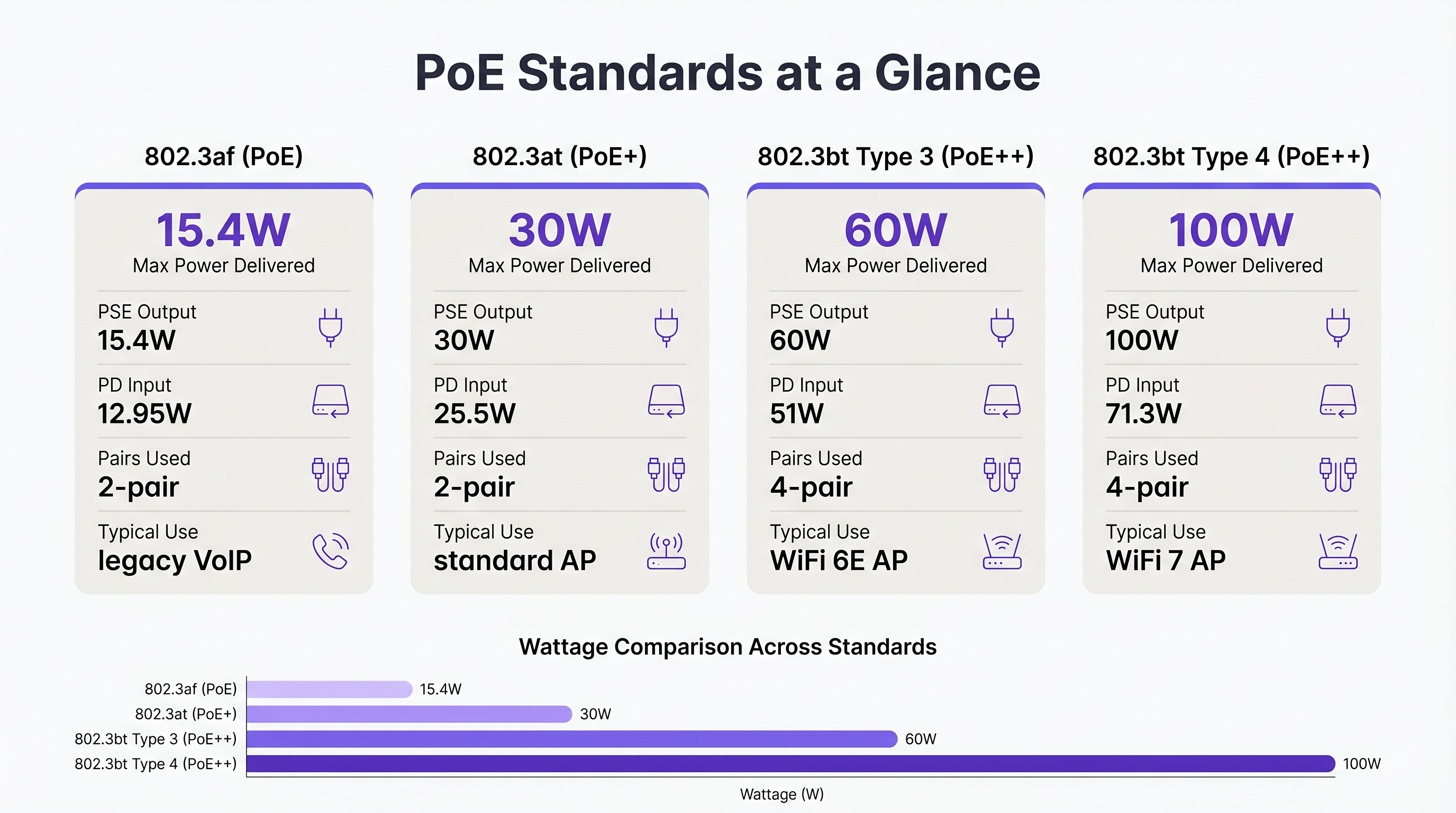
- 802.3af (PoE): Liefert bis zu 15,4 W am Switch-Port und stellt dem Gerät 12,95 W zur Verfügung. Historisch für ältere VoIP-Telefone und einfache Sensoren verwendet.
- 802.3at (PoE+): Liefert bis zu 30 W am Port und stellt dem Gerät 25,5 W zur Verfügung. Dies war der Standard für Standard WiFi 5 und WiFi 6 Access Points.
- 802.3bt Typ 3 (PoE++): Liefert bis zu 60 W am Port und stellt dem Gerät 51 W zur Verfügung. Dies ist die neue Basislinie für Hochleistungs-WiFi 6E APs, die mehrere Funkmodule und dedizierte Scan-Arrays für Wayfinding und Sicherheit aufweisen.
- 802.3bt Typ 4 (PoE++): Liefert bis zu 100 W am Port und stellt dem Gerät 71,3 W zur Verfügung. Dieser Standard ist für Ultra-High-Density WiFi 7 APs und komplexe IoT-Aggregatoren erforderlich.
Warum WiFi 6E und 7 PoE++ erfordern
Moderne Access Points sind im Wesentlichen Edge-Compute-Geräte. Ein typischer WiFi 6E AP betreibt Funkmodule gleichzeitig auf den 2,4 GHz, 5 GHz und 6 GHz Bändern. Darüber hinaus enthalten viele Enterprise APs ein viertes Funkmodul für BLE/Zigbee (verwendet für Sensors und Asset Tracking) und ein fünftes dediziertes Scan-Funkmodul für kontinuierliche WIPS/WIDS (Wireless Intrusion Prevention/Detection Systems). Der Betrieb dieser Komponenten, zusammen mit Multi-Gigabit-Ethernet-Schnittstellen (2.5GbE oder 5GbE), treibt den Stromverbrauch weit über die 25,5W-Grenze von PoE+ hinaus.
Wenn ein WiFi 6E AP an einen PoE+ Switch angeschlossen ist, verwendet er typischerweise LLDP (Link Layer Discovery Protocol), um die Stromversorgung auszuhandeln. Wenn nicht genügend Strom verfügbar ist, wechselt der AP in einen degradierten Zustand – oft wird das 6 GHz Funkmodul deaktiviert oder die Sendeleistung aller Funkmodule reduziert. Dies führt zu einem Netzwerk, das auf einem Dashboard funktionsfähig aussieht, aber für den Endbenutzer schlecht funktioniert.
Implementierungsleitfaden: Berechnung des Multi-Site-Budgets
Bei der Planung einer Multi-Site-Bereitstellung, wie der Aufrüstung einer nationalen Retail -Kette, müssen Sie das gesamte PoE-Budget für jeden IDF (Intermediate Distribution Frame)-Switch berechnen.
Schritt 1: Überprüfung der Leistungsanforderungen der Endgeräte
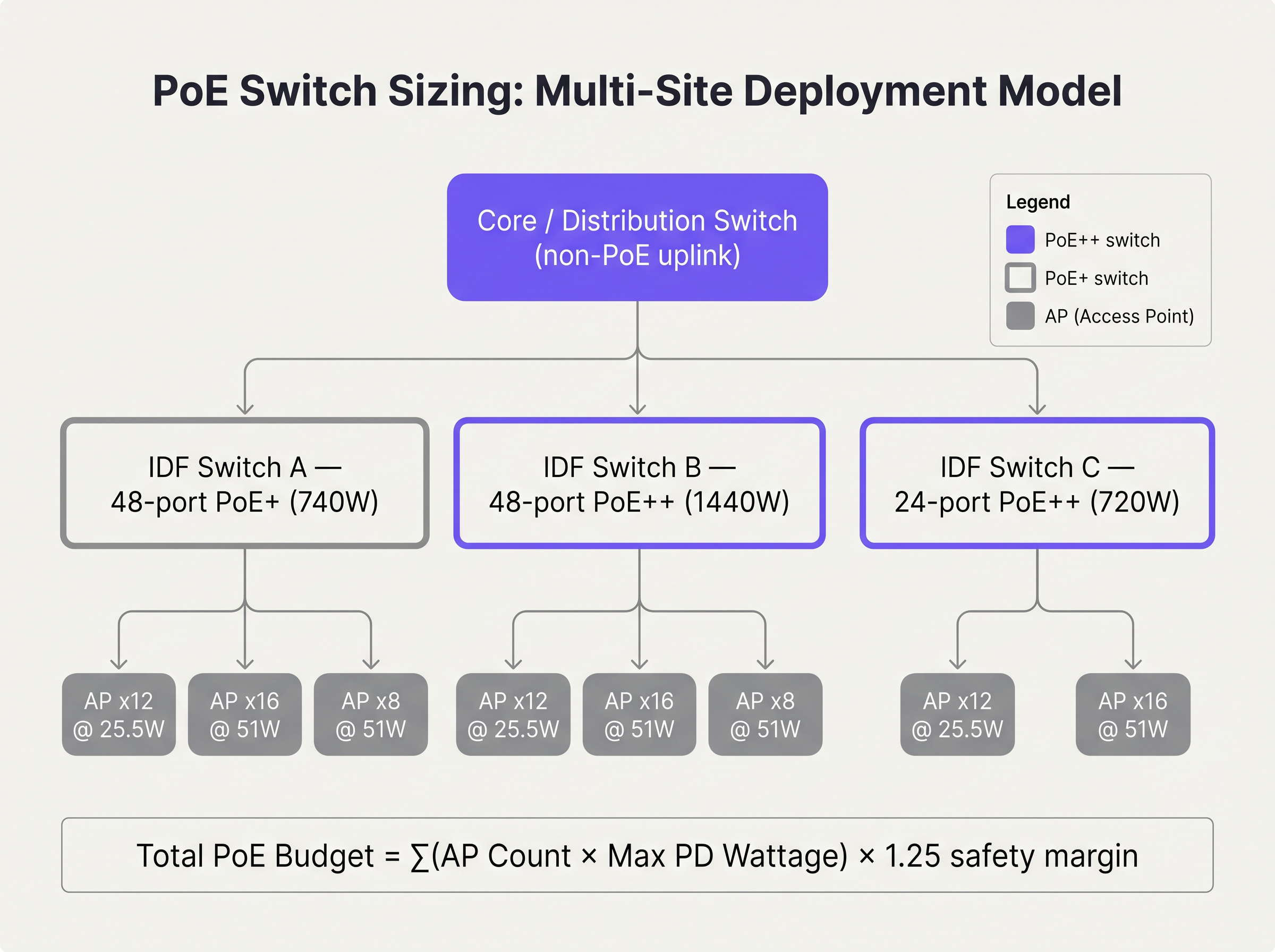
Erstellen Sie eine umfassende Liste aller PDs, die an den Switch angeschlossen werden. Verlassen Sie sich nicht auf den typischen Stromverbrauch; verwenden Sie die vom Hersteller angegebene maximale Leistungsaufnahme. Wenn Sie beispielsweise 24 WiFi 6E APs mit einer maximalen Leistungsaufnahme von jeweils 45 W bereitstellen, beträgt der Grundbedarf 1.080 W.
Schritt 2: Anwenden des Sicherheitsspielraums
Planen Sie niemals einen Switch so, dass er mit 100 % seiner PoE-Kapazität betrieben wird. Sie müssen Kabeldegradation, Wärmeverluste und zukünftige Erweiterungen berücksichtigen. Eine gängige Industriepraxis ist die Anwendung eines Sicherheitsspielraums von 20 % bis 25 %.
Total Budget = (Sum of Max PD Draw) × 1.25
In unserem Beispiel: 1,080W × 1.25 = 1,350W.
Schritt 3: Auswahl des Switch-Netzteils
Ein Standard-48-Port-PoE+-Switch verfügt typischerweise über ein 740-W-Netzteil. Dies ist für unseren Bedarf von 1.350 W völlig unzureichend. Der Architekt muss einen Switch mit einem 1440 W oder höheren Netzteil spezifizieren oder die APs auf zwei gestapelte Switches aufteilen, um die Last zu verteilen.
Best Practices für Unternehmensumgebungen
- Kabelinfrastruktur-Upgrades: PoE++ überträgt Strom über alle vier Paare des Twisted-Pair-Kabels. In Umgebungen wie dem Hospitality -Sektor, wo Kabel oft eng in Kabelpritschen gebündelt sind, entsteht dadurch erhebliche Wärme. Erhöhte Wärme erhöht den Kabelwiderstand, was zu einem Spannungsabfall führt. Spezifizieren Sie immer Category 6A (Cat6A)-Verkabelung für neue PoE++-Bereitstellungen, um die thermische Last zu bewältigen und Multi-Gigabit-Durchsatz zu unterstützen.
- LLDP-Konfiguration: Stellen Sie sicher, dass LLDP-MED global und auf allen AP-seitigen Schnittstellen aktiviert ist. Dies ermöglicht es dem Switch und dem AP, die Leistungsanforderungen dynamisch und mit granularer Präzision auszuhandeln, anstatt sich auf statische, klassenbasierte Zuweisungen zu verlassen, die oft Budget verschwenden.
- Port-Prioritätskonfiguration: Im Falle eines Netzteilausfalls in einer gestapelten Konfiguration beginnt der Switch, die PoE-Last abzuwerfen. Konfigurieren Sie Port-Prioritäten (Kritisch, Hoch, Niedrig), damit die wesentliche Infrastruktur (z. B. APs, die die Lobby oder Zahlungsterminals abdecken) mit Strom versorgt bleibt, während sekundäre Geräte (z. B.., Digital Signage) werden verworfen.
Fehlerbehebung & Risikominderung
Die Überzeichnungsfalle
Eine Überzeichnung tritt auf, wenn der gesamte potenzielle Stromverbrauch aller angeschlossenen Geräte die Stromversorgung des Switches übersteigt, selbst wenn der aktuelle Verbrauch innerhalb der Grenzen liegt. Zum Beispiel könnte ein Switch mit einem Budget von 740 W erfolgreich 30 APs mit jeweils 20 W (insgesamt 600 W) versorgen. Während eines Firmware-Updates oder eines Boot-Zyklus könnten diese APs jedoch vorübergehend auf ihren maximalen Verbrauch von 30 W (insgesamt 900 W) ansteigen. Dieser Anstieg führt dazu, dass der Switch seinen Überlastschutz auslöst, was zu einem rollierenden Neustart des gesamten Netzwerksegments führt.
Minderung: Berechnen Sie immer auf Basis des maximalen Verbrauchs, nicht des typischen Verbrauchs. Implementieren Sie eine strenge Änderungskontrolle, um zu verhindern, dass Techniker unautorisierte PoE-Geräte an Edge-Switches anschließen.
ROI & Geschäftsauswirkungen
Die Zukunftssicherheit Ihrer Switching-Infrastruktur erfordert höhere anfängliche Investitionsausgaben (CapEx). Ein 48-Port Multi-Gigabit PoE++ Switch ist deutlich teurer als ein Standard Gigabit PoE+ Switch. Der ROI wird jedoch durch die Vermeidung eines 'Rip-and-Replace'-Zyklus realisiert.
Betrachten Sie einen Gesundheitsdienstleister , der heute WiFi 6 einsetzt. Wenn er PoE+ Switches einsetzt, spart er zunächst Geld. Doch wenn er in vier Jahren unweigerlich auf WiFi 7 aufrüstet, um hochdichte medizinische Telemetrie zu unterstützen, werden diese Switches veraltet sein. Durch die Investition in eine PoE++ Infrastruktur heute erfordert der nächste drahtlose Upgrade-Zyklus nur den Austausch der Edge-APs, wodurch Hardwarekosten und Ausfallzeiten bei der Bereitstellung drastisch reduziert werden.
Darüber hinaus stellt eine ausreichende Stromversorgung sicher, dass erweiterte Funktionen wie Guest WiFi Session Timeouts: Balancing UX and Security und kontinuierliches Sicherheitsscanning korrekt funktionieren und das Unternehmen vor Compliance-Verstößen und schlechten Benutzererfahrungen schützen.
Audio-Briefing
Hören Sie unserem leitenden Lösungsarchitekten zu, wie er in diesem 10-minütigen Briefing die Realitäten der PoE-Planung erörtert:
Schlüsselbegriffe & Definitionen
Power Sourcing Equipment (PSE)
The device that provides power onto the Ethernet cable, typically a PoE switch or midspan injector.
When sizing switches, you are evaluating the total power capacity of the PSE.
Powered Device (PD)
The endpoint device receiving power from the Ethernet cable, such as an access point or IP camera.
The PD determines the power demand. Its maximum draw dictates the budget requirements.
802.3at (PoE+)
The IEEE standard delivering up to 30W at the switch port.
The legacy standard that is increasingly insufficient for modern WiFi 6E and WiFi 7 deployments.
802.3bt (PoE++)
The IEEE standard delivering up to 60W (Type 3) or 100W (Type 4) at the switch port.
The necessary standard for powering multi-radio, high-density access points.
LLDP-MED
Link Layer Discovery Protocol - Media Endpoint Discovery. An extension of LLDP that allows PSE and PD to negotiate exact power requirements.
Crucial for optimising the power budget dynamically rather than relying on static class allocations.
Oversubscription
A state where the potential maximum power draw of all connected devices exceeds the switch's power supply capacity.
A dangerous design flaw that leads to unpredictable network outages during load spikes.
Port Priority
A switch configuration that determines which ports lose power first if the total budget is exceeded.
Essential for ensuring critical infrastructure remains online during a partial power failure.
Voltage Drop
The loss of electrical potential along the length of a cable due to resistance.
The reason why a switch delivering 60W at the port only guarantees 51W at the device.
Fallstudien
A 200-room hotel is upgrading its wireless infrastructure. The design calls for 80 WiFi 6E APs (Max draw: 41W) and 20 IP Security Cameras (Max draw: 12W). The IT director plans to use three 48-port switches, each with a 740W power supply. Will this design succeed?
No, this design will fail due to power oversubscription.
Total AP power: 80 APs × 41W = 3,280W. Total Camera power: 20 Cameras × 12W = 240W. Total required power (without margin): 3,520W.
Total available power: 3 switches × 740W = 2,220W.
The design is short by at least 1,300W. The switches will shed load, causing APs to drop offline or negotiate down to disabled radios.
A stadium concourse deployment features long cable runs (up to 90 metres) from the IDF to the APs. The APs require 802.3bt Type 3 (60W). What physical layer considerations must be addressed?
The deployment must utilise Cat6A cabling, and cable bundles must be kept small. PoE++ over long distances generates significant heat, especially in the centre of large cable bundles. Heat increases resistance, which leads to voltage drop. If voltage drops too low over the 90m run, the AP will not receive the required 51W.
Szenarioanalyse
Q1. You are deploying 15 WiFi 6E APs (Max draw: 45W) in a new retail branch. You have an existing 24-port switch with a 370W power supply. What is your recommendation?
💡 Hinweis:Calculate the total maximum draw and compare it to the existing supply.
Empfohlenen Ansatz anzeigen
The total maximum draw is 675W (15 × 45W). The existing 370W switch is entirely insufficient and will fail. Recommendation: Replace the switch with a 24-port PoE++ switch featuring at least a 1000W power supply to accommodate the load and a safety margin.
Q2. During a network audit, you notice that several WiFi 6E APs are operating with their 6 GHz radios disabled, despite being configured correctly in the controller. What is the most likely physical layer cause?
💡 Hinweis:Consider what happens when an AP does not receive enough power via LLDP negotiation.
Empfohlenen Ansatz anzeigen
The APs are likely connected to an older 802.3at (PoE+) switch. Because they are not receiving the required 802.3bt (PoE++) power, they have negotiated down to a lower power state, which typically involves disabling advanced radios like 6 GHz to remain operational.
Q3. You are designing a high-density stadium deployment. To save costs, the procurement team suggests using existing Cat5e cabling for the new 802.3bt Type 4 (100W) APs. How do you respond?
💡 Hinweis:Consider the thermal implications of pushing 100W over four pairs in large cable bundles.
Empfohlenen Ansatz anzeigen
Reject the suggestion. Pushing 100W over Cat5e, especially in bundled cable trays common in stadiums, generates excessive heat. This increases resistance, causing severe voltage drop and potential fire hazards. Cat6A must be specified to handle the thermal load and ensure full power delivery to the APs.




