
Cómo configurar WiFi empresarial en iOS y macOS con 802.1X
Esta guía fidedigna proporciona a los líderes senior de TI pasos prácticos para implementar WiFi empresarial 802.1X en dispositivos iOS y macOS. Cubre la autenticación basada en certificados (EAP-TLS), perfiles de configuración MDM e integración de arquitectura para proteger las redes corporativas al tiempo que se admiten las iniciativas BYOD.
Parte de nuestra serie principal: Enterprise WiFi Security Guide →

Resumen Ejecutivo
Para los CTO y arquitectos de red que gestionan grandes espacios - desde hotelería y retail hasta centros de transporte - proteger el límite de la red inalámbrica empresarial es fundamental. Confiar en claves precompartidas (PSK) o Captive Portals heredados para el acceso del personal y de los dispositivos corporativos expone a la red al robo de credenciales y a fallas de cumplimiento.
Esta referencia técnica detalla la implementación de 802.1X utilizando EAP-TLS (Extensible Authentication Protocol-Transport Layer Security) para dispositivos Apple (iOS y macOS). Al imponer la autenticación basada en certificados, las empresas pueden eliminar las vulnerabilidades de seguridad relacionadas con las contraseñas, simplificar la incorporación de dispositivos a través de plataformas de gestión de dispositivos móviles (MDM) como Jamf e Intune, y garantizar una sólida segregación de red. Mientras que las soluciones de Guest WiFi gestionan el acceso público y la captura de datos, una implementación de 802.1X bien estructurada protege los recursos internos, garantizando el cumplimiento de los requisitos de PCI-DSS y GDPR.
Escuche el podcast informativo técnico de 10 minutos a continuación para obtener una descripción rápida de la arquitectura y los errores más comunes.
Análisis Técnico Detallado
La Arquitectura de 802.1X
El estándar IEEE 802.1X define el Control de Acceso a la Red Basado en Puertos (PNAC). En un contexto inalámbrico, impide que el cliente (suplicante) transmita tráfico a través del punto de acceso inalámbrico (autenticador) hasta que un servidor RADIUS (servidor de autenticación) haya verificado su identidad.
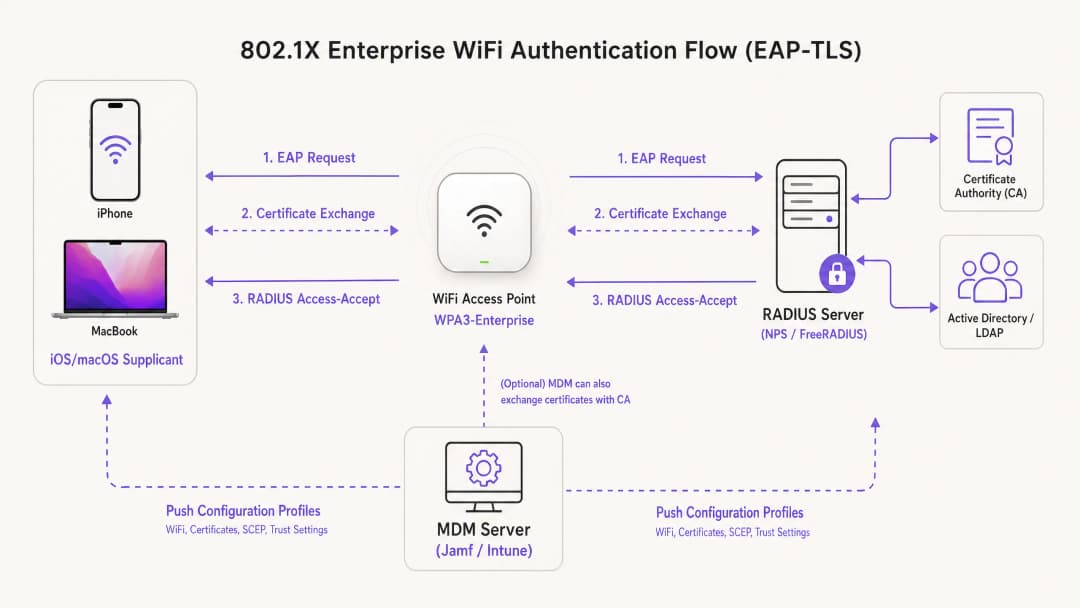
Para implementaciones dentro del ecosistema de Apple, EAP-TLS es el estándar de la industria. A diferencia de PEAP o TTLS, que dependen de credenciales de usuario vulnerables a amenazas de seguridad, EAP-TLS requiere que tanto el servidor RADIUS como el dispositivo cliente presenten certificados digitales. Este proceso de autenticación mutua garantiza que el dispositivo esté autorizado y que la red a la que se conecta sea legítima, protegiendo contra ataques de puntos de acceso no autorizados.
Perfiles de Configuración de Apple
Los dispositivos Apple no admiten de forma nativa la inscripción automática de certificados sin una gestión externa. Para implementar EAP-TLS a escala, los equipos de TI deben utilizar Perfiles de Configuración (archivos .mobileconfig). Estos archivos XML contienen cargas útiles específicas:
- Carga útil de WiFi: Define el SSID, el tipo de seguridad (WPA3-Enterprise) y los tipos de EAP compatibles.
- Payload de certificado: Entrega la CA raíz y cualquier CA intermedia requerida para confiar en el servidor RADIUS.
- Payload SCEP/ACME: Configura el protocolo utilizado para solicitar un certificado de cliente único de la Autoridad de Certificación (CA).
Para un análisis más profundo sobre cómo asegurar su infraestructura de AP, consulte nuestra guía: Access Point Security: Your 2026 Enterprise Guide.
¿Tiene preguntas sobre su configuración específica?
Nuestro equipo trabaja con gestores de espacios, responsables de TI e ingenieros de redes en 80 000 establecimientos. Reserve una llamada de 20 minutos y le mostraremos cómo lo resolvieron otros profesionales como usted.
Guía de Implementación
Paso 1: Preparación de PKI y RADIUS
Antes de comenzar la configuración del MDM, su Infraestructura de Clave Pública (PKI) y su servidor RADIUS (como Cisco ISE, Aruba ClearPass o FreeRADIUS) deben estar configurados para emitir y validar certificados. Asegúrese de que el certificado de su servidor RADIUS esté firmado por una CA interna o pública de confianza, y que el Nombre Alternativo del Sujeto (SAN) coincida con el FQDN del servidor.
Paso 2: Configuración del Payload de MDM (Jamf / Intune)
Para implementaciones empresariales escalables, la implementación basada en MDM es obligatoria.
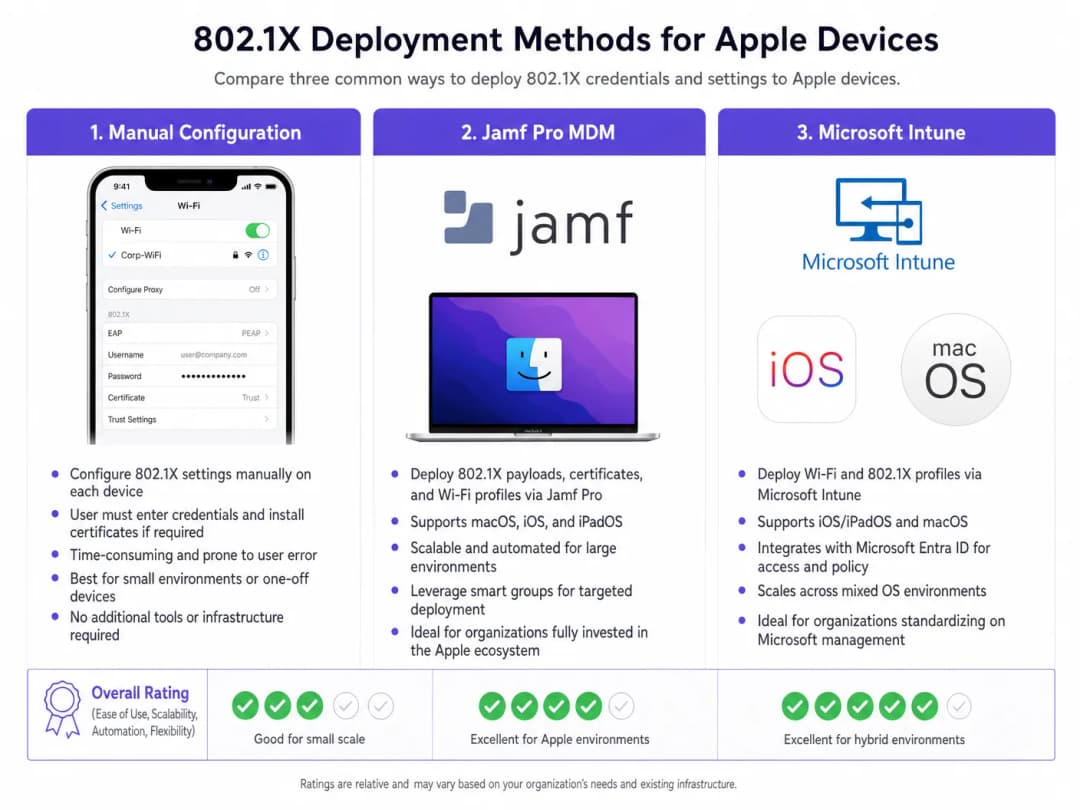
Creación del perfil:
- Ajustes de confianza: Este paso es crítico. En el payload de WiFi, debe seleccionar explícitamente el certificado de la CA raíz (implementado como un payload separado dentro del mismo perfil) como el ancla de confianza para el servidor RADIUS. Además, especifique el Nombre Común (CN) o SAN exacto del servidor RADIUS en el campo "Trusted Server Certificate Names". No hacer esto provocará que iOS/macOS le pida al usuario que confíe en el certificado manualmente, rompiendo el modelo de implementación zero-touch.
- Certificado de identidad: Vincule el payload de WiFi al payload SCEP o ACME para que el dispositivo sepa qué certificado presentar durante el saludo EAP-TLS.
Paso 3: Segregación de Red
Los dispositivos corporativos autenticados a través de 802.1X deben colocarse en VLAN dedicadas, completamente aisladas de las redes de acceso público. Para los establecimientos que utilizan las soluciones de WiFi Analytics de Purple, el SSID de invitados opera en paralelo, garantizando que el tráfico corporativo y los datos analíticos de los invitados nunca se crucen.
Para entornos con flotas de dispositivos mixtas, también puede consultar How to Set Up Enterprise WiFi on Android Devices with EAP-TLS.
Mejores Prácticas
- Forzar WPA3-Enterprise: Exija WPA3 para todas las nuevas implementaciones para aprovechar la fuerza criptográfica de 192 bits. Solo garantice la compatibilidad con dispositivos heredados cuando sea absolutamente necesario para las operaciones comerciales.
- Automatizar la renovación de certificados: Configure el payload SCEP para renovar automáticamente los certificados de cliente al menos 14 días antes de su vencimiento.
- Desactivar la aleatorización de direcciones MAC: Para los SSID corporativos enviados a través de MDM, desactive "Dirección privada de Wi-Fi" (iOS) para garantizar un seguimiento consistente y la aplicación de políticas en las herramientas de gestión de red.* Aproveche la seguridad de DNS: Combine 802.1X con un filtrado de DNS robusto para evitar que los dispositivos corporativos comprometidos se conecten a servidores de comando y control. Para conocer los detalles de implementación, consulte Protección de su red mediante DNS robusto y seguridad.
Resolución de problemas y mitigación de riesgos
El escenario de "falla silenciosa"
El problema más común en las implementaciones de 802.1X en iOS/macOS es la falla silenciosa, donde el dispositivo se niega a conectarse sin pedir confirmación al usuario. Esto casi siempre apunta a un problema en la cadena de confianza. Si el certificado del servidor RADIUS se ha renovado y la nueva Autoridad de Certificación (CA) raíz o intermedia no se envió a los dispositivos antes de la transición, los dispositivos Apple abortarán el saludo EAP para protegerse contra ataques de intermediario (man-in-the-middle).
Mitigación: Implemente un proceso estricto de gestión de cambios para los certificados RADIUS. Despliegue siempre la nueva cadena de CA a través de MDM al menos una semana antes de actualizar el servidor RADIUS.
Tiempos de espera de inscripción SCEP
Si los dispositivos no reciben sus certificados de cliente, verifique la contraseña de desafío SCEP y asegúrese de que el servidor MDM pueda comunicarse con el servidor NDES/CA a través de los puertos requeridos.
ROI e impacto empresarial
Desplegar 802.1X con EAP-TLS requiere una inversión inicial en arquitectura de PKI y MDM, pero el ROI se materializa a través de la mitigación de riesgos y la eficiencia operativa. Al eliminar los restablecimientos de contraseñas y automatizar el registro de dispositivos, los tickets de soporte técnico de TI relacionados con el acceso a WiFi suelen disminuir entre un 60 y un 80%. Además, lograr una segmentación de red estricta suele ser un requisito obligatorio para las pólizas de seguro de ciberseguridad y el cumplimiento de PCI-DSS, lo que protege a la organización de sanciones financieras catastróficas derivadas de brechas de seguridad.
Definiciones clave
EAP-TLS
Extensible Authentication Protocol-Transport Layer Security. Un marco de autenticación que requiere certificados digitales tanto en el cliente como en el servidor de autenticación.
Considerado el método 802.1X más seguro, elimina la necesidad de contraseñas y protege contra el robo de credenciales.
Suplicante
El dispositivo del usuario final (por ejemplo, iPhone, MacBook) que solicita acceso a la red.
El suplicante debe configurarse a través de MDM para presentar el certificado correcto y confiar en el servidor correcto durante el saludo 802.1X.
Autenticador
El dispositivo de red, normalmente un punto de acceso WiFi o switch, que bloquea el tráfico hasta que el suplicante se autentica.
El AP actúa como intermediario, pasando mensajes EAP entre el suplicante y el servidor RADIUS.
Servidor RADIUS
Remote Authentication Dial-In User Service. El servidor que verifica las credenciales (certificados) del suplicante y autoriza el acceso.
El motor de decisiones principal para el acceso a la red empresarial, a menudo integrado con Active Directory y PKI.
Perfil de configuración MDM
Un archivo XML (.mobileconfig) que se envía a los dispositivos Apple para aplicar configuraciones, implementar certificados y configurar el acceso a la red.
El mecanismo de entrega esencial para lograr implementaciones 802.1X sin intervención en iOS y macOS.
SCEP
Simple Certificate Enrolment Protocol. Un protocolo utilizado por los sistemas MDM para solicitar e instalar automáticamente certificados en los dispositivos.
Crucial para automatizar el ciclo de vida de los certificados de cliente requeridos para EAP-TLS.
SAN (Nombre alternativo del sujeto)
Una extensión para un certificado X.509 que permite asociar múltiples valores (como FQDN o direcciones IP) con el certificado.
Los dispositivos Apple verifican estrictamente el SAN del certificado del servidor RADIUS frente a los nombres de confianza definidos en su perfil de configuración.
WPA3-Enterprise
La última certificación de seguridad WiFi que requiere una fuerza criptográfica de 192 bits y Marcos de Gestión Protegidos (PMF) obligatorios.
El estándar de seguridad recomendado para nuevas implementaciones empresariales, que ofrece una protección significativa contra la interceptación de datos.
Ejemplos resueltos
Una cadena minorista global está implementando iPads corporativos para 500 gerentes de tienda. Actualmente utilizan un SSID oculto con una PSK, que se ha filtrado. Necesitan proteger la red utilizando Microsoft Intune sin requerir que los gerentes ingresen credenciales manualmente.
- Implemente una CA empresarial y configure la integración de NDES/SCEP con Intune.
- Cree un perfil de Certificado de confianza en Intune que contenga la CA raíz para el servidor RADIUS.
- Cree un perfil de Certificado SCEP dirigido a los iPads para emitir certificados de cliente únicos.
- Cree un perfil de WiFi en Intune. Establezca el tipo de seguridad en WPA2/WPA3-Enterprise, el tipo de EAP en EAP-TLS. Vincule el perfil SCEP como el certificado de cliente y el perfil de Certificado de confianza para la validación del servidor. Especifique los nombres de los servidores RADIUS.
- Envíe los perfiles a un grupo de prueba, verifique la conectividad y luego impleméntelos en los 500 dispositivos.
Una universidad está actualizando su infraestructura de red y necesita garantizar que las MacBooks de los profesores gestionadas por Jamf Pro realicen la transición sin problemas a un nuevo clúster de servidores RADIUS.
- Exporte los certificados raíz e intermedios del nuevo clúster de servidores RADIUS.
- En Jamf Pro, actualice el perfil de configuración existente (o cree un perfil de transición) para incluir los nuevos certificados de CA junto con los antiguos.
- Actualice los "Nombres de certificados de servidor de confianza" en la carga útil de WiFi para incluir los FQDN de los nuevos servidores RADIUS.
- Envíe el perfil actualizado a todas las MacBooks.
- Una vez que se confirme que el perfil está instalado en toda la flota, realice la transición de la infraestructura de red a los nuevos servidores RADIUS.
Preguntas de práctica
Q1. Su organización está implementando WPA3-Enterprise en todas las MacBooks corporativas. Durante las pruebas, los usuarios informan que sus dispositivos les piden repetidamente 'Verificar certificado' para el servidor RADIUS, a pesar de que el perfil se envió a través de Jamf. ¿Cuál es el error de configuración más probable?
Sugerencia: Considere qué información específica necesita el dispositivo Apple para confiar en el servidor de forma silenciosa.
Ver respuesta modelo
El perfil de configuración no incluye el mapeo de confianza explícito. Aunque la CA raíz esté instalada en el dispositivo, la carga útil de WiFi debe listar explícitamente el FQDN del servidor RADIUS en el campo 'Nombres de certificados de servidor de confianza', y la CA raíz debe seleccionarse como el anclaje de confianza para esa red WiFi específica. Sin esto, macOS le pedirá al usuario que verifique y confíe manualmente en el certificado.
Q2. Una cadena hotelera desea proteger sus operaciones internas (iPads del personal) utilizando 802.1X, mientras sigue ofreciendo acceso público a través de un captive portal. ¿Cómo debe diseñarse la arquitectura de red para admitir ambos requisitos de forma segura?
Sugerencia: Piense en la separación lógica a nivel de punto de acceso y switch.
Ver respuesta modelo
La arquitectura debe utilizar dos SSID distintos transmitidos desde los mismos puntos de acceso. El SSID interno se configurará para WPA3-Enterprise (802.1X), autenticando los iPads del personal a través de EAP-TLS y colocándolos en una VLAN interna segura. El SSID público será abierto, redirigiendo a los usuarios al captive portal de Purple Guest WiFi, y colocando a los huéspedes autenticados en una VLAN muy restringida, con acceso exclusivo a internet. Esto garantiza la segregación completa del tráfico corporativo y de huéspedes.
Q3. Está migrando su infraestructura RADIUS de una implementación Cisco ISE local a un proveedor RADIUS en la nube. El nuevo proveedor utiliza una Autoridad de Certificación pública diferente. ¿Cuál es el primer paso crítico antes de cambiar la configuración de RADIUS en los puntos de acceso?
Sugerencia: Considere el orden de las operaciones para evitar una pérdida completa de conectividad en los dispositivos cliente.
Ver respuesta modelo
El primer paso crítico es enviar un perfil de configuración de MDM actualizado a todos los dispositivos Apple que incluya los certificados raíz e intermedios de la nueva CA pública utilizada por el proveedor RADIUS en la nube. Esta cadena de confianza debe establecerse en los suplicantes antes de que los puntos de acceso se conecten a los nuevos servidores RADIUS; de lo contrario, los dispositivos rechazarán los nuevos certificados de servidor y no podrán conectarse.
Continúe leyendo esta serie
Una guía para administradores de red sobre la configuración de autenticación RADIUS para WiFi de invitados
Una referencia técnica completa para administradores de red sobre la implementación de la autenticación RADIUS para WiFi de invitados. Cubre la arquitectura, los pasos de configuración independientes del proveedor, las mejores prácticas de seguridad y la solución de problemas de fallas comunes en la implementación.
Implementación de SCEP para WiFi 802.1X y BYOD Seguro en la Educación Superior
Esta guía técnica detalla cómo los equipos de TI de educación superior pueden automatizar el registro de certificados 802.1X para miles de dispositivos BYOD usando SCEP. Cubre la arquitectura, los beneficios de seguridad y los pasos prácticos de implementación para reemplazar el onboarding manual con un modelo de acceso a la red seguro y sin intervención.
Configuring RADIUS Authentication for Guest and Staff WiFi Networks
Esta guía de referencia técnica describe la arquitectura, configuración e implementación de la autenticación RADIUS para redes WiFi empresariales de invitados y empleados. Proporciona a los arquitectos de red y gerentes de TI los protocolos exactos, los estándares de seguridad y las metodologías de solución de problemas requeridas para crear sistemas de control de acceso inalámbrico seguros y escalables.
¿Tiene preguntas sobre su configuración específica?
Nuestro equipo trabaja con gestores de espacios, responsables de TI e ingenieros de redes en 80 000 establecimientos. Reserve una llamada de 20 minutos y le mostraremos cómo lo resolvieron otros profesionales como usted.